
Dynamic watermarking and fence view, explained
On this page
- The two controls at a glance
- Dynamic watermarking: the short version
- Fence view: the short version
- Head to head: what each one actually blocks
- How a dynamic watermark reaches the screen
- Where they sit in the leak-control stack
- Posture by document type
- Does the deterrent actually work?
- An honest read on the limits
- Do these controls help with compliance?
- The verdict
- How to evaluate a provider
- What do these controls cost?
Permissions decide who gets into a room. Watermarking and fence view decide what happens to a document once it lands on someone else’s screen.
That is the whole distinction.
Both controls start from the same blunt assumption: an authorised reviewer might still act in bad faith. One makes a leak traceable. The other makes a clean capture hard. Neither pretends to be a lock.
This guide puts them side by side. It grids them against each other and against the rest of your security stack, then gives you a decisive read on when each one earns its place.
The two controls at a glance
Here is the shape of the whole comparison. Read it top to bottom and the division of labour jumps out.
| Attribute | Dynamic watermarking | Fence view |
|---|---|---|
| Core job | Attribute a leak to a person | Prevent a clean capture |
| What it puts on screen | A tiled overlay of email, IP, timestamp | A blur over all but a reading band |
| Deters by | Making the leaker identifiable | Making the photo useless |
| Answers the question | Who leaked this? | How do I stop them grabbing it? |
| Reading impact | Minimal, stays legible | Noticeable, slows honest readers |
| Best applied | Broadly, across most folders | Selectively, on the crown jewels |
| Beaten by | Retyping, paraphrasing, describing | Slow screen recording, frame by frame |
| Travels with a download? | Only if the room stamps the file | No, it is a viewer-only mode |
Two controls. Two jobs. One shared purpose. The rest of this article expands each row.
Dynamic watermarking: the short version
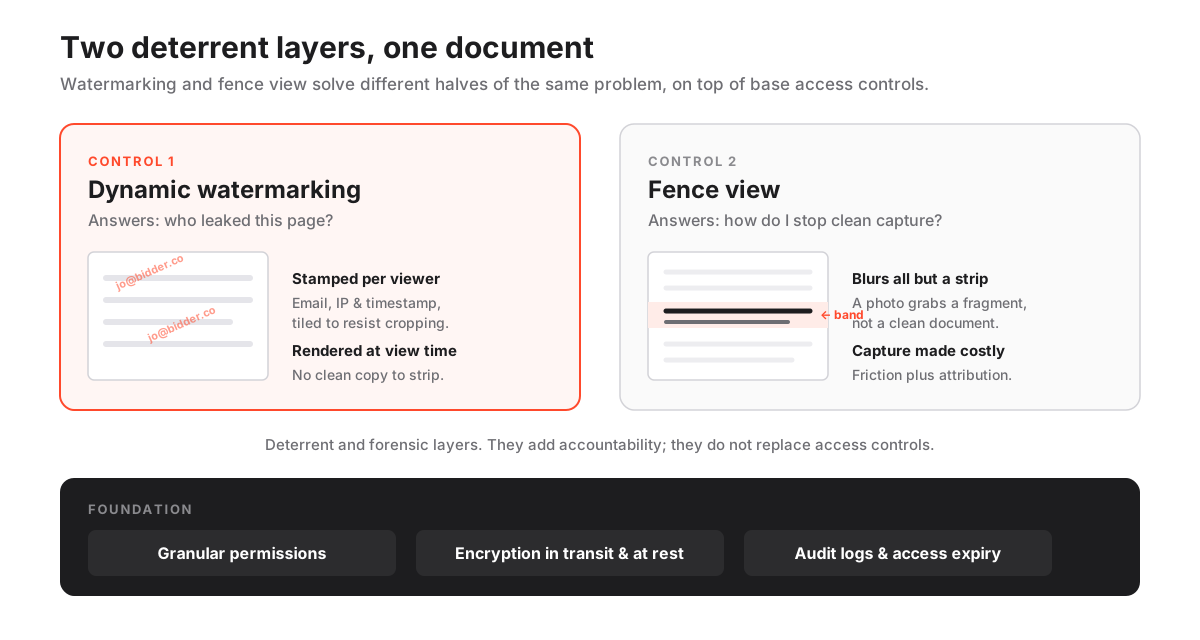
A dynamic watermark stamps identifying information onto every page a reviewer opens. It is generated live, for that person and that session, not baked into the file.
A typical stamp carries three things: the viewer’s email address, their IP address, and the date and time of access. The room tiles it diagonally at low opacity, so it survives a photograph without blocking the text underneath.
The word doing the work is “dynamic.” Compare the two kinds.
| Static watermark | Dynamic watermark | |
|---|---|---|
| When applied | Burned into the PDF before upload | Rendered by the room at view time |
| Who it names | Everyone, identically | The specific viewer, per session |
| Same file, 40 bidders | One overlay for all | 40 different overlays |
| Can be cropped or flattened | Yes | Tiled and rendered, so no clean copy |
| Forensic value after a leak | Low, points nowhere | High, points at one account |
Forty bidders open the same source document, and each sees a different stamp. If a page leaks, the overlay points straight at the account that displayed it.
That is a forensic trail. More usefully, it is a deterrent that discourages the leak before it happens.
Watermarking is a close cousin of redaction, which removes content outright. Watermarking instead attributes it. The dynamic watermarking glossary entry defines the term in isolation.
Fence view: the short version
Fence view is a display mode. It blurs the entire page except a thin horizontal band that follows your cursor or a fixed reading line, so only a sliver of content is legible at any instant.
Vendors label it differently: camera-shield, blur view, secure spotlight. The behaviour is identical, and the fence view glossary entry captures the definition on its own.
Where watermarking deters by attribution, fence view deters by friction. A phone photo or a screenshot grabs one blurred page with a single readable strip. Not a document. A fragment.
The two are complements, not alternatives. Watermarking answers “who leaked this.” Fence view answers “how do I stop them capturing it cleanly at all.” Most rooms let you enable both on the same folder, and on genuinely sensitive material you usually should.
Head to head: what each one actually blocks
This grid is the heart of the comparison. It lines up common leak methods against both controls and marks what each does to the attacker.
| Leak method | Dynamic watermarking | Fence view | Net effect combined |
|---|---|---|---|
| Single screenshot | Stamps the capture with the leaker’s identity | Blurs all but a reading band | Useless fragment, and it names the leaker |
| Single phone photo | Same stamp, survives the photo | Same blur, one strip legible | Same, capture is both partial and attributable |
| Slow screen recording | Every frame carries the stamp | Reveals the band over time | Recoverable, but tedious and self-incriminating |
| Forwarding a downloaded file | Only stamped if downloads are watermarked | No effect, viewer-only mode | Restrict downloads instead of relying on either |
| Retyping or paraphrasing a figure | No effect | No effect | Neither control reaches this; accept it |
| Shoulder-surfing in an open office | No effect on the glance | Blurs everything but the band | Fence view is the honest defence here |
Two conclusions fall straight out of that table.
- Against casual capture, the pair is strong. A screenshot or a photo of a competitor’s cap table walks away as a blurred page with one readable line, stamped with the viewer’s identity.
- Against a patient, determined leaker, it is friction, not a wall. Screen recording can reconstruct a page frame by frame. Fence view raises the time cost; watermarking leaves every recovered frame self-incriminating. That is the most you can honestly ask of a deterrent.
So read fence view as friction plus attribution, never an impassable barrier. The same honesty applies to the whole stack, which we lay out in the VDR security features checklist: layer the controls so beating one still leaves the leaker exposed by another.
How a dynamic watermark reaches the screen
The mechanics explain the one failure mode that catches buyers out.
The room renders documents server-side into a protected viewer, then composites the watermark onto each page image the moment it is served to an authenticated session. There is no un-watermarked copy sitting in the browser cache to strip.
How a dynamic watermark reaches the screen
The path a single page takes from storage to a stamped, viewer-specific image.
Estimated time: 1min
-
Authenticate the session
The reviewer signs in, and the room ties the session to their identity, group and permissions before any page renders. Two-factor authentication at this step is what makes the stamped identity trustworthy.
-
Render server-side
The document is converted to protected page images on the server rather than shipped as a downloadable original, so the browser never holds a clean file.
-
Compose the overlay
The room draws the watermark layer, email, IP, timestamp and often a room name, onto each page at low opacity in a tiled pattern that resists cropping.
-
Stream to the viewer
Only the composited, stamped image is streamed to the browser, and access rules like view-only or fence view are applied at the same layer.
-
Log the interaction
The view is written to the audit trail with the same identity shown in the watermark, so the overlay and the log corroborate each other.
The consequence is simple. Watermarking depends on the room controlling the rendering.
Let reviewers download native files freely and the dynamic stamp applies only to the in-browser view. Any offline copy escapes it, unless the room also stamps permitted downloads.
That is why two-factor authentication matters more than it first appears. A watermark is only as honest as the identity behind the session, and a stamp tied to a shared or spoofed login proves very little.
Where they sit in the leak-control stack
Neither control is an access barrier. They are deterrent and forensic layers that sit on top of permissions, expiry and encryption, not in place of them. The grid below shows the division.
Where each document control fits in the stack
| Control | Stops access | Deters leaks | Traces a leak | Works offline |
|---|---|---|---|---|
| Granular permissions | Yes | Partly | No | No |
| Dynamic watermarking | No | Yes | Yes | View only |
| Fence view | No | Yes | No | No |
| Encryption at rest / in transit | Yes | No | No | Yes |
| Access expiry / remote shred | Yes | Partly | No | For downloads |
Read the matrix as a set of complements, not a menu you pick one item from.
- Granular permissions and encryption keep the wrong people out and the data unreadable in transit.
- Watermarking and fence view accept that an authorised reviewer already has legitimate eyes on the page, and shift the goal to discouraging misuse.
- The audit trail ties them together: a watermark that names a reviewer is far stronger when the log independently records the same person opening the same page at the same second.
Beat any single row and another still has you.
Posture by document type
Here is the decisive rule: watermark broadly, fence selectively.
Watermarking costs almost nothing to reading comfort, so it can go on nearly every confidential folder. Fence view slows honest reviewers, so reserve it for material where one leaked page carries real value.
Suggested control posture by document type
| Document type | Dynamic watermark | Fence view | Downloads |
|---|---|---|---|
| Financial model / cap table | Yes | Yes | View only |
| Customer and supplier contracts | Yes | Yes | View only |
| IP filings and source code excerpts | Yes | Yes | Blocked |
| Board minutes and strategy decks | Yes | Optional | View only |
| Public filings / marketing material | Optional | No | Allowed |
The trade-offs behind that grid are worth naming plainly.
- Financial models, cap tables, contracts, IP. High value per page. Fence them, watermark them, keep them view-only. The reading friction is a fair price.
- Board minutes and strategy decks. Sensitive, but often read in long sittings where fence view becomes an irritant. Watermark always, fence only if the room hosts hostile parties.
- Public filings and marketing material. Already out in the world. Fencing them buys nothing. Leave downloads open.
The posture only holds if the underlying folder rights match it, which is why it pairs with sound data room permissions. A fenced folder that everyone can still download is theatre.
Does the deterrent actually work?
The evidence is indirect but consistent. Named accountability changes behaviour, and per-viewer watermarks make it visible on every page.
Two facts frame the case, and both point the same way.
The first: most exposure is human, not a dramatic external hack. Verizon’s Data Breach Investigations Report attributes roughly two-thirds of incidents to an ordinary human element, error and misuse, exactly the category a visible personal watermark is built to reach.
The second: the downside is expensive. IBM’s Cost of a Data Breach report puts the 2024 global average at 4.88 million USD, climbing year over year.
Against that, watermarking is close to free. A deterrent does not have to be perfect to pay for itself. It only has to move the reviewer who was on the fence about forwarding a page.
An honest read on the limits
Both are deterrents, not guarantees. Size that honestly before you lean on either.
An honest read on these two controls
Pros
- Per-viewer attribution turns any leaked page into a traceable one
- Fence view makes clean phone photos and screenshots impractical
- Applied at the render layer, so there is no un-stamped file to steal
- Cheap to enable and standard on reputable rooms
Cons
- No encryption; a reviewer can still transcribe or paraphrase content
- Watermarks can obscure detail on scanned or image-heavy pages
- Fence view slows legitimate reading, so it is wrong for every folder
- Only covers in-browser viewing unless downloads are watermarked or blocked
The single most common mistake is treating either control as a substitute for restricting downloads. If a native file leaves the room, the dynamic overlay does not travel with it unless the provider stamps the downloaded copy too.
For genuinely sensitive material, pair watermarking and fence view with view-only rendering and, where the stakes justify it, disabled downloads. Our guide on what a virtual data room does covers the surrounding controls, and how to choose a virtual data room puts them in the wider shortlisting frame.
Do these controls help with compliance?
They are not named in any regulation. They do help you satisfy the ones that are.
Most data-protection regimes ask two things: apply security measures appropriate to the sensitivity of the data, and be able to demonstrate that you did. A per-viewer watermark plus a corroborating audit trail is exactly the demonstrable, proportionate measure those obligations expect.
Take the GDPR. Article 32 requires “appropriate technical and organisational measures” for the confidentiality and integrity of personal data. Article 5(2), the accountability principle, requires you to be able to show it. Watermarking and logging speak to both.
The same logic runs through the certifications buyers ask for. SOC 2’s confidentiality criterion and the access-control and logging controls in ISO 27001 both reward the ability to attribute and record who accessed what, which is what these features deliver at the document layer.
Our VDR certifications guide covers what each framework actually assures. None of this makes watermarking a compliance silver bullet, but it does earn the controls a place in a defensible, audit-ready process rather than mere theatre.
The verdict
Turn dynamic watermarking on for almost every confidential folder. It costs nothing to reading comfort, makes every leaked page traceable, and is standard on any room worth shortlisting. There is no serious case for leaving it off.
Turn fence view on selectively, for the crown jewels: financial models, cap tables, contracts, IP filings. Its blur is a real cost to honest reviewers, so spending it everywhere buys resentment, not security. Spend it where a single leaked page would hurt.
Neither is a lock. Stop thinking of them that way. They are the accountability layer on top of permissions, encryption, expiry and audit logs. Beaten alone, each still leaves the leaker exposed by another control. That is why the honest answer to “are these enough?” is always no, they are one layer of several.
If you take one thing from the grids above, take this: match the control to the sensitivity of the folder, keep them layered, and test them before you trust them. A room that treats watermarking and fencing as group-level policy will scale to a real deal. One that offers a single account-wide toggle will not.
How to evaluate a provider
Do not accept “we have watermarking” at face value. Test it. Upload a representative document, invite a second test account, and work through five checks.
- Is it truly dynamic? Confirm the overlay is rendered per session, not a single static overlay applied to everyone.
- Does it survive downloads? Where downloads are permitted, verify a persistent watermark is stamped onto the exported file, not just the in-browser view.
- Can you customise the identifiers? Check whether you can add or remove the email, IP, timestamp and room name to suit your process.
- Is fence view readable? Confirm it works on your typical page sizes without making the document genuinely unreadable for honest reviewers.
- Is it set by folder or group? Verify both controls apply at folder or group level, so you are not toggling them file by file.
Rooms that expose these as granular, group-level settings scale to a real diligence process. All-or-nothing account switches do not.
Providers we rate highly here, such as iDeals and Datasite, treat watermarking and fencing as group-level policy, which is what you want when a room hosts several bidder teams at once. Ellty applies the same per-viewer watermarks and fence view alongside view-only rendering, the baseline any capable room should meet.
What do these controls cost?
Almost never priced as add-ons. Watermarking and fence view come bundled into the security tier of a data room rather than metered separately. What varies is the plan you need to reach them, since a handful of lean products gate fence view or download-watermarking behind a higher tier.
Rooms that bundle dynamic watermarking tend to open around 99 USD per month, while group-level fencing and watermarked downloads usually surface only once you reach the low-hundreds mid-market tier.
Read those numbers as a rough floor, not a quote. Vendors reshuffle which security controls sit on which plan surprisingly often, so the tier that unlocks fence view this quarter may not be the one that unlocks it next, and only the provider can confirm today’s line-up. For a fuller breakdown, see our VDR pricing guide, and our side-by-side comparison lays the controls out per provider.
Frequently asked questions
What information does a dynamic watermark show?
Most rooms stamp the viewer's email address, their IP address and the date and time of access, often with the room or project name. Some let you customise which identifiers appear. Because the stamp is generated per session, the same document shows a different overlay to each reviewer.
Does fence view stop screenshots?
Not literally, but it makes them nearly useless. Fence view blurs the whole page except a narrow readable band, so a screenshot or phone photo captures one strip of legible text against a blurred page rather than a clean document. Screen recording can capture the band over time, but every recovered frame still carries the reviewer's own watermark.
Do watermarks apply to downloaded files?
Only if the provider explicitly watermarks permitted downloads. Dynamic watermarking covers the in-browser view; if a native file is downloaded, the live overlay does not travel with it unless the room applies a persistent stamp to the download. For sensitive material, restrict downloads rather than relying on the view-time watermark alone.
