
How does a virtual data room work?
On this page
- The whole mechanism in one line
- How does a virtual data room work, step by step?
- The four controls you are actually paying for
- Set permissions like a pro: a working sequence
- What happens the moment someone opens a file
- Reading the audit trail without drowning in it
- Search and versioning: keeping a big room usable
- Running Q&A so it does not become email again
- Encryption and storage, in plain terms
- Do and do not: running the room without losing control
- The lifecycle, open to close
- How this differs from just sending a secure link
- What it costs to run this way
About to open your first room? Hold on to one framing: a virtual data room is not storage, it is a checkpoint.
You do not upload files so people can grab them. You upload them so people can look under conditions you set, and can prove you set.
That distinction sounds academic until a deal turns sensitive. Someone leaves a bidding group. A term sheet leaks. Counsel asks who saw the customer list and when.
In a shared folder, those questions have no clean answer. In a working room, each one resolves to a line in a log.
This guide walks the actual mechanism, the request-to-view loop, then turns pragmatic: how to set it up, what to switch on, what to leave off, and where people trip over their own controls. A virtual data room leans on a handful of access controls that repeat across every provider, and once you see them working together, the price tag and the process both start to make sense.
The whole mechanism in one line
What is a data room in a sentence? The file never leaves the server, so control never leaves you.
Everything below just unpacks that line. The reviewer sees a rendered image of each page, not the source file. Their identity is checked against the folder before the page loads.
Their name is stamped onto what they see. The event is logged. Revoke them, and the next click returns nothing.
Fix that picture in your head and the rest is footnotes.
How does a virtual data room work, step by step?
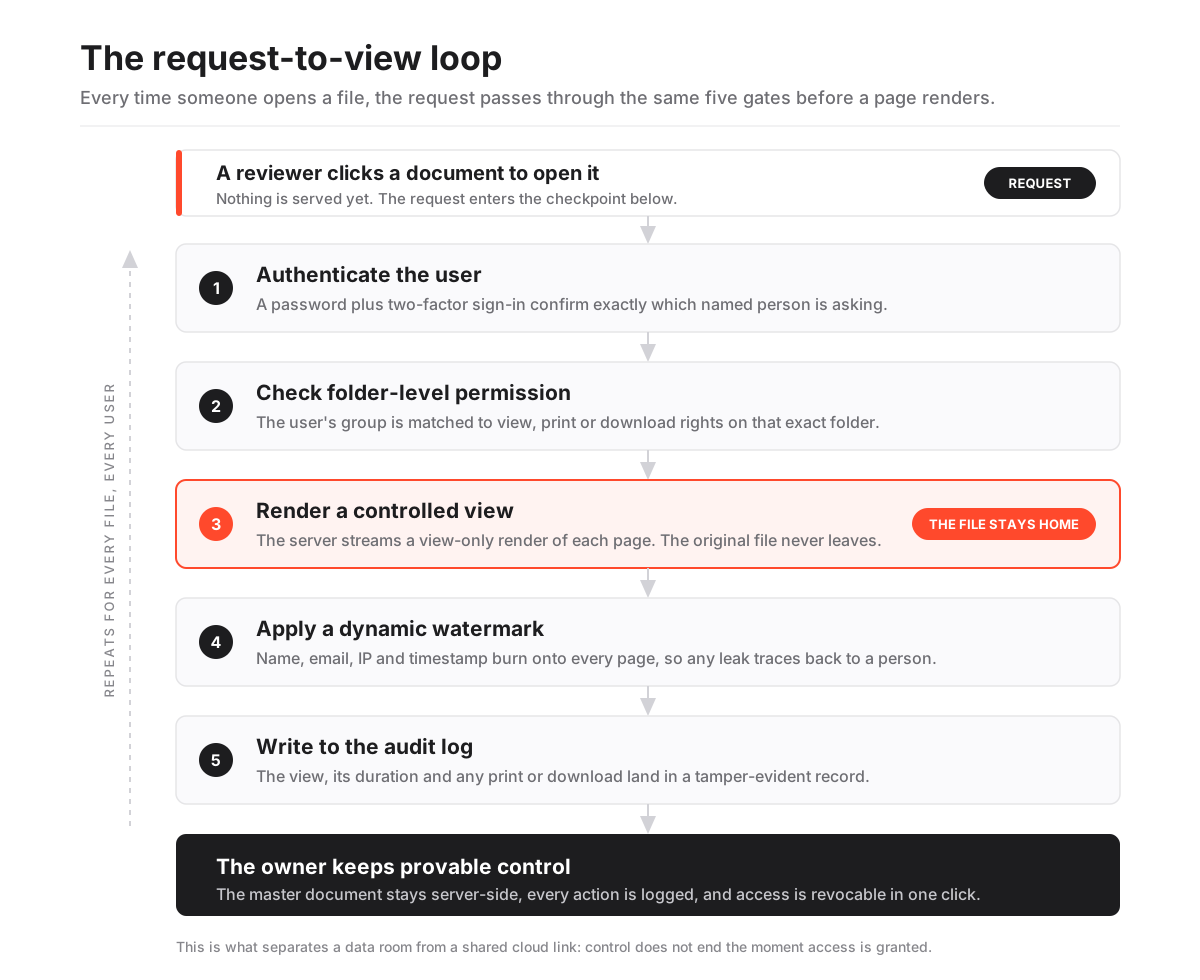
What actually happens under the hood? The room intercepts every document interaction and forces it through the same controlled sequence.
Nothing is ever simply “downloaded from a folder.” The platform authenticates the user, evaluates their permission for that file, renders a protected view, and logs the result. The steps below trace one document from the click to the entry it leaves behind.
How a virtual data room processes a single document request
The request-to-view loop that runs every time an authorised user opens a file.
Estimated time: 1min
-
Authenticate the user
The reviewer signs in, usually with a password plus two-factor authentication, so the platform knows exactly which named person is asking.
-
Check folder-level permission
The system looks up the user's group and confirms whether that group has view, print or download rights on the specific folder holding the file.
-
Render a controlled view
Rather than serving the raw file, the room renders it in the browser as a view-only or protected copy, so the original never leaves the server.
-
Apply a dynamic watermark
The viewer's name, email, IP and a timestamp are burned onto every page in real time, which deters screenshots and makes leaks traceable.
-
Write to the audit log
The view, its duration, and any print or download is recorded in a tamper-evident log that the document owner can export at any time.
That loop repeats for every file, every user, every time. Because the master document stays server-side, the owner can revoke a reviewer mid-deal and be confident no usable copy walked out the door.
It is a small design decision with an outsized consequence: control does not end when access is granted, the way it does the instant someone downloads a file from a shared link. There is no “trusted” path that skips the permission check, no cached copy that dodges the log, which is exactly why the category costs what it does.
The four controls you are actually paying for
What are you buying, exactly? Defence in depth applied to documents.
Each control covers a different failure mode, so a gap in one does not open the whole room. Encryption keeps the bytes unreadable. Permissions decide who may ask for a file. Watermarking traces any leak back to a person. The audit log proves what happened.
No single layer carries the room alone. What protects a document is the way the layers overlap, since bypassing one still leaves an attacker facing the rest, the way a lock, a badge reader, a camera and a visitor log each answer a different question.
The table below maps each layer to the job it does and the standard that typically backs it.
The security layers inside a working virtual data room
| Layer | What it does | Backing standard or method |
|---|---|---|
| Encryption in transit | Scrambles data moving between the user and the server so it cannot be intercepted | TLS 1.2 / 1.3 |
| Encryption at rest | Keeps stored files unreadable without the key, even if the disk is stolen | AES-256 |
| Access control | Confirms who the user is and what they may do with each folder | SOC 2 / ISO 27001 controls |
| Dynamic watermarking | Stamps identity onto every rendered page to deter and trace leaks | Applied at render time |
| Audit logging | Records every view, print and download in a tamper-evident trail | SOC 2 monitoring criteria |
Which of those standards matter most? SOC 2 and ISO 27001 do the heavy reputational lifting.
Defined in our what a virtual data room is guide, they are what turn the access-control row above from a claim into an audited fact. When a room advertises both, an independent assessor has tested the permission and logging machinery this page describes, not just the vendor’s marketing.
Treat a certification badge as a starting point, not a finish line. Ask which report the vendor holds, its date, and what was in scope.
Our guide to VDR certifications explains how to read those reports without a compliance background, the data room security guide covers the underlying controls in depth, and the security features checklist is the fastest way to spot a room that is missing a layer.
Set permissions like a pro: a working sequence
What makes a data room feel different from a shared drive? The permission model.
Instead of “anyone with the link can view,” access is assigned by group and by folder, so a bidder, an outside lawyer and an internal admin each see a different slice of the same room. Rights are layered: viewing is the weakest grant, and full download with no watermark is the strongest.
Where does that flexibility go wrong? Not with a hacker. The most common mistake in a first deal is an admin who grants the wrong group access to the wrong folder.
Here is a sequence that keeps you out of that trap.
- Start closed, then open. Set every new folder to no access by default and grant deliberately. It is far easier to widen a permission you can see than to remember which ones you left open.
- Design groups before people. Create the groups you know you will need, such as bidders, buy-side advisers, your own deal team, then invite users into groups. Never assign rights to individuals one by one; that is how a room drifts into chaos by week three.
- Map rights to the weakest role that still works. A bidder rarely needs more than a watermarked view. Give them exactly that. Every capability above “view” is a decision you should be able to justify.
- Fence the crown jewels. Keep the two or three genuinely sensitive folders, source code, the customer list, live litigation, on per-folder overrides even for otherwise-trusted groups. Open them only when the deal reaches the stage that warrants it.
- Loosen late, and only for the finalist. Downloads and unwatermarked prints belong to the exclusive bidder in the final stretch, if at all. Staged disclosure is a feature, not friction.
- Re-check after every change. After each new upload or group edit, open the room as a test user in that group. What you can see is what they can see. Trust the preview, not your memory.
Behind the scenes this is usually role-based access control plus per-folder overrides, so an admin can grant a whole group at once yet still fence off a single sensitive file. The matrix below shows how capabilities typically map to roles once you have set them up this way.
Typical permission matrix by user role
| Capability | Bidder / reviewer | Outside adviser | Internal admin |
|---|---|---|---|
| View documents (watermarked) | Yes | Yes | Yes |
| Print to protected PDF | Optional | Yes | Yes |
| Download original files | No | Late-stage | Yes |
| Submit Q&A questions | Yes | Yes | Yes |
| Manage users and folders | No | No | Yes |
See the pattern in that download row? A well-run process keeps original files view-only for most of the deal, then loosens controls only for the exclusive bidder at the end.
The permission system is what makes staged disclosure possible without cloning the room. If the terminology is new, the glossary entry on granular permissions and our full guide to data room permissions break it down further.
What happens the moment someone opens a file
Does the room send the reviewer the file? No. It streams a rendered image, a protected view of each page, into the browser, generated on demand from the server-held master.
That is why you can scroll a 400-page contract in a data room but never find the source PDF in your downloads folder, unless the owner explicitly allowed it. The mechanism is closer to a live video feed of the document than to a copy of it.
Two things happen at that render moment.
First, a dynamic watermark is composited onto every page, carrying the viewer’s name, email and a timestamp, so any photograph or screen capture points straight back to the person who took it. Stricter rooms add a fence view that blurs everything except a small readable band under the cursor, which defeats casual screenshots of a full page.
Second, the view is timed and logged. The owner can later see that a specific bidder spent nineteen minutes on the customer-contracts folder and never opened the litigation file.
That is genuine signal about where a buyer’s concern sits, and it is a normal, disclosed part of how these rooms operate.
The takeaway cuts both ways. A reviewer should assume everything they do is attributable, because it is. And an owner finally has a defensible answer to “who saw what,” which is worth using rather than leaving unread.
Reading the audit trail without drowning in it
What is the audit trail? A running, tamper-evident record of who did what and when inside the room.
Every login, view, page-turn, print and download is written to a log that the administrator can filter, export and hand to counsel. Because the log is append-only, it functions as evidence: in a dispute over what a buyer was shown during diligence, the seller can produce a defensible timeline rather than a memory.
That completeness is the quiet superpower of a data room. Consumer file sharing might tell you a link was opened; a data room tells you which page a named person read, for how long, and whether they printed it.
So what is the catch? Volume.
A busy room generates thousands of log lines, and staring at the raw feed is a good way to see nothing. Work it deliberately: filter by folder to see which parts of the deal draw attention, and by user to gauge how serious a bidder is.
The bidder who reads the litigation folder twice usually has a question coming; the one who has not logged in for two weeks has gone quiet for a reason. The engagement heatmap built on top of the log turns those patterns into a picture, and our guide to VDR audit trails shows how to turn the entries into a record that holds up.
Search and versioning: keeping a big room usable
Does a data room only lock documents down? No. It also keeps a sprawling file set navigable.
On upload, the platform runs optical character recognition over scans and PDFs so that even a photographed contract becomes full-text searchable. A reviewer can then type “change of control” and jump straight to the three clauses that matter, instead of opening folders one at a time. That searchability is what makes a room with tens of thousands of pages workable under a diligence deadline.
What handles the write side? Version control.
When the seller replaces a document, the room supersedes the old file rather than deleting it, keeps document versioning history intact, and can notify anyone who already reviewed the earlier draft. The audit log records the swap, so there is never ambiguity about which version a given bidder actually saw.
Both features reward one habit: a clean index. Search works far better against files named and foldered sensibly, and versioning only helps if you replace files in place rather than uploading “contract_final_v2_REAL.pdf” beside the original.
If you are building the room now, our notes on data room index best practices and the due diligence checklist will save you a re-organisation later. Together, search and versioning are the difference between a controlled record and a filing cabinet that happens to be encrypted.
Running Q&A so it does not become email again
What replaces the tangle of diligence emails? A structured question-and-answer channel that runs alongside the documents.
A bidder submits a question against a specific folder or document; the platform routes it to the right subject expert on the sell side, tracks its status, and publishes the answer back to the permitted group. Nothing lives in a personal inbox, so context and attribution survive even if a team member leaves mid-deal.
Why keep it in the room? Because diligence questions are sensitive in themselves.
Who asked about an unusual customer concentration, and when, can reveal strategy. Keeping Q&A inside the audited room, with the same permission rules as the documents, means those exchanges stay controlled and searchable rather than scattered across a dozen mailboxes.
The failure mode is predictable: a busy team pulls a question into email “just to answer quickly,” and within a week half the conversation lives outside the room again. Resist it.
Assign owners per topic, set an expected turnaround, and answer everything in the channel even when it is faster not to. Our guide to running data room Q&A covers how to staff and stage that channel so answers stay consistent across bidders.
Encryption and storage, in plain terms
What keeps the server-held masters unreadable? Encryption, plus the key that only the provider holds.
Files travel between browser and server over an encrypted TLS connection, and they sit on disk encrypted at rest with AES-256, the symmetric cipher standardised by the US National Institute of Standards and Technology. In practice that means an attacker who somehow copied the raw storage would still see only ciphertext, and a stolen laptop or intercepted request yields nothing usable.
Why is this layer not optional? Because a leaked term sheet or customer list can move a price or kill it outright.
What matters mechanically is how the ciphertext stays protected, so reputable providers add key management, regular penetration testing and geographic data-centre choices on top.
One check you should never skip: if your deal touches EU personal data, the location of that storage and the provider’s handling of it fall under the GDPR, worth confirming before you upload anything containing customer records.
Our guides on GDPR and data rooms and data residency go deeper. Where regulated data is involved, encryption is only the minimum the law assumes; residency and processing terms carry the rest of the weight.
Do and do not: running the room without losing control
Where do incidents actually come from? Not exotic attacks. Ordinary mistakes made in a hurry.
The mechanism is only as good as the operator, so keep this short list where the deal team can see it.
Do:
- Turn on two-factor authentication for everyone, without exceptions for “trusted” people.
- Grant by group, and preview the room as a test user after every change.
- Keep downloads off until a bidder is exclusive, and prefer protected PDF over the raw original even then.
- Watermark every view, and use fence view on the most sensitive folders.
- Export the full audit log at closure, before you revoke access, so the record survives the room.
Do not:
- Reuse one login across a whole advisory firm; it destroys attribution in the log.
- Answer diligence questions in email once the Q&A channel is live.
- Upload a new version beside the old one instead of superseding it; you break both search and the audit trail.
- Leave a folder on “inherit” when it holds the crown jewels; set it explicitly.
- Forget to close the room when the deal dies. A room left running with no live deal behind it is pure downside, exposure without a purpose.
If you want the longer version of that list, our roundup of data room mistakes to avoid walks through the ones that actually cost deals, and the how to choose a virtual data room guide helps you pick a provider whose defaults already lean the safe way.
The lifecycle, open to close
Is a data room a permanent archive? No. It is spun up for a transaction and wound down when the deal closes or dies.
Understanding that arc explains why the permission and audit machinery exists: the whole point is to open, control, and then cleanly close access.
- Setup: the seller builds the folder index to match the diligence checklist, then bulk-uploads and orders documents so reviewers find files where they expect them.
- Broad disclosure: several bidders get view-only access to a curated set, watermarked and logged, while sensitive folders stay locked.
- Narrowing: as bidders drop out, deeper folders open to the remaining few, and download rights may loosen for the exclusive party.
- Closure: the seller exports the full audit log and document set for the record, then revokes access so no copies persist in the wild.
Because access is revocable and the master files never left the server, closing a room genuinely ends outside access. That is a guarantee a shared cloud link cannot make once files have been downloaded. For the practical mechanics of opening and shutting a room, see our guides on how to set up a data room and how to grant and revoke access.
How this differs from just sending a secure link
What is the real difference? A secure link shares a copy; a data room shares a controlled view.
Once someone downloads a file behind a link, the owner has lost control of that copy forever, and the “who opened it” record is thin. A data room inverts that: the file stays home, the viewer sees a watermarked render, and every interaction is logged and revocable.
That is not convenience. It is provable control over confidential material.
It is also why the category commands a premium. You are not paying for storage, which is nearly free; you are paying for the checkpoint, the audit trail and the certified controls around them. Our head-to-head on data rooms versus Dropbox unpacks where generic sharing breaks down once a deal turns sensitive.
What it costs to run this way
Why does pricing sit well above consumer storage? Because the mechanism above is expensive to build and certify.
Indicative entry pricing for a lean room starts around USD 99 per month, mid-market rooms with fuller permission and Q&A tooling commonly land in the low hundreds per month, and enterprise deployments are usually quoted per engagement. Treat every figure as indicative and confirm current pricing with the provider, since plans, storage caps and user limits change often.
Several providers, Ellty and Datasite among them, run a free trial, which is the cheapest way to watch the request-to-view loop in action before you commit budget. When you trial a room, do not just admire the interface; drive the mechanics.
Upload a real folder, invite a colleague into a bidder group, set that group to view-only, then open the room as them and try to download. Check that the watermark carries their name, that the block holds, and that your own admin log already shows the attempt. A room that survives that ten-minute test is doing the job this guide describes.
If you would rather compare on paper first, our side-by-side on Ellty and iDeals walks the permission and audit differences, the Datasite review covers a heavier enterprise option, and the pricing guide breaks down the per-page and flat-rate models behind those numbers.
Frequently asked questions
Can a reviewer download files from a data room?
Only if the administrator grants download rights on that folder, and even then the file is often a protected, watermarked PDF rather than the raw original. Most sellers keep downloads disabled until a bidder reaches exclusivity, which is exactly why the permission model exists.
Does the person who owns the room see what I read?
Yes. Every view, page-turn, print and download is written to the audit log, so the administrator can see which documents a named user opened, for how long, and when. That engagement data is a normal, disclosed part of how data rooms work.
How does watermarking actually stop leaks?
It does not physically prevent a screenshot, but it composites the viewer's name, email and a timestamp onto every page in real time. Any photo or capture therefore identifies the person who took it, which is a strong deterrent and gives the owner traceability if a document surfaces. Fence view goes further by blurring all but a small readable band.
Is the file ever stored on my device?
Not unless you were granted download rights and chose to download. By default the room streams a rendered view from the server, so the master document stays server-side and can be revoked at any moment.
What makes a data room secure enough for regulated deals?
The combination of AES-256 encryption at rest, TLS in transit, granular permissions, watermarking and a complete audit trail, independently verified through SOC 2 and ISO 27001. Those audited controls are what let regulated buyers and their counsel trust the room.
