
15 security features every data room should have
On this page
- What are the 15 security features every data room should have?
- How do encryption and certifications prove a room is secure?
- How do access controls decide who gets in?
- How do document protection features stop a leak?
- Why does the audit trail matter more than any single control?
- What do time, place and redaction controls add?
- Which security mistakes cause the most data room leaks?
- How does each feature map to a real threat?
- Which features matter most for your deal type?
- How do you verify these features before you buy?
- Do more security features mean a higher price?
Read enough vendor security pages and they blur into one reassuring vocabulary: bank-grade, military-grade, end-to-end, enterprise-ready. The words are picked to close the question before you have asked it, and almost none of them name a control you can test.
So what actually counts as a security feature? Only one definition helps a buyer: a specific mechanism that governs one of three things. Who may open a confidential document. What they can do with it once it is open. And whether the seller can later prove, precisely, what happened.
Everything that does not map to one of those three jobs is atmosphere. The checklist below turns the adjectives back into features you can switch on, watch behave, and cross off.
Why be this literal? Because a data room is not a place you store documents. It is a place you expose them, on purpose, to people whose interests do not fully align with yours.
Rival bidders, opposing counsel, an acquirer’s diligence team, an investor who may walk: each is invited in because the deal cannot proceed without them seeing sensitive material, and each is a plausible source of a leak.
Security features are what let you run that controlled exposure without losing control of it. Judge them not by how impressive they sound but by how cleanly they answer a hostile question after the fact.
This guide groups the fifteen into three jobs, marks the nine we treat as non-negotiable, and works backward from the ways deals actually leak to the control that counters each. For the wider picture, the companion guide on virtual data room features explained covers permissions, Q&A and analytics in one place, and the broader virtual data room security overview sets the context.
What are the 15 security features every data room should have?
They split across three jobs a data room has to do: control access, protect documents, and record activity. The matrix below is the checklist itself.
Read the priority columns as guidance rather than gospel. A regulated industry or a large competitive auction can push a situational feature straight into the must-have column.
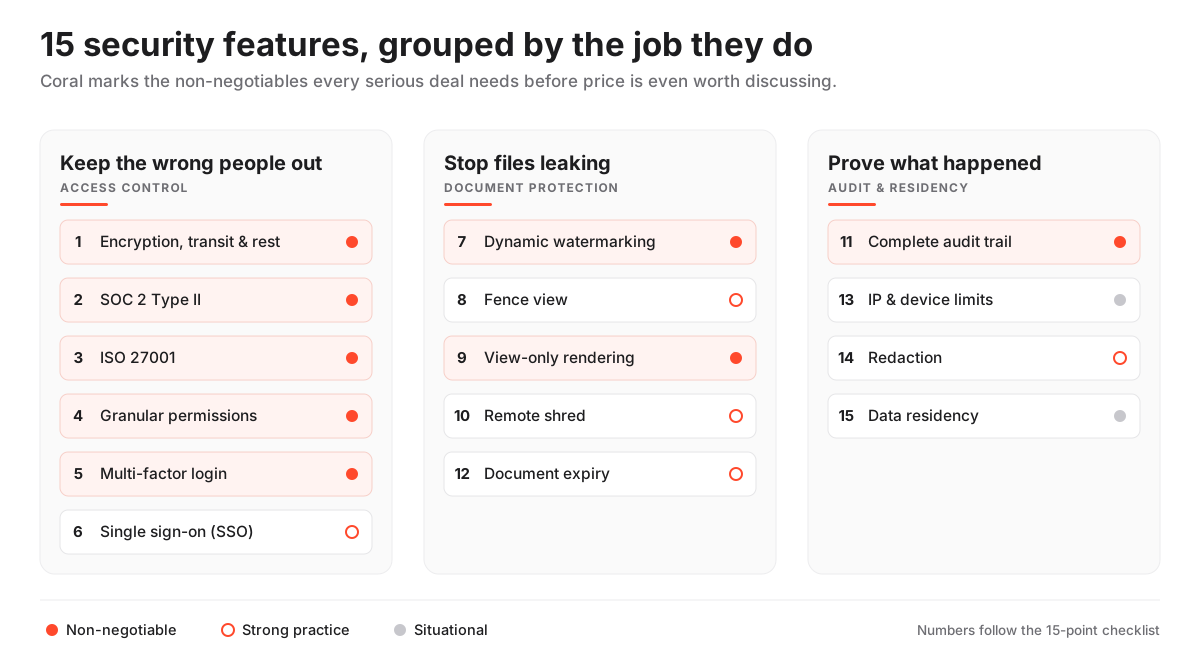
The 15-feature data room security checklist, by priority
| Security feature | Non-negotiable | Strong practice | Situational |
|---|---|---|---|
| 1. Encryption in transit and at rest | Yes | No | No |
| 2. SOC 2 Type II attestation | Yes | No | No |
| 3. ISO 27001 certification | Yes | No | No |
| 4. Granular, group-based permissions | Yes | No | No |
| 5. Multi-factor authentication | Yes | No | No |
| 6. Single sign-on (SAML/SSO) | No | Yes | No |
| 7. Dynamic watermarking | Yes | No | No |
| 8. Fence view (screen shielding) | No | Yes | No |
| 9. View-only rendering | Yes | No | No |
| 10. Remote shred and access revocation | No | Yes | No |
| 11. Complete audit trail | Yes | No | No |
| 12. Document expiry and time-limited access | No | Yes | No |
| 13. IP address and device restrictions | No | No | Yes |
| 14. Redaction | No | Yes | No |
| 15. Data residency / regional hosting | No | No | Yes |
Nine of the fifteen are non-negotiable for any serious transaction. That is the bar a room clears before its interface or its price is even worth discussing.
A beautiful room that fails one of the nine is not a cheaper option. It is a liability with a good login screen.
Why does the bar sit so high? Money. The loss a data room exists to prevent is not a one-off theft of a file, but the compounding cost of a leaked deal, a spooked counterparty, and the legal fees that follow.
The $4.88M figure comes from IBM’s widely cited Cost of a Data Breach Report 2024, and the human-element share is from the Verizon 2024 Data Breach Investigations Report.
Read together, they reframe the exercise. The dominant failure mode in a data room is not a master hacker defeating AES-256.
It is a file downloaded and forwarded. A login shared under deadline pressure. A screen left open in a shared office. A redaction that never actually removed the text underneath.
So the controls that matter most are the ones that make an ordinary mistake either impossible or harmless, and make a deliberate leak traceable enough to deter. That is the lens for the rest of this guide.
How do encryption and certifications prove a room is secure?
Encryption scrambles files so intercepted data is unreadable. Independent certification proves the whole control set was tested by an outside auditor rather than asserted by the vendor.
These are features 1 to 3, the foundation everything else sits on, because a leak-control feature is only as trustworthy as the platform enforcing it.
What should you look for? Encryption in transit, usually TLS 1.2 or higher, and encryption at rest, commonly AES-256, which protects the stored copy if the underlying disks or backups are ever exposed. Then look past the encryption to the certificates regulated counterparties expect before they upload anything of their own.
Why does certification outweigh any single toggle? Because it is the only claim on the whole page that a third party has staked their name on.
A vendor can label a checkbox with any phrase it likes. Only an auditor’s report tells you whether the controls behind it actually worked. Two standards carry real weight in most transactions, SOC 2 and ISO 27001, with a handful of others becoming relevant when personal or health data is involved.
The security standards that matter, and what to request
| Standard | What it proves | Issued or attested by | Ask the vendor for |
|---|---|---|---|
| SOC 2 Type II | Controls for security, availability and confidentiality operated effectively over a period | Independent CPA firm, against AICPA criteria | The current Type II report under NDA, plus its date range |
| ISO 27001 | A certified information security management system (ISMS) | Accredited certification body | The certificate and its statement of applicability |
| GDPR alignment | Lawful handling of EU personal data, including residency | Self-attested, backed by a DPA | A data processing agreement and hosting-region options |
| HIPAA (health deals only) | Safeguards for US protected health information | Self-attested, backed by a BAA | A signed business associate agreement |
Two details separate a real answer from a marketing one.
First, SOC 2 comes in two flavours that are not interchangeable. Type I confirms the controls existed at a single point in time; Type II confirms they operated effectively across a period, usually six to twelve months.
Type II is the one you want. A snapshot of controls on a good day tells you little about whether they hold when a real deal runs through them; the AICPA describes the underlying Trust Services Criteria in full.
Second, an ISO 27001 certificate carries a scope statement. A certificate can be perfectly genuine and still cover only the corporate headquarters or a single office rather than the data room platform.
So read the statement of applicability and confirm the product itself is inside the boundary. The glossary entries on SOC 2 and ISO 27001 unpack each standard in one screen, and the VDR certifications explained guide walks through how to read a report line by line.
What about regulated data? The list extends. GDPR alignment is not a certificate but a set of contractual and operational commitments, evidenced by a data processing agreement and genuine control over where data physically sits.
HIPAA, relevant only when US protected health information is in play, is self-attested and evidenced by a signed business associate agreement. Neither is a badge you can take at face value.
How do access controls decide who gets in?
Access controls are features 4 to 6: granular permissions, multi-factor authentication, and single sign-on. They answer the first question any deal asks, which is who is allowed through the door and how their identity is verified.
Get these wrong and no downstream control can save you. Every leak-control feature further down the list quietly assumes the person triggering it had a genuine right to be in the room. A perfect watermark on a document shown to the wrong person is a well-labelled leak.
Why are granular permissions the backbone? Because rights are set per folder or per document and assigned to a group, such as bidders, legal, or internal, rather than one named individual at a time. That model is exactly what lets two rival bidders sit in the same room and never see the existence of each other’s folders.
The subtle trap, and the source of a large share of real-world exposures, is inheritance. A right set on a parent folder usually cascades down to every sub-folder beneath it, so a single careless grant near the top of the tree can silently open an entire branch.
A good room defends against this with an effective-permissions preview, which renders the room exactly as a chosen group would see it. For the precise definition see granular permissions, and for the hands-on mechanics the guide on data room permissions explained goes deeper.
The other two access controls are about identity rather than authorisation, and both have moved from premium extras to baseline expectations:
- Multi-factor authentication (MFA): a second login factor beyond the password, now a baseline expectation rather than a paid add-on. The US Cybersecurity and Infrastructure Security Agency reports that turning on MFA makes an account roughly 99% less likely to be compromised, so a room leaving it optional on sensitive accounts should be read as a genuine red flag. See two-factor authentication.
- Single sign-on (SSO/SAML): routes data room access through the enterprise’s own identity provider, so an offboarded employee’s room access is cut in the same motion as their email. It removes a whole class of stale-account risk, usually at a mid-market or enterprise tier. See single sign-on.
- Permission inheritance preview: the ability to test a group’s real, effective rights before anyone external is invited, the single most useful safeguard against the inheritance trap above.
All three share one design goal: they shrink the window in which a mistake can happen. Permissions shrink what a mistaken invitation can reach. MFA shrinks the value of a stolen password. SSO shrinks the time a departed employee keeps access.
How do document protection features stop a leak?
Document protection is the leak-control layer, features 7 to 10: dynamic watermarking, fence view, view-only rendering, and remote shred. Everything in this group assumes the person looking at the document is legitimately inside the room.
The question shifts to a different one: whether the document can leave the room intact and untraceable. On a competitive or highly sensitive process, these features do most of the day-to-day work.
What does watermarking actually do? It stamps each page a user views or prints with their own identity, typically email, IP and a timestamp, so a leaked screenshot carries its own confession and points straight back to the person looking at that page.
It does not prevent the leak; it changes the economics of it, turning an anonymous act into a signed one. That is why it belongs in the non-negotiable tier despite being a deterrent rather than a barrier. The glossary covers dynamic watermarking in detail.
Fence view works the opposite way, as prevention. It overlays a striped barrier that reveals only a narrow band of the page at a time, defeating the casual screenshot and the over-the-shoulder read. The fence view entry explains the mechanics, and the paired guide on dynamic watermarking and fence view shows how the two behave on screen.
The remaining two close the obvious gaps. View-only rendering streams a file to the browser as images rather than handing over a downloadable original, so the guest sees the document without ever possessing a copy.
Remote shred, sometimes called document revocation or digital rights management, lets an administrator pull back access even after a file has landed on someone’s device. Together the four cover the spectrum from “make it traceable” to “take it back,” and a serious room offers all four.
A stored file is the easy problem, long since solved. The hard one a data room exists for is sharper: naming, with certainty, every person who opened a given page, and cutting their reach the hour a counterparty walks.
None of these controls are magic, and a buyer who believes a watermark is a wall will run the room carelessly. A determined leaker can always photograph a screen with a second phone, and no feature on this list stops that outright.
What the layer does is raise the effort and traceability of a leak high enough that it stops being casual, and ensure that if a document does escape you can name the likely source and cut the access the same afternoon. The expensive, self-incriminating, quickly-revoked leak is the realistic target.
Why does the audit trail matter more than any single control?
The audit trail, feature 11, is a complete, tamper-evident log of every action taken in the room: every view, download, print and permission change, each stamped with the user who did it and the exact time.
Of all fifteen it is arguably the most important. Access controls and leak controls are preventive; the audit trail is what makes the entire process defensible after the fact, and defensibility is what actually protects the seller when something goes wrong or is merely alleged to have.
Picture the moment it earns its keep. A dispute arises, or a regulator asks how confidential material was handled, or a counterparty claims they were shown something they should not have been. The seller with a complete log answers with evidence instead of argument.
The same log has a second life that has nothing to do with defence. An engagement view reads the audit trail forward instead of backward, showing which documents a given bidder actually opened, in what order, and how long they lingered on each.
That pattern is intent made visible. A buyer who spends an hour inside the customer contracts and the churn analysis is telling you something no polite status email will. That crossover from defensive record to negotiating signal is covered in the audit trail glossary entry and the deeper VDR audit trails explained guide, and provider reviews such as the iDeals review and the Datasite review note how granular each platform’s logs get, since depth varies more than the marketing suggests.
How do you test it? The question is blunt: can you export a report clean enough to hand to counsel without editing it first?
A log you can see on screen but cannot export cleanly is half a feature. So run real actions across two or three accounts, export the result, and treat any missing timestamps or user identities as the security hole they are.
What do time, place and redaction controls add?
Features 12 to 15 are the situational layer: document expiry, IP and device restrictions, redaction, and data residency. They are not universal must-haves, and a lean deal can run perfectly well without several of them.
But each becomes essential in a specific context, and a room that lacks the relevant one can quietly disqualify itself from a regulated transaction. The skill is knowing which of the four your particular deal actually needs.
- Document expiry and time-limited access (12): individual files or whole rooms self-lock after a set date, so a stale invitation cannot be quietly reopened months after the process has closed. It matters most for recurring disclosures and for shared links that outlive the deal.
- IP address and device restrictions (13): access is limited to approved networks or registered devices, sometimes contractually mandatory when a counterparty’s security policy demands their data never be opened outside a controlled environment. It is the most situational control on the list, invaluable in a handful of deals and irrelevant in most.
- Redaction (14): parts of a document are blacked out permanently before it is shared, which is meaningfully safer than trusting a reviewer not to zoom in or copy the text. See the redaction definition; the word permanently is the difference between real redaction and a cosmetic one.
- Data residency (15): control over which physical region your files are stored in, which carries legal weight under regimes like the EU GDPR, where cross-border transfer of personal data is a regulated act rather than a technical detail. The data residency in virtual data rooms guide covers the hosting-region questions to ask.
Redaction deserves a closer look, because it is the source of one of the most common self-inflicted leaks in due diligence.
Here is the trap. Someone blacks out a sensitive figure in a general-purpose editor and uploads the file, not realising the black box is a graphic sitting on top of text that is still fully present and selectable underneath. A reviewer copies the region, pastes it elsewhere, and the “redacted” number reappears intact.
Built-in redaction that genuinely removes the underlying text closes that gap; redaction done by hand in a separate tool frequently does not. Confirm which kind a room offers, and if the answer is unclear, test it by trying to select the text you thought you had removed.
Which security mistakes cause the most data room leaks?
Step back from the feature list and a pattern the Verizon data already hinted at comes into focus. Most data room leaks are not the software failing; they are the room being run carelessly by people under pressure.
The platform did what it was told. It was told the wrong thing, or the right feature was switched off to save five minutes on a busy afternoon. The highest-return security move for most sellers is not a longer feature list, it is operational discipline applied consistently to the features they already have.
How the same features get used well, and misused
Pros
- Set permissions by group and preview the room as each group sees it before anyone external is invited
- Enforce MFA for every user, including internal admins, not just outside reviewers
- Redact inside the room so the underlying text is genuinely removed, never selectable
- Revoke a group's access the same day a party drops out, and confirm the cut in the audit log
- Request the SOC 2 Type II report and ISO 27001 scope before you commit, not after
Cons
- Sharing files by email or a generic cloud link once the deal gets busy, outside the audited room
- Granting rights person by person, so one missed revocation leaves a stale door open
- Blacking out text in a separate editor that leaves the original selectable underneath
- Leaving MFA optional and trusting passwords on the most sensitive accounts
- Taking a bank-grade security label at face value without reading a single audit artifact
The pattern is consistent. The leak rarely comes from a feature that was missing; it comes from a feature that was present and either switched off, worked around, or trusted without being tested.
A room with all fifteen features run by someone who emails documents outside it the moment the process gets hectic is less secure than a room with nine run by someone disciplined.
So treat the features as a floor for good process rather than a substitute for it. The data room mistakes to avoid guide catalogues the rest, but the short version is that a disciplined room with seven features beats a sloppy room with fifteen.
How does each feature map to a real threat?
The clearest way to prioritise a feature list is to stop thinking about features and start thinking about threats, then work backward. A feature you cannot connect to a specific leak path is one you are buying on faith.
The table below inverts the checklist. It starts from the concrete paths by which confidential documents escape a room, names the control that counters each, and states what to verify during a trial.
Threats to a deal room, and the feature that counters each
| How documents leak | The control that counters it | What to verify |
|---|---|---|
| A dropped-out bidder still has access | Group-based permissions with instant revocation | You can cut a whole group's access in one action |
| A file is forwarded outside the room | Dynamic watermarking + view-only rendering | The watermark shows the recipient's identity on every page |
| A downloaded file spreads after the deal | Remote shred / document revocation | Access to an already-downloaded file can be pulled back |
| A screenshot of a sensitive page | Fence view + dynamic watermarking | Only a narrow band shows, and it is stamped |
| A stolen or shared password | Multi-factor authentication + SSO | A second factor is enforced, not optional |
| A stale invitation reused months later | Document expiry and time-limited access | Rooms and links can be set to auto-expire |
| A dispute over who saw what | Complete, exportable audit trail | You can export a court-ready activity report |
Read down the middle column and a small group keeps reappearing: permissions, watermarking, MFA and the audit trail counter more of the threat paths than everything else combined, and several paths need two of them working in concert. That recurrence is why those four sit in the non-negotiable tier.
The situational features each counter a narrower threat that only some deals face. So the right answer to “do I need it” is “which threat am I actually exposed to.” Prioritise by threat, and the fifteen features sort themselves.
Which features matter most for your deal type?
The checklist is universal, but the weighting is not. Treat it as one-size-fits-all and you invite two opposite errors: a startup overpaying for enterprise controls it will never switch on, and a regulated seller underspending on residency and redaction it cannot legally do without.
Every serious deal needs the same nine non-negotiables. Where deals diverge is on the situational layer, and the divergence tracks the sensitivity and regulatory exposure of the transaction far more than its dollar size.
Security priorities by deal type
| Deal scenario | Beyond the nine non-negotiables, prioritise | Usually optional |
|---|---|---|
| Startup or seed fundraising | A clean audit trail for investor engagement signals | IP restrictions, regional residency, enterprise SSO |
| Competitive M&A auction | Fence view, remote shred, document expiry, enterprise SSO | Little; sensitivity pushes most extras into must-have |
| Regulated (health or financial) deal | HIPAA or GDPR alignment, data residency, redaction | Rarely anything; compliance widens the must-have set |
| Real estate or asset sale | Bulk upload hygiene, document expiry on shared links | Enterprise SSO, IP allowlisting |
| Ongoing board or investor reporting | View-only rendering, expiry on recurring documents | Remote shred, granular residency |
Two rows are where buyers most often misjudge.
The competitive M&A auction sits apart. When several bidders each have an incentive to walk away carrying intelligence, the leak-control layer stops being situational and becomes the point of the exercise, so fence view, remote shred, document expiry and enterprise SSO all move into the must-have column.
The regulated deal moves for a different reason. Compliance dictates what you must have, so data residency and genuine redaction become non-negotiable.
Matching this against a specific transaction, the use-case shortlists go further: the best data rooms for M&A weighs leak controls heavily, the best data rooms for life sciences tilts toward compliance and residency, and the startup-focused guide leans toward cost and speed where the sensitivity is genuinely lower.
How do you verify these features before you buy?
Do not trust the feature grid, and do not trust the sales demo, which is choreographed to show every feature working on curated content that was never designed to stress it.
The only reliable evidence is the room behaving, or failing to, under a realistic slice of your own deal, which means building that slice yourself during a free trial. A feature that exists in the brochure and a feature that works the way your deal needs are not always the same thing. The sequence below is a focused test, roughly two hours per room.
How to verify a data room's security features during a trial
A hands-on security check to run before you commit to a provider.
Estimated time: 2h
-
Request the certification reports
Ask for the current SOC 2 Type II report and the ISO 27001 certificate, and confirm the scope and dates cover the exact plan and region you intend to buy.
-
Rebuild your real permission map
Create the user groups your deal will actually use, set folder-level rights, then use the effective-permissions preview to view the room as each group sees it.
-
Trigger the leak-control features
Open a sensitive file as a view-only guest and confirm watermarking, view-only rendering and, where offered, fence view all behave as expected.
-
Test revocation and expiry
Download a permitted file, then revoke access or trigger remote shred and confirm the access is genuinely cut; set a room to expire and check the lock.
-
Export the audit trail
Perform a series of views and downloads across accounts, then export the activity log and confirm it is complete and clean enough to hand to counsel.
Two of those five steps are the ones people skip, and they are precisely the two that decide a dispute: confirming that the certification scope actually covers the data room product rather than some adjacent part of the vendor’s business, and confirming that the audit trail exports into a form you could hand to counsel.
Budget the full two hours for at least two shortlisted rooms. The value of the exercise is comparative: the differences in how cleanly each room handles revocation and export are where the real winner separates from the also-rans.
Do more security features mean a higher price?
Partly. The baseline controls, encryption, certification, granular permissions, MFA, dynamic watermarking, view-only rendering and the audit trail, are increasingly bundled into entry tiers, because competition has made them table stakes.
The heavier extras, fence view, remote shred, enterprise SSO, IP restrictions and granular data residency, tend to sit in mid-market and enterprise plans. Indicative entry pricing across the category starts around $99 per month, with mid-market rooms in the low hundreds and enterprise deployments usually quoted per engagement. Treat every figure as indicative and confirm current pricing directly with the provider, since plans and included features change often.
The practical rule is to buy for the deal in front of you rather than the one you imagine you might one day run. A lean fundraising round rarely needs IP allowlisting or regional residency; a multi-party auction handling regulated data will need both, and starting a tier too low costs far more than the difference the first time a compliance requirement surfaces mid-process.
What varies between vendors is where each draws the line between tiers, because the identical feature name can sit at the entry level with one provider and behind an enterprise quote with another. Some providers we score fold watermarking and the full audit trail into their entry tier, but the only reliable move is to confirm in writing what a given plan includes. The pricing overview breaks the tiers down in USD, the VDR pricing models explained guide covers the per-page versus flat-rate structures that make two headline prices hard to compare, and the provider comparison hub shows which security controls sit at which tier, vendor by vendor.
Frequently asked questions
What is the single most important data room security feature?
Independent certification, closely followed by granular permissions. SOC 2 Type II and ISO 27001 prove an outside auditor tested the controls rather than the vendor claiming them, and permissions are what let rival parties share one room safely and revoke access in a single action. Every other feature assumes those two are sound.
Is SOC 2 the same as ISO 27001?
No. SOC 2 is an attestation by a CPA firm against the AICPA Trust Services Criteria, common in the US and usually delivered as a report you read under NDA. ISO 27001 is an international certification of an information security management system, delivered as a certificate with a scope statement. Many strong providers hold both; regulated buyers often expect at least one, current and in scope.
What is the difference between watermarking and fence view?
Dynamic watermarking stamps each page with the viewer's identity so a leak is traceable after the fact; it is forensic rather than a barrier. Fence view is a live barrier that reveals only a narrow band of the page at a time to defeat screenshots and shoulder-surfing. They work best as a pair, one forensic and one preventive, and a serious room offers both.
Can a data room stop a file leaking after it is downloaded?
To a degree. Remote shred, also called document revocation or DRM, can pull back access to an already-downloaded file, and dynamic watermarking makes any leak traceable. Neither stops someone photographing a screen with a second device, which is why serious deals also lean on view-only rendering to avoid handing over downloadable originals at all.
Do I really need all 15 features?
No. Nine are non-negotiable for any serious transaction; the remaining six scale with the sensitivity and regulatory exposure of the deal. A routine fundraising round rarely needs IP restrictions or regional data residency, while a regulated, multi-party auction may need every one. Match the feature set to the deal rather than paying for controls you will never switch on.
How can I confirm a provider's security claims are real?
Ask for the artifacts, not the marketing. Request the current SOC 2 Type II report and ISO 27001 certificate, check their scope and dates against the exact plan and region you intend to buy, then verify the leak-control features hands-on during a free trial by walking the room as an outside reviewer. Any claim you cannot see documented should be treated as absent.
Security features are only ever worth what they do for your specific deal, and the fastest way to see them in context is scored and priced together. The full comparison lines up every provider’s certifications, leak controls and audit depth against its pricing, so you can match capability to cost without wading through fifteen separate decks.
