
What is a virtual data room? A plain-English guide for dealmakers
On this page
- The one-sentence definition
- VDR vs the alternatives, at a glance
- How the control survives the share
- VDR vs generic file sharing, control by control
- Where the controls actually get used
- The four controls that carry the weight
- How secure is it, really
- Who sees what: the role grid
- Setting one up is faster than the shopping
- What it costs, tier by tier
- The verdict
A virtual data room, or VDR, is a secure online space where a company shares confidential documents with a controlled group of outsiders. Read that definition and it sounds like storage. It is not. Storage keeps files; a data room governs them.
Picture the locked physical room where, for decades, bidders and their lawyers reviewed paper one visitor at a time, watched by a supervisor who logged every folder pulled off the shelf. A VDR keeps that discipline and drops the geography. Reviewers on three continents can work the same documents at once, and the owner still sees everything.
This guide is built as a set of comparisons, on purpose. The quickest way to grasp what a VDR is happens to be seeing what it stacks up against: consumer cloud storage on one side, the old paper room on the other, and the tiers of VDR against each other. Lay those out side by side and the category defines itself.
The one-sentence definition
A virtual data room is a certified, permission-controlled repository that lets a business disclose sensitive documents to a defined audience while recording every interaction and keeping the original files on its own server.
That sentence hides three claims. Pull them apart:
- Disclosure is deliberate, not open. Nobody sees a file until someone grants the right to see it.
- Access is provable, not assumed. Every view, download and print lands in a log.
- Control survives the share. The owner does not lose the file the moment a reviewer opens it.
Everything else a VDR does serves those three claims. Hold onto them as you read the grids below, because each row in each table is really one of the three claims, restated.
VDR vs the alternatives, at a glance
Most people reach this question while choosing between a data room and something cheaper they already own. So start there. The table below sets the VDR against the three tools it usually replaces: a shared cloud drive, plain email attachments, and the physical deal room of the pre-internet era.
Virtual data room vs the tools it replaces
| What you care about | Virtual data room | Cloud drive / email | Physical deal room |
|---|---|---|---|
| Document-level permissions | Yes, per folder and per group | Blunt, mostly per link | Physical, one visitor at a time |
| Proof of who saw what | Full audit trail | Partial or none | A sign-in sheet, if you are lucky |
| Control after sharing | Revoke any time, even post-view | Gone once downloaded or forwarded | Held, but only on site |
| Watermarking to trace leaks | Dynamic, per viewer | None | None |
| Speed and reach | Global, instant | Global, instant | Slow, travel required |
| Suits a competitive deal | Built for it | Dangerous | Workable but glacial |
Read the bottom row first. The cloud drive is fast but leaks control. The physical room holds control but cannot scale. The VDR is the one option that refuses the trade-off, and that refusal is exactly what buyers, lawyers and regulated counterparties pay for.
Now the mechanics behind the “control after sharing” cell, because it is the least intuitive claim in the table.
How the control survives the share
A shared drive hands you the file. Once the bytes are on your laptop, the sender has lost. A VDR never hands over the raw file at all.
When an authorised reviewer opens a document, the platform renders a controlled, watermarked view in the browser and streams it from the server-held master. The original never leaves the provider. That one design choice is why access can be revoked after a document has been read, why every view carries the viewer’s own watermark, and why the audit trail can be complete rather than approximate.
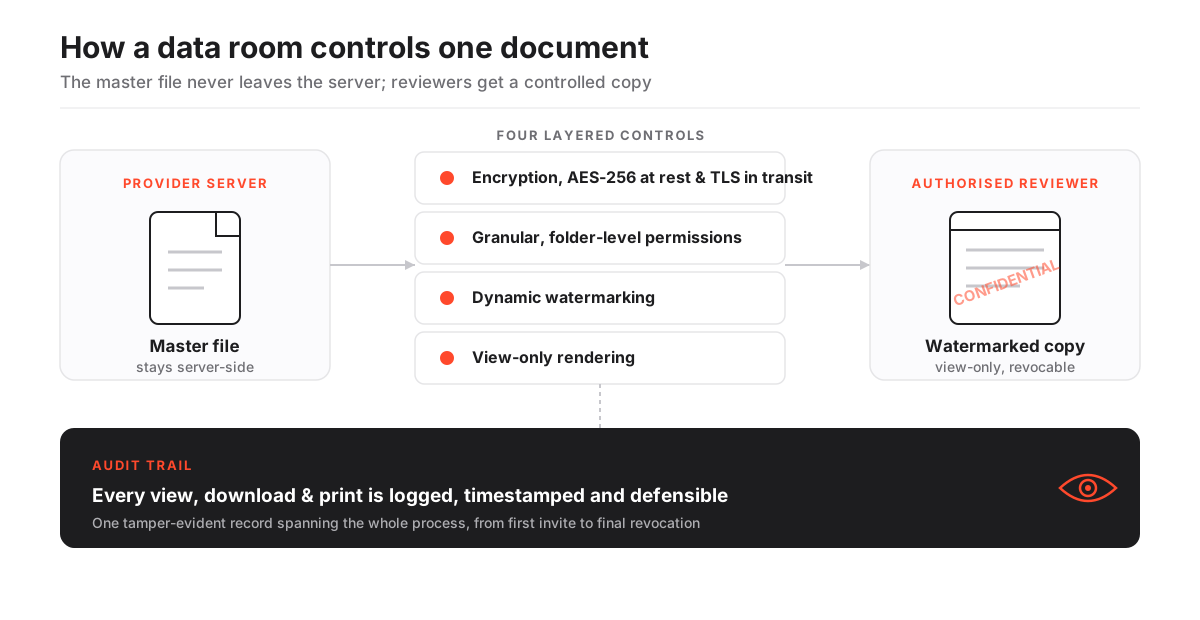
Follow the diagram left to right and you are watching one document defend itself at four checkpoints: encryption, permissions, watermarking, view-only rendering. Defeat one and three remain. That layering, not any single clever feature, is what earns the “built for it” verdict above. If you want the request-to-view mechanism traced layer by layer, our companion guide on how a virtual data room works follows one file from the click to the log entry it leaves behind.
VDR vs generic file sharing, control by control
The at-a-glance table above is for the decision. This one is for the argument you will have with a colleague who insists a shared folder is “basically the same thing.” It is not, and the differences are not cosmetic.
Virtual data room vs generic cloud storage
| Capability | Virtual data room | Generic file sharing |
|---|---|---|
| Granular, document-level permissions | Yes | No |
| Dynamic watermarking on every view | Yes | No |
| Full audit trail of views and downloads | Yes | Limited |
| Structured Q&A workflow for bidders | Yes | No |
| View-only rendering (master stays server-side) | Yes | Rare |
| SOC 2 / ISO 27001 certified | Yes | Varies |
Six rows, and generic sharing wins none of them outright. That is not a knock on Dropbox or Google Drive. They were built for convenience, and they are excellent at it. They were simply never built for a competitive process where a leaked term sheet moves a price.
The failure is specific, and it shows up at the worst moment:
- No watermark. A screenshot of a leaked page cannot be traced to the person who leaked it.
- A shallow log. The audit stops at “link opened,” which tells you nothing about which files were actually read.
- No clean revocation. Once a file sits on a laptop, no button un-downloads it.
- The wrong default. “Anyone with the link can view” is precisely the setting you never want on a diligence set.
Our deep dives on data rooms versus Dropbox and versus Google Drive walk each of these breakdowns in context. If you take one line from this section, take the next one.
The question is never whether a document is safe to store. It is whether you can prove who touched it, and revoke that access the instant a deal changes course.
Where the controls actually get used
The same permission, watermark and audit machinery serves every deal type. Only the folder structure and the audience change. The table sorts the common scenarios by what is being protected, which is a sharper lens than an alphabetical list of industries.
Where virtual data rooms are used, by scenario
| Scenario | Who is in the room | What the VDR protects |
|---|---|---|
| Mergers and acquisitions | Bidders, their advisers, sell-side bankers | Financials, contracts, IP and the record of who reviewed them |
| Startup fundraising | Prospective investors, the founding team | A curated diligence set shared without losing version control |
| Due diligence | Legal, financial and commercial reviewers | Source files verified against claims, with a full activity log |
| IPO and capital markets | Underwriters, auditors, counsel | Prospectus drafts and disclosure documents under strict access |
| Board and governance | Directors and the corporate secretary | Sensitive board papers with view-only, revocable access |
Read down the final column and a pattern jumps out. In every row, the thing being protected is not storage. It is accountability. A fundraising founder can email a pitch deck easily enough. What email cannot do is share a full diligence set and later prove which investor opened the customer-contracts folder. That gap is the reason the category exists.
Different scenarios pull toward different tools, which is why the shortlists split by use case: the best data rooms for M&A, the best rooms for startups, and the best rooms for due diligence each rank providers against the pressures of that particular deal.
The four controls that carry the weight
Vendor feature lists run long. Ignore most of it. Four controls do the real work, and they map cleanly to the three claims from the definition. The rest, bulk upload, full-text search, engagement heatmaps, are conveniences that make the four usable at the scale of a real deal.
The load-bearing controls, and what each one is for
| Control | What it does | Which claim it serves |
|---|---|---|
| Granular permissions | Decides who sees each folder, per group | Deliberate disclosure |
| Dynamic watermarking | Stamps each view with the viewer's identity | Control survives the share |
| Audit trail | Logs every view, download and print | Provable access |
| Encryption | Protects files in transit and at rest | All three, underneath |
Each control links to the mechanics if you want them: granular permissions, dynamic watermarking, and encryption at rest. A clean Q&A module sits just behind the four, keeping bidder questions organised instead of scattered across a dozen inboxes.
Here is the honest ledger. A VDR buys real capabilities, and it costs real things. Both columns are true at once.
The VDR trade-off in one view
Pros
- Provable audit trail for every document interaction
- Fine-grained control that survives after access is granted
- Certified security that satisfies regulated counterparties
- Structured Q&A that keeps a competitive process orderly
- One-click revocation when a bidder drops out
Cons
- Costs more than consumer file sharing
- Rooms need thoughtful setup to avoid permission mistakes
- Enterprise-grade options can carry custom, quote-only pricing
- Feature depth you never use is still feature depth you pay for
If you are weighing which features earn their place, our guide to VDR features explained separates the load-bearing controls from the marketing checklist, and the security features checklist turns the security column into a vendor scorecard.
How secure is it, really
A reputable virtual data room is engineered for exactly the deals it hosts. Its security comes from layering independent controls so no single failure exposes a document.
Files travel over an encrypted TLS connection and sit encrypted at rest with AES-256, so a stolen disk or an intercepted request yields only ciphertext. On top of that sit permissions, watermarking and the audit log, each doing a different job. Stack them and an attacker has to defeat all of them at once. That is the difference between a wall and a maze.
Two certifications do most of the reputational work, and they are not interchangeable. Know which is which before a vendor call.
SOC 2 vs ISO 27001, in plain terms
| Certification | What it attests | What to ask the vendor |
|---|---|---|
| SOC 2 | Controls for security and confidentiality were independently tested over a period of time | Type II report, and how recent |
| ISO/IEC 27001 | A formal information-security management system is in place and certified | Current certificate and scope |
| Both together | Independent audit plus a managed system, the combination regulated buyers expect | Which plans include each |
A SOC 2 report, defined by the AICPA, attests that a provider’s controls were independently tested over time. ISO/IEC 27001, published by the ISO, certifies a formal information-security management system.
The stakes explain the rigour. The global average cost of a data breach has climbed to nearly USD 5 million, according to IBM’s annual Cost of a Data Breach research. In an M&A context, a single leaked term sheet or customer list can move a price, or kill a deal outright.
Where EU personal data is involved, storage location and handling also fall under the GDPR, worth confirming before you upload anything containing customer records. For the deeper treatment, see are virtual data rooms secure and VDR certifications explained.
Who sees what: the role grid
Inside a live room, people are not one undifferentiated crowd. Access is assigned by group and by folder, so a bidder, an outside adviser and an internal administrator each see a different slice of the same room. This is role-based access control in practice, and it is what makes staged disclosure possible.
Roles in a live data room and what each one can do
| Role | Typical rights | Who fills it |
|---|---|---|
| Administrator | Builds the index, sets permissions, invites users, reads the audit log | Deal team or lead adviser |
| Internal contributor | Uploads and updates files, answers sell-side Q&A | Sell-side staff |
| Bidder / reviewer | Watermarked, view-only access to a curated set; downloads often disabled until late | Buyers and their teams |
| Outside adviser | Sometimes print or late-stage download rights the bidder itself does not hold | Lawyers, accountants |
Getting this map right is where first-time sellers most often slip. One over-broad grant can expose a folder to the wrong group, and the audit trail will faithfully record that it happened. Our guides on data room permissions and granting and revoking access cover the mechanics of assigning these roles without accidents.
Setting one up is faster than the shopping
The software is rarely the bottleneck. A basic room can be live in under an hour. The time goes into planning the index and setting permissions correctly, because a disciplined structure at the start saves hours of confusion for every reviewer later.
The essential path runs five steps, and the discipline is front-loaded on purpose.
How to set up a virtual data room
A first pass that gets a defensible room ready for external reviewers.
Estimated time: 1h
-
Plan the index
Map your folder structure to the diligence checklist before uploading a single file, so reviewers find documents where they expect them and nothing sensitive lands in the wrong folder.
-
Bulk upload and organise
Import documents in bulk, order them to match the index, and let the platform run full-text indexing so every file, including scanned PDFs, becomes searchable.
-
Set permissions by group
Create user groups such as bidders, outside advisers and internal team, then grant folder-level rights to the group rather than editing people one at a time.
-
Apply security controls
Turn on dynamic watermarking, view-only rendering and two-factor authentication before a single external reviewer is invited.
-
Invite and monitor
Invite reviewers, then use the activity log and engagement heatmap to see who is active and where their attention is focused.
Once the room is live, the work shifts to fielding questions and watching engagement rather than fiddling with software. Our full walkthrough on how to set up a virtual data room and the data room index best practices go deeper on the structure that step one depends on.
What it costs, tier by tier
Pricing spans a wide range because the category spans lean fundraising rooms and heavyweight banking platforms. Three tiers exist. Match yourself to a row before you match yourself to a vendor.
Indicative virtual data room pricing tiers (USD)
| Tier | Indicative price (USD) | Typical fit |
|---|---|---|
| Entry / lean room | ~$99 to $199 per month | Fundraising, small business sales, single-project diligence |
| Mid-market | Low hundreds per month | Growth-stage M&A, private equity add-ons, fuller Q&A needs |
| Enterprise | Custom quote per engagement | Large or serial transactions, investment banking, complex compliance |
The headline number is only half the story, because the pricing model matters as much as the price. Two rooms at the same monthly rate can bill very differently once the documents pile up.
- Per page. Predictable for a small set, punishing if your room turns out larger than planned.
- Flat rate. Easier to budget, but watch the storage and user caps that come attached.
- Per user. Fine for a tight deal team, expensive once every adviser needs a seat.
Our guides on VDR pricing models and the hidden costs of virtual data rooms explain how to compare quotes on a like-for-like basis, and the pricing overview puts the tiers in context.
Many providers, including Ellty and Datasite, offer a free trial, so you can test the render, permission and audit flow before committing budget. Treat every number as indicative and confirm current pricing with the provider, since plans, storage caps and user limits change often.
The verdict
Here is the decisive read, stripped of hedging. If you are sharing anything confidential where a leak has a price and a reviewer’s access should end when the deal does, a virtual data room is not a nicety. It is the correct tool, and consumer file sharing is the wrong one. The four grids above all point the same way: the VDR is the only option that keeps control and reach at once. That is what you are buying.
But do not overbuy. A solo founder raising a seed round and an investment bank running a competitive auction need very different rooms, and paying for depth you never touch is a real cost, not a free hedge. Weigh security certifications and permission granularity first, then usability and support, then price, in that order. Match the tier to the deal, shortlist two or three providers, and use a free trial to feel the render-and-permission flow before a single reviewer is invited.
From there, structured comparison beats vendor demos. Our how to choose a virtual data room guide turns those priorities into a scoring rubric, the full provider reviews let you check any name against the criteria, and if you are still deciding whether you need a dedicated room at all, is a virtual data room worth it makes the case both ways.
Frequently asked questions
Is a virtual data room secure enough for M&A?
A reputable VDR is built for exactly this. Look for SOC 2 and ISO 27001 certification, AES-256 encryption at rest, TLS in transit, granular permissions, watermarking and a complete audit trail. Those independently audited controls are what separate a data room from ordinary file sharing and what let regulated buyers and their counsel trust it.
How long does it take to set up a data room?
A basic room can be live in under an hour if your documents are ready and your index is planned. The time-consuming part is organising files and setting permissions correctly, not the software itself, so the effort is front-loaded onto structure rather than configuration.
Do virtual data rooms offer a free trial?
Many providers offer a free trial so you can test the interface, rendering and controls before committing. Trial length and included features vary, so check current terms with each provider rather than assuming they match.
Can I use Dropbox or Google Drive instead of a VDR?
You can share files that way, but you lose the controls that matter in a deal: document-level permissions, watermarking, a full audit trail, and the ability to revoke access after a file has been viewed. For anything confidential and consequential, that gap is the reason the VDR category exists.
How much does a virtual data room cost?
Indicative entry pricing starts around USD 99 per month, mid-market rooms land in the low hundreds, and enterprise deployments are quoted per engagement. Pricing models differ too, some charge per page and others a flat rate, so compare quotes carefully. Treat every figure as indicative and confirm current pricing with the provider.
