
Data room permissions and access controls explained
On this page
- What exactly is a data room permission?
- What are the standard permission levels, from weakest to strongest?
- What does least privilege actually mean for a data room?
- Why do file-level permissions beat folder-level ones?
- How much can a permissions slip actually cost?
- How do user groups keep a big deal from unraveling?
- View, print, download, admin: where is the real dividing line?
- What stops a document leaking once it is already on screen?
- Which permission setup fits which kind of deal?
- M&A auction with rival bidders
- Startup fundraising
- Real estate or asset sale
- Litigation or legal review
- How do I set up permissions without leaking anything on day one?
- What do audit logs actually prove?
- Which permission mistakes cause the most trouble?
- How do permissions support GDPR, SOC 2 and ISO 27001 compliance?
Most questions about data rooms collapse into one. Who can do what with which file, and can I take it back?
This guide answers that, plus the smaller questions hiding inside it. Read it straight through, or jump to whichever heading matches where you are stuck.
The short version: a shared drive hands someone a file. A data room lends them a controlled view of it, on your terms, for exactly as long as you allow.
Everything below is a variation on that one theme.
What exactly is a data room permission?
It is a per-user or per-group rule for what a person can do with a document, not merely whether they can open it.
Each permission bundles three things: an access level (view-only or download, say), a scope (the whole room, one folder, or a single file), and a set of protections (watermarking, an expiry date, and so on).
The word that matters is granular. Consumer file sharing gives you two settings, “can view” or “can edit”, stretched across a whole folder.
A virtual data room is far more precise inside that same folder. Let an outside bidder read a contract on screen without printing it, let their lawyer download a rights-protected copy, let your own deal lead do everything, all at once, and withdraw any of it in a single click.
That precision is the reason data rooms exist. Our guide to a VDR versus Dropbox traces where generic storage runs out of road.
What are the standard permission levels, from weakest to strongest?
Most virtual data rooms expose four to six standard access levels, stacked from the most restrictive up to full administrative control.
Vendors label them differently, but the ladder is close to universal, and it is the foundation for everything else in this article.
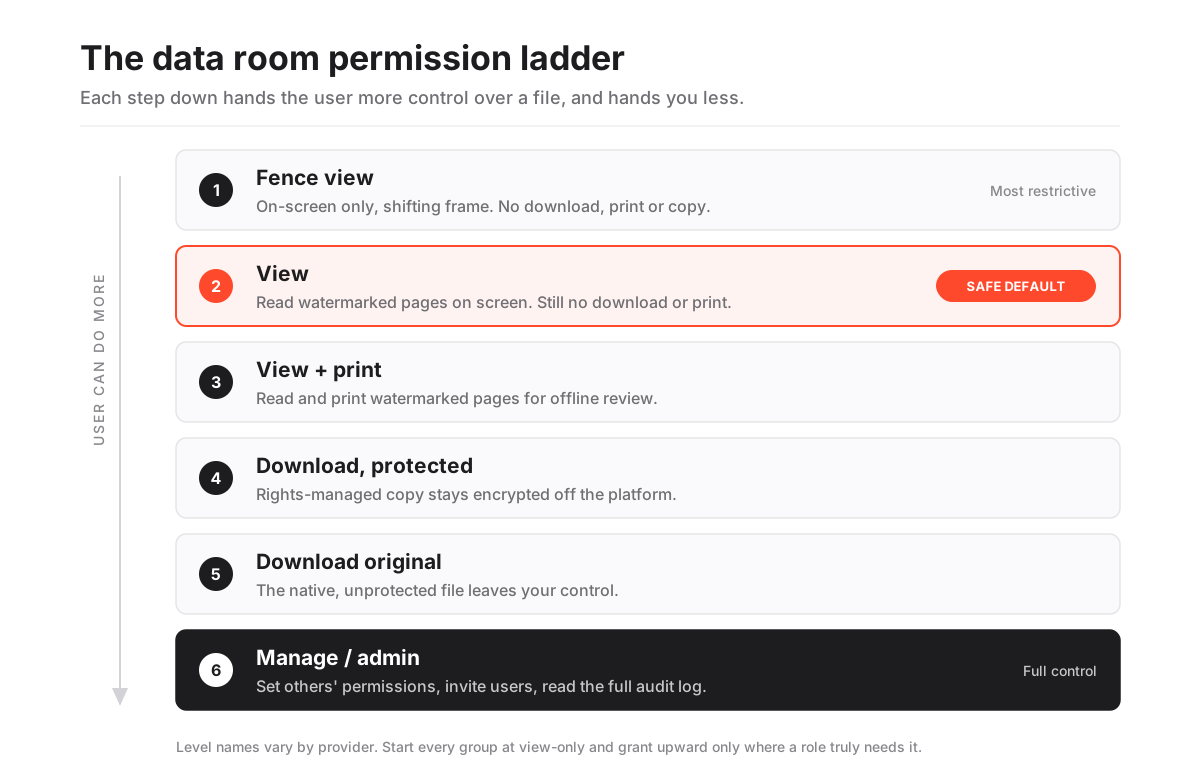
The common data room permission levels, from most restrictive to full control
| Permission level | What the user can do | Typical role |
|---|---|---|
| Fence view (view-only) | See rendered pages behind a watermark; no download, print, copy or right-click. Often shown in a shifting on-screen frame that blocks casual screenshots. | Early-round bidders, tyre-kickers, sensitive appendices |
| View | Read documents on screen with watermarking; still no download or print. | Reviewers who only need to read |
| View + print | Read and print watermarked pages for offline review. | Advisers who work from hard copy |
| Download (protected / DRM) | Download files that stay encrypted and rights-managed, so control follows the file off the platform. | Trusted counsel and financial advisers |
| Download original | Download the native, unprotected file. | Internal deal team, your own advisers |
| Manage / admin | Upload, structure folders, set other people's permissions, invite users and read the full audit log. | Deal lead, room administrator |
Read the ladder top to bottom and it doubles as a risk gauge. Every step down hands the recipient more control over the file, and hands you less.
Fence view keeps almost all the control on your side of the screen. “Download original” gives most of it away.
That insight is exactly why the discipline in the next section matters so much.
What does least privilege actually mean for a data room?
It means every user starts with the minimum access needed to do their job and gains more only when a specific task requires it.
Translated into a data room, it becomes one simple default. New groups get view-only across the whole room, and you open individual folders upward from there, rather than opening a permissive room and later clawing it back.
That default is not a marketing phrase. It is a formal security control, and the US National Institute of Standards and Technology states it plainly.
The principle that a security architecture is designed so that each entity is granted the minimum system resources and authorizations that the entity needs to perform its function.
National Institute of Standards and Technology, glossary definition of least privilege
Applied to a live deal, the rule gets concrete. A bidder’s junior analyst does not need download rights just because the lead partner has them.
Nor does a folder of routine board minutes need the same lockdown as unredacted customer contracts. Right-sizing access per role, not per convenience, is where least privilege stops being a slogan and starts preventing leaks.
Why do file-level permissions beat folder-level ones?
Because real deals are never as tidy as a folder tree suggests.
A folder of “material contracts” might hold ten routine agreements and one clause you cannot show a rival bidder until exclusivity is signed.
Folder-only tools force an ugly choice: over-share the sensitive file, or pull the whole folder and stall the review. File-level control removes the dilemma. You keep the room open and quietly restrict the one document that matters.
This granularity is also what makes staged disclosure possible. Sellers routinely run a room in phases, releasing pricing, customer lists or IP detail only to shortlisted parties as the field narrows.
Without per-file, per-group control, that staging collapses back into an all-or-nothing decision, which is exactly what you were trying to avoid.
How much can a permissions slip actually cost?
Enough to change how you think about ten minutes of setup.
IBM’s Cost of a Data Breach Report 2024 put the global average cost of a single breach at USD 4.88 million. A live deal room concentrates precisely the material that makes a breach expensive: confidential financials, legal files, and personal data in one place.
Against that number, tight permissions are one of the cheapest controls you own, and choosing the right tier for each group costs nothing but attention. Because the depth varies widely between vendors, you can line them up side by side before committing.
How do user groups keep a big deal from unraveling?
Groups let you assign rights to a role once and then add people to that role, instead of configuring every individual by hand.
In a busy room with sixty reviewers across five bidding consortia, editing users one at a time is how mistakes happen. Groups are how you avoid them.
A typical M&A room is organised into groups such as an internal deal team, a legal-adviser set, and one group per bidder, with each bidder group walled off so it cannot even see that the others exist.
You set the group’s baseline access once, then override the specific folders where that group needs more or less.
When a new analyst joins a bidder, you drop them into the group and they inherit the correct rights instantly, with nothing to reconstruct. The clean mechanics of adding and removing people are covered in our guide to granting and revoking data room access.
View, print, download, admin: where is the real dividing line?
The four rights form a capability stack. Each higher tier includes everything below it and adds one more thing the user can do.
View lets someone read a file, print adds a physical copy, download hands over the file itself, and admin adds the power to change what everyone else can do:
- View-only can see rendered pages, nothing more.
- Reviewer can also print or export watermarked pages.
- Contributor can additionally download the underlying file and upload or replace documents within a scoped area.
- Administrator can do all of that and set permissions, invite users, and read the full audit log.
Notice where the sharp line sits. Everything up to and including download is about consuming documents; only the administrator tier can reshape the room or grant rights to other people.
That is the boundary that actually protects you, so keep the admin tier tiny, ideally two named individuals.
A small admin circle is one of the simplest ways to shrink the chance of an accidental over-share. For how these tiers sit alongside encryption and certification, see our guide to virtual data room features explained.
What stops a document leaking once it is already on screen?
Permissions cannot reach the moment of greatest exposure, when a file is open on someone’s monitor. Two controls cover that gap.
The first is dynamic watermarking. It stamps each page with the viewer’s identity, email, IP address and a timestamp, so any leaked screenshot or phone photo points straight back to the person who took it.
The deterrent works because it is personal. A reader knows the trail leads to them.
The second is fence view, reserved for the most sensitive files. It renders the document inside a shifting frame that blanks out all but a narrow band of the page as the reader moves, which defeats casual over-the-shoulder reading and makes a clean photo of the full page much harder to capture.
Neither control is unbreakable alone. Layered onto view-only permissions, though, they raise the effort and personal risk of a leak to the point where most are never attempted. Our deep dive on dynamic watermarking and fence view shows what each looks like.
Which permission setup fits which kind of deal?
There is no single correct configuration. The right baseline depends on how adversarial the process is and how sensitive the data is.
An M&A auction with rival bidders needs tighter walls than a friendly fundraising round. Here is a sensible starting posture for four common scenarios.
M&A auction with rival bidders
Default every outside bidder group to view-only, walled off from the other bidders.
Hold back customer lists, pricing and IP detail until exclusivity is signed. Download stays with your own advisers, extended to shortlisted counsel late in the process and only on protected, rights-managed copies.
This is the most defensive of the four setups, because the readers are, by design, competing with each other. Our guide to data rooms for mergers and acquisitions works through the phasing in detail.
Startup fundraising
Default prospective investors to view-only. Keep full cap-table detail and key contracts back until a term sheet is on the table.
Download rights belong to the founders and, after that term sheet, to the lead investor’s counsel.
The process is friendlier than an auction, but a leaked cap table still does real damage, so the low default is worth keeping. See our guide to data rooms for startup fundraising.
Real estate or asset sale
View, or view plus print, is usually enough for buyers and surveyors who work from hard copy.
Fence or hold back tenant personal data and sensitive financial covenants. When download is warranted, give it to the buyer’s lawyer and surveyor on rights-managed copies rather than originals.
The real estate guide covers the document set particular to property deals.
Litigation or legal review
Default to fence view on anything privileged, and treat personal-data-heavy files as restricted unless there is a reason to open them.
Download stays with the internal team. Opposing parties rarely receive it, and almost never as original files. Our guide to data rooms for law firms goes further on privilege and retention.
The pattern across all four is identical. Default outsiders low, then decide deliberately what to lift and for whom.
The differences are only in how far you lift, and how long you wait.
How do I set up permissions without leaking anything on day one?
Treat it the way you would defuse something delicate. Start locked down, open access deliberately, and verify everything before a single outsider is invited.
Build the group structure first, apply the strictest useful default, then loosen individual folders, rather than opening a permissive room and tightening it afterward.
How to configure data room permissions safely
A least-privilege workflow that gets a room ready for external reviewers without accidental exposure.
Estimated time: 45min
-
Map roles before you touch a setting
List every group that will enter the room (internal team, each bidder, each adviser set) and decide the single baseline level each should hold. Design on paper first.
-
Create groups and set a restrictive default
Build the user groups and set every one to view-only across the whole room as the starting point, so nothing is downloadable until you decide it should be.
-
Grant access folder by folder
Open up specific folders for specific groups, raising rights only where a role genuinely needs to print or download. Leave sensitive folders view-only or fenced.
-
Turn on protection before inviting anyone
Enable dynamic watermarking, fence view on the most sensitive files, and two-factor authentication while the room is still empty of outsiders.
-
Test as a fake reviewer
Create a dummy user in each group and log in as them to confirm they see exactly what they should and nothing more. This catches inheritance mistakes before real eyes do.
-
Invite, then watch the log
Send invitations only after the test passes, then monitor the audit trail for the first days to confirm access matches your intent.
Step five is the one people skip, and the one that saves deals.
Permission inheritance between nested folders is subtle, and seeing the room through a bidder’s actual login is the only way to be certain a restricted file is genuinely hidden.
A dummy account costs five minutes. A leaked file costs a great deal more.
What do audit logs actually prove?
An audit log is the tamper-resistant record of every action taken in the room: who opened which document, when, from where, and what they did with it.
It is not a nice-to-have. It is the evidence that the permission system worked, and what a seller relies on to demonstrate a fair, controlled process if a deal is ever disputed.
Good logs are granular and exportable. They capture views down to the individual page and the seconds spent on it, plus downloads, prints, permission changes and failed access attempts.
Many rooms layer an engagement heatmap on top, turning the same data into a read on which bidders are genuinely working through the documents and which have gone quiet. Our explainer on VDR audit trails and the walkthrough of how a virtual data room works follow a document from upload to audited view.
Which permission mistakes cause the most trouble?
The costly errors are almost always over-sharing rather than under-sharing, and they cluster around a handful of predictable habits.
The four that leak most often:
- Granting download at the room level “to save time”, then forgetting a sensitive folder sits inside it.
- Relying on a folder permission when one file in that folder needed to stay hidden.
- Leaving a departed reviewer’s access live after their firm drops out of the process.
- Assuming a nested subfolder inherited the parent’s restriction without ever checking that it did.
The four habits that prevent them are close to mirror images:
- Default every new group to view-only and grant upward from there.
- Keep the administrator role to two named people.
- Test the room from a dummy account in each bidder group before inviting anyone.
- Review and revoke access at each stage gate as the process narrows.
Nearly all of these failures trace back to one mindset: treating permissions as something you configure once at kickoff and then forget.
In a live deal the correct list of who-can-see-what changes weekly, so the safest rooms are the ones whose administrators revisit access at every stage gate. Our roundup of data room mistakes to avoid sets these in the context of the wider process.
How do permissions support GDPR, SOC 2 and ISO 27001 compliance?
Access control is not only prudent. It is an explicit requirement of the standards that serious counterparties expect you to meet.
Under the GDPR, Article 32 requires “appropriate technical and organisational measures” to secure personal data, and the UK regulator’s guidance from the ICO on data security lists restricting access to authorised people as a core measure. Least-privilege permissions are a direct, auditable way to satisfy that.
The same principle runs through the certifications buyers look for. ISO 27001 treats access control as a core control domain, and a SOC 2 report, defined against the AICPA Trust Services Criteria, tests whether a system restricts logical access and logs it.
So the features described throughout this guide, granular roles, instant revocation and a complete audit trail, are the visible product-level evidence that a vendor meets those standards.
When you shortlist a room, confirm both the certifications and the specific controls, because a certificate without the underlying features is not worth much.
Security-led providers such as iDeals and Datasite lean hard into permission depth, and you can put them head to head on those controls. Lighter rooms like SecureDocs and Ellty keep the same ladder but simplify the setup.
If your process centres on due diligence, our best virtual data room for due diligence shortlist filters for the controls review teams lean on hardest, and the pricing overview shows what that depth costs. For the detail, see our guide to VDR certifications and GDPR and virtual data rooms.
Frequently asked questions
What is the difference between fence view and view-only?
View-only lets someone read a full watermarked page on screen but not download or print it. Fence view adds a shifting frame that blanks out most of the page, revealing only a narrow band as the reader moves, which defeats casual over-the-shoulder reading and makes photographing a clean full page much harder. Fence view is the stricter of the two and is usually reserved for the most sensitive documents.
Can I change or revoke data room permissions after inviting someone?
Yes. Instant, retroactive control is a defining feature of a virtual data room. An administrator can downgrade, restrict or fully revoke a user's or group's access at any time, and with rights-managed downloads the control can even reach files that were already downloaded, cutting off access to the copy. This is what makes staged disclosure and clean off-boarding of a dropped bidder possible.
Are data room audit logs enough to prove a fair process?
The audit log is central evidence, but not the whole picture. A complete, exportable log of every view, download, print and permission change gives a defensible record of who saw what and when, which matters if a deal is challenged. Pair it with a documented permission structure and consistent stage-gate reviews, and together they demonstrate that access was controlled and intentional throughout.
Do all virtual data rooms offer the same permission controls?
No. Most cover the core ladder from view-only to admin, but the depth varies: fence view, dynamic watermarking, rights-managed downloads and page-level audit logging are not universal. Because these controls are exactly what protects a sensitive deal, confirm the specific permission features, not just that a room claims to be secure, before you commit.
