
How to choose a virtual data room: a buyer's guide
On this page
- How do you choose a virtual data room?
- What criteria actually matter when choosing a VDR?
- Which security certifications are non-negotiable?
- How should your deal type change the decision?
- How much should a virtual data room cost?
- What are the warning signs of the wrong data room?
- What should you ask a VDR vendor before you buy?
- How do you run a trial that actually tells you something?
- How do you turn the trial into a decision?
- What do experienced buyers weigh that first-timers miss?
- Should you read individual provider reviews before deciding?
Choosing a virtual data room is a buying decision dressed up as a technical one. Treating it as purely technical is where most people go wrong.
Nearly every room in the serious tier runs on the same underlying machinery: encrypted storage, granular permissions, view-only rendering, an audit trail, and some flavour of question-and-answer workflow. Once you accept that the feature lists converge, the useful question changes. It stops being “which platform can do the most” and becomes “which platform fits this deal, this timeline and this budget without leaving a seam a counterparty can pull at.”
That reframing changes the whole exercise. You are no longer chasing the longest specification sheet. You are looking for the closest fit, and fit is measured against a transaction, not against a competitor’s marketing page.
This guide gives you a repeatable way to make that call. It sets out the four criteria that genuinely move the needle, explains how to weight them for your situation, and shows you how to run a trial that surfaces the differences a sales demo is engineered to hide.
The method is deliberately conservative, because a data room is the one place in a deal where a wrong call is expensive and public. A room that is too heavy wastes money and slows a fast raise. A room that is too light stalls diligence and hands the counterparty’s IT function a reason to push back. Neither failure shows up in a demo. Both show up in week two of a live deal, when the switching cost is highest.
The good news is that the decision is more structured than it looks. Screen on a hard floor, weight a short list of criteria against your deal profile, trial the survivors with your own documents, and score the result. Do that honestly and the winner tends to select itself.
How do you choose a virtual data room?
You choose a virtual data room by scoring a short list of providers against four decision criteria that survive contact with a real deal: audited security, permission granularity, a pricing model matched to your document volume and timeline, and responsive support in your timezone.
Rank those criteria by weight for your specific transaction. Screen out any provider that fails your non-negotiables. Then trial the two or three that remain using your own documents. The winner is the room that gets you defensibly live fastest without a plan you will outgrow mid-deal. Everything else in this guide is an elaboration of those four sentences.
First-time buyers tend to shop on price or brand recognition alone. Both instincts are understandable and both are wrong.
A cheap room that bills per page looks like a bargain until a diligence set balloons past a few thousand pages and the overage line quietly outgrows a flat-rate competitor. A famous banking platform feels safe because everyone has heard of it, yet it is expensive overkill for a seed raise, and its enterprise workflows will slow a founder who just needs investors in and out cleanly.
Fit beats reputation, and fit beats sticker price. The name on the invoice matters far less than whether the room’s strengths line up with what your deal actually stresses.
It helps to hold two numbers in mind before you start. The first is the size of the downside a data room exists to prevent. The second is the size of the effort the decision itself deserves.
Read that row as a budget for the decision, not just for the product. Four criteria means you can resist the vendor who wants the conversation to be about a fifth, flashier feature. Two or three trials means enough comparison to have evidence without so many that the deal stalls. About a week means the evaluation is a sprint, not a project. And an indicative entry price near USD 99 per month tells you the floor of the market is accessible, so cost is rarely the reason a good decision goes wrong.
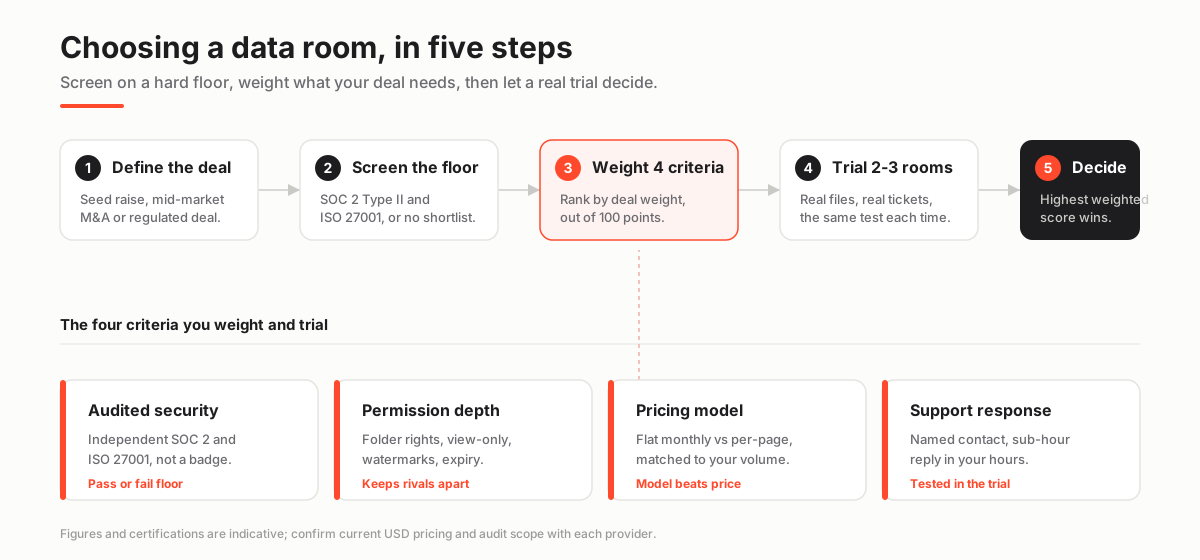
The diagram above is the whole method in one line: define the deal, screen on the security floor, weight the four criteria, trial two or three rooms, decide on the highest weighted score. The rest of this guide walks each box in turn. Keep that shape in your head, because it is what stops the process drifting into an open-ended feature comparison that never resolves.
What criteria actually matter when choosing a VDR?
Four criteria carry most of the weight in any serious evaluation. Almost everything else is a tiebreaker dressed up as a headline.
Security certification tells you the platform has been independently audited rather than self-declared, which is the difference between a control that exists and a control that a marketing team says exists. Permission depth decides whether you can safely put rival bidders, outside counsel and your own team into the same room without one group ever seeing another’s files.
The pricing model determines whether a growing document set stays affordable or turns into a monthly surprise. And support responsiveness decides how quickly you recover when something breaks at six in the evening the night before a deadline, which, on a live deal, it eventually will.
The table below turns each criterion into something you can verify with your own hands rather than take on a salesperson’s word.
The four criteria that decide a VDR choice, and how to verify each
| Criterion | What good looks like | How to verify it |
|---|---|---|
| Audited security | SOC 2 Type II and ISO 27001, encryption in transit and at rest, granular access | Ask for the current audit report and certificate scope, not a marketing badge |
| Permission depth | Folder and document-level rights, view-only rendering, dynamic watermarking, expiry | Set up two conflicting user groups in the trial and confirm neither can see the other's files |
| Pricing model | A model matched to your volume: flat monthly for open timelines, per-page only for small sets | Get a written quote with storage, user and overage terms, all in USD |
| Support and onboarding | Named contact, sub-hour response, help across your working hours | Open a real ticket during the trial and time the reply |
| Ease and speed to live | Bulk upload, drag-and-drop indexing, permission templates | Time yourself getting a 200-file room reviewer-ready |
Notice that every entry in the verify column happens during a trial, not during a demo. That distinction is the single most useful idea in this guide.
A vendor controls the demo. You control the trial. In a demo the vendor picks the files, the workflow and the pace, and everything works because everything was rehearsed. In a trial you pick the files, you set the permissions, you time the support reply, and the criterion stops being a claim on a slide and becomes evidence you gathered yourself.
If you take nothing else away, take this: refuse to decide on anything you have not personally verified inside a room you set up.
There is a fifth row in that table, ease and speed to live, and it deserves a note because people underrate it. Setup friction is not a cosmetic concern. Every hour spent fighting a clumsy upload flow or a confusing permission model is an hour the deal is not moving, and that time compounds when a counterparty is waiting on access. Treat speed to live as a real criterion, especially on a fast raise, and time yourself doing it rather than trusting the vendor’s estimate.
Which security certifications are non-negotiable?
For any deal that involves outside counsel, institutional buyers or regulated data, treat SOC 2 Type II and ISO 27001 as a hard floor: no certificate, no shortlist, no exceptions.
These are the two frameworks an acquirer’s security team expects to see. Their absence does not merely look bad. It actively stalls diligence while the counterparty’s IT function raises objections you then have to spend deal time answering. The floor exists to keep the room out of the conversation entirely, so that the deal can be about the business rather than about whether your document platform is trustworthy.
Everything that sits above that floor, penetration-test cadence, data-residency options, single sign-on, hardware-key support, is where you compare providers rather than screen them out. Screening is binary and happens first. Comparison is graded and happens second.
The stakes here are not abstract, and it is worth anchoring them to a number. IBM’s 2025 Cost of a Data Breach Report put the global average cost of a breach at USD 4.44 million (IBM), which is precisely the category of exposure a certified, permissioned room is built to contain.
A data room concentrates a company’s most sensitive material, financials, contracts, cap tables, employee records, into one place and then invites outsiders in to read it. That is exactly the situation where a lapse is catastrophic and where independent audit, rather than vendor assurance, is the only credible defence.
The two certificates are not interchangeable, and understanding what each proves helps you read a vendor’s answers.
ISO/IEC 27001 is the internationally recognised standard for information security management systems, published by the International Organization for Standardization. It certifies that the provider runs a documented, audited system for managing security risk rather than a set of ad hoc practices.
SOC 2 is defined by the AICPA Trust Services Criteria. In its Type II form it tests that the controls actually operated effectively across a period of months rather than existing on paper at a single point in time. That Type II distinction carries real weight in diligence, so ask specifically for the Type II report, not a Type I snapshot or an unspecified badge.
Two further dimensions sit just above the floor and become non-negotiable for particular deals rather than for all of them. If your transaction touches EU personal data, the transfer and residency obligations under the GDPR turn data location into a screening criterion in its own right, and our data residency guide walks through how to pin storage to a region.
For the complete screen, work methodically through the VDR security features checklist. If the terminology is unfamiliar, our explainer on which certifications actually matter untangles SOC 2, ISO 27001, HIPAA and the rest. You can also read the individual certificate definitions for SOC 2 and ISO 27001 if you want the precise scope of each before a vendor call.
How should your deal type change the decision?
Your deal profile should reshape the weighting of the four criteria, because the same criteria matter unequally across different situations. Pretending otherwise leads to over-buying.
A founder running a seed raise needs speed and a clean, uncluttered investor experience far more than a heavyweight structured Q&A engine that no seed investor will ever touch. A mid-market acquisition needs disciplined permissions and a genuinely exportable audit trail, because there are more parties, more sensitivity, and a real prospect that someone will later ask who saw what and when. A regulated carve-out needs data residency controls and enterprise-grade administration that a lean room simply does not have and was never built to provide.
The same four criteria apply to all three, but the weights swing hard. The matrix below shows which capabilities become must-haves versus nice-to-haves as the profile changes.
Which capabilities are must-haves by deal profile
| Capability | Startup fundraise | Mid-market M&A | Regulated / enterprise |
|---|---|---|---|
| SOC 2 + ISO 27001 certification | Yes | Yes | Yes |
| Fast self-serve setup | Yes | Helpful | Secondary |
| Structured Q&A workflow | Rarely | Yes | Yes |
| Dynamic watermarking + fence view | Optional | Yes | Yes |
| Data residency choice | Optional | If cross-border | Yes |
| Named onboarding manager | No | Valuable | Yes |
| Low flat monthly price | Yes | Watch overages | Custom quote |
Read down the columns and the pattern is obvious: the certification row is the only one that stays fixed, and every other row moves with the profile.
That is the whole argument against a universal “best data room.” A room that is close to perfect for a Series A can be the wrong tool for a cross-border acquisition, and paying enterprise prices for a friends-and-family round is money set on fire for controls nobody in that deal will use. The discipline is to decide the profile first and then let it steer the weighting, rather than falling for whichever feature a vendor demonstrated most persuasively.
The best data room is situational. Define the deal, then let the deal define the criteria that count.
If you already know your profile, you can skip most of the manual weighting and start from a shortlist someone has already tuned for that situation. Our ranked guides for startup fundraising, mergers and acquisitions, due diligence and private equity apply exactly this weighting for you, and the best-value ranking is the right starting point when budget is the binding constraint.
Use those as a head start, not a substitute for the trial. The shortlist narrows the field; the trial is still what confirms the fit.
How much should a virtual data room cost?
Budget against your document volume and your timeline, not against the sticker price, because in a data room the sticker price is often the least informative number on the page.
Indicative entry pricing starts around USD 99 per month for lean rooms aimed at small raises and simple deals. Mid-market rooms with structured Q&A, deeper permissions and named support commonly land in the low-to-mid hundreds per month. Enterprise and per-engagement deployments, the kind used in large banker-led transactions, are quoted individually and can run substantially higher once you factor in seats, storage and professional services.
Treat every one of those figures as indicative and confirm current pricing directly with the provider. Included storage, user seats and overage rates change often and quietly, and the number you were quoted last quarter is not a promise.
The pricing model usually matters more than the headline number, and this is the part buyers most often get wrong.
Per-page billing looks cheap for a thin room and can turn genuinely punishing once a diligence set runs to thousands of pages, which is exactly what happens in a real acquisition as the counterparty requests document after document. Flat monthly pricing is predictable and calm under a document set that grows unpredictably, but it can overcharge a tiny raise that would never accumulate enough pages to justify it. There is no universally correct model; there is only the model that matches your volume and timeline.
We break the trade-off down in detail in per-page versus flat-rate pricing and the broader pricing models explained guide, and the full cost breakdown shows exactly where the hidden fees tend to hide, from overage rates to per-user charges to the cost of keeping a room open after close.
One practical rule keeps you out of trouble: never accept a verbal price.
Insist on an all-in monthly USD figure, in writing, that names the included storage, the number of seats, the overage rate per page or per gigabyte, and the cost of extending the room past the quoted term. A vendor who will commit those numbers to writing is a vendor whose bill will not surprise you. A vendor who will only talk in ranges and adjectives is telling you something, and it is not good news.
If your deal is genuinely cost-sensitive, our roundup of the cheapest rooms and the guide to the hidden costs of virtual data rooms are the two pages to read before you sign.
What are the warning signs of the wrong data room?
Some limitations should stop a shortlist dead. Others are merely trade-offs to price in. The skill is telling the two apart so you neither over-buy nor under-buy.
The clearest disqualifiers cluster around the security floor and around honesty: missing or unevidenced certifications, vague answers about where data physically lives, and pricing the vendor will not commit to writing. Each of those is a reason to close the tab, because each one predicts a problem you will inherit later at a worse time.
The softer trade-offs, a thinner Q&A module, a slight learning curve, fewer third-party integrations, are perfectly acceptable when the deal profile does not lean on them. Separating the disqualifiers from the trade-offs is what keeps a shortlist honest, and the split below is a good starting template.
Red flags versus acceptable trade-offs
Pros
- Acceptable: a lighter Q&A workflow when your raise will not use structured bidder questions
- Acceptable: a short learning curve if onboarding support is genuinely responsive
- Acceptable: per-page billing when the document set is small and the timeline is short
- Acceptable: fewer enterprise integrations when your team is small
Cons
- Disqualifier: no current SOC 2 or ISO 27001, or a badge the vendor will not evidence
- Disqualifier: no clear answer on data residency for a cross-border or regulated deal
- Disqualifier: pricing that will not be quoted in writing, in USD, with overage terms
- Disqualifier: no audit trail of views and downloads, so you cannot prove who saw what
The last disqualifier deserves emphasis because it is the one people forget to check.
An audit trail that logs views, downloads and prints per user is not a nice-to-have. It is your evidence base long after the deal closes. If a dispute arises about what a bidder accessed, or a regulator asks how sensitive material was handled, the exportable log is the record that answers the question. A room that cannot produce that record leaves you defending a deal from memory, which is no defence at all.
Our guide to avoiding the common data room mistakes covers the rest of the traps, most of which trace back to skipping one of these checks under time pressure.
What should you ask a VDR vendor before you buy?
Ask the questions a demo is engineered to skip: the ones about scope, limits and what happens when the deal ends. A vendor’s answers, given in writing, tell you more than any feature grid, because they expose precisely where a plan is thin and where the costs are hiding.
The pattern to enforce across every question is to force specifics. A confident vendor answers in numbers, dates and documents. A vague one answers in adjectives, and the vagueness is itself a data point. Carry the list below into every sales call, hold the room to written replies, and file those replies so you can lay them side by side when you score.
- Certification scope: “What exactly does your SOC 2 report cover, and when was your last ISO 27001 audit?” A narrow scope can quietly exclude the specific product or region you are actually buying, so read the certificate boundary, not just its existence.
- Data residency: “Which regions can host our data, and can we pin storage to a single one?” This is decisive for cross-border or regulated deals; if the answer is soft, treat it as a red flag and read our data residency explainer before you continue.
- Pricing and overages: “What is the all-in monthly USD figure, including storage, seats and overage rates?” Insist on it in writing before you compare rooms, because a number you cannot quote back to the vendor later is a number you do not really have.
- Audit depth: “Does the audit trail log views, downloads and prints per user, and can we export the full record?” You may need that export long after the deal closes, and the time to confirm it exists is before you sign.
- Permission model: “Can I set folder and document-level rights, view-only rendering and dynamic watermarking, and expire access on a date?” These are the controls that let rival parties share one room safely.
- Exit terms: “How do we export everything and permanently delete the room when we are finished?” A room you cannot cleanly leave becomes a standing liability and, sometimes, a standing bill.
- Support: “Who is our named contact, and what response time is guaranteed inside our working hours?” A guarantee you can point to beats a promise you cannot.
Keep the written answers even if you do not choose the vendor. On your next deal the same list, already answered, saves you a week, and the vendors who answered crisply the first time are usually the ones worth re-approaching.
How do you run a trial that actually tells you something?
Shortlist two or three rooms, then run a short, structured free trial on each. Use the same real documents and the same test every time, so that you are comparing evidence rather than impressions.
Most serious providers offer a free trial precisely because they are confident their room performs under real use, and you should take them up on it in the most demanding way you reasonably can. Stage a genuine slice of your diligence set rather than the vendor’s polished sample files. Rebuild your actual folder index, configure two deliberately conflicting permission groups, turn on the security controls, and open a real support ticket with a real question.
The room that gets defensibly live fastest, with support that answers inside your working hours, is almost always the right answer, and it is rarely the room with the flashiest interface. The sequence below is the exact test to run.
How to evaluate a virtual data room in a free trial
A structured week-long test that surfaces the differences a sales demo hides.
Estimated time: 5d
-
Shortlist to two or three
Screen out any provider that fails your non-negotiables, usually certification and pricing transparency, and carry only the survivors into a trial.
-
Stage a genuine document slice
Upload a representative subset of your actual diligence set, never the vendor's polished samples, so upload speed and indexing meet real files rather than a rehearsed demo set.
-
Rebuild the index and clash-test permissions
Recreate the folder tree your reviewers will use, then stand up two deliberately conflicting groups such as rival bidders and confirm neither can see the other's files.
-
Turn on the security controls
Enable watermarking, view-only rendering and two-factor authentication, and check the audit log records a test view and download correctly.
-
Open a real support ticket
Ask a genuine question through the support channel and time the response; this is the clearest signal of what a live deal will feel like.
-
Score and decide
Rate each room against your weighted criteria, add setup time and support response, and pick the highest total, not the flashiest interface.
The permission test in step three is the one that separates a real room from a pretty one, so do not skip it or rush it.
Create two groups that must never see each other, load a file into each, and then log in as a member of each group and confirm the other group’s file is genuinely invisible, not merely unlinked. This is the exact scenario an auction or a competitive process puts you in, and a room that fumbles it in a calm trial will fail you loudly on a live deal.
If you want a deeper walkthrough of the setup itself, our step-by-step setup guide covers the index, permissions and monitoring in detail, and the free trial versus paid rooms guide explains what the trial tiers usually do and do not include.
How do you turn the trial into a decision?
Convert your judgement into a simple weighted score so the decision is defensible, repeatable and immune to the pull of a slick demo or a familiar logo. The method is deliberately plain arithmetic, because the point is not false precision, it is to make the criteria that matter to your deal outweigh the ones a vendor made memorable.
Work through the following sequence once, and keep the spreadsheet, because it travels to your next deal with only the weights changed.
- List your four criteria and assign weights out of 100. Split the hundred points across audited security, permission depth, pricing fit and support and speed, in proportion to how much each matters for this specific deal. A regulated carve-out might put forty points on security and residency; a seed raise might put forty on speed and support. The weights encode your profile.
- Score each shortlisted room out of ten on every criterion. Use the evidence from the trial, not the impression from the demo. If you could not verify a criterion during the trial, it does not get a high score, however good the sales pitch was.
- Multiply each score by its weight and total the room. A room that scores eight on a forty-point criterion earns more than a room that scores ten on a ten-point one, which is the whole reason for weighting rather than counting checkmarks.
- Add two tiebreak columns: setup time and support response. Record the actual minutes to a reviewer-ready room and the actual time to a support reply. These are the factors that hurt most under deadline pressure, so let them break a close call.
- Choose the highest total, then sanity-check it against the deal profile. If the winner surprises you, re-read your weights before you re-open the decision; usually the number is right and the surprise is just the familiar brand losing to the better fit.
The framework’s real job is to stop a persuasive demo or a well-known name from overriding what your deal actually needs. Define the profile, screen on the floor, weight the criteria, trial with your own files, score the result, and the choice tends to make itself.
If two rooms genuinely tie after all of that, break it on speed to live and support response, because those are the two things you will feel every day the deal is open.
What do experienced buyers weigh that first-timers miss?
There is a category of consideration that never appears in a comparison grid and yet decides whether a room feels like an asset or a burden three weeks into a deal. It is worth naming because first-time buyers almost always overlook it.
The first is the workflow around questions. In an M&A process the counterparty will submit dozens or hundreds of questions. Whether those flow through a structured module with assignment, tracking and a clean answer history, or through a chaotic email thread outside the room, changes how much of your week the deal consumes. Our guide to running data room Q&A explains why the structured path is worth the setup cost on any competitive process, and why it is dead weight on a raise that will never use it.
The second overlooked consideration is what happens to visibility once the room is live. A good room does not just store documents and control access; it tells you who looked at what, for how long, and when, which is intelligence you can use. An engagement pattern that shows a bidder poring over the material contracts folder for an hour tells you something a status call will not. That is why the audit trail is both a compliance record and a signal, and why a room that logs activity per user is worth more than its feature list suggests. Read how audit trails work in practice before you dismiss the logging as a formality.
The third is migration risk, which bites hardest at the two ends of a room’s life. Getting your documents into a room cleanly, with the folder structure and permissions intact, is the setup problem. Getting them out cleanly, with the audit record preserved, is the exit problem. Both are invisible in a demo and both are painful when handled badly, so treat bulk upload quality, index tooling and export completeness as real criteria rather than afterthoughts. If you are moving off an existing platform, the migration guide walks through preserving structure and permissions without a gap in coverage.
None of these three shows up when you shop on features and price. All three show up in the trial if you look for them, which is one more reason the trial is the decision and the demo is only the invitation.
Should you read individual provider reviews before deciding?
Yes, and the right moment to read them is after your criteria and weighting are set, not before.
Once you know what you are weighting for, individual reviews are where you confirm how a provider performs against those criteria in practice rather than in a brochure, and reading two or three side by side calibrates your expectations before the trials begin. Our hands-on reviews record real pricing, the security controls we could actually verify, and the honest limitations of each room, which is precisely the evidence a shortlist needs and precisely what a vendor’s own site will not volunteer.
Read them as a cross-check on the trial, not a replacement for it. The review tells you where to look; the trial tells you what you find.
Across the market the well-known options span a wide range of deal profiles. iDeals is a balanced mid-market room that suits many M&A and private-equity processes. Datasite is built for large, banker-led transactions and shows its enterprise weight accordingly. Intralinks and Ansarada sit in similar enterprise territory. And Ellty is a modern, full-featured room built for M&A, due diligence, real estate and fundraising, with a clear interface and published pricing.
The right one still depends entirely on the profile you defined earlier, which is why the head-to-heads are often more useful than any single review. If you have already narrowed to two names, comparisons like iDeals versus Datasite or Datasite versus Intralinks line the two up directly, and the full comparison lays out security, features and pricing for every provider we score in one view.
Frequently asked questions
How do I choose a virtual data room provider?
Match the deal to four criteria: audited security, permission depth, a pricing model that fits your document volume and timeline, and responsive support. Screen out any provider that fails your non-negotiables such as SOC 2 and ISO 27001, shortlist two or three, run a free trial with your own documents, and pick the one that gets defensibly live fastest without a plan you will outgrow. Weight the four criteria according to your specific deal profile, because a seed raise and a regulated carve-out value them very differently, and let that weighting rather than a demo drive the final call.
What is the most important feature in a data room?
Independently audited security is the floor that comes before any single feature: SOC 2 Type II and ISO 27001, encryption in transit and at rest, and granular permissions. Above that floor, permission depth is usually the most decisive capability, because it determines whether you can safely let rival bidders or multiple parties into the same room without exposing files to the wrong group. Test it directly in a trial by creating two conflicting user groups and confirming neither can see the other's documents, since a room that fumbles that in a calm trial will fail you loudly on a live deal.
How much should I pay for a virtual data room?
Budget against document volume and timeline rather than the sticker price. Indicative entry pricing starts around USD 99 per month for lean rooms, mid-market rooms sit in the low-to-mid hundreds, and enterprise deployments are quoted per engagement. Confirm current pricing with the provider, since storage, seats and overage terms change often and quietly. The pricing model usually matters more than the headline number, so favour flat monthly billing for open-ended timelines and reserve per-page billing for small, short document sets where it genuinely costs less.
Do virtual data room providers offer a free trial?
Many do, and you should treat the free trial as the core of your evaluation rather than an afterthought. Load a slice of your real diligence set instead of the vendor's sample files, rebuild your folder index, set two conflicting permission groups, enable the security controls, and open a genuine support ticket. A structured trial reveals setup speed, permission behaviour and support quality that a sales demo is specifically designed to hide, which is why it beats a demo as evidence for the decision.
Is a well-known VDR brand always the better choice?
No. A large banking-grade platform is often expensive overkill for a seed raise, and a lean modern room can be the wrong tool for a regulated cross-border carve-out. Fit beats reputation, and the room's strengths lining up with what your deal stresses matters far more than how many people recognise the name on the invoice. Define your deal profile first, weight the four criteria against it, and choose the room whose strengths match rather than the most familiar logo.
How long should VDR evaluation take?
Plan for about a week in total. Spend a day or two screening candidates against your non-negotiables, chiefly certification and pricing transparency, then run a short structured trial of two or three rooms in parallel using the same real documents and the same test. That is enough time to compare setup speed, permission behaviour and support response without stalling the deal, and any longer usually means you are re-litigating a decision the evidence has already made for you.
Once you have chosen, the work shifts from deciding to executing: getting the room live, disciplined and defensible before the counterparty arrives. Line up your finalists on security, features and pricing one last time, read the hands-on reviews for anything you could not verify yourself, and only then commit.
