
Virtual data room features explained
On this page
- The four groups every room is built from
- How granular permissions actually work
- The security floor, and why certification is the proof
- Protecting the document once someone is inside
- The features that keep a large room usable
- Q&A and oversight: what makes a deal defensible
- What features actually change the price
- Weighting the features to your deal type
- Testing the features before you commit
A virtual data room advertises dozens of controls across a feature grid that can run to several pages. Almost all of them exist to satisfy one unglamorous demand that a buyer’s lawyer will eventually put to the seller: can you prove who touched this document, and can you stop them from keeping a copy of it?
That question sits underneath the whole category. Read the marketing closely and you find that watermarks, permission matrices, fence views, audit logs and heatmaps are all variations on those two obligations, dressed up in different language and priced across different tiers.
Once you see the pattern, a data room stops looking like an intimidating pile of acronyms and starts looking like a small number of jobs done well or done badly. If the category itself is still new to you, the companion piece on what a virtual data room is and how it works sets the scene before this one goes feature by feature, and, more usefully, flags which of those features are actually worth paying for.
The temptation, when you first compare providers, is to treat the longest feature list as the winner. It rarely is.
A room crammed with capabilities you will never configure is not safer than a lean one whose few controls are set up correctly. It is simply more expensive and more confusing to administer under pressure.
The better instinct is to hold every claimed feature against the deal you are actually running and ask whether it changes an outcome. What follows walks through the four feature groups in the order a dealmaker meets them, from who gets in the front door to what the seller can prove after everyone has left, separating the controls that decide a transaction from the ones that merely decorate it.
The four groups every room is built from
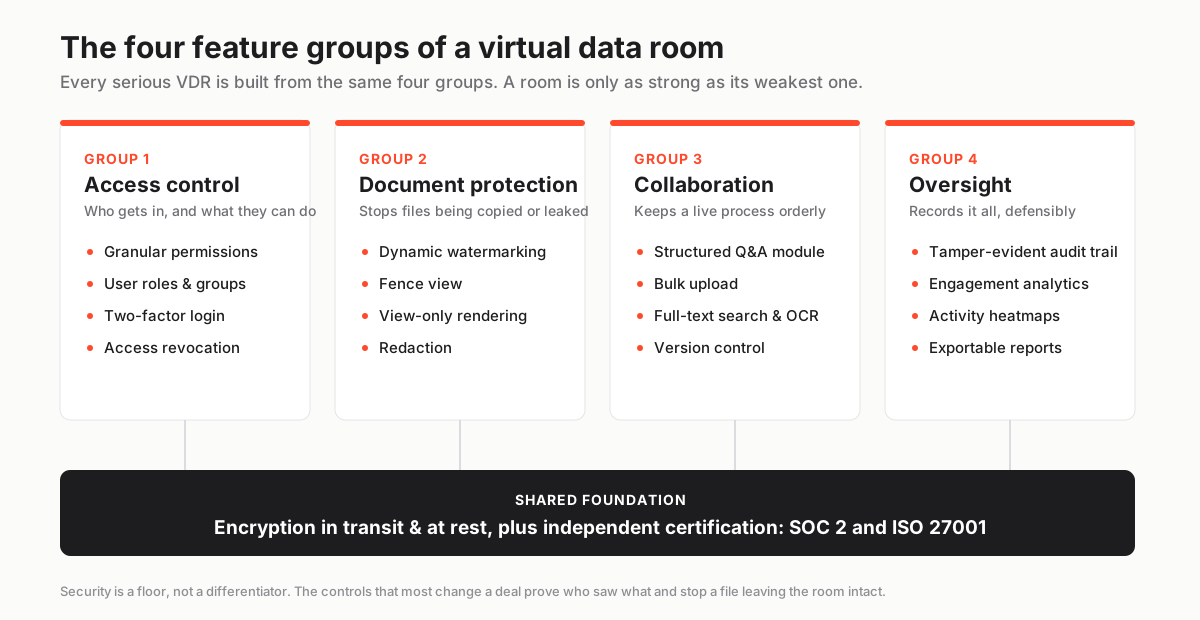
Every serious VDR is assembled from the same four feature groups, and a room is only ever as strong as its weakest one.
Access control decides who gets in and what they can do once inside. Document protection stops files being copied, printed, screenshotted or otherwise walked out of the room by someone who does have legitimate access. Collaboration tools, chiefly the structured Q&A module and full-text search, keep a live process orderly while dozens of people work in parallel. Oversight, meaning the audit trail and the analytics built on top of it, records the whole thing so the seller keeps a defensible, exportable account of how confidential material was handled.
Miss any one of the four and the others cannot compensate. Watertight encryption is worthless if permissions are sloppy, and a beautiful permission model tells you nothing if there is no log to prove it was respected.
It helps to understand why the protection groups are treated as non-negotiable rather than optional polish, and the answer is money.
IBM’s widely cited Cost of a Data Breach Report 2024 put the global average cost of a breach at 4.88 million US dollars. The documents sitting inside a deal room, financials, customer contracts, cap tables, litigation files, are exactly the material an attacker or a careless bidder can turn into leverage overnight.
A data room is not storing holiday photos. It is storing the most sensitive material a company will ever assemble in one place, and it is doing so at the precise moment the company is most exposed.
That is the context in which the four groups earn their keep, and it is a useful scoring frame when you sit down with the full comparison table: a gap in any single group is a gap in the whole room, not a rounding error you can wave away because the other three look strong.
How granular permissions actually work
If one feature deserves the label of backbone, it is granular permissions, because it is the control that makes a competitive process safe at all.
Granular permissions let an administrator grant rights at the level of a single folder or even an individual document, and, crucially, assign those rights to a defined user group rather than to one person at a time. That last detail is what turns a data room into something you can run at speed.
Two rival bidders can occupy the same room on the same afternoon and never see so much as the name of each other’s folders. A party that drops out of the process can be locked out the instant the decision is made, without anyone hunting through a list of individual accounts to revoke them one by one.
The mechanics are role based, and the discipline is worth internalising, because it is where most first-time administrators come unstuck.
You define your groups once, deciding up front what a bidder, a lawyer, an internal team member or a view-only guest is permitted to do. Then you add people to a group rather than hand-editing each person’s rights.
A bidder group might be allowed to view files in the browser and submit questions but not download originals. A contributor group might upload and organise but not manage users. An administrator group holds the keys to everything, including the rights model itself.
Because the rules live on the group, onboarding a new party means dropping them into the right bucket, and offboarding means emptying it. The data room permissions explained guide walks through the mechanics in more depth, and the glossary entry on granular permissions fixes the terminology if the vocabulary is new.
Underneath all of that sits a single design principle that experienced administrators reach for by instinct. It is worth stating plainly, because it prevents most of the accidents that leak documents.
Give each party the narrowest set of rights their task actually requires, and expand that set only when a concrete need surfaces. A room that opens tight and loosens on request is far safer than one that opens wide and has to be reeled back in after a file has already been seen.
The subtlety that trips people up is inheritance. Set a right on a parent folder and its sub-folders will usually inherit that right unless you deliberately override them, which means a single careless permission at the top of the tree can quietly expose an entire branch of documents nobody intended to share.
The best rooms defend against this with an effective-permissions preview. It lets you view the room exactly as a given group will see it before a single invitation goes out, so you catch the over-share while it is still hypothetical rather than after a bidder has stumbled into a folder of board minutes.
When you evaluate providers, the quality of that preview and the clarity of the inheritance model matter far more than the raw number of permission levels on offer.
The security floor, and why certification is the proof
Security is the group buyers ask about first and understand least, largely because vendors describe it as a differentiator when it is really a floor.
The genuine baseline is straightforward. Encryption of files both in transit, typically over TLS, and at rest, commonly with AES-256, so that intercepted data is unreadable. Two-factor authentication as a standard login control rather than a premium add-on. And, above all, independent certification against recognised standards.
That last item separates a serious platform from a hopeful one, because certification means an outside auditor has actually tested the controls instead of the vendor simply asserting they exist.
For most transactions, and certainly for any counterparty in a regulated industry, two certificates matter. SOC 2 is an attestation against the AICPA Trust Services Criteria covering the security, availability and confidentiality of a service. ISO 27001 is the international standard for an information security management system, certified by ISO.
A third consideration, data residency, decides which physical region your files are stored in. It becomes decisive the moment a deal touches a regime like the EU’s GDPR, where the wrong storage location is a compliance problem rather than a preference.
Treat all of this as a floor rather than a selling point, because almost every credible provider clears it. The presence of encryption and a SOC 2 logo tells you very little on its own.
The sharper questions are whether the certification is current, since attestations lapse and must be renewed, and whether it is in scope for the specific plan you are buying. Vendors sometimes hold a certificate that applies only to their enterprise tier while quietly leaving it off the entry plan a smaller buyer would actually purchase. Verify both before you rely on either.
There is a deeper reason certification cannot be the finish line: the overwhelming majority of breaches begin with people rather than cracked ciphers.
Verizon’s 2024 Data Breach Investigations Report found the human element involved in roughly 68 percent of breaches. That is precisely why the protection and permission features sit alongside encryption rather than behind it. A per-group permission model, dynamic watermarking and a complete audit trail exist to contain what a careless, rushed or compromised user can do once they are legitimately inside.
Encryption keeps the outsider out; everything else limits the damage the insider can cause. The VDR security features checklist turns this reasoning into a line-by-line test you can run against any provider’s claims, and it is worth confirming that two-factor authentication is enforced rather than merely available.
Protecting the document once someone is inside
Access control governs the door; document protection governs what happens after a legitimate user walks through it. This is where two features that are often confused, dynamic watermarking and fence view, do their distinct work.
Dynamic watermarking stamps each page a user views or downloads with their own identity, usually some combination of their email address, an IP address and a timestamp. A leaked screenshot or a photographed screen then points straight back to the individual who exposed it.
It does not physically stop a determined leaker, but it changes the psychology of the room. A document that carries your name across every page is a document you think twice about forwarding, and if it does escape, the seller has a forensic trail leading to the source.
Fence view goes a step further and works in the moment rather than after the fact. It overlays a striped barrier across the page and reveals only a narrow band of content at a time, which defeats casual screenshots and shoulder-surfing without making the document impossible to read for the person who genuinely needs to review it.
The two are best understood as a pair working on different timelines. Watermarking is a deterrent and a forensic aid that proves its value only after a leak has happened; fence view is a live barrier that reduces the chance of a leak while the sensitive file is actually open on screen.
Both sit on top of a more fundamental control called view-only rendering, in which a file is streamed to the browser as a series of images rather than handed over as a downloadable original, so the recipient never possesses the underlying document at all.
Where a file needs parts of it permanently blacked out before anyone sees it, a personal name, a price, a third party’s confidential terms, that is redaction. It is a distinct control worth confirming is built into the platform rather than something you are expected to do by hand in a separate tool before uploading.
The dedicated guide on dynamic watermarking and fence view walks through the exact mechanics of each, while the glossary pins down dynamic watermarking, fence view and redaction precisely enough that you can tell a provider’s marketing gloss from the real capability.
The features that keep a large room usable
There is a moment in every sizeable transaction when the character of the room changes.
In the first days, protection is all anyone thinks about. But once the room holds several thousand documents and a due-diligence team is working through them against a deadline, the features that decide whether the process moves or stalls are the ones concerned with findability rather than security.
A room can be perfectly encrypted and still fail if a reviewer cannot locate the one indemnity clause buried in a scanned agreement from 2011. The everyday document tools that prevent that failure are worth understanding as a group, because together they are the difference between a room that feels professional and one that feels like a dumping ground.
| Feature | What it does | Why it matters in a deal |
|---|---|---|
| Bulk upload | Imports large batches of files and folders in one action, preserving structure | Gets a room live in hours rather than days at the start of a process |
| Auto-indexing | Numbers documents to match the folder tree | Reviewers and lawyers all cite the same index reference |
| OCR | Turns scanned images into searchable text | Old contracts and scanned PDFs become findable rather than dead weight |
| Full-text search | Searches inside document contents, not just filenames | A buyer finds every mention of a clause in seconds |
| Version control | Tracks revisions and keeps a history of each file | Everyone works from the current document, with an audit of changes |
| Bulk permission change | Applies a rights change across many files at once | A new bidder is granted access without hand-editing folders |
Of that list, two quietly decide whether a room feels usable: optical character recognition and full-text search. They are joined at the hip.
A due-diligence team wading through hundreds of scanned agreements needs to search inside those documents, not merely across their filenames. A room without OCR turns every scanned file into an opaque wall that the buyer has to read line by line to be sure they have not missed something material.
Version control matters for a different reason: trust. When a document is revised late in a process, everyone needs confidence that they are looking at the current version and that the history of changes is preserved rather than overwritten.
None of this works without a disciplined underlying structure, because search and permissions both degrade fast in a chaotic tree. The data room index best practices guide is the practical companion here, showing how to lay out folders so findability and access control reinforce each other instead of fighting.
Q&A and oversight: what makes a deal defensible
The collaboration group has a single marquee feature, the structured Q&A module, which is more consequential than its dull name suggests.
During due diligence, bidders generate a constant stream of questions about the documents. Without a proper module those questions scatter across email threads, get answered inconsistently, and leave no reliable record of who was told what.
A Q&A module replaces that chaos with a workflow. Each question is logged, routed to the right subject expert, answered inside the room, and tracked through to a closed status, with priority levels and reporting layered on top. A coordinator triages incoming questions, the relevant expert answers, and the seller can watch which topics generate the most queries, which is often an early and valuable signal of where a deal might snag.
Because every exchange is captured in one place, the Q&A log quietly becomes part of the transaction record itself, evidence of what was disclosed and when. The glossary entry on the Q&A module gives the working definition, the guide on running data room Q&A is the practical manual for keeping one from bogging the deal down, and the ranked roundup of the best data rooms for due diligence weighs Q&A depth heavily precisely because it is where diligence-heavy deals live or die.
Oversight is the fourth group, and it is the one that makes the whole apparatus defensible after the fact.
The audit trail is a complete, tamper-evident log of every action taken in the room, every view, download, print and permission change, each stamped with the user who performed it and the time it happened. It is the feature that lets a seller prove, months later and to a court or a regulator if it comes to that, exactly how confidential material was handled during the process, and it is the reason a data room can be defended in a way a shared drive never can.
Analytics take the same underlying data and point it forward instead of backward.
An engagement heatmap shows which documents a given bidder actually opened and how long they lingered, which turns raw activity into intent. A buyer poring over the customer contracts and the churn analysis is telling you something their polite, non-committal emails will not.
Used with a little discipline, this becomes a genuine negotiating input rather than a mere security artefact. The audit trail definition and the deeper VDR audit trails explained guide cover the mechanics, and individual provider reviews, the iDeals review and the Datasite review among them, show how granular each platform’s logs actually get in practice, which varies more than the marketing admits.
What features actually change the price
Pricing, in the end, tracks the feature set with fairly predictable logic. The more advanced the controls and the more users and storage a deal requires, the higher the tier and the larger the invoice.
Entry plans reliably cover the essentials no serious room can omit: granular permissions, dynamic watermarking, a basic Q&A module and a full audit trail. The capabilities that command a premium tend to be fence view, advanced engagement analytics, custom branding, dedicated project management and enterprise single sign-on.
Those cluster in mid-market and enterprise plans, and the very largest capabilities often disappear into quote-only enterprise pricing where the number depends on the deal. Feature depth and price move together, so the honest way to read a pricing page is to work out which tier holds the two or three features you genuinely cannot run your process without, and buy that one.
The discipline this demands is buying for the deal in front of you rather than the deal you imagine you might one day run.
A lean fundraising round almost never needs enterprise single sign-on or a dedicated project manager. A multi-party auction with hundreds of reviewers and rival bidders sharing one room genuinely does need the advanced permission tooling and the fuller Q&A workflow, and skimping there is a false economy that shows up as chaos halfway through diligence.
Some of the providers we score, Ellty among them, fold watermarking and the core audit trail into their entry tier rather than reserving them for a premium plan. Even so, the only reliable move is to confirm what a specific plan actually includes before you sign, because the contents of a named tier vary more between vendors than the labels suggest.
If the structure of pricing rather than the sticker number is your real question, the guide on VDR pricing models explained unpacks how the tiers are built, the piece on the hidden costs of virtual data rooms covers the charges that do not appear on the pricing page, and the pricing overview lays the tiers out in USD so you can compare like with like.
Weighting the features to your deal type
The list of must-have features is not fixed; it shifts with the shape of the transaction. Weighting your evaluation before you compare providers saves you from being sold capabilities that do nothing for your particular deal.
A crowded M&A auction lives or dies on group permission control and Q&A throughput, because rival bidders share one room and every question has to stay tracked and walled off from the competition. The ranked best data rooms for M&A page starts from exactly those criteria rather than a generic score.
A startup raising money cares far more about speed of setup and engagement analytics, since a lean team needs the room live in hours and wants to read investor intent from the heatmap.
A private equity firm running many similar processes values reusable templates and reporting, so that one room structure repeats cleanly across deals and LP reviews. That is what the best data rooms for private equity shortlist is built around.
A life sciences or biotech deal puts redaction and data residency at the very top, because regulated and patent-sensitive files demand region control and permanent redaction of anything that must never be seen. The best data rooms for life sciences page weights those first.
A real-estate portfolio sale leans on bulk upload and full-text search across hundreds of near-identical leases and title documents, which is where the best data rooms for real estate ranking concentrates.
Identify your lane before you shop, and the grid stops being a wall of equal-looking checkmarks and becomes a set of weighted priorities you can decide with.
Testing the features before you commit
None of this analysis substitutes for putting your hands on the room. The single most valuable thing you can do before committing to a provider is to test its features against your actual workflow during a free trial rather than trusting the feature grid.
Load a realistic, slightly messy sample of the documents you will really be handling, set up the permission groups you will genuinely use, and then walk the room as an outside reviewer would experience it. The gap between what a feature claims and how it behaves under your specific process is exactly where unpleasant surprises live.
Five focused checks tell you more than any brochure, and they map directly to the four feature groups this guide has walked through.
How to evaluate a virtual data room's features
A hands-on checklist to run during a free trial before committing.
Estimated time: 2h
-
Recreate your permission map
Build the real user groups for your deal (bidders, legal, internal) and confirm you can set folder-level rights and preview the room as each group sees it, inheritance included.
-
Stress-test upload and search
Bulk upload a messy, realistic file set including scanned PDFs, then check that OCR and full-text search actually find text inside them.
-
Trigger the protection features
Open a sensitive file as a view-only guest and confirm watermarking, view-only rendering and, where offered, fence view all behave as expected.
-
Run a Q&A cycle
Post a question as a reviewer, route it to an expert, answer it, and check the log captures the full exchange from question to closure.
-
Read the audit trail
Review the activity log and analytics to confirm you can see who viewed what, and export a report you could hand to counsel without embarrassment.
While you are inside the trial, confirm two things the feature grid will not tell you. First, that the certification you are relying on is current and in scope for the exact plan you intend to buy. Second, that the support model is responsive, because on a time-pressured deal a project manager who answers within the hour is itself a feature worth paying for.
When you weigh must-have against nice-to-have, the honest split is clear. Granular group-based permissions with previewable inheritance, current SOC 2 and ISO 27001 certification, dynamic watermarking with view-only rendering, a complete exportable audit trail and a structured Q&A module are non-negotiable for any real transaction. Fence view, advanced heatmap analytics, enterprise single sign-on, custom branding, dedicated project management and region-specific data residency are situational luxuries that a regulated industry or a very large auction can promote into necessities.
The guide on how to choose a virtual data room sequences all of this against budget and timeline if you would rather see the whole selection process laid out end to end before you start.
Strip everything back and the conclusion is the one the opening question implied: features are only ever worth what they do for your specific deal, and the longest list is not the best room.
The controls that earn their place are the ones that prove who saw what and stop a document from leaving intact. Once you know which of those you genuinely need, the fastest way to turn that clarity into a shortlist is to see the features scored and priced side by side.
