
How to set up a virtual data room: a step-by-step guide
On this page
- The 80/20 rule of data room setup
- How long this actually takes
- Before you touch the software
- Build the index around the reader, not your filing cabinet
- Upload, then walk the room as a stranger
- Permissions: by group, never by person
- Security controls to switch on before anyone gets in
- The build, step by step
- Running the room once it is live
- What it costs to run one during a deal
- Do this, not that
What nobody tells you before your first deal? The software is the easy part.
You can create a room, drag in a few hundred files and send an invitation in an afternoon. What decides whether that room helps or hurts you is everything you do before you log in, and everything you do to keep it tidy once bidders are inside.
This is a working guide, not a feature tour. It follows the order you actually do the job in, and flags the mistakes that cost deals.
New to the category? Read what is a virtual data room first. Otherwise, let’s build.
The 80/20 rule of data room setup
What is the right split of effort? Roughly 80 percent preparation, 20 percent software.
Get that ratio backwards, rushing to upload before you have thought about structure and permissions, and you will spend the whole deal firefighting.
Why does structure matter so much? Because a virtual data room gates every view behind identity, permission and an audit record. That machinery only pays off if the room behind the gate is organised, complete and correctly locked down.
The provider hands you encryption, hosting and a viewer. You own the folder structure, the permission matrix and the disclosure plan. Those three are where a deal is quietly won or lost.
So the work splits into five jobs:
- Plan the folder index.
- Load and tidy the documents.
- Decide who can do what.
- Turn on the security controls.
- Invite reviewers and watch the logs.
The diagram below shows that sequence, with the effort weighting attached. Keep it in view; almost every mistake in this guide comes from doing these steps out of order.
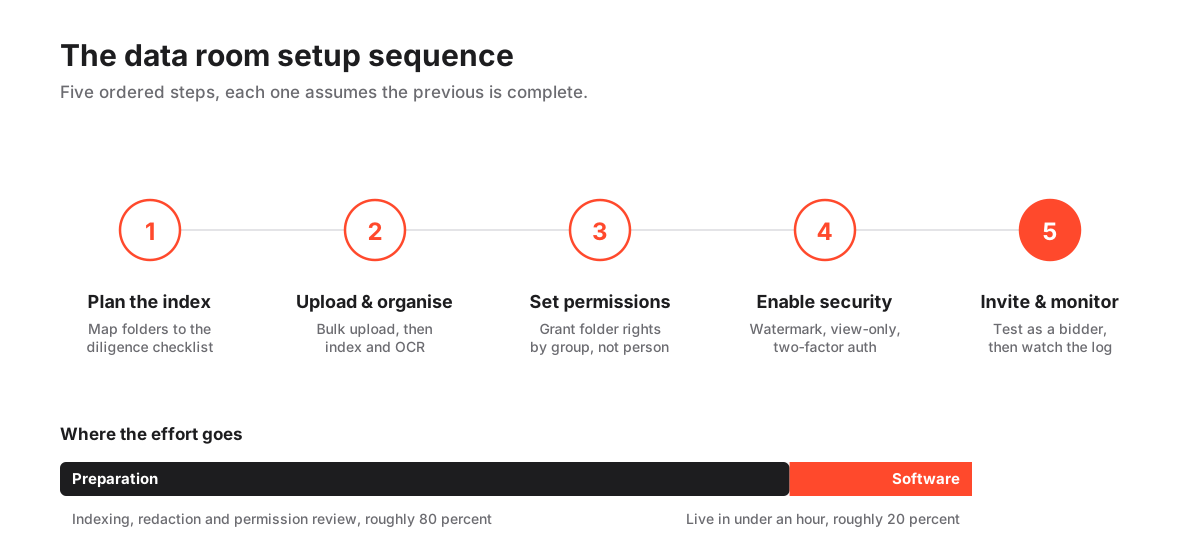
How long this actually takes
How fast can a room go live? Under an hour, once the documents are ready and the index is planned.
Creating the room, bulk-uploading, applying a permission template: those steps are fast by design. Vendors have spent years shaving friction out of them.
Is that the real timeline, though? No. The hour is the floor, not the plan.
For a competitive M&A sale with hundreds of documents, budget several days before the room opens. Expect most of that time to disappear into chasing files out of finance and legal, redacting sensitive fields, and checking that permissions match your disclosure strategy.
Why sweat the preparation? Because the downside is not symmetric.
A room that opens a day late is an annoyance you apologise for. A room that leaks a customer list is a different order of problem, and the average breach reached $4.88 million in 2024 per IBM’s Cost of a Data Breach report. A data room exists to keep you on the cheap side of that number.
Before you touch the software
What is the single most valuable first move? Build a folder index, in a spreadsheet, that mirrors the diligence checklist your buyers or investors will actually work through.
Draft it, agree it with your advisers, then recreate it in the room later. Getting the structure right on paper is far cheaper than reshuffling folders once files and permissions are attached to them.
While the index is being agreed, knock out three preparation tasks. Each is easy now and painful once bidders are inside.
- Collect and version the files. Pull final versions from finance, legal and operations, and kill the duplicates. Two conflicting drafts of the same contract in the room is a credibility problem, and it invites exactly the questions you do not want to field.
- Redact what must not be shared. Strip personal data, customer identifiers and anything outside the deal scope, and do it before upload, not after. Where EU personal data is involved this is not optional; it falls under the GDPR, and our GDPR and virtual data rooms guide walks the practical steps. The concept itself is defined in the redaction glossary entry if the term is new.
- Decide your disclosure phases. Most sellers stage disclosure: a broad set for all bidders early, sensitive material released only to the exclusive party late. Sketch which folders belong to which phase now. Retrofitting phases after invitations have gone out is precisely where leaks happen.
One more piece of pre-work, and it is organisational rather than technical. Name a single owner for the room.
When structure, permissions and Q&A are split across three people, folders drift and rights get granted twice. A named data room administrator keeps the permission matrix coherent from open to close, and has the authority to say no to a “quick” folder someone wants to bolt on mid-deal.
Build the index around the reader, not your filing cabinet
How should the index be organised? The way a buyer thinks, not the way your shared drive happens to be arranged.
A diligence team reasons in categories, corporate, financial, legal, commercial, HR, IP. So your top-level folders should follow those headings, and your sub-folders should break them down in an order a stranger can predict. The table below is a starter skeleton you can adapt to the deal.
A starter folder index for a company sale
| Top-level folder | What belongs inside | Typical sub-folders |
|---|---|---|
| 01 Corporate | Formation, ownership, governance | Constitution, cap table, board minutes, subsidiaries |
| 02 Financials | Historic and projected performance | Audited accounts, management accounts, model, tax |
| 03 Legal | Contracts and disputes | Material contracts, leases, litigation, insurance |
| 04 Commercial | Market and customer picture | Top customers, pipeline, supplier terms, pricing |
| 05 People | Employment and org | Org chart, key contracts, options, policies |
| 06 IP & Tech | Intangibles and systems | Registered IP, licences, security, data map |
Two rules keep an index usable. Number the folders, so they sort in the same order in every provider and nobody has to guess where “Financials” sits.
And keep it shallow. Three levels is almost always enough. If a reviewer needs more than three clicks to reach a document, your tree is too deep, and you are hiding files from the very people you invited to read them.
Want a sector-specific starting point? Our folder structure template and index best practices guides push this skeleton toward real deals, and the glossary entry on the data room index defines the term for first-time reviewers. If you are unsure which documents even belong in the room, what documents go in a data room is the checklist to work from.
Upload, then walk the room as a stranger
Now the software earns its keep. Upload in bulk, order the files to match the index, and switch on full-text indexing so everything is searchable.
Every serious provider supports drag-and-drop of whole folder trees, and most auto-convert Office files into a protected viewer format on the way in. A single import can populate the entire room.
Is “the files are in” the finish line? Not yet. Walk the tree once, top to bottom, as if you were the buyer opening it cold.
Fix anything out of place before a single permission goes on, because reorganising after rights are attached is where the tedious errors creep in.
Two habits here save real hours:
- Name files consistently. A leading number and a plain description, so a bidder scanning a folder understands what each file is without opening it. “03-02 Master Services Agreement (Acme).pdf” beats “final_v3_USE THIS ONE.pdf” every time.
- Run OCR on every scan. Optical character recognition turns image-only PDFs into searchable text. Skip it and your “searchable” room becomes a stack of pictures, and reviewers will ask you to find things they could have found themselves. The mechanics are in the OCR glossary entry.
Watch versioning throughout the deal, not just at setup. As revised contracts land mid-process, replace the old file rather than dumping a second copy alongside it.
Let the platform keep the version history so the audit trail stays clean and there is never a question about which draft was live when. For a deeper look at what these platforms are doing under the hood while you upload, see how a virtual data room works and the features explained guide.
Permissions: by group, never by person
If you take one operational lesson from this guide, take this one. Grant permissions by group, not person by person.
How does that work in practice? Create groups that mirror the deal, internal team, buy-side advisers, view-only bidders. Assign folder-level rights to each group, then simply drop each individual into the right group.
Why is this better than editing everyone one at a time? Because it makes mistakes visible.
You review one permission matrix, not fifty scattered settings, so a wrong download right jumps out instead of hiding in the sprawl. Our permissions explained guide covers the edge cases, and granular permissions defines the underlying capability.
Permission matrix by user group
| Action on a document | Internal deal team | Buy-side advisers | Bidders (view-only) |
|---|---|---|---|
| View in protected viewer | Yes | Yes | Yes |
| Download original file | Yes | Late phase | No |
| Print (watermarked) | Yes | Yes | No |
| Upload / edit | Yes | No | No |
| See other users | Yes | No | No |
| Manage permissions | Yes | No | No |
Which row runs the deal? The download row.
A well-managed process keeps most parties in view-only for the bulk of the process and releases downloads only to the exclusive bidder near the finish line. That staged disclosure is possible only because permissions are granular, and it is the single biggest reason a data room beats a shared cloud link.
When a party eventually drops out, the same group structure makes cutting them off a one-click job. The mechanics are in how to grant and revoke access.
Security controls to switch on before anyone gets in
What is the non-negotiable baseline? Three controls, all of which cost nothing to enable: dynamic watermarking, view-only rendering, and two-factor authentication.
Turn them on before you send a single external invitation.
- Dynamic watermarking stamps every view and print with the viewer’s identity, which is a strong deterrent against screenshots and forwarding because a leaked page points straight back to whoever leaked it.
- View-only rendering keeps the original file on the server and streams a protected image to the browser, so nothing usable actually leaves the room during most of the deal.
- Two-factor authentication blocks a shared or stolen password from opening the room, which closes the most boring and most common way access goes wrong.
While you are in the security settings, check the provider’s own credentials rather than taking marketing copy at face value. A SOC 2 report, defined by the AICPA, and ISO/IEC 27001, published by the ISO, tell you the platform’s controls are independently audited, not merely asserted.
Getting security setup right, and where teams slip
Pros
- Watermarking every view and print with the viewer's identity deters screenshots and forwarding
- View-only rendering keeps original files on the server, so nothing usable leaves during most of the deal
- Two-factor authentication blocks a shared or stolen password from opening the room
- Expiry and remote-revoke let you cut access the instant a party drops out
Cons
- Defaulting new folders to open, then locking them later, risks a leak in the gap
- Forgetting to disable download on sensitive folders undoes the whole staged-disclosure plan
- Over-restricting reviewers generates avoidable Q&A traffic and slows the deal
Then do one dry run before you open the doors. Log in as a test bidder account and confirm you can see exactly what that group should see, and nothing more.
Five minutes of impersonation catches the permission errors a spreadsheet review will miss, because you are looking at the room through the reviewer’s eyes. Our security features checklist itemises every control worth confirming, and dynamic watermarking and fence view explains how the leak-deterrents actually behave.
The build, step by step
Preparation done, the build itself is a short, repeatable sequence. Work through it in order.
Each step assumes the previous one is finished, and skipping ahead bites you. Permissions set before the index is final, for instance, tend to unravel the moment you move a folder.
How to set up a virtual data room
The build sequence once your documents and index are prepared.
Estimated time: 1h
-
Create the room and apply the index
Open a new room and recreate the numbered folder structure you agreed in the pre-work, before uploading anything.
-
Bulk-upload and index
Drag in the whole folder tree, then run full-text indexing and OCR so every document, including scans, is searchable.
-
Create user groups
Set up groups for the internal team, advisers and view-only bidders so you can grant rights to a group, not to individuals.
-
Grant folder-level permissions
Apply view, download and print rights per group against your disclosure phases, keeping sensitive folders view-only.
-
Enable security controls
Switch on dynamic watermarking, view-only rendering and two-factor authentication, and set any expiry or IP rules.
-
Test as a bidder, then invite
Log in with a test view-only account to confirm scope, fix any leaks, then send invitations and watch the activity log.
One feature worth checking for while you shortlist: reusable templates. Some providers, Ellty among them, let you save a folder-and-permission template so a second deal reuses the first room’s structure in minutes.
If you run recurring processes, such as successive fund diligence rounds, that reuse compounds fast. The comparison hub shows which platforms support templates and how they price them, and how to choose a virtual data room turns those features into a scoring shortlist.
Running the room once it is live
What changes the moment bidders arrive? You stop building and start monitoring and answering.
Two tools do most of the work here. The activity log and the engagement heatmap show you who is active, which documents draw attention, and where a bidder has gone quiet.
Route every bidder question through the built-in Q&A module rather than email, so nothing gets lost in an inbox and every answer is auditable. Our running data room Q&A guide covers how to route, prioritise and answer without the process fragmenting across a dozen threads.
Is the audit trail just housekeeping? No. It is evidence: a defensible, timestamped record of who saw what and when, which protects you if a party later disputes what was disclosed.
The engagement data is a bonus, because it reads as buying intent. A bidder who returns nightly to the financial model is telling you something a silent one is not.
Keep the room tidy as it grows. When new documents arrive mid-deal, file them into the correct folder and group, never a catch-all “misc” that quietly breaks the index you worked so hard to agree.
A data room is judged less by what it holds than by how easily a stranger can find, and only find, what they are meant to.
The mechanics of the record are in VDR audit trails explained, and if you ever have to move to a different platform mid-process, how to migrate to a new data room covers doing it without losing the trail.
What it costs to run one during a deal
How wide is the pricing range? Wide, because the category runs from lean fundraising rooms to heavyweight investment-banking platforms.
As a rough map: indicative entry pricing starts around $99 per month, mid-market rooms commonly land in the low hundreds, and enterprise deployments are usually quoted per engagement. Treat every figure as indicative and confirm current pricing with the provider before you commit.
Which costs ambush you at setup? Rarely the headline price. They are the meters: storage, per-page uploads, extra user seats.
Any one can inflate a bill during a document-heavy diligence phase, precisely when you are least able to switch providers. Check these before you sign, not after.
Setup-related cost factors to check before you commit
| Cost factor | Why it bites at setup | What to confirm |
|---|---|---|
| Storage cap | Bulk-uploading a full data set can breach a low cap fast | GB included and overage price |
| Per-page charges | Page-based plans punish large scanned documents | Whether pricing is per-page or flat |
| User seats | Adding every adviser and bidder can trigger seat fees | Included users and cost per extra seat |
| Onboarding fees | Some enterprise plans charge for setup assistance | Whether setup support is included |
The pricing model matters as much as the invoice total. A per-page plan can be cheap for a lean fundraising room and brutal for a scan-heavy legal set, so read per-page vs flat-rate pricing before you sign.
For the full picture, see how much a virtual data room costs and the guide to hidden costs. The specific reviews, such as our iDeals review or Firmex review, show how each provider handles the setup-time factors above, and the best value virtual data room shortlist ranks the ones that keep those meters in check.
Do this, not that
Why do most setups fail? For the same handful of reasons, and none of them are technical.
Here is the short version you can tape to your monitor.
Do:
- Build the index against the buyer’s diligence checklist before you upload a single file.
- Redact personal data before upload, never after.
- Permission by group, and review the one matrix rather than fifty individual settings.
- Keep sensitive folders view-only until the exclusive phase, then loosen the download row deliberately.
- Test as a view-only bidder before the first real invitation goes out.
Don’t:
- Mirror your internal filing structure and expect a stranger to navigate it.
- Grant rights person by person, where a single wrong download hides in the sprawl.
- Default new folders to open “for now” and plan to lock them later; the gap is the leak.
- Leave scanned PDFs un-OCR’d and then wonder why nobody can find anything.
- Open the room before a test login has confirmed exactly who sees what.
Two of those deserve one more sentence each, because they are the ones that actually blow up.
Uploading unredacted personal data creates a compliance exposure that no permission setting undoes, so redaction is a pre-upload step, full stop. And opening the room before a test login means the first person to spot a permission error may be a bidder looking at a file they should never have seen.
Build, test as an outsider, then invite. Our data room mistakes to avoid guide catalogues the rest, and if you are still weighing whether a full data room is even warranted, who needs a virtual data room helps you make that call before you spend a cent.
Frequently asked questions
Can I set up a data room myself, or do I need help?
For most fundraising and small M&A processes you can set the room up yourself in a few hours. The software is straightforward; the effort is in preparing documents and permissions. Larger or contested deals often lean on the provider's onboarding team or an adviser, but that is a choice, not a requirement.
What do I need to prepare before opening the room?
A folder index that mirrors the diligence checklist, final versions of every document with duplicates removed, any required redactions completed, and a plan for which groups see which folders in which phase. With those ready, the in-software build takes under an hour.
How do I decide who can download versus only view?
Keep most parties in view-only for the bulk of the deal and release downloads only to the exclusive bidder near the end. Set this by group at the folder level, and confirm it with a test login before inviting anyone, since a mistaken download right is the most common leak path.
Do providers offer a free trial to test the setup?
Many providers offer a free trial so you can build a sample room and test the interface, permissions and security controls before committing. Trial length and included features vary, so confirm current terms with each provider.
How do I keep the room compliant with data protection law?
Redact or exclude personal data you do not need to share, restrict access tightly by group, and keep the audit trail intact. Where EU personal data is involved, the GDPR applies to how you store and share it, so confirm the provider's data-handling and hosting location before you upload.
Can I reuse a room structure for the next deal?
Often yes. Some platforms let you save a folder-and-permission template and clone it, which turns a repeat setup into a few minutes of work. If you run recurring processes, check for template support when you shortlist providers.
