
Per-page vs flat-rate data room pricing: which is cheaper
On this page
- The one-sentence definition of each model
- Why the billing unit matters more than the sticker price
- The break-even, drawn as two lines
- What “a page” actually means to the meter
- The document types where per-page quietly explodes
- A worked example on a live deal
- Why providers offer per-page at all
- Match the model to the shape of your deal
- Run the numbers for your own deal in fifteen minutes
- The one case where per-page truly wins
- The other billing units, briefly defined
- How to avoid a surprise per-page invoice
- The short answer, restated
Two data rooms can advertise the same headline and bill you wildly different amounts. The reason is not the brand, and not the feature list.
It is the billing unit. One room charges a flat monthly fee. The other charges by the page.
That single choice decides more of your final invoice than almost anything else you compare. So let us define the two models plainly, prove the break-even with real numbers, and settle when each one actually makes sense.
The one-sentence definition of each model
Per-page pricing charges a fixed amount for every page of every document stored in the room.
Flat-rate pricing charges one predictable monthly fee for the whole room, usually with unlimited pages and often unlimited users.
That is the whole distinction. Everything else in this guide follows from it.
The two models answer the same need with opposite risk profiles. Per-page pricing ties your cost to how much content you load. Flat-rate pricing puts a ceiling on your cost and asks you to pay that ceiling whether you fill the room or not.
One bill grows with your deal. The other stays still while your deal grows around it.
Here is the shortcut worth memorising. Per-page bets that your room stays small. Flat-rate bets that it does not. Whoever wins the bet pays less.
Why the billing unit matters more than the sticker price
A per-page rate of $0.40 and a flat fee of $250 are not really two prices. They are two different questions.
The per-page rate asks how many pages you will have. The flat fee asks how many months the room will stay open. You cannot compare them until you answer both, and most first-time sellers answer neither before they sign.
That is the quiet trap. A headline number invites a straight comparison, and $0.40 obviously looks smaller than $250.
But $0.40 is a rate, not a total. Multiply it by a real page count and it can dwarf the flat fee several times over. The sticker price tells you nothing until you know the volume it multiplies against.
The break-even, drawn as two lines
Picture the cost of each model plotted against the number of pages in your room. The per-page line starts at zero and climbs with every page you add. The flat-rate line starts at the monthly fee and stays level, no matter how many documents arrive.
Two shapes, one crossing point. Below the crossing, per-page is cheaper. Above it, flat-rate is cheaper, and it keeps pulling further ahead as the room grows.
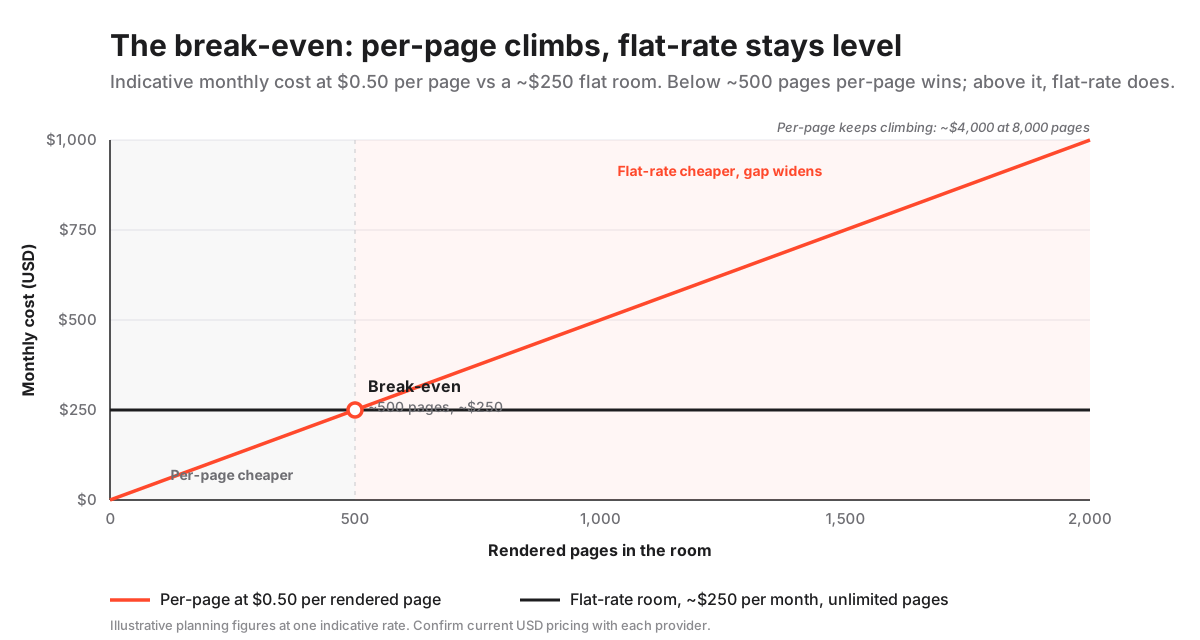
Against a representative flat room at $250 per month with unlimited pages, per-page at $0.50 a page crosses over at roughly 500 rendered pages. That crossing point is the single most important number in the whole comparison, so it is worth seeing at several volumes.
Per-page vs flat-rate cost by document volume (indicative USD, confirm with the provider)
| Rendered pages in the room | Per-page at $0.50/page | Flat-rate room (~$250/mo) | Cheaper option |
|---|---|---|---|
| 100 pages | $50 | $250 | Per-page |
| 500 pages | $250 | $250 | Break-even |
| 1,000 pages | $500 | $250 | Flat-rate |
| 3,000 pages | $1,500 | $250 | Flat-rate |
| 8,000 pages | $4,000 | $250 | Flat-rate |
The exact break-even moves with the inputs. A cheaper flat room lowers it. A lower per-page rate raises it.
But the shape never changes: one line climbs forever, the other goes flat. For any deal where you cannot promise the document set will stay small, you are choosing between a cost you control and a cost that controls you.
What “a page” actually means to the meter
Here is the definition that catches almost everyone. A page, for billing, is a page after the platform renders your file, not a page as it looks on your screen.
When a room ingests a document, it does not simply store your file. It runs optical character recognition and renders every file into a paginated, watermarkable, searchable format so reviewers can open it page by page. The meter reads that rendered output, which is the platform’s version of your documents, not yours.
The gap between the two counts is where the surprises live.
- A spreadsheet that looks like one file becomes one billable page for every printed page its tabs expand into.
- A slide deck is measured by its rendered slides, image backgrounds and all.
- A scanned contract bundle is counted at its full paper length, because every scanned sheet is a rendered page.
- A CAD drawing set paginates heavily, so a handful of files can carry a high page-per-file ratio.
This is why an estimate built from a file count is close to worthless. “We only have about 300 documents” is not the same statement as “we only have about 300 pages.”
On a diligence set, the gap between the two is often an order of magnitude. A single reporting pack, once its embedded spreadsheets and scanned annexes render out, can carry more billable pages than a founder expects the entire room to hold.
The document types where per-page quietly explodes
Per-page goes wrong on precisely the files that dominate a serious deal: dense, converted, or frequently updated. None of them look expensive when you drag them into a folder. All of them multiply once rendered.
If your deal contains any of the following, treat per-page as a risk rather than a bargain.
Financial models. A single workbook with dozens of linked tabs can render into hundreds of pages. One file quietly becomes a meaningful line on the invoice.
Scanned contracts and archives. Older agreements arrive as image PDFs. A box of scanned paper becomes thousands of billable pages the moment it lands.
Engineering and property drawings. Large-format plans and CAD exports paginate heavily and carry a high page-per-file ratio.
Board packs and pitch decks. Image-rich presentations render page for page and stack up across a reporting cycle.
Re-uploads and versions. Every corrected file can re-enter the page count, so an active room with document versioning keeps re-billing the same underlying content.
Notice the pattern. Per-page punishes the two things a good deal room is built to do: hold a lot of documents and update them freely. The better you run the process, the harder the meter runs.
A worked example on a live deal
Definitions are easier to trust once you watch them play out, so run the model on a real room.
Picture a lower-mid-market sale with about 900 source documents: a data pack of financials, a folder of scanned legacy contracts, an IP schedule and a board-reporting archive. Counted as files, that feels modest.
Counted as rendered pages, it is a different animal. The financial models alone can add several hundred pages. The scanned contracts add several hundred more. Load and version everything, and the room realistically lands somewhere between 4,000 and 9,000 pages.
Take the midpoint. At $0.50 a page, a 6,000-page room is $3,000 for a single month, against roughly $250 for a comparable flat room.
Now stretch it across a four-month diligence window. The per-page path costs many multiples of the flat one, and that is before a single overage charge lands.
The lesson is blunt. On any room built to carry a deal, the break-even is not a distant risk you might one day cross. It is crossed in week one. Per-page only stays ahead when the room is deliberately kept tiny.
Why providers offer per-page at all
If flat-rate wins most deals, why does per-page exist? Two honest reasons.
First, it genuinely suits light, occasional rooms. For a small one-off disclosure, a $0.40 line really is cheaper than a $250 monthly minimum, and there is nothing to apologise for in offering a plan that fits that use.
Second, it quotes beautifully. A per-page rate reads as cheaper to a buyer who has not yet estimated their rendered page count, which is most buyers most of the time. Some vendors position per-page or per-project plans for exactly the light-use segment that a flat minimum would overcharge, and that is a legitimate fit.
The catch is structural, not moral. The model rewards the provider on any active deal, where volume and re-uploads push the meter well past the point a flat fee would have capped.
There is nothing dishonest about it. The job of running the break-even before signing simply sits with the buyer, and it is the calculation most first-time sellers skip.
Match the model to the shape of your deal
Definitions settle, decisions get made. The cleanest way to decide is to find the deal profile that looks like yours and read straight across.
Which pricing model wins, by deal profile
| Deal profile | Per-page wins | Flat-rate wins |
|---|---|---|
| Small, final, text-only set (under ~400 pages) | Yes | Overpays |
| Document-heavy M&A or auction | No | Yes |
| Financial models or scanned PDFs present | No | Yes |
| Frequent re-uploads or rolling diligence | No | Yes |
| Tiny room, two or three reviewers, brief window | Yes | Overpays |
| Budget must be fixed and defensible upfront | No | Yes |
Read the matrix as a coin with two failure modes. Per-page fails when the room is busy. Flat-rate fails only when the room is nearly empty.
Most people set up a data room precisely because they have a lot to share. So the odds sit heavily with flat-rate.
Held to a single honest view, per-page looks like this.
Per-page pricing in one honest view
Where per-page helps
- Cheapest for tiny, final, text-only rooms shared briefly
- No monthly minimum to absorb on a near-empty room
- Pay only for the little you actually load and keep
- Simple to reason about when the set is genuinely fixed
Where per-page hurts
- Rendered pages, not files, so the count runs high
- Spreadsheets and scanned bundles inflate the bill fast
- Re-uploads and versions can re-bill the same content
- A late document surge turns a low headline into a big invoice
Run the numbers for your own deal in fifteen minutes
You do not need a spreadsheet model to settle this. You need one realistic page estimate and one multiplication.
The trick is to compare a peak page count against the flat fee, and never to trust the file count on your desktop.
How to compare per-page and flat-rate data room pricing
A quick calculation to find the cheaper billing model for your specific deal.
Estimated time: 15min
-
Estimate rendered pages, not files
Take your document count and inflate it for reality: assume financial models and scanned bundles render into many pages each, then add a buffer for documents that arrive mid-deal.
-
Get the per-page rate and the flat fee
Ask each provider for the per-page charge and, separately, for a flat monthly quote with unlimited pages, so you are comparing the same room two ways.
-
Multiply and compare
Multiply your peak page estimate by the per-page rate, then set that number next to the flat monthly fee for the length of your deal.
-
Add the overage and add-ons
Layer in extra admin seats, storage overage and premium security, which can lift either quote 20 to 40 percent above the headline.
-
Price the whole term, not one month
Multiply both models across the real number of months the room stays open, since a long deal amplifies whichever model is losing.
One rule closes the calculation. If the two numbers land close, choose flat-rate for the predictability alone.
Your page estimate is the least reliable input in the whole exercise, and per-page is the model that punishes an underestimate.
The one case where per-page truly wins
To be fair to the model, here is its home ground, defined tightly.
Per-page is the cheaper choice for a small, final set of ordinary text documents that will not grow. Think of a single property lease pack, a short legal disclosure, or a compact fundraising room with a final deck and a clean cap table, shared with a few reviewers for a few weeks.
If your set sits under a few hundred rendered pages and is genuinely locked, paying by the page beats a flat fee, because you are billed only for the little you use. Some providers lean into this with per-page or per-project plans built for exactly these light, one-off rooms.
The condition that makes it work is stability. The moment the set can grow, the moment a scanned archive or a live financial model enters, or the moment a second wave of documents becomes even possible, the calculation flips and flat-rate becomes both cheaper and safer.
So ask one question before committing to per-page: can I promise this room will not get bigger? If the honest answer is no, price the flat option.
The other billing units, briefly defined
Per-page is not the only unit you will meet. Two others deserve a quick definition, because each carries its own break-even.
Per-user pricing, roughly $15 to $60 per seat, is cheapest for a small, fixed review group. It gets expensive fast on a wide auction with many bidding teams, because every extra reviewer adds a line.
Per-gigabyte pricing suits text-light rooms but bites hard on video, images and large exports, where a handful of files can consume an entire storage tier.
And then there are hybrid plans, which mix these units, for example a flat base fee plus per-page overage above an allowance. A hybrid can be the worst of both if you do not read the allowance carefully.
The core lesson repeats across every model. Find the unit your usage grows in, and make sure you are not billed on it.
Our full breakdown of the four VDR billing models and USD ranges works through per-user and per-gigabyte in the same depth this page gives per-page, and the flat-rate glossary entry defines each term cleanly.
How to avoid a surprise per-page invoice
If you do end up in a per-page or hybrid room, a few habits keep the meter honest. Every surprise traces back to rendered pages, overage tiers or re-uploads, and all three are controllable if you ask the right questions before signing.
- Ask how pages are counted. Confirm whether the count is per rendered page, and how spreadsheets and scanned files are measured, before you estimate anything.
- Get the overage rate in writing. Know the price of pages beyond any included allowance, since that rate, not the headline, sets your downside.
- Cap or convert. Ask whether a flat cap or an unlimited-pages upgrade is available for a document-heavy phase, so a late dump cannot run away.
- Mind data residency. If your counterparties require EU-hosted storage, that choice can carry its own premium. Regional hosting is often a legal requirement rather than a preference under the EU rules on international data transfers and the UK ICO guidance on the same, so price it in early and read the data residency glossary entry before comparing quotes.
- Close the room on completion. A forgotten open room keeps billing on any model, and is one of the most common sources of wasted spend.
For teams that would rather not manage a page meter at all, a flat-rate room with unlimited pages removes the whole question. Providers such as SecureDocs and Ellty price this way, so a mid-deal document surge does not move the invoice.
The short answer, restated
Default to flat-rate. Reach for per-page only when you can guarantee a small, static, text-based set.
That single rule captures almost every case. Predictability is worth paying for on a live deal, and the one time per-page beats it is the one time your document set is trivial and locked.
When the two quotes land close, let the tie go to flat-rate. The estimate you fed the per-page model is the number most likely to be wrong.
If you are still shortlisting, the best data rooms for M&A hub ranks providers by scenario, the SecureDocs review shows how one flat-rate room prices unlimited pages in practice, and the guide to how a virtual data room works covers the rendering and permission machinery that turns your files into billable pages in the first place.
Frequently asked questions
Is per-page or flat-rate data room pricing cheaper?
Flat-rate is cheaper for most deals, and per-page is cheaper only for small, final, text-based document sets. The break-even against a typical $250 per month flat room is around 500 pages at $0.50 per page. Below that, per-page wins; above it, flat-rate wins and the gap widens as documents accumulate. Confirm current USD rates with each provider, as they change often.
How are pages counted in a per-page data room?
Pages are counted after the platform renders each file for secure viewing, not as they appear on your desktop. Spreadsheets, scanned contracts and drawings expand into many rendered pages, so the billable count is usually far higher than your file count. Always ask how a provider measures pages before estimating a per-page cost.
Why does per-page pricing get expensive on M&A deals?
M&A rooms are full of the document types that render into the most pages, including multi-tab financial models, scanned legacy contracts and image-heavy board packs, and they receive documents in waves. Because per-page bills every rendered page and every re-upload, a busy deal inflates the count quickly, which is why flat-rate with unlimited pages is usually cheaper and more predictable for M&A.
When is per-page pricing actually cheaper?
Per-page is cheaper only when your document set is small, final and mostly plain text, and will not grow. A short lease pack, a compact disclosure set, or a lean fundraising room shared with a few reviewers can cost less on a per-page or per-project plan. The moment the set can grow or includes scanned or spreadsheet files, flat-rate becomes the safer and cheaper choice.
How do I estimate my rendered page count?
Start from your document count, then inflate it for reality: assume financial models and scanned bundles render into many pages each, and add a buffer for documents that arrive mid-deal. Multiply that peak estimate by the per-page rate and compare it against a flat monthly quote across the full length of your deal. When the two are close, choose flat-rate for the predictability.
Do flat-rate data rooms include unlimited pages?
Many flat-rate rooms include unlimited pages and often unlimited users, which is the main reason they are predictable, but not all do. Some flat plans cap storage in gigabytes or limit administrator seats, so confirm exactly what the fixed fee covers and what triggers an overage charge before you commit. Treat any quoted figure as indicative and verify it with the provider.
