
The hidden costs of virtual data rooms
On this page
- First, what counts as a hidden cost?
- Step 1: Size the real usage before you read a single quote
- Step 2: Find every overage rate and cap it
- Step 3: Count the seats and ask who counts as a user
- Step 4: Separate the features you need from the paid add-ons
- Step 5: Price the setup and services line
- Step 6: Nail the currency and tax line
- Step 7: Read the renewal clause before you sign anything
- The 30-minute quote audit
- The pre-signature checklist
- How the provider categories differ
- Which providers hide the least
- Are hidden costs a reason to avoid a data room?
The quote said $8,000. The invoice said $12,400.
Nothing went wrong. Nobody was overcharged. The room simply did what the contract allowed: it billed the pages nobody counted, the reviewers nobody forecast, the redaction module nobody priced.
A virtual data room rarely costs what the pricing page says. The headline buys a base room. A set page or gigabyte allowance. A fixed pool of users. A standard feature set.
Everything your deal needs beyond that envelope is billed separately.
This guide is a working audit. Run the steps in order and you convert a headline quote into a defensible all-in USD number before you sign. For the wider view of what rooms cost in the first place, pair it with how much a virtual data room costs.
First, what counts as a hidden cost?
A hidden cost is any charge that is not in the headline price but is triggered by normal use of the room.
It is not fraud. It is unbundling.
Providers compete on the number that appears in comparison tables. So anything that would inflate that number gets pushed into overages, seats and add-ons. The real price lives on the order form, not the marketing page.
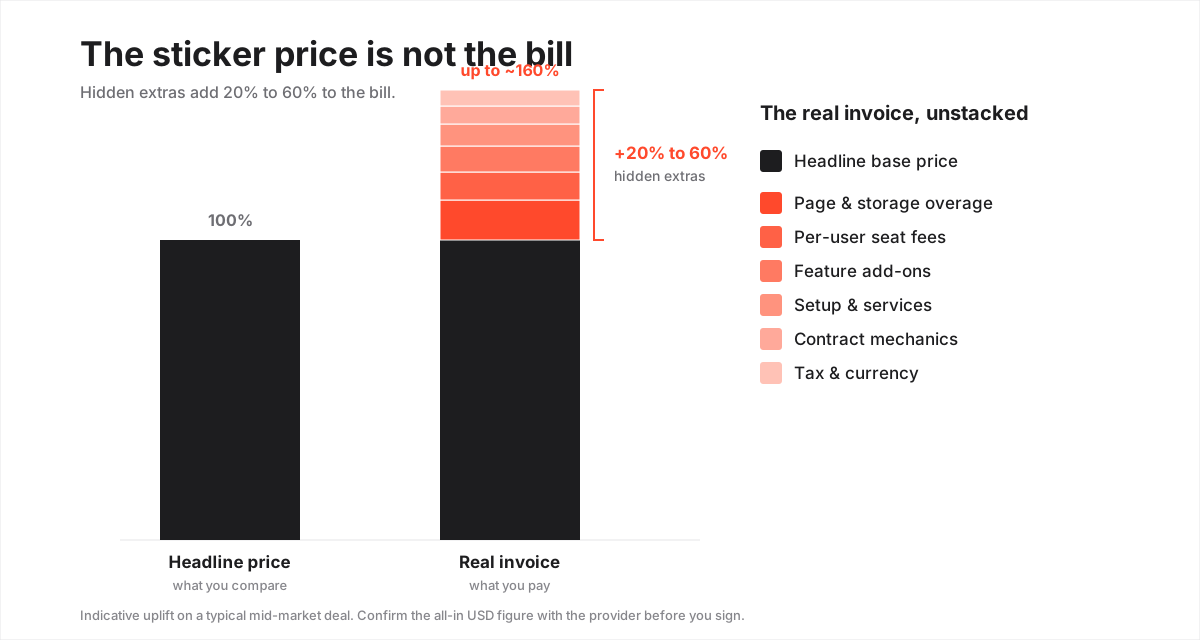
Six families cover almost every surprise. Learn the shape of each, then audit for it.
The hidden-cost families, what triggers them and indicative USD ranges
| Hidden cost | What triggers it | Indicative USD range | How to avoid it |
|---|---|---|---|
| Page or storage overage | Uploading past the included page count or GB cap | $0.30 to $0.85 per extra page, or per-GB tiers | Size the plan to the real document set, cap the rate in writing |
| Per-user or per-seat fees | Adding reviewers, admins or guests beyond the pool | $10 to $50 per additional user per month | Negotiate unlimited external guests, count seats up front |
| Feature add-ons | Enabling advanced Q&A, redaction, DRM or extra security | $50 to $500+ per month per module | List must-have features before you compare quotes |
| Setup and services | Onboarding, migration, custom branding, training | $0 to several thousand, one-off | Ask what is bundled; fold services into the base deal |
| Contract mechanics | Auto-renewal, minimum terms, early termination | Full remaining term if you miss the notice window | Diary the cancellation date, cap the renewal uplift |
| Tax and currency | VAT/GST, FX conversion, card and wire fees | Up to ~20% tax plus a 1 to 3% FX spread | Confirm the tax line and whether the quote is USD-billed |
Only two of these families relate to the software. The other four are commercial terms. And commercial terms move when you push.
Step 1: Size the real usage before you read a single quote
Do this before you talk to any provider.
A quote you cannot measure yourself is a quote you cannot check.
- Count the true page volume of your document set. A single scanned contract with exhibits can run to hundreds of pages; a full diligence set into the tens of thousands.
- Count the total gigabytes, not just the page count. Video, high-resolution scans and engineering files inflate storage far past a text-only estimate.
- Forecast the peak user count, not the opening week. Add every external reviewer, adviser, lawyer and accountant across the busiest phase of the deal.
- Split users into internal and external. You will need that split the moment seat pricing appears.
- Note the deal length in months. A three-month process and a two-year hold room have very different cost profiles.
Write these five numbers down. Everything that follows is measured against them.
Step 2: Find every overage rate and cap it
Overages hurt most because they are priced per unit, not blended. The marginal page or gigabyte can cost several times the average you thought you were paying.
A room advertised for 10,000 pages looks very different at 14,000, once the extra 4,000 are billed one by one.
- Read the included allowance first: pages, storage and any bandwidth cap.
- Compare it to your Step 1 numbers and mark exactly where you break the cap.
- Ask for the per-unit overage rate in writing. Per-page pricing is common on legacy and banking-grade platforms; storage plans meter the same way in gigabytes.
- Ask for a ceiling on that rate, or an automatic conversion to a larger tier once you cross the cap. A provider confident in its pricing usually agrees.
- If the volume is genuinely uncertain, price a flat-rate plan alongside the metered one and compare the worst case, not the base case.
The dangerous number is not the price per month. It is the price of the ten-thousandth page you did not plan to upload, because that is the one nobody quotes you.
That single capped clause turns an open-ended risk into a known worst case.
If you are weighing the two structures, the mechanics are in per-page vs flat-rate data room pricing and the wider VDR pricing models explained.
Step 3: Count the seats and ask who counts as a user
Per-user fees add up fastest on deals with many reviewers, typically $10 to $50 per named user per month.
A competitive M&A process with several bidding groups can push a user count from a planned dozen into the fifties, without anyone deciding to spend more.
- Take the peak user count from Step 1.
- Ask each provider, in writing, whether external guests are included or metered. Some bill every guest; others include unlimited guests and charge only for administrators.
- Multiply the metered seats by the per-user rate across the full deal length, not one month.
- Check how seats interact with granular permissions: the more finely you segment reviewers into groups, the more seats a per-user model can quietly consume.
- Push for unlimited external guests as a negotiated term. On a busy room, that one detail can swing total cost more than the headline price does.
For M&A specifically, a virtual data room for mergers and acquisitions walks through how seat counts balloon across bidding rounds.
Step 4: Separate the features you need from the paid add-ons
The features most often pulled out of the base plan: advanced Q&A workflow, automated redaction, granular digital-rights management, extra security controls, and premium or dedicated support.
Each can be genuinely useful. But a room that looks cheap at the base tier can end up mid-priced once the modules your deal needs are switched on.
- Write down the features your specific deal cannot run without. Be strict; ignore the ones that only sound nice.
- For each provider, mark which of those features sit in the base plan and which are billed as add-ons.
- Add the add-on monthly fees, $50 to $500+ per module, to the running total.
- Flag any baseline security control sold as a premium extra. When a room holds regulated data, certifications such as SOC 2 and ISO 27001 are table stakes, not a luxury tier.
- Treat a security surcharge as a signal to look harder at the provider, not just a line to pay.
A full walk-through of what these controls do and why they matter is in virtual data room features explained.
Step 5: Price the setup and services line
Setup, migration, custom branding and training are often quoted separately as one-off professional services. That runs from nothing on a self-serve room to several thousand USD on an enterprise deployment.
On a lean, self-serve room you can be live in under an hour at no extra charge. On a heavyweight banking platform, a services engagement is sometimes assumed and folded into the first invoice.
- Ask directly what onboarding is bundled and what is billed.
- Confirm whether training seats are included or charged per head.
- Ask whether custom branding or a dedicated project manager carries a fee.
- Get any migration quote in writing before you commit; a large, messy document set is real work and priced accordingly.
- Fold services into an annual commitment where you can. Much of this is negotiable when it is part of the deal rather than an afterthought.
If you are moving off an existing platform, the switching effort itself has a cost, covered in how to migrate to a new data room.
Step 6: Nail the currency and tax line
On a global purchase these are the costs buyers forget most often, and none of them show on the headline price.
- Confirm the currency you will actually be charged in. A quote shown in USD may still be billed in the provider’s home currency.
- Add the foreign-exchange spread if there is a conversion: roughly 1 to 3% on top of your bank or card fees.
- Ask whether the published figure is tax-inclusive or exclusive. Indirect taxes such as VAT or GST can add up to around 20% depending on where your entity sits.
- Check whether paying by wire rather than card avoids a processing surcharge.
- Where possible, ask to be invoiced directly in USD, or in your own currency at a locked rate, to remove the FX guesswork entirely.
Treat any USD figure a provider gives you as indicative. Confirm the all-in, tax-included number, because that is the amount your finance team has to reconcile.
Step 7: Read the renewal clause before you sign anything
The contract terms that quietly raise cost are auto-renewal, minimum commitments and early-termination clauses.
A standard VDR agreement renews automatically for another annual term unless you give notice inside a 30 to 60 day window before expiry.
- Find the term length and the exact auto-renewal notice window.
- Diary the cancellation date the day you sign. A room you meant to close after a deal can bill for a further year if the date slips.
- Check the minimum term. Even a deal that collapses early still owes the committed period, so a monthly option, where offered, is worth its slightly higher rate for a process of uncertain length.
- Ask for a cap on the renewal uplift. Second-year pricing is not always the same as your first-year rate, and without a cap it can step up.
- Where the room holds regulated personal data, budget the security obligations as contractual costs, not surprises.
Those obligations are real. Frameworks such as the GDPR’s Article 32 security-of-processing requirements and, for US health information, the HIPAA Security Rule shape the controls you must have in place, and the independent audits that evidence them, such as ISO/IEC 27001 certification, belong in the budget from day one. Our guide to GDPR and virtual data rooms goes deeper on where those obligations bite.
The 30-minute quote audit
Roll the seven steps into one repeatable pass.
Run it against every shortlisted provider and the quotes become comparable for the first time, because you are lining up all-in totals rather than headline rates that hide different things.
How to audit a VDR quote for hidden costs
A repeatable pass that converts a headline price into a realistic all-in USD estimate before you sign.
Estimated time: 30min
-
Estimate real usage
Count the true page or gigabyte volume of your document set and the peak number of users, including every external reviewer, not the quiet opening week.
-
Map usage to the plan
Check the included page, storage and seat allowances, then note where your estimate breaks the cap and what the per-unit overage rate is.
-
List required features
Write down the features the deal cannot run without, and mark which are in the base plan versus billed as add-ons for each provider.
-
Ask for the all-in quote
Request a single USD figure that includes overages at your estimated volume, all needed add-ons, seats, setup, services, and applicable tax.
-
Read the renewal clause
Confirm the term length, the auto-renewal notice window and any cap on the renewal price increase, then diary the cancellation date.
A broader framework for the whole selection is in how to choose a virtual data room, which sets the cost audit inside the wider decision.
The pre-signature checklist
Do not sign until every line below is a yes. Print it, work down it, and hold the order form against it.
- Real page and gigabyte volume counted, and the plan sized to it, not to the marketing example.
- Per-unit overage rate stated in writing, with a cap or an automatic tier upgrade agreed.
- Peak user count forecast, and confirmation in writing of whether external guests are included or metered.
- Every must-have feature checked against the base plan, with add-on fees added to the total.
- Baseline security (SOC 2, ISO 27001 or equivalent) confirmed as standard, not a paid tier.
- Setup, migration, branding and training costs itemised, or confirmed as bundled.
- Billing currency confirmed, FX spread accounted for, and the quote marked tax-inclusive or exclusive.
- Term length, auto-renewal window and renewal-price cap read and understood.
- Cancellation date diarised on the day of signing.
- A single all-in USD figure obtained, and the same figure obtained from every provider on the shortlist.
How the provider categories differ
Hidden costs cluster by category, so you can anticipate the shape of a bill before you ask for a quote.
- Lean self-serve rooms keep overage risk low and seat pricing often flat, and setup fees are rare, but they cap the feature set you might later need and usually offer a monthly option. They rarely surprise you on the bill.
- Mid-market platforms carry medium overage risk, common per-seat fees and frequent feature add-ons, on an annual term. This is where a careless audit costs the most.
- Enterprise and banking-grade platforms carry the highest overage risk and expect a setup and services engagement, but seats and features are usually negotiated or bundled into a custom, multi-year quote.
Match the category to the deal rather than chasing the lowest headline. Lighter options are covered in the cheapest virtual data rooms, and you can see how specific vendors land on transparency in the SecureDocs review, the iDeals review and the Firmex review.
Which providers hide the least
The rooms that hide the least run flat-rate plans, include generous or unlimited guest users, and publish a clear feature list. A flat structure leaves fewer places for extras to hide.
A room that bundles storage, seats and core features into one predictable figure is easier to budget than one that meters each on a separate line, even if the flat figure looks higher at first glance.
Transparency and category are not the same thing. Some lean self-serve rooms publish a clean flat price and honour it; a few enterprise platforms are equally clear once you get a real quote.
Among the flat-rate options, Ellty is one room worth putting on a shortlist for its predictable single figure, though the right pick still depends on your deal size and feature needs. Head-to-head comparisons such as iDeals vs Datasite show how two well-known rooms differ once you get past the headline.
Are hidden costs a reason to avoid a data room?
No. They are a reason to read the order form, not to skip the tool.
The controls a data room provides, a provable audit trail, granular permissions and certified security, are exactly what a serious transaction needs. The alternatives carry larger costs in risk and wasted time.
Naming the extras lets you price them in. Every family above is visible if you ask the right question, and most are movable if you commit annually or size the plan correctly.
A buyer who audits the quote pays a predictable price. A buyer who signs the headline pays whatever the meter decides.
Still weighing the spend? The benefits of a virtual data room and is a virtual data room worth it set the value against the cost.
Frequently asked questions
What is the biggest hidden cost in a virtual data room?
Usage overages are usually the largest surprise. Exceeding the included page count or storage cap triggers per-unit charges that can be several times the blended rate you thought you were paying, and because the exact volume of a document set is hard to predict, the overage is often discovered only after the invoice arrives.
How much do hidden costs add to a VDR bill?
On a typical mid-market deal, overages, seat fees, add-ons and services commonly add 20% to 60% on top of the headline price, before tax and any currency spread. The exact uplift depends on how far your usage exceeds the plan and how many features sit outside the base tier. Treat these figures as indicative and confirm with the provider.
Can I avoid per-user fees in a data room?
Often yes. Some providers include unlimited external guest users and charge only for administrators, while others bill every reviewer. Ask in writing whether external users are included or metered before you sign, and forecast the peak user count for the busiest phase of the deal, not the opening week.
Do virtual data rooms auto-renew?
Most annual VDR contracts renew automatically unless you give notice inside a set window, typically 30 to 60 days before the term ends. Diary the cancellation date as soon as you sign so a room you no longer need does not bill for another full term.
How do I get a quote that includes the hidden costs?
Ask for a single all-in USD figure that accounts for overages at your estimated page or storage volume, every add-on your deal requires, all seats, any setup or services charge, and applicable tax. Then confirm the renewal terms. That converts a headline price into a number you can actually budget against.
Read every quote as a floor, not a ceiling. The headline tells you where the meter starts; the order form tells you where it can go.
Price the deal, cap the rates that can move, diary the renewal, confirm the tax line, and check each USD figure with the provider, and the hidden costs stop being hidden.
