
Is a virtual data room worth it?
On this page
- Run one: decide whether it is worth it
- What the price actually buys
- Cost versus what it protects
- Run two: decide which room fits
- Worth-it by scenario: a quick checklist
- When it is not worth it
- Why not just a cheaper drive?
- The full decision sequence
- The real return
- Run three: actually capture the value
- Is it worth it for a small startup?
Short version: for a real deal, yes.
This guide skips the sales pitch and hands you a procedure instead. Work the steps in order. By the last one you will have a defensible yes or no for your own deal, plus the tier that fits it.
The steps come in three runs. First you decide whether to use a room. Then you decide which one. Then you make sure you actually get the value you paid for.
Each step is short. Do the first run before you request a single quote.
Run one: decide whether it is worth it
Five steps. They test your deal against risk, not against a price tag.
Step 1. Name the downside in numbers. Write down what a leak, a lost audit trail or a permissions mistake would cost this deal. Use money, days and reputation.
Be specific. A vague “it would be bad” cannot be weighed against a monthly bill. A figure can.
Step 2. Check signal one: outside parties. Will anyone outside your organisation open the files? Bidders, investors, acquirers, opposing counsel, auditors: all count. One outside reviewer is enough to trip this signal.
Step 3. Check signal two: sensitive data. Is any file confidential, regulated or legally sensitive? Financials, cap tables, IP, contracts, personal data under the GDPR, health records under HIPAA. A single yes trips it.
Step 4. Read the two signals together. One yes usually settles the question in favour of a room. Two yeses make generic storage indefensible. Zero yeses is the one case where you may not need a room at all; hold that thought for the “not worth it” section below.
Step 5. Put the two numbers side by side. Set the downside from step 1 against the monthly price of a room. If the room is a small fraction of the exposure, and it almost always is, it is worth it. Stop debating features and move to run two.
That is the whole test. Everything else here is detail that makes each step sharper.
Look at the first two numbers. A room in the low hundreds of dollars a month is a rounding error against a seven-figure exposure. Step 5 usually answers itself the moment those two figures share a line.
Need the term first? A virtual data room is a secure, permissioned place to share deal documents with an outside party, with a record of every action.
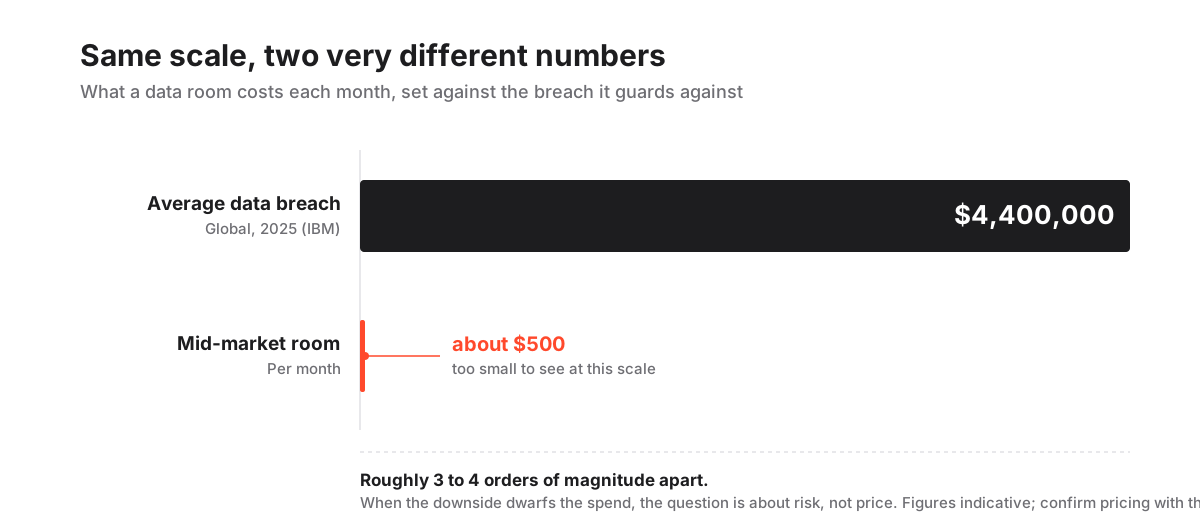
That is the asymmetry drawn to scale. One bar is the breach. The coral sliver is the room. Step 1 and step 5 live in that gap.
What the price actually buys
You are not paying for storage. You are paying for control and proof.
Four capabilities, each answering a question your deal will eventually ask.
- A provable audit trail: a timestamped record of who opened which document and when. It protects the seller if a process is later disputed.
- Access that survives the grant: permissions and dynamic watermarking that let you revoke or trace a file after it has been opened, not only before.
- Certified security: independent SOC 2 and ISO 27001 coverage that a regulated buyer’s counsel filters for before they read a single file.
- An orderly process: a Q&A module and activity heatmap that keep a competitive process structured instead of scattered across email.
Read as a list, these look like features. Read against a live deal, they are the difference between a clean close and a contested one.
Answering any of those questions late is what costs money, and the benefits of a virtual data room rarely show up on the invoice line by line.
Cost versus what it protects
Here is the ledger the worth-it question turns on. The two sides are not close.
According to IBM’s Cost of a Data Breach Report, the global average cost of a data breach reached roughly $4.4 million in 2025.
What a data room costs against what it protects (indicative USD, confirm with the provider)
| The spend | The exposure it addresses | Order of magnitude |
|---|---|---|
| Lean fundraising room | Investor documents leaking before terms are set | ~$99 to $250/mo |
| Mid-market deal room | A disputed M&A process with no defensible trail | ~$300 to $700/mo |
| Enterprise platform | Regulated data mishandled across hundreds of reviewers | $1,000+/mo, custom |
| The failure being priced | Average cost of a data breach (IBM, 2025) | ~$4.4M |
The last row is not a claim that every leak costs millions. It shows which side of the ledger dominates.
When the downside runs three or four orders of magnitude above the monthly spend, worth-it is a risk question, not a pricing one. For the pricing side in full, the guide on how much a virtual data room costs breaks the invoice apart line by line.
Run two: decide which room fits
You have decided a room is worth it. Now size it, or the meter will spoil a decision that was correct. Four steps.
Step 6. Estimate peak reviewers. Count the most people who will need access at once, advisers included. A competitive auction with three advisers per bidder inflates fast. This number breaks per-user pricing.
Step 7. Estimate document volume. Gauge how many pages and how much storage the deal will produce, and when the bulk lands. Document-heavy diligence breaks per-page pricing when thousands of pages arrive late.
Step 8. Match the billing model to that shape. Pick the structure that does not fight your deal:
- Per-page or per-storage: predictable for a lean, tightly scoped room; it can spiral on a document-heavy M&A process.
- Per-user or per-seat: fine for a small internal team; it penalises a wide reviewer list.
- Flat-rate or subscription: a higher floor that removes the surprise, usually the safer bet when the reviewer count is unpredictable.
Step 9. Ask for an all-in figure. Request a total from each shortlisted provider that includes users, storage and the security controls your counterparties will demand. Compare those totals, never headline prices.
Picking the model that fights your deal is the most common way a room that should have been worth it turns into a bill that is not.
The VDR pricing models explained guide compares the structures, per-page vs flat-rate pricing covers the split most buyers get wrong, and the hidden costs of virtual data rooms breakdown flags the overage charges that quietly erode value.
Worth-it by scenario: a quick checklist
Locate your own deal. Tick the signals that apply.
- M&A or a company sale. Outside parties, sensitive data, both yes. Worth it, clearly.
- Fundraising with investors. Cap table and financials in front of outsiders. Worth it.
- Legal or financial due diligence. Regulated files, external reviewers. Worth it.
- Board and governance reporting. Internal, but sensitive. Usually worth it.
- Sharing marketing files internally. No outside party, nothing sensitive. Rarely worth it.
A single tick in either middle signal, outside parties or sensitive data, usually tips the decision toward a room. Two ticks make generic storage indefensible.
The only rows that fail the test are the ones where nothing sensitive leaves the building.
When it is not worth it
Honesty matters here, or the rest of the guide reads as a pitch. There is a short list of cases where the spend is hard to justify.
Where a data room earns its price, and where it does not
Pros
- Outside reviewers, bidders or investors will access the documents
- The files are confidential, regulated or legally sensitive
- You may later need to prove who saw which document and when
- A leak or a permissions mistake would be expensive or reputational
Cons
- The sharing is purely internal with no external reviewers
- The documents carry no confidentiality or compliance exposure
- The exchange is one-off, low-stakes and needs no audit trail
- A general team drive already meets the security bar for this content
Even here the bar is low. One genuinely confidential document with one outside reviewer usually justifies a room, because the room is cheap and getting it wrong is not.
The line is not “big deal versus small deal”. It is “outside and sensitive versus internal and mundane”.
Why not just a cheaper drive?
Two comparisons decide this, and they pull in opposite directions.
Set it beside a physical data room and the VDR is the bargain. The paper-era version tied up couriers, print runs, a supervised reading room and a queue of one visitor at a time, and the bill reached five figures before anyone turned a page. Parallel online review erases most of that overhead. The virtual data room versus physical data room comparison puts the two ledgers next to each other.
Set it beside a shared drive and the VDR looks expensive, right up until you list what the drive cannot do. It will not tell you who opened which file. It cannot pull a document back once someone has downloaded it. It carries none of the certifications a regulated buyer screens for. The lower invoice quietly hides a higher deal risk.
So the framing “room versus a no-cost folder” misses the actual choice. The honest pairing sets the room against the price of a leak, a record you cannot produce, or a process the other side can later contest.
On that scale, the subscription is the line you are least likely to regret.
The full decision sequence
The steps above, folded into one repeatable procedure you can run against any deal. Bookmark it and reuse it.
How to decide whether a virtual data room is worth it
A short decision sequence that weighs your deal's risk against the cost of a room.
Estimated time: 30min
-
Name the downside
Write down what a leak, a lost audit trail or a permissions mistake would actually cost this deal, in money, time and reputation, not in the abstract.
-
Check the two signals
Confirm whether outside parties will review the files and whether any of the data is confidential or regulated. Either one usually settles the question.
-
Size the room to the deal
Estimate your peak reviewer count, document volume and timeline so you can price the tier your deal needs rather than the cheapest plan on the page.
-
Compare all-in figures
Ask each shortlisted provider for a total that includes users, storage and the security controls your counterparties will demand, then compare those, not headline prices.
-
Weigh it against the downside
Set that all-in monthly figure beside the cost you named in step one. If the room is a fraction of the exposure, which it almost always is, it is worth it.
The step people skip is the first. Once the downside is written in real numbers, the monthly figure looks small and the decision stops being a matter of taste.
For a shortlist that already balances value against price, the best value virtual data room ranking does the sizing for you.
The real return
The return shows up in three places, and only one is about saving money.
- Speed. Parallel review by every party at once, with full-text search and a clean index, compresses a diligence process that paper-era rooms measured in weeks.
- Protection. A defensible trail and revocable access turn a potential dispute into a non-event.
- Signal. A well-organised, certified room tells a sophisticated counterparty that the seller is credible and the process is real. Buyers underrate this one most.
That third effect is hard to invoice and easy to feel. A disorganised share drive invites lowball offers and endless “can you confirm” emails. A tight room narrows the questions and shortens the timeline.
On a deal where days cost real money, a faster process is often worth more than the whole annual subscription, several times over.
The return on a data room is rarely the money it saves. It is the deal that closes cleanly instead of stalling in a dispute you cannot document.
Run three: actually capture the value
Buying a room is not the same as getting its value. The most common way to waste the spend is to treat the room like a shared drive. Four steps to avoid that.
Step 10. Match the tier to the deal. Buy the lowest band that still carries the controls your counterparties will demand. Skip the reflex upgrade to enterprise.
Step 11. Set granular permissions. Grant folder-level rights by group so no reviewer sees more than they should. This is the whole point of the room, not an optional extra.
Step 12. Watch the audit trail. Read the activity log and engagement heatmap. They tell you which bidders are serious and where attention is going, intelligence a drive cannot give you.
Step 13. Close the room on completion. A forgotten open room after a deal closes is both a security gap and a wasted line on next month’s bill.
Before you commit to a term, test on your own files. Most reputable providers offer a free trial, which is the cheapest way to confirm the value.
Ellty’s free trial runs for 14 days, long enough to build a real permission model rather than click through a demo. Upload real documents, set the groups, watermark a file and check the audit trail.
Is it worth it for a small startup?
For a startup raising money, yes, and often more clearly than for a large company. A founder has the most to lose from a leak and the least room to absorb a messy process.
A seed or Series A round still puts your cap table, financials and IP in front of outside investors, which is exactly the “outside parties plus sensitive data” case the checklist flags.
The difference for a startup is tier, not verdict: a lean room in the lightweight band, not an enterprise platform. The best virtual data room for fundraising shortlist ranks the options sized for a raise.
One caveat: stage. Sharing a pitch deck with two friendly angels you already trust may only need a well-permissioned drive for that moment. The instant the round turns competitive, or a term sheet lands, the calculation flips and the room earns its price immediately.
Frequently asked questions
Is a virtual data room worth it for a small deal?
Usually yes, because the bar is about sensitivity, not size. If a small deal still puts confidential documents in front of outside reviewers, a lean room in the $99 to $250 per month range gives you an audit trail, revocable access and certified security for a fraction of what a leak would cost. It is only questionable when the sharing is purely internal and the data carries no confidentiality or compliance exposure. Confirm current pricing with the provider.
Why not just use Google Drive or Dropbox instead?
Generic file sharing is built for convenience, not accountability. It cannot prove who opened a specific file, cannot revoke a document once it has been downloaded, and rarely carries the SOC 2 or ISO 27001 certification a regulated buyer's counsel will require. For an internal, low-sensitivity share that is fine. For a real transaction, the missing audit trail and permissions are exactly the controls that make a data room worth the extra cost.
How do I justify the cost to my team?
Frame it as insurance, not software. Name what a leak, a lost audit trail or a permissions mistake would cost this specific deal, then set the room's monthly price beside it. With the global average cost of a data breach around $4.4 million in 2025 and a mid-market room in the hundreds of dollars per month, the outlay is negligible beside the risk it neutralises, and it usually shortens the process on top of that.
Is the free trial enough to test whether it is worth it?
For evaluating the interface and controls, yes. Most reputable providers offer a free trial, and Ellty's free trial runs for 14 days, which is long enough to upload your own files, build a real permission model, and check the watermarking and audit trail against how your deal will actually run. Use it to verify the controls you are paying for before you commit to a term.
