
Virtual data rooms for M&A: the complete guide
On this page
- What is a virtual data room in an M&A deal?
- Why do M&A deals need a data room instead of email or cloud storage?
- When in the deal timeline does the data room open?
- What documents go in an M&A data room?
- How do buy-side and sell-side use the room differently?
- How do you set up an M&A data room?
- How should you structure permissions for bidders and advisers?
- How does the Q&A process work in a competitive auction?
- What are the most common M&A data room mistakes?
- What does an M&A data room cost?
- What features matter most for an M&A room specifically?
- How do you choose a provider for an M&A deal?
Strip away the strategy and the valuation, and every merger is an argument about information.
One side knows the company cold and wants top dollar for it. The other side knows almost nothing, and you are asking it to commit real money on the strength of documents it has only just been allowed to open. The virtual data room, or VDR, is how you resolve that gap under controlled conditions.
It is where the seller discloses, the buyer verifies, and the platform quietly logs who did what. Months or years later, either side can prove exactly what changed hands. Treat it as file storage and you have missed the point entirely. The room is not the shelf your deal sits on. It is the mechanism by which the deal is negotiated, contained and, in the end, defended.
This guide is for people running or advising on a live transaction, not the merely curious. It covers what the room does at each stage, why consumer tools cannot do the same job, how to set one up so it survives a competitive process, what it costs in US dollars, and how to pick a provider whose strengths fit your deal rather than the promises on its homepage. Everything here applies to a small bilateral sale and a large cross-border auction alike. Only the scale changes.
What is a virtual data room in an M&A deal?
In an M&A context, a virtual data room is the single permissioned repository through which the sell-side discloses the target company to prospective buyers and their advisers. It replaces email attachments, shared drives and couriered binders with one audited space where the seller controls access at the folder and document level.
Every view, download and print is logged. So the seller can prove exactly what was disclosed, to whom, and when, long after the deal closes.
That last clause is the whole point. The room is built on the assumption that the parties do not fully trust each other and that a dispute may follow. Every feature that separates it from ordinary cloud storage exists to serve that assumption.
The evidentiary trail is the part generic tools cannot replicate, and it is why data rooms sit at the centre of transactions rather than beside them. A shared drive tells you a file exists. A deal-grade room tells you who read page fourteen of the shareholder agreement, for how long, and whether they came back to it the night before submitting their bid.
That distinction matters because M&A is one of the few commercial activities where a party may need to reconstruct, under oath, precisely what the other side had the chance to see. The room converts disclosure from a claim into a record. For a plain definition of the underlying tool, see our guide on what a virtual data room is; this page is about bending that tool to the demands of a deal.
It helps to know the lineage. The VDR is the direct descendant of the physical data room, a locked office where, for decades, bidders reviewed paper deal files one visitor at a time, under the eye of a supervising lawyer, often forbidden from making copies.
The physical room enforced control through walls, a sign-in sheet and a photocopier no one was allowed to touch. The virtual room enforces the same control through permissions, an audit log and dynamic watermarking. But it does so for many parties at once, across time zones, without the courier bills or the travel. Everything the modern platform does is, in one sense, an attempt to recreate the discipline of that locked office at internet scale.
Why do M&A deals need a data room instead of email or cloud storage?
Because a deal is adversarial, time-boxed and legally consequential, and consumer tools are built for none of those.
In a competitive sale you disclose the same sensitive file to several rival bidders at once, you need to revoke a party’s access the moment they drop out, and you may have to demonstrate years later that a specific warranty document was in the room before signing. Email and shared drives cannot enforce any of that. They cannot isolate rival bidders from one another, cannot produce a court-ready log of who saw what, and cannot revoke a file that has already been forwarded, downloaded or screenshotted.
The moment a sensitive document leaves a shared drive as an attachment, the seller has lost control of it permanently. In a deal, that loss of control has a price.
The stakes are not academic. A frequently cited Harvard Business Review analysis puts the share of acquisitions that fail to deliver their expected value at somewhere between 70% and 90%, and weak diligence, driven by disorganised or incomplete disclosure, is a recurring culprit. A well-run room does not guarantee a good deal. A badly run one actively raises the risk of a bad one.
Buyers who cannot find or trust the documents do predictable things. They discount the price to cover the uncertainty, they extend the timetable while they chase missing items, or, if the disorder reads as evasion, they walk. Confusion in the room is rarely neutral. It costs the seller either money or momentum, and often both.
There is a second, quieter reason, and it may be the more important one.
A disclosed document is a defence. If a buyer later claims a liability was hidden, the seller’s strongest answer is not a memory or a testimony; it is a timestamped record showing the document sat in an open folder that the buyer’s advisers demonstrably opened. Warranty and indemnity disputes, purchase-price adjustments and post-closing claims all turn on the question of what was disclosed, and disclosure that cannot be evidenced barely counts.
The room is where that defence is built, one logged interaction at a time, quietly, throughout the months of diligence, long before anyone knows whether it will ever be needed. Sellers who understand this treat the audit trail as an asset to be preserved, not a byproduct to be discarded at close.
Consider how that plays out in a concrete dispute. A buyer discovers, eighteen months after closing, a customer contract with an unusual termination clause that it says materially reduces the value it paid for. It brings a warranty claim.
The seller’s lawyers open the archived room, point to the exact folder in which that contract sat throughout diligence, and produce the log showing the buyer’s own legal advisers opened the document twice and spent forty minutes inside it during the review window. The claim, in most jurisdictions, does not survive that record, because the buyer was on notice and chose to proceed.
Now run the same scenario without a room. The contract was emailed once, months ago, to an address no one is sure was correct, with no proof it was ever opened. The seller’s defence has evaporated, not because the disclosure did not happen, but because it cannot be proven to have happened.
That gap between disclosure and provable disclosure is exactly the space a data room is built to close. It is why sophisticated sellers refuse to run a serious process on anything less.
When in the deal timeline does the data room open?
The room typically opens once a deal moves from marketing into diligence, after a buyer has signed a non-disclosure agreement and, usually, submitted an indicative offer. It then stays live through confirmatory diligence and signing, and a slimmed-down version often persists into integration.
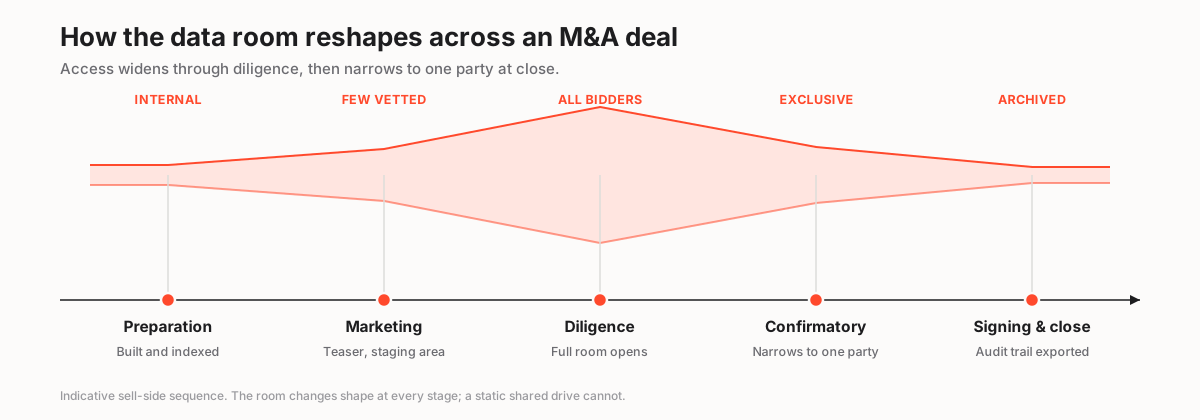
What makes the room fundamentally different from a static shared drive is that its shape changes at every stage. Access widens as more bidders qualify and narrows sharply once a preferred party emerges. A shared drive has one permission state; a deal room may have a dozen over its life, each deliberately set to match where the process has reached. Getting those transitions right is most of the craft of running a room well.
The table below maps the standard sell-side phases to what the room is actually doing at each one. Read it as a rhythm, not a rigid schedule. The boundaries flex with deal type, but the sequence is stable.
How the data room maps to an M&A deal timeline
| Deal phase | What happens | Data room activity |
|---|---|---|
| Preparation | Seller and advisers assemble the diligence file | Room built and indexed internally; no external access yet |
| Marketing / teaser | Approach vetted buyers under NDA | Teaser folder or staging area; core file still locked |
| Diligence | Bidders review financials, contracts, IP | Full room opens to permissioned bidder groups; Q&A runs |
| Confirmatory / exclusivity | Winning bidder verifies remaining items | Access narrows to one party; sensitive folders unlocked |
| Signing and close | Final documents executed | Audit trail exported; disclosure record locked and archived |
Getting the sequencing right, especially the staging area before the full file opens, is one of the clearest differences between a smooth process and a chaotic one.
Open the whole room too early and you surrender leverage over pacing. Bidders race ahead of the timetable you set and drown your team in premature questions. Open it too late and diligence slips past the exclusivity clock, compressing the buyer’s review into a panicked sprint that produces exactly the sloppiness you were trying to avoid.
The room’s job is to let the deal team meter disclosure deliberately, releasing the file in a sequence that keeps every bidder moving at the pace the seller chooses rather than the pace the fastest bidder would prefer. Pacing is leverage, and the room is how you keep hold of it.
What documents go in an M&A data room?
The room holds the evidence a buyer needs to verify every claim the seller has made, organised to mirror the diligence request list.
In practice that means corporate records, financial statements and models, material contracts, employment and benefits files, intellectual property registrations, litigation history, tax records and regulatory permits. The exact list scales with deal size and sector, since a regulated financial-services target carries very different files from a software company, but the top-level categories are remarkably stable across transactions. A buyer’s diligence questionnaire is essentially a table of contents for the room, and the seller who builds the folder tree to answer that questionnaire before it even arrives is already ahead.
- Corporate and governance: incorporation documents, cap table, board minutes, shareholder agreements.
- Financial: audited statements, management accounts, the financial model, debt and lease schedules.
- Commercial: top customer and supplier contracts, pricing, pipeline, key terms.
- Legal and IP: litigation, patents and trademarks, licences, insurance, compliance records.
- People: org chart, key employment contracts, incentive plans, pension liabilities.
For a folder-by-folder breakdown, our due diligence checklist and the companion guide on what documents go in a data room go deeper than we can here.
The organising principle is simple to state and hard to hold to under pressure. Every folder should answer a question a buyer will ask, and a disciplined data room index is what turns a pile of files into a navigable file.
Number the index and keep it stable. Renumbering folders mid-diligence breaks every reference in the Q&A log, invalidates every citation in the buyer’s issues list, and scrambles the working notes each bidder’s advisers have built against your original structure. A stable index is not a cosmetic nicety. It is the shared coordinate system the whole process navigates by, and changing it mid-flight is one of the most disruptive errors a deal team can make.
How do buy-side and sell-side use the room differently?
The two sides sit on opposite ends of the same platform and want opposite things from it. The seller wants maximum control and a complete record. The buyer wants efficient, thorough review and confidence that nothing has been withheld.
Those goals are not symmetrical, and the features each side leans on reflect the split. The seller lives in the permission matrix, the watermarking settings and the activity log. The buyer lives in the search bar, the download queue and the Q&A submission form.
A good platform serves both without forcing either to compromise, which is harder than it sounds. The controls that reassure a seller can easily frustrate a buyer, and a room tuned entirely for one side tends to punish the other.
Buy-side vs sell-side priorities in the same room
| Capability | Sell-side (seller) | Buy-side (buyer) |
|---|---|---|
| Granular, document-level permissions | Yes | Views only |
| Dynamic watermarking and view-only | Yes | No |
| Full-text search across the file | Nice to have | Yes |
| Q&A submission and tracking | Manages | Uses |
| Engagement / activity analytics | Yes | Not visible |
| Complete disclosure audit trail | Yes | Trusts it exists |
The seller’s use of engagement analytics is a genuine tactical edge, and one that surprises first-time sellers when they see it.
Watch which bidder spent three hours in the litigation folder, or which one keeps returning to a single customer contract, and you learn where the real concerns sit before they surface as questions or, worse, as a lowered offer. That intelligence lets the sell-side prepare its answer in advance and, sometimes, restructure the deal to neutralise the worry before it becomes a price cut.
On the buy-side, the same discipline runs in reverse. A buyer conducting its own confirmatory diligence, or running an internal room to brief its investment committee, wants fast full-text search, clean exports and a defensible record of what its own teams actually reviewed. That way it can justify the price it paid and, if the acquisition later disappoints, show that the review was thorough rather than negligent.
A data room is not where a deal is stored; it is where a deal is proven. The seller who treats it as a filing cabinet loses the argument that a well-organised room is quietly winning: that everything material was disclosed, on time, to the people entitled to see it.
How do you set up an M&A data room?
Setup is faster than most first-time sellers expect once the file is ready, because the software is not the hard part. The structure is.
The reliable path: build and index the room internally first, load permissions by group rather than by person, switch on the security controls before anyone external arrives, and only then invite bidders in waves. Done in that order, a competent team can stand up a serious room in an afternoon.
Done in the wrong order, uploading first and organising later, inviting bidders before the security settings are on, permissioning people one at a time as they arrive, the same team can spend a fortnight fixing problems it created on day one. Sequence is everything, and the numbered sequence below is the one that survives a competitive process.
How to set up a virtual data room for an M&A deal
A defensible sell-side setup that survives a competitive process.
Estimated time: 2h
-
Build the index against the diligence list
Map the folder tree to the buyer's expected request list before uploading, so reviewers find each document where their checklist says it should be.
-
Bulk upload and run full-text indexing
Import the file in bulk, order folders to match the index, and index every document so bidders and your own team can search inside PDFs and scans.
-
Create bidder and adviser groups
Set up groups (each bidder, their lawyers, their accountants, your internal team) and grant folder rights to the group, never to individuals one by one.
-
Turn on watermarking, view-only and 2FA
Apply dynamic watermarking, view-only rendering on the most sensitive folders, and two-factor authentication before a single external user is invited.
-
Stage the most sensitive material
Hold clean-team documents, customer names and pricing in a locked folder released only to the exclusive bidder, not the full field.
-
Invite in waves and monitor
Release access to bidder groups on a schedule, then watch the activity log and heatmap to track engagement and spot who is serious.
Two of those steps deserve a moment more than the list gives them.
Full-text indexing is easy to skip and painful to have skipped. If the room cannot search inside scanned PDFs, then a buyer hunting for a single indemnity clause across two thousand documents is reduced to opening files one by one, and the friction of that search reads, unfairly, as the seller hiding something.
And the decision to invite in waves rather than all at once is a strategic choice, not an administrative one. It lets the seller control the pace of diligence and observe how each bidder behaves before the next group even arrives.
Our standalone walkthrough on how to set up a virtual data room covers the mechanics in more detail, and the permissions guide explains group-based access, which is the single most error-prone part of the whole process and the one most likely to cause a genuine incident.
How should you structure permissions for bidders and advisers?
By group and by folder. Never by editing individuals as the field changes.
In a competitive auction you may have five bidders, each with their own legal and financial advisers, all in the room at once and all forbidden from seeing that the others exist. Group-based permissions are what make that possible. You grant the litigation folder to every bidder group, reserve the customer-pricing folder for the exclusive party, and revoke a losing bidder’s entire access in a single action rather than hunting through a list of thirty individual users hoping you have not missed one.
The moment you find yourself toggling permissions person by person under time pressure, you have already built the conditions for a leak. One missed toggle in a room full of rival bidders is not a tidiness problem. It is a disclosure to the wrong party.
The rule that saves deals is least privilege: each group sees only what it needs at its stage, and nothing more. Antitrust-sensitive material adds a further, non-negotiable layer on top of that principle.
When rival competitors bid for the same target, commercially sensitive data, current pricing, customer-level margins, forward strategy, is often walled off to a clean team of outside advisers who are contractually barred from passing it back to the acquiring principal. This is not caution for its own sake. It is tied directly to premerger antitrust review such as the US Hart-Scott-Rodino process the FTC administers.
Letting a strategic acquirer see a rival’s live pricing before the deal completes can constitute unlawful information exchange, so getting permissions wrong here is not merely untidy. It is a genuine legal exposure that can attract regulatory attention regardless of whether the deal itself ever closes. Our guide on granting and revoking data room access covers the mechanics of doing this cleanly.
How does the Q&A process work in a competitive auction?
Structured Q&A moves bidder questions off email and into the room, where they are routed, answered by the right expert, and permanently logged against the folder they concern.
The mechanism matters. Instead of a subject-matter question landing in an associate’s personal inbox and quietly dying there, the bidder submits it against a specific document or folder, the platform routes it to the relevant seller-side expert, and the answer, along with any supporting file, is recorded against the original question for the entitled parties to see.
Sometimes the answer goes to all bidders, sometimes only to the one who asked. The platform enforces whichever the seller chooses. The result is that the entire question-and-answer history becomes part of the disclosure record rather than a scatter of forgotten emails.
For the sell-side this does two valuable things at once. It keeps a competitive process orderly when hundreds of questions arrive in the compressed final week before bids are due, and it builds a second layer of the disclosure record on top of the documents themselves.
A well-run Q&A module supports categories, assignment to named responders, deadlines and clean export. It also gives the deal lead a diagnostic tool that pure document review cannot: pattern.
If three separate bidders all probe the same customer contract, that clause has just told you where the negotiation is heading, and the seller who is watching can prepare its position before the issue is ever raised at the table. Our dedicated guide on running data room Q&A walks through workflow design in depth, and the Q&A module glossary entry defines the moving parts for anyone meeting them for the first time.
What are the most common M&A data room mistakes?
Most failures in a data room are process failures, not software failures, and nearly all of them are avoidable with discipline established before bidders arrive rather than improvised once they have.
The recurring ones are simple to name and expensive to hit mid-deal, which is exactly why they keep happening. Each looks harmless in isolation and only reveals its cost when the room is live and the clock is running.
- Permissioning by person instead of by group. It works fine for three users and collapses at thirty; one missed toggle can expose a folder to the wrong bidder, and in a competitive auction that is a genuine incident.
- Uploading before the index is final. Renumbering folders after diligence starts breaks every Q&A reference, every buyer citation and every bidder’s own working notes at once.
- Skipping watermarking and view-only rendering to shave time off launch. A sensitive file can leak in seconds, and no control on earth recalls a screenshot already sitting on someone else’s phone.
- Dumping unredacted personal data into the room. Employee and customer records carry data-residency and privacy obligations that survive the transaction and follow the data wherever it goes.
- Deleting the room at close. The exported audit trail is the seller’s defence in a later warranty dispute; deleting it trades a trivial storage fee for real, uninsured risk.
A broad auction and a bilateral sale invite different mistakes, and pretending otherwise leads teams to over-engineer small deals and under-protect large ones. It helps to be honest about the trade-off before committing to a process, because the choice of process shapes almost every other decision about the room.
Running a broad competitive auction
Pros
- Competitive tension tends to lift the final price
- Multiple bids give the board a defensible market check
- A losing bidder can become a fast backup if the first deal breaks
Cons
- Every extra bidder multiplies leak and permissioning risk
- Clean-team and antitrust controls become mandatory, not optional
- The Q&A volume and management overhead climb sharply
What does an M&A data room cost?
Pricing spans a wide range because deals do, and any single headline number is close to meaningless without the deal profile attached to it.
A small one-on-one acquisition can run in a lean room from roughly $250 per month. A typical mid-market auction lands in the high hundreds to low thousands. A large, multi-bidder process on a banking-grade platform is usually quoted per engagement rather than off a public price list.
The billing model matters as much as the headline figure, sometimes more. Per-page and per-user plans can spike alarmingly on a document-heavy deal or a wide bidder field, while flat-rate rooms cap the cost regardless of how many files or users you add. Treat every figure below as indicative, a starting point for a conversation with the provider, and confirm current pricing before you commit anything to a budget.
Indicative M&A data room cost by deal profile (USD, confirm with the provider)
| Deal profile | Typical room | Indicative cost | Common billing model |
|---|---|---|---|
| Small / one-on-one sale | Single bidder, modest file | $250 to $600/mo | Flat monthly or per-page |
| Mid-market auction | 3 to 6 bidders, active Q&A | $700 to $2,000/mo | Flat rate with user tiers |
| Large / cross-border deal | Many bidders, clean team, residency | $2,000+/mo or custom | Custom / per-engagement quote |
| Buy-side single target | Buyer-run confirmatory room | $250 to $900/mo | Flat monthly |
Watch the hidden costs that turn a low sticker into a real bill: storage overages when a document-heavy file exceeds an allowance, per-user charges that climb every time a bidder adds another adviser, and premium security features that turn out to be paid add-ons rather than standard inclusions.
For the underlying economics, our guide on per-page vs flat-rate pricing explains why deal length and document volume decide which model actually wins for a given transaction.
The rule of thumb is worth internalising. A short, document-heavy diligence sprint punishes per-page billing, because you are paying for a huge file over a brief window. A long auction with a comparatively stable file rewards a flat rate, because you are paying a fixed sum across months of activity. Match the billing model to the shape of your deal and you can halve the effective cost without changing platforms. Ignore it and you can double a bill you thought you had capped.
One further cost is easy to overlook when the quote arrives: time.
A cheaper room that your team fights for a week is not cheaper once you price in the advisory hours spent wrestling it, and a poorly organised or slow platform can push a diligence phase past a deadline in ways that cost the deal far more than any subscription line. When you compare quotes, put the sticker price beside the realistic setup effort, the quality of support during the live window, and the friction a bidder will feel while reviewing. Those are the variables that actually move the total cost of the process rather than just the invoice.
A room is a tool bought for a few high-stakes months. As with any tool used under pressure, the right question is not what it lists for but what it costs you to run when the deal is live and the clock is unforgiving.
What features matter most for an M&A room specifically?
Four capabilities do most of the work in a deal, and, tellingly, they are not the ones vendors lead with in their marketing.
Certified security tells regulated buyers and their counsel that the platform is independently audited rather than merely self-described as safe. Granular, group-based permissions are what make a multi-bidder auction possible at all, not a convenience but a precondition. A complete audit trail protects the seller after close, when a warranty claim can turn on whether a single document was demonstrably available. And a disciplined Q&A module keeps the final-week rush orderly instead of chaotic.
Everything else a platform offers, the interface polish, the mobile app, the AI summariser, is refinement layered on top of those four. A room that nails the fundamentals with a plain interface beats a beautiful room that fumbles them.
Security certification deserves particular emphasis, because a buyer’s counsel will ask for it in writing and a vague answer will slow the deal. Look for SOC 2 Type II and ISO/IEC 27001, the internationally recognised information-security management standard published by the ISO, together with encryption in transit and at rest as a baseline rather than a premium.
For cross-border deals the requirements harden further. Data residency controls that keep files inside a specified jurisdiction can shift from a preference to an absolute condition of the deal proceeding, especially when European personal data is in scope and the transfer of that data across borders carries its own legal weight.
Our security features checklist is the fuller reference, and it is worth working through before you shortlist rather than after, because retrofitting a security requirement onto a chosen platform is far harder than choosing a platform that already meets it.
How do you choose a provider for an M&A deal?
Match the room to the deal, not the deal to the lowest price.
A one-on-one sale of a small company does not need a banking-grade platform and will pay for capacity it never touches. A large cross-border auction should never run on a lightweight room that lacks clean-team controls or data residency, because the saving is trivial next to the exposure.
The disciplined approach is to score candidates on five axes, audit depth, permission granularity, Q&A workflow, security certifications, and honest total cost for your specific deal length, then weight those against a sixth that first-time buyers routinely underrate: how quickly your own team can actually get live and comfortable. A platform that theoretically does everything but takes a week to learn is a poor choice for a deal that opens in three days.
The established enterprise names such as Datasite and Intralinks are built for large, complex, high-volume processes, and if your deal is a broad cross-border auction they are the natural end of the shortlist; our head-to-head on Datasite vs Intralinks sets out where each pulls ahead.
For mid-market deals where speed of setup and cost discipline matter more than banking-grade scale, platforms like iDeals and Ellty are among the options worth testing.
Most providers offer a free trial, and you should use it properly rather than passively. Run your actual index and permission structure through two or three rooms before committing, because a room that feels effortless in a polished demo can fight you the moment you load a real two-thousand-document file with a live permission matrix.
Our best VDRs for due diligence shortlist, the wider best VDRs for M&A ranking, and the how to choose a virtual data room guide turn this into a scored decision rather than a gut call, and a scored decision is far easier to defend to a board than a preference.
Frequently asked questions
How long does an M&A data room stay open?
Usually for the length of diligence through to signing, then a reduced version often persists into integration. A competitive auction can keep a room live for two to four months; a bilateral deal may need only a few weeks. You control access throughout, narrowing it to the exclusive bidder as the field shrinks, and you decide when to export the record and close the room down.
Who pays for the data room in an M&A deal?
Almost always the sell-side, since the seller runs the process and controls disclosure. On a buy-side confirmatory room the buyer pays for its own workspace. The cost is modest relative to the legal and advisory fees on the same deal, and it is usually treated as a transaction expense rather than a line worth negotiating hard over.
Can rival bidders see each other in the room?
No, and they must not. Group-based permissions keep each bidder and their advisers isolated, unaware that the others exist. Commercially sensitive or antitrust-sensitive material is often restricted further to a clean team of outside advisers who cannot relay it to the acquiring principal. Misconfigured permissions that leak one bidder's presence or data to another are a serious and entirely avoidable risk.
Is a virtual data room secure enough for a major acquisition?
A reputable VDR is built for exactly this. Require SOC 2 Type II and ISO 27001 certification, encryption in transit and at rest, granular group-based permissions, dynamic watermarking and a complete audit trail. Those controls, rather than the interface, are what separate a deal-grade room from ordinary file sharing, and a buyer's counsel will check for them before they let their client rely on the room.
What happens to the data room after the deal closes?
The seller exports the full audit trail and disclosure record, then archives or closes the room. That exported record is a defensible account of exactly what was disclosed, to whom, and when, which matters directly if a warranty or indemnity dispute arises later. Keep it in secure archive; do not simply delete the room at close to save a small storage fee.
Do we need a data room for a small acquisition?
If confidential documents are crossing between parties who have signed an NDA, then yes. Even a small deal benefits from the audit trail and the permission control; the only difference is that you can use a lean, lower-cost room rather than an enterprise platform. The controls matter more than the scale of the transaction, because a small deal can generate a dispute just as easily as a large one.
The through-line across every deal, large or small, competitive or bilateral, is the same. The data room is not where you store documents. It is where you control and prove the disclosure that a transaction is built on.
Get the index right so the file is navigable, get the permissions right so the wrong party never sees the wrong folder, and get the Q&A right so the record is complete, and the software fades into the background where it belongs, doing its quiet work of making a difficult exchange safe. Get those three wrong and no amount of feature richness will save the process. The platform is the easy part. The discipline is the deal.
