
From paper rooms to the cloud: a short history of VDRs
On this page
- The whole story in one screen
- Chapter one: the room was a real room
- It existed to solve one problem
- It was slow on purpose
- The sign-in sheet was the whole point
- Why the physical room ruled M&A for two decades
- The four forces that pushed the room online
- Broadband made big files movable
- The PDF gave everyone the same page
- SSL made the browser trustworthy
- The late-1990s merger wave supplied the demand
- What the first virtual rooms got right
- What the first virtual rooms could not yet do
- The upgrade that made a VDR a VDR
- Document-level permissions
- Dynamic watermarking
- Complete audit trails
- Structured Q&A
- Security certification becomes table stakes
- How a modern room gets built in about an hour
- The 2010s: cloud and mobile widen the market
- SaaS killed the IT project
- Mobile made the room portable
- How the eras stack up
- The 2020s: the room learns to read
- Reading a provider’s heritage like a buyer
- What the timeline says about price
- The market the room now serves
- Are physical data rooms still used at all?
- Three myths about the switch to virtual rooms
- Myth one: the virtual room was mostly about cost
- Myth two: online rooms were trusted from day one
- Myth three: newer always means better
- A short buyer’s checklist drawn from the history
- Where the format goes next
Start with the punchline. A data room used to be a literal room, and the virtual version is what survived when that room moved onto the internet.
For most of the twentieth century, buyers rented a secure office, filled it with binders, and let each side’s lawyers visit in turn. The VDR kept the part that mattered, a provable record of who saw what, and threw away the rest.
So read this timeline as a buyer’s tool, not a museum tour. A provider’s heritage still shapes how it prices, what it assumes about your deal, and where it quietly falls short.
The whole story in one screen
If you skim one section, skim this one.
- 1980s to 1990s. The physical deal room is standard practice for M&A. One party reviews at a time, on site, under supervision.
- Around 2000. Broadband, the PDF and SSL push the room online. Bidders review in parallel, from anywhere.
- Late 2000s to 2010s. Permissions, watermarking, audit trails and structured Q&A turn a document store into a real VDR.
- The 2010s. SaaS, cloud and mobile widen the market from banks to founders and small deal teams.
- The 2010s onward. SOC 2 and ISO 27001 certification become non-negotiable for regulated buyers.
- The 2020s. AI-assisted indexing, search and redaction become the new competitive frontier.
Six shifts, one constant. Each era kept the previous promise, a provable record of confidential access, and shed the friction around it.
Chapter one: the room was a real room
Before the web, a data room was a physical, access-controlled space. It usually sat at the seller’s law firm or investment bank, stocked with the confidential deal documents assembled for inspection.
Bidders and their advisers booked time slots. They signed in, read the files on site, and left them behind. Nothing was removed. Nothing was copied.
It existed to solve one problem
How do you let rival outsiders inspect your most sensitive papers without losing control of them? The locked room was the answer: tangible walls, a supervised door, and a log of everyone who walked through.
It was slow on purpose
Only one party could review at a time. A competitive auction stretched over weeks as each bidder cycled through the same office.
Staff logged entries by hand, and photocopying was restricted or banned outright. Geography made it worse. An overseas buyer had to fly people in and house them for days.
The sign-in sheet was the whole point
The room protected secrecy, but it also throttled every deal. A single contested transaction could tie up a dedicated office for a month.
That tradeoff was accepted because the record mattered more than the speed. A seller in a regulated deal needed to prove, later, that every bidder saw the same disclosures at the same time. A sign-in sheet delivered exactly that, if slowly.
Why the physical room ruled M&A for two decades
The supervised room became standard practice through the 1980s and 1990s. Cross-border deals and leveraged buyouts pushed due diligence to a scale that ad-hoc document sharing simply could not handle.
The bigger and more contested the deal, the more the locked room made sense. It was the only way to give multiple rival bidders access to the same sensitive files while keeping a supervised, even-handed record.
That discipline, equal access and a provably fair process, is the thread that survives every later reinvention. Every generation since has kept it.
The four forces that pushed the room online
The room did not go digital because someone wrote clever software. It went digital because four separate things arrived at roughly the same time, around the turn of the millennium.
Broadband made big files movable
Large document transfer stopped being painful. A bidder could pull down a heavy folder of files without a dedicated leased line or a courier full of discs.
The PDF gave everyone the same page
Adobe’s PDF handed every party a faithful, non-editable copy. What the seller uploaded was exactly what the bidder saw. No reformatting, no accidental edits, no version drift.
SSL made the browser trustworthy
SSL encryption made a browser session safe enough for confidential material. For the first time, a general counsel could accept that a document crossing the public internet was not crossing it in the clear.
The late-1990s merger wave supplied the demand
Record deal volume met an obvious bottleneck. The one-visitor-at-a-time model had become the slowest part of closing. Pressure plus enabling technology is what actually moves a market.
Put the four together and the pitch wrote itself. Let every approved bidder review at once, from anywhere, while the seller keeps a precise log of every page opened.
What the first virtual rooms got right
The first commercial web-based data rooms appeared around 2000, marketed to investment banks and law firms handling large M&A.
They won on speed. An auction that took six weeks in a physical office could now run in parallel across continents.
They won on reach. On-site visits gave way to a browser session, so an overseas buyer no longer needed a plane ticket to read a contract.
They won on accountability, and this was the deeper change. A paper room recorded who entered the building. A virtual room recorded who opened which document, for how long, and whether they printed it.
The leap was not from paper to pixels. It was from a sign-in sheet to a per-document audit trail, the single feature that made online rooms defensible for regulated deals.
Early adopters were the banking-grade incumbents whose names still anchor the market. You can trace that lineage in our reviews of platforms like Intralinks and Datasite.
What the first virtual rooms could not yet do
The early rooms had one gap they could not close with features: trust.
A physical office was tangible. A bank could point to a locked door and a supervised floor. Convincing a general counsel that files on a remote server were at least as safe took years.
So the next chapter is really about security, not software. The early rooms proved the model. They had not yet earned the confidence.
The table below sets the two side by side.
Physical deal room vs early virtual data room
| Dimension | Physical deal room | Early virtual data room (circa 2000s) |
|---|---|---|
| Simultaneous reviewers | One party at a time | Many, in parallel |
| Geographic reach | On-site visits only | Anywhere with a browser |
| Access record | Manual sign-in sheet | Automated audit log per document |
| Copy control | Physical supervision | View-only rendering, early watermarks |
| Setup time | Days to assemble binders | Hours to upload and index |
The upgrade that made a VDR a VDR
Storing files online was the easy part. Generic file hosting could do that. What made the category defensible was a layer of control that ordinary hosting never had.
Through the late 2000s and 2010s, four capabilities hardened into the baseline that buyers, lenders and their counsel now expect.
Document-level permissions
Access moved from the supervisor at the door to a matrix of groups and folders. Powerful, and also easy to misconfigure.
Setting rights by group rather than by individual, covered in our guide to data room permissions, became a core discipline rather than an afterthought.
Dynamic watermarking
Every viewed page could carry the viewer’s identity, stamped live. It deters leaks, and it makes a leaked page traceable to whoever opened it.
Complete audit trails
Not just who logged in, but who touched what, when, and for how long. The audit log is the modern descendant of the paper sign-in sheet, and vastly more granular.
Structured Q&A
Bidder questions stopped scattering across email threads. A structured workflow routed each question to the right expert and kept a record of the answer.
A modern room is judged less on how much it holds than on how precisely it lets you grant, watch and revoke access.
The move online did not just digitise the filing cabinet. It changed the question from “where are the documents kept” to “can you prove who touched them, and revoke that access the moment a deal turns.”
Security certification becomes table stakes
Independent certification is the trust mechanism that finally moved regulated buyers off the physical room. It is now non-negotiable for any serious platform.
As acquirers grew wary of putting sensitive files on an unaudited system, providers pursued external frameworks. Two names dominate.
- SOC 2, governed by the AICPA, audits the controls a service provider runs around customer data.
- ISO/IEC 27001, the international information-security standard published by the ISO, certifies a formal security management system.
A certification badge became shorthand for “this platform has been independently checked” by a third party, not just described in a sales deck.
It also reshaped procurement. An early buyer took a vendor’s security claims on faith. A modern security review starts with the audit report, the data-residency map and the encryption posture, and only then looks at features.
If a room cannot produce a current SOC 2 report or an ISO 27001 certificate, it rarely clears the shortlist for a regulated deal. Our VDR security features checklist and the explainer on what these certifications actually mean unpack the acronyms, because a badge is only as good as the scope behind it.
How a modern room gets built in about an hour
Where a physical room took days of binder assembly, a modern room can be review-ready in roughly an hour. The path most sellers follow has settled into a repeatable sequence, and each step quietly encodes a lesson from the paper era.
How a modern virtual data room comes together
The typical setup path that replaced days of physical binder assembly.
Estimated time: 1h
-
Sketch the tree first
Draft the folder skeleton against the diligence request list before a single file goes up, so the room mirrors how reviewers hunt rather than how your drive happens to sit.
-
Load and index in bulk
Push the documents up in one pass, slot them under the planned tree, then let the room build a full-text search layer across the whole set.
-
Sort reviewers into groups
Split people into groups such as bidders, counsel and internal staff, then grant rights at the folder level so nobody hand-edits access seat by seat.
-
Arm the controls while private
Switch on live watermarking, view-only display and two-factor sign-in while the room is still closed, never once outsiders are already inside.
-
Open up and observe
Let reviewers in, then read the activity log and engagement heatmap to see who is working and which files pull the most attention.
Three of those steps are the paper era in disguise. The index replaces the physical filing order. Group permissions replace the supervisor at the door. The heatmap replaces watching a bidder’s face across the table.
None of it is glamorous. Each control exists because some earlier generation learned, the hard way, what happens without it.
The 2010s: cloud and mobile widen the market
The 2010s took the online room and made it ambient. Two shifts did most of the work.
SaaS killed the IT project
Software as a service replaced installed clients and per-project server setups. A room could be spun up on demand rather than provisioned by an IT team.
Multi-tenant cloud infrastructure drove costs down and pushed setup time from days toward minutes. That opened the category to customers who had never used a formal room before: startups raising a seed round, small firms selling to a strategic buyer, non-profits sharing sensitive board papers.
Mobile made the room portable
Once reviewers could open a permissioned, watermarked document on a phone or tablet, the room stopped being a desktop appointment. A partner could check it between meetings.
Providers layered on engagement analytics, redaction and integrations with the tools deal teams already lived in. The net effect was reach. The room was no longer a bespoke service reserved for the largest transactions. It became a self-serve product with a published price list.
That is exactly why a current side-by-side pricing comparison is worth doing before you commit, and why a purpose-built room for a startup raise can look nothing like a banking-grade platform.
How the eras stack up
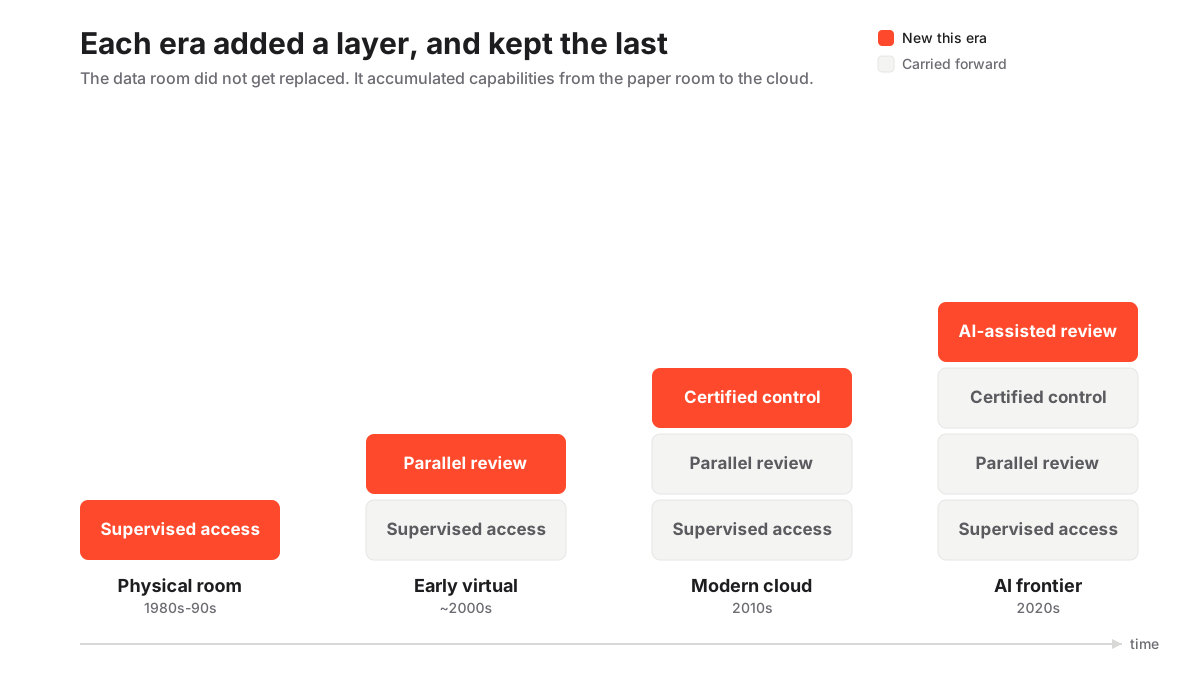
Each generation added a layer rather than replacing the last. The physical room proved supervised access. The early virtual room added remote parallel review. The modern cloud room added certified security and analytics.
Read the eras this way and a lot clicks into place. It is why “data room” can mean wildly different things depending on which heritage a vendor comes from. The matrix below shows how the core capabilities accumulated.
How data room capabilities accumulated by era
| Capability | Physical (1980s-90s) | Early virtual (2000s) | Modern cloud (2010s-now) |
|---|---|---|---|
| Parallel multi-party review | No | Yes | Yes |
| Per-document audit trail | No | Basic | Yes |
| Dynamic watermarking | No | Emerging | Yes |
| Structured Q&A workflow | No | No | Yes |
| Independent security certification | No | Varies | Yes |
| AI-assisted review and redaction | No | No | Growing |
The 2020s: the room learns to read
Artificial intelligence is the current frontier. It shifts the room from a passive store to an active reviewer.
Storage, permissions and certification are solved problems. The leading platforms now compete on how much of the diligence grind they can automate.
- Auto-indexing files bulk uploads into the right folders.
- Full-text and semantic search runs across thousands of documents at once.
- Automatic redaction strips personal data before a file is shared.
- Translation smooths cross-border deals where the paperwork spans languages.
Put plainly, the 2020s room reads the files, not just guards them.
For buyers, the catch is distribution. AI features are uneven and often gated to higher tiers. A room may advertise AI review yet reserve the useful parts, such as automated redaction or contract-clause extraction, for its enterprise plan.
Treat AI capability the way you treat certification. Verify the specific feature is on the plan you would actually buy, then test it against your own documents during a free trial rather than trusting the marketing page. Modern self-serve rooms, Ellty among them, put these capabilities behind a clean interface and published pricing, while the incumbents bundle AI into heavier, quote-only deployments.
Reading a provider’s heritage like a buyer
Here is where the history earns its keep. It tells you how to read a provider’s marketing.
Some platforms trace their lineage to the banking-grade rooms of the 2000s and price accordingly. Others are newer, self-serve tools built for founders and small deal teams.
Knowing which heritage a room comes from tells you a lot about its default assumptions, before you have read a single feature list.
- Banking-grade lineage tends to assume complexity, high-touch support and quote-based pricing.
- Self-serve lineage tends to assume speed, a clean interface and a published price.
Neither is better in the abstract. The right answer depends on your deal.
It also explains the current direction of travel. Having solved storage, permissions and certification, the category now competes on speed of setup, cleaner interfaces, AI-assisted review and transparent self-serve pricing.
What the timeline says about price
Pricing is where heritage shows up most bluntly.
Indicative entry pricing now starts around $99 per month for lean rooms. Mid-market plans land in the low hundreds. Enterprise deployments are still quoted per engagement.
Treat every figure as indicative and confirm current pricing with the provider. Plans and included storage change often.
Our comparison of leading data rooms lines the modern self-serve tools up against the heavier incumbents. The value-focused shortlist is a sensible starting point if budget is the binding constraint.
The market the room now serves
The virtual data room grew alongside the deal economy it supports, and that economy is enormous.
Global mergers and acquisitions volume has repeatedly exceeded 3 trillion US dollars a year, according to deal trackers such as the Institute for Mergers, Acquisitions and Alliances (IMAA). Every one of those transactions needs a secure, auditable place to run diligence.
That demand is why the humble document room turned into a category of its own.
And it is no longer just M&A. The same rooms now serve several jobs:
- Fundraising and investor diligence
- Private-equity portfolio reporting
- Licensing and IP transactions
- Litigation and regulatory disclosure
- Board governance and sensitive board papers
The through-line from the padlocked office of the 1980s is unbroken. Wherever confidential documents must cross organisational boundaries under time pressure and leave a defensible trail, a data room is the tool that does it.
For the vocabulary behind these use cases, the due diligence entry in our glossary is a useful companion. Our checklist for what actually goes in a room grounds the theory in a working file list.
Are physical data rooms still used at all?
Rarely, and usually only in narrow cases.
Some material cannot leave a site for legal or security reasons. For that sliver of situations, a supervised physical room still has a role.
For the overwhelming majority of transactions, certified virtual rooms have replaced the physical room entirely. The paper room is now the exception, not the default.
Three myths about the switch to virtual rooms
The history gets flattened in a lot of sales copy. Three claims come up often, and all three miss something.
Myth one: the virtual room was mostly about cost
It was not. Early web-based rooms were expensive, and banks paid the premium anyway. The draw was parallel review and a per-document record, not a cheaper bill. Cost only became a selling point once cloud infrastructure arrived in the 2010s.
Myth two: online rooms were trusted from day one
The opposite is true. Convincing a general counsel to put sensitive files on a remote server took years, which is why certification, not features, became the real battleground. Trust was earned late, not granted early.
Myth three: newer always means better
Heritage cuts both ways. A modern self-serve room can be perfect for a seed raise and thin for a contested cross-border auction; a banking-grade incumbent can be overbuilt for a small deal. The right room fits the transaction, not the release date.
A short buyer’s checklist drawn from the history
Every lesson above collapses into a handful of questions to ask before you sign.
- Does the audit trail work per document, not just per login? That is the feature that made online rooms defensible in the first place.
- Can the provider show a current SOC 2 report or ISO 27001 certificate? If not, it should not clear a regulated shortlist.
- Is permission set by group? Group-level rights are the discipline that keeps a room from leaking.
- Which AI features are on the plan you would actually buy? Not the marketing page, the plan.
- Does the pricing match your deal’s heritage? A banking-grade room for a seed raise is overkill; a lean self-serve room for a contested cross-border auction may be underkill.
Run those five, and the century of history behind the format is working for you.
Where the format goes next
History is a decent guide to direction. Each era solved the previous era’s biggest limitation, then exposed a new one.
- Storage was solved by the early web rooms, which then exposed a trust gap.
- Trust was solved by certification, which then exposed a setup and cost barrier.
- Setup and cost were solved by cloud and self-serve, which then exposed a review-effort ceiling.
- Review effort is what AI is now attacking, and it will expose the next limitation in turn.
The likely frontier is judgement, not labour. Once a room can index, search and redact on its own, the open question becomes how much interpretation a buyer will trust it to do. Summarising a contract is one thing. Flagging a risk is another.
For now, the practical advice is unchanged. Test the automation against your own files during a free trial, and keep a human on the judgement calls. The comparison of leading rooms is where to see which providers are pushing hardest on that edge.
Frequently asked questions
When was the first virtual data room created?
The first commercial web-based data rooms emerged around 2000, once broadband, the PDF format and SSL encryption made confidential online document review practical. They were aimed initially at investment banks and law firms handling large M&A transactions.
What did people use before virtual data rooms?
They used physical data rooms: secure, supervised offices, usually at a law firm or bank, filled with paper files. Bidders and their advisers booked time slots to read the documents on site, one party at a time, without removing or copying them.
Why did data rooms move from physical to digital?
Physical rooms allowed only one reviewer at a time and required on-site visits, which slowed every deal. Broadband, non-editable PDFs, SSL encryption and the high deal volume of the late 1990s made a parallel, remotely accessible online room both possible and commercially attractive.
What is the difference between an early VDR and a modern one?
Early virtual rooms mainly digitised storage and remote access. Modern rooms add granular permissions, dynamic watermarking, structured Q&A, detailed engagement analytics and independent certification such as SOC 2 and ISO 27001, plus increasingly AI-assisted review, indexing and redaction.
How is AI changing virtual data rooms in the 2020s?
AI is turning the room from a passive store into an active reviewer, with automated indexing, semantic search across large document sets, automatic redaction of personal data and translation for cross-border deals. Availability varies by plan, so confirm which AI features are included before you buy.
The arc from paper room to cloud platform is really a story about accountability catching up with convenience. Each generation kept the previous era’s core promise, a provable record of confidential access, and shed the friction around it.
If you are choosing a room today, that history is a buying lens. Match the provider’s heritage to your deal, and confirm the security and pricing claims against what you can actually verify. Our guide to choosing a virtual data room turns that lens into a checklist.
