
10 benefits of using a virtual data room
On this page
- The ten benefits, in one checklist
- Benefits vs the alternatives, at a glance
- Benefits 1 to 3: lock down control
- Step 1. Verify the security is certified, not just claimed
- Step 2. Set permissions at the document level, then harden them
- Step 3. Treat the audit trail as evidence
- Benefits 4 to 7: take back the time and money
- Step 4. Remove the physical bottleneck to speed up diligence
- Step 5. Centralise the documents into one source of truth
- Step 6. Count the real cost savings, not just the obvious ones
- Step 7. Route every question through structured Q&A
- Benefits 8 to 10: read the deal and reach further
- Step 8. Let global teams collaborate without shipping files
- Step 9. Use buyer analytics as a live read on momentum
- Step 10. Match the benefits to your deal and sector
- The one-hour setup that makes all ten land
- Which providers deliver the benefits best
Here is the bottom line. A virtual data room does one job: it lets confidential files leave your building without leaving your control. Everything below is the ten ways that pays off.
A virtual data room is a secure, permissioned online space for sharing confidential documents during a transaction. Treat this guide as a checklist, not an essay.
Read it top to bottom and you will be able to name every benefit, know exactly what each one replaces, and know the single step that turns it from a slide feature into a live-deal advantage.
New to the category? Start with the plain-English what is a virtual data room, then come back. Weighing the spend? Is a virtual data room worth it gives the blunt verdict.
The ten benefits, in one checklist
Scan this first. Everything below expands it.
- Certified security. Independently audited controls, not self-declared safety.
- Granular permissions. Each group sees only its own folders.
- Complete audit trail. A defensible log of every view, download and print.
- Faster due diligence. Bidders review in parallel, around the clock.
- Central organisation. One indexed, searchable source of truth.
- Lower deal cost. No physical room, courier, printing or travel.
- Structured Q&A. Bidder questions routed, tracked and answered once.
- Remote collaboration. Global teams work across time zones securely.
- Version integrity. Everyone reads the current, controlled document.
- Buyer analytics. Heatmaps show which files each party actually reads.
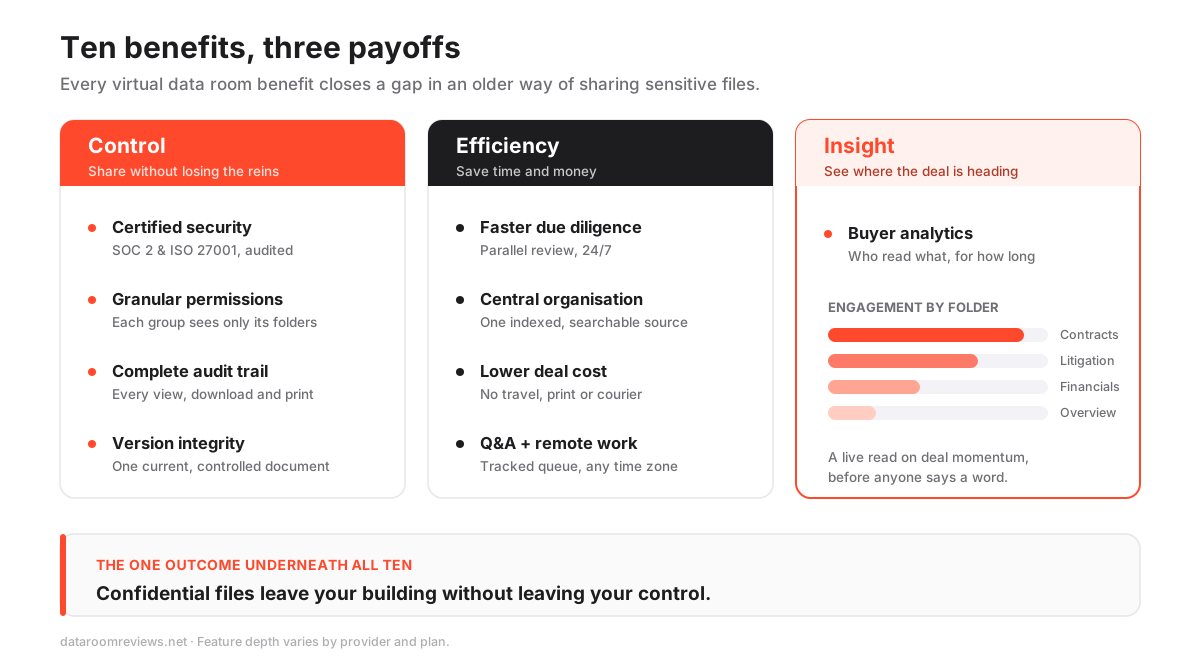
Three of those protect you. Four save you time and money. Three tell you where the deal is going.
None of them is exotic. Each simply closes a gap that email, drives and paper rooms left open. The diagram below groups them.
Benefits vs the alternatives, at a glance
One table. It sets the data room against the two things it replaced, a locked physical room and a generic shared drive, on the capabilities that decide a deal.
Physical room vs generic cloud vs virtual data room
| Capability | Physical data room | Generic file sharing | Virtual data room |
|---|---|---|---|
| Parallel, remote review | No | Yes | Yes |
| Document-level permissions | Manual | No | Yes |
| Full audit trail | Sign-in sheet | Limited | Yes |
| Dynamic watermarking | No | No | Yes |
| Structured Q&A workflow | No | No | Yes |
| Certified security (SOC 2 / ISO 27001) | No | Varies | Yes |
Keep that shape in mind. Cloud storage buys you convenience. A data room buys you convenience plus proof.
The rest of this guide is how you claim each part of that second column.
Benefits 1 to 3: lock down control
These three are the foundation. Work through them in order, because each depends on the one before.
Step 1. Verify the security is certified, not just claimed
Do not take “bank-grade” on trust. Check for two things.
- Confirm encryption in transit and at rest, and enforced two-factor authentication.
- Ask for the certifications and read them. Look for ISO 27001, the information-security management standard from the International Organization for Standardization, and a SOC 2 report, the attestation framework maintained by the AICPA that examines how the provider actually runs its controls.
- Where personal data crosses borders, confirm handling consistent with the EU’s GDPR.
Why this benefit ranks first: external validation is what lets a regulated buyer’s counsel sign off on using the room at all.
The stakes are not abstract. IBM’s 2024 Cost of a Data Breach report put the global average breach at USD 4.88 million, and a leak of deal documents can sink the transaction itself.
For the plain-language versions, see ISO 27001, SOC 2 and GDPR in the glossary, or the deeper virtual data room security guide.
Step 2. Set permissions at the document level, then harden them
This is where the room parts ways with a shared drive. Do it in four moves.
- Build groups first: bidders, legal, internal. Never grant rights to individuals one by one.
- Grant granular permissions per folder or per document, so a bidder sees the commercial files but never the board minutes, and outside counsel sees the contracts but not the cap table.
- Add downstream controls: view-only rendering, disabled downloads, dynamic watermarking and, on higher tiers, information rights management, so a recipient cannot quietly forward a file.
- When a party drops out, revoke their access in one action across every document they could open.
The payoff: control survives after access is granted, and it stays consistent even in a large, fast-moving process.
Step 3. Treat the audit trail as evidence
Every view, download, print and question is time-stamped and attributed. Together they produce a continuous audit trail of the whole diligence process. Capture the benefit like this:
- Confirm the log records views, downloads, prints and Q&A, per user.
- Test the export before the deal, so you know you can produce a clean, signed record on demand.
- Keep the export; disputes surface months after closing.
Safe storage was never the hard part. What a deal demands is proof: a record showing who opened each file, when, and for how long, that still holds up months after closing.
In regulated sectors and litigation-prone deals, “we believe they saw it” is worth far less than an exportable log. Our VDR audit trails explained guide covers what a good log should capture.
Benefits 4 to 7: take back the time and money
Control is defensive. The next four are where the room pays for itself.
Step 4. Remove the physical bottleneck to speed up diligence
In a paper room, bidders queued to enter one at a time. A VDR lets every approved reviewer work at once, from anywhere, at any hour.
To get the full speed benefit:
- Turn on full-text search and a clean data room index so a lawyer finds the right clause in seconds, not by paging through binders.
- Answer each question once, in the open, so the same point does not resurface with the next bidder.
- Keep the room live around the clock; reviewers in different time zones should never wait for office hours.
The effect compounds. Questions surface earlier, the seller answers them once, and the process reaches a decision faster.
On a competitive sale, speed also preserves tension between bidders, which tends to protect price. For a realistic timeline, see how long due diligence takes; for what buyers will ask, see the due diligence checklist.
Step 5. Centralise the documents into one source of truth
Scattered file versions are how deals go wrong. The organisation benefit is simple to bank:
- Map folders to the diligence checklist before you upload anything.
- Bulk upload, then order files to match that index.
- Run full-text indexing so every page is searchable from day one.
Pair this with version integrity. Because everyone reads from the same controlled room, no bidder works off a stale draft, and no conflicting copies circulate.
When a document changes, you update it once, in place, and every reviewer sees the current version. That single fact removes a whole class of late-stage disputes. Nobody can claim they relied on a superseded schedule or an old draft contract, because there was only ever one live copy.
Step 6. Count the real cost savings, not just the obvious ones
For most deals the room saves money once you count the full picture.
- Cut the visible costs: no physical room, no printing, no couriers, no reviewer travel.
- Cut the larger, hidden cost: professional time. Advisers billing by the hour spend it reading documents instead of commuting or waiting for their turn.
- Match the tier to the deal, so you do not overpay for enterprise features a fundraise will never use.
Pricing spans a wide range. Lean fundraising rooms start around $99 per month, mid-market rooms sit in the low hundreds, and enterprise banking platforms are usually quoted per engagement.
Every figure here is indicative, so confirm current pricing with the provider before you budget. Break the tiers down with how much a virtual data room costs, see the live numbers on our pricing overview, or shortlist by price with the cheapest virtual data rooms.
Step 7. Route every question through structured Q&A
A built-in Q&A module turns a flood of emails into a queue you can manage. Run it like this:
- Take questions only through the module, never through side email.
- Assign each one to the right subject expert and track its status.
- Publish the answer to the relevant parties, and answer duplicates once.
Two benefits fall out of that. First, you get another clean record that feeds straight into the audit trail.
Second, on a competitive process you manage information flow evenly across bidders, so no party gains an edge from a side conversation. For the operational detail, see running data room Q&A.
Benefits 8 to 10: read the deal and reach further
The last three are the ones dealmakers prize and newcomers overlook.
Step 8. Let global teams collaborate without shipping files
For cross-border deals this is often the deciding benefit. Because the room lives in the browser, a bidder in Singapore, counsel in London and the seller in New York all work from one controlled source.
- Enable single sign-on so joining is easy.
- Enforce two-factor authentication so the barrier stays high even as access goes global.
- Never let security depend on how carefully each recipient handles a downloaded file; the controls travel with the document.
The result: the team never has to choose between “easy to join” and “hard to breach.”
That trade-off used to be real. Physical rooms were secure but slow; early consumer file sharing was fast but leaky. A modern VDR collapses the two into one benefit, so a global deal team gets both at once.
Step 9. Use buyer analytics as a live read on momentum
Engagement analytics show, per user and per document, who opened what, how long they spent, and how often they returned. Turn that data into signal:
- Watch where a buyer lingers. Hours in the customer contracts and the litigation folder tell you where their concerns lie, before they raise them.
- Track engagement over time. Falling activity from a lead bidder is an early warning.
- Watch for a late surge; it often precedes a firm offer.
In our hands-on testing, the engagement heatmap is the feature sellers underestimate before their first deal and refuse to run without on their second. It turns a quiet inbox into a forecast.
dataroomreviews.net editorial team
No physical room and no generic drive can surface this. It is a core reason to run a process in a data room at all.
Two cautions keep the benefit honest. First, activity is not intent; a busy folder can mean interest or confusion, so read the pattern, not a single spike.
Second, share analytics only with your own side. The insight is an edge because bidders cannot see it, and it stops being one the moment you leak it back to them.
Step 10. Match the benefits to your deal and sector
Every deal that moves confidential files under time pressure benefits. The payoff is largest where the document set is heavy, the buyers are numerous, or the sector is regulated.
Different contexts lean on different benefits, so shortlist accordingly:
- M&A and multi-bidder sales lean on analytics, Q&A and audit: see best VDRs for mergers and acquisitions and the M&A data room guide.
- Startups and fundraising lean on speed and price: see best VDRs for startups.
- Legal and financial diligence lean on the defensible record: see best VDRs for due diligence.
The benefits carry beyond M&A. The same controls suit board reporting, licensing, litigation and asset sales. If confidential documents cross organisational boundaries, the permission, audit and analytics wins apply. Who needs a virtual data room maps the full set of use cases.
The one-hour setup that makes all ten land
The benefits are real, but not automatic; a sloppily configured room can leak or confuse. This is the short path that turns capability into advantage. Do it in order.
How to set up a virtual data room so the benefits land
A first pass that turns the room's capabilities into real deal advantages.
Estimated time: 1h
-
Plan the index first
Map folders to the diligence checklist before uploading, so every reviewer lands on the right file quickly and search stays clean.
-
Load and index documents
Bulk upload, order files to match the index, and run full-text indexing so every page is searchable from day one.
-
Build groups, then permissions
Create user groups such as bidders, legal and internal, and grant folder-level rights to groups rather than editing individuals.
-
Turn on the protective controls
Enable watermarking, view-only rendering and two-factor authentication before a single external user is invited.
-
Invite, then watch the analytics
Bring reviewers in and use the audit log and engagement heatmap to read interest and manage the Q&A queue.
Do this well and every benefit in this guide follows. Control, speed and insight all flow from an index reviewers trust and permissions that are right the first time. The full walkthrough lives in how to set up a virtual data room.
Which providers deliver the benefits best
The benefits are common to the category; the depth is not. A boutique fundraising room and a heavyweight banking platform tick the same boxes on paper yet feel very different in use.
That gap is what our scoring exposes. We benchmark each provider against 40+ criteria in USD, with hands-on notes, so you can see where each benefit above is genuinely strong and where it is thin.
Reading two full reviews before you shortlist is the fastest way to calibrate:
- Read the Datasite review for what an enterprise-grade analytics and Q&A stack looks like.
- Read the iDeals review for a broad mid-market feature set.
- If you already have a two-horse race, put the benefits side by side with Datasite vs Ansarada.
Frequently asked questions
What is the single biggest benefit of a virtual data room?
Control with proof. You share confidential documents while keeping document-level permissions and a complete audit trail, so you can show exactly who saw what and revoke access instantly. Every other benefit, from speed to analytics, builds on that.
Is a virtual data room worth it for a small deal?
Often yes. The security and audit benefits do not scale down to zero risk on a small transaction, and lean rooms start around an indicative $99 per month. Confirm current pricing with the provider.
Do the benefits apply outside M&A?
Yes. The same controls suit fundraising, due diligence, board reporting, licensing, litigation and asset sales. Any time confidential documents cross organisational boundaries under time pressure, the permission, audit and analytics benefits carry over.
Can I test these benefits before committing?
Many providers offer a free trial, so you can evaluate the security controls, permissions and interface with your own files first. Trial length and included features vary, so check current terms with each provider.
