
VDR pricing models: per-page, per-user and flat-rate explained
Here is the bottom line. A VDR pricing model is the unit a virtual data room counts when it builds your bill. Not the provider. Not the logo. The unit.
Change nothing but that unit and the same deal can cost a few hundred dollars or several thousand. That is why two rooms can advertise what looks like the “same” price and hand you invoices a factor of ten apart. The headline number rarely moves the total. The unit underneath it does.
This guide defines the four units, shows the short arithmetic that turns each one cheap or expensive, and gives you one repeatable method for lining up quotes that arrive on completely different units. If the term virtual data room is itself new, the plain-English guide to what a virtual data room is covers the room. This piece is about the invoice.
The four units, defined
Four billing units are in common use across the market. Learn what each one counts and you have learned most of what pricing pages would rather not say plainly.
- Per page. You pay a fixed amount for every rendered page of document stored in the room.
- Per user. You pay a fixed amount for every named person you invite, often called a seat.
- Per gigabyte. You pay by data volume, the total size of everything held in the room.
- Flat rate. You pay one monthly figure that bundles pages and users (and usually storage) into a single number.
Each unit was designed to reward a different shape of deal. That is why no single model is universally cheapest, and why a provider’s choice of unit tells you which customers it was built for.
The matrix below scores the four against the questions that actually decide a bill.
How the four VDR pricing models behave (matrix, indicative)
| Property | Per page | Per user | Per gigabyte | Flat rate |
|---|---|---|---|---|
| Cost is predictable up front | No | Yes | Roughly | Yes |
| Safe for many reviewers | Yes | No | Yes | Yes |
| Safe for heavy document sets | No | Yes | No | Yes |
| Safe for large media and exports | Varies | Yes | No | Yes |
| Cheapest for a tiny, stable room | Yes | Yes | Yes | No |
| No surprise overage on a live deal | No | Seat creep | No | Yes |
Read the bottom row first. The one dimension that breaks budgets is surprise overage on a live deal, and only one model clears it cleanly.
Every metered unit leaves exactly one variable exposed, and that exposed variable is where the invoice runs. The figure below shows it at a glance.
One picture, one idea
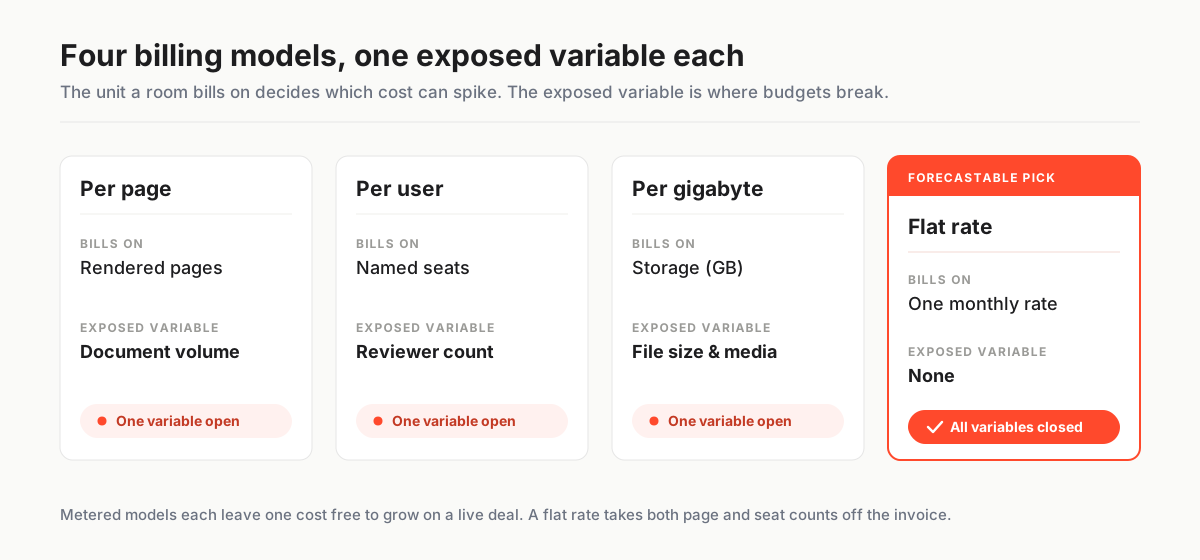
The diagram carries the single most useful idea in this subject. Each metered model closes some risks and leaves one open: per-page leaves pages open, per-user leaves seats open, per-gigabyte leaves data volume open. A flat rate closes all three.
From now on, hold every quote up to the same question the picture asks. Which variable does this model leave exposed, and can that variable grow on my deal? Take each unit in turn.
Per page, defined
Per-page pricing charges a fixed amount, indicatively $0.30 to $0.85, for each page of document stored. The catch hides in one word. “Page” means a rendered page, the output after the platform converts your file, not the file you dragged in.
That distinction is the entire risk. A single 40-tab financial model can render into hundreds of pages. A folder of scanned contracts, engineering drawings or board decks with dense appendices inflates the same way. You are billed on the output of a conversion engine you cannot see at upload time.
The arithmetic is blunt. At $0.50 per page, a document set that feels modest on your desktop crosses $2,500 the moment it renders to 5,000 pages. Re-upload a revised model and the pages can bill again.
So per-page is genuinely cheap in exactly one situation: a small, final, mostly text set that will not grow. The instant a deal brings live spreadsheets, large scanned archives or frequent revisions, the model turns against you. The 2026 pricing breakdown flags this as the most common source of a shock invoice, and the per-page-pricing glossary entry states the billing unit in one line.
Price the room you will have on the busiest day of the deal, not the empty room you sign up for. Every metered model punishes the buyer who forecasts the starting state instead of the peak.
Per user, defined
Per-user pricing charges a fixed amount, indicatively $15 to $60, for each named person you invite. It is the most predictable of the four units, but only while one condition holds: the reviewer list stays short and fixed.
For a seed raise shared with five investors, or a room used by one internal team plus outside counsel, per-seat billing is clean. You know the headcount, so you know the number. There is real comfort in that.
The model breaks on breadth. A competitive M&A auction can pull in a dozen bidding teams, each fielding its own deal lawyers, accountants, tax advisers and sector specialists. Thirty, fifty or eighty reviewers is normal on a real process. At $40 per seat, an eighty-person room is $3,200 a month in seats alone, before a single document is stored.
The quieter problem is that seat creep is silent. Every new adviser a bidder brings adds to the bill, and the seller controls neither how many advisers a bidder invites nor when.
Per-user pricing is a small-group model wearing an enterprise badge. It is the wrong fit for any process where reviewer count is open-ended. If that is your process, the best rooms for mergers and acquisitions shortlist favours structures that keep reviewer count off the invoice.
Flat rate, defined
A flat monthly rate, indicatively $99 to $1,000 or more, bundles unlimited pages and unlimited (or generously capped) users into one predictable number. Neither documents nor reviewers move the invoice. That single sentence is why flat-rate is the default structure for live deals.
On a busy auction or a document-heavy diligence process, flat-rate is usually both cheaper than the metered alternatives and, more importantly, forecastable. The flat-rate-pricing glossary entry covers the mechanics, and the per-page vs flat-rate comparison runs the two head to head.
Flat-rate pricing in one view
Pros
- One number that documents and reviewers cannot move
- Forecastable across the whole life of a deal, from first upload to close
- Absorbs re-uploads, revisions and last-minute bidder teams without an overage line
- Removes the incentive to under-invite advisers just to protect the budget
Cons
- Can mean paying for capacity a very small, quiet room never uses
- Entry flat tiers may cap admin seats or premium security as add-ons
- A metered model can undercut it when both page and seat counts are genuinely tiny and fixed
The trade-off lives at the small end. On a quiet room with three reviewers and forty pages, a flat rate can mean paying for headroom you never touch, where a per-user or per-page room would have cost less. Rooms with unlimited pages and users remove the page and seat risk entirely, which matters most when a deal is unpredictable and you cannot forecast the peak.
Two provider postures make this concrete. Self-serve flat-rate providers like SecureDocs post a number you can budget against without a sales call. That is the practical opposite of the quote-only, per-user posture of enterprise platforms such as iDeals.
The judgement call stays simple. If you can confidently name your maximum reviewers and pages and both are small, a metered model may undercut flat-rate. If you cannot, flat-rate is buying you certainty, and certainty is the product.
Per gigabyte, defined
Per-gigabyte pricing charges by data volume, indicatively $25 to $75 per GB per month. It is the niche unit of the four, a fit for text-light rooms that hold a small number of ordinary documents.
The logic is literal. Plain text and standard PDFs are tiny, so a lean, mostly-text room can stay under a gigabyte and pay very little. The model rewards low volume in the plainest possible sense.
It turns expensive the moment media enters. Video walkthroughs, high-resolution images, CAD files, full data exports and dense scanned archives consume gigabytes fast. A diligence room that includes a product demo reel or a warehouse of scanned title deeds can blow through its storage allowance without anyone noticing.
Per-gigabyte is the least common model today. The safest way to treat it is as a prompt to size carefully: forecast your heaviest files, not your average document, before you accept a storage-metered quote.
The same deal, priced four ways
Definitions only become useful when you run one deal through all of them. The cheapest model is always whichever one bills on the unit your usage does not grow in, and the only honest way to find it is to price the identical deal under each unit.
The worked example below takes one mid-market diligence room, roughly 50 reviewers and about 6,000 rendered pages held for two months, through all four structures. These are indicative planning numbers, not quotes. Every provider differs. The pattern is the point.
One diligence room (about 50 users, 6,000 pages, 2 months) priced four ways (indicative USD, confirm with the provider)
| Billing model | How it stacks up | Indicative 2-month cost |
|---|---|---|
| Per page | 6,000 pages at about $0.50 | $3,000+ |
| Per user | 50 seats at about $40/mo x 2 | $4,000 |
| Per gigabyte | Text-heavy set, low GB, but seat and page counts are irrelevant | $150 to $600 |
| Flat rate | One plan, unlimited pages and users | $700 to $1,400 |
Watch the ranking flip with the inputs. In this text-light case per-gigabyte reads cheapest. Swap in a folder of scanned contracts or a demo video and it jumps to the most expensive line, while flat-rate does not move at all.
That immovability is exactly why flat-rate wins deals you cannot forecast, and why the metered models only win rooms whose shape you already know with confidence. Budget-first buyers who still want the lowest defensible number can cross-check the best-value shortlist against their own peak-usage estimate.
The method for comparing quotes
Providers quote on different units precisely because it makes their numbers hard to line up. So normalise them yourself before you decide. Convert each quote to a single expected monthly USD figure at your realistic peak usage, then apply the same add-on multiplier to every option.
The sequence below takes about half an hour and removes almost every pricing surprise.
How to normalise VDR quotes across pricing models
A repeatable way to compare quotes that are billed on different units.
Estimated time: 30min
-
Forecast your peak
Estimate the maximum reviewers and the rendered page count your room will hold at the busiest point of the deal, not the empty room you sign up for. When unsure, size high.
-
Convert every quote to monthly USD
Multiply per-page quotes by your peak page count, per-user quotes by your peak seats, per-gigabyte quotes by your forecast storage, and read flat-rate quotes as is. Now every option is one number.
-
Multiply by the deal length
Turn each monthly figure into the total for the number of months the room stays open, since a short raise and a quarter-long diligence process are different commitments.
-
Add the same add-on load
Layer an identical allowance for overage, extra admin seats, premium security and onboarding onto each option, indicatively 20 to 40 percent, so you compare like with like.
-
Stress-test the assumptions
Re-run the metered options with 50 percent more pages or seats. If a model doubles under that stress and flat-rate does not, you have found your risk and your answer.
Step one does the most work by far. Almost every VDR budgeting mistake traces back to pricing the empty starting room instead of the full room at peak. Every metered model punishes that error. A flat rate quietly absorbs it.
What sits on top of every model
Fixing the billing unit does not fix the whole bill. A layer of add-ons sits above all four models, commonly lifting the invoice 20 to 40 percent over the sticker price.
They do not change which unit you are billed on, but they do change the final number. Budget for them by name rather than discovering them on the first invoice. The deeper breakdown of the hidden costs of virtual data rooms is worth reading before you sign.
- Overage fees. The charge for pages, seats or gigabytes past your included allowance, usually the largest single surprise on a metered plan.
- Extra administrator seats. Entry tiers often cap full-control admins, and additional ones are billed separately from ordinary reviewer seats.
- Premium security. Single sign-on, IP allow-listing and extended retention are commonly add-ons rather than defaults, though baseline certified security is not.
- Data residency. Hosting in a specific region to satisfy privacy law can carry a premium. Under the GDPR rules on international data transfers, an EU-hosted room is frequently a compliance requirement rather than a preference; the guide to data residency in virtual data rooms covers when it is worth paying for.
- Onboarding and migration. Guided setup, bulk upload and a dedicated contact may live only in the top tier or cost extra.
One caveat cuts the other way. Certified information security is table stakes, not a premium, from the mid tier upward. The controls regulated buyers expect, SOC 2 and ISO/IEC 27001, are usually bundled once you pass the entry plan. Treat them as a minimum, and read the SOC 2 glossary entry and the data-residency glossary entry before you weigh security claims across quotes.
Where the market is heading in 2026
The direction of travel is clear: away from metered per-page billing and toward flat, all-inclusive rooms. Buyers are driving it, because they refuse to sign a quote whose final cost they cannot predict.
As deals move faster and document sets grow heavier, the page-count risk that per-page pricing carries has flipped from a saving into a deal-team liability. Providers have responded by folding pages and users into a single rate.
The practical implication for a 2026 buyer is that a per-page or per-gigabyte quote now deserves extra scrutiny, not because the model is dishonest, but because it pushes forecasting risk onto you. If a provider only offers metered billing on a document-heavy deal, treat that as a reason to model the worst case hard, or to shortlist a flat-rate alternative. For a data-backed view of where current ranges sit, the full pricing guide tracks USD figures by tier and deal size.
The rule to remember
If you keep one sentence from this guide, keep this: pick the model that bills on the unit your deal does not grow in.
Flat-rate for anything busy, document-heavy or hard to forecast. Per-user only for a small, fixed review group. Per-page or per-gigabyte only when your data set is genuinely small, final and stable.
Match the billing unit to the shape of your process and most pricing surprises disappear before they can happen. If you are still choosing a provider rather than a model, the best rooms for startup fundraising and best rooms for mergers and acquisitions hubs rank options by scenario, and the individual provider reviews note each one’s billing model and trial terms.
Frequently asked questions
What is a VDR pricing model, in one sentence?
It is the unit a data room counts to build your invoice: rendered pages, user seats, gigabytes of storage, or a flat monthly rate that bundles them. The unit matters more than the provider, because the same room can read as cheap or expensive depending only on which unit your usage stacks up in.
What is the difference between per-page and flat-rate VDR pricing?
Per-page charges for each rendered page of document stored, indicatively $0.30 to $0.85, so the bill grows with document volume and can balloon when spreadsheets or scanned files render into thousands of pages. Flat-rate bundles unlimited pages and users into one monthly figure, so document count does not move the invoice. Per-page is cheaper only for small, stable, text-based sets; flat-rate is cheaper and more predictable for document-heavy or unpredictable deals.
Is per-user or flat-rate pricing better for M&A?
For most M&A processes, flat-rate is the better fit. Per-user is predictable for a small fixed group, but a competitive auction can pull in dozens of bidding teams and their advisers, and at $40 or so per seat the cost climbs fast and unpredictably. A flat rate with unlimited or generously capped users takes reviewer count off the table, which is what you want when you do not control how many advisers each bidder brings.
Why did my per-page VDR bill come in higher than expected?
Almost always because pages are counted after the platform renders each file, not as you see them on your desktop. A multi-tab spreadsheet, a scanned contract archive or a set of engineering drawings can each convert into far more pages than the source file count suggests, and re-uploading a revised document can bill the pages again. Forecast the rendered page count, not the file count, before accepting a per-page quote.
Does per-gigabyte pricing ever make sense?
Yes, but only for a text-light room holding a small number of ordinary documents, since plain text and standard PDFs are tiny and a lean room can stay under a gigabyte cheaply. It turns expensive the moment video, high-resolution images, CAD files or full data exports enter the room, because those consume storage quickly. Forecast your heaviest files, not your average document, before accepting a storage-metered quote.
Do all VDR pricing models include a free trial?
Trial availability depends on the provider, not the billing model. Many reputable data rooms offer a free trial regardless of how they bill, and Ellty's runs for 14 days, which is enough to test permissions, watermarking and the audit trail. Trial length and included features vary, so confirm current terms with each provider before you commit.
