
Virtual data room vs Google Drive for confidential deals
On this page
- Can you run a confidential deal on Google Drive?
- What actually is the difference between a VDR and Google Drive?
- Which controls does Drive lack that a deal needs?
- What can Google Drive do that a data room cannot?
- What does a VDR audit trail capture that Drive’s does not?
- Is Drive not secure? Where does compliance come in?
- Is Google Drive actually cheaper than a data room?
- When is Google Drive genuinely good enough?
- Can I just set a Drive folder to “view only”?
- Can I use Drive and a data room together?
- Does Google sell a data room product?
- How do you move confidential files off Drive into a data room?
- How quickly can the switch happen?
- Which should you choose for M&A, fundraising or due diligence?
- The short answer, one more time
Almost every deal team already lives in Google Drive. So the folder is usually half-built before anyone stops to ask whether it should be holding the deal at all.
You know the pattern. Create a shared folder, flip it to “anyone with the link”, drop in the financials, start adding people. That instinct is understandable, and it carries you fine for a while.
It stops carrying you the moment the files turn genuinely confidential and the readers turn into outsiders.
This guide answers the questions teams actually ask when a deal starts pushing Drive past its limits. Skim to the one you need. The theme underneath all of them is simple: Drive is a place to store and co-edit files, and a virtual data room is a place to disclose files under control and prove what happened.
Can you run a confidential deal on Google Drive?
You can host the files there. You should not run the deal there.
Drive was designed for open, editable collaboration among people you trust, not for controlled disclosure to outsiders whose interests may diverge from yours. It has no dynamic watermarking, no document-level Q&A, no fence-view rendering, and only a coarse activity log.
The instant a folder crosses from your internal team to external bidders, lawyers or investors, you lose the ability to control and prove what happens to each file.
For a low-stakes share, fine. For a process where a leak or a disputed “who saw what” could sink the deal, it is a live exposure.
And the exposure is not hypothetical. The global average cost of a data breach reached about $4.88 million in 2024, according to IBM’s Cost of a Data Breach report. Verizon is blunter about how these happen: roughly 68% of breaches involved a non-malicious human element such as an error or misdelivery, per the 2024 Data Breach Investigations Report. A single over-permissive Drive link is exactly that kind of mistake.
What actually is the difference between a VDR and Google Drive?
The difference is purpose, and it runs deeper than a feature checklist.
Google Drive is a general-purpose cloud storage and collaboration suite. A virtual data room is a permissioned, audited repository built specifically for sharing confidential documents with a controlled outside group. Drive optimises for frictionless editing and access; a VDR optimises for control, accountability and defensibility.
One assumption separates them. A VDR assumes the reader is an outsider you must supervise. Drive assumes the reader is a colleague you trust.
That single assumption reshapes everything downstream, from how granular permissions are granted to how a file renders on screen. If you want the ground-level definition first, what a virtual data room is covers the anatomy, and how a virtual data room works walks the mechanics.
Which controls does Drive lack that a deal needs?
Five, and they are the ones that decide whether a tool is fit for a transaction. The table lines them up against the basics both tools share.
Deal-critical controls: Google Drive vs a virtual data room
| Capability | Google Drive | Virtual data room |
|---|---|---|
| Store and share files online | Yes | Yes |
| Document-level permissions per user group | Folder-level, coarse | Yes |
| Dynamic watermarking to trace a leak | No | Yes |
| View-only / fence-view rendering | Preview only | Yes |
| Structured Q&A workflow for bidders | No | Yes |
| Complete, tamper-evident audit trail | Basic activity log | Yes |
| Instant, retroactive access revocation | No | Yes |
| Independent certification (ISO 27001 / SOC 2) | Workspace has SOC reports | Reputable providers |
The pattern holds all the way down. Drive can hold and serve the documents, but it cannot enforce fine-grained control once they leave your hands, and it cannot prove what happened afterwards. That proof, the who-opened-what-and-when, is the whole reason data rooms exist.
Two gaps deserve names, because teams so often assume Drive covers them:
- Dynamic watermarking stamps each page with the viewer’s identity, so a leaked screenshot points straight back to who took it.
- Fence view blurs everything except a narrow reading band, which defeats casual photography of the screen.
Neither exists in Drive, and no combination of Drive settings recreates them.
What can Google Drive do that a data room cannot?
Plenty, and it is only fair to say so.
Drive is the better tool for real-time co-authoring, informal collaboration and general storage. Several people edit the same document live. Comment threads are effortless. The tie-in with Docs, Sheets and Slides is seamless, and everyone on your team already has an account and knows the interface.
A data room is deliberately more rigid. Most rooms are read-and-review environments, not co-editing spaces, and that friction is the point.
Where each tool genuinely wins
Pros
- Google Drive: effortless real-time co-editing and comments
- Google Drive: near-zero learning curve, everyone has an account
- Google Drive: cheap for general storage and internal teams
- Google Drive: deep Docs / Sheets / Slides integration
Cons
- VDR: purpose-built control, but a review environment, not a co-editing one
- VDR: higher sticker price than a Workspace seat
- VDR: needs deliberate permission setup to be safe
- VDR: overkill for casual, low-stakes file sharing
So they are not really rivals. They solve different problems. The mistake teams make is stretching Drive past its job into a role it was never built for, simply because it is the tab already open in the browser.
What does a VDR audit trail capture that Drive’s does not?
A data room records the reader. Drive mostly records the file.
Drive’s activity view tells you a document was opened or edited, and by whom, at the file level, and the detail thins out fast for anyone outside your Workspace domain.
A VDR keeps a page-level audit trail: every view, the time on each page, downloads, prints, failed access attempts, and permission changes, tied to a named user and exportable as a record you can defend.
When a deal turns contentious, that is the difference between “we think they saw it” and “they viewed page 14 of the shareholder agreement for two minutes on 3 March”.
The granularity does two jobs at once. During the process it powers engagement analytics, so you can tell which bidders are seriously reviewing and which have gone quiet, and it feeds a structured Q&A module that keeps every question, answer and follow-up threaded to the right document.
After the process it becomes evidence: a clean, time-stamped account of what was disclosed, to whom, and when. Drive fakes the first job clumsily and cannot do the second at all. For the mechanics, see VDR audit trails explained and running data room Q&A.
Is Drive not secure? Where does compliance come in?
Drive is secure at the platform level. It is the deal level where it falls short.
Google Workspace encrypts data in transit and at rest and holds enterprise attestations, so the underlying infrastructure is sound. But security for a confidential deal is not only about the vendor’s data centre.
It is about whether you can stop one specific bidder from downloading one specific file, watermark every page with the viewer’s identity, and produce a defensible log if a document leaks. Drive cannot do those things at the document level. A VDR is built around them.
Compliance sharpens the line further. Where a deal touches personal data, the EU GDPR requires appropriate technical controls and a demonstrable basis for who can access what, and regulated buyers expect independent assurance such as ISO/IEC 27001 certification and SOC 2 examinations scoped to the deal environment.
A reputable VDR is designed to evidence exactly this. A general Drive folder leaves you assembling that proof by hand.
Google can store the file safely; that was never in doubt. The unanswered question is whether you can name who opened it, bind their identity onto every page they saw, and shut that access the second the deal shifts. A shared folder just shrugs at all three.
For the detail, see are virtual data rooms secure, the VDR security features checklist, and how GDPR applies to virtual data rooms.
Is Google Drive actually cheaper than a data room?
On the sticker price, yes. As a like-for-like comparison, no, because you are buying different things.
A Google Workspace seat runs roughly $7 to $18 per user each month. A deal-grade VDR typically starts around $99 per month and climbs with users, storage and features.
What the Drive price does not include is the cost of a mishandled disclosure: a leaked term sheet, an unprovable audit trail, or a deal stalled while lawyers argue over who accessed what. A VDR is not paying for storage. It is paying for accountability.
The pricing structures differ in kind too, not just amount. Drive is a flat per-seat subscription. Data rooms span per-page, per-user and flat-room models that suit different deal shapes, so the right pick depends on how many documents and reviewers you expect.
Both guides on VDR pricing models and the hidden costs of virtual data rooms unpack that, and the pricing hub collects indicative figures by provider. If you are weighing it purely in dollars, is a virtual data room worth it works through the maths.
When is Google Drive genuinely good enough?
Whenever the downside of a leak is small and no outside party needs supervised access. That covers a large share of everyday sharing, and reaching for a room in those cases is wasted effort.
Use this quick split:
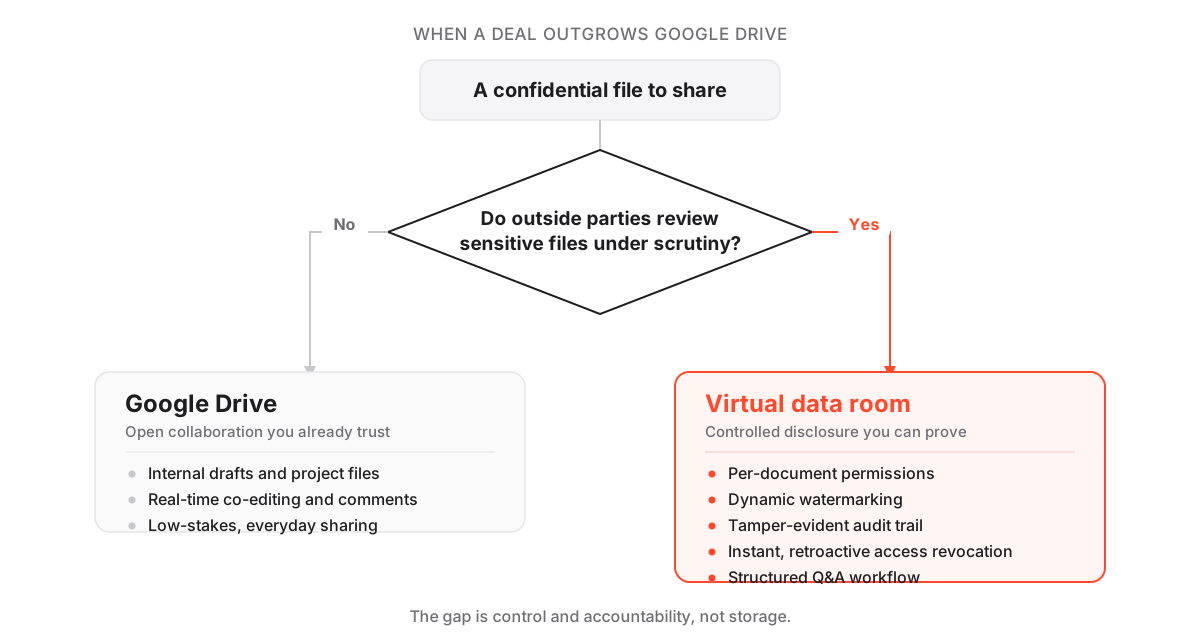
- Reach for Drive when the material is internal drafts, marketing assets, project files, or anything you would not mind a colleague forwarding.
- Reach for a VDR when outside counterparties review sensitive files, when you must prove who saw what, when a competitive process means rival parties have to be kept apart, or when a regulator or buyer’s counsel will demand certified security.
The dividing line is not file size or headcount. It is sensitivity plus the presence of outsiders. Hit both and Drive is out of its depth; miss either and a room is overkill.
Can I just set a Drive folder to “view only”?
It helps a little, and it is nowhere near enough.
View-only in Drive still permits previews, and it adds none of the deal controls that matter: no watermarking to trace a leak, no per-page audit logging, no fence view, and no way to revoke a file after someone has already downloaded it.
It curbs casual editing. It does not deliver leak deterrence or provable oversight. Treating “view only” as a substitute for a data room is the single most common way teams talk themselves into an exposure they cannot see until something goes wrong.
Can I use Drive and a data room together?
Yes, and it is usually the smartest setup.
Keep internal drafting, working files and low-sensitivity collaboration in Drive, where the co-editing and low friction earn their keep. Move the curated, deal-critical documents into a virtual data room the moment outside parties need supervised access.
Most teams draft in Drive and disclose in a room, and the two never really compete, because each is doing the job it was built for.
Does Google sell a data room product?
No. There is no dedicated Google virtual data room.
Google Drive and Workspace are general collaboration and storage tools. The data room capabilities, watermarking, structured Q&A, granular permissions and a defensible deal audit trail, come from purpose-built VDR providers.
Those are what our reviews test and score, from enterprise names like our iDeals review and Datasite review down to leaner options for smaller deals.
How do you move confidential files off Drive into a data room?
Mostly organisation, not technology. A first pass takes an afternoon, and the work is in how you arrange things, not the upload itself.
How to move confidential deal files from Google Drive into a virtual data room
A first pass for teams shifting sensitive documents out of a shared Drive into a controlled room.
Estimated time: 2h
-
Audit what is currently shared
Review every Drive sharing setting first. Find any 'anyone with the link' documents and revoke them before you migrate, so nothing leaks during the move.
-
Rebuild the index around the buyer
Design the folder tree around how reviewers work (corporate, financial, legal, commercial), not around how your team happened to store files in Drive.
-
Export and upload in bulk
Download the deal documents from Drive as PDFs where possible, then bulk upload into the room and run full-text indexing so everything is searchable.
-
Set permissions by group, not by person
Create user groups such as bidders, legal and internal, and grant folder-level rights per group rather than editing individuals one by one.
-
Turn on the controls Drive never had
Enable dynamic watermarking, view-only rendering and two-factor authentication before a single external reviewer is invited.
-
Invite in waves and watch engagement
Send invitations in stages and use the activity log and engagement heatmap to see who is active and where attention concentrates.
The teams that struggle are the ones that copy their Drive folder structure verbatim. A room organised around the reviewer, with clean permission groups, does in an afternoon what an ad hoc Drive share never manages: it makes the process fast and provable at once. For more, see how to set up a virtual data room and the data room folder structure template.
How quickly can the switch happen?
Faster than most people expect. A basic room can be live in under an hour once your files are ready, and a full migration from Drive is typically an afternoon of work.
The time goes into organising the index and setting permission groups correctly, not into wrestling with the software. That is why the “we do not have time to set up a room” objection rarely survives contact with the actual clock.
Which should you choose for M&A, fundraising or due diligence?
For any of the three, choose a virtual data room. These are the scenarios data rooms were built for, and each one carries the two conditions that rule Drive out: sensitive material and outside parties reviewing it under scrutiny.
- M&A: bidders comb financials, contracts and IP, and a competitive auction means keeping rival buyers apart while proving disclosure to each.
- Fundraising: founders share a curated set with investors and want to see who actually engaged before the next call.
- Due diligence: legal and financial teams verify claims against source files and expect a clean, exportable audit trail.
Drive can hold the documents in all three. It cannot run any of them defensibly. Where providers separate is in how gracefully they handle these workflows at each price point, which is what our comparisons dig into.
For a scenario-specific start, see the guide on a virtual data room for M&A or for startup fundraising. If you would rather begin from a shortlist, the best virtual data rooms roundup and the best-for hubs rank rooms by scenario.
The short answer, one more time
If the file is internal and the downside of a leak is small, Drive is the right tool and a data room is overkill.
If the file is confidential and an outside party will review it under time pressure, a virtual data room is the right tool and Drive is a liability you have not priced.
Frequently asked questions
Is Google Drive secure enough for M&A due diligence?
Not on its own. Google Workspace secures the underlying infrastructure, but Drive lacks the document-level controls M&A needs: per-user permissions, dynamic watermarking, view-only rendering, a structured Q&A workflow and a tamper-evident audit trail. For a real transaction, a reputable virtual data room certified to ISO 27001 and SOC 2 is the appropriate tool.
Can I just set a Drive folder to 'view only' instead of using a VDR?
View-only in Drive still allows previews and does not add watermarking, per-page audit logging, fence view or the ability to revoke a file after it has been downloaded. It reduces casual editing but does not deliver the leak deterrence and provable oversight a confidential deal requires.
Is a virtual data room worth the extra cost over Google Drive?
For a confidential deal, usually yes. A Workspace seat runs roughly $7 to $18 per month while a deal-grade room starts around $99 per month, indicative and worth confirming with the provider. The premium buys accountability and control, not storage. Against the average $4.88 million cost of a data breach, that is modest insurance.
Can I use Google Drive and a data room together?
Yes, and many teams do. Keep internal drafting, project files and low-sensitivity collaboration in Drive, then move the curated, deal-critical documents into a virtual data room once outside parties need supervised access. Use each tool for the job it was built for.
Does Google offer a data room product?
Google does not sell a dedicated virtual data room. Google Drive and Workspace are general collaboration and storage tools. Data room capabilities such as watermarking, Q&A, granular permissions and deal audit trails come from purpose-built VDR providers, which is what we test and compare.
How quickly can I switch from a Drive folder to a data room?
A basic room can be live in under an hour once your files are ready, and a full migration from Drive is typically an afternoon of work. The time goes into organising the index and setting permission groups correctly, not the software itself.
