
Are virtual data rooms secure? How the protection works
On this page
- The short answer: are virtual data rooms secure?
- How does a data room keep documents safe, exactly?
- What threats is a data room built to stop?
- Which certification actually proves security, and which are noise?
- What does the encryption actually do?
- What keeps the wrong people out in the first place?
- Why does the audit trail matter so much?
- Are all data rooms equally secure? (No.)
- How do I verify a room’s security myself before buying?
- So where does data room security actually break down?
- Can the provider itself see my files?
It is late the night before a board deadline. A folder of financials, cap tables and signed customer contracts is sitting on a desktop, and someone is about to drag it into a browser tab.
The question that stops the cursor: is this thing actually secure, or is that just marketing?
That pause deserves a straight answer before the reassurances. So this guide runs as a Q&A, the questions buyers really ask before they upload a diligence pack, answered plainly. Start here, jump to the one keeping you up, or read straight through.
The short answer: are virtual data rooms secure?
Yes. A properly certified virtual data room is one of the safest ways to share confidential documents, and it is materially safer than email or a shared drive.
Security here is not a single switch you flip. It is a stack of independent controls, each covering a different failure mode. Encryption keeps the bytes unreadable. Permissions decide who may even ask for a file. Watermarking makes any leak traceable. An audit trail records every action. No single failure exposes a document.
The honest caveat: “secure” describes a well-configured room from a certified provider. It is not a blanket guarantee stamped on the whole category. A rebadged file-sharing tool with a login screen is not the same thing, and the difference is the rest of this article.
That $4.88M figure, from IBM’s annual Cost of a Data Breach Report, is the business case for the category in one number. A data room exists to pull confidential files out of the channels where breaches actually happen, inboxes and shared drives, and into an environment engineered to contain them.
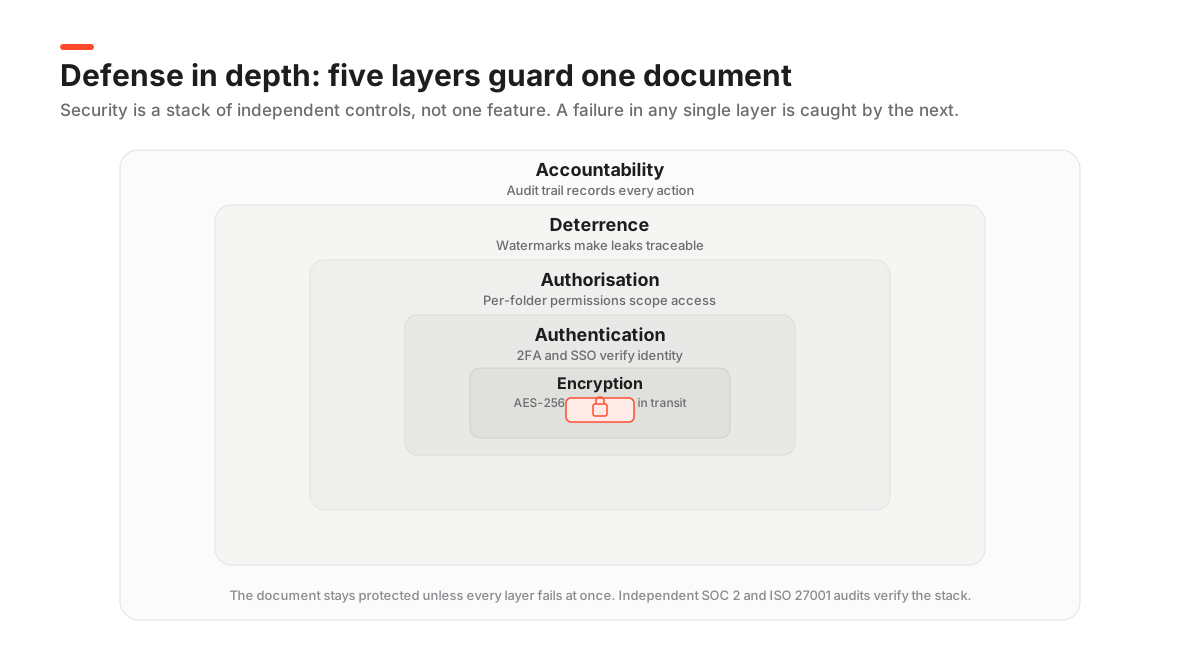
How does a data room keep documents safe, exactly?
Through defence in depth. Picture the five nested rings in the diagram above. Each ring does one job, and if an attacker or an accident slips past one, the next still holds.
That beats hunting for a single “most secure” feature. Breaches almost never fail on the encryption. They fail on the ring around it: a shared password, an over-broad permission, an un-revoked login.
Here is the whole stack in one place, with the part buyers usually skip. What breaks when a given layer is missing.
The data room security stack, layer by layer
| Layer | What it does | What fails without it |
|---|---|---|
| Encryption | AES-256 at rest and TLS in transit make stored and moving data unreadable | A stolen disk or intercepted connection exposes raw files |
| Authentication | Two-factor login and SSO confirm the person is who they claim to be | A single leaked password opens the whole room |
| Authorisation | Granular, per-folder permissions scope each user to only their slice | One over-broad share reveals the entire deal |
| Deterrence | Dynamic watermarking and view-only rendering discourage and trace leaks | A leaked page is anonymous and untraceable |
| Accountability | A tamper-evident audit trail records every view, print and download | Disputes turn on memory, not evidence |
Read that last column top to bottom and the theme is clear. The scary outcomes come from one weak ring, not a broken platform. That is why the questions below treat certifications, encryption, access control and the audit trail as separate things to check, never a single “is it secure” tickbox.
What threats is a data room built to stop?
Name the specific bad things that can happen to a confidential file during a live deal, then match each to its countermeasure. The category is engineered around one threat model: sensitive documents copied, forwarded, or seen by the wrong party under time pressure.
- A file gets forwarded to an outsider. Reviewers never receive a raw copy; they see a permission-checked, watermarked render, and access is revocable in one click.
- The wrong bidder opens a sensitive folder. Granular, per-folder permissions scope each group to only its slice of the room, never the whole set.
- A leaked page surfaces where it should not. Dynamic watermarking burns the viewer’s name, email and a timestamp onto every page, so a screenshot points straight back to whoever took it.
- A dispute later hinges on who saw what. The tamper-evident audit trail hands the owner a defensible, exportable timeline instead of a memory.
- Traffic or storage gets intercepted. AES-256 at rest and TLS in transit turn intercepted data into unreadable ciphertext.
Notice the pattern. Most of these are about control after access is granted, not just keeping intruders out. That is the real gap between a data room and a firewall.
Which certification actually proves security, and which are noise?
If you check one thing, make it a current SOC 2 Type II report. It is the single most useful document to request, because an independent auditor tested the provider’s security and confidentiality controls over months, not on one convenient afternoon.
Watch the Type. Type I says the controls existed on a single date. Type II says they worked over time. Only Type II is meaningful.
The strong second is ISO/IEC 27001, published by the ISO, which certifies the whole information-security management system around those controls rather than a snapshot. Both credentials matter because an outside auditor stands behind them, not the vendor’s own marketing team. A SOC 2 report is defined by the AICPA; our explainer on VDR certifications walks through how to read a report’s scope and effective dates so a stale one does not fool you.
And the noise? “Bank-grade security” is a phrase, not a certification. “Military-grade encryption” usually just means AES-256, which is table stakes.
The bottom line is blunt. If a provider cannot produce a current SOC 2 Type II report on request, treat every other security claim as unverified.
What does the encryption actually do?
It makes stolen data worthless. A serious room encrypts files in two states: in transit, moving between your browser and the server, and at rest, sitting on disk.
In transit runs over TLS 1.2 or 1.3, the same protocol behind online banking, so an intercepted connection yields only scrambled data. At rest uses AES-256, so a thief who physically stole the storage hardware would recover ciphertext and nothing else.
What separates strong providers from merely adequate ones is key management. Encryption is only as good as the protection around the keys that unlock it, so leading rooms rotate keys, store them apart from the data, and on higher tiers may offer customer-managed or zero-knowledge encryption.
If your deal touches EU personal data, where those files physically sit matters too, since storage location falls under the GDPR. Confirm the data-centre region before uploading anything with customer records.
What keeps the wrong people out in the first place?
Access control, and this is where a data room departs most sharply from a shared drive. On a shared drive, one link tends to grant everyone who holds it the same access.
In a room, rights are assigned by user group and by folder, layered from weakest to strongest. A bidder, an outside adviser and an internal admin each see a different, tightly scoped view of the same room.
The controls doing that work:
- Two-factor authentication, so a leaked password alone cannot open the room.
- Granular, folder-level permissions, granted to groups rather than person by person, which cuts down configuration mistakes.
- View-only rendering with restricted print and download, often reinforced by fence-view so most reviewers never touch a raw file.
- Time-bound and revocable access, letting an admin cut off a user or a whole group the instant a deal shifts.
- IP and device restrictions on stricter setups, limiting where the room can be opened at all.
Our guide on how a virtual data room works walks the full permission matrix and the request-to-view loop if you want the mechanics.
Why does the audit trail matter so much?
Because buyers underrate it right up until the moment they need it, and then it is the only thing that helps.
The trail is a chronological, tamper-evident record of every action in the room: who logged in, which document they opened, how long they lingered on each page, whether they printed or downloaded. In a competitive process that log is not a nicety, it is evidence. It turns “we believe the buyer saw the environmental report” into a timestamped, exportable fact you can show a regulator, a court, or the acquirer’s counsel.
The quality gap is real. A strong trail captures activity at the page level and cannot be edited by the administrator, so it stays defensible. Weak ones log only logins and downloads, which is close to useless in a dispute. Our deep dive on VDR audit trails shows what a genuinely detailed log looks like.
Are all data rooms equally secure? (No.)
Assuming they are is the most common and most expensive mistake buyers make.
The gap between a purpose-built diligence platform and a lightly rebadged file-sharing tool is wide, and it opens up exactly where deals get sensitive. Some products sold as “data rooms” are consumer storage with a permission layer bolted on, missing the certifications, watermarking depth and audit granularity that regulated counterparties expect.
Here is the contrast, capability by capability.
Certified enterprise VDR vs a basic file-sharing tool marketed as a data room
| Security capability | Certified enterprise VDR | Rebadged file sharing |
|---|---|---|
| SOC 2 Type II + ISO 27001 | Yes | Rarely both |
| AES-256 at rest and TLS in transit | Yes | Varies |
| Dynamic per-page watermarking | Yes | No |
| Granular folder-level permissions | Yes | Link-level only |
| Complete, exportable audit trail | Yes | Limited |
| Remote shred / access revocation | Yes | No |
One nuance, because it is easy to draw the wrong lesson: cheaper does not mean unsafe. Plenty of well-priced rooms are properly certified. Price tier and security tier are simply different axes, and you have to check the second one on its own.
Our roundup of the cheapest virtual data rooms flags which budget options still carry real certifications, our pricing guide explains what those tiers actually buy you, and each entry in our provider reviews lists the certifications we could verify at test time.
How do I verify a room’s security myself before buying?
You run diligence on it the way you would on any critical vendor. Ask for evidence, then test the controls with your own hands during a free trial.
Do not take a security page at face value. Reputable providers are used to producing audit reports on request, and reluctance to share one is itself a signal worth noting. These are the exact steps we run before scoring any provider.
How to verify a virtual data room's security before you commit
A practical, provider-agnostic diligence checklist you can run during a trial.
Estimated time: 2h
-
Request the SOC 2 Type II report
Ask for the current report under NDA and check the effective dates and the scope. A Type II covering the last 12 months is the gold standard; a stale or Type I-only report is a caution flag.
-
Confirm ISO 27001 and encryption specifics
Verify ISO/IEC 27001 certification and that files are AES-256 at rest and TLS 1.2 or higher in transit. Ask where data is hosted and whether the region can be chosen.
-
Test the permission model live
In a trial, create a test bidder group and confirm it truly cannot see or download folders you restricted. Try to break your own configuration before a real reviewer can.
-
Check watermarking and access revocation
Open a document as a test user, confirm the dynamic watermark shows their identity, then revoke access and verify the view stops immediately.
-
Export a sample audit log
Confirm the audit trail captures views, prints and downloads at the page level, and that you can export it. If the log is thin, the room cannot give you a defensible record.
Doing this once, before real documents go in, beats any volume of vendor assurances. It converts security from a claim on a marketing page into something you have watched work with your own test files. For a printable version to carry into procurement, keep our VDR security features checklist open alongside the trial.
So where does data room security actually break down?
Almost never at the encryption.
When documents leak from a room, the cause is overwhelmingly human: a permission set too broadly, a departing employee whose access was never revoked, a password shared without two-factor, a bidder photographing a screen with a phone.
The human element continues to be a major driver of breaches, present in the large majority of incidents year after year.
Verizon Data Breach Investigations Report
That pattern, documented in every edition of Verizon’s Data Breach Investigations Report, holds for data rooms too. Which is why the administrator’s discipline matters as much as the platform’s engineering. The most secure room on earth still leaks if an admin grants download rights on a sensitive folder to the wrong group.
The defences are unglamorous, but they work. Enforce two-factor for every user. Grant the least access that lets someone do their job. Keep original downloads disabled until a bidder reaches exclusivity. Review the audit log for odd activity while the deal is live.
Watermarking will not physically stop a photograph, but it turns every leaked page into evidence that names the leaker, a real deterrent in a small pool of known reviewers.
Can the provider itself see my files?
This is the question sophisticated buyers ask last and worry about most, and the honest answer has a texture to it.
With standard managed encryption, the provider technically controls the keys and could, in principle, reach stored files. That is exactly why the independent SOC 2 and ISO 27001 controls around insider access, logging and separation of duties exist. They are your assurance that the provider’s own staff cannot quietly browse your deal. For the most sensitive engagements, some enterprise platforms offer customer-managed or zero-knowledge encryption, where the provider cannot decrypt your data even if compelled to.
For the vast majority of transactions, a certified provider’s audited controls are more than enough, and the residual provider-access risk is far smaller than the human-error risk above. If your deal is unusually sensitive, national-security-adjacent, or bound by specific data-residency law, raise customer-managed keys and hosting region explicitly in procurement rather than assuming the default. Our provider reviews note where a room offers advanced key control versus standard managed encryption, and the comparison tool lets you filter for it directly.
Frequently asked questions
Are virtual data rooms safer than email or Google Drive?
Substantially. Email and consumer cloud storage hand over a copy the moment a file is shared, offer little more than link-level access, and give you a thin record of who opened what. A certified data room keeps the master file server-side, serves a permission-checked watermarked view, logs every action, and lets you revoke access instantly. That is a different security category, not a marginal upgrade.
What is the single most important security feature to check?
A current SOC 2 Type II report. It is an independent auditor's attestation that the provider's security and confidentiality controls actually worked over a period of months, not just on paper. If a vendor cannot produce one on request, treat every other security claim as unverified until proven.
Can documents be downloaded or copied from a data room?
Only if the administrator grants download rights on that folder, and even then the file is often a protected, watermarked PDF rather than the raw original. Most sellers keep downloads disabled for the bulk of a deal and loosen them only for an exclusive bidder late in the process.
Does encryption alone make a data room secure?
No. Encryption protects the file, but security also depends on granular permissions, two-factor authentication, watermarking, a full audit trail, and, crucially, an administrator who configures all of it correctly. Most real-world leaks stem from misconfiguration or human error, not broken encryption.
Is a free trial enough to test a room's security?
A free trial is the ideal way to verify security claims, and most reputable providers, Ellty among them, offer one. Use it to test the permission model with a dummy bidder group, confirm watermarking shows the viewer's identity, revoke access and check it stops, and export a sample audit log to see how detailed it is.
Do data rooms meet GDPR and HIPAA requirements?
Reputable providers can, but it is provider-specific and must be confirmed. For GDPR, check the data-centre region and the processing terms; for HIPAA, confirm the provider will sign a business associate agreement. Never assume compliance from a marketing label; ask for the specifics that apply to your data.
How long does it take to verify a room is secure?
About an afternoon if you are organised. Requesting the SOC 2 and ISO 27001 reports takes minutes; the hands-on part, testing permissions with a dummy bidder group, checking watermarks, revoking access and exporting a sample audit log, fits comfortably inside a two-hour trial session. Doing it before real files go in is always worth the time.
