
Which data rooms have AI features? A provider-by-provider comparison
On this page
- What counts as an AI feature in a data room?
- Which data room providers ship AI features?
- Which AI job does your deal actually need?
- Where AI in a data room helps, and where it falls short
- What to ask before any AI touches your documents
- How to compare data room AI features in a trial
- How AI changes the price comparison
- What Halvorsen did differently on the next deal
- Does every deal need data room AI at all?
The deal team at Halvorsen Capital chose its data room in a forty-minute demo.
What won the room was a chat box. You typed a question about a contract and it answered in plain English, with the relevant clause quoted underneath. Everyone on the call agreed it looked like the future, and the order form was signed that week.
Then the carve-out began. Halvorsen was buying the Iberian logistics arm of a larger group: about 11,400 files, roughly a third of them in Spanish or Portuguese, with a thick layer of employee records and customer price lists that had to be masked before a clean team on the buyer side could see them.
The chat box had nothing to offer that job.
Nobody needed a summary of a contract they were not yet allowed to show. They needed names, salaries and unit prices blacked out across thousands of pages, and they needed the non-English files sorted into the right folders before bidders asked where things were. Two associates spent most of three weeks redacting by hand, and a partner spent one very long weekend checking their work.
Halvorsen did not buy a room with bad AI. It bought AI for the wrong job.
The fix the team applied on its next deal is what this guide is built around, and it is unglamorous: list the jobs the deal will actually create, decide which of them AI can take on, and only then look at which providers ship what. (Halvorsen and its deals are illustrative. The pattern is one we hear about often.)
What counts as an AI feature in a data room?
An AI feature in a data room is any function where a model reads, classifies or generates content from your documents, rather than applying fixed rules that an administrator set up.
That definition cuts out a surprising amount of what gets marketed under the label.
Full-text search over OCR’d documents is useful, but it is pattern matching, not AI in the sense that matters here. An engagement dashboard that counts page views and time on page is analytics. Neither involves a model making a judgement about your content, so neither carries the new risks, or the new upside, that AI brings.
Once the definition is applied strictly, the features that remain fall into five jobs.
- Redaction. Detecting personal data, prices, names or defined terms across a batch of files and masking them, ideally with a review queue before anything is applied.
- Translation. Rendering a document in the reviewer’s language so a bidder’s counsel in another country can read it without waiting on a translator.
- Indexing and categorisation. Reading an uploaded file and suggesting what it is and where it belongs in the folder tree. Our explainer on AI document indexing in data rooms covers this job in depth.
- Readiness or gap scoring. Comparing the index against what buyers typically expect, then flagging what is missing, such as a material contract or an IP register, before the room opens.
- Search, summaries and document chat. Answering natural-language questions across the room and summarising long documents, the job Halvorsen’s demo showed off.
Each job pays off in a different phase of the deal. Redaction and indexing save time during preparation. Readiness scoring earns its keep in the week before launch. Translation and search matter most once reviewers are inside.
There is a sixth candidate at the edge of the list: predictive engagement scoring, which tries to guess from reading behaviour which bidder is serious. Some premium rooms layer it over their analytics, but it is thinly documented across the providers we track, so we treat it as a bonus rather than a selection criterion.
Which data room providers ship AI features?
Five of the 25 providers in our dataset flag built-in AI tooling. The table below shows what each one points that tooling at, based on our review notes, and also lists three well-established rooms where AI is not flagged, so the gap is visible rather than implied.
AI features by provider: what is flagged in our data and the main job it does
| Provider | AI flagged in our data | Main AI job documented | Indicative price (USD) |
|---|---|---|---|
| Datasite | Yes | AI-assisted redaction across large batches, alongside buyer-engagement analytics | Custom quote |
| Ansarada | Yes | AI readiness scoring that grades the index and flags gaps before launch | Custom quote |
| Drooms | Yes | AI translation and indexing suggestions for multilingual rooms | Custom quote |
| Box | Yes | General content-cloud AI tooling, not built around a deal workflow | From $15 per user per month |
| Ellty | Yes | AI features inside a full deal room with Q&A, watermarking, DRM, e-signature and audit trail | From $149 per month |
| iDeals | Not flagged | Deep deal workflow and redaction; no AI tooling in our data | Custom quote |
| Intralinks | Not flagged | Enterprise permissions and audit depth; no AI tooling in our data | Custom quote |
| Firmex | Not flagged | Engagement dashboards, but no AI summarisation or predictive scoring | Custom quote |
Read the table across, not down. Three things stand out.
First, the jobs barely overlap. Datasite puts its AI to work on redaction at volume, Ansarada on scoring how complete a sell-side index is, and Drooms on translation and filing suggestions for multilingual European portfolios. Asking which of them has the best AI is like asking whether a torque wrench beats a tape measure. It depends entirely on the job.
Second, some of the most established rooms are not flagged at all. That is not a quality verdict. iDeals and Intralinks rank near the top of our scores on the controls that decide most deals: permissions, audit depth, Q&A and support. It simply means that if AI is a hard requirement, your shortlist moves.
Third, the general-purpose option is real but different. Box ships AI across a content cloud that many companies already use daily, which is convenient. It is not shaped around a bidder process, so you supply the deal structure yourself.
Ellty sits in the same full-featured class as iDeals and Datasite, pairing its AI features with granular permissions, threaded Q&A, dynamic watermarking, DRM, e-signature and a full audit trail, and it is one of only two rooms in this group with a published entry price.
That last figure is the one to remember when a demo goes well.
A word on how to use a table like this. AI is the fastest-moving part of every vendor’s roadmap, and a feature announced in a press release can take months to reach the plan you are actually buying. Treat “not flagged” as a prompt to ask, not as a closed door. When a provider you otherwise like is missing an AI job you need, ask three things directly: is it shipped today, is it on your tier, and can you test it in the trial on your own files.
Treat “flagged” with the same caution in reverse. A tick tells you a capability exists. It does not tell you how well it handles a scanned lease from 2009 or a price list pasted into a contract as an image. Pairwise pages such as iDeals vs Datasite are a better place to weigh the wider trade-offs between two specific rooms.
Which AI job does your deal actually need?
Start from the deal, not the feature list. The matrix below maps six common deal types against the five AI jobs, rated by how much each job tends to matter. It is a starting point drawn from how these processes usually run, not a rule.
| Deal type | Redaction | Translation | Indexing | Readiness scoring | Search and summaries |
|---|---|---|---|---|---|
| Competitive sell-side auction | Useful | Depends on bidders | Useful | Critical | Useful |
| Cross-border carve-out | Critical | Critical | Critical | Useful | Useful |
| Venture or growth fundraise | Rarely needed | Rarely needed | Rarely needed | Useful | Rarely needed |
| Real estate portfolio sale | Useful | Depends on assets | Critical | Useful | Useful |
| Litigation or internal investigation | Critical | Depends on custodians | Useful | Rarely needed | Critical |
| Buy-side review of a seller’s room | Seller’s job | Useful | Rarely needed | Rarely needed | Critical |
Two patterns jump out.
Volume and language drive almost everything. The carve-out row lights up because it combines thousands of files, several languages and personal data, which is the exact profile where manual work becomes the bottleneck. A fundraise with 300 well-organised documents gets very little from AI, because a person can hold the whole room in their head.
The other pattern is that the buy side and the sell side want different AI. Sellers prepare, so they care about indexing, redaction and gap-finding. Buyers review, so their interest is search and summaries, and on a buy-side mandate you are usually working in a room the seller chose. If that is your position, the sibling guide on AI search and document chat in data rooms is the more relevant read.
The decision tree turns the same logic into four questions you can answer in a minute.
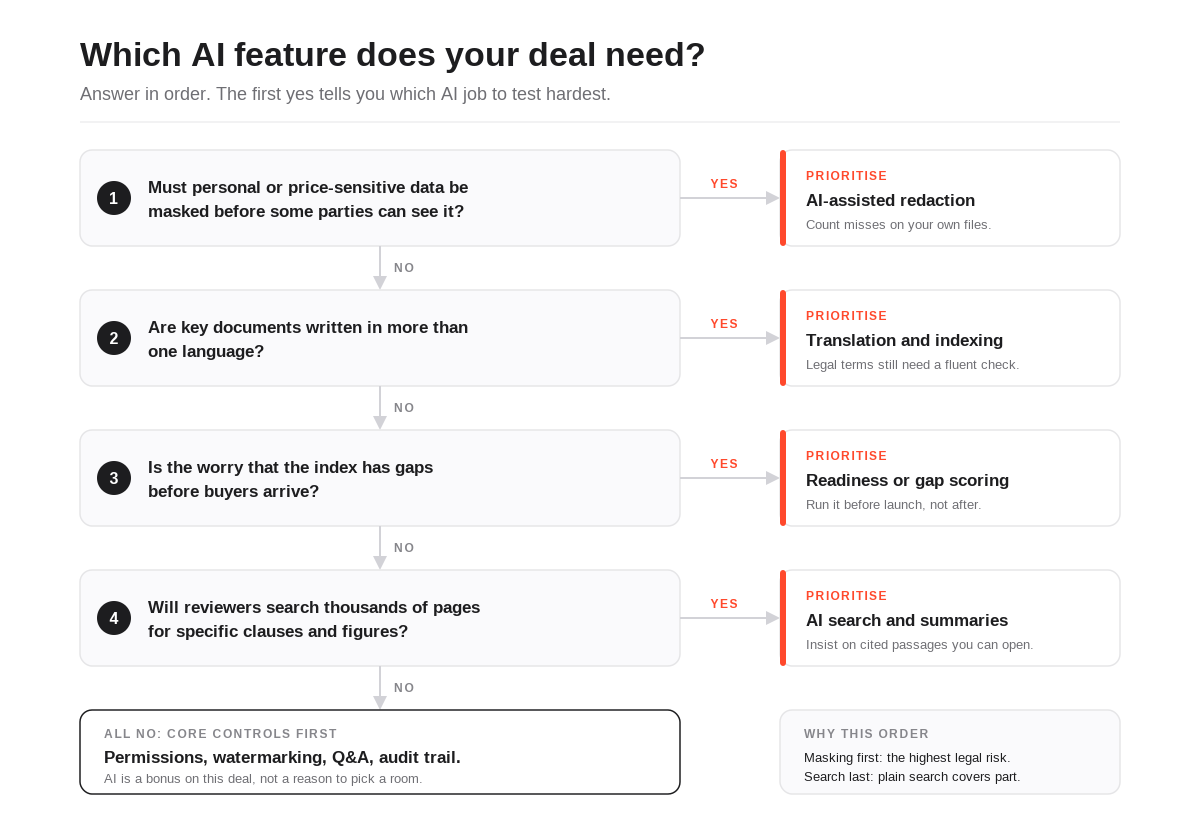
Notice the order. Masking comes first because it carries the most legal risk and the most manual hours when it goes wrong. Search comes last, because it is the job most rooms can partly cover with ordinary full-text search, even without a model.
If every answer is no, the honest conclusion is that AI should not decide your choice of room. Core controls should.
Where AI in a data room helps, and where it falls short
AI features are neither a gimmick nor a replacement for a deal team. They are labour-saving tools with specific failure modes, and the failure modes matter more than the demos suggest.
What data room AI does well, and what it gets wrong
Where it helps
- Cuts weeks of manual redaction on large batches of contracts, payroll files and price lists
- Makes foreign-language files reviewable without waiting days for a translator
- Catches missing documents in the index before a buyer's counsel points them out
- Finds a clause or a figure across thousands of pages in seconds rather than hours
Where it falls short
- A missed redaction is silent: nothing flags the salary figure the model did not recognise
- Summaries and chat answers can be fluent and wrong, and reviewers stop checking once they trust the tool
- Machine translation of legal terms needs a qualified check before anyone relies on it
- Adds new questions about where documents are processed and what happens to prompts and outputs
The redaction risk deserves a second look, because it is asymmetric.
If an AI tool over-redacts, someone notices a blacked-out word that should be visible and asks for it. If it under-redacts, nobody notices anything until a competitor’s analyst reads a customer’s unit price. A false positive costs a question in the Q&A log. A false negative can cost the deal, or trigger a complaint under privacy law.
Summaries carry a quieter risk. A model can produce a confident paragraph that misstates a termination right, and the reviewer who skims it has no reason to doubt it. Our sibling piece on AI hallucinations in due diligence works through how those errors show up in diligence work and how teams catch them.
There is also a newer attack surface. A document uploaded to a room can contain hidden text written to steer a model, for instance an instruction buried in white-on-white type telling an AI assistant to describe a liability as immaterial. The OWASP Top 10 for LLM applications lists prompt injection as its first entry for good reason, and a data room that lets outside parties upload files is exactly the setting where it applies.
None of this argues against AI. It argues for treating every AI output as a draft that a person signs off.
What to ask before any AI touches your documents
Before a feature list, there is a data-handling conversation to have. These questions separate a provider that has thought about AI from one that bolted a model on last quarter.
- Does any model train on our documents? You want a clear no in writing, covering both the provider’s own models and any third-party model it calls.
- Where does processing happen? If documents leave the room’s hosting region to reach a model provider, that matters for data residency commitments and privacy law.
- What is kept, and for how long? Prompts, outputs and intermediate files should follow the room’s retention rules and be deleted with the room.
- Do AI answers respect permissions? A chat tool that answers a bidder’s question using a folder that bidder cannot open is a leak with a friendly interface. Test it by logging in as a restricted user.
- Are AI actions logged? Each AI redaction, summary and query should appear in the audit trail with a user and a timestamp, just like a view or a download. The guide on logging AI activity in a data room covers what a good record looks like.
- Can it be switched off? Some sellers will want AI disabled for one bidder group or one folder. Per-room and per-group controls are a sign of maturity.
For a structured way to think about AI risk across these questions, the NIST AI Risk Management Framework is a widely used reference and maps neatly onto vendor due diligence.
The permissions question is the one most teams skip, and it is the one with the sharpest edge. A data room exists to show different parties different things. An AI layer that flattens those walls, even occasionally, undoes the point of the room.
How to compare data room AI features in a trial
Demos are built on the vendor’s documents. Your deal runs on yours, with their scanned signature pages, handwritten annotations and tables pasted as images. The only comparison that tells you anything is one run on your own material.
How to test data room AI features in a trial
A side-by-side test of AI features on your own documents, run during a free trial before you commit to a provider.
Estimated time: 3h
-
Write the job list
Using the matrix above, write down the two or three AI jobs your deal will genuinely create, and ignore the rest during testing.
-
Build a test pack
Assemble 50 to 100 of your own files, including scans, image-based tables, non-English documents and a few files with sensitive items you have catalogued in advance.
-
Score redaction against your catalogue
Run AI redaction on the pack and count what it missed and what it over-masked against your list. Misses matter far more than over-masking.
-
Ask questions with known answers
Put ten questions to search or chat whose answers you already know, and check every cited passage rather than the summary alone.
-
Test permissions as a restricted user
Log in as a reviewer with access to one folder only and ask about content in a folder they cannot open. The answer should be nothing.
-
Check the audit log
Confirm that AI queries, redactions and summaries appear in the activity log with a user and a timestamp, and that the log exports.
-
Price the AI you would actually use
Ask whether the features you tested are bundled or billed separately, and get the all-in figure in USD for your expected volume.
Run the same pack through every room on your shortlist. Comparing redaction miss rates on identical files is far more telling than comparing feature names, which vendors use loosely. Our step-by-step guide to testing data room AI features goes further on building the test pack and scoring the results.
One practical note: free trials sometimes restrict AI features or cap their usage, so ask before you start whether the trial includes the AI you plan to test, and at what volume.
How AI changes the price comparison
AI complicates pricing more than any other feature, because it can be bundled, sold as a module, metered by pages processed, or limited by plan.
Four of the five providers flagged in our data price by quote or per user, so the AI line in your budget is often invisible until a proposal arrives. When you compare, ask the same three things of every vendor: is the AI you need included at your tier, is usage capped, and what happens to the bill if you run redaction across the whole room twice. The full breakdown of models is in our guide to data room AI pricing, and the wider picture of plan structures sits on the pricing overview.
Do not let an AI module tip a close decision on its own. A room with weaker AI and stronger permissions is usually the safer choice for a contested deal than the reverse.
What Halvorsen did differently on the next deal
Six months after the carve-out, Halvorsen was back in the market, this time selling a portfolio company with plants in Germany and Poland.
Before booking a single demo, the deal lead wrote one page. About 6,000 documents. German, Polish and English. Two likely bidders who competed with the target, which meant a clean team and careful masking of customer terms. A seller index that had last been tidied before the pandemic.
Against the matrix, that page pointed at three jobs: redaction, translation and readiness scoring. Search barely registered, because the team knew the documents well.
The shortlist followed from the jobs rather than the demos. Each room got the same 80-file test pack, including scanned supplier contracts with prices in image-based tables. One room’s AI redaction missed most of those prices, because it never read the images. That came out in the trial, at no cost, instead of in a bidder’s hands.
The team chose the room that caught the image-based prices and could translate the Polish board minutes, then kept a human check on every redacted batch. Redaction took four working days instead of three weeks.
The room they picked did not have the most impressive chat feature on the shortlist. Nobody missed it.
Does every deal need data room AI at all?
No, and it is worth saying plainly.
A large share of deals, particularly fundraises and smaller private sales with a few hundred well-organised documents, run perfectly well on the controls that have defined data rooms for two decades: granular permissions, dynamic watermarking, a structured Q&A module and a complete audit trail. If those are weak, no amount of AI makes up for it. The explainer on virtual data room features sets out that core in detail.
AI earns its place where volume, language or masking turn preparation into a bottleneck. In those deals it can save weeks. Outside them, it is a pleasant extra, and you should weigh it that way when one room’s demo dazzles and another’s does not.
A useful rule of thumb from the deals we see: if you can describe the job the AI will do, with a rough count of the documents it will touch, it belongs in your evaluation. If you can only describe how impressive it looked, it does not.
Frequently asked questions
Which virtual data rooms have AI features?
Of the 25 providers we track, five flag built-in AI tooling in our current data, among them Datasite, Ansarada, Drooms and Box. They aim it at different jobs, from AI-assisted redaction and readiness scoring to translation, indexing suggestions and general content AI. Several established rooms, including iDeals, Intralinks and Firmex, are not flagged for AI in our data, which reflects documentation rather than overall quality.
Can AI redaction in a data room be trusted?
As a first pass, yes; as the final word, no. AI redaction can mask thousands of pages far faster than a person, but it can miss items in scans, image-based tables and unusual formats, and a missed redaction is invisible until someone reads it. Test it on your own files during a trial, measure what it misses, and keep a human sign-off on every batch before bidders gain access.
Does data room AI train on my documents?
It should not, but you need the answer in writing. Ask each provider whether its own models or any third-party model it calls train on customer documents, where AI processing happens, and how long prompts and outputs are retained. A clear contractual commitment matters more than a reassuring line in a demo.
Do AI search and chat respect data room permissions?
They must, and it is worth testing rather than assuming. Log in as a user restricted to one folder and ask about content in a folder they cannot open; a correct implementation returns nothing. An AI answer drawn from a restricted folder is a leak, even if the underlying file never opened.
Is a data room with AI more expensive?
Often, though not always visibly. AI may be bundled into a tier, sold as a module or metered by pages processed, and most providers in our data price by quote. Ask whether the AI you need is included at your tier, whether usage is capped, and what the all-in USD figure is for your expected volume; treat any price as indicative and confirm with the provider.
