
AI auto-indexing in data rooms: how uploads get sorted, tagged and checked
On this page
- What AI auto-indexing actually does
- The journey of one upload
- Which jobs AI handles well, and which it does not
- Where auto-indexing goes wrong in real deals
- AI suggestion versus manual filing versus a template
- Gains and limits at a glance
- The review pass that makes AI indexing safe
- Data privacy when a model reads your documents
- What to test in a trial before you rely on it
- Who should lean on auto-indexing, and who should go slower
Here is the claim you will hear in almost every demo: upload the whole folder, and the room organises itself.
It is half true.
The half that is true is impressive. A modern room can take a few thousand mixed files, read the scanned ones, guess that a document titled scan_0042.pdf is in fact a commercial lease, number it, tag it with the property and the tenant, and flag that the same lease was uploaded twice from two different laptops. Work that used to cost a paralegal a week now runs in the time it takes to make coffee.
The half that is false is where deals get hurt. The room does not know that a side letter amends the lease it filed three folders away. It does not know that one employment contract belongs to a key person whose terms the seller would rather disclose only to the finalist. And it has no idea that the index is missing an entire category of document that any buyer’s lawyer will ask for on day two.
So the myth needs replacing with a more useful sentence.
AI indexing does not organise your room. It drafts an organisation for you, quickly and mostly well, and then someone who understands the deal has to check it.
This guide explains what happens to a file between upload and its final place in the index, which steps are reliable, which ones misfire, and how to run a review pass that catches the errors that matter before a counterparty sees them.
What AI auto-indexing actually does
AI auto-indexing is the automated reading, sorting, labelling and checking of documents as they enter a virtual data room, so that each file ends up numbered, tagged and placed in a structured data room index with little manual filing.
Under that one label sit several separate jobs, and vendors bundle them differently. It helps to pull them apart, because each one fails in its own way.
Text extraction. Before anything can be classified, the system needs readable text. Native PDFs and office files already carry it. Scans and photos need optical character recognition, which turns page images into searchable text. Everything downstream depends on this step, including full-text search.
Classification. The system decides what kind of document it is looking at (a lease, a board minute, a payroll report, an NDA) and proposes a folder. Older rooms did this with rules and keyword lists. Newer ones use language models that read the opening pages and infer the document type from context.
Naming, numbering and tagging. The file gets a clean title, an index number that matches its folder position, and tags such as counterparty, date, jurisdiction or asset. Tags are what let a reviewer filter three hundred leases down to the twelve that expire next year.
Quality checks. The last layer looks for problems: exact and near duplicates, password-protected or corrupt files, pages with no extractable text, documents that look like drafts rather than executed versions, and, in the more ambitious products, gaps against a diligence checklist.
Not every room does all four. Some do the first and third only and call it auto-indexing. Others put the whole bundle under a broader AI feature set. When you compare products, ask which of the four jobs the feature covers, because the marketing term rarely says.
The journey of one upload
Follow a single file through the pipeline and the weak points become obvious.
Picture a seller’s finance director at a mid-sized logistics group, Corvane Freight, dragging a zip of 2,400 files into a fresh room on a Friday afternoon. Somewhere in that zip is IMG_7731.jpg, a phone photo of a signed warehouse lease from 2019.
First, the room unpacks the archive and preserves the original folder paths as metadata, even if it later moves the file. Good rooms keep that trail so an administrator can see where a document came from.
Second, OCR reads the photo. The lease is slightly skewed and the signature block is in shadow, so the extracted text is clean on page one and patchy on the last page. The system records a confidence score for the extraction, which matters later.
Third, classification. The model reads the first pages, sees “lease”, “landlord”, “premises” and a rent schedule, and proposes the folder for real estate leases with high confidence. It suggests a title built from the parties and the date.
Fourth, tagging. It pulls the landlord’s name, the site address and the start date. It cannot read the expiry date because that clause sits on the shadowed last page, so the expiry tag stays blank.
Fifth, checks. The system notices that a PDF called Warehouse lease signed.pdf has nearly identical text and marks the pair as likely duplicates. It does not notice that a two-page side letter, filed under general correspondence because its first paragraph talks about a meeting, extends that lease by five years.
Every step looked like success. The index is tidy, the file is in the right folder, the duplicate is flagged. And the single most important fact about that lease, its real term, is now split across two folders with no link between them.
That is the characteristic failure of auto-indexing. It rarely produces chaos. It produces confident, tidy, slightly wrong structure.
Which jobs AI handles well, and which it does not
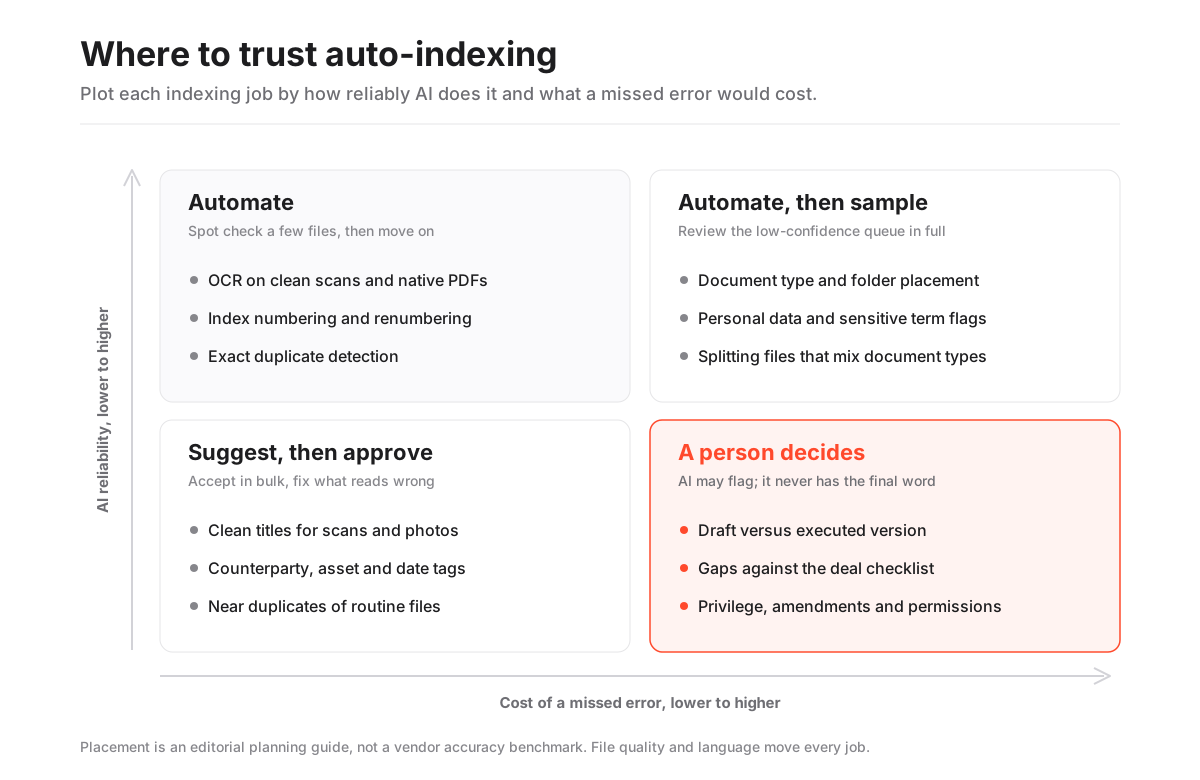
Reliability varies by job far more than by vendor. The table below is our working view from testing rooms with AI-assisted indexing and from how these techniques behave generally; treat it as a guide to where to spend review time, not as a benchmark of any product.
Auto-indexing jobs by typical reliability and what an error costs
| Job | Typical reliability | Where it slips | Cost of a missed error |
|---|---|---|---|
| OCR on clean scans and native PDFs | High | Handwriting, stamps, skewed phone photos, tables | Low to medium: file is unsearchable but still visible |
| Index numbering and renumbering | High | Manual overrides that the system later renumbers | Low: cosmetic, but breaks Q&A references if numbers shift |
| Exact duplicate detection | High | Same document saved with different page sizes or cover pages | Low: clutter and wasted reviewer time |
| Document type classification | Medium to high | Short letters, amendments, mixed bundles, non-English files | Medium to high: a file in the wrong folder can inherit the wrong permissions |
| Entity and date tagging | Medium | Defined terms, schedules, dates written in words | Medium: filters and expiry reports go quietly wrong |
| Near-duplicate and version detection | Medium | Marked-up drafts versus executed copies | High: a buyer reads the draft as the deal |
| Gap detection against a checklist | Low to medium | Missing documents that look like nothing | High: the gap surfaces in Q&A or after signing |
| Personal data and sensitive term flags | Medium | Names in tables, IDs in images, free-text notes | High: privacy exposure to the wrong party |
Read the last column before the second.
The jobs with high reliability also happen to have low stakes. The jobs where an error is expensive, versioning, gaps and sensitive data, are exactly the ones where the model is least sure of itself. That inversion is the whole reason a review pass exists.
Classification sits in the middle and deserves special attention, for one reason that is easy to miss. In most rooms, permissions are set by folder. A document filed in the wrong folder does not just look untidy. It inherits that folder’s access rules, which may include a bidder group that should never see it.
Where auto-indexing goes wrong in real deals
The failures follow a few patterns. Once you have seen them, you can test for them in minutes.
Amendments and side letters drift away from their parents. A short document that changes another document often reads, to a classifier, like correspondence. It gets filed on its own, and the link to the agreement it modifies is lost. Buyers then read the original terms as the current terms.
Mixed bundles get one label. A scanned PDF that contains a board minute, two resolutions and a share certificate is a single file to the system. It will be classified by whatever dominates the first pages, and the share certificate disappears into the governance folder.
Drafts pass as final. Version detection compares text. A marked-up draft and the executed agreement can be 98 percent identical, and the system may keep the newer upload as the master even if the newer upload is the draft someone found on a shared drive. Our guide to data room version control covers how to stop this at the source.
Language and format edge cases. Classifiers trained mostly on English legal documents do worse on Portuguese employment contracts or German land registry extracts. Spreadsheets with no prose, engineering drawings and image-only presentations give the model almost nothing to read.
Confident blanks. A tag that could not be extracted is often left empty rather than marked as uncertain. An expiry report built on those tags will simply omit the lease whose expiry date was on a shadowed page.
The missing document problem. This one is structural. A model can classify what is there. It struggles with what is not there, because absence has no text. Checklist-based gap detection helps, but only if the checklist matches the deal, and a generic one will happily report a room as complete when the one document that matters was never uploaded.
Auto-indexing almost never makes a room look messy. It makes a room look finished, which is more dangerous, because nobody reviews a room that already looks done.
AI suggestion versus manual filing versus a template
Teams often frame the choice as AI or no AI. In practice there are three ways to build an index, and most good rooms are a blend of all three.
Three ways to build a data room index
| Approach | Speed on 2,000+ files | Consistency | Catches deal-specific nuance | Best used for |
|---|---|---|---|---|
| Manual filing by the deal team | Slow: days | Varies by person | Yes, if the filer knows the deal | Sensitive folders, final review, anything permission-critical |
| Template folder structure, files placed by hand | Medium | High at folder level | Partly: the template encodes expectations | Recurring deal types, portfolio sales, a checklist backbone |
| AI auto-indexing into a template | Fast: minutes to hours | High on routine files | Weak on amendments, privilege and gaps | The bulk of routine documents, first-pass sorting, OCR |
The strongest setup we have seen is the third row sitting on top of the second. A template, ideally one built from a proven folder structure, gives the AI a fixed set of destinations. The model is then choosing between known folders rather than inventing a structure, which narrows its errors and makes them easier to spot.
Letting the model invent the folder tree from scratch is the riskier path. It will produce something plausible, but plausible is not the same as the structure a buyer’s counsel expects, and you lose the link between your index and your due diligence checklist.
Gains and limits at a glance
AI auto-indexing in a data room
Pros
- Cuts first-pass filing of a large upload from days to hours
- Makes scans and photos searchable through OCR
- Applies naming and numbering consistently across thousands of files
- Flags exact duplicates, corrupt files and unreadable pages early
- Tags support filters and reports, such as contracts by counterparty or expiry
Cons
- Misfiles amendments, side letters and mixed bundles with high confidence
- Can treat a draft as the current version
- A wrong folder can mean wrong permissions, not just a messy index
- Gap detection is only as good as the checklist behind it
- Accuracy drops on non-English files, spreadsheets and image-only documents
The review pass that makes AI indexing safe
The point of automation is to change what people spend time on, not to remove them. A practical review pass on a room of a few thousand documents takes a focused afternoon for two people, and it is the cheapest insurance in the whole setup.
Work through it in this order, before a single external invitation goes out.
- Lock the folder template first. Decide the top-level structure and numbering scheme before the bulk upload, so the AI sorts into your destinations, not its own.
- Upload into a staging area. Use a staging area or a folder no outside party can see. Never let auto-indexing run in a live room with bidders already invited.
- Review the low-confidence queue. Most rooms that classify with AI can show which suggestions they were unsure about. Clear that queue entirely; it is usually a small fraction of the upload.
- Sample the confident ones. Open a random set from each top-level folder, ten to twenty files each, and check type, title and tags. If you find more than one or two errors in a folder, review that folder in full.
- Hunt for amendments. Search for “amendment”, “side letter”, “variation”, “addendum” and “deed of” across the room, then make sure each one sits next to, or is clearly linked to, the agreement it changes.
- Split mixed bundles. Any PDF over a few dozen pages that combines document types should be split and refiled. The extra files are worth it.
- Check versions by hand on key contracts. For your top material agreements, confirm the executed copy is the one marked current.
- Run the sensitive-data sweep. Use whatever personal data or sensitive-term flags the room offers, then search manually for salary, passport, national ID and medical terms in folders that will reach a wide group.
- Compare against your checklist. Walk the deal checklist line by line and mark each item found, not applicable or missing. Do not rely on an automated completeness score alone.
- Set permissions last. Only after the structure is stable should you map bidder groups to folders. Our guide to data room permissions covers the levels.
Two sign-offs close the loop: one person from the deal team confirms the structure and versions, and one person who knows the sensitive material confirms nothing is exposed to the wrong group. Write both names down. If a dispute ever arises, the audit trail will show the uploads; your sign-off record shows the review.
Data privacy when a model reads your documents
Auto-indexing means software is reading every page you upload, including personal data about employees, customers and tenants. That raises two questions worth asking before the bulk upload, not after.
The first is where the processing happens. Some providers run classification inside their own hosted environment; others call third-party model services. Both can be sound, but the answer belongs in your records, and in Europe it bears directly on obligations under the GDPR, including the sub-processor chain and any transfers outside the EU. Our guide to data residency in virtual data rooms covers what to ask.
The second is whether your documents are used to train anything. The answer you want is a clear, contractual no, covering both the provider’s own models and any model service it relies on. A sentence in a marketing page is not the same as a clause in the agreement.
There is a quieter risk too. A tag or extracted summary is a new piece of data derived from a confidential document. If an index export or a tag report travels to people who cannot see the underlying file, you may have disclosed something through the metadata. Check what the index view shows to each permission group, not just what the documents show.
For a wider look at the security questions AI features raise, the OWASP Top 10 for LLM applications is a useful, vendor-neutral checklist, and our guide on data room AI features compared sets indexing alongside search, summaries and redaction.
What to test in a trial before you rely on it
Demo rooms are built from tidy sample files. Your documents are not tidy. The only meaningful test is a small, representative slice of your own material, uploaded during a trial.
Build a test pack of about fifty files that includes the awkward cases on purpose: two phone photos of signed contracts, a scanned bundle mixing several document types, a lease with a separate side letter, a draft and executed pair of the same agreement, a spreadsheet with no prose, and a handful of documents in a second language if your deal has one.
Then watch for five things.
- How many of the fifty land in the right folder without help, and whether the system shows its own confidence.
- Whether the side letter ends up near its lease, and whether anything links them.
- Which of the draft and executed pair is marked current.
- Whether the mixed bundle is flagged as mixed, or silently filed as one type.
- Whether you can override a suggestion once and have the system respect it, rather than re-sorting the file on the next upload.
That last point matters more than it sounds. A room that keeps undoing manual corrections will cost you more time than it saves. Also confirm whether AI indexing is included in the plan you are quoted or sold as an add-on; the pricing of data room AI varies more than the core room price does.
Rooms differ here. Datasite pairs bulk upload with auto-indexing and full-text search built for very large document sets. Drooms offers AI-assisted indexing suggestions, auto-numbering and duplicate flagging aimed at large, multilingual real estate portfolios. Ansarada leans on AI readiness scoring that grades index completeness before launch. Ellty includes AI tools alongside bulk upload, permissions, Q&A and a full audit trail in a modern, full-featured room. Run the same fifty-file test on each shortlisted product and the differences show up quickly.
Who should lean on auto-indexing, and who should go slower
The value of AI sorting scales with volume and repetition.
A sell-side adviser running a carve-out with 15,000 documents across six jurisdictions gets enormous value from OCR, numbering and first-pass classification, and has the team to review the output properly. A portfolio sale of forty similar properties benefits too, because the same document types repeat and the model’s guesses get easier to check.
A founder sharing 120 carefully chosen documents with three investors gets far less. At that size, filing by hand into a good template takes an hour and removes the review step entirely. The setup guide walks through doing that well.
The teams that should go slowest are those with highly sensitive, permission-critical material: clean-team documents, pricing data shared between competitors, health records, or anything where a single misfiled file is a regulatory event. For those folders, file manually even if the rest of the room is sorted by AI. The time cost is small; the downside of a confident misfile is not.
If you are still choosing a room, our list of the best data rooms for due diligence notes which products lead on setup tooling, and the index best practices guide explains what a buyer-ready index should look like whichever way you build it.
Frequently asked questions
What is AI auto-indexing in a data room?
It is the automated reading, classifying, naming, tagging and checking of documents as they are uploaded to a virtual data room. The system extracts text, proposes a folder and title for each file, applies index numbers and tags, and flags issues such as duplicates or unreadable scans. The result is a draft index that a person should review before outside parties are invited.
How accurate is AI document classification in a VDR?
It is usually strong on common, clearly written document types and weaker on short letters, amendments, mixed scanned bundles, spreadsheets and non-English files. Accuracy depends more on your file quality and the document mix than on the vendor. Test it on a sample of your own awkward files during a trial rather than relying on a demo.
Can AI indexing put a document in front of the wrong bidder?
Yes. In most rooms permissions are set by folder, so a misfiled document inherits the access rules of the folder it lands in. That is why auto-indexing should run in a staging area, and why permissions should be mapped only after the structure has been reviewed.
Does auto-indexing replace a due diligence checklist?
No. AI can sort what you uploaded, but it struggles to notice what is missing, because an absent document has no text to read. Walk your own deal checklist against the finished index and mark every item as found, not applicable or missing.
Is my data used to train the indexing model?
It depends on the provider and on any model service it uses. Ask for a contractual commitment that your documents are not used for training, and confirm where processing happens and which sub-processors are involved, especially if the room holds personal data covered by the GDPR or similar laws.
