
Is WeTransfer safe for confidential deal documents?
On this page
- What WeTransfer is, and what it was built to do
- Is WeTransfer encrypted?
- Where control stops: the life of one transfer
- A transfer link is a bearer token
- Which deal documents can safely travel by transfer link?
- WeTransfer versus a virtual data room, control by control
- Do paid WeTransfer plans fix the problem?
- What about WeTransfer’s terms and data handling?
- If you have to use WeTransfer, do it this way
- When to stop using transfer links and open a room
- How WeTransfer compares with the other everyday tools
Can I send the draft share purchase agreement to the buyer’s lawyers over WeTransfer?
You can. It will arrive, it will be encrypted on the way, and it will probably be fine.
The honest answer is still no, not for that document. Not because WeTransfer is careless with your file, but because the job it does ends at the exact moment your risk begins.
That distinction is the whole article. WeTransfer is a courier. A courier gets a sealed envelope from your desk to someone else’s desk, and does it well. What it does not do is stay in the room while the envelope is opened, stop the reader from photocopying the contents, write down who read page twelve, or take the pages back if the deal collapses on Friday.
For a lot of files that is perfectly acceptable. For the files that sit at the centre of a transaction, the ones an NDA was drafted to protect, it is a gap you should only accept knowingly.
Below we look at what a transfer link actually protects, where control stops, which documents can reasonably travel this way, and how to tighten the process if a counterparty insists on WeTransfer anyway.
What WeTransfer is, and what it was built to do
WeTransfer is a file-transfer service: you upload one or more files, the service stores them for a limited period, and recipients download them through an emailed message or a shareable link.
The product is designed around one moment, the handover. It is excellent at moving large files that email will not carry, such as video, design packages or a zipped folder of scans, and it asks almost nothing of the recipient. No account, no client software, no training.
That frictionless design is the point. It is also why it suits creative and everyday business work far better than adversarial disclosure.
A deal process asks the opposite of the recipient. It wants them identified, logged in, restricted to a slice of the material, and accountable for what they do with it. Every one of those requirements adds friction on purpose, and none of them is part of a transfer service’s core job.
If you want the structural contrast in more depth, our guide on secure file transfer versus a data room compares the whole category, not just one brand.
Is WeTransfer encrypted?
Yes. WeTransfer states that files are encrypted in transit and at rest on its servers, which is the baseline you would expect from any reputable transfer service in 2026.
Encryption is not where the risk sits, though. It answers one question: can someone intercept or read the file while it is moving or stored? It does not answer the questions a deal team actually worries about:
- Who opened the file after it arrived?
- Did they forward it to someone outside the NDA?
- Did they keep a copy after the process ended?
- Can we prove any of this six months from now?
Once the recipient downloads the file, it is an ordinary, unencrypted document on their laptop. From that moment, the file’s safety depends entirely on the recipient’s habits and systems, and nothing in the transfer record can tell you what happened next.
That is not a flaw in WeTransfer. It is what encryption in transit and encryption at rest are, and what they are not.
Where control stops: the life of one transfer
The clearest way to see the gap is to follow a single confidential file through a transfer, stage by stage, and ask who is in control at each point.
| Stage | What happens | Who controls the file | What you can prove later |
|---|---|---|---|
| Upload | You add the file and choose recipients or create a link | You | That you sent it, and when |
| Storage window | The file sits encrypted on the provider’s servers until the transfer expires | The provider, under its terms | Little beyond the transfer existing |
| Link delivered | Recipients receive an email or a link; the link can be forwarded | Anyone holding the link | Usually nothing about who clicked |
| Download | A full, native copy lands on the recipient’s device | The recipient | Possibly a download notification |
| After download | The copy can be emailed, printed, uploaded elsewhere or kept indefinitely | The recipient and anyone they share with | Nothing |
| Expiry | The provider deletes its stored copy; downloaded copies are untouched | No one | Nothing |
Read the right-hand column from top to bottom. Your evidence trail thins out at precisely the moment the file becomes most exposed.
Compare that with a data room, where the third, fourth and fifth rows never really happen in the same way. The reviewer views the document inside the room; a dynamic watermark stamps their identity across every page; downloads are disabled or wrapped in digital rights management; and every open is written to an audit trail tied to a named user.
The expiry row is the one people misread most often. When a transfer expires, it feels as if the file has been recalled. It has not. Only the provider’s stored copy is gone. Every downloaded copy carries on.
A transfer link is a bearer token
Here is the detail that turns a minor gap into a real one.
A shareable transfer link works much like a key left under a doormat. Whoever has it can, in general, open the door. The service does not usually check that the person clicking is the person you meant to reach.
So the link inherits every weakness of the channel it travels through. It sits in email threads that get forwarded. It gets pasted into chat. It is copied into a calendar invite for a call. Each of those copies is another working key until the expiry date.
Consider an illustrative case. Brightwater Logistics, a mid-sized freight business exploring a sale, sends its management accounts and top-twenty customer contracts to three interested buyers by transfer link. One buyer’s corporate development lead forwards the email to an external consultant to “take a quick look”. The consultant is also advising a competitor of Brightwater’s on an unrelated project.
Nothing illegal has necessarily happened. Nobody hacked anything. But Brightwater has no record of who downloaded its customer contracts, no watermark connecting a leaked page to its source, and no way to ask for the copy back with any evidence behind the request.
Phishing makes the bearer-token problem worse in the other direction. Fake “you have received files” notifications that imitate well-known transfer services are a long-running lure for credential theft, and the FBI’s Internet Crime Complaint Center has warned repeatedly about business email compromise built on exactly this kind of convincing, routine-looking message. When your counterparties are used to clicking transfer links from you, they are also primed to click a forged one. Our guide to fake data room invitation phishing covers how deal teams get targeted this way.
Which deal documents can safely travel by transfer link?
Not every file in a transaction deserves the same treatment, and pretending otherwise is how teams end up either over-engineering a press release or under-protecting a cap table.
A practical approach is to sort documents by how much damage a leak would cause, then match the tool to the tier.
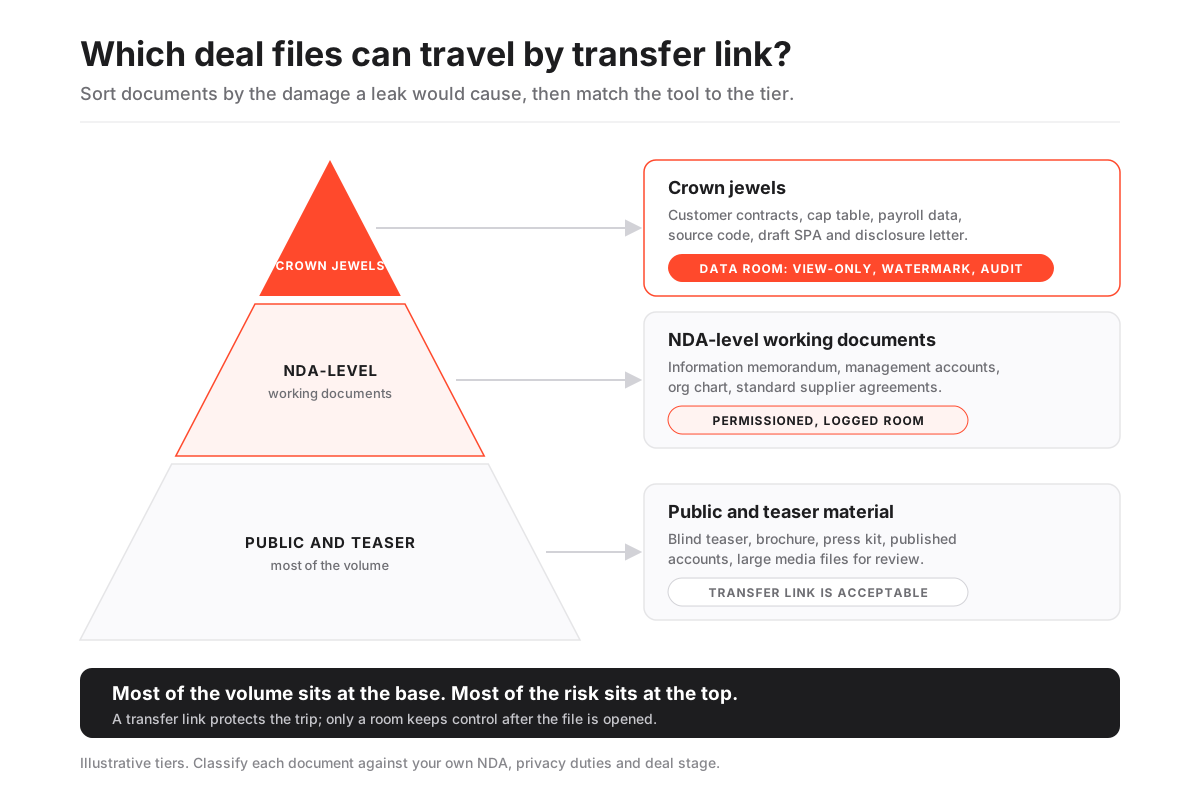
The base of the pyramid holds material that is public or close to it: a blind teaser, a marketing brochure, a press kit, published annual accounts, a large video file for a brand review. If one of these leaks, the cost is embarrassment at worst. A transfer link is a perfectly reasonable way to move them.
The middle tier holds the documents that justify an NDA: the confidential information memorandum, management accounts, the organisation chart, standard supplier agreements, the draft data room index itself. A leak here harms negotiating position and relationships. These files need to be read by named people with their access logged, which is the job of a room, not a link.
The narrow top holds the crown jewels: customer contracts with pricing, the cap table, employee and payroll data, source code, patent filings in progress, the draft share purchase agreement and disclosure letter. A leak here can damage the business, breach privacy law, or derail the deal. These files should be view-only by default, watermarked to the viewer, and fully audited.
The pyramid is deliberately unequal. Most of the volume sits at the bottom; most of the risk sits at the top. A single team can use a transfer service for the base and a data room for everything above it without any contradiction.
If you are unsure which tier a file belongs to, our list of what documents go in a data room is a useful sorting aid.
WeTransfer versus a virtual data room, control by control
Here is how the two compare on the controls that matter once a confidential file leaves your hands. We separate WeTransfer’s basic transfers from its paid tiers, because the paid tiers genuinely close part of the gap.
Control coverage for confidential deal documents
| Control | WeTransfer (basic) | WeTransfer (paid) | Virtual data room |
|---|---|---|---|
| Encryption in transit and at rest | Yes | Yes | Yes |
| Password-protected access | No | Yes | Yes |
| Custom expiry date | No | Yes | Yes |
| Named, logged-in recipients only | No | No | Yes |
| View-only access that blocks download | No | No | Yes |
| Dynamic watermark tied to the viewer | No | No | Yes |
| Page-level activity log per user | No | No | Yes |
| Revoke access after the file is opened | No | No | Yes |
| Granular folder and file permissions by group | No | No | Yes |
| Structured Q&A with the counterparty | No | No | Yes |
Two rows deserve emphasis.
Revocation after opening. In a data room you can switch off a bidder’s access at 4 p.m. and, from that moment, they cannot see anything they have not already downloaded, and in a well-configured room they were never allowed to download in the first place. With a transfer, revocation means deleting the transfer before the recipient clicks. After the click, there is nothing left to revoke.
Named recipients. A room requires each reviewer to authenticate as themselves, ideally with two-factor authentication. That single requirement is what makes every other control meaningful. A watermark is only useful if it names a real person; an audit trail is only useful if each row belongs to someone accountable.
For the deeper treatment of both controls, see how to grant and revoke data room access and dynamic watermarking and fence view.
Do paid WeTransfer plans fix the problem?
They help with one specific risk, and it is worth being precise about which.
A password on a transfer stops a forwarded link from working on its own. If the password travels by a separate channel, say a phone call or a text message, an over-eager forward of the email no longer hands the files to a stranger. A shorter, custom expiry window also reduces how long a stray link stays live.
Those are real improvements. If you must use a transfer service for middle-tier material, use them.
What they do not change is the download. A paid transfer still ends with a full native copy on the recipient’s device, with no watermark naming them, no view-only rendering, and no record of what happens next. The password protects the doorway; it says nothing about the room behind it.
There is also a practical question of administration. On a live deal, you might be sending dozens of files to four bidder groups across several weeks, each with different permissions. Managing that through separate password-protected transfers means a spreadsheet of passwords, expiry dates and recipient lists, maintained by hand, under deal pressure. That spreadsheet is itself a single point of failure.
What about WeTransfer’s terms and data handling?
Read the terms of any service you put confidential files into. That advice sounds dull until it matters.
In mid-2025, WeTransfer drew public criticism over updated terms of service that included wording about using content to improve machine-learning models, and the company revised the language after the backlash and said it does not use customer files to train AI. Whatever you make of the episode, it illustrates a structural point: on a general-purpose transfer service, the terms are written for millions of everyday users, and you accept them as they are.
A data room contract for a transaction is usually a different kind of agreement. You can ask where data is hosted, how long it is retained, whether it is ever used beyond providing the service, and which certifications back those answers. Our guide to data residency in virtual data rooms explains why hosting location matters for cross-border deals.
Privacy law points the same way. If the files you are sending include personal data about employees or customers of an EU business, the GDPR expects you to know which processors handle that data and on what terms. That is easier to evidence with a deal-specific room and a processing agreement than with a consumer-grade link.
If you have to use WeTransfer, do it this way
Sometimes the counterparty’s IT policy blocks your data room, a regulator wants a single large file, or the timeline makes a room impractical for one exchange. If you are going to send a confidential file by transfer link anyway, reduce the blast radius.
How to send a confidential file by transfer link with less risk
A damage-limiting routine for the occasions when a data room is not an option for a single exchange.
Estimated time: 20min
-
Confirm the tier of the document
Check where the file sits on the sensitivity pyramid. If it is crown-jewel material, push back and offer a data room instead before going further.
-
Strip and reduce the file
Send only the pages the recipient needs. Remove hidden comments, tracked changes and metadata, and redact personal data that the recipient does not need to see.
-
Stamp the file yourself
Add a static watermark naming the recipient firm and the date to every page before upload, so a leaked copy at least points to its source.
-
Use a password and a short expiry
Set a password and the shortest expiry the recipient can work with, ideally 48 hours. Avoid open links that never expire.
-
Send the password by a separate channel
Share the password by phone or text message, never in the same email as the link, so a forwarded email does not carry the key.
-
Log the exchange
Record what you sent, to whom, when and under which NDA in your own deal file, and ask the recipient to confirm receipt and deletion after use.
Notice what this routine is really doing. It recreates, by hand and imperfectly, a few of the controls a room gives you by default. That is a reasonable thing to do once. It is a poor thing to do forty times across a sale process.
When to stop using transfer links and open a room
The switch is less about file size or convenience and more about the moment a process acquires adversarial structure. Open a data room when any of these become true:
- More than one outside party will review the same material, especially if they compete with each other.
- An NDA governs the exchange and you may later need to prove what was disclosed and when.
- The files include personal data, customer pricing, IP or anything regulated.
- You will need to stage disclosure in phases, showing more to fewer parties over time.
- Questions will flow back from the counterparty and need tracked, consistent answers.
A process that ticks two or more of these boxes has already outgrown a transfer service, even if nobody has said so out loud.
The cost question is smaller than it used to be. Modern rooms with published pricing start in the low hundreds of USD per month; Ellty, for instance, lists plans from $149 a month with a 14-day free trial and includes permissions, Q&A, watermarking, DRM, an audit trail and e-signature in the same room, in the same feature class as iDeals and Datasite. Treat all figures as indicative and confirm with the provider. For the wider price picture, see how much a virtual data room costs.
How WeTransfer compares with the other everyday tools
WeTransfer is not uniquely weak here. It sits in a family of general-purpose tools that are good at moving or syncing files and thin on deal controls.
Cloud drives add persistent folders and some sharing settings, which is a step up from a one-off link, but they were still designed for collaboration among people you already trust. We cover the specifics in virtual data room vs Dropbox and virtual data room vs Google Drive. Chat tools have their own version of the problem, which our piece on Slack and Teams as deal-document channels works through.
Document-tracking tools sit closer to a room. Something like DocSend adds per-page analytics and link controls for a pitch deck, which is useful for fundraising outreach, though it is not built to run multi-party diligence with group permissions and Q&A.
The common thread: the more of the deal’s structure you need the tool to enforce, the further you move from transfer services toward a purpose-built room. If you want a quick fit check, the recommendation quiz narrows it down in a few questions.
Frequently asked questions
Is WeTransfer encrypted?
Yes. WeTransfer states that files are encrypted while they upload and download and while they are stored on its servers. Encryption protects the file in transit and in storage, but it ends the moment a recipient downloads a native copy, so it does not control what happens to the document afterwards.
Can someone else open my WeTransfer link?
Often, yes. A transfer link works like a bearer token: anyone who has it can usually download the files until the transfer expires. Paid tiers let you add a password, which helps if you send the password by a separate channel, but a basic link forwarded by email can be opened by whoever receives it.
Is WeTransfer GDPR compliant for sharing personal data?
WeTransfer is an EU-based company that publishes privacy terms, but compliance is about your process as much as the tool. If you send personal data, you need to know who processes it and on what terms, minimise what you send, and be able to show who accessed it. A logged, permissioned data room makes that far easier to demonstrate.
What is safer than WeTransfer for confidential documents?
For NDA-level or highly sensitive deal documents, a virtual data room is the safer choice. It requires named logins, can keep files view-only, stamps a watermark with the viewer's identity, logs every page view, and lets you revoke access at any time. For a single large but non-sensitive file, a password-protected transfer with a short expiry is usually adequate.
Does deleting a WeTransfer transfer delete downloaded copies?
No. Deleting or letting a transfer expire removes the copy held on the provider's servers and disables the link. Any copy a recipient has already downloaded stays on their device and can be shared onwards, which is why transfer services cannot offer true revocation.
So, is WeTransfer safe for confidential deal documents?
Safe enough for the envelope. Not built for what is inside it.
Use it for the wide base of the pyramid without guilt. For anything an NDA was written to protect, give the document a room where every reader has a name, every page carries that name, and every view leaves a record you can still read when someone asks, months from now, who saw what.
