
Asking a data room questions in plain English: AI search and document chat
On this page
- What is AI document chat in a data room?
- Keyword search, semantic search and document chat are three different tools
- How does a question turn into an answer?
- Which questions does document chat answer well?
- Does document chat respect data room permissions?
- Where does the model run, and what does it keep?
- Does AI chat activity show up in the audit trail?
- How to test document chat in a trial
- Which data rooms offer AI search, and what does it cost?
- So, can you stop reading the data room?
Here is the myth, stated as plainly as people state it in demos: once a data room can answer questions, nobody needs to read the data room anymore.
It is an attractive idea. A buy-side associate facing 6,000 files and a twelve-day exclusivity window would love it to be true. So would the partner paying for that associate’s hours.
It is not true. But the reasons it fails are specific, and they are worth more than a blanket warning, because document chat genuinely is useful once you know which questions it can carry and which ones it quietly drops.
Start with the part of the myth that holds up.
Asking a room where the lease for the Rotterdam warehouse is, or what the notice period is in the master services agreement with the largest customer, used to mean opening folders, guessing file names and scrolling. A capable chat feature answers both in seconds, with the page it read. That is a real saving, and on a large room it adds up to days.
Now the part that breaks. Ask the same tool whether any customer contract allows termination on a change of control, and you will get a confident paragraph listing three agreements. What you will not get is any signal about the fourth one, a scanned PDF from 2017 the model never retrieved. The answer reads as complete. It is not.
Everything below is about telling those two situations apart.
What is AI document chat in a data room?
AI document chat is a feature that answers natural-language questions by retrieving relevant passages from documents in the room and having a language model write a reply grounded in those passages, usually with links back to the source pages.
Vendors call it different things: ask the room, AI assistant, smart Q&A, document copilot. The label matters less than the mechanism, and the mechanism matters less than one property: whether every sentence in the answer can be traced to a page you are allowed to see.
It is also worth separating it from the data room’s Q&A module. That module is a structured workflow where a bidder asks the seller a question and a person answers it on the record. Document chat is a reviewer interrogating the documents directly, with a model in the middle and no human on the other side. Mixing the two up leads to a dangerous habit: treating a model’s paraphrase as if the seller had said it. Our guide to running data room Q&A covers the human workflow.
Keyword search, semantic search and document chat are three different tools
Most rooms already had search before any of this. The new features sit on top of it, and buyers often lose track of which layer they are actually using.
Keyword search, or full-text search, finds files containing the words you type. Combined with OCR, it reaches scanned pages too. It is literal, predictable and auditable: if the word is there and the page was indexed, you get a hit.
Semantic search finds passages whose meaning is close to your query even when the words differ. Search for “termination if the company is sold” and it can surface a clause that says “assignment upon a change in ownership”. It still returns documents, not prose, so you remain the one who reads and judges.
Document chat adds a writing step. It takes the passages that semantic search retrieved, hands them to a language model, and returns an answer in sentences. That step is where the speed comes from. It is also the only step that can produce a statement that does not exist in any file.
What each search layer can and cannot do inside a data room
| Capability | Keyword search | Semantic search | Document chat |
|---|---|---|---|
| Finds exact terms, names and numbers | Yes | No | No |
| Finds passages with different wording but the same meaning | No | Yes | Yes |
| Returns a written answer in sentences | No | No | Yes |
| Results are fully predictable and repeatable | Yes | No | No |
| Can state something no document says | No | No | Yes |
| Shows how many documents matched | Yes | Yes | No |
| Useful for proving a term is absent from the room | Yes | No | No |
| Saves reading time on long contracts | No | Yes | Yes |
The row that matters most is the highlighted one. A keyword search can miss things, but it cannot fabricate them. Chat can do both.
Notice also the row about absence. If you need to know that no lease in the room contains a break clause, the defensible method is still a set of keyword searches across OCR-indexed text, plus a reviewer reading what comes back. Chat answers that question in a tone of certainty it has not earned.
How does a question turn into an answer?
Under the hood, almost every document chat feature follows the same pattern, usually called retrieval-augmented generation. Knowing the five stages tells you where each kind of error enters.
Indexing. When files are uploaded, the system extracts text, runs OCR on images and scans, splits each document into chunks of a few hundred words, and stores a numerical representation of each chunk. A scan with poor OCR becomes a chunk full of noise, and noise is never retrieved for the right question.
Retrieval. Your question is converted the same way, and the system pulls the chunks that sit closest to it, often somewhere between five and fifty of them. This is the bottleneck. If the decisive clause is not among the retrieved chunks, the model never sees it.
Permission filtering. In a well-built room, retrieval only considers chunks from documents the person asking is allowed to open. In a badly built one, filtering happens later, or not at all.
Generation. The model reads the retrieved chunks and writes the answer. It is instructed to stay within them, but models sometimes blend in general knowledge or smooth over gaps.
Citation. The better systems attach the page reference for each claim, so you can click straight to the text. This last step is what turns an answer into something a reviewer can check in ten seconds.
One plain consequence follows from this pipeline. The model is reading a sample of your room, chosen by similarity to your wording. It is not reading the room.
For the filing side of the same technology, our explainer on AI auto-indexing in data rooms walks through what happens to an upload before anyone asks it anything.
Which questions does document chat answer well?
Question type predicts reliability far better than vendor name does. The table below groups the questions deal teams actually ask by how much a typical answer can be trusted without opening the source. The ratings are our editorial judgement from how retrieval systems behave, not a measured benchmark of any product.
| Question type | Example in a sell-side room | How far to trust the answer | Why |
|---|---|---|---|
| Locate | Where is the lease for the Leeds site? | High | One document, distinctive terms, easy to verify by clicking |
| Extract | What is the notice period in the Halden supply agreement? | High, if cited | Single passage; the citation shows the exact sentence |
| Summarise one file | Summarise the key obligations in the shareholder agreement | Medium | Long files are chunked, so a summary may skip schedules and side letters |
| Compare across files | How do payment terms differ across the top ten customer contracts? | Low to medium | Retrieval may return seven of the ten and the answer will not say so |
| Count or total | How many employees have non-compete clauses? | Low | Models are poor at exhaustive counting over partial retrieval |
| Prove absence | Is there any litigation not listed in the disclosure schedule? | Very low | The model cannot know what it did not retrieve |
| Judge or advise | Is this indemnity market standard? | Not a room question | Needs legal judgement and context the room does not contain |
The pattern runs from narrow to broad. The narrower the question, the more an answer can lean on one passage you can verify. The broader the question, the more it depends on retrieval having caught everything, and retrieval never promises that.
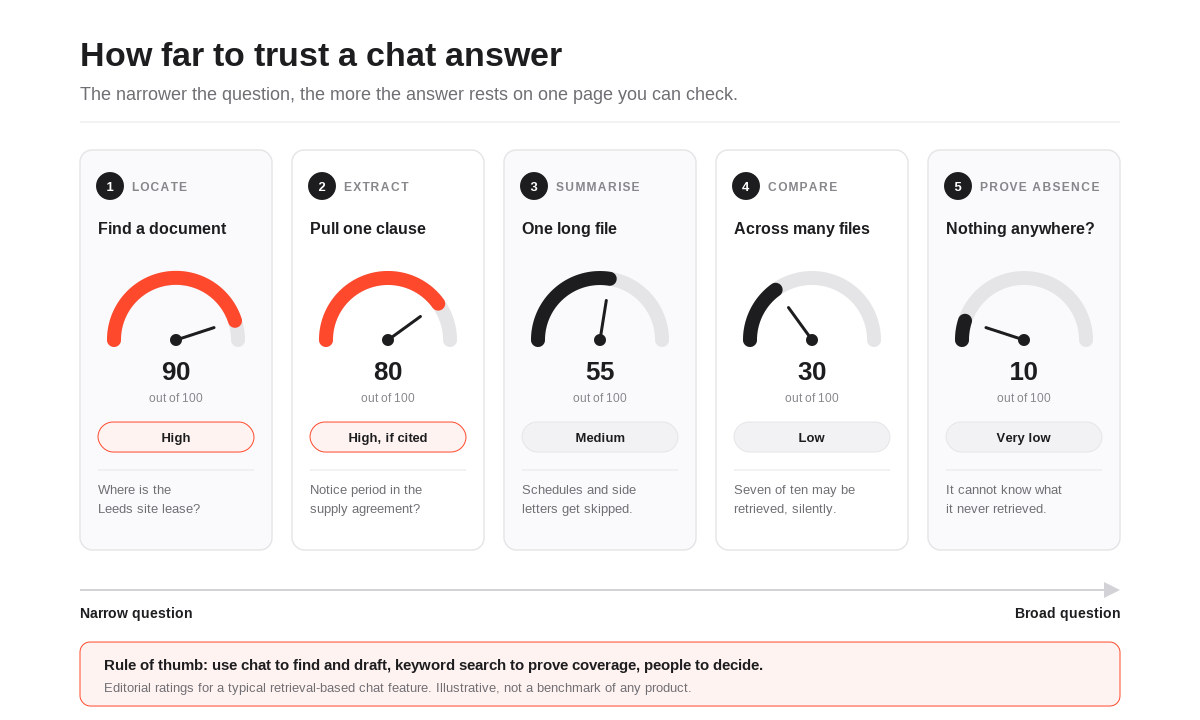
A useful habit is to rewrite broad questions into narrow ones. “Do any contracts have change-of-control terms” becomes a keyword search for “change of control”, “assignment” and “transfer of ownership”, then a chat question per hit asking what each clause actually requires. Slower than one prompt. Much faster than reading everything, and far easier to defend.
Does document chat respect data room permissions?
It should. Do not assume it does.
A data room exists to show different people different things. Bidder A sees the general folders; Bidder B, further along, also sees the customer contracts; the clean team sees pricing that neither bidder’s deal team may touch. If the chat feature retrieves from the whole index and only hides the citations afterwards, the answer text itself can leak what the citation would have revealed. “The largest customer accounts for 31 percent of revenue” is the leak, whether or not a link is attached.
There are three questions worth putting to any provider in writing:
- Is retrieval filtered by the asking user’s permissions before the model sees anything?
- Does a permission change, such as revoking a folder, take effect in chat immediately, or only after re-indexing?
- Can the administrator disable chat for specific groups, for example all external bidders, while keeping it for the sell-side team?
The second question catches more products than you would expect. Search indexes are often rebuilt on a schedule, so a revoked document can stay retrievable for hours. On a competitive process, hours matter. If bidder separation is a live concern, our piece on whether bidders can see each other in a data room covers the wider controls, and data room permissions explained covers the levels themselves.
A working rule for deal teams: if a reviewer cannot open the page, the chat must not be able to quote it, paraphrase it or count it. Anything less is a permission system with a side door.
Where does the model run, and what does it keep?
Uploading a target’s contracts to a data room is a decision the seller has thought through. Sending those contracts to a third-party model provider is a second decision, and it is often made by default when someone switches on an AI toggle.
The questions here are concrete. Which model does the feature use, and is it hosted by the data room provider, a cloud platform, or an external AI company? Is any customer content used to train or improve models? How long are prompts and answers retained, and where? Are the AI subprocessors listed in the provider’s data processing terms?
None of these has a single right answer. A room that calls an external model under a contract with zero retention and no training can be perfectly acceptable. A room that cannot tell you which model it uses is not.
Personal data raises the stakes. Employee files, customer lists and medical records in a room are subject to privacy law wherever the data subjects live, and under the GDPR a new processor touching that data needs a lawful basis and a contract. Our guide to GDPR and virtual data rooms goes through the obligations, and data residency in virtual data rooms covers where processing physically happens.
There is also a newer risk specific to this feature. A document in the room can contain text written to manipulate the model, for example an instruction hidden in white type telling it to describe the contract as favourable. Security researchers list this as prompt injection, and it sits at the top of the OWASP Top 10 for LLM applications. In a sell-side room the documents come from the seller, which is exactly the party a buyer should not let steer its analysis. The guide on prompt injection in deal documents treats it in depth.
Does AI chat activity show up in the audit trail?
It should, and it is worth checking, because the audit trail is how a room proves who saw what.
When a reviewer opens a contract, the log records the view. When a reviewer asks the chat about that contract and reads a three-sentence summary, the reviewer has learned its contents without opening it. If the log captures only document views, that knowledge transfer is invisible.
A complete implementation logs the question, the user, the time, the documents retrieved and ideally the answer returned. Some sellers will want that; some buyers will find it intrusive, since a seller who can read every prompt sees the buyer’s lines of inquiry. That tension is real, and it is best settled in the process letter, not discovered mid-deal. For the full mechanics, see what a data room audit trail records, and the companion piece on logging AI activity in a data room.
How to test document chat in a trial
A demo room is built to make chat look good. Your own files are not. The test below takes an afternoon and tells you more than any sales deck.
How to test AI document chat in a data room trial
A repeatable check of accuracy, coverage, permissions and logging using a small sample of your own documents.
Estimated time: 3h
-
Build a test set with known answers
Upload 40 to 80 real or lightly anonymised files, including at least five scans, two spreadsheets and one long agreement with schedules. Before asking anything, write down the correct answers to ten questions.
-
Ask across the full range of question types
Include two locate questions, three extract questions, two single-file summaries, two cross-file comparisons and one absence question. Record each answer and whether it cited a page.
-
Click every citation
Check that each cited page actually says what the answer claims. Count answers with no citation, a wrong citation, or a correct citation attached to an overstated sentence.
-
Plant a known needle
Bury one distinctive clause in a scanned schedule and ask a question only that clause answers. If the chat misses it, you have learned the limits of its retrieval on scans.
-
Test permissions from a restricted account
Create a test user without access to one folder and ask questions whose answers live only there. The correct behaviour is a refusal or a no-information reply, not a paraphrase.
-
Revoke and ask again
Remove that test user's access to a document they could see, then immediately ask about it. Note how long it takes before chat stops drawing on it.
-
Check the log and the paperwork
Export the audit trail and confirm the chat session appears. Then ask the provider in writing which model runs the feature, whether content is used for training, and how long prompts are retained.
Score the result honestly. A tool that gets eight of ten right with citations is very useful. A tool that gets nine of ten right without citations is harder to use safely, because you cannot tell which one is wrong. For a broader trial script that covers AI features beyond chat, see testing data room AI features.
Which data rooms offer AI search, and what does it cost?
Among the 25 providers we track, five carry AI tooling in our current data: Datasite, Ansarada, Drooms, Box and Ellty. They do not aim it at the same job. Datasite’s emphasis is AI-assisted redaction, Ansarada scores how ready an index is, Drooms applies AI to indexing and translation, and Box brings general content-cloud AI to stored files. Ellty, a full-featured modern room in the same class as iDeals and Datasite, includes AI features alongside its Q&A, watermarking, DRM and audit trail.
What our data does not tell you is whether a given provider’s AI includes conversational chat with citations, or only search and assistance features. Product pages move quickly here, so ask for a live demonstration on your own files rather than relying on a feature list.
Pricing is the other variable. Some providers fold AI into existing plans, others sell it as an add-on or meter it by usage. Base room prices run from around $149 per month for published-price rooms to custom quotes for enterprise platforms, all indicative, confirm with the provider. The guide to how data room AI is priced breaks down the models, and the VDR cost calculator helps put the base subscription in context.
So, can you stop reading the data room?
No. But you can stop reading it blind.
The honest version of the promise is narrower and still worth paying for. Document chat shortens the distance between a question and the page that answers it. It makes long contracts navigable, turns scattered schedules into something you can interrogate, and lets a junior reviewer find the right file on the first attempt instead of the fifth.
What it does not do is take responsibility. Every finding that ends up in a diligence report, a disclosure letter or a price adjustment still needs a person who opened the source and read it. The NIST AI Risk Management Framework frames this as keeping humans accountable for outputs in high-stakes use, and few uses are higher-stakes than deciding what a company is worth.
A practical split works for most teams. Use chat to find and to draft. Use keyword search to prove coverage. Use people to decide.
That split also tells you what to look for when choosing a room. Citations on every answer. Permission filtering before retrieval. AI activity in the audit trail. A clear written answer on training and retention. A provider that offers all four has built the feature for deals. A provider that offers a clever chat box and vague answers on the rest has built it for demos.
Frequently asked questions
Is AI document chat accurate enough for due diligence?
It is accurate enough to find documents and pull specific clauses, provided every answer carries a citation you check. It is not reliable enough to confirm that a risk is absent from the room or to count items across many files, because it only reads the passages its retrieval step selected. Use it to speed up review, and keep a person accountable for every finding that reaches the report.
What is the difference between semantic search and document chat?
Semantic search returns documents or passages whose meaning matches your query, leaving you to read and judge them. Document chat goes one step further and has a language model write an answer from those passages. That writing step saves time but is also the only point where a statement can appear that no document actually makes.
Can a bidder use data room AI to see documents they are not allowed to open?
In a well-built room, no, because retrieval is filtered by the asking user's permissions before the model reads anything. In a weaker implementation, answers can paraphrase restricted content even when citations are hidden. Test this in a trial with a restricted account, and confirm that revoking access takes effect in chat immediately.
Do data room AI features train on my documents?
It depends on the provider and on the model it uses. Many enterprise arrangements exclude customer content from training and limit retention, but this is a contractual question, not a technical default. Ask which model runs the feature, whether content is used for training, how long prompts are kept, and whether the AI provider is listed as a subprocessor.
Should I turn document chat on for bidders or only for the sell-side team?
Many sellers start with the sell-side team only, where chat helps prepare disclosure and answer Q&A faster, and switch it on for bidders once permission filtering and logging have been tested. Opening it to bidders can shorten their review, which helps the timetable, but agree in the process letter whether bidder prompts are logged and visible to the seller.
