
Can Notion work as a startup data room? Where it falls short
On this page
- What does it mean to use Notion as a data room?
- What Notion genuinely does well for an early raise
- Where does Notion fall short as a data room?
- The three Notion features that leak by accident
- How much each gap matters at each stage
- Where do investor questions go in Notion?
- Is a Notion data room secure?
- If you stay on Notion, harden it first
- When should you move from Notion to a real data room?
- What does moving to a data room cost?
- The verdict, stage by stage
Imogen Hart had been an associate at Halyard Ventures for three years, and she could tell a lot about a company from the link it sent.
This one arrived on a Tuesday evening from the founder of Tallowfield Robotics, a warehouse-automation startup raising a $9 million Series A. It was a Notion page. Clean cover image, a short welcome note, a toggle list of folders: Financials, Cap Table, Customers, Product, Team.
It looked good. It read well. She liked it.
Then she started clicking.
The financial model was an embedded spreadsheet she could open in a new tab and download. The customer folder held a linked database whose filter showed six logos, but removing the filter revealed forty rows, including pipeline notes on two prospects that had already said no. The Team page linked to a hiring tracker with salary bands. A comment thread from the founders, half a sentence about a co-founder vesting issue, was still sitting in the margin of the cap table page.
Nobody at Tallowfield had meant to share any of that. Notion had simply done what it is designed to do: make everything connected and easy to reach.
Imogen did not pass on the deal because of the page. She did write two lines in her diligence memo about operational discipline, and she did forward the link to a partner, who forwarded it to a co-investor, and nobody at Tallowfield ever knew how far it travelled.
That is the honest shape of the Notion-as-data-room question. It is rarely a disaster. It is usually a quiet loss of control that the sender cannot see and the reader notices immediately.
What does it mean to use Notion as a data room?
Using Notion as a data room means building a set of workspace pages that hold your diligence documents, then sharing those pages with investors or buyers through guest invitations or a public link instead of a dedicated virtual data room.
It is a popular choice for a reason. Founders already live in Notion. The company wiki, the product roadmap and the board updates are often there. Building a “data room” page takes an afternoon, costs nothing extra, and looks far more polished than a shared folder of PDFs.
The question is not whether Notion can display documents nicely. It plainly can.
The question is whether it can do the three jobs that make a data room a data room: limit what each outside reader can do with a file, prove afterward who saw what, and keep the back-and-forth of questions on the record. That is where the fit weakens, and how much it matters depends almost entirely on the stage and the audience.
What Notion genuinely does well for an early raise
Credit where it is due, because a fair comparison starts with the strengths.
Notion is excellent at narrative. A pre-seed investor reading a well-built page gets the story, the metrics, the team and the product in one scroll, with context written around each document instead of a bare file list. That framing is something many traditional rooms do badly.
It is fast to update. Change a number in the metrics table and every reader sees the new figure on their next visit, with no re-upload and no version confusion.
It handles mixed media well. Embedded demo videos, product screenshots and live charts sit next to the documents.
And for a small circle of angels who already know the founders, the stakes are modest. They are reading for conviction, not running a legal review. A tidy Notion page is a perfectly reasonable answer to “send me what you have”.
That last figure, from IBM’s Cost of a Data Breach report, is a corporate average and not a startup forecast. It is there as a reminder that the documents in a raise, cap tables, customer contracts, employee data, are the same kind of material that drives those numbers when it leaks.
Where does Notion fall short as a data room?
The gaps cluster around one design choice. Notion was built so that people with access can work with content. A data room is built so that people with access can only do what you allow, and so that every action leaves a trace.
The table below sets the two side by side on the controls that matter once a process becomes serious.
Notion vs a purpose-built virtual data room on deal-critical controls
| Control | Notion (shared pages) | Purpose-built VDR | Why it matters in a raise or sale |
|---|---|---|---|
| Per-reader download and print control | Limited; readers who can view an attached file can usually open or save it | View-only, print-only or download per group or per file | Stops a cap table or contract leaving the room as a clean copy |
| Dynamic watermarking | Not available natively | Viewer name, email and time stamped on every page | Makes a leaked screenshot traceable to a person |
| Per-reader activity tracking | Basic page view data, varies by plan | Page-level views, time spent, downloads per user | Shows which funds are actually doing the work |
| Tamper-evident audit log | Workspace audit log on top enterprise tiers, aimed at admins | Exportable, append-only log of every action | Evidence if a disclosure is disputed later |
| Structured Q&A | Comments on pages, visible to anyone with access | Routed questions, private per bidder, with answer history | Keeps investor questions on the record and away from rivals |
| NDA or terms gate before entry | No native click-through gate | Common, with the acceptance logged | Records that each reader agreed to confidentiality |
| Instant revocation | Remove guest or disable link, but copies already saved stay out | Revoke access, and DRM can cut off downloaded files | Matters when a fund drops out or a deal breaks |
None of these gaps is a bug in Notion. They are the predictable result of a tool that treats every reader as a potential collaborator.
The three Notion features that leak by accident
Most over-sharing in Notion data rooms is not a failure of access control. It is the access control working exactly as designed on content the founder forgot was connected.
Linked databases. A filtered view of a database is still a view of the whole database. If a guest can open the view, they can often remove the filter, open the source, or see properties you never meant to display. Tallowfield’s forty-row customer list is the classic case.
Inherited sharing. In Notion, sub-pages inherit the access of their parent unless you change it. Drop a draft page into the data room tree, even briefly, and every guest can see it. Move a page out and the inheritance changes again. It is easy to lose track of which page is shared with whom.
Public web links. Publishing a page to the web is one toggle. Anyone holding the URL can read it, the link can be forwarded without limit, and you have no reliable record of who opened it. For a raise, that removes the single thing a data room exists to provide.
There is a fourth, softer leak: comments and page history. Internal notes left in a margin, or a previous version of a page that showed a different valuation, can be visible to readers who have more access than you intended.
How much each gap matters at each stage
Not every gap matters equally at every stage. A pre-seed raise from four angels and a competitive sale of the company are different risks, and the diagram maps that difference.
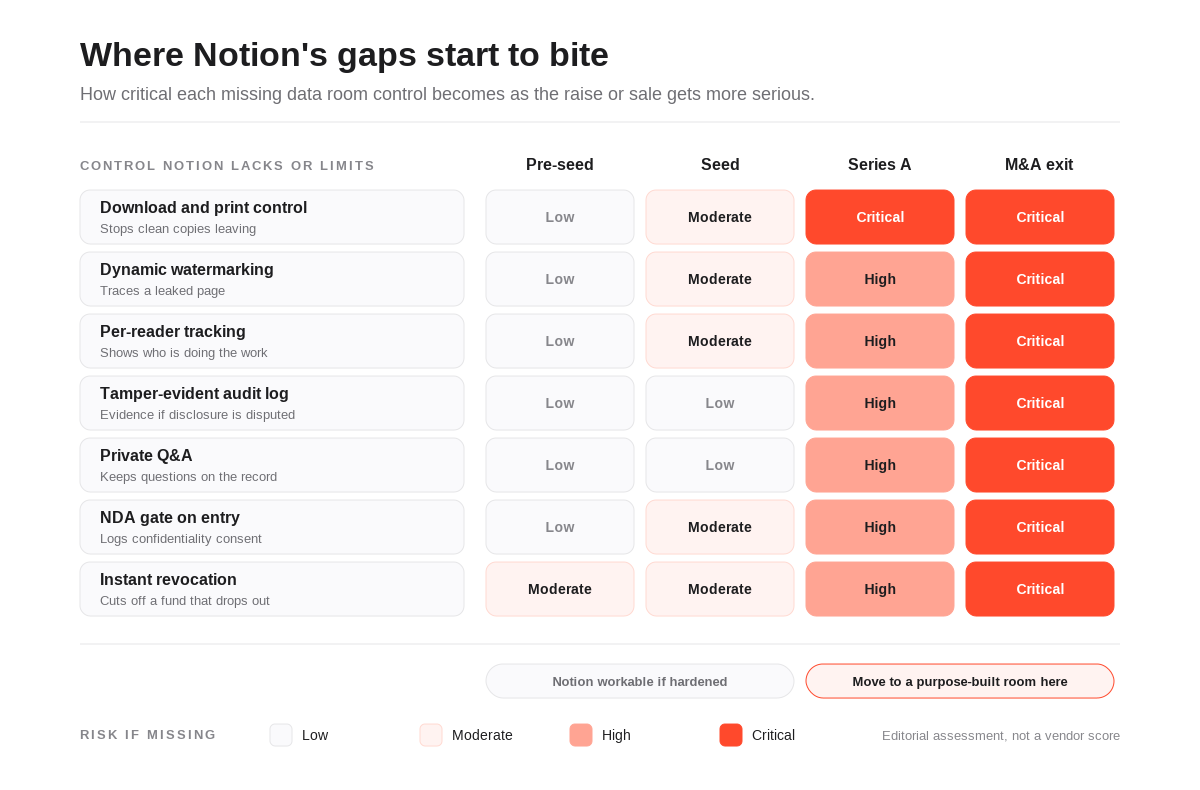
Read it from left to right. At pre-seed, almost nothing is critical, because the readers are few, friendly and reading for story. By the Series A, several institutional funds are reviewing the same materials in parallel, lawyers join, and the documents get more sensitive: full cap table, customer contracts, employment agreements. By the time you sell the company, every control on the left is load-bearing.
| Stage | Typical readers | Documents in scope | Notion as the room? |
|---|---|---|---|
| Pre-seed | 3 to 10 angels, friendly | Deck, one-page metrics, founder bios | Usually fine |
| Seed | 1 lead fund plus angels | Model, cap table, key contracts | Workable if hardened |
| Series A | Several funds, their counsel | Full cap table, customer contracts, IP, HR | Risky; move to a VDR |
| Series B and later | Institutional funds, auditors | Audited accounts, compliance, data protection | Not recommended |
| M&A exit | Competing buyers, advisors | Everything, often including personal data | No |
The shift is not about company size. It is about who is reading and what they could do with the material. A Series A is often the first time competing funds see the same documents, and the first time a lawyer will later want to know who saw which version.
Where do investor questions go in Notion?
Into comments, emails and WhatsApp threads, which is the problem.
A diligence process generates questions. Dozens of them at seed, hundreds in a sale. In a data room, each question is logged against the document it concerns, routed to the person who should answer, and kept private to the fund that asked. The answer is stored next to the question, and both sit in the record when the deal closes.
Notion has comments. They are good for collaboration and wrong for this job. A comment on a shared page is visible to everyone with access to that page, which means one fund can read another fund’s questions, and through them, guess at its concerns. Founders quickly learn this and move questions into email.
Once that happens, the record fragments. The answer about customer churn lives in one inbox, the clarification on the option pool in another, and a correction to the revenue figure in a call nobody minuted. Months later, when a lawyer asks what was disclosed about churn and when, nobody can produce a clean answer.
A structured Q&A module is one of the least glamorous features of a data room, and one of the most valuable once there are more than two investors at the table. Our guide to running data room Q&A shows how a well-run question log works.
Is a Notion data room secure?
Notion as a platform takes security seriously, and the question is usually framed wrongly.
The risk is not that someone breaks into Notion. It is that the people you invited can do more with the content than a deal process should allow, and that you cannot reconstruct afterward what they did.
Three practical points follow from that.
First, encryption and infrastructure certifications protect data from outsiders. They do nothing about an authorised reader who downloads your cap table and emails it on. That is a permissions and deterrence problem, which is what dynamic watermarking and fence view exist to address.
Second, evidence matters more than founders expect. If an investor later claims a liability was not disclosed, you want a record showing the document was there and was opened. Our explainer on data room audit trails walks through what that record looks like and why it settles arguments.
Third, personal data changes the calculus. Once employee files or customer records enter the room, privacy law applies. Under the GDPR, for example, you need to be able to show appropriate access controls over personal data, and a page any guest can export is a weak position to defend.
If you stay on Notion, harden it first
Plenty of founders will use Notion for a seed round anyway, and for a small, friendly raise that is a defensible call. If you do, close the obvious holes before the first link goes out.
Work through this list in order:
- Build the room as a separate top-level page, not a branch of your company wiki, so nothing inherits access by accident.
- Replace linked databases with static copies. Export the filtered view to a PDF or a fresh, unlinked table that holds only the rows you mean to show.
- Turn off publish to web on every page in the tree, and check again after every edit.
- Share with named guests by email, never by open link, and give each guest the lowest access level that lets them read.
- Strip comments and check page history on every page before sharing; delete drafts rather than hiding them.
- Convert sensitive files to PDF and stamp them with a static watermark that carries the recipient’s name, since Notion will not do it dynamically.
- Keep a manual share log: who received access, on which date, and when it was removed.
- Hold back the most sensitive material, such as the full cap table, customer contracts and anything with personal data, until a lead investor is committed, then share it through a proper room.
- Set a review date to remove every guest once the round closes.
That list will get a seed raise through safely in most cases. Notice, though, how much of it is manual work that a dedicated room does by default. Each line is a place where a tired founder at midnight can slip.
When should you move from Notion to a real data room?
Move when any one of these becomes true. You do not need all of them.
- More than one institutional fund is reviewing in parallel. Competing readers need separation, and you will want to see which of them is actually engaged.
- A term sheet is signed and confirmatory diligence starts. Lawyers on both sides will ask for a clean, indexed set and a record of what was provided.
- Personal data enters the room. Employment agreements, payroll, customer records with personal details.
- You are selling the company or a material asset. A sale process without watermarking, audit evidence and private Q&A is a liability you take into the purchase agreement.
- You catch yourself writing workarounds. Static PDF copies, manual share logs, watermark stamps in a design tool. That is the point where the free-of-charge tool has stopped being cheap.
A good test is to imagine the worst plausible question twelve months from now: “Prove that investor X saw the indemnity schedule before closing.” If Notion cannot answer it, and it usually cannot, the stage has outgrown it.
The guide on using a virtual data room for startup fundraising covers what to put in the room at each round, and what documents go in a data room gives the full inventory.
What does moving to a data room cost?
Less than most founders assume, because the market now has published monthly pricing at the lower end.
| Option | Pricing model | Indicative USD | Where it fits |
|---|---|---|---|
| Notion pages | Part of your existing workspace | No added cost | Pre-seed, friendly angels |
| Document-tracking link tool | Per user per month | From about $45 per user per month | Deck sharing with read analytics |
| DRM-focused sharing tool | Monthly subscription | From about $120 per month | Per-file control without a full room |
| Self-serve data room | Flat monthly | Roughly $149 to $300 per month | Seed to Series B, small sale processes |
| Enterprise data room | Custom quote | Quote only | Large M&A, regulated deals |
All figures are indicative; confirm current pricing with each provider.
Self-serve rooms are where most startups land. Ellty, for example, publishes pricing from $149 per month with a 14-day free trial, and covers permissions, Q&A, dynamic watermarking, an audit trail, DRM and e-signature in one modern interface, in the same feature class as iDeals and Datasite. SecureDocs runs a flat monthly rate from around $250 with unlimited users, and CapLinked starts around $299 per month. If you only need to track how investors read a deck, a link-sharing tool such as DocSend is cheaper, but it is not a full room; the Digify vs DocSend comparison shows where that category stops.
For a wider view, see the best virtual data rooms for startups and our breakdown of how much a virtual data room costs. If you are weighing other general-purpose tools as well, a data room vs Google Drive runs the same test on a different workspace, and the upcoming guide to Slack and Teams vs a data room covers chat tools.
The verdict, stage by stage
Notion is a good writing tool that founders stretch into a data room because it is already open in another tab.
For a pre-seed raise among people you trust, that stretch holds. Build the page carefully, share by named invitation, keep the sensitive files out.
For a seed round, it holds if you harden it and accept that you are doing manually what a room does automatically.
From the Series A onward, it does not hold. The readers are more numerous, more professional and less friendly; the documents are more sensitive; and the questions you may need to answer later are about evidence, not presentation. That is the job a purpose-built room was designed for.
There is a sensible middle path many companies use: keep Notion for the narrative overview, the “read me first” page that tells the story, and link from it to a proper data room that holds the documents. Readers get the polish. You keep the control.
Frequently asked questions
Can I use Notion as a data room for a seed round?
Yes, for a small raise with friendly investors it is workable, provided you build the room as a separate page tree, share with named guests rather than a public link, remove linked databases and comments, and keep the most sensitive files such as the full cap table back until a lead investor commits.
Does Notion have watermarking or download protection?
Notion does not add dynamic watermarks to shared pages, and readers who can view an attached file can usually open or save it. Some workspace-level export controls exist on higher tiers, but per-reader, per-document control of the kind a virtual data room provides is not part of the product. Check Notion's current documentation for your plan.
Can I see which investors viewed my Notion data room?
Only partly. Notion offers some page view information depending on your plan, but it does not provide the page-level, per-user tracking of time spent, downloads and prints that a data room records, and it cannot show what happened to a file after it was saved.
When should a startup switch from Notion to a virtual data room?
Switch when several institutional funds review in parallel, when a term sheet triggers confirmatory diligence, when personal data enters the room, or when you start selling the company. Any one of those means you need access control, audit evidence and private Q&A that Notion does not provide.
Is it worth paying for a data room for a Series A?
Usually yes. Self-serve rooms with published pricing start from roughly $149 per month (indicative, confirm with the provider), and a raise typically runs a few months. Against the value of the round and the cost of a leaked cap table or a disputed disclosure, the fee is small.
Back at Halyard, Imogen’s memo line about operational discipline was not about Notion. It was about whether the founders understood what they were handing over.
A data room answers that question before anyone asks it.
