
Managed vs self-service data rooms: what the concierge actually does
On this page
- What is a managed data room service?
- What does the concierge actually do, task by task?
- What does self-service actually look like now?
- Hours, not invoices: what does each model cost?
- When does a managed service earn its fee?
- When does managed service get in the way?
- Which model fits which deal?
- How do you run a self-service room with concierge discipline?
- What should you ask before paying for managed service?
- Is there a middle option?
On a Thursday night in March, a second-year associate at Halden Ridge Capital finished loading 2,300 files into a self-service data room. The firm was selling a regional packaging business, eleven bidders had signed NDAs, and the room had to open at 9am.
She was tired. To save time she created the bidder groups by copying the internal deal-team group and renaming it.
The internal group had download rights on every folder.
For two days, three bidder teams could download unwatermarked originals of the management accounts, the customer contracts and the pricing schedules. Nobody noticed until a partner skimmed the activity report on Monday and saw a buyer’s analyst pulling 140 files in an hour.
The partner’s first instinct was to blame the tool. “Next time we pay for a managed room,” he wrote to the team. “Someone else builds it.”
That instinct was half right. A provider concierge probably would have created the groups from a template rather than a copy. But the actual fix Halden Ridge adopted was cheaper and more durable: a one-page permission matrix signed off by the partner before any group is created, and a fifteen-minute second-person check of every group’s rights before invitations go out. They kept the same self-service room for the next deal, and the one after that.
The lesson worth carrying into this comparison is simple. The mistake did not come from the room being self-service. It came from nobody owning the step a concierge would have owned.
So the useful question is not “managed or self-service?” in the abstract. It is “which tasks does a concierge actually take on, and do we have someone to do them if we skip it?”
What is a managed data room service?
A managed data room service is a provider-run setup and support model in which a named project manager or dedicated team performs the administrative work of the room on your behalf, while your deal team keeps control of what is disclosed and to whom.
You will see it sold under several names: concierge, white-glove, full-service, dedicated project management. Some providers include it by default on quote-based contracts; others sell it as an add-on or offer it on larger rooms only.
A self-service room is the opposite arrangement. You sign up, you build the folder tree, you upload, you create the groups, you invite users, and you call support only when something breaks. The platform may be every bit as capable. The difference is who spends the hours.
That distinction sounds obvious. In practice it gets blurred, because sales conversations tend to describe managed service as “we handle everything,” which is never quite true.
What does the concierge actually do, task by task?
Strip away the marketing and a concierge does three kinds of work: moving content, maintaining access, and reporting. It almost never decides anything on your behalf, because it cannot. The provider does not know which customer contract is too sensitive for the strategic bidder, or what your answer to question 214 should be.
The figure maps ten common tasks in a managed room to who typically owns them.
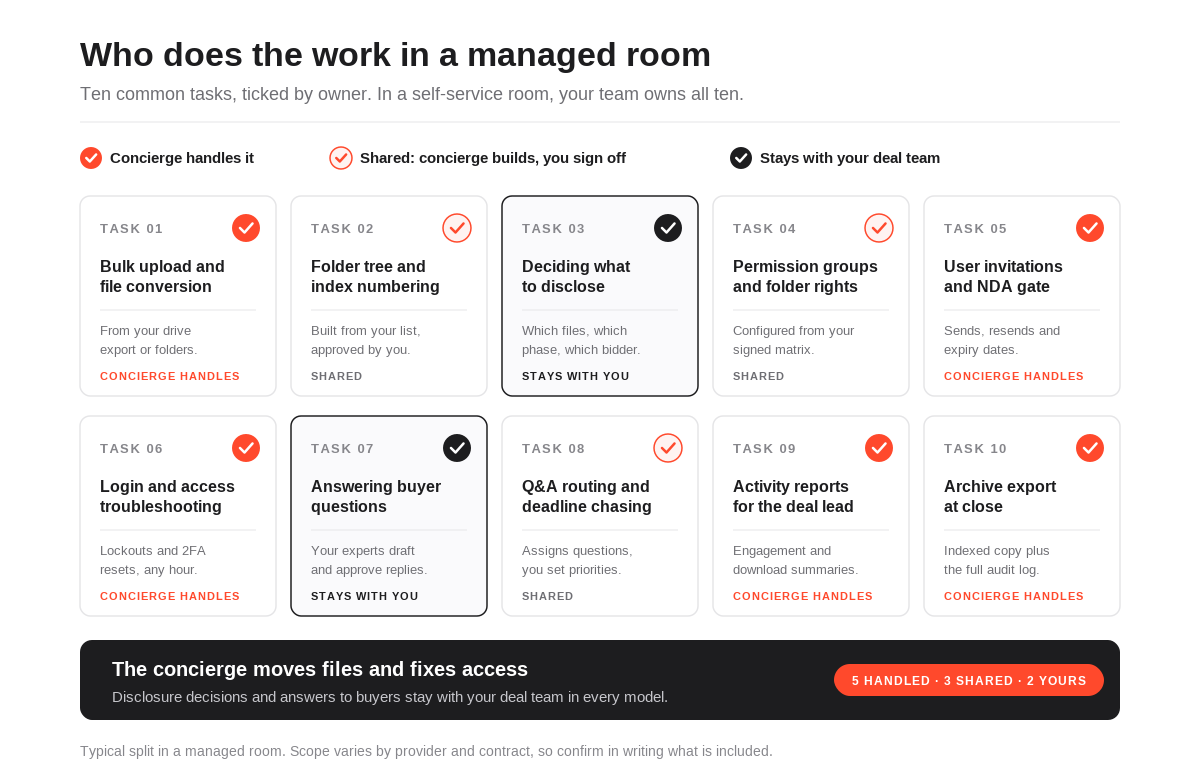
The split in more detail:
| Task | Managed room: who does it | Self-service room: who does it | When it happens |
|---|---|---|---|
| Bulk upload and file conversion | Concierge, from your files or a drive export | Your administrator | Before launch, then in waves |
| Folder tree and index numbering | Concierge builds from your checklist; you approve | Your administrator | Before launch |
| Deciding what goes in the room | You | You | Before launch and at each phase |
| Permission groups and folder rights | Concierge configures from your matrix; you sign off | Your administrator | Before invitations, then per phase |
| User invitations and NDA click-through | Concierge | Your administrator | Launch, then ongoing |
| Login and access troubleshooting | Concierge, often around the clock | Your administrator, plus provider support | Throughout |
| Q&A routing and deadline chasing | Shared | Your administrator or deal lead | Throughout the review |
| Answering buyer questions | You and your experts | You and your experts | Throughout the review |
| Activity reports for the deal lead | Concierge on request | Self-generated from the dashboard | Weekly or before each bid round |
| Archive export at close | Concierge prepares and delivers | Your administrator exports | Close or termination |
Notice the rows marked “You” in both columns. Those are the decisions that carry legal and commercial risk, and no provider will own them. If someone tells you a managed room means you never have to think about permissions, ask who signs the matrix. The answer should be a person on your side.
The data room administrator role does not disappear in a managed room. It changes shape: from doing the clicks to checking them.
What does self-service actually look like now?
Ten years ago, choosing self-service often meant choosing a thinner product. That gap has mostly closed.
Modern self-service rooms ship the same core controls the enterprise names offer: granular permissions at group, folder and document level, a structured Q&A module, dynamic watermarking, a full audit trail and, increasingly, AI-assisted indexing and search. Ellty, for example, pairs that full feature set with e-signature, DRM, a clean interface and published pricing from $149 a month with a 14-day free trial, which is the kind of package that used to require a sales call.
What self-service platforms usually add to make DIY practical:
- Folder templates and automatic index numbering, so you start from a scaffold rather than a blank tree.
- Bulk upload that preserves nested folders from a desktop or drive export.
- Permission inheritance, so rights set on a parent folder flow down unless you override them.
- Group templates, which are exactly what would have prevented the Halden Ridge accident.
- In-product guidance and chat support for when something does not behave.
That last point matters. Self-service rarely means unsupported. It means support answers your question; it does not do the work.
For the setup mechanics themselves, our guide to setting up a virtual data room walks through the build in order, and data room index best practices covers the numbering conventions buyers expect.
Hours, not invoices: what does each model cost?
The pricing comparison is lopsided on paper. Self-service rooms tend to publish monthly prices. Managed rooms tend to be quote-only, with the service bundled into a larger contract that may also price by page, by user or by room.
Comparing invoices alone misses the cost that actually decides most cases: internal hours.
Here is an illustrative estimate for a 1,500-document sell-side room with eight bidder groups and a ten-week process. The hours are our working estimates from typical mid-market setups, not provider figures.
| Workstream | Self-service: internal hours | Managed: internal hours | What drives the difference |
|---|---|---|---|
| Folder tree, upload and numbering | 8 to 14 | 2 to 4 (review and approve) | Concierge does the upload and renaming |
| Permission matrix and group setup | 4 to 6 | 2 to 3 (matrix and sign-off) | You still write and approve the plan |
| Invitations and access issues | 4 to 8 | 1 to 2 | Concierge fields lockouts and resends |
| Q&A administration | 6 to 10 | 4 to 8 | Routing helps; drafting answers does not shrink |
| Reports and archive | 2 to 4 | under 1 | Concierge prepares exports |
| Total | 24 to 42 | 9 to 18 | Roughly 15 to 25 hours shifted to the provider |
Put a blended internal rate of, say, $150 an hour on those numbers and the managed model saves somewhere between $2,250 and $3,750 of staff time on this deal. That is an illustrative figure, not a benchmark; your rate and your room will differ.
Now compare that with the price gap between your two quotes. If the managed contract costs several thousand dollars more for the same deal length, the hours roughly pay for it. If it costs five figures more, they probably do not, unless the hours simply do not exist on your team.
That last condition is the one people underweight. Hours you could theoretically spend are not the same as hours someone will actually spend at 11pm before a launch.
For a fuller picture of line items beyond the subscription, see our breakdown of the hidden costs of virtual data rooms, and run your own numbers through the VDR cost calculator. Prices quoted here and on provider pages are indicative; confirm current USD figures with the provider.
When does a managed service earn its fee?
Managed service pays off when the constraint is people, not money.
Four situations come up repeatedly.
No one on the team has run a room before. A first-time founder selling a company, or a corporate team doing its first divestiture, gains a lot from someone who has seen fifty rooms and knows where the traps are.
The room is very large or arrives in a mess. Tens of thousands of files from several legacy systems, inconsistent naming, scanned paper. Conversion and indexing at that scale is real labour.
The process runs across time zones with many outside users. Bidders in Singapore locked out at 3am your time need someone awake. Several quote-based providers, including iDeals and Datasite, advertise round-the-clock support, and EthosData pairs every room with a named project manager.
The deal lead is also running the business. In a carve-out, the person who knows the documents best is often still doing their day job. Every hour they spend clicking upload buttons is an hour not spent preparing for management presentations.
Managed data room service: what you gain and what you give up
Pros
- Setup hours move to someone who does this every week, so launch dates hold even when your team is stretched.
- Access problems get fixed quickly, often outside your working hours, which matters with international bidders.
- An experienced project manager catches structural mistakes, such as a group created with the wrong rights, before invitations go out.
- Reports and the archive at close arrive prepared rather than as a last-week scramble.
Cons
- Pricing is usually quote-only and bundled, which makes it harder to compare like for like.
- Every change runs through another person, so small edits can wait on a ticket or an email.
- Your team learns less about the room, which can hurt when a late-night fix is needed and the concierge is unavailable.
- Disclosure decisions, the permission plan and Q&A answers still need an owner on your side, so the service is narrower than it sounds.
When does managed service get in the way?
The weaknesses are the mirror image of the strengths.
Speed is the first. A self-service room can be live the same afternoon. A managed engagement usually begins with a kickoff call, a template exchange and a provisioning step. That is fine for a planned sale. It is frustrating when a term sheet arrives on Tuesday and investors want to start diligence on Wednesday.
Control is the second. When the deal lead wants to move a folder, re-scope a bidder group after a round, or add one document at midnight, routing that through a concierge adds friction. Most managed providers let you edit directly as well, so check whether the managed option is “they do it for you” or “they do it instead of you.”
Learning is the third, and it is subtle. Teams that never touch the permission screens often cannot read the audit trail confidently either. When a buyer disputes what they saw, you want someone in-house who understands the controls.
Finally, cost transparency. Bundled service hides what you are paying for each piece. That is not inherently bad, but it makes the hours comparison above harder to run honestly.
There is one more quiet cost: dependency. Once a provider’s project manager has built three of your rooms, your folder conventions, group templates and close-out routine live partly in their head. Switching providers later means rebuilding that knowledge. If you buy managed service, ask for the index template, the permission matrix and the archive checklist as documents you keep, so the method stays yours even if the room does not.
Which model fits which deal?
No single answer covers every process, so here is how we would match them.
| Deal situation | Better fit | Why | Watch out for |
|---|---|---|---|
| Competitive sell-side auction, 10+ bidders, adviser-led | Managed, or self-service with a dedicated admin | Volume of users and access issues | Bidder isolation errors at group setup |
| Startup seed or Series A round | Self-service | Small room, fast start, founder knows the files | Over-sharing the full cap table early |
| Repeat acquirer running buy-side diligence | Self-service | Same team, same templates, many deals a year | Stale users left in old rooms |
| First-time corporate divestiture | Managed | No in-house room experience, messy source files | Paying for service you stop using after setup |
| Fund reporting or ongoing investor portal | Self-service | Long-lived, predictable, low change volume | Monthly cost over a multi-year term |
| Cross-border deal with large unstructured archive | Managed | Conversion, indexing and multilingual support | Hosting region and data residency |
Read the “watch out for” column as carefully as the “better fit” one. It is where both models fail.
If your team runs several deals a year, the economics move toward self-service quickly, because templates and habits compound. Our guide to multi-project data room plans covers how pricing changes when rooms are recurring.
How do you run a self-service room with concierge discipline?
If you choose self-service, the trick is to copy what a good concierge does, not just the clicks. These steps are the routine Halden Ridge adopted after the accident, tightened a little.
How to run a self-service data room with managed-service discipline
A pre-launch and in-flight routine that gives a self-service room the checks a provider project manager would normally supply.
Estimated time: 6h
-
Name one administrator and one checker
Give the room a single owner for clicks and a second person, ideally the deal lead, who reviews rights before anything goes live. Write both names in the deal file.
-
Write the permission matrix before creating groups
List every group down the side and every top-level folder across the top, and mark view, print, download or none in each cell. Get the deal lead to sign it off.
-
Build groups from a template, never a copy
Create each external group fresh at the most restrictive level, then open folders upward. Never duplicate the internal group, because it carries download and admin rights.
-
Test with a dummy bidder account
Invite a test address into each bidder group and log in as that user. Confirm what it can see, that watermarks appear and that downloads are blocked where the matrix says so.
-
Stage the invitations
Invite the deal-side advisers first, then bidders in one batch, with expiry dates set. Keep a log of who was invited and when.
-
Read the activity report daily in week one
Look for unusual download volumes or users reaching folders they should not. Most setup mistakes show up in the first 48 hours.
-
Schedule the close-out
Book the archive export, user revocation and room shutdown in the calendar on day one, so they are not forgotten when the deal signs.
The test-account step is the single most valuable one. It takes ten minutes and it would have caught the Halden Ridge error before any bidder logged in.
For the access side specifically, our guide on granting and revoking data room access covers expiry dates and offboarding, and whether bidders can see each other explains the group isolation settings to verify.
What should you ask before paying for managed service?
If you lean toward a managed room, the sales call is where you find out what “managed” means for this provider. Use these questions.
- Who is my named contact, and what are their hours? A shared support queue is not the same as a project manager who knows your deal.
- What exactly is included? Upload, conversion, indexing, redaction support, invitations, reporting, archive. Get it in writing.
- Is there a cap? Some services cover a set number of hours or uploads, then bill extra.
- Can my team still edit directly? You want the option to move fast without a ticket.
- Who signs off the permission setup? The right answer is “you do, before invitations go out.”
- How is the service priced if the deal runs long? Extensions are where bundled pricing surprises people.
- What happens at close? Ask for the archive format, delivery method and how long the room stays readable.
Many of these overlap with the general questions in our list of data room demo questions, which is worth having open during the call.
Is there a middle option?
Yes, and it is where many teams land.
Most self-service providers offer some form of onboarding help: a setup call, a template review or a migration service for an initial upload. Most managed providers let your team work directly in the room once it is built. The two models meet in the middle more often than the labels suggest.
A common hybrid looks like this. The provider or an adviser’s operations team handles the initial bulk upload and index. The deal team owns permissions, invitations and Q&A from launch onward. Support is used reactively.
That arrangement keeps the expensive, error-prone early hours off the deal team while keeping control where it belongs. It also leaves your team able to run the next room alone.
If you are still deciding between specific providers, our guide to choosing a virtual data room lays out the wider criteria, from security certifications to pricing models.
Frequently asked questions
What is a managed data room?
A managed data room is a virtual data room where the provider supplies a named project manager or team to handle administrative work such as bulk uploads, folder numbering, user invitations, access troubleshooting, reports and the archive at close. The deal team still decides what to disclose, approves the permission plan and answers buyer questions.
Is a managed data room more secure than a self-service one?
Not inherently. Both rely on the same controls: permissions, watermarking, two-factor authentication and audit logs. A managed room can reduce setup mistakes because an experienced person builds the groups, but a self-service room with a written permission matrix and a test login before launch gets most of the same protection.
How much does a managed data room service cost?
It is usually quote-only and bundled into the room contract, so there is rarely a published price. Compare it against the internal hours it replaces; for a mid-sized sell-side room we estimate 15 to 25 hours shift to the provider. Treat any figures as indicative and confirm current USD pricing with the provider.
Can I switch from self-service to managed halfway through a deal?
Often yes, since many providers sell onboarding or project help as an add-on, but it is easier before launch than mid-process. Switching rooms entirely during live diligence is disruptive and best avoided; if you are unsure, buy setup help at the start and run the room yourself afterwards.
Do self-service data rooms include support?
Yes. Most include chat or email support and in-product guidance, and several offer setup calls or migration help. The difference is that support answers questions while a concierge performs the work, so in a self-service room someone on your team still does the uploads, groups and invitations.
