
Can bidders see each other in a data room?
On this page
- What does bidder isolation actually mean?
- What each bidder can and cannot see by default
- The isolation spectrum, from separate rooms to an open consortium
- Seven ways bidders accidentally learn about each other
- Should bidders know how many rivals they face?
- How Q&A keeps questions private, and when answers go to everyone
- Isolation setups compared by deal type
- How to set up a room so bidders stay invisible to each other
- When bidders should see each other
- What the seller sees that bidders never do
- What to ask a provider before you rely on isolation
Bidder isolation is the data room setting that lets several competing buyers review the same company at the same time without any of them learning who else is in the process, what the others are asking, or how hard they are reading.
The short answer to the question in the title is no.
The longer answer is a contrast. The seller can see everything: every bidder, every login, every page turned. Each bidder can see almost nothing beyond its own corner. A competitive sale depends on keeping that asymmetry intact for weeks, sometimes months, while dozens of outside people move through the same documents.
That asymmetry is not a side effect. It is the product. A shared drive gives every invitee roughly the same view of the same folder, which is exactly why auctions are not run on shared drives.
What follows is a practical account of where isolation lives inside a room, the half dozen places it quietly breaks, and the setup routine that keeps four or forty bidders from discovering one another.
What does bidder isolation actually mean?
Think of it as three walls.
The first wall is around people. A bidder’s analysts, lawyers and accountants should see their own colleagues in the room and nobody else. No other firm’s names, no other email domains, no headcount from the other side.
The second wall is around conversation. Questions a bidder asks the seller, and the answers that come back, belong to that bidder unless the seller consciously decides an answer should go to everyone.
The third wall is around behaviour. Which files a bidder opened, how long it spent in the financial model, whether it downloaded the customer contracts: all of that is visible to the seller and invisible to rivals.
A room can have a solid first wall and a broken second one. That is the most common failure we see, and it is worth understanding why. Platforms tend to get people isolation right out of the box, because user groups are the basic unit of granular permissions. Conversation isolation depends on how the Q&A module is configured and how disciplined the people answering are. Behaviour isolation depends on who is allowed to read reports.
If you want the mechanics of groups and access levels before going further, our guide to data room permissions and access controls covers the ladder from fence view to full admin.
What each bidder can and cannot see by default
Defaults differ by provider, so treat the table below as the target state for a competitive sale rather than a promise about any single product. The right-hand column is where we most often find the wall has a door in it.
| Item in the room | Own bidder group | Other bidders | Where it leaks if misconfigured |
|---|---|---|---|
| User names and email addresses | Visible (own team only) | Hidden | A room-wide user directory or a ‘who is online’ panel left switched on |
| Number of bidder groups | Hidden | Hidden | Group names shown in folder permissions or in a shared announcement |
| Own questions and answers | Visible | Hidden | Answers broadcast to all bidders with the asker’s wording intact |
| Seller answers marked as general | Visible | Visible | Intended; the risk is identifying detail left in the text |
| Documents released to the group | Visible | Depends on release plan | A staged folder released to the wrong group |
| Activity reports and engagement data | Hidden | Hidden | A bidder admin granted reporting rights it did not need |
| Watermark text on pages | Own identity only | Not applicable | Screenshots shared outside the room; the watermark names the source |
| Upload area for bidder documents | Own submissions only | Hidden | A single shared upload folder for marked-up drafts or bids |
Two rows deserve a second look.
The watermark row is a reminder that a dynamic watermark works in your favour here. It identifies the viewer to anyone who sees a leaked page, which is a deterrent, but it also means a page forwarded from one bidder to another carries the original reader’s name. That is evidence for the seller, not a leak from the platform.
The upload row is the one advisers forget. Bidders often send back marked-up purchase agreements. If every group uploads into the same folder, the second bidder can read the first one’s mark-up. That would be a serious breach of process, and it has nothing to do with software quality.
The isolation spectrum, from separate rooms to an open consortium
Isolation is not binary. It runs along a scale, and different processes sit at different points on it.
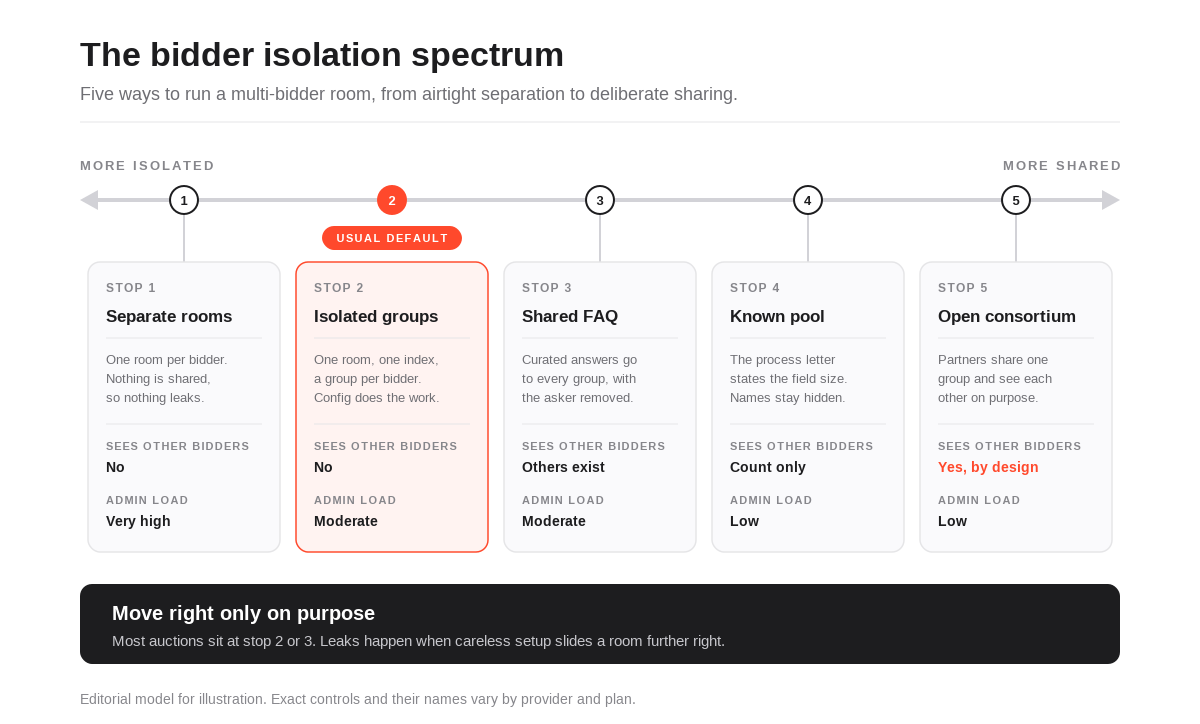
At the far left sits the separate-room model: one complete room per bidder. Nothing can cross between them because nothing is shared. It is airtight and expensive to run, because every document update, every answer and every new folder has to be repeated in each room.
One step right is the model most auctions use: isolated groups inside one room. A single document set, one index, one Q&A module, with each bidder in its own group and visibility rules doing the separating. Updates happen once. Isolation depends on configuration.
Further right comes the shared FAQ model, where the seller publishes selected answers to all groups, stripped of the asker’s identity. Bidders still cannot see each other, but they can see that other questions exist.
Then the known pool: the seller tells bidders, usually through the process letter, roughly how many parties are in the round. Names stay hidden. The point is competitive pressure, not transparency.
At the far right sits the open consortium room, where co-investors or club members are meant to see one another and work together. Here visibility is the goal, and the isolation work shifts to keeping the consortium away from the seller’s internal folders.
Most mid-market sales live in the second or third position. The mistake is drifting rightward by accident.
Seven ways bidders accidentally learn about each other
Almost every leak we hear about falls into one of these patterns. None requires a security flaw.
- The visible user list. Some rooms show all participants in a member panel or a contact directory. If that panel is room-wide rather than group-scoped, every bidder can scroll through the others.
- The broadcast answer. An adviser answers a question and clicks the option to share it with all bidders, without rewriting it. The original phrasing (‘As discussed with our lenders at a named bank…’) identifies the asker.
- The file name. A document called ‘NDA signed, Bidder C’ or ‘Mark-up from a named fund’ lands in a folder that more than one group can see.
- The group label. Groups named after the bidder firms appear in a permissions view, an export, or a notification email that a bidder admin receives.
- The email copy. A process update goes out from someone’s mailbox with every bidder in the To line. This is the oldest leak in the book and still happens.
- The shared upload folder. Bidders return drafts into one folder, so each can read the others’ submissions.
- The over-scoped bidder admin. A bidder’s lead is given admin rights to manage its own team, and those rights turn out to include room-wide reports.
A useful habit is to log into the room as a test user in each bidder group before invitations go out, and look for these seven things on screen. It takes fifteen minutes. Our guide to data room notifications and alerts covers the outbound side, where automated emails can reveal more than the room itself.
Should bidders know how many rivals they face?
This is a process question rather than a technology question, but the data room is where the answer gets enforced.
Some sellers want bidders to believe the field is crowded, because perceived competition supports price. Others prefer complete silence, because a bidder that suspects it is alone may slow down, and one that suspects a large field may walk away rather than spend on diligence. Whatever the choice, the room must not contradict the process letter.
Telling bidders the size of the field
Arguments for disclosure
- Creates competitive tension that tends to tighten timelines and bids
- Discourages a lone bidder from assuming it can re-trade later
- Sets expectations about Q&A response times when many parties are asking
- Reduces suspicion when shared FAQ answers reveal that others are active
Arguments against
- Invites bidders to probe for names through advisers and the market
- A small field, once disclosed, can weaken the seller's leverage
- Any mismatch between the letter and what the room shows damages trust
- Some bidders treat a large field as a reason to cap diligence spend
Whatever the seller decides, the count should come from the banker or the process letter, never from the platform. A room that reveals five group names, while the letter says the process is ‘highly competitive’, tells bidders exactly what they need to know.
How Q&A keeps questions private, and when answers go to everyone
The Q&A module is where isolation most often slips, so it deserves more than a line.
In a deal-grade room, each question belongs to the group that asked it. It is routed inside the seller team to the right expert, answered, and returned to that group alone. Capable platforms let the seller mark an answer as relevant to all bidders and publish it to a shared FAQ, which saves time when four groups ask the same question about the same lease.
That publish step is the risk. A question is written in the bidder’s own voice. It may mention its financing sources, its integration plans, or the specific worry its investment committee raised. Republishing it unchanged hands that context to every rival.
The safe pattern is simple: rewrite before you publish. Turn ‘Our lender is concerned about covenant headroom in the facility agreement, can you confirm…’ into ‘Please confirm the covenant headroom under the facility agreement as at the last test date.’ Same fact, no fingerprint.
Our walkthrough on running data room Q&A goes deeper on routing and approval chains, and the glossary entry for the Q&A module summarises what to look for in a demo. Rooms that handle many parties at once, such as iDeals with threaded routing or SmartRoom with its multiple bidder pools, are worth comparing on exactly this point: how answers move from private to shared, and who approves it.
Isolation setups compared by deal type
The right point on the spectrum depends on the process. The matrix below is our editorial view of sensible starting positions; your advisers may have good reasons to deviate.
| Deal type | Recommended setup | Q&A mode | User directory | Watch out for |
|---|---|---|---|---|
| Broad auction, 10+ first-round bidders | Isolated groups, staged release | Private, curated shared FAQ | Hidden, group-scoped | Group labels in exports; heavy FAQ rewriting load |
| Targeted sale, 2 to 5 bidders | Isolated groups | Private, rare broadcasts | Hidden | Bidders inferring each other from FAQ timing |
| Exclusive negotiation, one buyer | Single buyer group | Private | Own team only | Old bidder groups left active after exclusivity |
| Strategic buyer competing with funds | Isolated groups plus a clean team folder | Private | Hidden | Commercially sensitive data reaching a competitor too early |
| Consortium or club bid | One shared consortium group | Shared inside the consortium | Visible inside the consortium | Consortium members drifting into seller-only folders |
| Fundraising round, several investors | Isolated groups or one investor group | Mixed | Seller’s choice | Lead investor seeing follow-on investors’ questions unintentionally |
The strategic-buyer row deserves a note. When a competitor is bidding, isolation from other bidders is only half the issue. The seller may also need to restrict what that competitor sees at all, by placing the most sensitive pricing or customer data in a clean team folder that only named outside advisers can open. That protects the seller if the deal falls apart, and it helps both sides stay on the right side of competition rules on sharing information between rivals. The US Federal Trade Commission and equivalent authorities elsewhere take information exchange between competitors seriously, so take legal advice on the clean team design rather than improvising it.
How to set up a room so bidders stay invisible to each other
The routine below assumes one room with isolated groups, the most common setup. Run it once before invitations go out and again whenever a new bidder joins.
How to isolate bidders in a virtual data room
A pre-launch pass that separates competing bidders by people, conversation and behaviour, then proves the separation from the bidder's side of the screen.
Estimated time: 90min
-
Create one group per bidder with neutral names
Name groups Bidder A, Bidder B and so on, never after the firm. Keep the mapping of letters to firms in a seller-only note outside the bidder-visible space.
-
Scope the user directory to the group
Turn off any room-wide member list or presence panel, or limit it so each user sees only colleagues in the same group.
-
Set Q&A to private by default
Configure questions so they are visible only to the asking group and the seller team, and require an approver before any answer is published to all bidders.
-
Give each bidder its own upload folder
Create a submissions folder per group for mark-ups and bid letters, with no cross-group visibility, so drafts never sit side by side.
-
Restrict reporting rights
Keep engagement reports and activity exports with the seller team. If a bidder lead needs to manage its own users, grant user management without room-wide reporting.
-
Audit file and folder names
Search the index for firm names, initials and bidder letters in file titles, and rename anything that reveals who signed, asked or submitted what.
-
Test from inside each group
Log in as a test user in every bidder group, check the directory, Q&A, notifications and folder tree, and confirm nothing points to another party.
The last step is the one that catches problems. Configuration screens tell you what you meant to set. A test login shows you what a bidder actually sees.
When a bidder drops out, close its group the same day. Our guide to granting and revoking data room access covers the mechanics, and the companion piece on what happens to a data room when a deal falls through looks at what to keep and what to close down.
When bidders should see each other
Isolation is the default for an auction, not a universal rule.
Consortium bids. Two or three investors bidding together need to share analysis, divide workstreams and see each other’s questions. Put them in one consortium group with shared Q&A, and treat that group exactly like a single bidder relative to everyone else.
Club deals and co-investments. A lead fund may want co-investors to see a curated subset of the room. A separate co-investor group with narrower rights usually works better than adding co-investors to the lead’s group.
Lender groups. Banks in a syndicate often know who else is lending. A lender group can share visibility internally while remaining isolated from equity bidders.
Staged processes that merge. Occasionally two bidders combine mid-process. That is a seller decision, and the room should only be changed after the process letter or the bankers confirm it in writing.
In each case, visibility is created on purpose and scoped tightly. The failure mode is the same as before, just reversed: a consortium group set up quickly with room-wide rights, so the partners can see the seller’s internal working folders as well as each other.
What the seller sees that bidders never do
Isolation only runs one way, and that is by design.
While each bidder sees a quiet room, the seller sees the whole field. Activity reports show which group opened which document, when, and for how long. An engagement heatmap shows at a glance which bidders are working through the financials and which barely logged in after the management presentation.
That visibility shapes the process. A banker who sees one bidder spending hours in the customer contracts and another that has not opened the tax folder can calibrate follow-up calls, timetable extensions and the shortlist for the next round. Providers differ on depth here. Datasite, for example, scores bidders on how deeply they read the room, and Ansarada offers bidder engagement analytics across the pool; our iDeals vs Datasite comparison covers how two of the deeper platforms approach reporting.
There is a fairness question in the background. Bidders know the seller can see their activity; that is standard and usually disclosed in the room’s terms. What matters is that the seller does not pass one bidder’s activity data to another, directly or through hints. Doing so would undermine the process and, with a strategic bidder involved, could raise competition concerns.
Personal data deserves a brief mention too. User names, email addresses and IP logs are personal data under laws such as the GDPR. Keeping them within the seller team and the relevant bidder group is good process and good privacy hygiene at the same time.
What to ask a provider before you rely on isolation
A short list for the demo, framed as questions with observable answers:
- Can the member directory be limited to each group, and is that the default?
- Is every Q&A thread private to the asking group unless someone publishes it, and can publishing require approval?
- Do system notifications ever mention other groups, other users or group names?
- Can bidder group admins manage their own users without seeing room-wide reports?
- Can you preview the room as a member of a specific group before inviting anyone?
- What exactly appears in exports a bidder can download, such as an index or Q&A log?
If a provider can show each of these in a live test room, isolation is in good shape. If the answer is ‘yes, that can be configured’ with no demonstration, ask to see it. You can line providers up on these controls with our feature comparison builder, and the data room demo questions guide has a longer script.
Get the configuration right and the answer to the title question stays a confident no, for the whole life of the deal.
Frequently asked questions
Can bidders see who else is in a virtual data room?
Not if the room is configured for a competitive process. Each bidder sits in its own permission group with a group-scoped user directory, so it sees only its own colleagues. Bidders learn about rivals when the seller leaves a room-wide member list switched on, names groups after firms, or copies several bidders on the same email.
Can other bidders see my Q&A questions?
In a well-run room, no. Questions are private to the group that asked them and the seller team. The seller can choose to publish an answer to all bidders when it is generally relevant, and good practice is to rewrite it first so the original wording, which may reveal your financing or concerns, never reaches other parties.
Can a bidder see how active other bidders are?
No. Activity reports, engagement heatmaps and download logs are seller-side tools. A bidder may see reports about its own team if the seller grants that right, but room-wide reporting should stay with the seller and its advisers throughout the process.
Should consortium partners share one data room group?
Usually yes. Consortium members bidding together need to see each other's questions and divide the work, so a single consortium group with shared Q&A works well. That group should still be isolated from every other bidder and kept out of the seller's internal folders.
Is it better to give each bidder a separate data room?
Separate rooms give the strongest isolation but multiply the admin, because every document update and answer has to be repeated in each room. Most sellers use one room with isolated groups and a tested configuration, and reserve separate rooms for unusual cases such as a competitor bidder needing a heavily restricted document set.
