
How to grant and revoke data room access safely
On this page
- Grant versus revoke, at a glance
- What a grant actually is
- What a revoke actually is
- Why controlled access is the whole point
- The access ladder: which level for which party
- Which grant method for which situation
- The group-first grant, step by step
- The revocation matrix: what each mechanism actually reaches
- Staged disclosure: grant and revoke as one rhythm
- Offboarding: the revoke that actually leaks
- The audit trail is the evidence
- The mistakes that cause the most trouble
- How this maps to GDPR, SOC 2 and ISO 27001
- The verdict
An adviser is dropped from the deal on a Thursday. Nobody closes their account. Three weeks later their login still opens the room, they read the updated financials, and no alarm sounds.
That gap is the whole reason a virtual data room exists.
Sharing a document is easy. Taking it back is the hard part. That single asymmetry is why granting and revoking access deserve more thought than the two buttons make them look.
Grant and revoke are not opposites you toggle. They are a matched pair of levers, each with its own scope, its own reach and its own failure mode.
Get them right and a live deal room stays under control through every twist. Get them wrong and confidential files quietly walk out of the room while the log shows nothing amiss.
This guide sets the two actions side by side. It compares the levels you can grant, the methods you grant them by, and, above all, what each revocation mechanism can and cannot claw back.
Grant versus revoke, at a glance
Start with the shape of the two actions before the detail. They mirror each other, but not perfectly, and the gaps are where administrators trip.
How granting and revoking differ in a data room
| Dimension | Granting access | Revoking access |
|---|---|---|
| What it does | Gives a person or group a defined right over defined documents | Withdraws that right, in part or in full, at any time |
| Right unit | A group, ideally, so rights are inherited not improvised | A user or a whole group, deactivated or downgraded |
| Reach over on-screen content | Opens exactly the folders and levels you scope | Closes everything not already downloaded, instantly |
| Reach over downloaded files | Sets whether a copy leaves at all, and in what form | Reaches DRM copies; cannot reach plain originals |
| When to act | At each stage gate, as new parties qualify | At each stage gate, the moment a party drops out |
Read the last two rows twice. Granting decides whether a copy ever leaves the room, and in what form. Revoking can only reach that copy if the grant made it reachable.
The safety of a revoke is decided the moment you grant, not the moment you panic.
What a grant actually is
A grant gives one person a defined set of rights over specific documents. It carries a scope, meaning the room, a folder or a single file, and a level, meaning how much they can do once inside that scope.
Neither dimension is a simple on/off switch, and that precision is the whole point. It is what granular permissions buy you. It is also why you reach for a data room precisely when you cannot trust the recipient with an uncontrolled copy.
You are lending a view of confidential files to outside bidders, their lawyers and their bankers. On your terms. For as long as the deal warrants, and not a day longer.
What a revoke actually is
A revoke withdraws rights, in whole or in part. It can be as narrow as pulling print rights on one folder, or as total as deactivating a user across the entire room.
Revocation in a data room is retroactive in a way ordinary file sharing never is. Reviewers see rendered pages served by the platform, not files sitting on their own disk.
Pull their access and you close the door on everything they had not already downloaded. Instantly. Completely.
That is the core promise of a room over a shared drive. You never rely on the other party to delete their copy, because for on-screen and rights-managed content there is no independent copy to delete.
Why controlled access is the whole point
Because the cost of getting it wrong runs to millions, not inconvenience. A live deal room concentrates exactly the confidential financial, legal and personal data that makes a breach expensive, and the party that shared it is the one left explaining how.
IBM’s Cost of a Data Breach Report 2024 put the global average cost of a single breach at USD 4.88 million. The most expensive breaches share a profile: access that was too broad and lived too long.
A data room does not erase the risk. It moves the two variables you can actually control, who has access and for how long, out of email threads and shared drives and into a system where a grant is deliberate and a revoke is instant.
The access ladder: which level for which party
Access is a ladder, not a switch. Matching each party to the lowest rung that lets them do the job is the single most protective habit in room administration.
This is the principle of least privilege, and it is codified, not merely advised. The US National Institute of Standards and Technology puts it plainly:
Least privilege: the principle that a security architecture is designed so that each entity is granted the minimum system resources and authorizations that the entity needs to perform its function.
That definition, from the NIST glossary, is the test to apply to every grant. The table below maps the parties in a typical deal to the level that usually fits, using role-based access control rather than case-by-case calls.
Matching each party to the access level that fits
| Party in the deal | Access level that usually fits | Why it fits |
|---|---|---|
| First-round bidders | View-only, watermarked | Unqualified interest; no download until they earn it by advancing |
| Shortlisted bidders | Protected (rights-managed) download | Deep diligence needs offline reading, but the file stays revocable |
| Buy-side lawyers and advisers | View-only to protected download on assigned folders | They need detail in their workstream, not the whole room |
| Internal deal team | Full access to their workstream; admin for the leads | They own the content, so the leads run the room |
| Auditors or regulators | Time-boxed view-only, later in the process | Access should expire automatically with their mandate |
The rungs stack. Print rights assume view rights. Protected download assumes print. Full download sits at the top. Granting a level always includes everything beneath it, which is why “just give them download” is rarely the safe answer.
The trade-offs between rungs are worth stating bluntly:
- View-only, watermarked. Lowest risk, fully retroactive, zero claw-back problem. The cost is friction: reviewers who want to read offline cannot, and heavy diligence feels slow.
- Protected (DRM) download. The sweet spot for shortlisted bidders. Files leave the room but stay encrypted and revocable. The cost is dependency on the provider’s DRM actually working across the reviewer’s devices.
- Full original download. Fastest for the recipient, and a one-way door for you. Once a plain file is on a laptop, no revoke reaches it. Reserve this for content you would not mind seeing forwarded.
For the full mechanics of each rung, our guide to data room permissions explained maps the whole ladder.
Which grant method for which situation
Most virtual data rooms offer several onboarding methods. The right one depends on how many people you are adding and how tightly you need to control identity.
Ways to grant data room access and when each fits
| Method | How it works | Best suited to | Main watch-out |
|---|---|---|---|
| Single email invite | You invite one named person to a group; they set a password and pass 2FA on first login. | Adding individual advisers or a late-arriving reviewer | Slow at volume; easy to attach the wrong group by mistake |
| Bulk invite / import | Upload a list of users mapped to groups and send invitations in one action. | Onboarding a whole bidder consortium or advisory team at once | One wrong column in the import can mis-assign a group across many people |
| Single sign-on (SSO) | Access is federated through the counterparty's identity provider, so their IT controls the login. | Large enterprise buyers with their own identity systems | Deprovisioning depends on the other side's IT acting promptly |
| Group-scoped self-registration | An approved-domain link lets people from a whitelisted company register into a preset group. | Broad, lower-sensitivity phases with many reviewers from one firm | Only safe with strict domain allow-lists and admin approval |
For most M&A rooms the workhorses are single and bulk email invites, with single sign-on reserved for large corporate buyers who insist on it.
The method changes. The principle does not. The person always lands inside a group whose rights you decided in advance, never with a bespoke permission set improvised at the moment of invitation.
Enforcing two-factor authentication on every method closes the gap a forwarded invite would otherwise open.
The group-first grant, step by step
Whichever method you choose, build the group first, set its rights, then invite people into it. Every invitee inherits a vetted permission set instead of being configured by hand.
How to grant data room access safely
A group-first workflow that gives each new user exactly the rights their role needs, with nothing left to chance.
Estimated time: 20min
-
Create the group before the person
Set up a group for the role (a specific bidder, the legal advisers, the internal team) and define its baseline access, typically view-only across the room, before you invite anyone into it.
-
Scope the group's rights folder by folder
Open individual folders for that group only where the role genuinely needs them, raising the level to print or protected download deliberately rather than granting broadly to save time.
-
Invite by email into the group
Send the invitation to the person's business email tied to the group, so they inherit its exact rights on first login. Avoid one-off individual permissions that sit outside any group.
-
Require identity verification
Enforce two-factor authentication and, on sensitive rooms, restrict access to approved email domains so a forwarded invite cannot onboard an unintended person.
-
Confirm from the other side
Log in as a dummy member of the new group to verify they see exactly what they should. Grant is not finished until you have seen the room through their eyes.
One habit separates a clean room from a leaky one: refusing to grant access to an individual outside a group.
Individual exceptions feel faster in the moment. They become invisible landmines later, because no one remembers that one reviewer holds download rights the rest of their group does not.
The revocation matrix: what each mechanism actually reaches
Here is the crux, and the most misunderstood part of access control. There are four ways to revoke, and they do not do the same thing.
Confuse them and you will believe a file is safely clawed back while it sits untouched on a stranger’s laptop.
What each revocation mechanism actually controls
| Capability | Deactivate user | Downgrade group | Remote-wipe DRM file | Expiry / time limit |
|---|---|---|---|---|
| Blocks all future logins to the room | Yes | Partly | No | Yes |
| Removes access to files viewed on screen | Yes | Yes | No | Yes |
| Reaches a rights-managed (DRM) file already downloaded | No | No | Yes | If set |
| Reaches a plain original file already downloaded | No | No | No | No |
| Works automatically without an admin acting | No | No | No | Yes |
Four mechanisms, four different jobs:
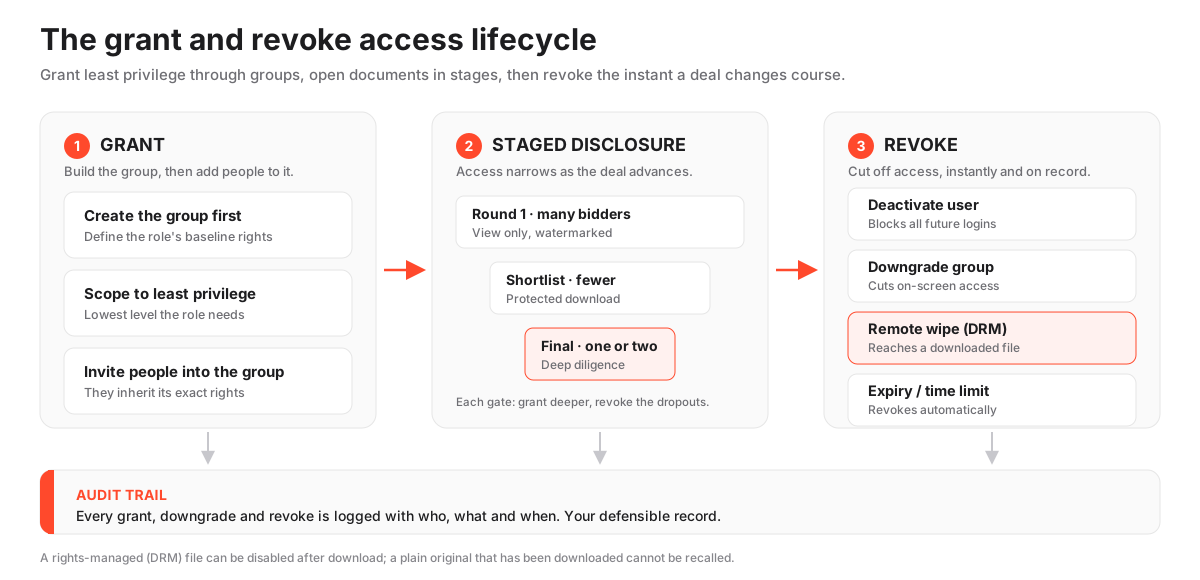
- Deactivate the user. The single decisive action for offboarding one person. Cuts off all future logins the moment you confirm it. Reversible if they return. Reaches nothing already downloaded as a plain file.
- Downgrade the group. The right move when a whole set of parties should lose depth without being ejected. Closes on-screen access to the folders you pull. Existing logins may persist until the level actually reloads.
- Remote-wipe a DRM file. The only mechanism that reaches a copy already off the platform, and only if that copy was rights-managed to begin with. No help against a plain original.
- Expiry / time limit. The only mechanism that works with no admin present. Set it at grant time and access lapses on schedule, which is exactly what you want for auditors and regulators.
Read the third and fourth rows of the table together and the lesson is decisive. A rights-managed download, governed by digital rights management, stays encrypted and phones home for permission, so revoking access can disable it even after it has left the platform.
A plain original download is just a file on someone’s laptop. No amount of clicking “revoke” pulls it back.
This is exactly why sensitive folders should stay view-only or protected-download, and why granting original-download rights is a deliberate decision, not a default. Pairing protected download with dynamic watermarking and fence view adds a further deterrent, since every page a reviewer sees carries their identity.
Staged disclosure: grant and revoke as one rhythm
Staged disclosure means releasing documents to a narrowing group as the deal progresses. Grant deeper access to the parties who advance; revoke it from those who drop out.
It is the natural rhythm of a competitive process, and the two levers are what let you run it without standing up a separate room for each phase.
The pattern is consistent across deals:
- Round one. Many bidders on view-only access to a curated, non-sensitive set: teaser financials, high-level contracts, corporate structure.
- Shortlist. The administrator opens deeper folders, meaning detailed pricing, customer lists, IP, key-person contracts, to the surviving groups only, and revokes the eliminated bidders’ access entirely.
- Final parties. The last folders open to one or two groups, still protected-download rather than plain original wherever the content is sensitive.
Each transition is a stage gate. Each gate is at once a grant to the parties moving forward and a revoke for those left behind.
Done well, no bidder ever sees a document their round did not warrant, and the audit log records exactly when each door opened and closed. Sellers running a full process can see how the leading rooms handle this depth in our roundup of the best virtual data rooms for M&A.
Offboarding: the revoke that actually leaks
Offboarding is where most access leaks happen. Treat every exit as a deliberate revoke, not an afterthought.
The moment a bidder is eliminated or an adviser leaves the mandate, deactivate the whole group or the individual user. Do not wait until the deal ends to tidy up dormant accounts.
The failure pattern is predictable and costly:
- A bidding consortium walks away, but their analysts stay active for weeks because no one closed the group.
- An advisory firm is replaced, yet a departed associate’s login still works because access was tied to a person nobody thought to remove.
- A departed user held rights-managed downloads, and no one triggered the remote-wipe or expiry, so those files keep phoning home for a mandate that ended.
The first two are unforced errors that stage-gate discipline eliminates. At every phase change, review the full user list against who should still be in the room, and revoke anyone who should not.
Where a departed user held DRM downloads, use the remote-wipe or expiry control to reach those files too. And deactivate rather than delete, so the audit trail of what they accessed stays intact.
The audit trail is the evidence
Every grant, downgrade and revoke is written to the audit trail as a timestamped, attributable event, alongside the document views and downloads it governs.
This is not incidental record-keeping. It is the evidence that your access control worked, and it is what a seller leans on to show a fair, controlled process if the deal is ever questioned.
A strong log captures the permission change itself, meaning who granted or revoked what, for whom, and when, not just the resulting document activity. It also lets an administrator export the record for the deal file.
That closed loop, an intentional grant, a scoped level, a timely revoke and a complete record of all three, is what turns a pile of permission settings into a defensible process. Our explainer on VDR audit trails goes deeper into what a good log should capture and how to use it as evidence.
The mistakes that cause the most trouble
Nearly every access failure is over-granting or under-revoking, and they cluster around a handful of predictable errors:
- Granting download at the room level to save setup time, then forgetting a sensitive folder sits inside it.
- Adding a reviewer as an individual exception outside any group, so their unusual rights become invisible.
- Leaving an eliminated bidder’s group active because offboarding was deferred to the end of the deal.
- Assuming a plain-original download can be clawed back the way a rights-managed one can.
- Never re-checking the user list, so access set at kickoff drifts out of step with who should still be in the room.
The common thread is treating access as something you configure once. In a live deal, the right answer to “who can see what” changes weekly.
The safest rooms are the ones whose administrators revisit grants and revokes at every stage gate, not just at launch. Our wider guide to data room mistakes to avoid sets these access errors alongside the setup blunders that surround them. If you are still standing the room up, how to set up a virtual data room covers the groundwork that makes clean grants possible.
How this maps to GDPR, SOC 2 and ISO 27001
Tight access control is not only prudent. It is an explicit requirement of the standards serious counterparties expect a data room to meet.
Under the GDPR, Article 32 requires “appropriate technical and organisational measures” to secure personal data. Restricting access to authorised people, then removing it promptly when it is no longer needed, is one of the clearest ways to meet that obligation for the personal data a deal room inevitably holds.
The same principle runs through the certifications buyers scan for:
- ISO 27001, defined in the standard published by the ISO, treats access control and the timely revocation of access as core controls.
- A SOC 2 report, tested against the AICPA Trust Services Criteria, checks specifically whether a system grants logical access appropriately, removes it when it should, and logs both.
The grant and revoke discipline in this guide is the visible, product-level evidence that a vendor meets those standards. So when you shortlist a room, confirm not just that it claims certification but that it actually offers instant revocation, DRM claw-back and a permission-change audit log. A certificate without those controls is thin cover.
Our reviews of security-led providers such as iDeals and Datasite spell out where each lands, and modern, full-featured rooms like Ellty are worth weighing for M&A, due diligence and fundraising where you want granular control with a clean interface.
The verdict
Grant and revoke are not two settings. They are one discipline, applied at every stage gate for the life of the deal.
The decisive rule: grant through groups, at the lowest level a role needs, and the revoke almost takes care of itself. On-screen and rights-managed content is fully retroactive, so pulling a user closes every door you care about the instant you confirm it.
The only access a revoke cannot reach is the access you should never have granted: a plain original file on someone else’s device.
So the safest administrator is not the one who reacts fastest when a bidder drops out. It is the one who granted so carefully that dropping a bidder is a single click with nothing left dangling.
Build the group. Scope the level. Stage the disclosure. Revoke at every gate. Let the audit trail prove all four.
Then compare the rooms on whether they actually deliver instant deactivation, DRM claw-back and a permission-change log, because that is where the marketing and the mechanics part company.
Frequently asked questions
Can I revoke data room access instantly after a bidder drops out?
Yes. Instant, retroactive revocation is a defining feature of a virtual data room. Deactivating the user or group cuts off all future logins the moment you confirm it, and closes access to everything they had not already downloaded. For rights-managed downloads, you can often disable the file on their device too. This is what makes clean offboarding of an eliminated bidder possible, which a shared drive cannot offer.
Does revoking access delete a file the person already downloaded?
Only if the file was a rights-managed (DRM) download. Those stay encrypted and check for permission, so revoking access can disable them even after they leave the platform. A plain original download is just a file on the person's device, and no revocation can reach it. This is why sensitive documents should be kept view-only or protected-download, and original-download rights granted only deliberately.
Should I grant access to individuals or to groups?
Almost always to groups. Set a group's rights once, then add people to it so everyone in a role inherits the same vetted permissions. Granting bespoke rights to individuals outside any group creates invisible exceptions that are nearly impossible to audit later and are a common source of accidental over-sharing in busy rooms.
What is the difference between deactivating and deleting a user?
Deactivating a user cuts off their access while keeping their history in the audit trail, so you retain a record of what they viewed and downloaded. Deleting a user can remove that history, which weakens your evidence of a controlled process. For offboarding, deactivation is usually the safer choice because it revokes access without erasing the accountability record.
How often should I review who has access during a live deal?
At every stage gate, and at minimum whenever the field of parties changes. Access set at kickoff drifts out of date fast as bidders drop out and advisers rotate. Reviewing the full user list against who should still be in the room at each phase, and revoking anyone who should not, is the single most effective habit for keeping a live room under control.
