
Data room demos: how to see past the scripted tour
On this page
- What a data room demo is, and what it is built to show
- Why the scripted tour looks better than your deal will
- Who should be on the call
- The questions to ask, grouped by what they expose
- Setup and upload
- Permissions and isolation
- Q&A and workflow
- Reporting and audit
- Security and compliance
- AI features, if they are on the slide
- Make them drive your documents, not theirs
- A demo plan you can run in 60 minutes
- What you can verify live, what needs a trial, and what needs the contract
- Demo or free trial: what each can prove
- Pricing questions that belong in the demo
- Scoring the demo so two vendors can be compared
- The follow-up email that closes the gaps
Forty minutes of screen share. A twelve-month commitment at roughly $3,800 a month. That was the trade a mid-market advisory boutique made last spring, and on paper it looked sensible.
Then the live deal started.
The first bulk upload of 6,100 files flattened two levels of the folder tree, so the index the bidders were promised did not match what they saw. The Q&A module routed every question to a single administrator because nobody had set up expert groups during the demo; nobody had shown how. And the seller’s CFO, logged in to check what a bidder could see, discovered that the restricted view displayed folder names the bidders were not supposed to know existed.
None of it was hidden. All of it was fixable. Fixing it took an associate and a vice president about 34 hours across the first fortnight. At blended internal rates near $250 an hour, that is roughly $8,500 of time spent repairing a decision that a better demo would have informed.
The firm, Pennock Lane Advisory, is illustrative. The pattern is not.
Demos are not dishonest. They are rehearsed. A rehearsed tour shows a product at its best, in conditions that will never repeat on your deal, and the cheapest correction is to change the conditions before the call starts. This guide covers how: what a demo is built to show, who to bring, what to ask, which live tests to demand and how to score the answers so two vendors can be compared on the same terms.
What a data room demo is, and what it is built to show
A data room demo is a guided walkthrough of a virtual data room, run by a vendor’s sales or solutions team, usually in a sample room preloaded with tidy documents and shown from an administrator account.
That last detail matters most. Nearly every demo is driven from the most powerful seat in the room, where every button works and every folder is visible.
Your bidders will never sit there.
The scripted tour typically follows a fixed arc: a polished folder tree, a drag-and-drop upload of a few files, a permission change on a named group, a quick look at Q&A, a dashboard of activity, and a closing slide about security certifications. Each step is real. The arc is designed so that nothing slow, ambiguous or awkward appears on screen.
That is a reasonable thing for a seller to do. It is not a reasonable thing for a buyer to accept as evidence. The fix is to bring a script of your own and ask the presenter to follow it instead, at least for part of the hour. Most good vendors expect this and some welcome it, because a prepared buyer is a buyer close to signing.
If you are still deciding whether you need a purpose-built room at all, start one step earlier with our guide to choosing a virtual data room, then come back here once the shortlist exists.
Why the scripted tour looks better than your deal will
The sample room in a demo differs from a live deal room on almost every axis that causes problems. Size, mess, number of parties and the seat you view from all change.
Here is what typically separates the two.
| Element | Typical demo room | A typical mid-market sell-side room | What the gap hides |
|---|---|---|---|
| Document count | 40 to 200 clean files | 3,000 to 15,000 files of mixed quality | Upload speed, conversion errors, search quality at volume |
| File types | Mostly PDF and Office | PDF, scans, spreadsheets with macros, CAD, email exports, video | Which formats render in the viewer and which force a download |
| Folder depth | Two or three levels, already indexed | Five to seven levels, renumbered several times | Auto-indexing, renumbering and how the index survives a reorganisation |
| Parties | One sample bidder group | Four to ten bidder groups plus advisers and clean teams | Group isolation, bulk invitations, per-group Q&A routing |
| Viewing seat | Administrator | Restricted, view-only bidder | What a bidder actually sees, including folder names and file counts |
| Q&A volume | Five sample questions | Several hundred questions over six to ten weeks | Routing, approval workflow, duplicate handling, export |
| Duration shown | Minutes | Three to six months of live activity | Reporting over time, archiving, renewal and closure |
The ranges are indicative and vary widely by deal, but the direction never changes. The demo shows the room on its best day, and your deal will spend most of its life on ordinary and bad ones.
The single biggest blind spot is the viewing seat. A permission model can look watertight from the administrator panel and still leak small facts from the bidder side: a folder title, a file count, an empty subfolder that hints at a dispute. Our explainer on whether bidders can see each other in a data room walks through the subtle cases.
Who should be on the call
Most demos are attended by whoever found the vendor. That is usually the wrong cast.
A data room touches at least four kinds of people on a deal, and each of them sees a different product. The deal lead cares about speed and reporting. The person who will administer the room cares about uploads, groups and permissions. Your IT or security contact cares about authentication, encryption and certifications. And an outside reviewer, ideally someone who has sat on the buy side of a process, cares about what it feels like to read 400 documents in that viewer at eleven at night.
You do not need all four for the whole hour. You do need each of them for their part.
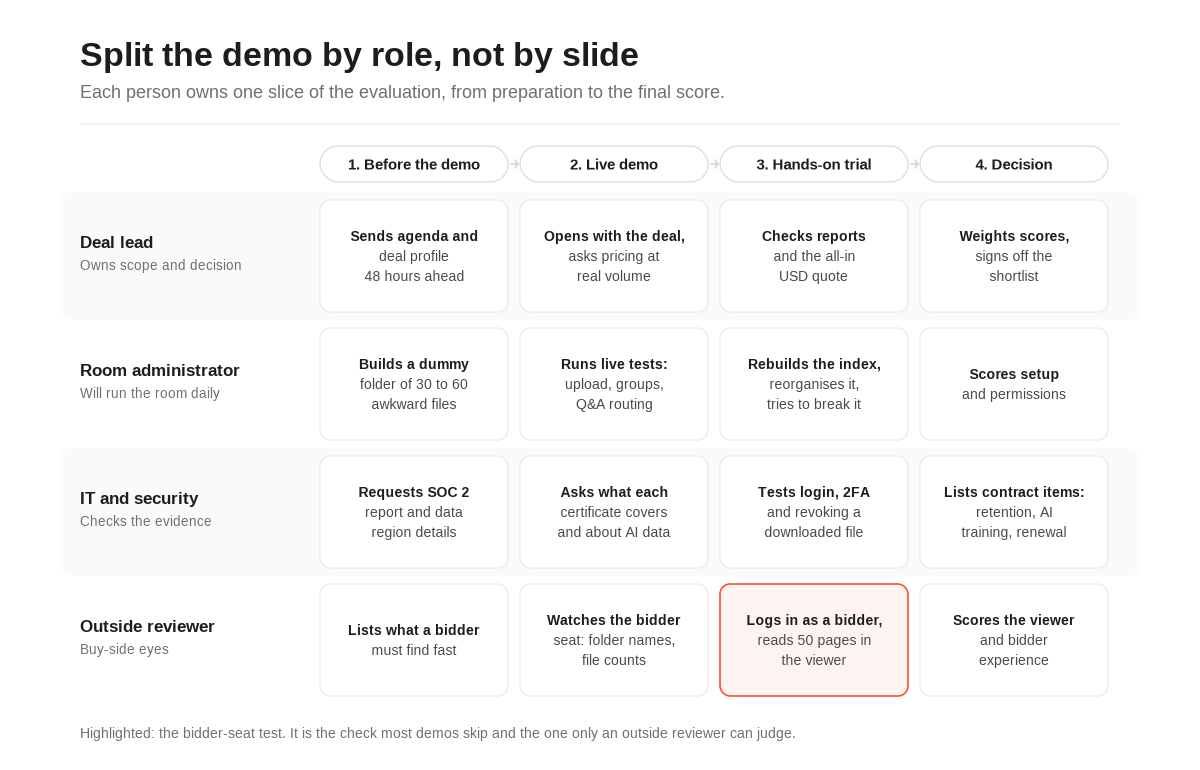
The figure maps the split. Before the call, the administrator prepares the sample folder and the deal lead sends the agenda. During the call, each role takes a slice of the questions. In the trial, the outside reviewer does the one job nobody else can: logging in as a bidder and reporting what the room feels like from there.
The decision then rests on a shared scoresheet rather than on whoever spoke last.
If you plan to hand the room to the vendor’s team to run, the cast changes again. Our comparison of managed and self-service data rooms covers how that shifts the questions.
The questions to ask, grouped by what they expose
Generic questions get generic answers. “Is it secure?” will always be answered yes.
Good demo questions ask the presenter to show, not tell, and each one is aimed at a specific failure mode. Group them by the part of the deal they protect, assign each group to the person who cares, and keep the list on screen during the call.
Setup and upload
- “Can you upload this folder of ours now, with its nested structure, and show the index it produces?”
- “What happens to the index numbering when I move a folder from section 4 to section 2?”
- “Which file types render in the browser viewer, and which force a download to open?”
- “How do you handle a 2 GB file, a password-protected PDF and a spreadsheet with macros?”
The point of the first question is not the upload speed. It is whether the presenter is willing to leave the script. A confident team says yes.
Permissions and isolation
- “Log in as a restricted bidder and show me what a bidder in group B can see in a folder they cannot open.”
- “Can I set view-only access with printing blocked for one group and download with a dynamic watermark for another, on the same file?”
- “If I revoke a user right now, what happens to a copy they downloaded an hour ago?”
- “Are folder names, file counts and other groups’ activity hidden from bidders by default, or only when configured?”
These four questions catch most of the problems that surface in live deals. The third one separates rooms with real digital rights management from rooms that only control access inside the browser.
Q&A and workflow
- “Route a question from bidder group A to our tax adviser, require approval before the answer is released, and show what group C sees.”
- “How are duplicate questions from different bidders handled?”
- “Can I export the full Q&A log with timestamps at the end of the deal?”
Our guide to running data room Q&A explains why routing and approval matter more than the inbox itself.
Reporting and audit
- “Show me the activity report for one user over one week, down to the page.”
- “Can that report be exported, and is the log tamper-resistant?”
- “How long are logs kept after the room is archived?”
Security and compliance
- “Which certifications cover the product itself, not just the hosting provider?”
- “Can I see the current SOC 2 report under NDA, and what period does it cover?”
- “Where is data stored, and can I choose the region?”
A SOC 2 report is an independent attestation against the AICPA’s Trust Services Criteria. Ask whether the report covers the application, or only the cloud infrastructure underneath it. Both are legitimate; they are not the same assurance.
AI features, if they are on the slide
- “Run that AI feature on a document I give you now, not on the sample set.”
- “Does the AI respect permissions, so a bidder cannot get an answer from a file they cannot open?”
- “Is anything I upload used to train a model, and do AI actions appear in the audit trail?”
AI demos are the most rehearsed part of any modern tour. Our guide to testing data room AI features goes deeper on how to probe them.
Make them drive your documents, not theirs
Questions are half the method. Live tests are the other half.
A live test is a request to perform a real task, with your material, while you watch. It turns a claim into evidence in about three minutes, and the way a presenter reacts tells you almost as much as the result.
Prepare a sample folder of 30 to 60 non-confidential or dummy documents that reproduces the shape of your deal. Include at least one awkward item: a scanned contract with handwritten notes, a large spreadsheet, a file with a very long name, a nested folder five levels down. Send it 48 hours before the call so the vendor has no grounds to say they were not ready.
Then ask for four things on the call.
First, upload the folder and show the index. Second, create two bidder groups with different rights and log in as each. Third, send a test question through Q&A and route it. Fourth, pull the activity report for the test users you just created.
That is roughly fifteen minutes of the hour. It replaces fifteen minutes of slides you would have forgotten by Friday.
A presenter who will not leave the sample room is telling you something about the product, the team or both. Write it down.
There is one fair objection. Some enterprise vendors will say a live upload of an external folder needs a security review on their side. That is reasonable. The answer is to schedule a second, shorter session or move the test into a trial, not to drop the test.
A demo plan you can run in 60 minutes
The plan below fits a standard one-hour slot. It front-loads the tests, keeps slides to the end and leaves time for pricing, which most buyers forget to ask about until the order form arrives.
How to run a data room demo that tests the product
A one-hour demo agenda that replaces the scripted tour with your own documents, roles and scoring.
Estimated time: 1h
-
Send the agenda and sample folder
Two days before the call, email the vendor a one-page agenda, the list of attendees by role and a dummy folder of 30 to 60 files that mirrors your real deal, including at least one awkward file.
-
Open with your use case, not their slides
Spend the first five minutes describing the deal: type, page volume, number of bidder groups, expected length and any regulated data. Ask the presenter to tailor what follows to that.
-
Run the four live tests
Have the presenter upload your folder, create two bidder groups with different rights, route a test question through Q&A and pull an activity report for the test users. Note the time each test takes.
-
Switch to the bidder seat
Ask for a restricted bidder login and review the room from there for five minutes: folder names, file counts, viewer quality, download behaviour and watermark placement.
-
Work the role-based question list
Hand over to the administrator, the security contact and the deal lead in turn, each working their own section of the question list for five to ten minutes.
-
Ask the pricing questions
Request an all-in USD figure at your real page count, seat count and deal length, including overages, add-ons and renewal terms. Ask for it in writing after the call.
-
Score before you hang up
Each attendee fills in the shared scoresheet within ten minutes of the call ending, before the next vendor's demo blurs the memory.
A note on order. Pricing goes near the end because the tests change what you need to price. If the bidder seat exposes a gap, the add-on that closes it belongs in the quote.
What you can verify live, what needs a trial, and what needs the contract
Not every claim can be proven on a screen share. Trying to force them all into the demo wastes the hour; letting them all slide to the contract wastes your leverage.
The matrix sorts the most common claims by where they can actually be verified.
Where each vendor claim can be proven
| Claim | Visible in a live demo | Needs a hands-on trial | Needs contract language |
|---|---|---|---|
| Bulk upload keeps folder structure | Yes | Yes | No |
| Auto-index survives reorganising folders | Yes | Yes | No |
| Bidder groups cannot see each other | Yes | Yes | No |
| Viewer handles your file types | No | Yes | No |
| Q&A routing and approval workflow | Yes | Yes | No |
| Page-level activity reporting | Yes | No | No |
| Performance at full deal volume | No | Yes | No |
| Uploaded files not used for AI training | No | No | Yes |
| Log retention after archiving | No | No | Yes |
| Overage rates and renewal cap | No | No | Yes |
| Support response times | No | Yes | Yes |
Read the table from right to left. Anything in the contract column should appear in the order form or master agreement, not only in the sales deck. Anything in the trial column should be on your trial checklist with a named owner.
Demo or free trial: what each can prove
A demo shows you what the vendor wants you to see. A trial shows you what you can make the product do on your own.
Both are useful. They answer different questions.
A demo is the faster way to understand a complex product’s model: how groups, rights and workflows fit together, and how the vendor thinks about deals. It is also the only route on many enterprise platforms. Intralinks and Datasite, for example, are quote-only in our data, and evaluation runs through a demo and a scoped quote rather than a self-serve trial.
A trial is the better test of fit. You upload what you want, invite who you want and break what you want. Several providers in our reviews offer one, including iDeals, Ansarada and Firmex, and some modern full-featured rooms such as Ellty publish pricing and offer a 14-day free trial alongside the usual permissions, Q&A, watermarking and audit tools, so a buyer can run every test in this guide without booking a call.
The best sequence for a competitive shortlist is usually demo first, trial second. Use the demo to learn the model and ask the contract questions; use the trial to prove the parts the demo could not. Our guide to free trials versus paid data rooms covers what a trial can and cannot tell you.
| Proof route | What it proves best | Typical time | Main limit |
|---|---|---|---|
| Live demo | The product model and the vendor’s understanding of your deal | 45 to 60 minutes | Run from the vendor’s seat, on the vendor’s data |
| Self-serve trial | Fit with your own files, groups and reviewers | 3 to 14 days | Limited support; you must design the tests yourself |
| Guided pilot | Behaviour at realistic volume, with vendor help | 1 to 3 weeks | Usually only on larger or enterprise commitments |
| Reference call | How the vendor behaves when a live deal goes wrong | 30 minutes | References are chosen by the vendor |
Pricing questions that belong in the demo
The demo is the cheapest place to learn the real price, because the presenter wants the next meeting.
Ask while the goodwill is high. The aim is a single all-in USD figure for your deal, not a monthly headline.
- “What is the all-in cost at 12,000 pages, 60 users and a six-month deal, including overages?”
- “Which of the features you just showed are add-ons, and what do they cost?”
- “Are external guests counted as paid users?”
- “What is the minimum term, the auto-renewal notice window and the cap on renewal increases?”
- “What does it cost to keep the room archived for two years after close?”
For orientation, published entry pricing in our data ranges from about $15 a month for general file-sharing tools to $149 to $299 a month for dedicated deal rooms with published rates, while enterprise platforms quote per project. Every figure is indicative; confirm the current number with the provider before you budget.
Our audit of the hidden costs of virtual data rooms lists the overage and renewal traps in detail, and the VDR cost calculator turns your page, user and month numbers into a comparable total.
Scoring the demo so two vendors can be compared
Without a scoresheet, the last demo of the week wins. It is fresh, and everyone remembers the presenter’s joke.
Keep the sheet short. Six to eight criteria, each scored one to five, each owned by the attendee best placed to judge it. Weight them to your deal before the first call, not after.
A workable set for a sell-side process: upload and indexing, permission isolation from the bidder seat, Q&A workflow, reporting depth, viewer quality on your file types, security evidence, pricing transparency, and how the presenter handled your tests. That last one is subjective. It is also predictive of how the support team will behave in week three of a live deal.
Two scoring rules keep the sheet honest. A claim that was told but not shown scores no higher than three. A claim that failed a live test scores one, whatever the explanation.
Then compare. If two vendors score within a few points, the trial decides. If one wins clearly on the criteria you weighted highest, the trial confirms.
For a structured side-by-side once the scores are in, the comparison hub lines up the providers we cover on the same criteria.
The follow-up email that closes the gaps
Every demo leaves open items. The follow-up email is where they get closed in writing.
Send it within a day. List each question the presenter promised to answer later, each claim you want confirmed in contract language, and the all-in quote request with your exact page, user and month assumptions. Ask for the SOC 2 report or ISO 27001 certificate if you did not receive it on the call, and for trial access if the vendor offers one.
Keep the tone neutral and the list numbered. A vendor that answers every point within a few days is giving you a preview of its support. One that answers selectively is giving you a different preview.
Frequently asked questions
What should I ask in a data room demo?
Ask the presenter to show, not tell. Request a live upload of your own sample folder, a restricted bidder login to see what bidders see, a test question routed through Q&A with approval, and a page-level activity report for a test user. Add security questions about which certifications cover the application itself, and pricing questions that produce an all-in USD figure at your real page, user and month counts.
How long should a data room demo take?
Around 45 to 60 minutes is enough if you send an agenda and a sample folder two days ahead. Spend roughly fifteen minutes on live tests, five on the bidder view, twenty on role-based questions and ten on pricing. A demo that runs longer is often filling time with slides rather than testing anything.
Is a demo or a free trial better for choosing a data room?
They prove different things. A demo explains the product model and lets you ask contract and pricing questions directly; a trial proves fit with your own files, groups and reviewers. For a competitive shortlist, a demo followed by a short trial is usually the strongest sequence. Some enterprise vendors offer only demos and scoped quotes.
Who should attend a data room demo?
At minimum, the deal lead and the person who will administer the room. Add an IT or security contact for the certification and authentication questions, and if possible someone with buy-side experience who can judge the bidder view and the document viewer. Each attendee should own one section of the question list and score it.
What are red flags in a data room demo?
A presenter who refuses to use your sample folder or log in as a restricted bidder, vague answers on which certifications cover the product, no clear position on whether uploaded files train AI models, and reluctance to give an all-in price in writing. Any one can have an innocent explanation; two or more together deserve a trial before you sign.
