
How many users does a data room need? Seat counts by deal type
On this page
- What counts as a user in a data room?
- How many users does a data room need by deal type?
- Why seat counts grow halfway through a deal
- How do providers meter users?
- How to count the seats you actually need
- Where the real limit hides: admin seats, groups and storage
- What does extra user capacity cost?
- Is “unlimited users” really unlimited?
- More seats, more exposure: the security side of user limits
- Choosing a plan once you have the number
A data room user limit is the maximum number of people a plan allows to hold their own login to the room.
That sounds like a minor line on a pricing page. It is not.
Two rooms at the same monthly price can differ by a factor of ten on who you are allowed to invite. One plan includes three administrators and unlimited guests; another bills every named reviewer as a seat, including the outside counsel of a bidder you have never met. On a small seed round the two are interchangeable. On a sale process with five bidders, one of them quietly becomes the most expensive line in your deal budget.
The difference is not the price. It is the counting rule.
This guide sets out how providers count users, what realistic seat numbers look like for each type of transaction, and how to size a plan so that adding the sixth bidder in week three does not trigger a renegotiation. All figures are in USD and indicative; confirm current terms with each provider before you budget.
What counts as a user in a data room?
A user is any named identity with credentials to the room. Beyond that, providers diverge.
Most pricing schemes recognise at least two classes. Administrators (sometimes called owners, managers or full users) can upload files, build the folder tree, set permissions, invite others and read the full audit log. Guests (viewers, external users, invitees) can open what they are granted and nothing more. A third class, Q&A participants, sits awkwardly between the two: experts on the sell side who answer questions without managing the room, and bidder leads who submit questions on behalf of a team.
The diagram below maps those roles as overlapping sets. The overlaps matter because providers often bill a person by the most privileged role they hold.
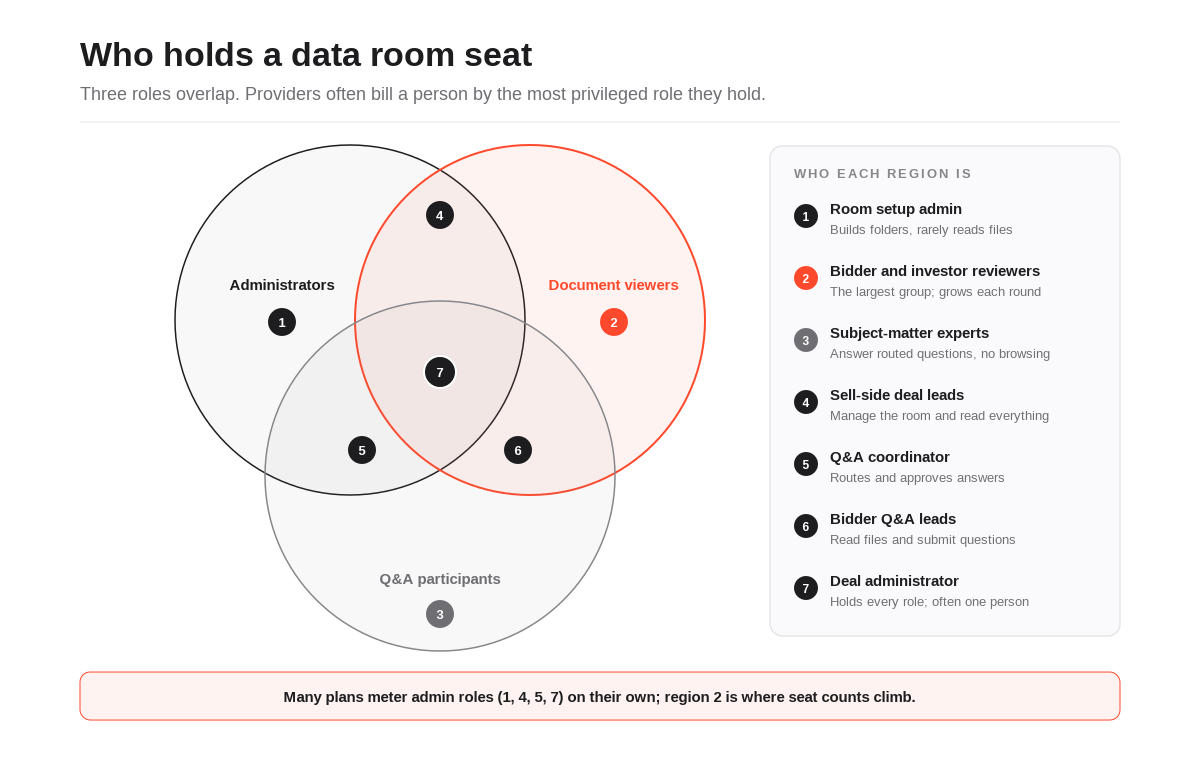
Two further distinctions decide what a limit actually means:
- Named versus concurrent. Almost every data room counts named users, meaning each invited person is a seat whether they log in once or daily. Concurrent licensing, common in older enterprise software, is rare here because the audit trail has to tie every action to one identity.
- Active versus provisioned. Some plans count only users whose access is currently live; others count every account ever created on the room. If you revoke a dropped bidder’s twelve reviewers, ask whether those seats free up.
Get these two answers before comparing any headline number. The role-based access control model a room uses usually tells you how it will count.
How many users does a data room need by deal type?
The honest answer is a range, and the range is driven by one variable more than any other: how many outside parties you let in at once.
The table below gives indicative named-user counts for common transactions. The sell-side column covers your own team plus your advisors. The counterparty column is per bidder or investor, including their outside advisors.
| Deal type | Sell-side users | Users per counterparty | Typical counterparties | Indicative total |
|---|---|---|---|---|
| Seed or Series A raise | 3 to 6 | 2 to 4 | 3 to 8 investors | 10 to 30 |
| Growth round with lead diligence | 5 to 10 | 4 to 10 | 2 to 5 funds | 20 to 60 |
| Bilateral sale (one buyer) | 6 to 12 | 10 to 25 | 1 | 20 to 40 |
| Mid-market sale, limited auction | 8 to 15 | 8 to 20 | 3 to 6 bidders | 60 to 150 |
| Broad auction, first round | 10 to 20 | 3 to 8 | 10 to 25 bidders | 100 to 250 |
| Real estate portfolio sale | 6 to 12 | 5 to 15 | 4 to 10 bidders | 60 to 160 |
| IPO preparation | 15 to 40 | 10 to 30 (banks, auditors, counsel) | 3 to 6 firms | 100 to 250 |
| Annual audit or board reporting | 3 to 8 | 4 to 12 | 1 to 2 | 10 to 30 |
Treat those numbers as a planning starting point, not a benchmark. They are our own estimates, drawn from the deal patterns covered in our guides on M&A data rooms and startup fundraising rooms.
Notice how the bilateral sale and the broad auction can land on similar totals for completely different reasons. One buyer with a deep advisory bench, versus twenty bidders who each send a thin first-round team. The seat count is similar; the pattern of growth is not.
Why seat counts grow halfway through a deal
Initial headcount is the number you plan for. Peak headcount is the number you pay for.
A sale process does not hold still. In the first round, each bidder sends a small team to read the information memorandum and the high-level folders. Once a bidder is shortlisted, that team expands sharply: tax advisors, environmental consultants, IT specialists, insurance brokers, lenders who need to see enough to underwrite the financing. A bidder who sent four people in round one can send twenty in round two.
The multiplier works like this. Four second-round bidders at 18 reviewers each is 72 buy-side users. Add 12 on the sell side and you are at 84, against an initial invitation list that might have been 30.
Then the process thins out again. Dropped bidders are revoked, and the final confirmatory phase may involve one buyer with its full bench.
So the shape of usage is a hump, not a line. A plan sized to the start of the deal runs out of room in the middle; a plan sized to the peak may charge you for capacity you use for three weeks. If you want the time dimension of this, our guide on how long due diligence takes breaks down the phases where that hump usually sits.
Fundraising rooms follow a different curve. Investors arrive in a rolling stream rather than in rounds, each fund sends two or three partners and an associate, and most never return after the first week. The total number of accounts created over a raise can be three or four times the number active on any given day. That is precisely the case where the provisioned-versus-active rule above decides whether a capped plan is enough. A founder who invites 40 funds over two months on a plan that counts every account ever created will hit the ceiling long before the round closes, even though only a handful of investors are reading at once.
Internal and audit rooms are the flattest of all. The same small group logs in every month, the headcount barely moves, and a per-seat plan sized once is usually right for the whole year.
The users you invite on day one are rarely the users you pay for. Budget for the second round, when every shortlisted bidder brings its specialists.
How do providers meter users?
There are four common approaches, and almost every provider uses one of them or a blend.
Per-seat pricing charges a monthly fee for each licensed user. It is the default for content-collaboration tools adapted to deal work. Box, for example, starts at $15 per user per month on its Business tier, and its pricing notes say invited external viewers do not consume paid seats; DocSend lists from $45 per user per month. Both indicative, confirm with the provider.
Flat room pricing with unlimited users charges one rate per room or per month and lets you invite as many people as the deal needs. SecureDocs is the clearest published example, at around $250 per month with unlimited users on the room (indicative).
Quote-based pricing is the norm for enterprise-class rooms such as iDeals, Datasite, Intralinks and Ansarada. User count is one of several drivers in the quote, alongside storage, room count and duration, and the terms are negotiated rather than published.
Admin-capped plans include a fixed number of administrator seats and allow guests freely, so the meter runs on your team rather than on bidders. This structure shows up in both published and quoted plans, so ask about it directly.
How the four metering models treat the questions that move your bill
| Question | Per-seat | Flat, unlimited users | Quote-based | Admin-capped |
|---|---|---|---|---|
| Cost predictable before bidders are known | No | Yes | Once signed | Yes |
| Adding a bidder raises the bill | Often | No | Depends | No |
| External viewers billed as seats | Varies | No | Varies | No |
| Admin seats limited | No | Sometimes | Sometimes | Yes |
| Efficient for a 2 to 5 person internal team | Yes | No | No | Yes |
| Efficient for 100 or more external reviewers | No | Yes | If negotiated | Yes |
The row to read twice is the first one. With a per-seat plan, you cannot know your cost until you know who the bidders are and how many people each sends. That uncertainty is fine for an internal audit room. For a competitive auction it turns the invoice into a function of other people’s staffing decisions.
For a broader view of how these structures compare beyond users, see VDR pricing models explained and the side-by-side on per-page versus flat-rate pricing.
How to count the seats you actually need
Most teams underestimate by counting names they already know. A better method counts roles and multiplies.
How to size data room user limits before you buy
A role-based seat count that plans for the peak of the process, not the first invitation list.
Estimated time: 45min
-
List your sell-side roles, not names
Write down every function that needs access: deal lead, CFO, finance analyst, general counsel, outside counsel, banker, accountant, HR lead, IT lead. Count one to three people per function and mark which of them must administer the room.
-
Estimate counterparties per round
Decide how many bidders or investors you expect in each round. For an auction, use the first-round number for breadth and the second-round number for depth; they are rarely the same.
-
Multiply by reviewers per counterparty
Use three to eight people per counterparty in a first round and ten to twenty-five in confirmatory diligence. Include their lawyers, accountants, tax, IT and lender teams, who usually need named logins of their own.
-
Add Q&A and specialist accounts
Count subject-matter experts who will answer questions on your side and any external specialists, such as an environmental or IT consultant, who need narrow access to one folder.
-
Take the peak, then add a buffer
Your plan should cover the highest overlap of rounds, usually the second round, plus a 20 to 30 percent buffer for late additions. Late lenders and insurers are the most common surprise.
-
Map the number onto each pricing model
Price the peak on a per-seat plan, a flat unlimited-user plan and any quotes you hold. Ask each provider what one extra seat costs mid-deal and whether revoked users free their seats.
A note on step five. Buffers feel wasteful until the buyer’s lender asks for access on a Friday afternoon. If your plan is capped, the choice at that moment is an emergency upgrade or a shared login, and a shared login breaks the audit trail you are paying for.
Our data room readiness checklist covers the rest of the preparation that should happen before the first invitation goes out.
Where the real limit hides: admin seats, groups and storage
The total user number gets the attention. Three other limits tend to cause more friction.
Admin seats. A plan with unlimited guests and two administrators works until your outside counsel needs to upload a disclosure schedule at 11pm while your deal lead is on a flight. Count how many people genuinely need to change the room, not just view it. Three to five is common for a mid-market sale.
Permission groups. Some plans limit the number of user groups, and groups are how you separate bidders from one another. Five bidders plus internal, advisor and clean-team groups is already eight. If groups are capped, your permission structure is capped with them.
Storage and room count. User limits rarely sit alone. A plan that allows unlimited users may cap gigabytes or the number of concurrent rooms, which matters more for portfolio sales and serial acquirers. Separate guides on data room storage limits and multi-project data room plans covers those two caps in detail.
The pattern across all three: the generous number on the pricing page is the one the provider is competing on. The binding constraint is usually somewhere else.
What does extra user capacity cost?
Run the same deal through two models and the effect is easy to see.
Take an illustrative mid-market sale: Harrowgate Instruments, a precision-sensor maker, running a limited auction with four second-round bidders. The peak is 12 sell-side users and 18 reviewers per bidder, so 84 named users, for four months.
On a per-seat plan at an indicative $45 per user per month, licensing every one of those 84 people would cost about $3,780 a month, or roughly $15,000 across the process. If the provider only bills internal seats and lets external viewers in at no seat charge, the same deal costs 12 seats, about $540 a month. That gap is the entire reason to read the counting rule before the price.
On a flat plan with unlimited users at an indicative $250 per month, the four months come to about $1,000 whether the peak is 30 or 300.
Quote-based enterprise rooms land somewhere else again; the user count feeds a quote that also prices storage, analytics and support, and for a process like Harrowgate’s the figure is typically higher than either published option, in exchange for deeper engagement analytics and managed help. Published pricing does not mean a thinner product, either. Ellty, for example, publishes pricing from $149 a month with a 14-day free trial while offering the permissions, Q&A, watermarking, audit trail and e-signature set expected of the established names; ask any provider you shortlist, including that one, exactly how it counts guests at your peak number.
None of these figures are quotes. They are indicative, confirm with the provider. The point is the shape: per-seat cost scales with other people’s staffing, flat cost does not.
For the line items that usually ride alongside extra users, such as overage rates and archive fees, our guide to hidden costs of virtual data rooms goes through each.
Is “unlimited users” really unlimited?
Usually yes in the sense that matters, with three caveats worth checking.
First, fair-use clauses. Some unlimited plans reserve the right to review usage that looks like a different product, for example using a deal room as a permanent client portal for thousands of people. That rarely touches a normal transaction, but read the clause.
Second, unlimited guests, limited admins. “Unlimited users” sometimes means unlimited viewers with a fixed number of administrators. For most deals that is fine. For a sell-side process run jointly by a company, its bank and two law firms, it can be tight.
Third, unlimited users on one room. If you run several deals at once, the unlimited allowance may apply per room, and the room count becomes the meter.
A good test question for the sales call: “If I invite 300 people across six bidder groups next month, what changes on my invoice?” The answer should be a clear sentence. If it needs a follow-up email, that tells you something.
More seats, more exposure: the security side of user limits
User limits are not only a pricing question. Every login is a door.
A plan that makes seats cheap also makes it easy to over-invite: the whole bidder team, the junior associates who will never open a file, the advisor who left the firm last month. Each extra account is another set of credentials that can be phished, shared or left active after the person no longer needs it. The broader point, that most data exposure stems from ordinary access mistakes rather than sophisticated attacks, is well documented in IBM’s Cost of a Data Breach report.
The discipline that counters this is cheap:
- Give every person their own named login, never a shared team account, so the audit trail stays attributable.
- Default new guests to view-only and grant more only where a role needs it.
- Require two-factor authentication for every user, not just admins.
- Set access expiry dates on each bidder group that match the process timetable.
- Revoke dropped bidders the day they leave the process.
Our guide on how to grant and revoke data room access walks through each of these in a live room. The least-privilege principle behind them is also central to the NIST zero trust architecture, which treats every access request as one to verify rather than assume.
Unlimited seats are a pricing convenience. They are not a reason to invite everyone.
Choosing a plan once you have the number
With a peak user count in hand, the shortlist tends to sort itself.
If your peak is under 30 and mostly internal, as in an audit room or an early fundraising round, per-seat tools and small published plans are usually efficient. If your peak is 60 to 250 with most of it on the buy side, flat unlimited-user plans and admin-capped plans keep the cost predictable. If you also need deep engagement analytics, managed support, multilingual Q&A or heavy redaction, the quote-based enterprise rooms earn their price, and the user number becomes one input in a negotiation.
Whichever direction, get the counting rule written into the order form: what counts as a user, whether revoked users free their seats, the admin seat allowance and the per-seat overage. Those four sentences prevent most mid-deal surprises.
The best-value virtual data room shortlist is a useful next stop if cost per user is the deciding factor, and the full provider comparison shows how plans differ on everything else.
Frequently asked questions
How many users does a typical M&A data room have?
A mid-market sale with three to six bidders usually peaks between 60 and 150 named users: 8 to 15 on the sell side and 8 to 20 per bidder once advisors join. A broad auction can pass 250 in the first round. Plan for the second-round peak, not the first invitation list, and add a 20 to 30 percent buffer.
Do data room guests count toward the user limit?
It depends on the provider. Some bill every named user, including bidders and their counsel; others include unlimited guests and only meter administrators; a few let external viewers in without consuming paid seats. Ask the provider in writing which accounts are billable and whether revoking a user frees the seat.
Is per-user or flat pricing cheaper for a data room?
Per-user pricing is usually cheaper for a small internal team of two to five people. Flat pricing with unlimited users is usually cheaper once outside reviewers number in the dozens, because the cost no longer depends on how many people each bidder sends. Model your peak user count on both before deciding.
Can two people share one data room login to save a seat?
They should not. A shared login makes the audit trail unable to say who viewed or downloaded a document, defeats per-person watermarking and usually breaches the provider's terms. If seats are tight, upgrade the plan or move to a model that does not bill guests rather than sharing credentials.
How many admin seats does a data room need?
Most deals need three to five administrators: the deal lead, a backup, the banker or lead advisor, and outside counsel who uploads disclosure material. Two is workable for a small fundraise. One is a single point of failure, especially during the busiest weeks of diligence.
