
Penetration testing and data rooms: reading a vendor's pen test summary
On this page
- What a penetration test actually is
- Why data rooms get tested differently from ordinary apps
- The five things to read in any pen test summary
- How severity is scored, and what each band means for you
- What good scope looks like for a virtual data room
- How a pen test fits alongside SOC 2 and ISO 27001
- Red flags that justify a follow-up question
- A checklist for your own review
- What to do if the vendor will not share
- How the big rooms tend to handle this
Ask a data room vendor for proof of security testing and you will get one of five documents back. They are not equal.
What a vendor may send when you ask for pen test evidence, and what each one actually proves
| Document | What it shows you | What it leaves out | Usually shared |
|---|---|---|---|
| Attestation letter | That a named firm tested the platform on given dates, plus a one-line outcome | Scope detail, finding counts, remediation status | On request, sometimes without an NDA |
| Executive summary | Scope, method, finding counts by severity, overall posture | Technical detail of each finding | Under NDA, often in a trust portal |
| Full technical report | Every finding with reproduction steps and evidence | Nothing material, which is why vendors guard it | Rarely; sometimes read-only in a call |
| Remediation or retest letter | That earlier findings were fixed and re-verified | What the original findings were | Alongside the summary, if you ask |
| SOC 2 Type II report | An auditor's opinion on controls over a period, including vulnerability management | Whether testers actually tried to break the product | Under NDA |
Of the five, the executive summary is the one worth fighting for. It is short enough that vendors will share it and specific enough to tell you something.
The attestation letter is the one you will be offered first.
That is the gap this guide is about. A one-paragraph letter that says a reputable firm “conducted a penetration test and found no critical issues” sounds reassuring. It is also almost impossible to evaluate on its own, because the meaning of “no critical issues” depends entirely on what the testers were allowed to touch, how long they had, and whether anyone checked the fixes.
What a penetration test actually is
A penetration test is a time-boxed, authorised attempt by security specialists to break into a system the way a real attacker would, then write up what worked.
It is different from a vulnerability scan. A scanner runs automated checks against known weaknesses and produces a long list, much of it noise. A pen tester uses scanners too, then does the part a tool cannot: chains small weaknesses together, tests business logic, and tries to reach data they should never see.
For a virtual data room, that last part is the whole point.
The question a buyer cares about is narrow and concrete. Could a user invited to one deal see documents from another? Could a bidder in group A open a file restricted to group B? Could a view-only reviewer pull the original file out of the viewer? Could someone bypass two-factor sign-in, or reuse a link after their access was revoked?
Those are authorisation and isolation questions. Automated scanners are notoriously weak at them. Skilled humans are not.
Why data rooms get tested differently from ordinary apps
Most software holds one customer’s data in one place. A data room holds many deals for many customers, and inside each deal it deliberately shows different people different slices of the same folder tree.
That design is what makes a room useful. It is also what makes it a rich target.
Every permission boundary is a place where a bug can leak. The permission model has to hold between customers, between deals, between bidder groups, between folders and, increasingly, between a user and an AI assistant that can read across documents on their behalf. Our guide to whether bidders can see each other in a data room covers the visible side of that separation; a pen test probes the invisible side.
There is also the document pipeline. When you upload a spreadsheet or a scanned contract, the platform converts it, renders it, indexes it, perhaps runs optical character recognition and stamps a watermark on each page. Every one of those steps parses untrusted files. File parsers are a classic route to serious vulnerabilities, and a test that never uploaded a malformed file has not looked at them.
Then there are the controls that exist specifically to stop leakage after a document is open: dynamic watermarking and fence view, print and download blocks, and DRM on files that leave the room. A tester should try to defeat each of them. If the summary never mentions the viewer, assume nobody tried.
The five things to read in any pen test summary
Most summaries follow a predictable outline: an introduction, a scope section, a methodology paragraph, a findings table and a closing statement. Skim the introduction. Spend your time on five questions.
1. What was in scope? This is the single most important line in the document. A useful scope names the production web application, the document viewer, the public API if there is one, mobile apps if they exist, the admin console and the sign-in flow including single sign-on. A weak scope says “the company’s external network perimeter” and stops.
2. Who tested it? You want an independent third party, named, with a recognised methodology. References to frameworks such as the OWASP testing guides or a published penetration testing standard are good signs. An internal red team is valuable too, but it is not independent evidence.
3. When? Look at the test window, not the letter date. A letter signed in March for a test run the previous May is already eleven months old in practice.
4. How serious were the findings? Count by severity. Note whether any were critical or high, and read the one-line description of each if it is given.
5. Were the serious findings fixed and retested? “Remediated” on its own is the vendor’s word. “Remediated and verified by the testing firm on a retest dated X” is the tester’s word, and it is worth considerably more.
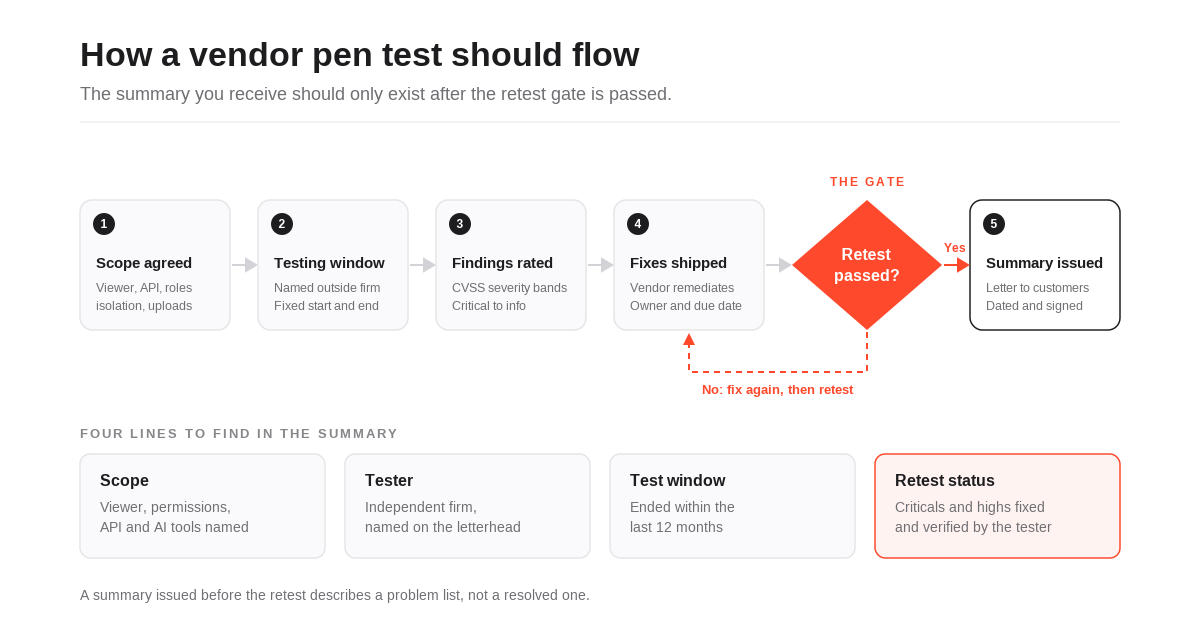
The diagram makes the point visually. The retest is the gate. A summary issued before it, or one that does not mention it, describes a problem list rather than a resolved one.
How severity is scored, and what each band means for you
Most testing firms rate findings using the Common Vulnerability Scoring System, published by FIRST, or a house scale mapped onto it. The bands are standard enough that you can read any summary against the same yardstick.
| CVSS band | Score range | What it typically looks like in a data room | Reasonable remediation expectation |
|---|---|---|---|
| Critical | 9.0 to 10.0 | Cross-tenant data access, authentication bypass, remote code execution through file upload | Fixed within days, retested before the summary is issued |
| High | 7.0 to 8.9 | A bidder reading a restricted folder, privilege escalation to admin, watermark or download control bypass | Fixed within weeks, retested |
| Medium | 4.0 to 6.9 | Weak session handling, verbose error messages, missing rate limits on sign-in | Fixed on a published schedule, often within a quarter |
| Low | 0.1 to 3.9 | Minor header misconfiguration, information disclosure with little practical impact | Tracked and fixed in normal releases |
| Informational | 0.0 | Hardening advice, best-practice notes | Considered, not required |
Remediation windows above are typical industry expectations rather than a formal standard. Confirm the vendor’s own policy.
Two caveats are worth keeping in mind.
First, severity is about the platform, not your deal. A medium-rated issue in a feature you will never use matters less to you than a low-rated issue in the viewer every bidder will touch. Read the descriptions, not just the counts.
Second, a perfectly clean result deserves a gentle question rather than applause. Real applications of this complexity almost always produce some findings. “Zero findings of any severity” can mean an exceptionally hardened platform. It can also mean a two-day test against a narrow scope. The scope section tells you which.
What good scope looks like for a virtual data room
If you only have time to check one thing, check this list against the scope section.
A thorough scope for a modern data room covers:
- The production web application, tested both unauthenticated and as several user roles (admin, internal deal team, external bidder, view-only reviewer).
- Tenant and deal isolation: explicit attempts to read another customer’s or another project’s data.
- Group and folder permission boundaries inside one project.
- The document viewer and its protections: watermark, fence view, print and download blocks, copy controls.
- File upload and conversion, including malformed and oversized files.
- Authentication: password policy, two-factor enforcement, session expiry, single sign-on and account recovery.
- Access revocation: whether a removed user or expired link is genuinely cut off, including cached sessions.
- The public API, if one exists, with the same authorisation checks as the web interface.
- Mobile apps, if offered.
- AI features, if offered: whether an assistant can be induced to reveal documents the user lacks rights to.
That last line is new, and many summaries from even a year ago will not include it. If the vendor ships document chat or AI summarisation, ask whether it was in scope. Our piece on prompt injection in deal documents explains why a malicious file can try to steer an assistant, and the OWASP Foundation maintains widely used guidance on testing both web applications and large language model features.
Exclusions are normal. Testers rarely attack physical data centres or the cloud provider’s own infrastructure, and that is fine because those layers carry their own certifications. What should worry you is an exclusion that cuts out the part of the product you will actually use.
How a pen test fits alongside SOC 2 and ISO 27001
Buyers sometimes treat these as interchangeable. They answer different questions.
| Evidence | The question it answers | Who produces it | Typical cadence |
|---|---|---|---|
| Penetration test summary | Did skilled people manage to break the product when they tried? | Independent testing firm | Annually and after major changes |
| SOC 2 Type II report | Did the vendor’s controls operate effectively over a review period? | Licensed CPA firm | Annual audit period |
| ISO 27001 certificate | Does the vendor run a certified information security management system? | Accredited certification body | Three-year cycle with annual surveillance audits |
| Bug bounty or disclosure policy | Can outside researchers report flaws, and does the vendor act on them? | The vendor, sometimes via a platform | Ongoing |
A SOC 2 report, defined by the AICPA, does not prescribe a fixed pen test schedule, but auditors commonly look for one as evidence that the vendor monitors and corrects its own security. ISO 27001 expects an organisation to manage technical vulnerabilities, and regular testing is the usual way to show it does.
So the certificate tells you a process exists. The pen test tells you the product held up against a determined attempt. You want both, and our explainer on data room certifications covers how to read the certificate side without being dazzled by the logo.
One more distinction: certificate scope. Some vendors hold certification for their whole organisation; others cite a certification that covers the hosting layer they run on. Both can be legitimate. They are not the same claim, so read the scope line on the certificate the same way you read it on the pen test.
Red flags that justify a follow-up question
None of these alone means a vendor is unsafe. Each one means the summary has not yet answered your question.
The test window ended more than 12 months ago. Software changes quickly; a test of last year’s code says less every month.
The scope reads “external perimeter” or “network” with no mention of the application. Port scans of a load balancer tell you almost nothing about whether bidders can see each other’s folders.
The tester is unnamed, or is the vendor’s own staff with no external validation.
Critical or high findings are listed as “accepted risk” without explanation. Sometimes that is defensible. You should hear why.
Findings are marked “in progress” with no target date.
The summary was written by the vendor rather than the testing firm. Look at the letterhead and the signature.
The vendor refuses to share anything beyond a marketing sentence, even under NDA. Larger customers usually get the executive summary; if you are running a significant transaction, it is reasonable to ask for it.
Treat each of these as an opening for a conversation. A vendor with a mature programme answers quickly and specifically. A vendor without one tends to send more marketing.
A checklist for your own review
Use this list when the summary arrives. It is designed to be worked in order, and each item can be answered from the summary or with one email.
- Confirm the date. Note the test window end date. Flag anything older than 12 months.
- Match scope to use. List the features you will rely on (viewer, Q&A, permissions, API, AI tools) and tick each one off against the scope section.
- Check roles tested. Make sure testers logged in as an external, restricted user, not only as an administrator.
- Name the tester. Record the firm and whether it is independent of the vendor.
- Count by severity. Write down critical, high, medium and low counts at the time of the test.
- Read every critical and high line. Note what part of the product each one touched.
- Find the retest. Confirm critical and high findings were fixed and verified by the tester, with a date.
- Check open items. Ask for target dates on anything still open.
- Cross-reference certifications. Confirm the SOC 2 period and ISO 27001 certificate are current and cover the product, not only the hosting layer.
- Ask about cadence. Confirm the vendor tests at least annually and after major releases.
- Ask about AI features. If the room offers document chat or AI summaries, ask whether they were in scope.
- File the evidence. Save the summary and correspondence with your vendor due diligence records, so the next review starts from your notes rather than from zero.
This takes about an hour for a typical summary. On a deal where the data room will hold a target company’s crown-jewel contracts, it is an hour well spent.
What to do if the vendor will not share
Some vendors genuinely cannot share even a summary under the terms of their testing contract. Others are simply cautious. Either way, you have options short of walking away.
Ask for a call. Many vendors will walk a prospective customer through the summary on screen without sending it. Take notes against the checklist above.
Ask for the retest letter on its own. It reveals less and is easier to release, and it answers the most important question: were serious findings fixed?
Ask written questions. “Was tenant isolation in scope? Were there any critical findings, and were they retested?” Vendors who will not send a document will often answer a direct question in writing.
Lean on the certification evidence. A current SOC 2 Type II report covers vulnerability management in some depth and is usually shareable under NDA.
And weigh the answer against the stakes. For a small fundraising room holding a pitch deck and a cap table, a current SOC 2 report plus a clear verbal answer may be proportionate. For a sell-side M&A process with customer contracts, source code or patient data in the room, the bar should be higher, and the security features checklist in our guide to whether virtual data rooms are secure is a reasonable place to set it.
How the big rooms tend to handle this
Enterprise-focused providers such as iDeals, Datasite and Intralinks carry both SOC 2 and ISO 27001 according to our review data, and serve buyers whose security teams routinely ask for testing evidence. In practice that usually means a trust portal or a defined NDA process for releasing a summary, though the exact documents on offer vary and should be confirmed directly.
Smaller and self-serve providers vary more. Some publish a clear security page and share a summary on request; some will answer specific questions but not release a document. Neither pattern is automatically better. What matters is whether you can get honest answers to the five questions above.
Do not let the absence of a public pen test page decide the matter on its own. Ask. The quality of the reply is evidence in itself.
If you are still building a shortlist, our guide to choosing a virtual data room puts security evidence alongside pricing, features and support, and the feature comparison builder lets you line up the controls you care about across several rooms at once.
Frequently asked questions
Will a data room vendor give me its full penetration test report?
Usually not. Full reports contain reproduction steps for every finding, so vendors protect them closely. Most will share an attestation letter on request and an executive summary under NDA, and some will walk you through the summary on a call. For a significant transaction it is reasonable to ask for the executive summary and the retest letter.
How often should a data room provider run a pen test?
At least once a year, and again after major changes such as a new viewer, a new API or new AI features. A test window that ended more than 12 months ago is a reason to ask whether a newer test is scheduled or underway.
Is a SOC 2 report enough without a pen test?
A SOC 2 Type II report shows that the vendor's controls operated over a period, including how it manages vulnerabilities, but it is not a hands-on attempt to break the product. The two answer different questions. For sensitive deals, ask for both, or at least for a written confirmation of the latest test date, scope and retest status.
What does no critical findings in a pen test summary mean?
It means the testers did not find a flaw they rated 9.0 or above on the CVSS scale within the scope and time they had. That is useful only once you know the scope and duration. A narrow, short test can produce a clean result without testing the parts of the room you will rely on.
Should AI features in a data room be pen tested?
Yes, if the room offers them. Document chat and AI summaries can read across files on a user's behalf, so testers should check that an assistant cannot be manipulated into revealing documents the user has no right to see. Ask the vendor directly whether AI features were in scope.
A pen test summary is a short document carrying a lot of weight. Read the scope first, the date second and the retest line third, and most of the uncertainty goes away. If those three lines are missing, the summary hasn’t really answered the question yet. Ask again before you rely on it.
