
Fake data room invitations: how phishing targets deal teams
On this page
- What is a fake data room invitation?
- Why deal teams make such good targets
- Anatomy of the lure
- Genuine invitation or fake? The signals that actually differ
- Variations that do not arrive as a classic invitation
- What the attacker does with a captured login
- Project Juniper, replayed: four places to break the chain
- How to check an invitation before you click
- Which controls help, and where they stop
- What sell-side administrators can do
- If someone has already clicked
On a Tuesday afternoon, Nadia Okafor got the email she had been waiting for.
She was a vice president at Marrow & Pike, a mid-market buyout firm, and her team had spent three weeks circling Brightwater Provisions, a regional food distributor. The seller’s adviser had promised data room access “this week”. The subject line read: You have been invited to Project Juniper.
The message carried the right code name. It was signed by a deal coordinator whose name matched someone at the advisory firm. It said the room would open to bidders at 9:00 the next morning and that access should be confirmed today. There was one coral button: View documents.
She clicked it. The login page looked like a data room login page. She typed her work email and password, then the six-digit code her authenticator app produced.
The page spun, then reported a temporary error.
Nothing else happened that evening. The real invitation, from the real provider, arrived two days later.
By then someone else had been reading her mailbox for forty hours. We will come back to what they did with it, and to the four separate points where the attack could have been stopped.
The names here are invented. The pattern is not.
What is a fake data room invitation?
A fake data room invitation is a phishing message that imitates the access notification a virtual data room sends when an administrator adds you to a project, with the goal of capturing your credentials on a lookalike login page.
It is a narrow, well-aimed version of credential phishing. The attacker does not need you to download malware or open an attachment. They need one click and one typed password, ideally from someone whose mailbox sits at the centre of a live transaction.
That last part is what makes it different from the generic “your mailbox is full” email. The lure is built for a specific moment in a specific deal, and the person receiving it is primed to expect exactly that email. The same lure also turns up dressed as a shared-file notice from a generic sharing service, which is one reason our guide on whether WeTransfer is safe for confidential documents spends time on link hygiene.
Why deal teams make such good targets
Most security awareness training teaches people to distrust unexpected emails. Deal work breaks that rule by design.
A buy-side associate on an active process might receive invitations from three or four different providers in a quarter, each with its own branding and sender domain, each pointing to a room they have never seen before. Unfamiliar is normal. Urgent is normal. A code name nobody outside the deal would recognise is normal too.
Then there is the information that leaks long before any room opens. Trade press reports that a business is “exploring a sale”. An adviser posts about a new mandate. A target’s finance director updates a professional profile. Regulatory filings name the parties. None of this is secret, and all of it tells an attacker who is likely to be expecting a data room invitation and roughly when.
The prize is also unusually large. A compromised mailbox on a live deal can expose the real room, privileged legal correspondence, bid letters and, most dangerously, the payment instructions for deposits, escrow and completion funds.
Put those together and the target almost selects itself: a busy person, expecting a stranger’s email, with access to money and secrets.
Anatomy of the lure
Every effective fake invitation borrows the same building blocks from the real thing. The table below takes them one at a time.
| Lure element | What it imitates | Why it works on deal teams |
|---|---|---|
| Project code name in the subject | The confidential name the seller assigns to a process | Feels like inside knowledge, so it reads as proof of legitimacy |
| Named sender at an advisory firm | The deal coordinator who administers the room | People trust a named human over a no-reply address |
| Deadline to confirm access | Bid timetables and room opening dates | Time pressure suppresses the habit of checking |
| Single button to view documents | The access link in a genuine notification | One click is the whole decision |
| Cloned login page | The provider’s sign-in screen and branding | Visual match is the only check most people make |
| Request for a one-time code | Two-step sign-in that the real room enforces | Asking for a code looks like extra security, not less |
| Fake error after login | A busy server on opening day | Explains why nothing happened, so no alarm is raised |
Read down the right-hand column and a pattern appears. Each element turns something a careful professional is trained to trust into the mechanism of the attack.
The code name feels like a credential. The code request feels like security. Even the error message is designed to sound mundane.
That is why “look for spelling mistakes” is weak advice here. A well-built lure has none.
Genuine invitation or fake? The signals that actually differ
If the surface looks identical, where do the two diverge? In places most readers never look: the sender’s domain, the link destination, how the invitation was announced, and what the login flow asks for.
| Signal | Genuine invitation | Fake invitation |
|---|---|---|
| Announced in advance | Usually mentioned on a call or in a process letter, naming the provider | Arrives unannounced, or before the adviser said the room would open |
| Sender domain | The provider’s own domain, consistent across messages | Lookalike domain, a free mail service, or a compromised third party |
| Link destination | Resolves to the provider’s published sign-in address | Points to a recently registered domain or a URL shortener |
| Account state | You may be asked to set a password for a new account | Asks for an existing work password, often your email password |
| Second factor | Uses the method the room enrolled you in | Asks you to type a code into the page or approve an unexpected prompt |
| Pressure | Timetable is clear but rarely hours-long | Same-day confirmation or access will lapse |
| After login | You land in a project with folders | Error, blank page or a redirect to a real site |
Two rows deserve emphasis.
First, the account state. A real data room invitation creates an account on the provider’s platform; at most it asks you to set a password there. It has no reason to ask for your corporate email password. An invitation that wants your work Microsoft or Google credentials is almost always a fake.
Second, the announcement. On a well-run process the adviser tells bidders which provider will host the room before anyone receives an invitation. If your team knows to expect a specific provider name and sender domain, a mismatched email stands out immediately.
For a refresher on how legitimate access normally gets provisioned and withdrawn, our guide to granting and revoking data room access walks through the administrator’s side.
Variations that do not arrive as a classic invitation
The fake invitation is the cleanest version of the attack, but it has relatives. Knowing them makes the pattern easier to see when it changes shape.
The shared-file notice. Instead of an invitation, the email says a document has been shared with you: a teaser, a management presentation, a draft NDA. The link leads to a page that asks you to sign in to view it. Same mechanism, different costume.
The calendar invite. A meeting request for a “management presentation” or “data room walkthrough” lands directly in the calendar, with a link in the body. Calendar invitations often bypass the scrutiny people give to email, because they look like logistics rather than messages.
The text message follow-up. A short message to a mobile number says the invitation expires tonight and gives a link. Phone screens hide full addresses, which is exactly why this route is attractive.
The voice call. Someone claiming to be from the provider’s support desk calls to “help with access” and asks you to read back a code that has just arrived. No legitimate support team needs that code.
The QR code. A PDF attachment carries a QR code to “open the secure room”. Scanning it moves the click onto a personal phone, outside the firm’s mail filtering and browser protections.
What ties these together is that each one tries to move you from a channel where you can inspect the destination to one where you cannot. That shift is itself a warning sign. A provider that wants you in its room has no reason to route you through a QR code or a phone call.
What the attacker does with a captured login
Back at Marrow & Pike, the fake error page was not a bug. It was the end of the useful part of the attack.
Modern phishing kits often sit between the victim and a real sign-in service, passing credentials and one-time codes through as they are typed. The industry calls this adversary-in-the-middle phishing. The attacker ends up holding a valid session, not just a password, which means the second factor has already been satisfied on their behalf.
What they do next depends on what the credentials unlock.
A corporate mailbox. This is the most common and the most costly outcome. The attacker reads quietly, learns the deal timetable, and often sets mailbox rules that hide replies from certain senders. Then they wait for a payment.
A real data room account. If the victim reused a password, or the fake page relayed a login to the genuine provider, the attacker can browse the actual room. Watermarks and audit logs will record their activity under the victim’s name, which helps the investigation later but does not stop the exposure.
A foothold for the next lure. A compromised mailbox inside one deal firm becomes a trusted sender to every other party on the process. The next fake invitation arrives from a real colleague.
In Nadia’s case, the attacker found the thread with the seller’s adviser and, a week later, sent the adviser’s finance team a polite note from her genuine address: Marrow & Pike had changed banks, please use the attached details for the exclusivity deposit refund mechanism. The account details were fake. The email was real.
That is business email compromise, and the data room invitation was simply the way in. Victims in the United States can report it to the FBI’s Internet Crime Complaint Center, which tracks this category of fraud closely.
Project Juniper, replayed: four places to break the chain
Run the story again with a few habits in place.
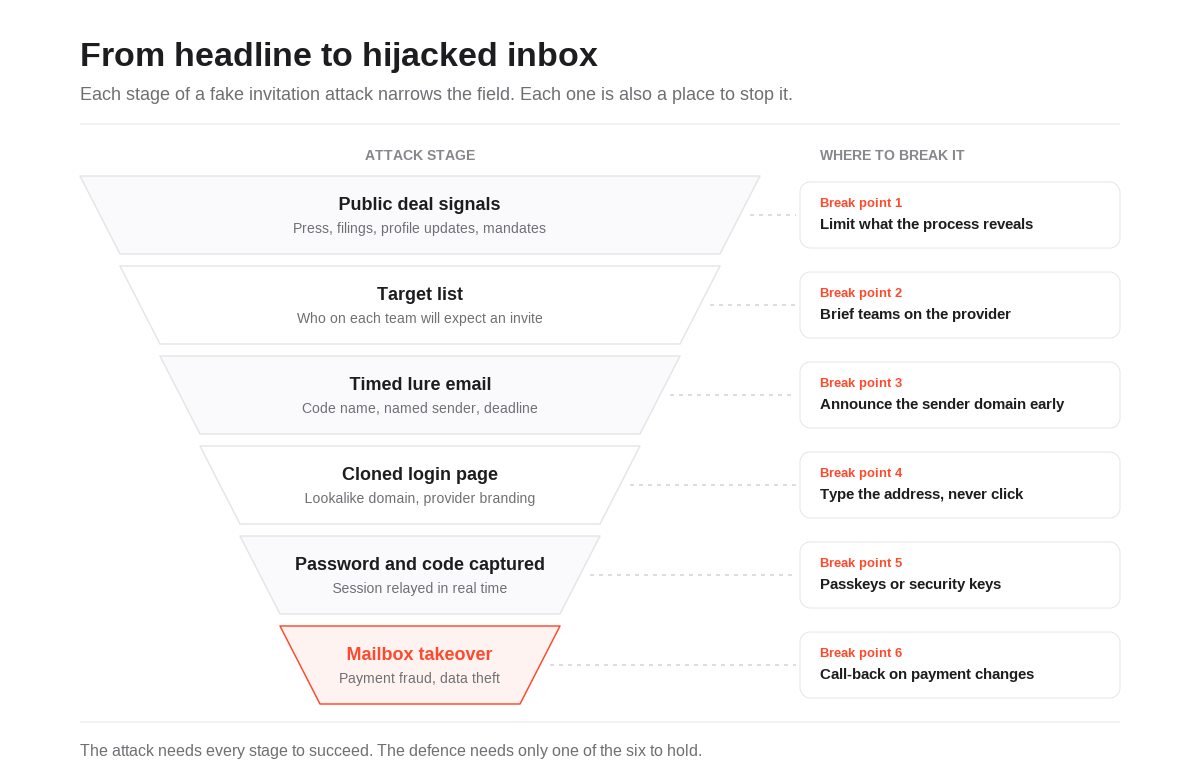
Before the email. If Brightwater’s adviser had told every bidder, on the kick-off call, which provider would host the room and what address invitations would come from, the fake would have arrived from the wrong domain to a team that knew the right one.
At the inbox. The sender domain had been registered eleven days earlier. Mail filtering that flags newly registered domains, or a quick look at the full address rather than the display name, would have raised a question.
At the click. Had Nadia ignored the button and typed the provider’s address into her browser herself, she would have found no pending invitation, because there was none.
At the login. Had her firm used passkeys or hardware security keys instead of six-digit codes, the cloned page could not have completed the sign-in. Those methods are tied cryptographically to the real domain and will not answer a lookalike.
Any one of the four would have been enough. That is the encouraging part. The attack needs every stage to succeed; the defence needs only one stage to hold.
How to check an invitation before you click
Here is a routine that takes under five minutes and does not depend on spotting a perfect forgery.
How to verify a data room invitation
A short routine for anyone who receives a data room invitation during a live deal, buy side or sell side.
Estimated time: 5min
-
Match it to an expected event
Ask whether anyone on the process told you this provider would host the room and roughly when. If the invitation arrives before the stated opening or from a provider nobody mentioned, treat it as unverified.
-
Read the real sender address
Expand the sender field and look at the domain after the at sign, not the display name. Compare it with earlier messages from the same provider or with the domain your adviser gave you.
-
Inspect the link without opening it
Hover over or long-press the button to read the destination. A data room link should resolve to the provider's own domain, not a shortener, a file-sharing page or an unfamiliar address.
-
Go in through the front door
Instead of using the button, type the provider's sign-in address yourself or use a saved bookmark. A genuine pending invitation will be visible once you sign in or reset your password there.
-
Confirm out of band
If anything still feels off, call or message the deal coordinator using contact details you already hold, not the ones in the email. A real coordinator will not mind.
-
Report, do not delete
Forward a suspicious invitation to your security team and tell the adviser running the process. Other parties on the same deal may have received the same lure.
The fourth step does most of the work. If you never sign in from an email link, a cloned page has nothing to catch.
Which controls help, and where they stop
It is tempting to treat a better login method as the cure. It helps a great deal, but every control has an edge.
Technical defences against fake invitations, weighed honestly
What they do well
- Passkeys and security keys are bound to the genuine domain, so a lookalike page cannot replay them
- Two-factor sign-in on the room itself stops a reused password from opening the real project
- Single sign-on lets a firm apply its own conditional access and revoke sessions centrally
- Mail filtering and domain age checks catch many lures before a person ever sees them
- Audit trails show exactly what a compromised account viewed, which narrows the response
Where they fall short
- SMS and app codes can be relayed live by adversary-in-the-middle kits
- Strong login on the data room does nothing if the phished credential is the corporate mailbox
- External bidders and advisers bring their own security posture, which the seller cannot enforce
- Filters miss lures sent from real but compromised accounts at trusted firms
- No control reverses a payment once funds have moved to a fraudulent account
The industry body behind passkeys explains the phishing-resistance argument in its overview of passkeys, and the US government’s digital identity guidelines treat phishing-resistant authentication as a distinct, stronger category.
On the provider side, support for these controls varies. Full-featured rooms such as iDeals and Datasite offer two-factor sign-in and SSO; Ellty provides two-factor sign-in alongside granular permissions, dynamic watermarking and a full audit trail. The two-factor authentication and single sign-on glossary entries explain the difference, and our guide to passkeys and data room login covers where phishing-resistant sign-in is heading. Confirm the exact methods on the plan you are buying rather than assuming.
What sell-side administrators can do
The seller’s adviser controls the one thing no bidder can: how invitations are introduced. A few habits make fake invitations far easier to spot.
- Name the provider early. State in the process letter, and again on the kick-off call, which data room provider will host the deal and the domain invitations will come from.
- Warn every party once. A one-line note that the team will never ask anyone to enter an email password, and will never change payment details by email, sets a clear rule that a later fraud attempt must break.
- Require two-factor sign-in for all external users. Make it a room-level setting rather than a per-user choice. Our permissions guide covers how to apply it alongside view-only defaults.
- Keep invitations predictable. Send them in batches at announced times. An invitation that arrives off schedule then looks wrong to everyone.
- Watch the audit trail for odd sign-ins. Repeated failures, new countries or unusual hours on a bidder account are worth a phone call. The audit trail explainer shows what a good log captures.
- Lock payment instructions behind a call-back. Any change to deposit, escrow or completion account details should be confirmed by phone using numbers agreed at the start, not ones supplied in the request.
Buy-side firms have their own version of this list. Keep a short register of the providers each live deal uses, so anyone on the team can check an unfamiliar invitation against it. Make “type the address, never click” a written rule for deal staff, not a tip. And treat any request to move money that arrives by email as unverified until someone has spoken to a known person.
None of this costs anything. It is process design, and it protects the seller as much as the bidders, because a compromised bidder can become the source of the next lure inside the same deal.
If someone has already clicked
Speed matters more than blame. Assume the session was captured, not just the password.
- Reset the password and revoke every active session on the affected account, both the corporate mailbox and any data room accounts that share credentials.
- Re-enrol the second factor and, where possible, move that user to a passkey or security key.
- Check mailbox rules and forwarding. Attackers frequently add rules that hide or redirect replies; remove anything the user did not create.
- Review sign-in and audit logs for the room and the mailbox to establish what was accessed and when.
- Tell the other side. The adviser and counterparties need to know that messages from that address over the affected period should be re-verified, especially anything involving money.
- Freeze payment changes until each one is confirmed by voice with a known contact.
If a document did leave the room, the playbook in our guide to responding to a data room leak picks up from there.
As for Marrow & Pike: the adviser’s finance team called Nadia’s office to confirm the “new bank details”, as their own process required. The call reached the real Nadia, who knew nothing about it. The payment never went out.
The fifth place to break the chain turned out to be the oldest one: a phone call.
Frequently asked questions
How can I tell if a data room invitation is real?
Check three things: whether anyone on the deal told you to expect that provider, whether the sender domain matches the provider's own domain, and whether the invitation appears when you sign in by typing the provider's address yourself. A genuine invitation survives all three checks. A fake one usually fails the first or second.
Does two-factor authentication stop data room phishing?
Partly. It stops an attacker who only has your password, but SMS and authenticator codes can be relayed in real time by adversary-in-the-middle phishing kits. Passkeys and hardware security keys resist this because they only respond to the genuine domain, so they are the stronger choice for deal teams.
Why would a fake invitation ask for my email password?
Because the corporate mailbox is often worth more than the data room. It holds the deal timetable, adviser correspondence and payment instructions, which lets an attacker run invoice or deposit fraud from a trusted address. A real data room invitation asks you to set a password on the provider's platform, not to enter your work email password.
What should a seller tell bidders to reduce phishing risk?
Name the data room provider and the sender domain before invitations go out, state that nobody will ask for email passwords or change payment details by email, and send invitations at announced times. Those three messages make an off-pattern fake far easier for every party to spot.
Is it safe to click the link in a genuine data room invitation?
It usually is, but the safer habit is to sign in by typing the provider's address or using a bookmark. That habit costs a few seconds and removes the risk entirely, because a cloned page is never reached if you never follow an emailed link.
