
DRM in virtual data rooms: remote revoke, expiry and offline access
On this page
- What is DRM in a virtual data room?
- Why view-only and watermarks are not DRM
- How does a protected file stay under control?
- Remote revoke: what it pulls back and what it cannot
- Expiry dates and time-boxed access
- Offline access: the trade-off nobody puts on the pricing page
- Which file types survive DRM well?
- Which data rooms list document DRM?
- Which control stops which leak?
- When DRM earns its friction, and when it does not
- How to test DRM before you sign
- What does the evidence say about the stakes?
DRM is the one data room control that still works after a file has left the room, and it is worth paying for only on the documents you would genuinely need to claw back.
That sounds like an easy call. It is not, for three reasons.
First, many buyers assume they already have it. View-only access, dynamic watermarks and expiring links all sound like DRM, and sales decks blur the line on purpose. None of them protects a file that has been downloaded in its native form.
Second, the vendors who do offer it describe it in absolute terms, “revoke anywhere”, “control after download”, which skip over how the mechanism actually behaves on a plane, behind a firewall or in front of a phone camera.
Third, DRM has a real cost in reviewer patience. A protected file that refuses to open in a lawyer’s usual PDF tool at 11 p.m. the night before a bid deadline does not feel like security. It feels like an obstacle, and obstacles get worked around.
So the honest question is not whether DRM is good. It is where in your room it earns its friction, and which settings decide whether it does anything at all.
What is DRM in a virtual data room?
Digital rights management in a data room is a control that encrypts a document and binds it to a usage policy that is checked every time the file is opened, wherever it is stored.
The policy says who may open the file, until when, on how many devices, and whether they may print, copy or forward it. The encryption makes sure the file is unreadable without passing that check.
You will also see the term information rights management, which most vendors use interchangeably. Our glossary entry on digital rights management covers the vocabulary; this guide covers how it behaves in a live deal.
The useful mental model: a normal download hands someone the house. A DRM download hands them a room with a lock you still hold the key to.
Why view-only and watermarks are not DRM
These three controls get bundled together, and the bundling causes real mistakes.
View-only access keeps the document inside the browser viewer. The reviewer never receives the file, so there is nothing to revoke later. That is strong, but it ends the moment you grant download rights.
A dynamic watermark stamps the viewer’s identity across each page. It deters and attributes; it does not prevent. A watermarked PDF that has been downloaded can be opened, printed and emailed forever, and the only consolation is that the stamp names the person who let it out. Our guide to dynamic watermarking and fence view covers that pair in depth.
An expiring link stops new visits to the room after a date. It does nothing to copies already saved.
DRM is different in kind. It assumes the file will leave, and keeps a hand on it afterwards.
What each document control actually does once a reviewer has the file
| Control | Where it acts | Survives a download? | Can you change it later? | Main weakness |
|---|---|---|---|---|
| View-only access | Inside the room's viewer | Not applicable, no file leaves | Yes, instantly | Useless once you allow download |
| Dynamic watermark | Stamped on each rendered or downloaded page | Yes, as a visible stamp | No, the stamp is fixed on saved copies | Deters a leak, does not block it |
| Expiring room access | At the room login | No | Yes, for future logins | Saved copies stay readable |
| Fence view | Inside the viewer only | No | Yes | Viewer-only, slows honest readers |
| Document DRM | On the file itself, at every open | Yes | Yes, revoke or expire remotely | Needs online checks and a compatible viewer |
How does a protected file stay under control?
The mechanics are simpler than the marketing suggests, and knowing them tells you exactly where the gaps are.
When a reviewer with protected-download rights clicks download, the room does not hand over the original. It encrypts the document and attaches a policy reference. The encrypted file can sit anywhere: a laptop, a USB stick, an email thread. On its own it is noise.
To open it, the reviewer needs a viewer or plug-in that understands the format. That viewer contacts the provider’s policy server, proves who the user is, and asks for a decryption key. The server checks the current policy. Still permitted? Key granted, document renders, every page carries a watermark. Revoked, expired, or the wrong person? No key, nothing to read.
Every open is a fresh question. That is the whole trick.
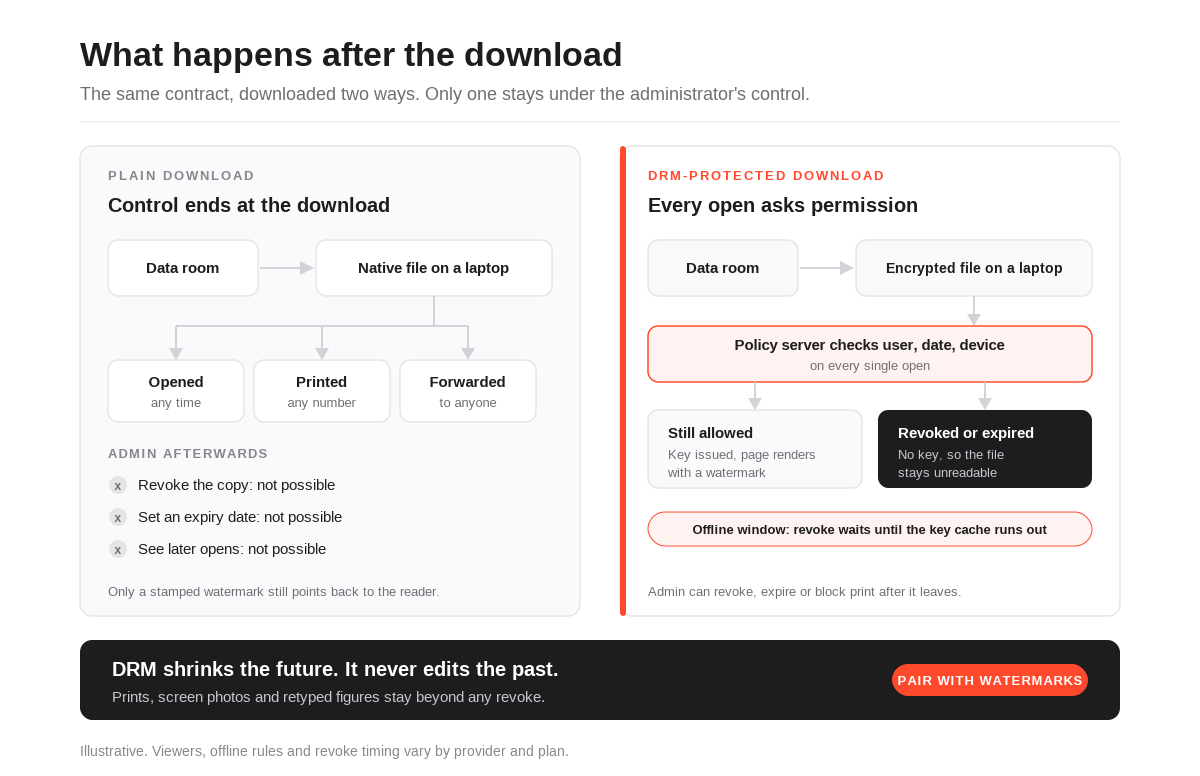
Two consequences follow directly.
The first is that revoke is only as fast as the next key request. If the viewer caches keys for offline use, revoke waits until that cache runs out.
The second is that the viewer is part of your security perimeter. Some providers render protected files in a browser-based viewer; others need a desktop or mobile app. The trade-offs between those approaches are their own topic, covered in our guide to browser-based viewing vs secure viewer plug-ins.
Remote revoke: what it pulls back and what it cannot
Remote revoke is the headline feature, and it does real work.
Picture an illustrative sell-side process. Harrow Ridge Partners is selling a specialty-chemicals business to a shortlist of four bidders. In round two, one bidder’s advisers download the customer contract schedule under DRM. A week later that bidder drops out, and the seller learns its parent has a sister company that competes for two of those customers.
Without DRM, the schedule is simply gone. With DRM, the deal administrator revokes the bidder’s group. The next time anyone on that team opens the file, from any device, the viewer asks for a key and receives a refusal.
That is genuinely valuable. It is also narrower than “revoke anywhere” suggests.
Revoke cannot reach content that has already left the protected format:
- pages printed to paper while print rights were on;
- photos of the screen, which no software can block;
- figures retyped into a spreadsheet or notes;
- what the reviewer simply remembers about pricing and terms.
DRM shrinks the future. It never edits the past.
That line is worth keeping in front of every deal team. Revoke reduces how long and how widely a document can keep circulating. It is not an undo button, and anyone who tells a client it is one is setting up a difficult conversation later. When a leak does happen, the response depends on the audit trail and the watermark as much as on revoke; our guide to data room leak incident response walks through that sequence.
Expiry dates and time-boxed access
Expiry is revoke on a timer. You set a date, or a number of days after download, and the policy server stops issuing keys once it passes.
It is the quieter control, and in practice the more useful one, because it needs nobody to remember to act.
Three patterns work well in transaction rooms:
- Round-aligned expiry. Protected downloads in a first-round folder expire on the round’s bid deadline. Bidders who advance get a fresh grant; the rest lose access without anyone sending a single email.
- Short fuse for crown jewels. Customer pricing, source-code extracts or unreleased product plans expire 48 to 72 hours after download. Long enough to review, too short to circulate.
- Hard stop at close or termination. Every protected copy across the room expires on the expected signing date plus a margin, then gets extended deliberately for the winning bidder.
The trap is setting expiry on room access while forgetting file expiry. They are separate settings in most products. A bidder whose login expired can still open a protected file whose own policy has no end date, if the offline rules allow it.
That brings us to the setting that decides almost everything.
Offline access: the trade-off nobody puts on the pricing page
Advisers travel. Counsel read on trains. Some corporate networks block the outbound calls a DRM viewer needs. So nearly every DRM system offers an offline mode: once a reviewer has opened a file online, the viewer keeps a key for a set period and allows opening without a connection.
That period is the offline grace window, and it is where DRM quietly gets weaker.
During the window, revoke and expiry wait. The reviewer’s viewer will not ask the server anything until the cached key runs out or the device reconnects. A 30-day offline window on a two-week bid round means revoke effectively does nothing for the length of the round.
| Offline setting | Reviewer experience | Revoke effective within | Sensible for |
|---|---|---|---|
| No offline access | Must be online for every open | Next open, typically seconds | Pricing, customer lists, IP |
| 24 hour grace | Can read on one flight | Up to a day | Most confirmatory diligence |
| 7 day grace | Comfortable for travelling advisers | Up to a week | Lower-sensitivity legal and HR folders |
| 30 days or open-ended | Feels like a normal file | Weeks, or never in practice | Rarely justified in a live deal |
The right answer is almost never one global setting. Put the strict rule on the handful of folders that matter and allow a short grace period elsewhere, so the honest majority of reviewers are not punished for the sensitivity of a few files.
Ask every provider how the offline window is configured: per room, per folder or per file, and whether the administrator can see which devices currently hold an offline key.
Which file types survive DRM well?
PDFs are the easy case. Almost every DRM viewer renders them faithfully, watermark included, and reviewers barely notice the wrapper.
Spreadsheets are where the friction shows. A financial model is useful because it is live: formulas, pivot tables, scenario toggles. Many protected formats either flatten the workbook into a read-only render or open it in a restricted editor that drops macros and external links. An analyst who needs to rerun the sensitivities will ask for the native file, and the request is reasonable.
Native Word documents for markup sit in between. Some systems allow tracked changes inside a protected session; others force a PDF round trip.
Large CAD drawings, video walkthroughs and source-code archives often fall outside what a DRM viewer handles at all.
The practical move is to sort folders by format before choosing the control. PDFs and scans go under DRM or view-only without debate. Live models get a deliberate decision: protected download with a short expiry, or a native file for a named adviser under a tighter NDA, logged and watermarked. Writing that rule down before the room opens saves an argument on the night the model is due.
Which data rooms list document DRM?
DRM is common among full-featured rooms and missing from many general file-sharing tools. Our provider data records whether each product lists document DRM; how deep it goes differs, which is why the notes column matters more than the yes or no.
| Provider | DRM listed | What stands out on document control | Indicative starting price |
|---|---|---|---|
| ShareVault | Yes | Persistent DRM built for pharma, biotech and IP diligence; view, print, expiry and revoke stay attached after download | Custom quote |
| BlackBerry Workspaces | Yes | DRM embedded in each file; remote withdraw or wipe after local save; viewers across Windows, macOS, iOS and Android | Custom quote |
| Digify | Yes | DRM-first sharing with post-download revoke and page-level tracking | $120/mo, billed annually |
| Intralinks | Yes | Post-download revoke controls aimed at regulated, high-value deals | Custom quote |
| iDeals | Yes | DRM alongside redaction, SSO and structured Q&A | Custom quote |
| Datasite | Yes | DRM alongside AI redaction and buyer-engagement analytics | Custom quote |
| Ellty | Yes | DRM alongside watermarking, Q&A, e-signature and AI tools; 14-day free trial | $149/mo |
| Box | Not listed | Strong content governance and watermarking, but document DRM is not in our data | $15/user/mo |
| DocSend | Not listed | Link-level tracking and watermarking rather than file DRM | $45/user/mo |
All prices are indicative, confirm with the provider. “Listed” means the feature appears in our provider data; it does not tell you which plan includes it or how offline access is handled. If DRM depth is the deciding factor between two tools, the Digify vs DocSend comparison shows how far apart two document-sharing products can sit on this one capability.
Which control stops which leak?
DRM is one layer. It makes sense only next to the others, so here is the threat view rather than the feature view.
Leak scenarios against the controls that address them
| Leak scenario | Watermark | View-only | DRM with revoke | Audit trail |
|---|---|---|---|---|
| Bidder forwards a downloaded file to a third party | Attributes it | Prevents it | Recipient cannot open it | Shows the download |
| Bidder drops out but keeps local copies | No effect | No copies exist | Revoke on next open | Shows what was taken |
| Laptop lost or stolen | No effect | No copies exist | Unreadable without the user's sign-in | Shows last access |
| Reviewer photographs the screen | Attributes it | No effect | No effect | Shows the view |
| Reviewer retypes key figures | No effect | No effect | No effect | Shows time on page |
| Printed pages left in a meeting room | Attributes it | Prevents printing | Blocks print if set | Shows the print |
Read down the DRM column and you see its real strength: copies that travel, devices that go missing, parties that leave the process. Read across the bottom rows and you see why no single control is the answer, and why the audit trail remains the record you lean on when everything else has failed.
The bigger design principle behind this layering is the one NIST sets out in its zero trust architecture publication, SP 800-207: access decisions are made per request and per resource rather than granted once at the perimeter. DRM is that idea applied to a single document. Our guide to zero trust and virtual data rooms takes the comparison further.
When DRM earns its friction, and when it does not
DRM is easy to over-apply. Here is the trade-off stated plainly.
Turning on document DRM in a deal room
Where it pays off
- Keeps control of files that genuinely need to be downloaded, such as large models or contract sets counsel must mark up offline
- Lets you cut off a departing bidder's copies without relying on a deletion certificate
- Makes lost or stolen devices far less dangerous
- Turns expiry into an automatic housekeeping step at each round boundary
- Pairs with watermarks so every opened page is both attributable and revocable
What it costs you
- Reviewers may need a specific viewer or app, which slows onboarding and frustrates advisers
- Spreadsheets with formulas and native files often lose function inside a protected format
- Offline grace periods quietly delay revoke and expiry
- Does nothing against cameras, retyping or memory
- Deeper DRM tends to sit on quote-priced or higher plans
A sensible default for most sell-side processes: keep the bulk of the room view-only, watermark everything, and reserve protected download for the folders where offline work is unavoidable and exposure would be expensive. That usually means financial models, customer-level data and technical IP, not the corporate minute book.
For fundraising, the calculation is different. Investors reading a deck rarely need a download at all, so view-only plus watermarking often covers it, and DRM becomes relevant only for detailed data packs shared late in the process.
Regulated data changes the picture again. Where a folder holds personal data, DRM’s ability to stop a stray copy from being opened supports the security and minimisation duties in the GDPR, though it does not replace a lawful basis or a data processing agreement. Our guide to GDPR and virtual data rooms covers the rest.
How to test DRM before you sign
Feature lists do not show how DRM behaves. A 30-minute test on a free trial or a guided demo does. Use a real-looking but harmless file and two accounts, one admin and one reviewer.
Before the test
- Ask which plan includes protected download, and whether it is priced as an add-on.
- Ask which viewer opens protected files: browser, desktop app, mobile app, or a mix.
- Ask how the offline grace window is configured and whether it can differ per folder.
During the test
- Download a protected PDF and a protected spreadsheet as the reviewer. Open both offline and online.
- Revoke the reviewer as admin. Time how long until the file refuses to open, online and offline.
- Set a file expiry 10 minutes ahead and confirm it bites on time.
- Try to print, copy text and take a screenshot. Note what is blocked and what is merely watermarked.
- Forward the file to a third account and confirm it cannot open.
After the test
- Check the audit trail shows the download, each open attempt and the revoke.
- Confirm whether a device holding an offline key is visible to the admin.
- Write down every workaround a frustrated reviewer would find in the first five minutes.
That last point is the honest one. If your own team found a workaround in five minutes, so will a determined bidder, and the setting needs changing before the room goes live. For the operational side of granting and pulling access during a process, see our guide on how to grant and revoke data room access.
What does the evidence say about the stakes?
It is fair to ask whether this level of control is proportionate. Most leaks in deals are not dramatic; they are a forwarded attachment or a copy left on a contractor’s laptop.
The cost of breaches in general is well documented. IBM’s annual Cost of a Data Breach report has for years put the global average in the millions of dollars, and lost or stolen devices and malicious insiders appear in its breakdowns of how breaches start. A deal-room leak is a narrower event than a corporate breach, so those figures do not translate directly. They do show that the scenarios DRM addresses, copies travelling beyond their intended reader, are routine rather than exotic.
The more practical evidence is your own room. If the audit trail shows protected files downloaded by a party that later left the process, DRM decided whether those copies still matter.
Frequently asked questions
Can a data room revoke a file after it has been downloaded?
Yes, if the file was downloaded under DRM. The protected file needs a key from the provider's server each time it opens, so revoking the user or group means the next open is refused. A plain, unprotected download cannot be revoked, and content already printed, photographed or retyped is beyond any software control.
Is DRM the same as dynamic watermarking?
No. A dynamic watermark stamps the viewer's identity on each page so a leak can be traced, but the watermarked copy stays readable forever. DRM encrypts the file and checks permission at every open, so it can be revoked or expired. Most serious rooms use both together.
Does DRM work when the reviewer is offline?
Usually, for a limited time. Most DRM systems cache a key after the first online open and allow offline reading for a grace period the administrator sets. During that window revoke and expiry wait until the device reconnects or the key runs out, so keep the offline window short for sensitive folders.
Can DRM stop screenshots and phone photos?
It can block some screen-capture tools on supported devices, but nothing stops a camera pointed at a screen. That is why DRM is paired with dynamic watermarks, which make any photo traceable to the person who took it, and with NDAs and clean-team rules for what reviewers remember.
Do all virtual data rooms include DRM?
No. Most full-featured data rooms list document DRM, but many general file-sharing tools do not, and the depth varies even among those that do. Check which plan includes it, which viewer reviewers need, and how offline access works before you rely on it.
