
How much storage does a data room need? Sizing gigabytes by deal
On this page
- What is a data room storage limit?
- How many gigabytes does a typical deal actually use?
- Why the real number beats the first estimate
- Pages or gigabytes: how providers meter storage
- What happens when a room reaches its storage cap?
- How to size a data room in one afternoon
- Which file types use the most space?
- Can you reduce storage without losing anything that matters?
- Does storage still count after the deal closes?
- Questions to put to a provider about storage
- Is storage a good reason to choose one room over another?
If you only do three things before choosing a storage tier, do these.
- Right-click the folder. Prepare the document set on your own drive first, then read its size in gigabytes. That number beats any estimate built from page counts or guesswork.
- Multiply for the things you have not uploaded yet. Late scans, replacement drafts, bidder-requested extras and any video add weight after day one. Plan for the room you will have in week six, not the one you open.
- Get the overage line in writing. Ask what happens at the cap: a per-GB charge, an automatic tier jump, or a blocked upload. Then decide whether you can live with it.
That is the whole method in under a hundred words. The rest of this guide explains the numbers behind each step, so you can defend your sizing to a finance team and push back on a quote that does not fit.
Storage is rarely the largest line on a data room bill. It is, however, the line most likely to change after you sign, because nobody knows exactly how big a diligence set will become until bidders start asking for things.
What is a data room storage limit?
A data room storage limit is the maximum volume of files, measured in gigabytes or in pages, that a plan lets you hold before it charges an overage, moves you to a higher tier, or stops accepting uploads.
Some plans state it plainly as a GB figure. Others express it as a page allowance, which is the older convention from banking-grade platforms. A third group advertises unlimited storage, usually with a fair-use clause somewhere in the terms.
The limit can apply per room or across your whole account. That distinction matters more than it sounds. An advisory firm running six rooms a year on a shared 100 GB pool hits the ceiling in a way a single-deal seller never will.
Two related limits often sit next to it and get confused with it: a per-file size cap, which decides whether one large file can be uploaded at all, and a user or seat cap, which governs who can look. Our companion guide on large files, video and CAD in a data room covers the per-file side, and the guide to data room user limits covers seats.
How many gigabytes does a typical deal actually use?
Less than most people assume, for document-heavy deals. Text PDFs are small. A clean, digitally created contract of 40 pages might weigh 300 KB to 1 MB. Ten thousand pages of that kind of material can fit inside a few gigabytes.
The table below gives indicative ranges by deal type. They come from typical document sets, not from any single provider’s data, and your own folder will vary.
| Deal type | Typical document count | Indicative storage range | What usually inflates it |
|---|---|---|---|
| Seed or pre-seed round | 30 to 150 files | Under 1 GB | Pitch videos, product demo recordings |
| Series A to C fundraise | 150 to 800 files | 1 to 5 GB | Board decks with embedded media, detailed financial models |
| Small business sale | 500 to 3,000 files | 2 to 15 GB | Scanned leases, invoices and paper-era contracts |
| Mid-market M&A | 3,000 to 25,000 files | 10 to 75 GB | Scans, version history, HR files, IT and security evidence |
| Real estate portfolio | 2,000 to 40,000 files | 50 to 500+ GB | Site photos, drawings, surveys, drone and walkthrough video |
| Life sciences licensing | 1,000 to 15,000 files | 20 to 200 GB | Study data exports, regulatory dossiers, imaging |
| Litigation or investigation | Highly variable | 50 GB to several TB | Email exports, forensic images, audio and video evidence |
Indicative ranges for planning only; your real total depends on file formats and scan quality, so measure the prepared folder and confirm allowances with the provider.
Notice where the big numbers come from. It is almost never contracts. It is media, imaging and anything that started life on paper.
For the documents themselves, our guide on what documents go in a data room lists what each workstream expects, which is the best way to predict which of these rows your deal will resemble.
Why the real number beats the first estimate
Here is the pattern almost every first-time seller follows. They count the documents, guess an average size, multiply, and arrive at a tidy figure. Then the room fills up faster than the figure allowed.
The gap has five sources, and each one is predictable.
Scans. A page scanned at 300 dpi in colour can weigh ten to fifty times what a digitally created page does. A box of old leases run through an office scanner can outweigh the entire set of current contracts. Running optical character recognition makes those scans searchable, and some OCR settings enlarge the file further by adding a text layer on top of the image.
Versions. When you replace a document the right way, the room keeps the earlier draft. That is the point of version control in a data room, and on most plans every stored version counts toward the cap. A heavily negotiated agreement can sit in the room five or six times over.
Spreadsheets and models. Financial models with embedded data tables, pivot caches or pasted images grow quietly. A model that started at 4 MB can reach 80 MB by the third round of buyer questions.
Media. One hour of 1080p video typically lands around 1 to 3 GB, depending on the codec and bitrate. A single factory or property walkthrough can therefore outweigh a thousand contracts.
Late requests. Bidders ask for things that were not in the original index. IT security evidence, customer-level revenue cuts, environmental reports. Each request adds weight after the plan has been chosen.
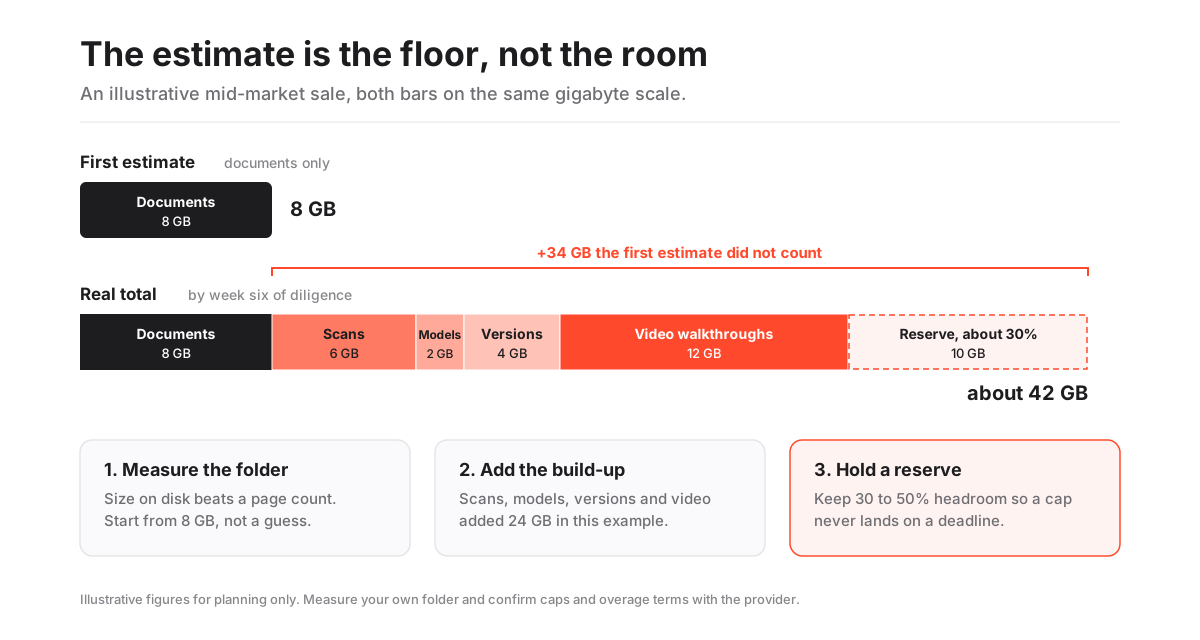
The figure uses invented but realistic numbers for a mid-market sale. The documents-only estimate is not wrong; it is incomplete. Each added layer is common on a real sale, and with a sensible reserve they push the starting figure up roughly five times.
The first storage estimate measures the deal you are planning. The invoice measures the deal you actually ran.
That is why the method at the top of this page starts with the folder on disk and then adds a build-up, rather than starting from a page count and hoping.
Pages or gigabytes: how providers meter storage
Storage is sold under three broad structures, and each one shifts risk to a different party. The matrix below compares them on the questions that decide a budget.
How the main storage pricing structures behave
| Question | Per-page allowance | Tiered GB cap | Flat plan with stated cap | Unlimited with fair use |
|---|---|---|---|---|
| Bill is predictable at signing | No | Yes | Yes | Yes |
| Scanned files cost more than digital ones | Yes | No | No | No |
| Video and large media are cheap to add | Yes | No | No | Yes |
| Overage rate is usually stated per unit | Yes | Yes | Yes | No |
| Easy to check usage yourself in the admin panel | No | Yes | Yes | Yes |
| Fits a deal with uncertain volume | No | No | Yes | Yes |
A few rows deserve a sentence of explanation.
Per-page pricing punishes scans in an odd way: it does not care about file size, only page count, so a 600-page scanned binder costs the same as a 600-page digital one. That makes it cheap for media, which has few or no pages, and expensive for long paper archives. It is also hard to monitor, because most people cannot tell how many pages a folder holds without uploading it. The mechanics are covered in our guide to per-page vs flat-rate data room pricing, and the term itself in the glossary entry on per-page pricing.
Tiered GB caps are the modern default. You can watch the meter, and a folder’s size on disk maps directly to what the room will count.
Unlimited plans remove the meter but not the limit. Fair-use clauses usually exist to stop someone using a deal room as a general archive, and they are rarely triggered on a normal transaction. If your deal is media-heavy, though, read that clause twice.
What happens when a room reaches its storage cap?
One of three things, depending on the contract. Knowing which one applies to you is more important than the size of the cap.
- Overage billing. Uploads keep working and you pay a per-GB or per-page rate for the excess. Cheap if the rate is capped, painful if it is not.
- Automatic tier upgrade. The room moves you to the next plan up, often for the rest of the term. Predictable, but it can double a monthly figure overnight.
- Hard stop. Uploads fail until an administrator buys more space or deletes something. This is the worst outcome during live diligence, because it lands in the middle of a request deadline.
The hard stop deserves a second look. Imagine a seller three weeks into a sale, with four bidder groups waiting on a revised customer contract set. The upload fails at 4 p.m. on a Friday. The administrator who can approve a plan change is on a flight.
Nothing about that is a security incident. It is still a missed deadline in front of every buyer, and buyers read missed deadlines as signals.
Overages themselves are covered in depth in our guide to the hidden costs of virtual data rooms. The short version: get the rate, the ceiling and the trigger in writing.
How to size a data room in one afternoon
You do not need a consultant for this. You need the prepared document set, a calculator and about two hours.
How to size data room storage before you choose a plan
A practical sizing pass that turns a prepared folder into a defensible gigabyte figure with headroom.
Estimated time: 2h
-
Assemble the folder locally
Build the document set in the same folder structure you plan to use in the room, following your index. Do not upload anything yet; the point is to measure what you actually have.
-
Read the size on disk
Check the total size of the top folder in gigabytes, then the size of each top-level section. Note which sections are heaviest; it is usually scans, media or engineering files, not contracts.
-
Add the build-up
Add an allowance for content that will arrive later: roughly 20 to 40% for replacement versions on a negotiated deal, plus the full size of any video or drawings still to come, plus a rough figure for bidder requests outside the index.
-
Add a reserve
Hold 30 to 50% on top of the built-up figure. Deals grow, and the reserve is what stops a hard cap from landing in the middle of a deadline.
-
Check the account model
Confirm whether the cap is per room or shared across your account. If it is shared and you run several rooms a year, size against the busiest overlapping period, not one deal.
-
Match the number to a plan
Pick the plan whose cap covers the reserved figure, then compare its cost with the next tier down plus the worst-case overage. Choose the cheaper total, not the cheaper headline.
The step people skip is the third one. A seller who sizes only what exists today will buy a plan that fits the opening week and nothing after it.
Once you have a figure, the VDR cost calculator turns storage, users and deal length into an indicative all-in USD range you can compare across structures.
Which file types use the most space?
A rough sense of file weight helps you predict where the gigabytes will go before you measure. These are indicative averages, and real files vary widely.
- Digital PDF or Word document: around 20 to 100 KB per page. Ten thousand pages fit comfortably in under 1 GB.
- Scanned page: around 100 KB to 1 MB per page in black and white, more in colour or at high resolution.
- Spreadsheet or financial model: from under 1 MB to several hundred MB when data tables or images are embedded.
- Photograph from a modern phone or camera: around 3 to 15 MB each. A property survey with 2,000 photos can pass 15 GB alone.
- Engineering drawings and CAD files: from a few MB to several GB for a large assembly.
- Video: roughly 1 to 3 GB per hour at 1080p with common compression, and several times that at 4K or in editing formats.
- Email exports and archives: highly variable, but a single mailbox export can run to tens of gigabytes.
The list makes one practical point. If your deal involves property, manufacturing, clinical data or recorded interviews, measure those folders first, because they will decide your tier on their own.
Can you reduce storage without losing anything that matters?
Yes, within limits. Some savings are free. Others trade storage for reviewer experience, and a few should be avoided because they damage the record.
Safe savings:
- Export instead of scan. Where a digital original exists, upload it rather than a scan of a printout. It is smaller, sharper and searchable.
- Compress scans sensibly. Black-and-white scanning at 200 to 300 dpi is readable for contracts and far lighter than colour at high resolution.
- Remove true duplicates. The same PDF filed in three folders counts three times on most plans. Pick one home and cross-reference it in the index.
- Re-encode video for viewing. A walkthrough exported for streaming at a sensible bitrate is a fraction of the camera original and plays better for reviewers.
Savings to avoid:
- Deleting old versions to free space. It breaks the audit history of which draft each party saw. If version storage is the problem, buy more space.
- Zipping everything. Archives save space but hide their contents from preview, search, watermarking and per-file access logs. Reviewers download a black box, and you lose the record of what they opened.
- Linking out to an external drive for heavy files. It saves room storage by moving the most sensitive large files outside the controls you bought the room for.
The index matters here too. A clean structure makes duplicates visible and stops the same file being uploaded twice by different team members. Our data room index best practices guide shows how to set one up before the upload begins.
Does storage still count after the deal closes?
Often, yes. Closing a deal does not automatically close the room, and an archived room may keep counting toward an account cap until it is deleted or exported.
Three end-of-deal questions belong on your sizing list.
First, how long does the provider keep an archived room, and does it still bill for the storage? Some keep a read-only archive for a set period at no charge; others treat it as an active room.
Second, in what format is the final archive delivered? A full export on encrypted media or as a downloadable package is common, and its size will match the room, so make sure whoever receives it has somewhere to put tens of gigabytes.
Third, what are you obliged to keep, and for how long? Where a room holds personal data about employees or customers, the GDPR’s storage limitation principle in Article 5 pushes the other way: you should not hold personal data longer than the purpose requires. A deal that collapses raises the same question sooner, which our guide on what happens to a data room when a deal falls through works through.
The point for sizing is simple. If your account cap is shared, an unarchived old deal can quietly eat the space your next deal needs.
Questions to put to a provider about storage
Ask these on the demo call, and ask for the answers in the order form rather than an email.
- Is the cap per room or shared across all rooms on the account?
- Is it measured in gigabytes, pages, or both?
- Do stored versions count toward the cap?
- What is the per-file size limit, and is it different for browser upload versus a desktop or bulk uploader?
- What exactly happens at the cap: overage, automatic upgrade, or blocked uploads?
- What is the overage rate, and is there a ceiling on it?
- Does an archived room still count toward the cap after close?
- Is “unlimited” subject to a fair-use clause, and what does it say?
- Can I see live storage usage in the admin panel?
Those nine questions take ten minutes to ask. They tell you more about the real cost of a room than the pricing page does, and they make quotes from different providers comparable.
Comparisons are easier when you can read a starting price before the call. Providers with published pricing, such as Ellty from $149 per month or SecureDocs with its flat monthly plans, let you anchor the conversation early; quote-only enterprise rooms such as Intralinks or Datasite will price storage as part of a custom proposal. Either way, the allowance and the overage terms are what you are confirming. All figures are indicative; confirm current USD pricing and storage terms with each provider.
Is storage a good reason to choose one room over another?
Usually not on its own. For most document-led deals, any serious room offers more than enough space, and the decision should rest on permissions, audit depth, Q&A and the experience your bidders will have.
Storage becomes decisive in three situations: deals with large media or engineering sets, advisory firms running many rooms on one account, and processes with genuinely unknown volume, such as a litigation hold or an early-stage carve-out where the document set is still being found.
In those cases, the metering structure matters more than the headline cap. An unlimited or high-cap flat plan removes a variable that you cannot forecast. A per-page plan can be the cheapest choice for a media-heavy, page-light deal. A tiered GB plan suits anyone who measured carefully and wants to pay for what they use.
When you are ready to weigh rooms on the rest of the feature set, the side-by-side view on our data room comparison page shows how storage terms sit alongside security, permissions and price.
Frequently asked questions
How much storage does a typical data room need?
For a document-led deal, less than most people expect. A fundraising round usually fits in 1 to 5 GB, a small business sale in 2 to 15 GB and a mid-market M&A process in roughly 10 to 75 GB. Deals with photos, drawings or video, such as real estate portfolios or industrial sales, can pass several hundred gigabytes. Measure your prepared folder and treat these ranges as indicative.
Is 10 GB enough for a data room?
For a startup fundraise or a small, mostly digital business sale, 10 GB is often enough. For a mid-market M&A process with scanned contracts, version history and late bidder requests, it is usually too tight once you add a sensible reserve. Size from the actual folder plus 30 to 50% headroom rather than from a round number.
Do old document versions count toward the storage limit?
On most plans, yes. When you replace a file through version control, the room keeps the earlier draft and counts it toward your storage. That is the right trade-off, because deleting old versions breaks the record of which draft each reviewer saw. Ask the provider how versions are counted and budget 20 to 40% extra on a heavily negotiated deal.
What happens if I go over my data room storage limit?
Depending on the contract, you either pay an overage per gigabyte or per page, get moved automatically to a higher tier, or find that uploads are blocked until you buy more space. A blocked upload during live diligence is the most disruptive of the three, so confirm which applies and get the overage rate and any ceiling in writing before you sign.
Are unlimited storage data rooms really unlimited?
Usually for practical purposes on a normal deal, but most unlimited plans include a fair-use clause that lets the provider act if a room is used as a long-term archive or holds unusually large media. If your deal is video- or drawing-heavy, read the clause and ask the provider directly what volume would trigger it.
