
Version control in a data room: replacing files without losing the trail
On this page
- What does version control mean in a data room?
- The anatomy of a versioned document
- Replace, delete or add alongside: what each action does
- Why silent replacement is the real risk
- How providers handle versions, by tier
- How do you replace a file without losing the trail?
- Should bidders be able to see older versions?
- Versions, Q&A and the disclosure record
- What to test during a free trial
- Version control at scale: naming, freezing and migration
- What version history cannot do
- How the Halvorsen dispute ended
On a Tuesday afternoon in June, a paralegal at Brindle & Rowe uploaded a new customer master agreement to the data room for Halvorsen Cold Chain.
The change looked small. The renegotiated contract lowered the liability cap the company owed its largest grocery customer, which was good news for any buyer. She dragged the file into the folder, the room asked whether this was a new document or a new version of an existing one, and she chose the second option.
Three weeks later, that click mattered more than anything else she did on the deal.
Northgate Infrastructure Partners, one of four bidders, submitted a revised offer with a price chip attached. Their model, they said, assumed the old, higher liability cap, because that was the contract in the room. Brindle & Rowe disagreed. Somebody had to be right, and the answer lived in the version history.
We will come back to Halvorsen throughout this guide, because the case shows almost every part of version control at work: the replacement itself, the record it leaves, the notification that should go with it, and the export that ends the argument.
What does version control mean in a data room?
Version control in a data room is the feature that tracks every iteration of a document under one stable identity, so that a newer draft replaces the live copy while older drafts stay stored, attributed and auditable.
That definition has three moving parts. A stable identity, meaning the document keeps its index number, its place in the folder tree and its permission settings when a new version arrives. A stored history, meaning earlier versions are not overwritten or thrown away. And attribution, meaning each version carries who uploaded it, when, and ideally why.
The glossary entry on document versioning covers the term in the abstract. In practice, what separates a deal-grade room from a shared folder is not whether it keeps old copies. Plenty of cloud drives do that. It is whether the room ties each version to the audit log, so that “who saw what” becomes “who saw which version of what”.
That distinction is the whole Halvorsen dispute in one sentence.
The anatomy of a versioned document
Pull one document apart and you find more structure than the file name suggests.
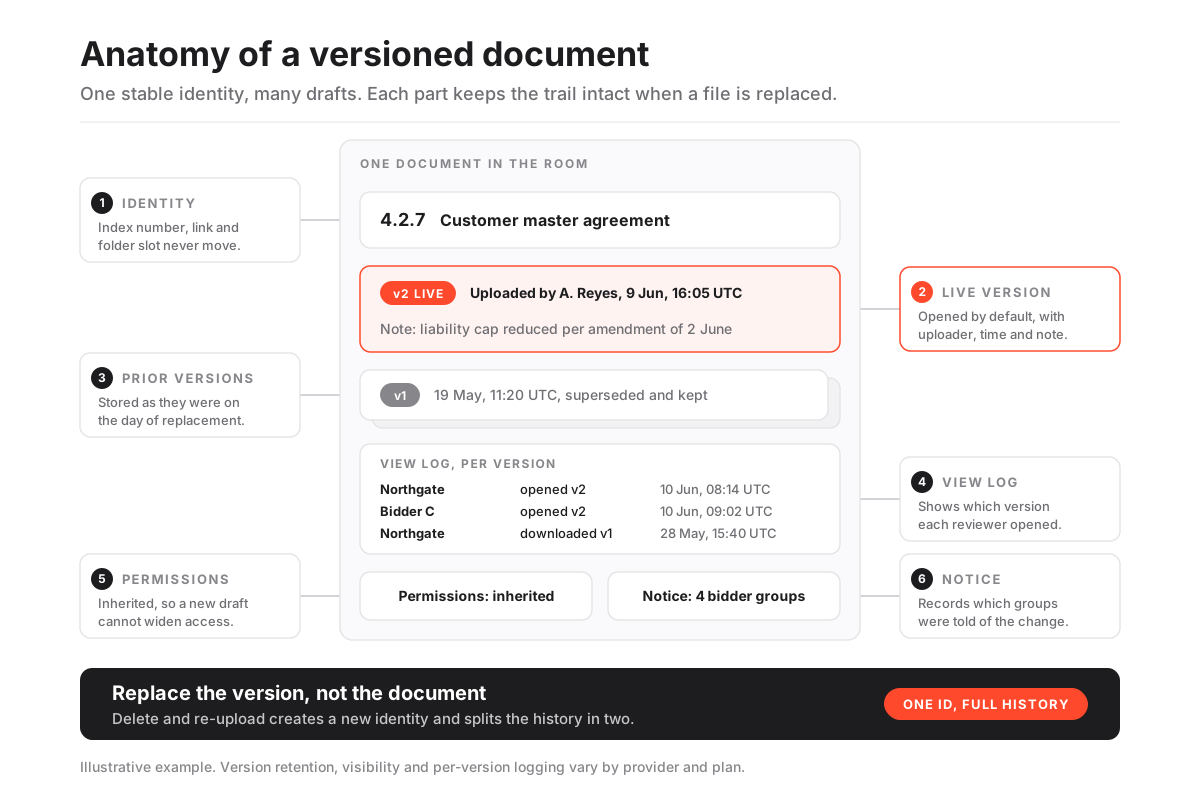
At the top sits the document identity: an index number such as 4.2.7, a fixed position in the folder tree and a link that reviewers and Q&A threads point to. This is the part that must never change when a new draft arrives, because everything else hangs off it.
Beneath it is the live version, the one a reviewer opens by default. Behind that sits the stack of prior versions, each kept as it was on the day it was replaced.
Every version carries its own metadata. The uploader’s name. The upload time in UTC. A change note, if the uploader bothered to write one. And a per-version view log, which records who opened that particular draft and when.
Two more parts sit alongside. Permissions are inherited from the document, not re-set per version, so a replacement cannot quietly widen access. And a notification record shows which groups were told that a new version exists.
In the Halvorsen room, every one of those parts was populated. That is less common than it should be.
The most frequently empty part is the change note. Uploaders under deadline pressure skip it, and the history fills with versions that say nothing about why they exist. Six months later, nobody can tell a typo fix from a renegotiated price without opening both files side by side.
Replace, delete or add alongside: what each action does
There are three ways to put a new draft into a room, and they leave very different traces. Most version disputes start with someone choosing the wrong one under time pressure.
| Action taken | Document identity and link | Prior version | Audit history | Permissions | Reviewer notification |
|---|---|---|---|---|---|
| Replace as new version | Kept: same index number and link | Stored in version history | Continuous, one record per version | Inherited unchanged | Can be sent to affected groups |
| Delete old, upload new | Lost: new index number and link | Gone or in a recycle bin | Split across two unrelated documents | Must be set again by hand | Reviewers see a “new” file, not a change |
| Upload alongside as a second file | Two documents with similar names | Still live and still viewable | Two parallel histories | Set separately on each | Confusing; both look current |
The first row is what you want almost every time. The second is the most common mistake, and the one that hurts most in a dispute, because the link between the old and new drafts now exists only in someone’s memory.
The third row has a narrow legitimate use. If you deliberately want reviewers to compare a marked-up draft with a clean one, two files with clear names can work. As a general habit, it creates exactly the ambiguity version control exists to remove.
Why silent replacement is the real risk
A file that changes without anyone noticing is worse than a file that never changes at all.
Picture the alternative Halvorsen story. The paralegal deletes the old contract and uploads the new one under the same file name. To a reviewer, nothing seems different. Northgate’s analyst, who downloaded a watermarked copy of the old version in week two, has no reason to look again.
When the price chip arrives, Brindle & Rowe can show the new contract was in the room. They cannot easily show when it replaced the old one, whether Northgate was told, or that Northgate ever opened it. The old document has a separate history, possibly deleted. The argument becomes a negotiation about memory.
This is why deal lawyers care about versions at all. The question in a dispute is rarely “was the document disclosed”. It is “which version was disclosed, to whom, and when”. Our guide to what a data room audit trail records explains why a log that cannot answer that second question carries much less weight.
There is a quieter cost too. Reviewers who sense that files change without warning start downloading everything, defensively, to keep their own snapshots. That defeats the point of view-only access and multiplies the uncontrolled copies you were trying to avoid.
How providers handle versions, by tier
Versioning sounds like a checkbox. It is not. Depth varies a great deal, and it often varies by plan as well as by provider.
Version control depth by tool type (indicative; confirm with the provider)
| Capability | General file-sharing tool | Mid-tier data room | Deal-grade data room |
|---|---|---|---|
| Replace file while keeping the link | Yes | Yes | Yes |
| Prior versions retained | Often, with time limits | Yes, retention varies | Yes, for the life of the room |
| Per-version view log | No | Sometimes | Yes |
| Change note on each upload | No | Sometimes | Yes |
| Admin chooses whether reviewers see old versions | No | Sometimes | Yes |
| Notification to selected groups on replacement | Basic, all followers | Yes | Yes, by group, with wording control |
| Version history in the closing archive | No | Varies by plan | Yes |
A few concrete data points from our reviews. CapLinked lists versioning alongside its per-group and per-folder access controls, dynamic watermarks and time-boxed access; see the CapLinked review. DocSend lets you update a document after sending while the original link keeps working, which suits a pitch deck that changes mid-raise, though it is not built for structured diligence; the DocSend review covers where that line falls.
Full-featured modern rooms, Ellty among them alongside iDeals and Datasite, pair a complete audit trail with granular permissions, watermarking and Q&A. Whatever the product, the specific questions are the same: how long prior versions are kept, whether the log is per version, and whether history survives into the archive. If you are shortlisting, compare providers side by side on those points rather than on the word “versioning”.
How do you replace a file without losing the trail?
The method below is the routine Brindle & Rowe actually followed on the Halvorsen contract. It takes about ten minutes per material document, and almost all of that is the change note and the notification.
How to replace a document in a data room without breaking its history
A repeatable routine for uploading a new draft over a live document during diligence.
Estimated time: 15min
-
Find the existing document, not just the folder
Open the live document by its index number and use the room's replace or upload new version action on that document. Dropping a file into the folder usually creates a separate document instead.
-
Check the file before it goes live
Confirm it is the final draft, that any redactions are applied, and that the file name follows your index convention. A replacement is visible the moment it lands.
-
Write a one-line change note
Say what changed in plain words, for example liability cap reduced under amendment dated 2 June. Future you, and opposing counsel, will read this line.
-
Decide who sees prior versions
Choose whether reviewers can open earlier drafts or only the live one. Keep history visible to administrators either way.
-
Notify the affected groups
Send a replacement notice to every group with access to the document, worded neutrally. For material changes, post a matching entry in the Q&A log or disclosure tracker.
-
Spot-check the record
Open the version history and confirm the new version shows your name, the UTC time and the note, and that permissions are unchanged.
Step five is the one teams skip. It is also the one that decided Halvorsen.
When the paralegal uploaded the new contract, the room sent a notice to all four bidder groups: “Customer master agreement 4.2.7 updated; see version note.” Northgate’s lead analyst opened version two the next morning, at 08:14 UTC, and spent several minutes on the liability schedule. The log showed it.
Should bidders be able to see older versions?
This is a judgment call, and reasonable advisers disagree.
Letting reviewers open prior versions of a document
Arguments for
- Reviewers can see exactly what changed, which reduces repeat questions and speeds up legal review
- Transparency about changes makes later claims of concealment harder to sustain
- Buyers who already modelled an earlier draft can reconcile their work without asking for it
- Useful in long processes where contracts are renegotiated during the sale
Arguments against
- Superseded drafts can contain errors, internal comments or terms that were never agreed
- More material in front of bidders means more questions about things that no longer matter
- Earlier versions may hold personal data that a later redaction removed
- Reviewers may cite an old draft in negotiation even though it was replaced
A practical middle path is common. Administrators always see the full history. Reviewers see the live version by default, and earlier versions are released only for documents where the change itself matters, such as a renegotiated contract, with a short note explaining the difference.
The personal data point deserves weight. If a later version redacts employee or customer details, leaving the earlier unredacted version open to bidders undoes the redaction. Under the GDPR and similar laws, that is not a technicality. Our guide to GDPR and virtual data rooms covers the wider obligations.
Versions, Q&A and the disclosure record
Version control does not work in isolation. On a live deal it touches at least two other parts of the room.
The first is Q&A. When a buyer asks about a clause and the seller answers by uploading a corrected document, the answer should reference the version, not just the file. “See 4.2.7, version 2, uploaded 9 June” is an answer that survives a dispute. “See updated contract” is not. Our walkthrough on running data room Q&A sets out how to link answers to documents cleanly.
The second is the disclosure record. In many share purchase agreements, the data room contents are referenced in the disclosure letter, often by attaching an index or an archive of the room as it stood at a given date. If versions change late, the disclosure index has to say which version counts. Agree this with counsel early: is the deemed-disclosed set the room at a cut-off date, or every version ever uploaded?
That second question sounds technical. It decides who carries the risk when a document changes in the final week.
A sensible rule of thumb is to freeze material documents a few days before signing, route any later change through the Q&A log as well as the replacement, and export the version history alongside the final index. That way the paper trail and the room tell the same story.
What to test during a free trial
Marketing pages will say “version control”. A short test in a trial room tells you what it means for that product. Run these checks with a dummy document before you commit.
- Replace from the document, then from the folder. Does dropping a same-named file into the folder create a version or a duplicate? Many rooms behave differently depending on where you upload.
- Look for the change note field. Is there one, is it visible to reviewers, and does it appear in exports?
- Open both versions as a test reviewer. Then check the audit log. Does it record which version was opened, or only the document?
- Toggle prior-version visibility. Can you hide history from reviewers while keeping it for administrators, per document or only room-wide?
- Trigger a notification. Can you choose which groups receive it, and can you edit the wording?
- Export the archive. Does the closing export include prior versions and their logs, or only the live files?
- Ask about storage. Do prior versions count against a storage or page allowance? On per-page plans, repeated replacements of a large file can add cost, a point our guide to hidden costs of virtual data rooms explores.
A sibling guide on data room storage limits goes deeper on how history interacts with caps. If the answers here are vague, treat that as the answer.
Version control at scale: naming, freezing and migration
Halvorsen had about 1,400 documents. A mid-market sale can have several thousand, and versioning discipline gets harder as volume grows.
Three habits keep it manageable.
Keep version numbers out of file names. “Customer MSA v3 FINAL revised.pdf” is a symptom of a system without versioning. Let the room number the versions and keep the file name stable, tied to the index. The guide to data room index best practices covers naming conventions that survive a long process.
Freeze before key milestones. Before first-round bids, before the confirmatory phase, and before signing, announce a short freeze on material folders. Changes after a freeze go through Q&A as well as replacement.
Carry history across a migration. If you move rooms mid-process, ask whether the new provider can import prior versions and their logs, or only current files. Often it is only current files. In that case, export the full history from the old room and archive it with the deal file before the old room closes; the guide on migrating to a new data room covers the sequence.
None of this needs special software beyond what a capable room provides. It needs someone to own it. On Halvorsen, that was the paralegal, and she kept a one-page log of every material replacement in parallel with the room’s own record.
What version history cannot do
Version control is strong evidence about the room. It says much less about the world outside it, and it is worth being honest about the gaps.
It cannot update copies that already left. When Northgate’s analyst downloaded version one in week two, that file sat on a laptop from then on, frozen. The room can record that the download happened and stamp it with a watermark, but it cannot reach out and swap the old file for the new one. Some rooms with persistent digital rights management can revoke access to downloaded files, which helps, but a revoked file is not the same as an updated one.
It does not explain the change by itself. A version history tells you that a new file replaced an old one, at a given moment, by a given person. It does not tell you what changed inside the document unless someone wrote a change note or the room offers a comparison view. For a forty-page contract, “v2 uploaded” without a note leaves reviewers hunting for the difference, and invites the very question you hoped to avoid.
It does not prove anyone understood. A log entry showing a reviewer opened version two for six minutes is evidence of access, not of comprehension. In most disputes that is enough. In some, a buyer will argue the change was not drawn to their attention clearly. That is why the notification wording and the Q&A entry matter as much as the replacement.
It depends on people using it. The best versioning engine in the market does nothing if an associate drags a file into a folder and creates a duplicate at midnight before a deadline. Short training at kickoff, a named owner for replacements, and a quick weekly scan for duplicate file names catch most of these slips before they matter.
None of this is a reason to distrust version control. It is a reason to pair it with notes, notices and a clear process.
How the Halvorsen dispute ended
Back to Northgate’s price chip.
Brindle & Rowe exported the version history for document 4.2.7. It showed version one uploaded on 19 May, version two on 9 June at 16:05 UTC, with the change note “liability cap reduced per amendment dated 2 June”. It showed the notification sent to all four bidder groups that afternoon. And it showed Northgate’s lead analyst opening version two at 08:14 UTC the next day.
The export went to Northgate’s counsel with a short cover note.
The price chip on the liability cap was withdrawn within a week. The deal signed on the original timetable, with other points still to negotiate, as every deal has.
What made the difference was not the software alone. It was one correct click at upload, one line of change note, and one notification sent to the right groups. Version control is a feature. Using it consistently is a process. You need both.
Frequently asked questions
What is version control in a virtual data room?
It is the feature that keeps every iteration of a document under one stable identity. When you upload a new draft, the room makes it the live version, stores the earlier ones, and records who uploaded each version and when. In deal-grade rooms the audit log also records which version each reviewer opened.
Is it safe to delete a file and upload a new one instead?
It works technically but it is poor practice during diligence. Deleting and re-uploading creates a new document with a new link and a separate history, so the connection between the old and new drafts is lost. Use the room's replace or new version action on the existing document instead.
Do bidders get notified when a document is replaced?
Only if the room is set up to notify them, and capable rooms let you choose which groups are told and how the notice reads. For material changes, pair the notification with a Q&A entry or disclosure note so there is a second record that the change was communicated.
Can reviewers see earlier versions of a document?
It depends on the provider and on your settings. Many rooms let administrators decide whether reviewers can open prior versions, either room-wide or per document. A common approach is to show only the live version by default and release history where the change itself matters.
Do old versions count against storage limits?
Often they do, because prior versions are stored files. On page-based or storage-capped plans, repeatedly replacing large documents can push usage up. Ask the provider how history is counted and confirm any limits in USD before you sign.
