
Data room index: naming and numbering best practices
On this page
- Why the index decides your first impression
- What a good structure looks like
- How to number folders and files
- How to name files so search finds them
- Put the rules in a legend
- How deep should it go?
- When category prefixes earn their keep
- Keep it consistent as documents change
- The mistakes that show up every time
- Planned index versus improvised one
- It changes by transaction type
- What the software carries, and what it cannot
A buyer’s lawyer opens your room at nine in the morning with a checklist in one hand. She wants item 4.3, the shareholders’ agreement. She types, or she scans the left rail, and either she is reading the document in ten seconds or she is sending you an email asking where it lives.
That ten seconds is the whole game.
A data room index is the table of contents for a deal. Open it, and a buyer, lender or investor knows within seconds whether your side is organised or improvising.
It is the ordered map of folders and files reviewers reach for first. A strong one turns a virtual data room from a pile of confidential files into a navigable record. A weak one buries good documents and invites the same question five times.
This is the cheapest edge you get in a transaction. A couple of hours of naming and mapping up front pays back across the whole process.
Why the index decides your first impression
Reviewer confidence rests on one thing: speed of retrieval.
When a lawyer jumps from checklist item 4.3 straight to folder 04.3, the process feels controlled and the seller looks credible. When she cannot, every mislabelled file reads as sloppiness.
And sloppiness in the data room raises a quiet question. What else is disorganised in the business?
The index is also your own control surface. It is how you assign granular permissions by folder, track completeness against the due-diligence checklist, and spot gaps before a buyer does.
So treat it as a deliverable, not a by-product. The best deal teams write the index before a single file is uploaded, then use it as a live scorecard of what is ready and what is still outstanding.
What a good structure looks like
Shallow and numbered.
Eight to twelve top-level categories that follow the order of diligence: corporate, financial, legal, commercial, people, IP, tax, then the deal-specific extras. Each top folder is a workstream someone owns.
The corporate lawyer lives in 02, the finance team in 03. Nobody wastes time in folders that are not theirs.
The taxonomy shifts with the deal. An M&A sale needs deep corporate and legal sections. A fundraising round leans on the pitch, cap table and model. A fund reporting room for limited partners centres on statements and capital accounts.
| Top-level folder | M&A sale | Fundraising | Fund / LP reporting |
|---|---|---|---|
| 01 Corporate and governance | Yes | Yes | Light |
| 02 Financial statements and model | Yes | Yes | Yes |
| 03 Legal and contracts | Yes | Summary | No |
| 04 Commercial and customers | Yes | Yes | No |
| 05 People and HR | Yes | Key hires | No |
| 06 IP, tech and data | Yes | Yes | No |
| 07 Tax | Yes | High level | Yes |
| 08 Deal / round documents | Yes | Yes | Yes |
A starting skeleton, not a rule. Add or drop folders to match your checklist and sector.
The labels matter less than the discipline. Keep the top level flat and numbered, and map every folder to something a reviewer actually wants.
Unsure what goes where? Build the folders straight from a diligence checklist, or prune a ready-made folder structure template. For the full inventory of what sits inside each folder, what documents go in a data room is the companion to this guide.
How to number folders and files
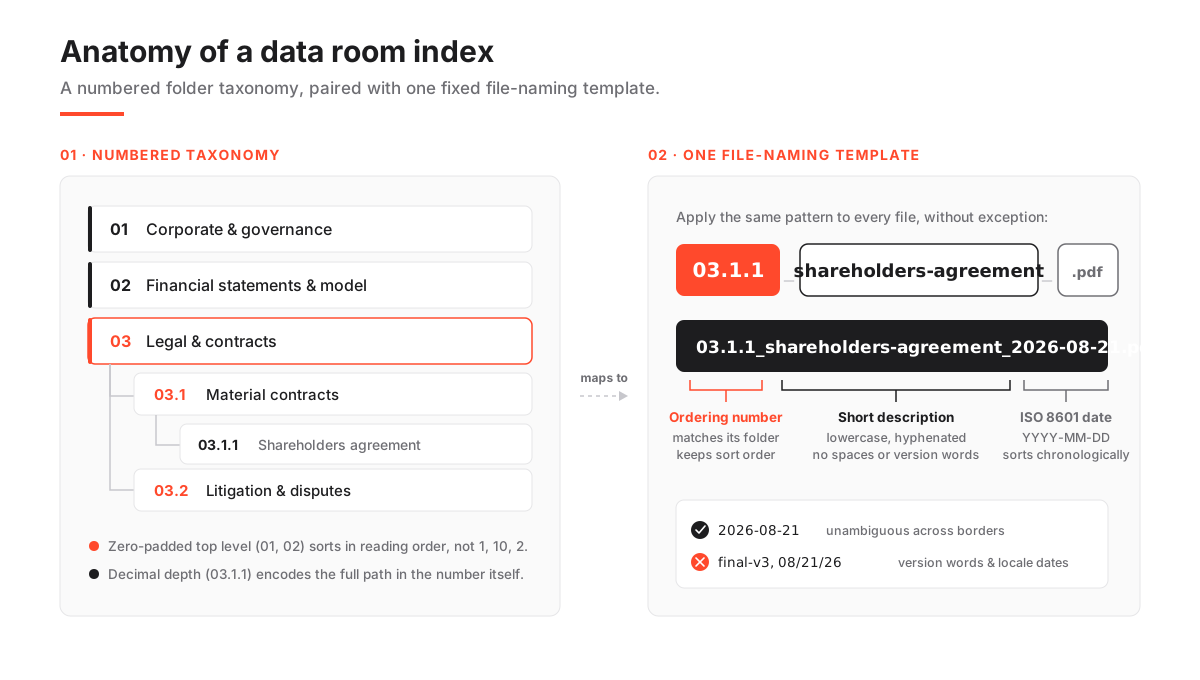
Zero-pad the top level: 01, 02, 03. Files then sort in reading order, not alphabetically.
Skip the padding and a system sorts 10 before 2. Your careful index scrambles the moment you pass nine folders. It is the small trick most first-time sellers miss.
Go decimal for depth: 03 Financial, 03.1 Statements, 03.1.1 FY2025. Now the number itself encodes the path.
A reviewer who sees 03.2.4 knows it sits in section 3, sub-section 2, without opening a single folder. She can quote that code in a Q&A thread, and both sides look at the same document.
Keep the numbers stable once bidders are in. Renumbering mid-process breaks every reference anyone has written down.
Five schemes, and where each belongs:
- Zero-padded sequential (01, 02 … 12): the top level of any room. Decide the pad width up front, 01 or 001.
- Decimal / hierarchical (03.1, 03.1.2): sub-folders and nested files. Past three levels it gets unwieldy.
- Category prefix (FIN-01, LEG-04): cross-referencing in Q&A and reports. Prefixes must be defined in a legend.
- Plain sequential, no pad (1, 2 … 12): very small rooms only. It sorts 10 before 2, so avoid it past nine items.
- Date-led (2026-08-21_board-pack): time-series folders like board packs. Only where chronology is the primary axis.
Most rooms combine two: zero-padded sequential at the top, decimal below.
For files, mirror the folder number and add a slug: 03.1.1_income-statement_FY2025.pdf. The number holds sort order; the slug tells a human what it is.
That pairing survives a download. Advisers export sections to work offline, and a file called financials.pdf on a crowded desktop is a file that gets lost.
How to name files so search finds them
One template, every file, no exceptions.
An ordering number, a short lowercase hyphenated description, then an ISO 8601 date where relevant: 03.2_shareholders-agreement_2024-11-03.pdf.
Consistency beats any single naming choice. A predictable pattern is what lets full-text search and a reviewer’s eye both work at speed.
Three conventions do most of the work.
Use ISO 8601 dates, YYYY-MM-DD, in every filename that carries one. It sorts chronologically and removes the day-month-year ambiguity that trips up cross-border deals.
Avoid spaces and special characters. They break on some systems and inside downloaded archives; use hyphens or underscores instead.
Never trust version words. “final”, “latest” and “v3” are how document trust dies.
“final-v3-really-final” is not a version. Let the room’s document versioning hold the history, and keep one clean current name per document.
How to build a data room index from scratch
A repeatable sequence that produces a defensible, reviewer-ready index.
Estimated time: 2h
-
Start from the diligence checklist
Pull the standard checklist for your transaction type and treat each major heading as a candidate top-level folder. The index inherits its logic from the work the buyer will do.
-
Draft the top-level taxonomy
Set eight to twelve numbered categories (01-12), zero-padded, each owned by one workstream. Keep it flat; resist the urge to nest at this stage.
-
Define the naming template
Write down the file pattern (number, description, ISO date) and the numbering rules in a short one-page legend, then store that legend as document 00 in the room.
-
Map documents to folders
Assign every file to a numbered home before uploading. Anything that does not fit is either a missing folder or a document that should not be in the room.
-
Rename in bulk, then upload
Apply the template to filenames offline, in bulk, so you upload clean names once rather than renaming inside the room later.
-
Freeze and permission
Lock the numbering, set folder-level permissions by group, and only then invite reviewers. Renumbering after invites breaks every reference.
Put the rules in a legend
The legend is a one-page document, stored as folder 00 or a pinned note. It explains the naming template, the numbering scheme, and any prefixes, so a first-time reviewer needs no verbal briefing.
It is the difference between a system only its author understands and one a fresh adviser navigates on day one. If a new lawyer joins the buy-side in week three, the legend stops her renaming files her own way or asking what the room already answers.
Keep it short and factual. State the filename pattern with one worked example. List what each top-level number covers in a single line. Define any category prefixes (LEG, FIN, TAX). Name the index owner who approves changes.
Ten minutes to write. It saves the same conversation being had five times over the life of the deal.
How deep should it go?
Three levels, wherever you can: category, sub-category, documents.
Every extra level adds clicks, and clicks are where reviewers get lost and questions get repeated. A folder holding one or two files probably should not be a folder. A folder holding fifty probably needs one clear layer of sub-folders, not four.
Use the two-click rule. Any document a reviewer wants should be reachable in roughly two clicks from the top level. When you find yourself four levels deep, a top-level category is usually doing too much and should split into two peers.
Shallow and wide beats deep and narrow. A numbered top level is scannable in one screen; a deep tree hides its own contents.
The targets are simple: 8 to 12 top-level folders, no more than 3 levels of nesting, and roughly 2 clicks to reach any document.
When category prefixes earn their keep
Default to zero-padded sequential at the top and decimal below. Reserve prefixes (FIN-, LEG-) for rooms where documents are quoted heavily in Q&A or third-party reports.
Sequential-plus-decimal is the most portable scheme. It needs no legend to read, it sorts correctly, and the number doubles as a path. It suits the large majority of M&A and fundraising rooms with no extra ceremony.
Prefixes pay off in two cases. A long, contested process where advisers cite documents constantly in writing, where LEG-04.2 is faster to say and harder to mistype than a bare number. And a room feeding a formal diligence report, where the report’s cross-references want a stable, human-readable handle.
The cost: prefixes must be defined once in the legend, or a new reviewer has to guess what LEG means. Cannot commit to maintaining that legend? Stay with plain decimal. A scheme nobody documents is worse than a simpler one everyone understands.
Keep it consistent as documents change
Assign one index owner. Store the naming rules as a visible legend. Route every new upload through that owner or a shared template so the pattern never drifts.
Consistency decays fastest when several people upload directly, each with a private idea of how files should be named. A single gatekeeper keeps a room that started clean from sliding into chaos by week three.
For the numbers, the rule is simple: additions are fine, renumbering is not, once bidders are inside. Must insert a document into a full section? Give it the next free decimal (03.2.9) rather than shifting everything below it.
When documents are superseded, lean on versioning, not agreement-v2. Because the numbering is stable, you can grant a group rights to section 05 once and trust the same code means the same folder for the whole process. That is where folder-level access controls and the index meet.
The mistakes that show up every time
They are predictable, which makes them avoidable. Almost all trace back to skipping the planning step and improvising the structure as files arrive.
- No zero-padding, so folder 10 sorts above folder 2 and the index scrambles past nine items.
- Version words (
final,v3,latest) that destroy trust in which document is current; use the room’s history instead. - Locale-specific dates like 08-21-2026 or 21/08/2026, ambiguous across borders and sorting randomly; use ISO 8601.
- Deep nesting past three levels, burying documents four clicks down where reviewers stop looking and start asking.
- Renumbering mid-deal, breaking every reference an adviser has written into their notes and Q&A threads.
- Uploading before mapping, so the index reflects the order files happened to arrive, not the order a buyer reads them.
The wider set lives in data room mistakes to avoid.
Planned index versus improvised one
A planned index earns you:
- Reviewers who self-serve, cutting repeat Q&A and adviser hours.
- Numbering that doubles as a stable reference in Q&A and reports.
- Gaps against the checklist visible before a buyer finds them.
- A room that signals preparation, which supports valuation and pace.
The price:
- A few hours of naming and mapping up front.
- One owner to hold the convention as documents change.
- A legend, if you use category prefixes.
It changes by transaction type
The naming and numbering rules are universal. The folder taxonomy is not.
An M&A sale demands the full spread of corporate, legal and commercial detail; the buyer is acquiring liabilities as well as assets. A fundraising room is lighter on legal minutiae and heavier on the story: the model, the cap table, the pipeline and the round documents. A fund or limited-partner reporting room is narrower still, built around statements, capital accounts and tax.
So do not clone one deal’s index into the next without pruning. A fundraising round loaded with the full M&A legal tree looks over-engineered and slows an investor down. An M&A room built from a lean fundraising template looks thin and raises concern.
Start from the right skeleton, then shape it to your checklist. The shortlists for M&A, fundraising and due diligence show which providers suit each. To populate and permission the room once the index is set, the setup guide picks up where this ends.
What the software carries, and what it cannot
A good platform does not decide your taxonomy. It removes the manual labour of applying and holding one: bulk upload, drag-and-drop reordering, auto-numbering that keeps folder codes consistent, and a printable index generated on demand.
The tool organises what you give it. The judgement about what belongs where stays with you, because it cannot see your diligence checklist.
Yours to decide:
- Mapping folders to the diligence checklist.
- Deciding what is missing.
- The naming template (set it once).
The room can automate:
- Applying that template across files in bulk.
- Keeping folder numbers sequential.
- Generating a printable index or table of contents.
- Versioning superseded documents.
Check auto-numbering first. It removes the single most common source of drift: newly uploaded files get numbered to match the surrounding folder automatically, so a two-person deal team keeps a large room tidy without manual re-filing. Some platforms, Ellty among them, do this out of the box; others leave numbering entirely to you.
Weigh indexing ergonomics as a real selection criterion, alongside security and price. The hands-on notes in the iDeals and Datasite reviews are a good place to start, and indicative pricing sits right next to them.
Frequently asked questions
How many top-level folders should a data room index have?
Aim for eight to twelve numbered top-level folders, each mapping to a diligence workstream such as corporate, financial, legal, commercial, people, IP and tax, plus the deal-specific documents. Fewer than eight usually means categories are overloaded; many more than twelve means the top level is doing work that belongs one layer down.
What date format should I use in file names?
Use ISO 8601, written as YYYY-MM-DD, for example 2026-08-21. It sorts chronologically by default and removes the day-month-year ambiguity that causes errors in cross-border deals. Avoid locale formats like 08/21/2026 or 21-08-2026, which are ambiguous and sort unpredictably.
Can I reorganise the index after bidders are inside?
Add documents freely, but avoid renumbering once external reviewers are in the room. Renumbering breaks every reference advisers have written into their notes and Q&A threads. To insert a file into a full section, give it the next free decimal number rather than shifting everything below it.
The index is the cheapest advantage in a deal. Set the taxonomy against your checklist, apply one naming template without exception, and freeze the numbers before anyone external logs in.
For the wider mechanics once the room is live, running data room Q&A and what a data room index is sit right next to this one.
