
E-signature inside a data room: NDAs, approvals and closing sets
On this page
- What does e-signature inside a data room actually mean?
- Click-through NDA or signed NDA at the door?
- Is an e-signature in a data room legally binding?
- How the signing loop runs from first NDA to archived closing set
- Approvals and consents: the quiet middle of the loop
- Which data rooms have built-in e-signature?
- Native, integrated or separate: which signing setup fits your deal?
- What can go wrong with e-signature on a deal?
- A pre-signing checklist for the data room
- Does e-signature justify choosing one data room over another?
Start with the map. A deal asks for signatures at three moments, and they are not the same job.
The three signing moments in a typical deal, and what the room should do at each
| Signing moment | Typical documents | Who signs | Usual signature standard | What the room should do |
|---|---|---|---|---|
| At the door | Non-disclosure agreement, clean-team agreement, process letter acknowledgement | Each bidder firm, sometimes each individual reviewer | Click-through acceptance or a simple e-signature | Block access until signed, store the signed copy per party, log the timestamp |
| In the middle | Board resolutions, shareholder consents, exclusivity letters, side letters | Directors, shareholders, deal leads on both sides | Simple or advanced e-signature, per the company's own rules | Route to named signers in order, keep drafts and signed copies apart |
| At closing | Purchase agreement, disclosure letter, ancillary agreements, signature pages | Authorised signatories of every party | Advanced or qualified e-signature where required; wet ink for some filings | Hold the agreed final versions, collect pages in parallel, file the executed set as one bundle |
| After closing | Transition services agreements, earn-out statements, completion accounts sign-off | Buyer and seller finance and legal leads | Simple or advanced e-signature | Keep the room or an archive live long enough to sign and store these |
Most teams only think about the third row. That is where the stress is.
The first two rows are where the time goes, though, and they are where a data room with signing built in quietly earns its keep.
Take an illustrative sale. Tidewater Robotics, a 140-person industrial automation business, ran a sell-side process with nine bidders invited. Each bidder firm signed an NDA before it saw a page. Four weeks later, the board passed two resolutions approving a preferred bidder and an exclusivity period. Ten weeks after that, closing involved a purchase agreement, a disclosure letter, five ancillary agreements and 41 separate signature pages across six legal entities.
That is roughly 60 signature events in one deal, before anyone counts the post-close paperwork.
Tidewater’s advisers ran the NDAs and board resolutions through a standalone signing tool, then downloaded the signed PDFs and uploaded them back into the room. On closing day, one signature page went out attached to version 11 of a side letter. Version 12 was the agreed text.
Nobody noticed for three days. The fix was simple and embarrassing: re-sign the page against the right version, and explain the gap to the buyer’s counsel.
Nothing in that story involves a security breach or a bad actor. It is pure version drift, the kind that happens whenever the document someone reviewed and the document someone signed live in two different systems. (Tidewater is invented. The failure mode is common.)
What does e-signature inside a data room actually mean?
E-signature inside a data room is the ability to send a document stored in the room for electronic signature, collect the signatures, and file the executed copy back into the room, with every step recorded in the same audit trail that covers views and downloads.
There are three ways a provider can deliver that, and the difference matters more than the feature name suggests.
Native signing. The provider built the signature workflow into the room itself. You pick a document, place signature fields, choose signers and send. The signed copy appears in a folder you chose.
Integrated signing. The room connects to an outside signing service. You start the request from inside the room, the outside service handles the ceremony, and the executed copy syncs back. It feels close to native when the connector works and clumsy when it does not.
Separate tool. The room has no signing at all. You download, sign elsewhere, and upload the result by hand. Tidewater’s process.
All three can produce a legally valid signature. They differ in how many hand-offs sit between the reviewed draft and the executed copy, and every hand-off is a place where the wrong file can slip through.
Click-through NDA or signed NDA at the door?
The first signature in most deals happens before the bidder sees anything.
Many data rooms offer a click-through gate: the first time a user logs in, they read the terms and click to accept before the room opens. That is fast and creates a timestamped record tied to a named user. Plenty of processes use it for the room’s terms of access, sitting on top of a firm-level NDA signed earlier.
A signed NDA is different. It is the firm’s agreement, executed by someone with authority to bind the firm, and usually negotiated by counsel before the invite goes out. Our glossary entry on the non-disclosure agreement covers the usual terms.
| Question | Click-through acceptance | Signed NDA via e-signature |
|---|---|---|
| Who is bound | The individual user who clicked | The firm, through an authorised signatory |
| Negotiable terms | No, accept or leave | Yes, usually marked up by counsel first |
| Time to complete | Seconds, at first login | Hours to days, depending on markups |
| Evidence produced | Log entry with user, time and IP | Executed PDF plus a signing certificate |
| Best used for | Room rules, individual confidentiality reminders | The main confidentiality obligation between the parties |
The practical answer for most sell-side processes is both. The firm signs the negotiated NDA, and every individual reviewer clicks through the room’s access terms on first login.
What a room with signing built in adds is the gate. Access stays locked until the NDA is executed, which removes the awkward step where an administrator checks an inbox before granting permissions. Our walkthrough on how to grant and revoke data room access covers the permission side of that gate.
Is an e-signature in a data room legally binding?
In most commercial settings, yes. The legal frameworks were settled years before data rooms started offering signing.
In the United States, the federal ESIGN Act of 2000 and the Uniform Electronic Transactions Act, adopted in almost every state, give electronic signatures the same legal effect as handwritten ones for most commercial contracts. Neither law cares which software produced the signature. What matters is intent to sign, consent to do business electronically, and a record that can be retained and reproduced.
In the European Union, the eIDAS Regulation sets three tiers. A simple electronic signature can be as basic as a typed name or a click. An advanced electronic signature must be uniquely linked to the signer and detect later changes. A qualified electronic signature adds a qualified certificate and device, and it is the only tier with the automatic legal equivalence of a handwritten signature across member states.
The signature is rarely what gets challenged. The question that comes up later is which version was signed, and whether the signer was who they claimed to be.
That pull line explains why the data room matters at all.
A signing tool proves that a signature happened. A data room proves the context around it: who had access to the document beforehand, which version they reviewed, when the final version was uploaded, and that the executed copy matches it. Our guide to VDR audit trails walks through what those records look like.
The exceptions are worth knowing. Some documents in some jurisdictions still need wet ink, a notary or a qualified signature: certain real property transfers, some powers of attorney, filings with specific registries, and documents a counterparty’s own constitution requires to be executed a particular way. Counsel on each side should confirm the method for every closing document before the signing day, not on it.
Identity assurance is a separate question. A signature sent to an email address proves control of that inbox. Stronger identity checks, such as one-time codes, two-factor login or document-based verification, raise the assurance level. The NIST digital identity guidelines are a useful reference for how assurance levels are graded, even outside government work.
How the signing loop runs from first NDA to archived closing set
The cleanest way to picture e-signature in a data room is as a loop, not a single event.
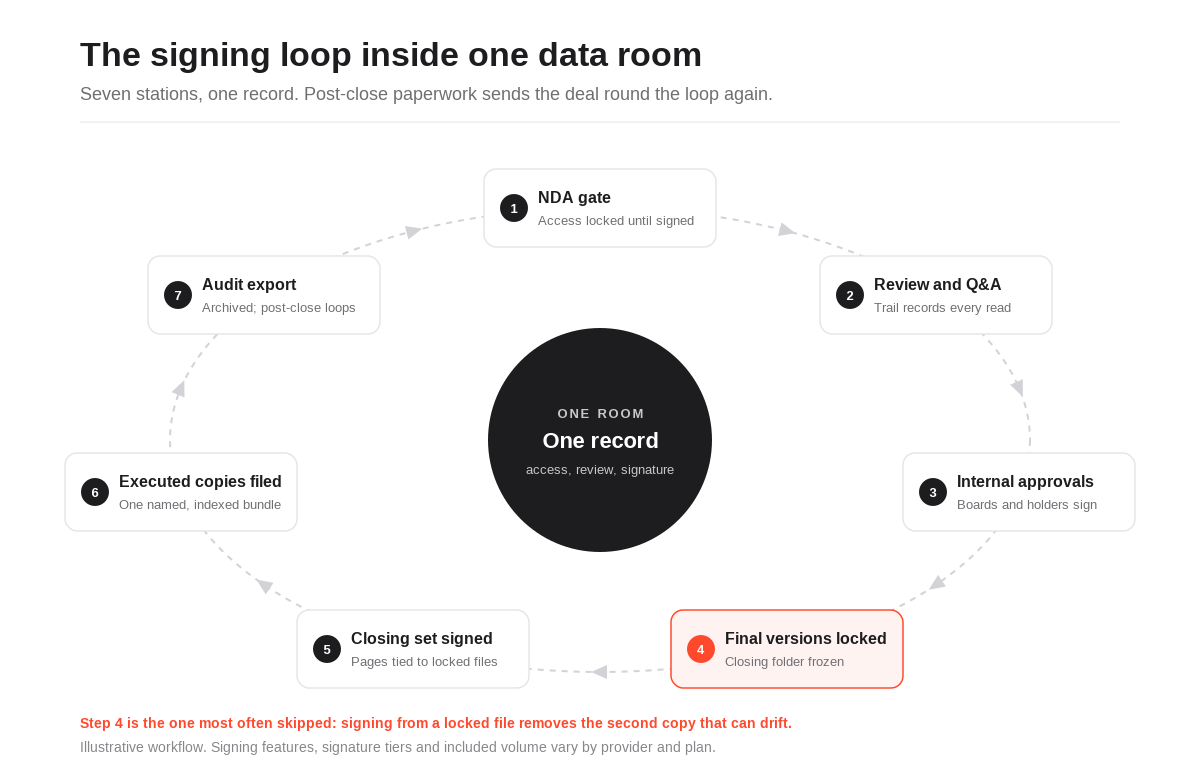
The loop starts at the NDA gate and ends with an audit export, but it rarely closes cleanly at completion. Post-close documents, completion accounts and earn-out statements, send it round again weeks or months later.
Each station has one job.
- NDA gate. Access is withheld until the firm’s NDA is executed. The signed copy lands in a restricted folder visible only to the sell-side team.
- Review and Q&A. Bidders read and ask questions. No signing here, but the audit trail records what each reviewer saw, which later supports the disclosure position.
- Internal approvals. Board resolutions and shareholder consents go to named signers in the order the company’s rules require.
- Final versions locked. The agreed texts are uploaded to a closing folder and frozen. This step is the one Tidewater skipped.
- Closing set signed. Signature pages go out in parallel, each tied to the locked version.
- Executed copies filed. Signed documents return to the room as a single bundle, named and indexed.
- Audit export. The full record, signatures included, is exported and archived.
Steps 4 and 6 are where native or well-integrated signing pays for itself. When the signature request is generated from the locked file inside the room, there is no second copy to drift. Our guide to data room version control covers how locking and version history work in practice.
Approvals and consents: the quiet middle of the loop
Closing gets the attention. The middle of the deal generates more signatures.
A sale that needs board approval for the preferred bidder, a shareholder consent for exclusivity, and perhaps a waiver from a lender can easily produce a dozen signature events before the purchase agreement is even final. In a company with several shareholders or a fund structure, consents multiply fast.
These documents share three traits. They are short. They go to people who are not part of the daily deal team, such as non-executive directors, fund LPs or family shareholders. And they often have to be signed in a specific order or by a specific deadline.
That makes them a good fit for signing inside the room.
Sending a two-page resolution from the folder where the board pack already sits means the director signing it can open the supporting papers from the same place, and the record shows they had access when they signed. A separate tool sends the resolution by email, and the board pack sits somewhere else.
Two cautions apply. First, check whether your company’s articles or a shareholder agreement require a particular execution method for resolutions. Second, keep the people who sign consents in their own permission group, separate from bidders, so a director’s access to sensitive board material does not accidentally extend to the rest of the room. The guide to data room permissions sets out how to structure groups for that.
Which data rooms have built-in e-signature?
In the 25 providers we currently track, six flag e-signature as a built-in feature. They come from very different corners of the market.
E-signature and the deal controls around it, across providers that flag built-in signing in our data
| Provider | Built-in e-signature | Structured Q&A | Redaction | Indicative starting price (USD) |
|---|---|---|---|---|
| Ellty | Yes | Yes | No | From $149/mo |
| SecureDocs | Yes | Yes | No | From $250/mo |
| Citrix ShareFile | Yes | No | No | From $55/mo |
| Box | Yes | No | No | From $15/user/mo |
| Diligent | Yes | No | No | Custom quote |
| DocSend | Yes | No | No | From $45/user/mo |
The table shows a real trade-off. Several rooms that combine signing with other deal tools come from the file-sharing and document-tracking side of the market rather than the M&A side.
Citrix ShareFile includes RightSignature for legally binding signatures and files the executed copy back into the same secure folder, which suits accounting and legal teams exchanging documents with clients. SecureDocs lets you send term sheets, NDAs and closing documents from inside the room. Diligent pairs signing with board governance, which makes it a natural home for resolutions and board packs. DocSend leans toward investor-facing document tracking, and Box is a content cloud with signing alongside everyday collaboration.
Ellty also flags e-signature in our data, alongside structured Q&A, dynamic watermarking, DRM, an audit trail and AI tools, so the signing step sits inside a full deal room rather than a file-sharing product.
Several M&A-focused rooms that rank highly on Q&A and redaction, including iDeals and Datasite, do not flag native e-signature in our data. That does not mean you cannot sign around them. Many teams connect a dedicated signing service or simply run signing separately. It means the closing loop has one more hand-off to manage. The head-to-head on Box vs Citrix ShareFile shows how two of the signing-enabled options differ on everything else.
Native, integrated or separate: which signing setup fits your deal?
The right answer depends less on the deal size than on how many signature events you expect and how strict your version control has to be.
Native e-signature inside the data room
Where it helps
- The executed copy is filed next to the reviewed version automatically, with no download and re-upload step.
- One audit trail covers access, review and signature, which makes the record easier to produce later.
- Access can be gated on a signed NDA without an administrator checking an inbox.
- Signers who are not on the deal team, such as directors, can open supporting papers from the same place they sign.
Where it falls short
- Built-in signing tools may offer fewer signature tiers or identity checks than a specialist service, so confirm qualified signature support if you need it.
- Signing volume can be capped or priced as an add-on; check what your plan includes before closing week.
- Some counterparties' counsel insist on their own signing platform, so you may run two tools anyway.
- Several of the M&A rooms strongest on Q&A and redaction do not offer it natively, which forces a trade-off between signing and other deal features.
A separate signing tool is still a reasonable choice when signature events are few and the closing is run by a law firm with its own established process. Plenty of large deals close that way.
It becomes a liability when signatures are spread across the deal, when non-specialists are doing the uploading, or when nobody owns the step of matching each executed copy to its locked version.
What can go wrong with e-signature on a deal?
Most problems fall into four groups.
Version drift. The signed page belongs to a different version of the document than the one agreed. Fix it by locking final versions in a closing folder and generating every signature request from there.
Wrong signatory. The person who signed lacked authority to bind the entity. A data room cannot solve this, but a closing checklist that lists each entity, its authorised signatories and the evidence of authority, such as a board resolution, can. File that evidence in the room next to the executed document.
Weak identity. A signature request sent to a shared mailbox or a forwarded link proves very little. Use named recipients, one-time codes or two-factor login for anything material.
Lost executed copies. The final signed bundle sits in someone’s inbox and never reaches the room before it is archived. If the deal does not complete, the question of what was signed becomes urgent; our guide to what happens to a data room when a deal falls through covers that scenario.
A fifth issue is less common but worth flagging: signing inside a room that is about to close. If the subscription ends the day after completion, post-close documents have nowhere to go. Agree a retention or archive period before signing day.
A pre-signing checklist for the data room
Run this list a week before closing, not the night before.
- Map every signature event. List each document, each entity, each signatory and the required execution method, including any wet-ink or notarised items.
- Confirm the signature tier. Check whether any document needs an advanced or qualified signature under eIDAS, or a specific method under a party’s constitution.
- Lock final versions. Move agreed texts into a dedicated closing folder and restrict editing to one administrator.
- Generate requests from the locked files. Never attach a document from a desktop or email thread.
- Set signer permissions. Give signers access only to the closing folder and the supporting papers they need.
- Check plan limits. Confirm signing volume, number of signers and any per-envelope charges with the provider.
- Name the executed bundle. Agree a naming convention so the final set is easy to find and index.
- Book the archive. Decide how long the room stays live after completion and export the full audit trail before anything is switched off.
That last step is easy to skip in the relief of a signed deal. It is also the step that protects you a year later.
Treat the closing set like any other high-stakes upload. Our guide to the core features of a virtual data room shows where signing fits among the controls a deal room should offer, and the ranking of the best data rooms for M&A weighs the full feature set.
Does e-signature justify choosing one data room over another?
On its own, rarely. It is a tie-breaker, not a headline criterion.
The features that decide a deal room are still permissions, audit trail depth, Q&A workflow, watermarking and price. If two rooms are close on those, built-in signing is a good reason to pick the one that has it, because it removes a recurring source of version errors.
If you are running board-heavy or consent-heavy processes, such as a fund with many LPs or a company with a long cap table, signing moves higher up the list. The number of signature events is the best predictor of how much it is worth.
If closing will be run entirely by a law firm with its own signing platform, it barely matters.
The honest test is to count. Write down every signature your deal will need, from the first NDA to the last earn-out statement. If the list runs past a dozen, signing inside the room is worth real weight in your shortlist. Use our provider comparisons to see which rooms pair it with the rest of what you need, and treat every price as indicative until the provider confirms it.
Frequently asked questions
Can you sign an NDA inside a virtual data room?
Yes, in rooms with built-in or integrated e-signature. The usual setup is to send the NDA from the room, keep access locked until it is executed, and store the signed copy in a restricted folder. Rooms without signing can still use a click-through acceptance at first login, which binds the individual user but is not a substitute for a negotiated firm-level NDA.
Is a data room e-signature legally valid?
For most commercial documents, yes. The US ESIGN Act and UETA and the EU eIDAS Regulation all recognise electronic signatures. The exceptions are documents that a specific law, registry or a party's own constitution requires to be executed by wet ink, before a notary, or with a qualified electronic signature, so counsel should confirm the method for each closing document.
What is the difference between native and integrated e-signature in a data room?
Native signing is built by the data room provider and runs inside the room. Integrated signing uses an outside signing service started from the room, with the executed copy synced back. Both can produce valid signatures; native signing usually has fewer hand-offs, while a specialist service may offer more signature tiers and identity checks.
Which virtual data rooms include e-signature?
In our current provider data, six of the 25 rooms we track flag built-in e-signature, including SecureDocs, Citrix ShareFile, Box and Diligent. Several M&A-focused rooms do not flag it natively and are usually paired with a separate signing service. Feature sets and included signing volume change, so confirm with each provider before you rely on it.
How do you avoid signing the wrong version of a deal document?
Lock the agreed final versions in a dedicated closing folder, restrict editing to one administrator, and generate every signature request directly from those locked files. Then file the executed copies back into the same folder as a single bundle and export the audit trail before the room is archived.
Sixty signature events, one deal. Each one is a small chance for the reviewed document and the signed document to part ways.
Keeping them in the same room does not make anyone’s signature more valid. It makes the record easier to trust, and that is what people go looking for after the deal is done.
