
Data room folder structure: a proven template
On this page
- Start with the reviewer, not your hard drive
- What a folder structure actually is, and why it carries so much weight
- The template: ten top-level folders to start from
- Build the tree in five moves, before you upload anything
- How deep should it go? Two to three levels, almost always
- Map every folder to a workstream on the checklist
- Permission the tree, not the files
- Name files so they still make sense after download
- The same backbone, different weight by deal type
- What the numbered template costs you, and what it buys
- The mistakes that cost sellers the most, and how to design them out
- Keeping the structure clean once the room is live
Nobody opens a data room to admire your filing system. They open it to answer one specific question their client is paying them to answer, and they want that answer in seconds.
The gap that decides everything is the gap between how you filed the documents and how a reviewer hunts for them. Close it, and diligence feels effortless. Leave it open, and every reviewer quietly reclassifies your business as disorganised before reading a single contract.
This guide is built to be copied. You get a top-level template you can lift wholesale, the naming and permission rules that keep it standing, a build sequence you can run in under an hour, and the adjustments that matter once you know whether you are selling, raising, or opening the room to a fund.
Start with the reviewer, not your hard drive
Here is the mistake almost everyone makes first. You open the empty data room, glance at your shared drive, and drag folders across roughly as they sit. The finance team’s folder becomes the finance folder; the legal area becomes the legal folder. Within an afternoon you have a room.
It is the wrong room. It mirrors your internal politics, not the buyer’s checklist.
Reviewers do not read a data room front to back. They arrive with a request list their advisers wrote, and they work it line by line. Match the shape of that list and they fly. Miss it, and every item turns into a small negotiation: is the shareholders’ agreement under corporate, under legal, or in a folder someone named “governance stuff”?
Multiply that friction across a thousand documents and several teams, and you have added a week to the deal for nothing. So the first principle is blunt. Build the tree the reviewer expects.
What a folder structure actually is, and why it carries so much weight
A data room folder structure is the organised tree of folders and subfolders that holds every confidential document a counterparty reviews during a transaction. It matters more than it looks, because the tree is not just storage. It is the index, the permission surface, and the audit backbone at once.
It is the index because the tree is the visible face of your data room index, the thing a reviewer scans to orient themselves in the first thirty seconds. A well-planned index is the highest-leverage move in the whole setup, and our walkthrough on how to set up a virtual data room treats it as step one.
It is the permission surface because folders, not files, are what you grant access to. And it is the audit backbone because the platform logs activity against folder paths. Stable paths keep the record readable; a mid-deal reshuffle smears the history across renamed paths nobody can reconstruct.
There is one more thing the structure does, and sellers underrate it. It signals competence. When your folders map cleanly onto a standard due diligence request list, the other side reads that as a company that has done this before and has nothing to hide. That impression is worth real money at the table, and it costs nothing but an hour of planning.
The template: ten top-level folders to start from
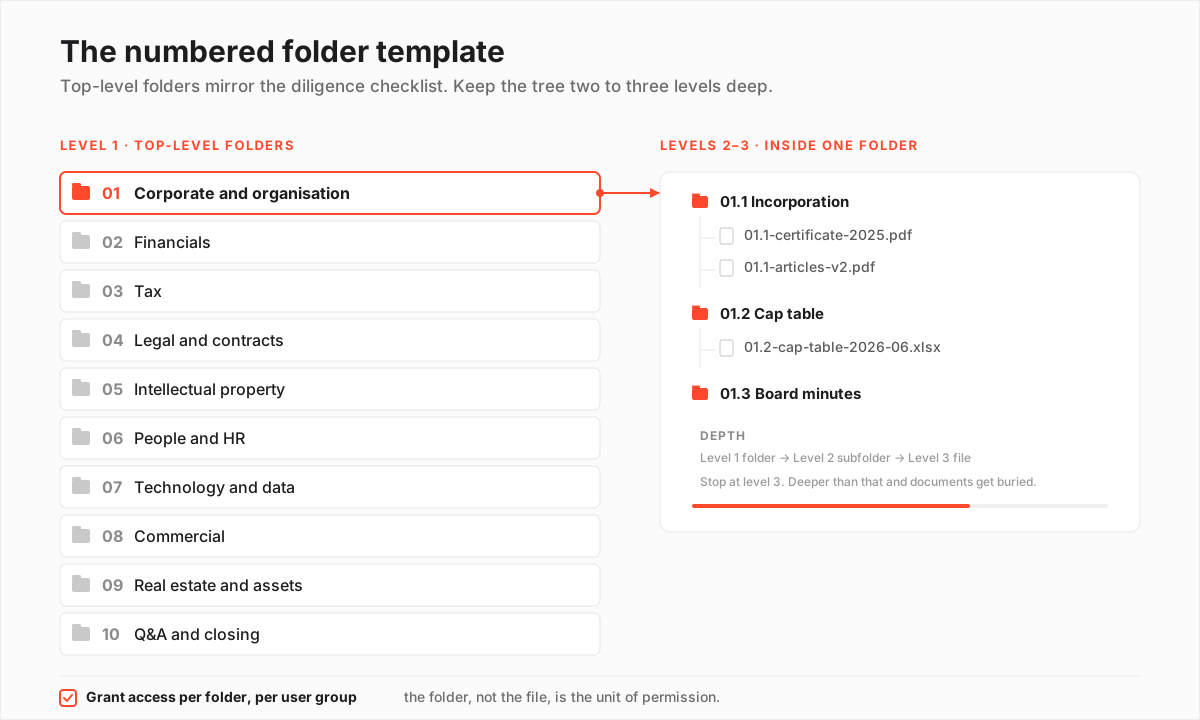
Almost every serious data room shares the same backbone. No law mandates it, but the practical standard has converged over thousands of deals, and professional advisers recognise it on sight. Start from this superset and prune, rather than inventing a structure from nothing. Pruning a known-good template is far safer than guessing at your own.
The core top-level folders and what each one holds
| Top-level folder | What lives here | Review priority |
|---|---|---|
| 01 Corporate and organisation | Incorporation, cap table, shareholder agreements, board minutes, org chart | Opened first |
| 02 Financials | Audited and management accounts, forecasts, working-capital detail, debt schedule | High |
| 03 Tax | Returns, correspondence, transfer-pricing docs, any open disputes | High |
| 04 Legal and contracts | Material customer, supplier and partner agreements, litigation, permits | High |
| 05 Intellectual property | Patents, trademarks, domain names, software licences, IP assignments | Deal-dependent |
| 06 People and HR | Org structure, key employment contracts, option plans, policies | Medium |
| 07 Technology and data | Architecture, security certifications, data-processing records, subprocessors | Rising |
| 08 Commercial | Pipeline, customer concentration, churn, marketing and pricing | Medium |
| 09 Real estate and assets | Leases, title, fixed-asset register, insurance | Deal-dependent |
| 10 Q&A and closing | Diligence questions, disclosure schedules, draft transaction documents | Late stage |
Read that as a menu, not a mandate. A pure software company may barely touch real estate. A holding company with no employees may collapse people and HR into one subfolder. The point is that you decide what to drop, deliberately, then renumber so the sequence has no gaps.
Why the numbers? Because the two-digit prefix is doing real work, not decoration. Prefixing each folder with 01, 02, 03 forces a deterministic sort in every VDR, so 02 Financials always sits above 08 Commercial no matter how the platform would otherwise alphabetise them.
Reviewers memorise that order within a day, and your Q&A references stop being ambiguous. “See 04 Legal and contracts, subfolder 04.3” points to exactly one place. For the document-by-document view of what fills each folder, the companion piece on what documents go in a data room works through every category.
Build the tree in five moves, before you upload anything
One discipline separates a fast room from a chaotic one. Build the empty skeleton first, then load files into it. Do it the other way around and you end up dragging files that already carry permissions and shared links, breaking both as you tidy.
How to build your data room folder tree
Turn the standard template into a live, review-ready folder structure.
Estimated time: 45min
-
Start from the diligence request list
Get the buyer's or investor's diligence checklist if one exists; if not, use a standard M&A request list. Your top-level folders should map one to one onto its main headings.
-
Create numbered top-level folders
Build the 01 to 10 folders from the template, dropping any that do not apply to your deal and renumbering so there are no gaps.
-
Add one level of subfolders
Inside each top-level folder, add subfolders for the natural groupings, for example 02.1 Audited accounts, 02.2 Management accounts, 02.3 Forecasts. Stop at this level unless a folder truly needs a third.
-
Add an index or read-me at the root
Drop a short index document at the top level that lists what each folder contains and flags anything deliberately withheld until a later stage.
-
Load files last, into the finished skeleton
Only once the empty tree is right do you bulk-upload. Files land in a structure that already makes sense, instead of you reorganising around them afterwards.
If you take one thing from this section, take the order. Skeleton, then index, then files. It feels slower on the day. It saves days of rework the week bidders arrive.
How deep should it go? Two to three levels, almost always
Depth is where good intentions go to die. Two to three levels is the sweet spot for nearly every room. Top-level folders set the categories, one layer of subfolders handles the natural groupings inside each, and a third level appears only where a category genuinely earns it, such as material contracts split by counterparty.
Go beyond three and reviewers start clicking blind. Important documents settle at the bottom of paths nobody thinks to check. The failure shows up at both extremes, and the cost is the same either way: wasted reviewer time.
- Too flat and a single folder holds two hundred ungrouped files. Reviewers scroll, lose their place, and miss things.
- Too deep and a key contract sits five clicks down a path nobody guesses. It is technically present and effectively invisible, which in a dispute is worse than being absent.
Here is a useful test. If a reviewer cannot guess which folder a document lives in on the first try, the tree is too deep or the labels too vague. When you feel the urge to add a fourth level, the level above was usually scoped wrong. The fix is to split that parent into two siblings, not to burrow deeper.
Map every folder to a workstream on the checklist
Numbering pays off because it lets your folders line up with the diligence checklist section by section. Each top-level folder should correspond to a workstream on that list, so the financial reviewer lives in one folder and the legal team in another, and the two never collide.
When the buyer’s list says “Section 4: Material contracts,” your folder 04 Legal and contracts is the obvious home. If you are still assembling the checklist itself, our due diligence checklist lays out the standard request headings to number your folders against.
The mapping does something quieter too. It makes the room defensible. Because a VDR records who opened which folder and when, a clean checklist-to-folder mapping gives you a precise, auditable record of what each party reviewed.
If a disclosure dispute surfaces after closing, that record is your evidence, and it is only as clear as the structure it was logged against. This is one reason audit trails sit at the heart of a data room, and an argument for freezing your top-level tree before anyone is invited in.
Permission the tree, not the files
Not every reviewer should see every folder, and the folder is the surface you grant access against. Sensitive branches, such as employee-level HR data, customer names, and unredacted contracts, are routinely held back from the wider bidder group and released only to a shortlist, or only after an offer lands.
Setting granular permissions at the folder level, per user group, is far safer than toggling individual files. That is why the structure and the permission map have to be designed together.
A typical folder-level permission matrix by user group
| Folder | Prospective buyers | Legal / advisers | Internal only until later |
|---|---|---|---|
| 01 Corporate and organisation | Yes | Yes | No |
| 02 Financials | Yes | Yes | No |
| 04 Legal and contracts | Redacted | Yes | No |
| 06 People and HR | No | Partial | Yes |
| 07 Technology and data | Summary | Yes | No |
| 10 Q&A and closing | Yes | Yes | No |
The People and HR folder deserves the most care, because it usually holds personal data that sits under privacy law. Under the GDPR, personal data must be limited to those with a genuine need to see it, and diligence disclosures are a well-known pressure point.
The practical answer is data minimisation. Redact names and salaries in the open bidder view, and release the full set only to a clean team of advisers bound by confidentiality. For fuller detail, our guide on data room permissions walks through the common access tiers.
Run this short checklist for the permission pass once, before you invite anyone:
- List your user groups first: prospective buyers, their advisers, your internal team, and any clean team.
- Walk the tree top to bottom and assign each folder a default visibility per group.
- Flag every folder holding personal data, unredacted contracts, or customer identities for a stricter default.
- Decide which branches stay dark until an offer or a signed NDA upgrade, and note it in the root index.
- Test the buyer view by logging in as a restricted user, not by trusting the settings screen.
Name files so they still make sense after download
Consistent naming turns a folder tree into something searchable and scannable. It is the rule people skip because it feels fussy. It is not.
The moment a reviewer downloads a document to their own machine, the file name is the only context that survives. Your folder tree does not travel with the file, so the name has to carry its own meaning.
Adopt one convention before you upload anything, and apply it without exception: a numeric prefix for order, a short descriptive name, the counterparty or period where it matters, and a version or date. A file called 04.2-supply-agreement-acme-2025-v3.pdf tells a reviewer everything at a glance. A file called final FINAL contract (2).pdf tells them you are winging it.
Anatomy of a file name that stays useful after download
| Component | Why it earns its place | Example fragment |
|---|---|---|
| Numeric prefix | Ties the file back to its folder and forces order | 04.2 |
| Short descriptor | States what the document is in two or three words | supply-agreement |
| Counterparty or period | Disambiguates near-identical documents | acme |
| ISO date or version | Removes 'which final is final' guesswork | 2025-v3 |
| Plain characters only | Spaces and symbols break links and downloads | hyphens, no spaces |
Four rules carry most of the value, and they are worth stating as flat instructions:
- Use the same date format everywhere, ISO style (2026-08-09), which sorts correctly and kills the ambiguity between regional day-month-year and month-day-year orders.
- Never rely on “final” or “latest” in a filename, because there is always a later final. Use explicit version numbers or dates instead.
- Avoid spaces and special characters, which break links and downloads.
- Keep names short enough to read in the narrow filename column VDRs display.
Retro-fitting names after bidders are inside looks harmless. It breaks half the shared links in your Q&A thread. Set the convention on day one.
The same backbone, different weight by deal type
The template stays constant across transactions. What shifts is where the review weight falls, and knowing that tells you where to invest preparation time.
An acquisition puts weight on contracts, liabilities, and IP, because the buyer inherits all three and has to price the risk. A fundraising round leans on financials, the cap table, and the growth story, because the investor is buying a future, not a liability profile. Fund or LP diligence cares most about track record, governance, and compliance. The folders are the same; the branches you fatten differ.
Where the review weight falls by deal type
| Data room folder | Acquisition (M&A) | Fundraising round | Fund / LP diligence |
|---|---|---|---|
| Financials | High | Highest | High |
| Legal and contracts | Highest | Medium | Medium |
| Intellectual property | High | High | Lower |
| Corporate and cap table | High | Highest | High |
| People and HR | Medium | Lower | Medium |
| Technology and security | Rising | Medium | High |
That emphasis should steer which platform you shortlist, because a lean fundraise and a full-scale acquisition stress different features. If you are raising, our pick of the best data rooms for fundraising weighs speed and cost.
If you are selling, the best data rooms for mergers and acquisitions and the best rooms for due diligence weigh permission depth and Q&A, because a competitive process lives and dies on how well you can partition bidders. Smaller deals often run fine on a leaner tool from the best rooms for small business. When you are down to a couple of names, the side-by-side comparison and the pricing overview settle most of the remaining questions.
One column is climbing across the board: technology and security. As more targets are software or data businesses, buyers now expect a dedicated folder holding architecture notes, subprocessor lists, and independent security certifications such as SOC 2 or ISO 27001.
ISO 27001 is the common reference for information-security management, and a SOC 2 report is governed by the AICPA framework. Having the certificate ready in folder 07 answers an entire workstream before anyone asks. If your target is regulated or data-heavy, promote that folder regardless of deal type.
What the numbered template costs you, and what it buys
No structure is free, so be honest about the trade before you commit. The numbered, checklist-mapped template asks for planning time up front and a little renumbering discipline whenever you prune a branch. In exchange it makes the room faster to review, simpler to permission, and cleaner to audit.
The numbered, checklist-mapped structure
Pros
- Reviewers find documents on the first click, cutting clarifying questions
- Numbered folders map straight onto the diligence request list and Q&A references
- Folder-level permissions become simple because the folder is the unit of access
- The audit trail stays readable, since activity is logged against stable paths
- The empty skeleton clones into a reusable template for the next round
Cons
- Needs planning time before you can upload a single file
- Renumbering after you prune a branch takes discipline to keep gap-free
- A root index only helps if someone keeps it in step with the tree
The cons are all manageable. The planning time is under an hour. The renumbering is a five-minute job you do once at build. The index only drifts if you let it.
The mistakes that cost sellers the most, and how to design them out
The recurring folder-structure mistakes are predictable, which is the good news. Predictable mistakes are easy to design out. Here they are as a straight do-and-don’t list.
Do:
- Build the empty skeleton and index before uploading a single file.
- Number top-level folders and map them to the diligence checklist sections.
- Design the permission map at the same time as the tree, folder by folder.
- Keep the hierarchy to two or three levels and split, rather than deepen, when a folder bloats.
- Put a dated subfolder on anything that arrives after reviewers are already inside.
Don’t:
- Upload files in the order they sat on your shared drive, which mirrors your chaos instead of the reviewer’s checklist.
- Let the folder tree and the permission map drift apart, which either leaks a sensitive folder or hides a routine one.
- Bury key documents four or five levels deep where nobody thinks to look.
- Leave “miscellaneous” or “other” folders lying around, because they become dumping grounds within a week.
- Rename or move a top-level folder once bidders are in, since it breaks their mental map and any links you shared in Q&A.
The most expensive of these is the first, uploading in shared-drive order, because it front-loads a false sense of progress and then costs you a full reorganisation once you realise the room reads as a mess. Our roundup of data room mistakes to avoid covers the ones that quietly add weeks, and most trace back to a structure that was never designed, only accreted.
Keeping the structure clean once the room is live
Freeze the top-level structure the moment reviewers are invited, and manage everything after that through subfolders and the Q&A folder. Renaming or moving a top-level folder mid-deal breaks the map reviewers have built in their heads and can invalidate links you shared in Q&A.
New documents slot into the existing tree. Anything genuinely new gets a clearly dated subfolder, so reviewers can see what arrived since their last visit.
This discipline protects your audit record too. Because the VDR logs activity against folder paths, a stable structure keeps that history reconstructable, whereas constant reshuffling smears it across renamed paths.
If you expect to reuse the room for a future round, keep a clean copy of the empty skeleton the day you finish building it. Platforms differ in how easily they let you clone a structure, which is worth checking when you compare providers or read individual provider reviews.
Frequently asked questions
Is there a legally required data room folder structure?
No. There is no mandated layout, but a practical standard has converged around the categories used in M&A due-diligence request lists: corporate, financials, tax, legal, IP, people, technology, commercial, real estate and Q&A. Following it means advisers recognise your room immediately, which speeds review.
Should I number my data room folders?
Yes. A two-digit numeric prefix (01, 02, 03) forces a predictable sort order across every platform and lets you reference folders unambiguously in Q&A. It also lets your numbering mirror the sections of the buyer's diligence request list.
Where should sensitive personal data go in the structure?
In a tightly permissioned People and HR folder, usually redacted in the open bidder view and released in full only to advisers under confidentiality. Privacy law such as the GDPR expects data minimisation, so limit access to those with a genuine need and pseudonymise where you can.
Can I reuse a folder structure for the next deal?
Yes, and you should. Keep a clean copy of the empty numbered skeleton and clone it for the next round. Many virtual data rooms let you save a structure as a template, which turns setup for a repeat raise or sale into minutes rather than hours.
The folder structure is the cheapest part of a data room to get right and one of the most expensive to get wrong, because every reviewer feels it on their first click.
Build the numbered skeleton before you upload anything. Map it to the diligence checklist. Design permissions folder by folder, name files so they survive a download, and adapt the emphasis to your deal. Do that and the structure disappears in the best possible way: reviewers stop noticing it, because it simply works.
