
10 data room mistakes that stall deals
On this page
- Why these mistakes cost the deal, not just time
- Mistake 1: The folder index is an afterthought
- Mistake 2: Access granted too broadly
- Mistake 3: Dumping every file into the room
- Mistake 4: Running Q&A through email
- Mistake 5: Ignoring the audit trail
- Mistake 6: Skipping watermarking and view-only
- Mistake 7: Underestimating setup time
- Mistake 8: Leaving stale documents live
- Mistake 9: Not revoking access when a party drops out
- Mistake 10: Choosing a room on price alone
- The five that make a process feel unsafe
- Catch these before your buyers do
A data room almost never loses a deal on its own. People lose it, through a short list of avoidable setup mistakes.
The buyer never sees your good intentions. They see the room. A layout that is hard to navigate. A Q&A thread buried in email. A permission slip that let the wrong person read the wrong file.
Below are the ten mistakes that most reliably stall M&A, fundraising, and other diligence processes, each with a plain fix you can apply today. Read it as a pre-flight checklist, not a lecture.
Nine of the ten cost nothing to fix. They cost only attention. The payoff is a process the other side experiences as calm and competent.
Why these mistakes cost the deal, not just time
Diligence is where momentum is won or lost, and momentum is fragile.
Research collected by Harvard Business Review puts the M&A failure rate somewhere between 70% and 90%. Most of that is strategic. But a real share of deals simply lose energy during diligence.
A room that is slow to work through hands a wavering buyer an easy reason to delay, chip the price, or walk. So does a room that raises doubts about how carefully the seller handles information.
The data room is the one part of the process the other side touches directly. Its flaws colour their read on everything else.
Here is the good news. These mistakes cluster into four predictable buckets: structure, access, process, and platform fit. Get the first three right and the platform mostly takes care of itself.
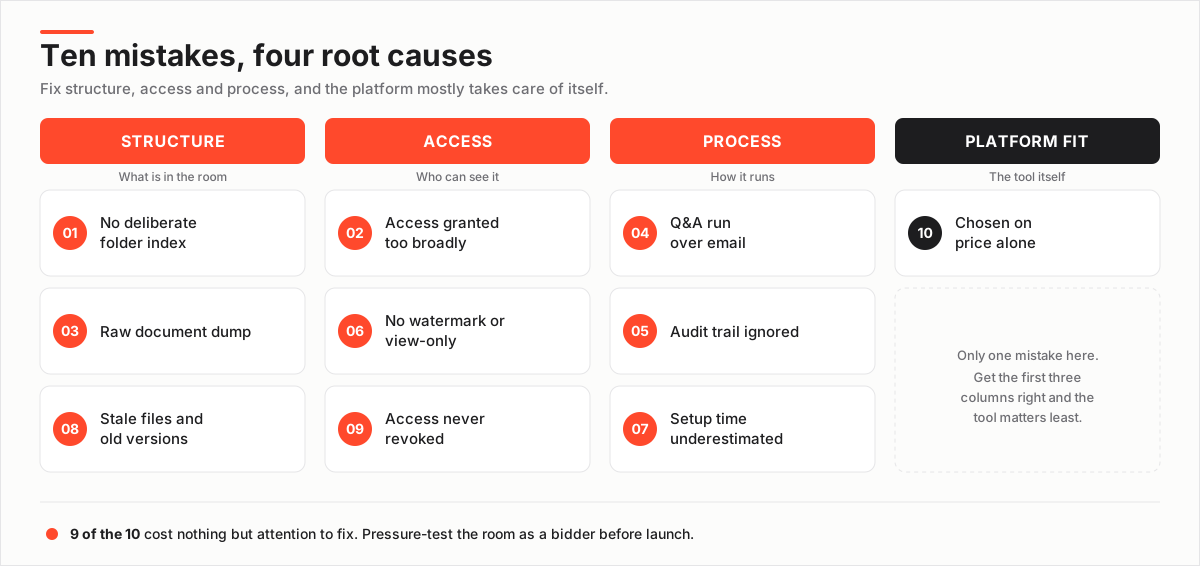
The ten below are ordered by how early in setup each one bites.
Mistake 1: The folder index is an afterthought
The most common mistake is uploading files first and worrying about structure later.
A room without a deliberate index forces every reviewer to hunt, and hunting reads as disorganisation. Buyers infer that a company which cannot organise its own documents may not have its house in order elsewhere.
It is the first impression the room makes. First impressions in diligence are sticky.
The fix: plan the index against the diligence checklist before you upload anything. Group by the categories buyers actually work through: corporate, financial, commercial, legal, IP, HR. Number the folders so the order is obvious and stable.
A clean, numbered tree lets a reviewer predict where a document lives before they search. Our data room index best practices and the ready-made folder structure template give you a skeleton to adapt.
Mistake 2: Access granted too broadly
Broad permissions are the highest-cost convenience mistake in the book.
Giving every invited user access to every folder is fast to set up and slow to regret. A junior analyst on the buy side does not need the founder employment agreements. A bidder you are still qualifying should not see your customer contracts on day one.
The fix: work with user roles and groups, not individuals. Create groups such as bidders, buy-side legal, and internal team, then assign folder-level rights to the group.
Use a staging area so the most confidential folders open only once a party is serious. That is the difference between a granular permission model you can reason about and a pile of one-off exceptions you will lose track of.
The mechanics are in data room permissions explained.
Mistake 3: Dumping every file into the room
A raw data dump feels thorough. It lands as noise.
Upload everything you have without curating, and reviewers wade through duplicates, drafts, and irrelevant files to find the handful that matter. Every extra document is one more thing a lawyer can question.
Volume is not diligence readiness. Signal is.
The fix: curate to the checklist. Include the final, signed version of each document, remove superseded drafts, and resist the urge to pad the room to look comprehensive.
If you are unsure what genuinely belongs, work from a due diligence checklist, not from the contents of your shared drive.
Mistake 4: Running Q&A through email
Bidder questions over email scale badly.
With one bidder it feels manageable. With three it becomes a tangle of threads. Nobody is sure which answer is current, who has seen what, or whether two teams got different responses to the same question.
That inconsistency is exactly what a buyer’s counsel notices. It is the sort of gap that surfaces later as a disclosure dispute.
The fix: use the room’s Q&A module. It routes each question to the right owner, keeps a single audited record of every answer, and lets you publish responses consistently across bidders.
It also protects you. If a dispute arises later about what was disclosed, the Q&A log is your evidence. Our guide to running data room Q&A covers ownership and turnaround so answers do not become the bottleneck.
Mistake 5: Ignoring the audit trail
Treat the audit trail as a compliance formality and you waste the most useful signal in the room.
Every view, download, and print is logged. That log tells you which bidders are genuinely engaged, which documents are drawing scrutiny, and where a buyer is spending time. Ignore it and you negotiate blind.
The fix: read the engagement data actively. A bidder who has not opened the room in a week is cooling. A cluster of activity on the customer-concentration folder tells you where the tough questions are coming, often before they are asked.
The engagement heatmap turns raw logs into a picture you can act on. The same record is your defensible proof of who accessed what and when, which matters if a deal turns contentious. See VDR audit trails explained for what to watch.
The audit trail is not paperwork you file away. In a live process it is a bidder-intent dashboard. After the deal it is the receipt that proves what you disclosed and when.
Mistake 6: Skipping watermarking and view-only
Leave out dynamic watermarking and view-only access and you remove your cheapest deterrent against leaks.
When a confidential document can be downloaded clean and forwarded, you lose control of it the moment you grant access. In a competitive process where bidders may be rivals, that is a real exposure, not a theoretical one.
The fix: turn on dynamic watermarking so every page carries the viewer’s identity. Set the most sensitive folders to view-only or fence view so files render in the browser instead of downloading.
These controls will not stop a determined actor with a camera. But they change the incentives and make casual sharing traceable. The mechanics are in dynamic watermarking and fence view, and the broader set in the VDR security features checklist.
Mistake 7: Underestimating setup time
Assuming the room can go live the day you need it is how deals start late.
The software is quick. The work is not. Organising documents, agreeing the index, cleaning up versions, and setting permissions correctly takes real hours. Doing it under time pressure is how permission mistakes creep in.
The fix: give the room lead time. Start assembling and curating documents before you formally open the process. Launch day should be a review, not a scramble.
Some rooms, Ellty among them, let you stand up your full folder structure and populate it in stages. That helps when your documents are not all ready at once. The step-by-step path is in how to set up a virtual data room.
Readiness maps directly to launch time and risk:
| Room readiness | Time to launch | Indicative cost (USD/mo) | Deal risk |
|---|---|---|---|
| Documents ready, index planned | Under 1 hour | $99-$400 | Low |
| Documents ready, no index yet | Half a day | $99-$400 | Medium |
| Documents scattered, no plan | Several days | $400+ | High |
| Launching mid-deal under pressure | Rushed, error-prone | Varies | Highest |
Figures are indicative. Confirm current pricing on the VDR pricing page.
Mistake 8: Leaving stale documents live
Leaving outdated files, drafts, and duplicates in the room is a quieter mistake. It still undermines trust the moment a reviewer spots it.
Open two versions of the same contract, or find a draft that contradicts the signed copy, and the buyer has to stop and ask which is real. Now they are wondering what else in the room is unreliable. Doubt, once planted, spreads to documents that were perfectly clean.
The fix: keep one source of truth per document. Use proper document versioning, not parallel copies. When a file is superseded, replace it and remove the old copy.
Do a housekeeping pass before launch, then periodically during a long process, especially if the room stays open across months of negotiation. If a document holds sensitive personal data a counterparty does not need, use redaction rather than pulling the whole file.
Mistake 9: Not revoking access when a party drops out
Forgetting to revoke access is the mistake with the longest tail.
When a bidder withdraws or an adviser rolls off, their login often stays live. It quietly keeps the ability to read confidential files they no longer have any business seeing. Multiply that across a process with several parties and you have a confidentiality gap nobody is watching.
The fix: revoke on exit, as a standing rule. Review the active user list on a schedule, weekly during a live process. A proper room cuts access instantly and, with information-rights controls, can pull back documents already distributed.
This is not just hygiene. Under regimes such as the GDPR, keeping personal data accessible to people with no lawful reason to see it is a genuine compliance exposure. Our guide to granting and revoking data room access covers the workflow. GDPR and virtual data rooms covers the privacy angle.
Mistake 10: Choosing a room on price alone
Picking the cheapest room without checking what it includes is a false economy, and it surfaces at the worst time.
A low headline price can hide per-page charges, extra fees for users or storage, or the absence of a control your deal genuinely needs. You discover the gap mid-diligence, when switching is painful.
The fix: match the room to the deal, not to the sticker. Confirm the certifications your counterparties expect, such as SOC 2 (audited against the AICPA Trust Services Criteria) and ISO 27001 (the ISO information-security standard). Then check the pricing model fits your document volume.
The hidden costs of virtual data rooms guide breaks down where the real bill comes from. If budget is the constraint, a good free trial lets you road-test controls before you commit. For a curated starting point, our best value virtual data room shortlist ranks rooms on capability per dollar.
The five that make a process feel unsafe
A single mistake rarely kills a deal. Two or three together are what make a process feel unsafe. Here is how the worst offenders show up on the buy side, and the fix for each.
| Mistake | How it shows up on the buy side | The fix |
|---|---|---|
| No real index | Reviewers cannot find documents; repeated “where is X?” questions | Number folders to the diligence checklist before uploading |
| Access too broad | Sensitive files reach the wrong people; leak risk | Folder-level rights by user group, staged by deal stage |
| Document dump | Duplicates and drafts drown the signal | Curate to final, signed versions only |
| Email Q&A | Questions and answers scattered, no version of truth | Use the room’s structured Q&A module |
| Access never revoked | Dropped bidders keep reading confidential files | Revoke on exit; review the user list weekly |
Catch these before your buyers do
Pressure-test the room as if you were a bidder.
Before you send a single invitation, log in through a test account with a restricted group and try to do what a reviewer will do. Find a document from the index alone. Run a full-text search. Open a sensitive folder you should not reach. Download a watermarked file.
The gaps you hit are the gaps your buyers will hit. Only they will judge you for them.
How to pressure-test a data room before launch
A pre-launch pass that surfaces the common mistakes while you can still fix them quietly.
Estimated time: 45min
-
Navigate from the index only
Open the room fresh and try to find five key documents using the folder structure alone, no search. If you cannot predict where something lives, neither can a buyer.
-
Test a restricted group
Log in as a bidder-level test user and confirm you can see only what that group should. Try to open a folder you should not reach and verify it is blocked.
-
Run a real search
Search for a term you know is buried inside a document. If full-text search does not surface it, your files may not be indexed or may be image-only scans.
-
Check the security controls
Download a file from a view-only folder to confirm it renders rather than downloads, and verify the dynamic watermark carries the viewer's identity.
-
Review the user and audit view
Open the user list and the activity log. Confirm there are no stale accounts and that views and downloads are being recorded as expected.
Run that pass. Fix what it exposes. Most of the ten mistakes never reach a buyer.
Still comparing platforms? Our Ellty, iDeals, and Datasite reviews show how leading rooms handle permissions, Q&A, and audit trails in practice. Our use-case shortlists narrow the field faster than a feature grid: the best VDR for M&A, the best VDR for fundraising, and the best VDR for due diligence. If you want the mechanics of choosing first, read how to choose a virtual data room.
Frequently asked questions
What is the single most damaging data room mistake?
Over-broad permissions. Giving every invited user access to every folder is the fastest way to leak confidential information to someone who should not have it, and it is hard to unwind once documents have been seen. Work with user groups and folder-level rights from day one, and stage the most sensitive material so it opens only when a party is genuinely serious.
How early should I start building the data room?
Start before you formally open the process. The software is quick to set up, but organising documents, agreeing the index, and setting permissions correctly takes real hours. Building under deal-day pressure is where permission mistakes and stale-document errors creep in, so give yourself lead time to curate and pressure-test the room first.
Does spending more on a data room prevent these mistakes?
No. Almost every mistake on this list is about process and setup, not budget: the index, the permissions, the Q&A discipline, and revoking access cost nothing extra. A more expensive room gives you stronger controls to work with, but a cheap room used carefully beats an expensive one dumped full of files.
