
How much does a virtual data room cost?
On this page
- How much does a virtual data room cost?
- The four levers that set the price
- Why the headline never matches the invoice
- A real bill, line by line
- The hidden costs that wreck a budget
- Lightweight, mid-market, enterprise
- How to get an accurate quote
- Is it worth the cost?
- VDR versus the alternatives
- Cheaper without cutting security
- Which cost fits your deal?
- Quick answers
A virtual data room costs about $99 to $1,000 or more per month. Where you land inside that range has almost nothing to do with the logo on the login page.
It has everything to do with your deal.
The same platform can bill you $150 or $5,000 for the same transaction. What changes is the number of reviewers, the pages they open, the months the room stays live, and the controls your counterparties insist on.
So this guide skips the fake average. It works from the levers up: what moves the price, what a real bill looks like, the costs that hide below the headline, how to force an accurate quote, and whether the spend is worth it.
How much does a virtual data room cost?
Roughly $99 to $1,000 or more per month. A realistic mid-market deal room settles between $300 and $700 once users, documents and security are in.
Lean rooms sit lower. A single fundraising round can run under $150 per month.
Enterprise sits higher. Platforms that host months-long M&A auctions with hundreds of reviewers are quoted per engagement and reach five figures.
The provider matters less than the shape of the deal. Three reviewers and thirty reviewers price the same room very differently.
The category runs from a founder sharing a pitch deck to a bank running a competitive auction. A single average price is noise.
So do not memorise a number. Learn the levers that push your particular room up or down. Every dollar figure below is indicative for 2026, so confirm current pricing before you commit.
The four levers that set the price
Four variables drive almost the entire spread: reviewers, documents, deal length, and the depth of security and support.
Providers dress these up in different billing units. Underneath, every quote is a function of the same four.
Here is how each one hits your bill.
| Cost driver | Why it raises the price | Typical impact |
|---|---|---|
| Number of reviewers | Per-seat plans and admin caps charge for every user | High on wide auctions, low on small rooms |
| Document volume | Per-page and per-gigabyte models bill by content | Severe with financial models and scans |
| Deal length | Monthly billing compounds over a long process | Grows the longer a room stays open |
| Security depth | SSO, data residency and retention are often add-ons | Moderate, but stacks with governance needs |
| Setup and support | Onboarding, migration and managers cost extra | One-off, but easy to overlook |
Ranges are indicative snapshots for 2026 and vary by provider, region and term. Confirm before you budget.
Two of these are the usual traps: document volume and reviewer count. Both get underestimated at sign-up.
You size the room for the quiet opening week. Then a late document dump or a second round of bidders quietly bumps you into a pricier bracket.
Price the peak of the deal, not its start. That one habit prevents most billing surprises.
Want the mechanics of each unit? The deeper guide to virtual data room pricing models pulls the four models apart, and the per-page vs flat-rate pricing comparison shows which one wins on your kind of deal.
Why the headline never matches the invoice
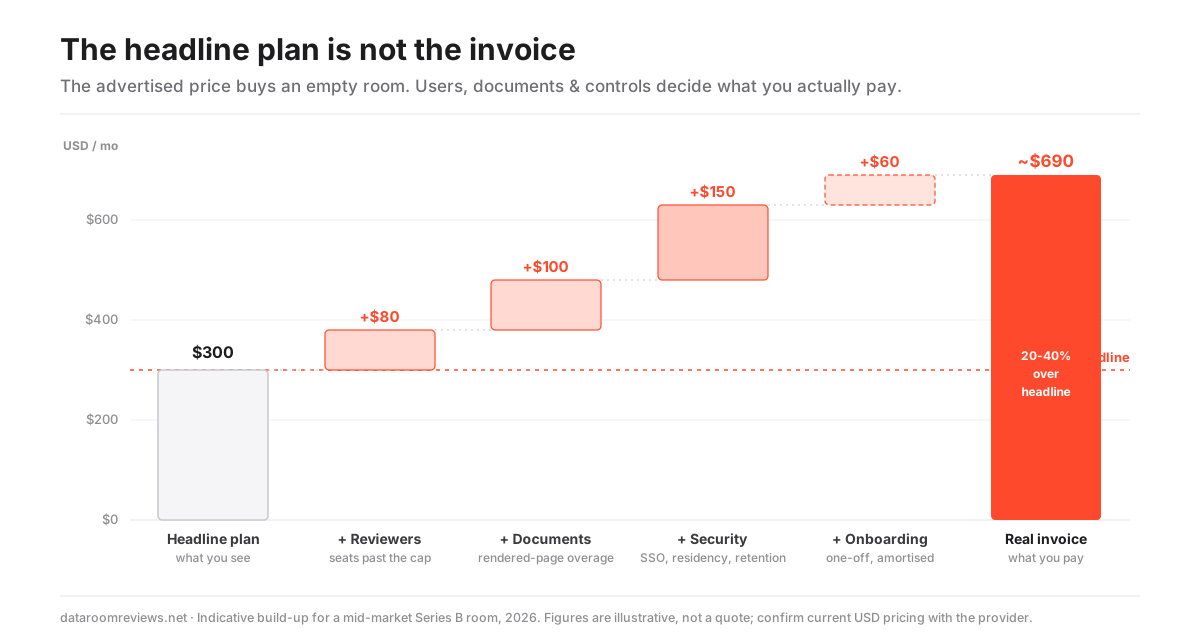
The advertised price is the cost of an empty room. The invoice is the cost of a working one.
Landing-page figures describe the entry tier: a small user cap, a fixed storage allowance. A live deal routinely exceeds one or both.
Per-page models are the worst offenders, because pages get counted after the platform renders your files.
A 200-tab spreadsheet becomes hundreds of pages. A folder of scanned contracts multiplies into thousands. None of it visible on your desktop.
So treat any headline number as an opening bid. Then ask three questions before you trust it.
- How many users and administrators does this include?
- What happens when I exceed the storage allowance?
- Which security features are add-ons rather than defaults?
The answers usually reveal the same thing. The true cost of a serious room sits one tier above the advertised entry price.
Treat the headline plan the way a buyer treats an asking price. It sets the conversation, but the number you actually pay is decided by the users, pages and controls your specific deal drags into the room.
A real bill, line by line
A realistic mid-market room is a base subscription plus a stack of smaller charges.
The base plan buys the room and its core controls. The extras cover the capacity and governance a real deal consumes.
Here is an indicative model for a Series B diligence process. Not a quote, but the shape holds across most mid-market deals.
- Base subscription covers the room, core permissions and standard security: $300 to $500 per month.
- Additional users are reviewers and admins beyond the plan cap: $0 to $150 per month.
- Storage overage covers documents past the included allowance: $0 to $200 per month.
- Premium security covers SSO, IP allow-listing and data residency: $50 to $250 per month.
- Onboarding and support covers guided setup, bulk upload and a manager: $0 to $500 as a one-off.
Read that list and the pattern is obvious. Two rooms with the same headline price produce different invoices because of the variable lines.
A flat-rate plan folds the middle lines into the base fee. It trades a lower ceiling for a predictable one. Some rooms, including Ellty, price this way.
A per-unit plan can be cheaper on a tiny, quiet room. It gets considerably more expensive once the variable lines light up.
The hidden costs that wreck a budget
The costs that break a budget are rarely on the pricing page. They surface once the room is live and busy.
None of them are dishonest. They are priced separately, so they only appear when your deal actually uses them.
- Rendered pages, not files. A compact folder can render into thousands of billable pages once spreadsheets and scans expand.
- Adviser and bidder seats. Wide auctions invite dozens of external reviewers, and per-seat plans bill for every one.
- Security as an upsell. Single sign-on, IP allow-listing and data residency are frequently upgrades, not defaults.
- The forgotten open room. A room left running months after a deal closes is pure waste that nobody notices until renewal.
Because these lines are invisible at sign-up, they are also the easiest to model in advance.
The hidden costs of virtual data rooms guide lists the full set. Pricing the deal at its peak neutralises most of them before they reach an invoice.
Lightweight, mid-market, enterprise
The market splits into three cost bands. The jump between them buys governance and support, not storage.
Lightweight, $99 to $250 per month. Fine for fundraising and simple sharing. Unlimited users and pages vary, watermarking is limited, and full audit trails are thin.
Mid-market, $300 to $900 per month. The controls a real diligence process needs: unlimited users and pages, dynamic watermarking, a defensible audit trail and structured Q&A. SSO and data residency are often add-ons.
Enterprise, $1,000 or more, custom. Adds the security governance, integrations and hand-holding banks and regulated buyers require. SSO, data residency, retention policies and a dedicated onboarding manager come standard.
Use the bands as a filter, not a wish list.
If a buyer’s counsel will insist on dynamic watermarking, a defensible audit trail and structured Q&A, the lightweight band is a false economy. Your real budget starts in the mid-market row.
Buying below the controls your deal requires does not save money. It moves the cost to a scramble mid-process.
For the ranked options in each band, the best value virtual data room hub is the fastest way to see who competes where.
How to get an accurate quote
Stop asking for a starting price. Hand the provider the shape of your deal instead.
A quote built from your actual reviewer count, document volume and timeline lands close to the invoice. A headline figure never does.
Work the sequence below before you compare vendors. Then you are comparing like for like.
How to get an accurate virtual data room quote
A short sequence that turns a vague headline price into a number you can budget against.
Estimated time: 40min
-
Count your peak reviewers
Estimate the maximum number of users and administrators the room will hold at the busiest point of the deal, including every bidder team and adviser, not just your side.
-
Size the document set
Add up the documents and their format, since scanned files, financial models and media inflate rendered page and storage counts far beyond a plain file count.
-
Fix the timeline
Decide how many months the room realistically stays open, because that turns a monthly rate into a total and decides whether an annual term is cheaper.
-
List required controls
Write down the non-negotiable security features your counterparties will demand, such as watermarking, SSO, audit trails and data residency, so add-ons appear in the quote.
-
Request an all-in figure
Ask each provider for a total that includes users, storage, the controls on your list and onboarding, then compare those all-in numbers rather than headline plans.
The last step is the one that matters.
Providers quote on different units. The only fair comparison is an all-in monthly figure for your specific deal.
Our side-by-side pricing comparison does that normalisation for you, restating every provider as a comparable USD number.
Is it worth the cost?
For any deal with confidential documents and outside parties, yes. The reason is downside, not upside.
A data room is insurance. Against a leak, a lost audit trail, or a permissions mistake at the exact moment those failures cost the most.
The global average cost of a data breach reached about $4.4 million in 2025, per IBM’s Cost of a Data Breach Report. Set that against a $500-per-month room. The room is a rounding error against the exposure it controls.
The value is also procedural.
A certified room gives the seller a defensible record of who saw which document and when. Revocable access the instant a deal changes course. A structured Q&A that keeps a competitive process orderly.
On a live transaction, those are not conveniences. They are the difference between a clean process and a disputed one.
The spend clearly pays for itself when:
- you share confidential files with outside parties under time pressure;
- you must prove who saw which document and revoke access on demand;
- regulated buyers filter for SOC 2 and ISO 27001 before they engage;
- a competitive auction needs structured Q&A to stay orderly.
It is overkill when the job is a purely internal, low-sensitivity file share, a one-off handover to a single trusted party, or very early talks before any confidential material moves.
Want the full argument against real scenarios? The is a virtual data room worth it guide walks through where the value shows up and where cheaper tools genuinely suffice.
VDR versus the alternatives
Against a physical data room, a VDR is dramatically cheaper. Against generic cloud storage, it costs more but does a different job.
The old physical room meant travel, printing, on-site supervision and one visitor at a time. That ran to tens of thousands of dollars on a serious deal before anyone read a page.
A VDR removes all of that and lets every party review in parallel. The VDR vs physical data room comparison puts numbers on it.
Generic file sharing looks cheaper still. But it cannot prove who opened a file. It cannot revoke a downloaded document. It rarely carries the certifications regulated buyers require.
So the honest comparison is not VDR versus a free drive. It is VDR versus the cost of a leak or a broken process. Priced that way, the subscription is the cheapest line in the deal.
For where the two differ on capability, the what is a virtual data room guide maps the control gap, and the data room alternatives guide covers when a lighter tool is defensible.
Cheaper without cutting security
You can run a room on a smaller budget. Cut on billing structure and housekeeping, not on the controls you are paying for.
Most reputable providers offer a free trial. That is enough to test the interface, upload flow and permission model at no cost before you commit. Ellty’s free trial runs for 14 days.
Beyond the trial, the reliable savings are simple.
- Right-size the tier. Buy the lowest band that still includes the controls your deal needs, not a reflex jump to enterprise.
- Match the billing unit. Flat-rate for wide, document-heavy deals; per-user only for small, fixed review groups.
- Time the term. Trade a longer commitment for a lower effective monthly rate on any process running more than a couple of months.
- Close idle rooms. A forgotten open room after a deal closes is one of the most common sources of wasted spend.
What you should never trim is certified security.
Baseline SOC 2 and ISO/IEC 27001 coverage is what a regulated counterparty filters for. Dropping it to save a tier usually costs more later.
One more note. Data residency, hosting a room in a specific region, is often a legal requirement rather than a luxury. Under GDPR, moving personal data outside the EU carries strict conditions set by the European Data Protection Board, so budget for it where your deal touches EU data.
The cheapest virtual data rooms shortlist ranks the options that hold security while trimming price.
Which cost fits your deal?
The right budget follows the shape of the process, not a headline price.
A seed raise with a handful of investors belongs in the lightweight band, month-to-month.
A mid-market M&A process with dozens of reviewers belongs in the mid-market band, with the controls buyers expect.
A banking-grade auction is an enterprise, custom-quote conversation.
Match the band and the term to your reviewer count, document volume and timeline. The number stops being a mystery.
Quick answers
How much does a virtual data room cost per month? Indicative monthly pricing runs from about $99 for a lean fundraising room to $1,000 or more for an enterprise platform, with most real mid-market deal rooms between $300 and $700. The final figure depends on reviewer count, document volume, deal length and security add-ons. Confirm current pricing with the provider, since plans change often.
Why is my quote higher than the advertised price? The advertised price usually describes the entry tier with a small user cap and a fixed storage allowance. A live deal typically exceeds one or both, and premium controls such as single sign-on and data residency are frequently add-ons. Extra users, storage overage and security features commonly lift the real cost 20 to 40 percent above the headline plan.
Is a flat-rate or per-unit data room cheaper? It depends on the deal. Per-user or per-page billing is cheaper for a small, quiet room with a stable document set, but it can climb fast once reviewers or rendered pages multiply. For a wide, document-heavy process, a flat monthly rate with unlimited users and pages is usually both cheaper and more predictable.
