
Virtual data room alternatives compared
On this page
- The tools that stand in for a data room
- Why teams reach for a substitute at all
- Cloud storage: the default, and the riskiest one
- SharePoint: closer, still not a room
- Document-sharing tools like DocSend
- Email and secure file transfer
- The physical data room
- What each option actually costs
- What you are really trading away
- Choosing for the deal in front of you
- The line where an alternative stops being one
- What Dana did, and why it is the usual ending
Dana Whitlock had kept the books at Ravenna Foods for nine years before anyone said the word out loud. Ravenna is a mid-sized specialty manufacturer, family-owned, roughly ninety staff. It makes small-batch sauces you have probably eaten without noticing the name on the jar.
Then one Tuesday in March, a listed distributor sent an unsolicited letter of interest. The founders turned to Dana with a simple question: can you get them the numbers?
That is where almost every deal starts. Not with a shopping trip for software, but with a folder and a deadline.
So Dana did the obvious thing. She dropped the last three years of accounts, the customer contracts, the supplier terms and a messy folder of HR files into a shared Google Drive link, and emailed it over.
Fast, free, familiar. It worked for about eleven days.
Then the distributor’s corporate development team asked whether other parties were involved. An advisor suggested Ravenna run a proper process rather than sell to the first caller. By April there were four interested buyers instead of one.
That is the moment the free tool she already owned quietly stopped being adequate. It is also the moment Dana started typing “virtual data room alternatives” into a search bar, hoping to avoid a new monthly bill.
This guide is written for the Dana in that story. It lays out every credible substitute for a virtual data room, what each one gives up, and the precise point where the cheaper option stops being a real alternative and starts being a liability.
The tools that stand in for a data room
An alternative, for our purposes, is any tool that can take confidential documents and put them in front of outside parties, even when its control and accountability fall short of a dedicated room.
Draw the line that way and five families show up again and again.
There is generic cloud storage: Dropbox, Google Drive, Box and OneDrive. There is Microsoft SharePoint, which a great many companies already run inside Microsoft 365. There are document-sharing tools such as DocSend that turn a file into a tracked link. There are secure transfer services and client portals of the sort law and accounting firms lean on. And there is the traditional physical data room, a locked office with paper in it.
Each competes with a VDR on exactly one axis. Usually that axis is cost. Sometimes it is familiarity. Occasionally it is speed of setup.
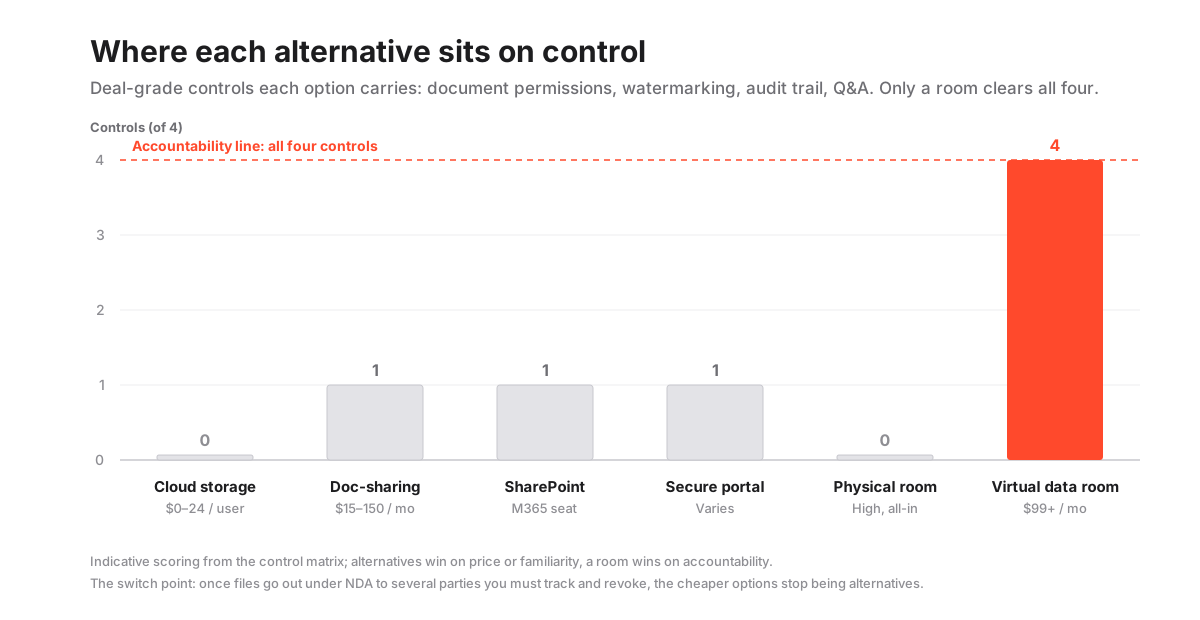
What they concede, every time, is the layer of control that actually defines a room: granular permissions that decide who sees which document, a tamper-evident audit trail that records every open and print, and a structured Q&A module that keeps a hundred buyer questions from scattering across a hundred emails.
If the underlying concept is still fuzzy, the plain-English explainer in what is a virtual data room is the right first stop, and the VDR glossary defines the vocabulary the rest of this piece leans on.
Keep Dana’s four bidders in mind as you read. They are the reason the axis that matters shifts, mid-deal, from convenience to accountability.
Why teams reach for a substitute at all
Two forces push people away from a purpose-built room, and both are entirely rational.
The first is budget. A founder halfway through a raise does not want a fresh monthly line item landing on a cash-flow forecast that is already tight.
The second is momentum. A small team living inside Google Workspace or Microsoft 365 does not want to learn a new platform while a term sheet is moving, and momentum in a deal is a real asset you do not spend lightly.
For low-stakes sharing, both instincts are correct.
Here is the catch Dana ran into. A data room is not a storage product that happens to be secure. It is a governance product that happens to store files.
Compare it to Dropbox on price and you are comparing two tools that do genuinely different jobs, like pricing a filing cabinet against a courtroom stenographer.
The value of a room does not appear during friendly sharing at all. It appears the instant a deal turns competitive, adversarial or regulated, which is precisely the instant a cheaper tool starts to feel thin under your feet.
So the honest framing is never “storage versus storage.” It is convenience versus accountability, and the price of accountability is invisible right up until you need it.
Cloud storage: the default, and the riskiest one
For casual, low-risk sharing, generic cloud storage is a genuine alternative. For competitive due diligence, it rarely is. Understanding why is the whole game.
Cloud storage syncs and shares files beautifully. Modern plans have grown up, too: link expiry, password protection and basic access logs are now standard, not premium. None of that is the problem.
The problem is everything the deal layer needs that cloud storage was never built to provide. Per-document dynamic watermarking that stamps a viewer’s identity onto every page. View-only rendering that resists a casual download. A tamper-evident record of every open and every print. Group-based permissions that hold their shape after access is granted. A Q&A channel that keeps bidder questions organised instead of feral.
Think about Dana’s first eleven days. One known buyer, a friendly tone, a shared link. That situation never needed any of the above, and a shared Drive was the right call. A seed round handed to two investors you already trust is the same story. The tool fits the risk.
Now add three more bidders and their lawyers. Suddenly the questions multiply.
Which buyer saw the customer contracts, and did they download them before they walked away? If a supplier term sheet leaks to a competitor mid-process, can you prove where it went? When bidder three drops out, can you actually pull their access, or is a copy already sitting in someone’s synced folder on a laptop you will never see again?
A shared link answers none of those questions. In a real sale, those are the only questions that matter.
The deeper trade-offs, tool by tool, live in virtual data room vs Dropbox and virtual data room vs Google Drive.
SharePoint: closer, still not a room
SharePoint sits a clear notch above consumer storage, and it deserves the credit. It carries real access controls, proper versioning and, on the right licences, information-protection labels that can restrict what happens to a file after it leaves.
A team already paying for Microsoft 365 will reasonably ask why they cannot just stand up a locked site and call it a data room.
The answer is the deal layer, again. SharePoint has no bidder-facing Q&A workflow. It has no per-document watermark that follows a specific file to a specific named viewer. And its permission model, powerful as it is for internal collaboration, turns fiddly the moment several outside groups each need a cleanly separated, non-overlapping view of the same underlying documents.
There is a subtler cost, and Dana would have felt it. Configuring SharePoint to behave like a room takes genuine admin skill, the kind most deal teams do not have sitting idle. One misconfigured permission exposes the wrong folder to the wrong party.
That is not a hypothetical. It is the single most common way sensitive material leaks in an amateur setup.
The full breakdown of where SharePoint helps and where it quietly hurts is in virtual data room vs SharePoint.
Document-sharing tools like DocSend
Tools such as DocSend live in an interesting middle. They are more than storage and less than a room, and they are excellent at the one thing they do.
You take a document, and DocSend turns it into a tracked link. Then you watch page-by-page engagement, so you can see that an investor lingered on the financials and skipped the team slide. Light watermarking comes along for the ride.
For sending a pitch deck to a list of investors and learning who actually read it, that is a real capability. Honestly, it is often all a founder needs at the top of the funnel.
The ceiling appears the moment you try to run a multi-party process through it. There is no group permission model that walls bidder A off from bidder B. There is no folder tree that mirrors a diligence checklist so a buyer’s lawyer can navigate the way they expect to. There is no Q&A module to keep dozens of threaded questions from collapsing back into email chaos.
One detail tells you where the tool really sits on the spectrum: DocSend is owned by Dropbox. It is a smarter way to send a file, not a place to run a competitive auction.
For the specifics, our DocSend review maps the exact edges of what it does, and the DocSend vs iDeals comparison shows what changes when you step up to a full room.
So for Ravenna, DocSend would have been a fine way to circulate the teaser and the initial information memorandum. It would have collapsed the moment four buyers wanted structured access to two hundred underlying files.
Email and secure file transfer
For a one-off exchange of a few non-critical documents, encrypted email or a managed secure-transfer service works, and there is no shame in using it. For anything that resembles diligence, it fails on the single dimension that counts: control after delivery.
Secure email and managed file transfer are very good at moving data safely from point A to point B. That is the whole design.
The trouble starts the instant the file lands in a recipient’s inbox, because at that moment you have lost it.
There is no revocation. There is no watermark tying a leaked page back to a person. There is no view-only rendering to slow a download. And the audit trail, such as it is, stops dead at delivery; it can tell you the file was sent, not what happened to it for the rest of its life.
This is exactly why law and accounting firms so often bolt a client portal on top. A portal raises the security floor, gives advisors a controlled front door, and is a perfectly sensible way to exchange a handful of sensitive files under professional supervision.
What it still lacks is the bidder-group permissions and the Q&A workflow that a competitive process demands. Think of a client portal as a good front door. You would not try to run a five-bidder auction in a hallway.
The physical data room
There is still a place, a narrow one, for the original format. For decades a data room was a literal locked room, and bidders with their lawyers reviewed paper files one visitor at a time, signing a book on the way in.
A small number of transactions still use that format today, usually where physical originals genuinely matter or where the secrecy required is so extreme that keeping everything off any network is the point.
For almost every other deal, the trade-offs are brutal once you count them. Travel eats days. There is no remote review, and certainly no parallel review, so four bidders cannot work at once; they queue. The record of who saw what is a handwritten sign-in sheet rather than a searchable log. And you cannot revoke a thing short of physically collecting paper you may never get back.
The virtual room did not gradually improve on the physical one so much as replace it outright. That whole arc is told in virtual data room vs physical data room.
For Ravenna, ninety staff and four remote bidders, the physical room was never on the table. It is on this list for completeness.
What each option actually costs
Headline price is where the alternatives look strongest. It is also where the comparison misleads most.
The tools you already own cost nothing extra. A document-sharing subscription is modest. A room carries a clear, visible monthly fee that shows up on a budget where everyone can see it.
But the cheaper options do not remove cost so much as relocate it. They push it into staff time spent policing access by hand. They push it into risk if a confidential file leaks with no way to trace it. And they push it into a quieter, real cost that Dana understood instinctively: the credibility hit when a buyer’s counsel opens a shared Drive folder and silently downgrades their read of how professional the seller is.
That last one has no invoice, but it moves price.
The table below is indicative, in USD, and every figure is a starting point rather than a quote. Plans, seat counts and included storage change often, so confirm current pricing with each provider before you rely on any number here.
| Option | Indicative cost (USD) | Setup effort | Best fit |
|---|---|---|---|
| Cloud storage you already own | $0 to ~$24 per user | Minimal | Friendly, low-stakes sharing with known parties |
| SharePoint / Microsoft 365 | Bundled in M365 seats | Medium to high | Internal-heavy sharing where admin skill exists |
| Document-sharing tool | ~$15 to $150 per month | Low | Sending decks and memos with read analytics |
| Secure transfer / client portal | Varies by firm | Medium | Advisor-led exchange of a few sensitive files |
| Physical data room | High, all-in | High | Rare cases needing originals or extreme secrecy |
| Virtual data room | ~$99 to several hundred per month | Low to medium | Multi-party diligence, competitive or regulated deals |
Read that bottom row against the top one and the honest conclusion is not that a room is cheap. It is that a room’s cost is legible, and the alternatives’ costs are hidden.
For a full breakdown of how rooms themselves are priced, including the per-page trap that catches first-timers, see how much does a virtual data room cost. If budget is the whole constraint, the leanest options are lined up in cheapest virtual data rooms. And if you would rather test before you spend, free trial vs paid data rooms explains how a trial period fits into a live process. Live figures across providers sit on the pricing hub.
What you are really trading away
Strip away the feature lists and the thing you give up when you pick an alternative has a single name: traceability. And traceability is what makes a leak survivable rather than catastrophic.
With a cheaper tool you can still share the file. That part is easy. What you cannot do is prove who opened it, stop them once the deal turns, or show a regulator a defensible record afterward.
That gap is not abstract, and it carries a number. The global average cost of a data breach reached about $4.88 million in IBM’s Cost of a Data Breach report, and a confidential deal document leaking mid-process stacks commercial damage on top of the security bill.
Three losses do most of the harm. It is worth naming them plainly, because they are the losses Dana would have to explain to Ravenna’s founders if something went wrong.
First, revocation. Once a file leaves in an email or a synced folder, it is gone; you cannot pull it back. A room revokes access to a single document instantly, even after it was granted, even after it was opened.
Second, attribution. Without per-viewer watermarking there is simply no way to tie a leaked page to the person who exposed it. The leak becomes a whodunit with no evidence and five suspects.
Third, the record. A tamper-evident audit trail is what turns “we think they saw it” into “here is exactly who saw what, and when.” That record is the evidence a non-disclosure agreement is meant to be enforceable against; without it, the NDA is a promise you cannot prove was broken.
No alternative delivers all three. A room delivers them as the baseline, before you have configured anything at all.
Choosing for the deal in front of you
The mistake is to choose the tool first. Work from the deal instead, and the tool tends to pick itself.
Three questions carry almost all the weight. How sensitive are the documents, really? How many outside parties will review them? And will you ever need to prove or revoke access after the fact?
Walk those in order.
Start with sensitivity. If the files are privileged, regulated, or would do real damage if they leaked, that alone tilts the decision toward control and pushes the lightest tools off the table. Ravenna’s HR files and customer contracts cleared that bar on their own.
Then count the outside parties. One known recipient can happily live with a tracked link. Several competing bidders cannot; they need group-based permissions that only a room provides cleanly, because the entire point is that bidder A must never glimpse what bidder B is doing.
The jump from one party to several is the jump that broke Dana’s Google Drive.
Next, ask whether you will ever have to prove access. If a defensible record of who saw what and when could matter later, in a dispute, an earnout argument or a regulator’s request, then you need a tamper-evident audit trail. That requirement quietly rules out email and most consumer storage.
Then ask about revoking. If a party could drop out mid-process, and in a competitive sale one usually does, you need instant, document-level revocation that keeps working after access was granted. A shared link cannot promise that.
Finally, price the whole cost, not the sticker. Add the staff time spent policing access and the tail risk of a leak with no audit trail to the monthly figure, then compare honestly against a room’s fee. Often the alternative that looked cheaper is not.
The longer version of this framework, with a full scoring rubric, is in how to choose a virtual data room. If you prefer to start from your situation, the ranked shortlists for fundraising, M&A and best value are all scored on the same criteria, so you can compare like with like.
The line where an alternative stops being one
There is a clean threshold, and it is worth stating flatly. Choose a room the moment accountability becomes the point of the exercise.
In concrete terms, that is when outside parties will review confidential files under NDA, when more than a couple of counterparties are involved, when a regulator or an acquirer’s counsel will scrutinise how you ran the process, or when a leak would be legally or commercially serious.
Ravenna crossed every one of those lines the week the fourth bidder appeared. Which is exactly why Dana’s search ended where it did.
Certified security is a big part of what sits on the far side of that line. Independent audits give buyers confidence that a platform is what it claims to be, rather than asking them to take a vendor’s word for it. SOC 2 examinations are performed against criteria maintained by the AICPA, and information-security management is certified against ISO/IEC 27001.
Cloud tools may well hold these certifications at the company level. But that is not the same as bundling the deal-specific controls, the watermarking and the logging that a room applies by default to the exact files in play.
The regulatory stakes are not theoretical either. Under the EU General Data Protection Regulation, the most serious breaches can draw fines of up to 20 million euros or 4% of a company’s total worldwide annual turnover, whichever is higher, per Article 83 of the GDPR.
When personal data sits in the files, and in an HR folder it always does, a controlled room with revocation and audit trails is not a luxury purchase. It is how you demonstrate the accountability the law expects you to have.
The certification landscape is unpacked in virtual data room certifications explained, the practical controls to look for in the VDR security features checklist, and the privacy specifics in GDPR and virtual data rooms.
For most teams that reach this threshold, the sensible move is to shortlist purpose-built rooms rather than keep stretching a stand-in past its limits. The options worth scoring run a wide range, from lean, fundraising-friendly rooms through mid-market platforms such as iDeals to enterprise banking tools like Datasite, each covered in depth in our reviews.
And if, like Dana, you began the process in cloud storage, how to migrate to a new data room shows how to make the switch without disrupting a process that is already live.
What Dana did, and why it is the usual ending
Ravenna’s sale closed the following winter. The buyer was not the distributor that sent the first letter. It was the third bidder, the one who came in during the competitive round that would never have happened had Dana simply sold to the first caller.
That competitive round is the whole argument of this guide in miniature. The tool that was perfectly adequate on day one, the free shared link she already owned, became the wrong tool on the day the deal grew a second bidder. It would have become a genuine liability on the day it grew a fourth.
Notice what did not happen. Dana did not overpay for a room she never needed. She used the free thing while the stakes were low, which is exactly right, and she moved to a controlled room when accountability became the point, which is also exactly right.
The alternatives in this guide are not traps to be avoided. Most of them are the correct answer for some real situation, and cloud storage in particular is the right call more often than a room vendor would admit.
The skill is not in picking the most powerful tool. It is in reading the deal honestly and matching the tool to the moment, then knowing the one signal, the arrival of outside parties you must limit, track and revoke, that means the cheaper option has quietly stopped being an alternative at all.
Ravenna’s founders never saw the audit trail Dana relied on. That is the point of it. It sat in the background, unremarkable, right up until the moment someone asked who had seen the customer contracts, and Dana could answer to the minute.
Frequently asked questions
What is the closest low-cost alternative to a virtual data room?
The nearest option at no extra cost is cloud storage you already pay for, such as Google Drive or OneDrive, using folder permissions, link expiry and passwords. It works for friendly, low-stakes sharing but lacks per-document watermarking, a tamper-evident audit trail and a bidder Q&A workflow. Many dedicated rooms also offer a free trial, so you can test a real VDR before committing.
Is Google Drive or Dropbox secure enough for due diligence?
For casual sharing with trusted parties they can be. For competitive or regulated due diligence they usually fall short, because they lack document-level revocation, dynamic watermarking, a complete activity log and the deal-specific controls a buyer's counsel expects. The gap widens fast as the number of bidders grows, which is exactly what happened to Ravenna in the scenario above.
Can SharePoint be used as a data room?
It can be configured to share files securely and it beats consumer storage on access controls, but it is not a purpose-built room. It has no bidder-facing Q&A, no per-viewer watermark that follows a file, and permissions that get fiddly across multiple outside groups. Setting it up to behave like a room takes admin skill, and a single misconfiguration can expose the wrong folder to the wrong party.
Can I start with an alternative and move to a VDR later?
Yes, and most teams do exactly that, beginning in cloud storage for early, friendly sharing and switching once real diligence starts. The one rule is to plan the move before it is urgent, because migrating a live process is disruptive if you leave it late. Our guides on choosing and migrating a room help you time the switch cleanly.
