
How to migrate from one data room to another
On this page
- Pre-flight checklist
- What actually has to move
- The migration in seven steps
- Step 1: Freeze and snapshot
- Step 2: Map the new index
- Step 3: Bulk upload and re-index
- Step 4: Rebuild permission groups
- Step 5: Re-apply security controls
- Step 6: Parallel-run and verify
- Step 7: Invite users and cut over
- What transfers versus what you rebuild
- Pick a migration method
- Timing an active-deal cutover
- Preserve permissions and audit history
- How long it takes
- Common mistakes
- What it costs
Switching data room providers is not a copy-and-paste job. Only the documents move on their own.
A room is four things stacked on top of each other: documents, a folder structure, a permission model, and a legal record of every view and download. The files travel. The other three layers you rebuild by hand.
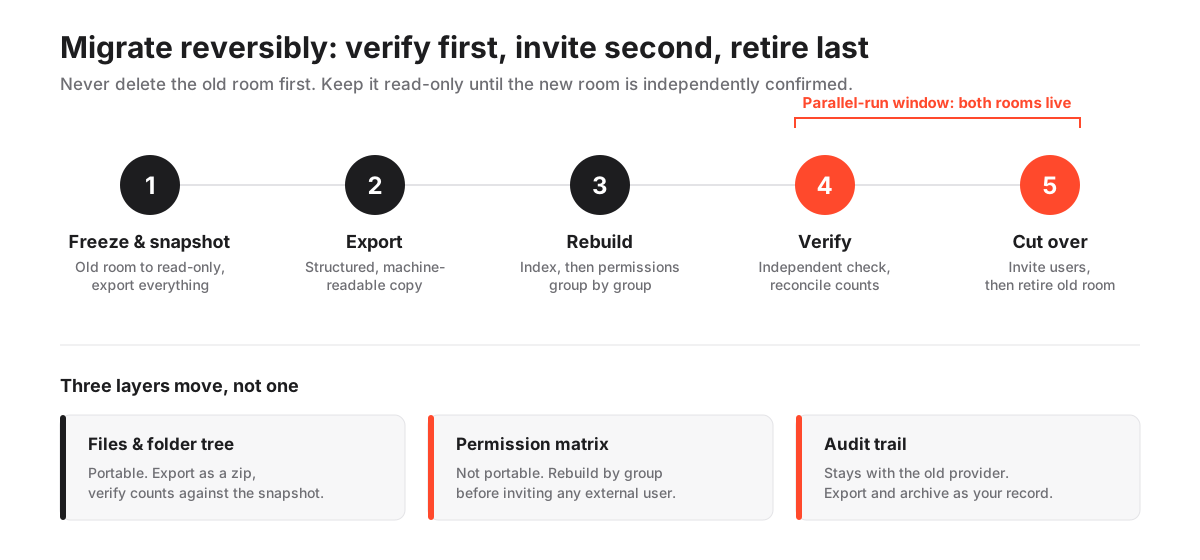
So treat this as a stepwise field guide and follow it in order. Do not skip the freeze, do not delete first, and do not cut over on a live deal without a parallel run.
One rule sits above the rest: verify first, invite second, retire last. A move you can roll back beats a move you finish a day sooner.
Pre-flight checklist
Do all of this before you touch a single file. Tick each box.
- Confirm the destination room’s bulk-upload limit clears your largest folder in one pass.
- Confirm supported file types cover everything in the source room.
- Confirm the security certification you are switching for applies to the exact plan you are buying, not just the vendor’s top tier.
- Confirm whether assisted onboarding or an API import is available, and whether either carries a fee.
- Screenshot or export the current permission matrix, group by group.
- Note the retention window on the deal so you know how long the old room must survive.
- Agree a short parallel-run window with the deal team, and a dated notice for external users.
If any box stays empty, stop and close the gap. A migration surfaces platform limits that a polished sales demo never will.
Read the destination’s write-up first. The Datasite review, the iDeals review and the Firmex review each record upload ceilings and whether import help is bundled. To line those attributes up rather than open tabs one at a time, compare every provider side by side.
What actually has to move
The file copy is the visible 20 percent. The trouble lives in the parts with no export button.
Sort every asset in the room into one of three buckets.
Transfers on its own
- Documents and the folder tree, usually as a structured zip that mirrors your data room index.
Rebuilt by hand
- Permission groups and folder-level rights, recreated with the new room’s granular permissions.
- Watermark and view-only settings, re-applied per group.
- Full-text search index and OCR, regenerated inside the new room.
Archived, then restarted
- Q&A threads: export the Q&A module history to PDF or CSV as a record, then start fresh live threads.
- The historical audit log: export and store it; the new room begins a clean log from day one.
Here is the pattern to memorise: documents are portable, and everything wrapped around them is not. Plan the move around the wrapper, not the files.
The migration in seven steps
The whole method is one fixed order: prepare, export, rebuild, verify, then cut over.
Two rules keep it safe. Rebuild permissions before you invite anyone. Never delete the source room until the destination is independently checked.
How to migrate to a new virtual data room
A reversible sequence for moving documents, permissions and audit history to a new VDR without disrupting an active deal.
Estimated time: p3d
-
Freeze and snapshot the old room
Set the current room to read-only for external users, then export a full copy of the folder tree, files, Q&A history and the complete audit log. This snapshot is your rollback point and your compliance record.
-
Map the new index
Recreate the folder structure in the new room, ideally cleaning up dead folders and duplicate files as you go. A migration is the one natural moment to tidy an index without disrupting reviewers.
-
Bulk upload and re-index
Import the documents in bulk, preserving order, then run full-text indexing and optical character recognition so search works from day one.
-
Rebuild permission groups
Recreate user groups (bidders, legal, internal, advisers) and assign folder-level rights to match the old matrix. Rebuild by group, never person by person, to avoid gaps.
-
Re-apply security controls
Turn on dynamic watermarking, view-only rendering, two-factor authentication and any data-residency setting before a single external user is invited.
-
Parallel-run and verify
Keep both rooms live briefly. Have an internal reviewer confirm every group sees exactly what it should, spot-check a sample of documents, and reconcile counts against the snapshot.
-
Invite users and cut over
Invite external reviewers to the new room, communicate the switch, then set the old room to no external access. Retire it only after the new room is confirmed correct.
Notice what is not on that list: deleting the old room. Keep it dormant and read-only until the deal closes or the retention window ends.
Step 1: Freeze and snapshot
Do these in order, top to bottom.
- Set the source room to read-only for all external users.
- Export the full folder tree and every file as a structured zip.
- Export the Q&A history to PDF or CSV.
- Export the complete audit log.
- Store all four exports together as your deal-file archive.
Do not change a single setting until the snapshot is complete. It is both your rollback point and your compliance record, so treat it as the foundation the rest of the move stands on.
Step 2: Map the new index
- Recreate the top-level folder structure in the destination room.
- Merge duplicate versions and prune dead folders as you build.
- Fix inconsistent file names before you upload, not after.
- Leave the source snapshot untouched; you are tidying the copy, never the original.
A migration is the rare moment when reorganising the index disrupts no active reviewer, because you are rebuilding the structure anyway. Use it. If you are starting from scratch, the data room index best practices guide is a shortcut to a tree reviewers can navigate on the first try.
Step 3: Bulk upload and re-index
- Import documents in bulk, folder by folder, preserving order.
- Reconcile the file count in each folder against the snapshot as you go.
- Trigger full-text indexing.
- Run OCR on scanned documents so search reads them.
- Search for a known phrase to confirm indexing actually finished.
Bulk-upload limits are the classic mid-transfer surprise. If a folder exceeds the ceiling, split it, upload in passes, then reconcile counts again.
Step 4: Rebuild permission groups
- Recreate each user group first: bidders, legal, internal, advisers.
- Assign folder-level rights to each group to match the old matrix.
- Rebuild group by group, never person by person.
- Cross-check each group’s rights against the screenshot you took before the freeze.
- Leave every external seat empty for now.
Rebuilding person by person almost guarantees a missed permission. Groups are the unit of safety here. To confirm how granular your controls should be after the move, the data room permissions guide breaks the group model down in detail.
Step 5: Re-apply security controls
- Turn on dynamic watermarking.
- Enable view-only rendering where downloads are not allowed.
- Require two-factor authentication for every user.
- Set the data-residency region if the deal demands one.
- Confirm the certification you switched for is active on this plan.
Do all five before a single external user is invited. Security posture must not slip during the move. If a control looks wrong later, the VDR security features checklist is a fast way to confirm nothing was missed.
Step 6: Parallel-run and verify
- Keep both rooms live: the old one read-only, the new one built but private.
- Log in as each user group and confirm it sees exactly what it should.
- Spot-check a random sample of documents across folders.
- Reconcile total document counts against the snapshot.
- Have someone who did not build the new room run the verification pass.
This is the step teams skip when a deal feels urgent. It is also the step that catches the permission gap before a bidder does. A fresh pair of eyes finds what the builder’s eyes gloss over.
Step 7: Invite users and cut over
- Send external invitations to the new room.
- Post a clear, dated notice so no bidder thinks access was pulled.
- Set the old room to no external access.
- Keep the old room dormant and read-only as a fallback.
- Retire it only after the deal closes or retention ends.
The order matters more than the speed: verify first, invite second, retire last.
Send the cutover notice on a business day, not late on a Friday, so anyone who hits a snag can reach you before the weekend. Name a single owner for the switch, so invitations, the notice, and the old-room lockdown all fire in the same hour rather than drifting apart across a team.
What transfers versus what you rebuild
One table to keep beside you during the move.
What transfers cleanly versus what you rebuild when switching VDRs
| Asset | Usually transfers | What you must do |
|---|---|---|
| Files and folder tree | Yes, as a structured export | Verify counts against the snapshot |
| Full-text search index | No, regenerated | Re-run indexing and OCR in the new room |
| Permission groups and rights | No | Rebuild the matrix group by group |
| Open Q&A threads | Rarely, in usable form | Export as a record, restart live threads |
| Historical audit trail | No, log starts fresh | Export and archive the old log for compliance |
| Watermark and view-only rules | No | Re-apply per group before inviting users |
The audit-trail line is the one to plan around. Under the GDPR right to data portability, personal data must be provided in a “structured, commonly used and machine-readable format” (GDPR Article 20), which helps with the raw export.
Portability law does not force a competitor to import a rival’s proprietary log, though, so the old activity history stays with the old provider. Archive it deliberately.
Pick a migration method
There are four ways to move a room, and they trade effort against control. Choose by deal urgency and how large or messy the source room is.
- Native export plus manual rebuild. High effort, slower, full control. Best when you want to clean up the index while you move.
- Bulk download and re-upload. Medium effort, fast, high control. Best when the structure is already clean.
- Provider-assisted onboarding. Low effort on your side, fast, shared control. Best for a large room on a tight timeline.
- API or connector transfer. Medium effort, fast, high control. Best when both vendors expose APIs.
Not every provider offers assisted onboarding or an API, so check availability and any fee before you commit. Many fold assisted onboarding into a paid plan or annual contract, which means the assisted route can cost nothing beyond the subscription. Ellty is one of several providers whose onboarding includes hands-on import help; confirm what is bundled before you assume it comes at no charge.
Timing an active-deal cutover
Never do a hard cutover on a live deal. Run the two rooms in parallel through a short window.
- Keep the old room read-only so reviewers keep access.
- Stand up and verify the new room quietly.
- Switch external invitations only after an internal check confirms every group sees the right documents.
- Announce the change with a dated notice.
- Hold the old room as a fallback until you are certain.
The single most common failure is a permission gap that a bidder finds before you do. A parallel run plus a deliberate verification pass, ideally by someone who did not build the new room, catches those gaps while the old room is still there as a fallback.
Preserve permissions and audit history
Two things regulators and counterparties care about. Neither travels with the files, so handle each on its own track.
Permissions
- Export or screenshot the current matrix before the freeze.
- Rebuild it at the group level in the new room.
- Verify each group’s view against the old matrix during the parallel run.
Audit history
- Export the old log in full.
- Store it with the deal file.
- Accept that the new room starts a clean audit trail from day one.
Keep both the old permission map and the old log, and you can prove continuity if a buyer’s counsel asks who accessed a document last quarter, even though that quarter lived in a different system. The VDR audit trails guide covers what a defensible log needs to contain.
How long it takes
For a typical mid-sized room, plan for a few days to about two weeks end to end. The document transfer is often done in hours.
What dominates the schedule is rebuilding permissions, re-indexing, and the verification pass. Larger or poorly organised rooms, or ones with strict data-residency rules, push toward the longer end.
Surveys of enterprise data migration projects have repeatedly found that a majority overrun their budget or timeline, and the usual cause is underestimating everything that is not the raw copy. A VDR migration is small by comparison, but the lesson holds. Budget most of your calendar for permissions and checking, not uploading. Add a buffer for verification rather than assuming the new room is correct on the first attempt.
Common mistakes
The failures here are procedural, not technical. Nothing about a document is fragile; the metadata around it is.
Almost every botched migration traces back to one of three shortcuts: deleting the old room too early, rebuilding permissions person by person, or skipping the parallel-run check because the deal felt urgent.
Migration discipline versus the shortcuts that bite
Do this
- Snapshot everything, including the audit log, before you change a setting
- Rebuild permissions by group and verify each group's view against the old matrix
- Run both rooms in parallel and verify with someone who did not build the new one
- Keep the old room read-only until the deal closes or retention ends
Avoid this
- Deleting or closing the old room before the new one is independently checked
- Granting rights person by person, which almost guarantees a missed permission
- Doing a hard cutover mid-deal with no fallback if a gap appears
- Skipping obsolete-looking files without checking retention obligations first
For a wider view of what goes wrong when a room is stood up in a hurry, the data room mistakes to avoid guide covers setup errors that a migration is a good chance to correct rather than carry forward.
What it costs
The migration itself is usually cheap. The cost sits in the new subscription and, sometimes, an assisted-onboarding fee.
- Self-serve, run by your own team: internal time only, often a weekend.
- Provider-assisted import: from bundled at no extra cost on a paid plan up to a low four-figure USD engagement fee for a large, complex room.
- New-room subscription: commonly from around $99 per month for lean rooms into custom enterprise quotes.
Watch one avoidable cost: paying two subscriptions during the overlap. Keep the parallel window short and deliberate.
For a fuller breakdown of where fees hide, see the guides on VDR pricing models and the hidden costs of virtual data rooms. Every figure here is indicative, so confirm current pricing with the provider. And if a certification is part of why you are switching, the explainer on VDR certifications covers how ISO/IEC 27001 and SOC 2 scopes differ between vendors.
To narrow the field before you commit, the best data rooms for due diligence hub is a faster starting point than reading every review in turn.
Frequently asked questions
Do permissions transfer to the new data room?
No. Permission groups and folder-level rights are proprietary to each platform and do not migrate. Export or screenshot the current matrix before you freeze the old room, then rebuild it group by group in the new environment before inviting any external user.
Will I lose my audit trail when I switch data rooms?
The historical log stays with the old provider; the new room starts a fresh audit trail. You do not lose the record if you export and archive the old log before retiring the room. Keep that export with your deal file, because counterparties may ask who accessed a document during the earlier phase of the process.
Can I migrate a data room in the middle of a live deal?
Yes, if you run both rooms in parallel rather than doing a hard switch. Keep the old room read-only so reviewers keep access, verify the new room quietly, then move invitations over only after an internal check confirms every group sees the correct documents. Communicate the change with a dated notice.
How long should I keep the old data room open after migrating?
Keep it read-only until the new room is fully verified and, for a live deal, until the transaction closes or your retention window ends. The old room is your rollback point and your archived record, so retiring it early is the main avoidable risk.
