
Best virtual data rooms for startups
On this page
- Start with the job, not the feature grid
- Set your security floor before you price anything
- Read the price tag as a billing unit, not a number
- Run the setup-speed test
- The 45-minute path from stage to room
- Do this, skip that
- Match the room to your stage
- Know the traps worth walking away from
- Use the room as a read on your investors
- Know when you will outgrow it
Picture the moment this guide is built for. An investor you have chased for a month replies on a Thursday afternoon and asks for your data room.
You do not have one. You have a Google Drive folder with a deck, a half-finished model, three customer contracts and a cap table that must not reach the wrong eyes. You have, realistically, until Monday.
So what does the next hour have to produce? Something secure enough to hand an institutional investor, cheap enough not to dent your runway, and live before the interest cools.
That is the real startup problem, and most “best data room” lists ignore it. They are written for investment bankers, so they rank platforms on features a founder will never touch.
Follow one of those lists and you pay enterprise money to run what is, in truth, a tidy folder for ten investors.
This guide reframes “best” around the founder’s constraints: speed, cost you can predict, and a security floor you cannot afford to drop. It is a working guide, not a leaderboard. Read it and you should shortlist, trial and choose a room in an afternoon, then defend the choice to anyone who asks.
Start with the job, not the feature grid
What is the single biggest mistake founders make? Shopping by feature checklist.
A checklist rewards the platform with the most rows, and the most rows almost always belong to the enterprise product priced for a bank.
Start from the job instead. For a startup it is narrow: share a scoped set of documents with a handful of investors, keep the sensitive ones under control, and look organised doing it, all without a sales call in the way.
Everything else is negotiable. The four core controls, a flat price and a self-serve setup are not.
Frame it as a job and the marketing sorts itself out. A provider leading with dedicated deal managers and CRM integrations is telling you plainly that it is built and priced for a different buyer.
That is not a criticism; it is a signal to keep scrolling. A room that leads with “set up in minutes, unlimited users, permissions on every folder” is speaking to your job. Our ranked shortlist of the best data rooms for startups already weights the buying priorities this way, but the reasoning below is what lets you pressure-test any list, ours included.
The table below is the filter. When you read a review, translate each headline feature into one question: does this serve the left column or the right one?
What a startup optimises for versus what an enterprise buyer optimises for
| Buying priority | Startup | Enterprise / bank |
|---|---|---|
| Deal-grade security floor | Yes | Yes |
| Flat price with unlimited users | Yes | Less critical |
| Same-day, self-serve setup | Yes | Assisted |
| Dedicated deal manager | Rarely | Yes |
| Deep workflow and integrations | Nice to have | Yes |
| Custom, quote-only pricing | No | Yes |
Read that as a lens on the whole category. Security tops both columns because it is optional for no one.
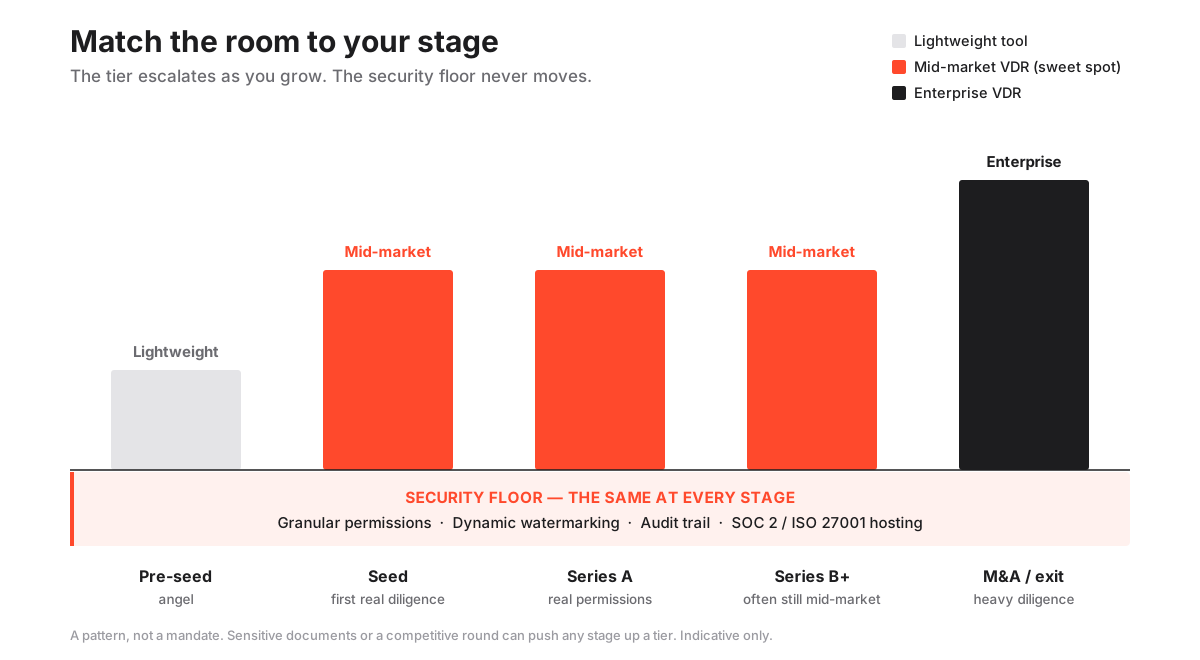
Below it, the two buyers diverge hard, and that divergence is exactly why a bank’s shortlist is the wrong place for a founder to start. The chart below fixes the idea in one picture: the four security controls stay constant across every startup stage, and only the room tier around them changes as you grow.
Set your security floor before you price anything
Which comes first, security or price? Security. Every time.
Compare on cost first and you anchor on the cheapest number, then rationalise away the missing control. That is precisely how founders end up on a plan that leaks. Write down the floor, disqualify anything that fails it, and only then compare survivors on price.
Is this enterprise-grade paranoia? No. The same four controls that protect a billion-dollar acquisition protect a two-million-dollar seed round, because the risk is proportional, not absent.
A leaked cap table or an unprotected customer contract can reprice or kill a raise as surely as a leaked term sheet sinks an M&A deal. The startup twist is only this: the four controls must sit at the entry tier you can actually afford, not behind an upsell.
The security floor a startup room must clear (and the extras it can skip)
Pros
- Granular, document-level permissions so each investor group sees only its folder
- Dynamic watermarking and view-only rendering on the cap table and contracts
- A complete audit trail of every view and download, so you know who is progressing
- SOC 2 or ISO 27001 certified hosting, encrypted in transit and at rest
Cons
- A dedicated account manager rarely pays off on a lean round
- Deep CRM and workflow integrations are enterprise concerns, not seed ones
- Bespoke branding and vanity URLs are cosmetics you can drop
- Advanced redaction and heavy compliance modules are usually overkill pre-Series B
Why does each control on the left earn its place? Because each does a concrete job, so treat them as jobs, not boxes.
Granular permissions stop an angel wandering into the folder you built for a lead. Dynamic watermarking stamps each viewer’s identity across every page, so a leaked screenshot points back to a person.
The audit trail gives you a defensible record of who saw what and when, which matters for security and, as we will see, for reading investor intent. Certification means an independent auditor vouched for the infrastructure, not the vendor’s marketing team.
Want to go deeper than a shortlist can? The guide on data room permissions explained works through who-sees-what in detail, and the security features checklist is the page to keep open in a second tab while you compare candidates.
Do not skip the checklist step. It takes ten minutes, and it is the single thing that stops you buying a pretty interface wrapped around thin controls.
Read the price tag as a billing unit, not a number
Now, and only now, look at cost. What should you expect? For a proper permissioned room, roughly $99 to $400 per month.
The low end covers lean fundraising rooms; the upper end adds Q&A, single sign-on and more storage. Below that band sit document-tracking tools that cost little or nothing but stop short of being real data rooms. Above it sit enterprise platforms that quote per engagement and routinely run into four figures a month.
For most startups the sweet spot is the entry tier of a flat-rate room, priced so a list of thirty investors costs the same as a list of three.
What actually ambushes founders? Not the sticker price. The billing unit hiding behind it.
A plan that looks cheap at $20 per user is a trap the moment a competitive round pulls in twenty investors and their associates. A per-page plan compounds even more quietly, because a financial model and a stack of scanned contracts render into thousands of billable pages before you notice.
The choice between flat-rate pricing and per-page pricing is the largest cost lever you control, so make it deliberately.
The discipline is simple: price the room you will have at the busy peak of the raise, not the quiet one you open on day one. If the plan gets more expensive as your round gets more successful, it is the wrong plan.
The full breakdown of VDR pricing models walks each structure with worked examples, and the cheapest secure data rooms guide shows how far down the price scale you can go before you lose a control that matters.
Here is how the three realistic tiers line up once you set the sticker price against the trade-offs.
Startup data room options by tier (indicative USD, confirm with the provider)
| Option tier | Indicative price | Free trial | Best fit for a startup |
|---|---|---|---|
| Document-tracking tools | $0 to $45/mo | Common | Pre-seed sharing of a deck and a light data set |
| Purpose-built mid-market VDR | $99 to $400/mo | Usually 7 to 14 days | Seed to Series A rounds that need real permissions |
| Enterprise VDR platform | Custom / quote-only | Sometimes on request | Late-stage or M&A-adjacent raises with heavy diligence |
Why does the middle tier win for most founders? Be honest about the reasons.
Document-tracking tools tempt on price, but they stop being enough the second an institutional investor asks for folder-level access control and a real audit log. The enterprise tier buys depth you will not touch until an exit.
Within that middle band, look for a room that keeps watermarking and the audit trail at the entry price rather than gating them a tier up; Ellty, for instance, is one of the rooms that does. When you are ready to put named providers side by side on price and controls, the full comparison of every room we score does exactly that, normalised to a monthly USD figure.
Run the setup-speed test
How much does timing really matter? More than founders admit, so make setup speed a hard selection criterion, not an afterthought.
You should stand up a defensible room in under an hour, because a priced round runs on a two-to-six-week diligence window and the room usually has to appear the moment an investor asks, not a week later after a scoping call and a provisioning delay.
The test is one thing: is the platform self-serve end to end? Sign up, build a folder structure, bulk upload, set permissions by group, invite the first investor, all without speaking to a salesperson.
If any step routes you through a demo booking or a “we’ll get you provisioned” email, that platform was built for the enterprise buyer who plans the room months ahead, not for you reacting to live interest on a Thursday.
There is a second reason speed matters, and it is about impression. A founder who produces a clean, permissioned room the same afternoon reads as prepared, and investors quietly price in preparation.
The step-by-step setup guide covers the mechanics of building the room quickly; the point here is simpler still. A room you cannot open today is not a candidate, however good its feature grid looks.
The 45-minute path from stage to room
Do you need a weekend to decide this? No. Worked in order, the sequence below settles the choice in well under an hour.
Clear the security floor first, size the raise, match the billing model, then stress-test the top candidate in a free trial before you pay a cent. Work from your stage and peak usage backward to the smallest room that fits, rather than forward from a feature list.
How to choose the best virtual data room for your startup
A short path from your fundraising stage to the smallest room that still clears the security floor.
Estimated time: 45min
-
Set the security floor
Write down the four non-negotiables (permissions, watermarking, audit trail, SOC 2 or ISO 27001) and disqualify any room that gates one of them behind a higher tier before you compare on price.
-
Size the raise, not the day one
Estimate the most investors and documents the room will hold at the busiest point of the process, so a wide round or a late document dump does not blow up your bill.
-
Pick a flat billing model
Choose a flat monthly rate with unlimited users over per-user or per-page plans, so adding investors and pages grows your access, not your invoice.
-
Match the tier to your stage
Take the entry tier for a pre-seed or seed room and step up only if your Series A diligence genuinely needs Q&A, single sign-on or more storage.
-
Trial the top candidate
Use a free trial to set permissions and try to break them, upload a document and confirm the watermark renders, then open the audit log and check every action was recorded.
Two habits inside that sequence do most of the work: pricing the busy peak instead of the empty opening day, and testing the controls in a trial rather than trusting the feature grid.
Both are free. Both separate a founder who chose well from one renegotiating a plan mid-raise.
Notice that the trial in step five is not a formality. It is where you find out whether the watermark actually renders on a real PDF and whether the audit log actually logs. If you want the general selection framework beyond the startup lens, the guide to choosing a virtual data room covers it from first principles.
Do this, skip that
Once you have run the sequence, a handful of habits keep you out of the traps that catch founders after a clean shortlist. Treat the list below as a quick self-check before you enter a card number.
Do:
- Price your peak, not your launch. Model the room at the busiest week of the raise, with every investor and document loaded, and confirm the invoice still holds.
- Trial and try to break it. Set a permission and attempt to reach the folder you just locked. Upload a file and check the watermark carries your test viewer’s identity. Open the audit log and confirm your actions are there.
- Keep a tidy index. A clean folder structure is half of what makes you look diligence-ready, and it is the half you control for free.
- Check where certifications live. An honest room applies SOC 2 or ISO 27001 across every paid tier, including the cheapest.
Skip:
- Enterprise depth you will not open. Dedicated managers, deep integrations and bespoke workflow are runway spent on a buyer you are not.
- Per-user and per-page plans during a raise. They convert your success into a bigger bill at the worst possible moment.
- A “bargain” that dropped a control. A room that hit its price by turning off watermarking did not save you money; it moved the risk onto you.
- Buying for a stage you have not reached. A pre-seed founder does not need a Series B room, and paying for one is the most common avoidable overspend in the category.
Match the room to your stage
Where do founders quietly overspend? Buying for a stage they have not reached. So shop your actual stage.
A pre-seed founder can often start with a light document-tracking tool. A seed-to-Series-A team needs a purpose-built room with real permissions. Only a later or M&A-adjacent raise justifies the enterprise tier.
Find your row below and stop there.
Best-fit data room by startup stage
| Stage | Lightweight tool | Mid-market VDR | Enterprise VDR |
|---|---|---|---|
| Pre-seed / angel | Yes | Optional | No |
| Seed | Risky | Yes | No |
| Series A | No | Yes | Rarely |
| Series B and later | No | Often | Yes |
| M&A / exit | No | Sometimes | Yes |
The pattern is a gentle escalation, not a leap. Most startups live in the mid-market column for their entire venture-backed life and only touch the enterprise tier at an exit.
That is exactly why paying enterprise prices during a seed round is such a common and avoidable mistake. If your immediate need is specifically a raise rather than a full corporate room, the ranked best data rooms for fundraising narrows the field to that one use case.
Know the traps worth walking away from
Three traps do most of the damage, and naming them before you buy defuses all three.
The first is paying for enterprise depth you will never open, which simply wastes runway. The second is choosing a billing model your raise can inflate, which turns a predictable cost into a variable one at the worst moment. The third, and most dangerous, is accepting a low price reached by quietly removing a security control, which transfers risk from the vendor to you.
Is the cost of that third one hypothetical? Not remotely. IBM’s Cost of a Data Breach Report pegs the worldwide average breach at roughly $4.4 million in 2025, and for a startup mid-raise a single leaked document can lose the round outright.
A cheap room that saves you $40 a month by turning off watermarking has not saved you anything the day a confidential contract leaks and you cannot prove who took it.
The tell for that third trap is where a provider lists its certifications. SOC 2, defined by the AICPA Trust Services Criteria, and ISO/IEC 27001 reflect the provider’s underlying infrastructure, so an honest room applies them across every tier, including the cheapest paid plan.
If certification shows up only on the top tier, read it as a warning that the affordable plan runs on infrastructure the vendor will not stand behind. The wider set of data room mistakes to avoid covers the operational traps too, like over-broad permissions, that catch founders after they have chosen well on the spec sheet.
Use the room as a read on your investors
The room is not just a container. It is an instrument, and most founders under-use it.
Start with the obvious signal. A clean, well-indexed, permissioned room tells an investor the team is organised and diligence-ready.
A chaotic shared drive, or a folder dumped without structure, raises the unspoken question of what else inside the company is disorganised. Diligence is partly a test of operational maturity, and the room is the first piece of your operations an investor touches directly.
Treat it as a working demo of how you handle sensitive information under scrutiny.
Then use the second, more tactical read. A room with an audit trail and an engagement heatmap turns viewing data into fundraising intelligence.
Watch which investor opened your financial model three times and which never got past the deck. That tells you who is genuinely working toward a term sheet and who is being polite, so you can spend follow-up energy where the interest is real instead of chasing everyone at the same intensity.
The guide on VDR audit trails explained covers how to read that log during a live process, and the broader startup fundraising data room guide maps what belongs inside the room at each round, so the signal you send is the one you intend.
Know when you will outgrow it
When do you outgrow a room? When its billing model starts fighting your growth, or its feature set stops covering your diligence.
The triggers are concrete, not aspirational. A raise gets wide enough that per-user pricing starts to hurt. A diligence request needs a structured Q&A module your lightweight tool does not have. A security requirement such as single sign-on or stricter access logs appears that only the next tier provides.
None of those means your first choice was wrong. A lean pre-seed tool that carried you to a term sheet did its job.
The signal to move is a real request the current room cannot meet, not a vague sense that you should have something fancier. When that moment comes, migrating is more straightforward than founders fear if the room is well organised, and the guide on how to migrate to a new data room walks through moving files and permissions without losing the audit history you have built up.
Frequently asked questions
What is the best virtual data room for a startup?
The best room for a startup is the cheapest one that still clears the security floor, opens the same day, and bills on a flat rate with unlimited users. Concretely that usually means a purpose-built mid-market VDR at roughly $99 to $400 per month rather than an enterprise platform, because startups need speed, predictable cost and the four core controls (permissions, watermarking, audit trail and certified hosting) more than they need deep enterprise workflow. Treat every figure as indicative and confirm current pricing with the provider.
How much does a data room cost for a startup?
A proper permissioned room for a startup runs roughly $99 to $400 per month, with the low end covering lean fundraising rooms and the upper end adding Q&A, single sign-on and more storage. Below that band sit document-tracking tools that cost little to nothing but stop short of full data room controls, and above it sit enterprise platforms quoted per engagement. The billing model matters more than the sticker price: a flat rate with unlimited users protects a startup from a bill that balloons as the investor list grows.
Do startups really need a full VDR, or is a shared drive enough?
A shared drive works for the first coffee, but not for real diligence. The moment an institutional investor moves toward a term sheet, they expect folder-level access control, watermarking on sensitive files and an audit trail, none of which a consumer shared drive provides. A permissioned room also signals that the team is organised, and disorganised diligence is a common reason rounds stall or reprice.
How fast can a startup get a data room live?
A defensible room can be live in under an hour if your documents are ready and your index is planned, provided you choose a self-serve platform that does not require a sales demo or a provisioning delay. The slow part is organising files and setting permissions correctly, not the software. Setup speed is worth treating as a selection criterion, because during a live raise the room often has to appear the moment an investor asks.
Is a free trial worth using before choosing?
Yes. A free trial is the lowest-risk way to confirm a room actually delivers its security floor before you pay. Use the window to set granular permissions and try to break them, upload a document and check the watermark renders, then open the audit log and confirm every action was recorded. Many providers offer one, and Ellty's free trial runs for 14 days, which is long enough to stress-test the controls rather than just admire the interface.
When should a startup upgrade to a bigger data room?
Upgrade when a real requirement outgrows your current room, not before. The usual triggers are a raise wide enough that per-user pricing starts to hurt, a diligence process that needs a structured Q&A module, or a security requirement such as single sign-on that only a higher tier provides. Until one of those concrete needs appears, staying on the smaller, cheaper tier is the right call.
Strip all of this back and one discipline remains: buy the smallest room that clears the security floor for your stage, on a price a growing investor list cannot inflate.
Get that right and the room does what a good tool should during a raise, which is disappear into the background while you focus on the investors. When you are ready to go deeper, the startup fundraising data room guide maps contents to each round, and VDR audit trails explained covers the one feature that quietly doubles as fundraising intelligence.
