
Free trials vs paid data rooms: what you really get
On this page
- The short answer, before the detail
- The full comparison, one grid
- What the trial hands you for nothing
- What the trial quietly holds back
- What paying actually buys
- How long the window runs
- The security question, settled
- Trial, demo, or proof-of-concept
- When to trial and when to just buy
- What it costs once the card is charged
- Read the fine print before you pay
- Run the trial so it actually decides something
- The verdict
Almost every reputable virtual data room offers a free trial. Almost every buyer misreads what it is for.
The trial is not a cheaper room you can quietly close a deal inside. It is a structured test of one thing: when your documents and your counterparties are in the software under pressure, does it behave the way you need.
Get that read right and the paid decision becomes obvious. Get it wrong and you go one of two ways. You overpay for capacity you never tested, or you run a sensitive process on a plan that was never built to carry it. This guide lines the two up side by side, so you can see exactly where the line falls, and where it should.
The short answer, before the detail
A free trial de-risks the choice of provider. A paid plan de-risks the deal.
That is the whole distinction in one line. Almost every mistake buyers make traces back to blurring it.
The trial gives you a working room with the core controls switched on, capped hard on the things that make a room expensive at scale: documents, users, storage, analytics, retention. The paid plan lifts those caps to the size your deal needs. Then it wraps them in a contract, a service commitment, and a support relationship you can lean on when a bidder cannot log in at 9pm before a deadline.
So trial when you are choosing. Buy when you are running. Everything below is detail on how that plays out.
If you have not even settled which providers deserve a trial slot, start from a scored shortlist like our best-value virtual data room ranking rather than the first vendor that emails you.
The full comparison, one grid
This is the core of the decision. Read down the rows and watch where the two columns diverge.
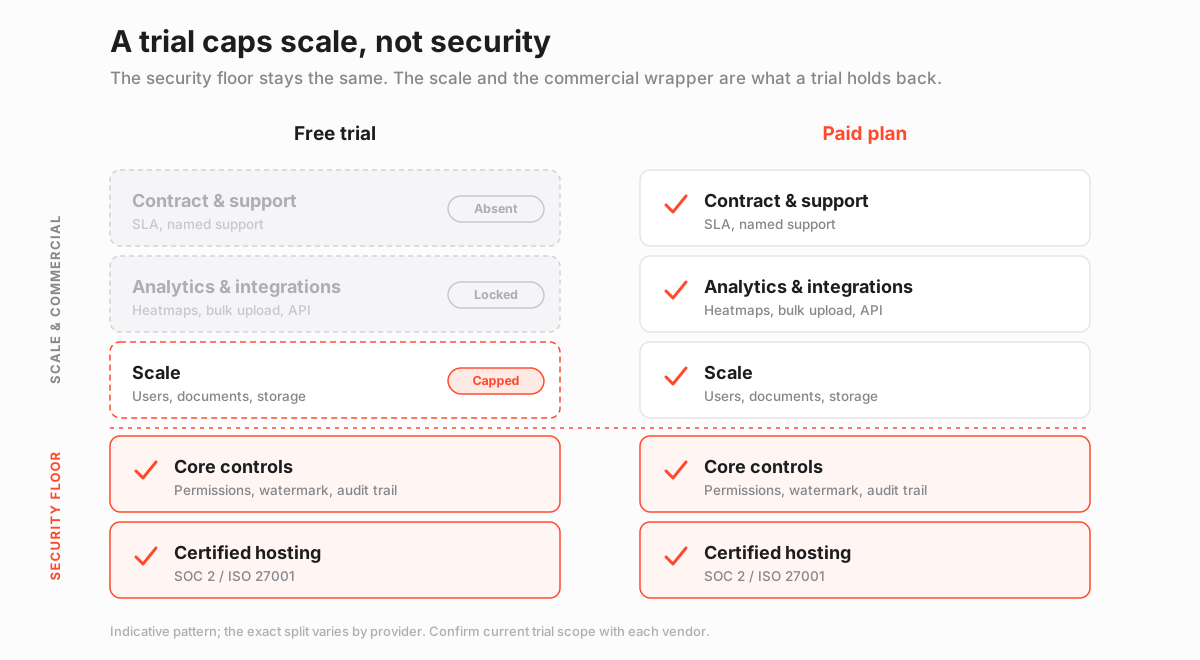
The security block at the top barely moves. The scale, tooling and commercial blocks below it are where the trial and the paid room part ways.
| Dimension | Free trial | Paid data room |
|---|---|---|
| Core purpose | Test the product and the vendor | Run a live, dated transaction |
| Typical duration | 7 to 14 days, sometimes extendable | Monthly, annual, or per-deal term |
| Document / page count | Capped low | High, metered, or unlimited |
| External user count | A handful | Tens to hundreds, per plan |
| Storage | Small allowance | Sized to the deal, with overage terms |
| Granular, folder-level permissions | Included | Included |
| Dynamic watermarking | Usually included | Included |
| View-only and secure rendering | Usually included | Included |
| Complete audit trail | Usually included | Included |
| SOC 2 / ISO 27001 hosting | Included | Included |
| Advanced analytics and heatmaps | Limited or hidden | Full |
| Q&A module and workflows | Basic or capped | Full |
| Bulk upload, API, integrations | Often locked | Included on the right tier |
| Contract and SLA | None | Yes |
| Named support | Best-effort | Assigned, with response terms |
| Auto-renewal | Common, on a fixed date | The billing itself |
| Price | Free, card usually required | ~$99/mo to custom quotes |
| Best for | Shortlisting and comparison | Diligence, raises, M&A, carve-outs |
Notice the shape. The controls in the top block are not what a provider withholds to push you toward paying. They are the entire point of the category. A room that strips them in a trial is telling you how it thinks about security in general.
The caps live in the lower blocks: scale, analytics, integrations, and the commercial wrapper. That split is the honest shape of a trial, and it doubles as a test. A provider that gates dynamic watermarking behind payment has drawn the line in the wrong place, because that is a leak control, not a premium upsell.
What the trial hands you for nothing
A serious trial is a real room, not a slideshow. You should be able to do genuine work inside it. Expect all of the following:
- A live workspace. Upload documents, build a folder index, and click around a room that actually renders your files.
- The permission model. Create user groups and set granular permissions at the folder level, so you feel the logic before it matters.
- The leak controls. Apply watermarks, force view-only rendering, and confirm both show up on an outside tester’s screen.
- The paper trail. Watch the audit trail populate as you view and download, so you know the record is real.
- The certified floor. The same SOC 2 and ISO 27001 hosting the paying customers sit on, not a lesser sandbox.
- The vendor’s reflexes. How fast support answers a stranger, which previews how fast they answer you once money is on the table.
Read a trial as a controlled rehearsal. If granular permissions feel awkward across ten documents, they feel worse across a two-thousand-document diligence set.
The trial is the cheapest moment to discover that. It is also the cheapest moment to walk away.
What the trial quietly holds back
The withholding is deliberate, and mostly reasonable. It aims at capacity and high-end tooling, not at security. Know what is missing, so you do not judge the room on gaps that vanish the day you pay:
- Scale. User and document counts are capped low, so you never see the room under real load.
- Advanced analytics. Engagement heatmaps and deep reporting are usually greyed out, so you evaluate them blind.
- Automation. Bulk upload, the API, and integrations are frequently reserved for paid tiers.
- Retention. The room can expire mid-process, taking your setup with it if you overstayed.
- The commercial wrapper. No contract, no SLA, no service guarantee if something breaks at the worst moment.
- Time. The window is a rehearsal, not a deal clock, and it was never sized for a live transaction.
None of these are reasons to distrust a trial. They are reasons not to mistake it for the finished product. The gaps are the price of a free look, and they close when you sign.
What paying actually buys
When the card is charged, you are not buying better security. You are usually buying the things a deal cannot proceed without:
- Headroom. Enough users, pages and storage that a late bidder or a document dump does not hit a wall.
- Availability. A room that will not expire in the middle of your process.
- A contract. Terms your legal and security teams can point to, plus the certifications on file.
- A support relationship. Named contacts and response commitments, not a queue.
- The full toolset. Analytics, integrations and automation that were locked or dimmed in the trial.
How long the window runs
Most trials run 7 to 14 days. Some providers stretch that on request when a genuine, dated deal is imminent.
Two weeks is enough to test the workflows that matter: the index build, the permission logic, watermarking, the Q&A flow and the audit trail. It is rarely enough to run a full transaction. It is not meant to be.
Two moves make the window worth more than it looks:
- Start the clock when you are ready. Ask the vendor to align the trial start with the day your documents are prepared, not the day you sign up. A trial that starts before you do burns days on an empty room.
- Ask for one extension. A vendor that refuses a short extension for a real, dated deal is previewing how flexible its support will be after you pay.
Do not read length as quality. A tight, well-built seven-day room beats a loose fourteen-day one every time. The window is a marketing decision. The controls inside it are the product.
The security question, settled
Are the trial’s controls secure enough to run a real deal? Technically, often yes; the controls are the same. Practically, no, and the reasons have nothing to do with encryption.
The room can expire mid-process. The user cap can lock out a late-arriving bidder. There is no contract or service commitment if something fails at the worst possible moment.
Certified security is necessary, but it is not sufficient. A deal also needs guaranteed availability, headroom, and support, and those are exactly what the paid plan adds.
Read the certifications rather than trusting the logo. A SOC 2 report is scoped and dated. An ISO 27001 certificate names the standard the provider is audited against. A trial that flashes a badge without a current, in-scope report deserves a second look before you upload anything sensitive.
There is a data-protection angle too. If your documents contain personal data, processing it, even in a trial, sits under regimes like GDPR, and the provider is a processor with obligations from the first upload. A throwaway sandbox does not sidestep the paperwork. If the data is sensitive enough to need a data room, it is sensitive enough to deserve the paid room’s commitments.
What a free trial can and cannot prove
Pros
- Whether the interface and permission model fit how your team actually works
- Whether watermarking, view-only and the audit trail behave as expected
- How responsive support is before you are a paying customer
- Whether the room is fast and stable with your real documents loaded
Cons
- It cannot carry a full transaction; the window and caps are too tight
- It will not reveal how the room performs at hundreds of users or thousands of pages
- Advanced analytics and integrations are usually hidden, so you judge them blind
- There is no contract or service guarantee if something fails mid-deal
Trial, demo, or proof-of-concept
The self-serve trial is not the only way in, and for some buyers it is the wrong one. Match the route to the risk.
| Route | Who it fits | Typical length | What it proves |
|---|---|---|---|
| Self-serve free trial | Hands-on teams comparing shortlisted rooms | 7 to 14 days | The real feel of the interface, permissions and speed |
| Guided demo | First-time buyers who want scoping help | 45 to 60 minutes | The security model and whether the vendor gets your deal |
| Proof-of-concept | Large, regulated or procurement-led deals | 2 to 4 weeks | Behaviour with your real data at closer to real scale |
A ten-person seed raise rarely needs a proof-of-concept. A cross-border carve-out with counsel on the line should not be decided from a demo video.
Many enterprise platforms skip the public trial entirely and lead with the last two routes, so ask which routes a vendor offers before you assume a self-serve trial exists.
If you are weighing named platforms, a hands-on write-up such as the iDeals review or the Datasite review will tell you which evaluation route each vendor actually leads with.
When to trial and when to just buy
The decision is binary more often than people admit.
Trial when:
- The provider is new to you and the choice is reversible.
- You are comparing two finalists and want a hands-on tiebreaker.
- You are re-checking a familiar vendor after a redesign or a pricing change.
Buy outright when:
- The deal is already live and dated.
- You know the platform from a prior transaction.
- Security or compliance needs the contract and certifications on file before anything is uploaded.
The failure mode to avoid is treating the trial as free capacity. A trial that quietly becomes your production room is a deadline waiting to detonate, because the clock and the caps were never sized for the work now running inside it.
If you are shortlisting for a specific job, the segment rankings narrow the field fast, whether that is the best data room for startup fundraising or the best data room for early-stage startups.
What it costs once the card is charged
Paid pricing spans a wide range, because the category spans lean fundraising rooms and heavyweight banking platforms. The tiers below frame the range by the job each does, not by brand.
| Tier | Indicative monthly price | Typical users | Best-fit job |
|---|---|---|---|
| Lean / startup room | $99 to $199 | Up to ~10 | A single raise or a small, contained diligence set |
| Mid-market flat-rate | $300 to $900 | Unlimited on plan | An active M&A or sell-side process with many bidders |
| Enterprise / per-deal | Custom quote | Unlimited plus admins | Regulated, multi-workstream or recurring transactions |
Treat every figure as indicative and confirm current pricing with the provider, since plans, included storage and user caps change often.
The number that surprises people is not the sticker; it is the total. Three things inflate it quietly:
- Overage. Extra pages or users above the plan, billed after the fact.
- Storage creep. Data above the included tier, month after month.
- The room left open. Retention charges for a room nobody closed after the deal did.
The billing model matters as much as the headline rate. A per-page pricing plan and a flat-rate pricing plan can invert in cost depending on how many documents you load. The breakdown of the hidden costs of a virtual data room walks through where those charges hide, and the full pricing guide compares the billing models head to head.
Read the fine print before you pay
Before payment details go in, confirm three numbers and one process:
- The conversion date. The exact day the trial becomes a paid plan.
- The first invoice. What that first charge is, in USD, not a vague “from” figure.
- The renewal price. What recurs after the first term, which is not always the promotional rate.
- The cancellation path. How you stop it, and whether it can be done without a phone call.
Most trials require a card up front and auto-renew on a fixed date. The moment you enter that card, you are one calendar reminder away from a charge you may not have decided on.
Auto-renewal disclosed clearly is not a trap. Vague renewal terms are a finding, not a formality. Factor that read into how you judge the pricing model as a whole.
Run the trial so it actually decides something
The comparison above tells you what to weigh. This is how to gather the evidence without wasting the window.
Do not click around aimlessly. Run the trial as a scripted rehearsal of your real deal, so the test surfaces the problems you would otherwise meet under pressure.
How to run a virtual data room free trial properly
A five-step test that turns a trial into a real buying signal instead of a tour.
Estimated time: 2h
-
Load a representative slice
Upload 30 to 50 real documents in the formats and sizes your deal will actually use, not three sample PDFs, so speed and rendering are tested honestly.
-
Build the index and permissions
Recreate your intended folder structure and set folder-level rights for at least two user groups, so you feel how the permission model behaves before it matters.
-
Invite a stand-in bidder
Add an external tester, then confirm they see exactly what their group should and nothing more, and that watermarks and view-only render on their screen.
-
Exercise the audit trail and Q&A
Have the tester view and download files, then check that every action lands in the log, and run one question through the Q&A workflow end to end.
-
Price the real plan and set a cancel reminder
Get a written USD quote for the tier your actual deal needs, then diarise the trial end date so an unwanted auto-renewal never surprises you.
One overlooked check is the heatmap. Even a trial usually shows some activity view, and seeing where a tester’s attention lands previews the intelligence you will rely on once real bidders arrive.
For the fuller version of that setup discipline, the step-by-step guide to setting up a virtual data room covers indexing and permissions in depth, and the data room index best practices guide covers the structure your reviewers will judge you on.
The verdict
Stop thinking of the trial and the paid room as cheap and expensive versions of one product. They are a rehearsal and a performance.
The rehearsal exists to prove the room fits before you commit. The performance exists to carry the deal once you have.
So use each for its job. Trial two finalists in parallel, load your real documents, run your real workflow, and watch for anything that gets in the way. A head-to-head like iDeals vs Firmex narrows the field, and the security features checklist keeps the comparison honest.
Then, when the deal is live and dated, buy the tier your work needs, not the one from the demo video. The trial chooses the room. The paid plan runs the deal. Keep those jobs separate and you will rarely overpay, and never be caught with a sandbox where a deal room should have been.
Frequently asked questions
Do all virtual data rooms offer a free trial?
Most reputable providers do, though a few enterprise and per-transaction platforms replace the trial with a guided demo and a proof-of-concept room instead. Trial length and included features vary widely, so confirm current terms with each provider before you rely on one.
Can I run a real deal inside a free trial?
You can, but you should not. The window is usually 7 to 14 days, the user and document counts are capped, and there is no contract or service guarantee if something breaks. Trials are for choosing a provider; paid plans are for running the deal.
Is a free trial less secure than a paid plan?
Usually the core controls are the same, since permissions, watermarking, the audit trail and certified hosting are the whole point of the category. What the trial withholds is scale, advanced analytics, integrations and the commercial wrapper of a contract and support commitment, not the security floor.
Do free trials require a credit card?
Many do, and many then auto-renew into a paid plan on a fixed date. Confirm whether a card is required, when the trial converts, and how to cancel before you enter payment details, and set a reminder for the day before the trial ends.
How much does a data room cost after the trial?
Indicative entry pricing starts around $99 per month, mid-market flat-rate rooms commonly run $300 to $900, and enterprise or per-deal deployments are quoted per engagement. Treat every figure as indicative and confirm current pricing, caps and storage with the provider.
