
Virtual data room vs SharePoint
On this page
- What is the core difference between a virtual data room and SharePoint?
- Can’t SharePoint just do what a data room does?
- How do the two compare feature by feature?
- Is SharePoint secure enough for M&A due diligence?
- What does each option really cost?
- Which deals and industries insist on a VDR over SharePoint?
- When is SharePoint genuinely the right choice?
- When do you need a purpose-built data room instead?
- How do you decide between them?
- What are the trade-offs at a glance?
- What breaks most often when teams run a deal on SharePoint?
- Can you export from SharePoint into a data room later?
Pick by trust, not by habit. Use SharePoint for the colleagues you already rely on. Use a virtual data room the moment files leave that circle.
That one line settles most cases, yet teams routinely decide the other way. A deal lands, and the reflex is to reach for the tool that is already licensed, already half-full of the right files, already familiar to everyone who will touch it. SharePoint feels like the obvious home for diligence.
The instinct is understandable. It also hides a false assumption: that the two tools do the same job at different prices.
They do not. SharePoint was engineered so colleagues you trust can build things together. A virtual data room was engineered so you can hand a curated set of secrets to people you do not trust yet, and prove afterward exactly what they saw. Those are opposite problems, and each tool’s design follows from the one it was built to solve.
This guide tests that split against the criteria that actually decide a diligence process: who can do what to a document, whether you can prove it later, and what the exercise really costs once you count hours instead of the invoice. The verdict is not that one tool wins. It is that each is decisively better at its own job, and using the wrong one bites precisely when you can least afford it.
What is the core difference between a virtual data room and SharePoint?
SharePoint is a collaboration and content-management platform. It is built for people inside an organisation to store, co-author and govern documents together.
A VDR is the mirror image: a security-first repository built to disclose a curated set of confidential files to a controlled group of outsiders, then demonstrate exactly who saw what, when, and under which restrictions.
The difference is intent, not a feature list. SharePoint assumes shared ownership and open contribution among trusted colleagues. Every default it ships expresses that, from inheritance-based permissions to easy guest links to co-authoring.
A VDR assumes a guarded, one-directional handover to parties who are not yet trusted, and its defaults run the opposite way: least privilege, view-only rendering, watermarks bound to a named viewer, and a log a lawyer can lean on. Everything downstream, the permissions model, the audit depth, the Q&A workflow, follows from that single divergence of purpose. Hold that framing; it explains every disagreement below.
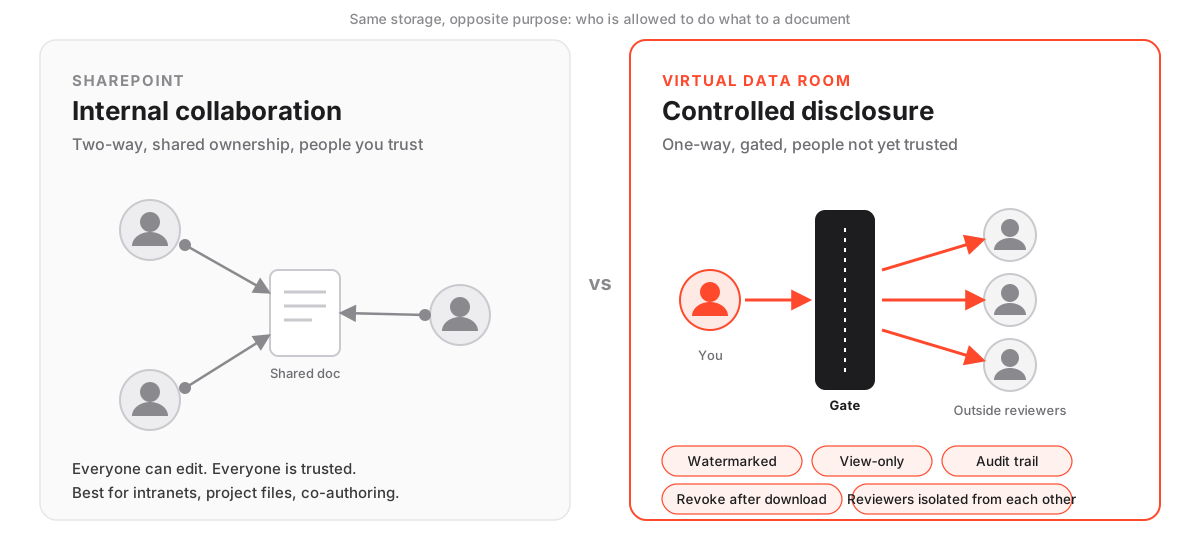
For the ground-level definition before this goes deeper, the companion guide on what a virtual data room is walks the anatomy, and how a virtual data room works covers invitations, permission groups and reporting. The diagram captures the split: SharePoint runs two-way among insiders, while a room runs one-way to outsiders through a gate of controls.
Can’t SharePoint just do what a data room does?
It can approximate parts of the job, and for low-stakes work that is enough. The fit loosens exactly where a real deal applies pressure.
SharePoint handles storage, versioning and internal permissions well. With careful configuration you can share files with external guests, apply sensitivity labels, even block downloads for specific audiences.
What it does not do natively is the deal-specific work a competitive process demands:
- Document-level dynamic watermarking that traces a leaked page back to the person who opened it.
- A tamper-evident record built to satisfy an auditor, not just an IT admin.
- A structured Q&A module that keeps bidder queries on the record.
- A permissions architecture that treats external users as the norm rather than the exception.
You can assemble a facsimile of each with add-ins, conditional-access policies and Microsoft Purview labels, and skilled administrators do. The catch is what you are actually doing: engineering a data room out of a collaboration tool, on your own liability, against a deal clock, when your team has the least slack to get it perfect.
The gap is not a wall you cannot climb. It is a stack of small configuration decisions, each individually reasonable, collectively where a mistake hides.
The first figure is why this comparison is worth taking seriously. IBM’s Cost of a Data Breach report put the 2024 global average at roughly $4.88 million.
Few diligence slips reach that headline number, but the failure mode is the same species of event: a confidential file reaching a party it was never meant to reach. A document over-shared to a rival bidder does not feel like a breach in the moment, because no firewall was crossed. It is precisely the exposure a purpose-built room exists to prevent. The other two figures come from our own testing: we score each room against more than forty criteria, and a basic room can be stood up in under an hour.
How do the two compare feature by feature?
On the controls that govern a competitive process, a VDR is native where SharePoint is optional, licence-gated, or simply absent. The matrix maps each capability out of the box, because out-of-the-box behaviour is what protects you when nobody has time to harden a system mid-deal.
Deal-control capabilities: native support out of the box
| Capability | Virtual data room | SharePoint |
|---|---|---|
| Built for external, untrusted reviewers | Yes | Internal-first |
| Document-level permissions by user group | Yes | Configurable |
| Dynamic per-user watermarking | Yes | No |
| View-only rendering that blocks download | Yes | With labels |
| Tamper-evident, per-document audit trail | Yes | Basic logs |
| Structured bidder Q&A workflow | Yes | No |
| One-click, retroactive access revocation | Yes | Manual |
| Independent SOC 2 / ISO 27001 for the deal room | Yes | Platform-level |
Three rows carry more weight than the rest.
The certification row first. SharePoint does hold platform-level SOC 2 and ISO 27001 attestation through Microsoft, which is genuine and meaningful. But it certifies how the platform operates, not how your particular deal room is configured on the day a bidder logs in. A certificate on the vendor’s wall is not the same as a control on your document.
Watermarking is the cleanest divide. Dynamic, per-user watermarks are standard in a VDR and simply not a native SharePoint feature. If tracing a leaked page back to the person who opened it matters, that row often settles the question.
Retroactive revocation is the third. Pulling access back even from a document already rendered or downloaded is a button in a room and a manual clean-up job in SharePoint, one that frequently never happens.
For a deeper treatment of the controls behind those rows, see data room permissions explained, dynamic watermarking and fence view and VDR audit trails explained. Each unpacks a capability that reads as one word in the table but is the real dividing line in practice.
Is SharePoint secure enough for M&A due diligence?
For internal storage, SharePoint is highly secure, so the question as posed misses the actual risk in a deal. Microsoft encrypts data in transit and at rest, backs the platform with strong independent certifications, and gives administrators granular control over access. If your worry is an outside attacker breaking in, SharePoint is a hardened target.
But intrusion is almost never what sinks a diligence process. Over-disclosure is. An employee shares a folder one level too high. A guest link outlives the negotiation. An inherited permission hands a new bidder sight of documents from a previous round.
None of these are exotic attacks. They are ordinary human mistakes, and an internal-first tool makes them easy precisely because easy sharing is what it was designed to deliver.
The data backs this up. Verizon’s Data Breach Investigations Report has consistently found that the human element factors into roughly two-thirds of breaches, exactly the class of error a permissive collaboration tool amplifies rather than contains.
A VDR attacks that class structurally. It defaults to least-privilege external access, so a reviewer sees only what they were granted. It watermarks every page to a named viewer, so a leaked copy points back to its source. It renders sensitive files view-only, so the easy path is not the download. And it lets you revoke access retroactively, so a link cannot outlive its usefulness. Those four behaviours are what regulated buyers and their counsel have learned to expect, and the reason serious transactions run on a room rather than a shared site.
SharePoint asks who is allowed to collaborate on this document. A data room asks who is allowed to see this page, for how long, watermarked to whom, and can I take it back the moment the deal turns. Those are not the same question.
Both tools rest on the same recognised standards. Reputable VDRs certify against ISO/IEC 27001, the information-security management standard, and undergo SOC 2 examinations, just as Microsoft does. The difference is not the certificate but the default: whether out-of-the-box behaviour matches how a confidential, adversarial disclosure actually unfolds, or whether you have to reconfigure it to get there.
If security is your central concern, the guide on whether virtual data rooms are secure and the VDR security features checklist go deeper, and VDR certifications explained unpacks what each attestation actually covers.
What does each option really cost?
The headline comparison is misleading, and knowing why is half the decision.
SharePoint looks free because it is bundled inside a Microsoft 365 subscription most companies already pay for. A VDR carries a visible, standalone monthly charge. Cash to cash, the room looks like the expensive choice.
That comparison omits the largest cost of running a deal on SharePoint, which is not cash at all: the administrator hours to configure external sharing safely, the add-ins or Purview licences needed to approximate watermarking, the time counsel spends assembling an audit story from thin logs, and the tail risk of getting any of it wrong on a live transaction. Total cost of ownership, not sticker price, is the honest metric.
Indicative cost and effort, deal-by-deal (USD)
| Dimension | Virtual data room | SharePoint (Microsoft 365) |
|---|---|---|
| Entry pricing | From ~$99 / month | Bundled in M365 Business (~$6 to $22 / user/mo) |
| What you pay for | A purpose-built, per-deal room | A whole productivity suite, deal use is incidental |
| Setup effort for external diligence | Low, external sharing is the default | High, requires guest access, labels and policy work |
| Watermarking and Q&A | Included | Not native, needs add-ins or manual process |
| Audit reporting for counsel | Built-in, exportable | Basic activity logs, extra tooling to extend |
| Hidden cost | Enterprise tiers can be quote-only | Admin time and misconfiguration risk |
The nuance the table cannot capture: the marginal cash cost of using SharePoint for a deal is close to zero, because the licence is paid for and the storage provisioned. For a small, low-sensitivity process with a single trusted counterparty, that is a decisive advantage.
It evaporates the moment the transaction turns competitive or regulated. The configuration and oversight burden then shifts onto your own team, arriving when the deal has already stretched them thinnest. A from-$99-per-month room converts that burden into a fixed subscription with the controls ready-made. Treat every figure here as a starting point, not a quote; plans, storage and per-user tiers change often, so confirm current pricing with each provider before you budget.
For a full breakdown of what a room costs and why the range is so wide, see how much a virtual data room costs, and if budget is the deciding factor, the cheapest virtual data rooms roundup shortlists the lower-cost options without pretending they suit every deal.
Which deals and industries insist on a VDR over SharePoint?
Wherever disclosure is competitive, regulated or legally consequential, a VDR is effectively the default and SharePoint is the exception that needs justifying.
Mergers and acquisitions are the clearest case. Multiple bidders review the same confidential set and must be walled off from one another, so no party learns who else is at the table. That isolation is native to a room and a manual, error-prone chore in SharePoint; the VDR for mergers and acquisitions guide covers the workflow.
Private-equity firms running parallel processes lean hard on per-group permissions and exportable audit reporting, both of which the VDR for private equity guide sets out. A fund that cannot reconstruct who accessed what across concurrent deals has a governance problem.
Regulated sectors add another layer on top of the competitive tension. Life-sciences diligence routinely exposes clinical-trial data and intellectual property, where a single leaked file can compromise a patent position. Real-estate and IPO processes carry statutory disclosure duties that presume a clean, auditable record. Law firms handle privileged material where inadvertent disclosure carries professional consequences.
Where health data enters the picture, HIPAA safeguards attach to it. Where the personal data of EU residents is in scope, GDPR obligations follow the file regardless of which tool holds it, which is why GDPR and virtual data rooms is worth reading before you choose a platform.
The pattern is consistent: the higher the stakes, the harder it becomes to defend running the process on a general-purpose collaboration site. If diligence specifically is your use case, the best virtual data room for due diligence shortlist ranks the providers that handle these demands most cleanly.
When is SharePoint genuinely the right choice?
SharePoint wins, and wins comfortably, whenever the work is collaborative, internal and low-stakes on external exposure.
Co-authoring a proposal, maintaining an intranet, running a shared project workspace among trusted colleagues, exchanging non-sensitive material with a partner you already trust: in every one of those, SharePoint is not merely adequate, it is the better tool, and you are already paying for it. It also suits an informal, single-party conversation with no competitive tension and no future need to prove who opened which page, where a VDR’s controls would only slow the work down.
The signal to stay in SharePoint is refreshingly simple. Everyone with access is someone you would happily hand the file to permanently, and you would not lose a minute of sleep if they forwarded it onward. The moment that stops being true of even one reviewer, the calculus changes.
When do you need a purpose-built data room instead?
You need a VDR the moment disclosure becomes controlled, competitive or auditable. Those three words cover more ground than they first appear to.
Controlled means you want to decide not just who gets a file but what they can do with it and for how long. Competitive means two or more outside parties, some of them rivals, are reviewing the same confidential set and must not see one another’s activity. Auditable means a board, a regulator, or opposing counsel in a later dispute may one day ask you to produce a complete, tamper-evident record of exactly who accessed what.
The tells are concrete, and they tend to arrive in clusters. Multiple external reviewers who should not see each other’s activity. Documents you want watermarked and rendered view-only. A question-and-answer process that has to stay on the record. A lawyer who will, at some predictable point, ask for a complete access log and expect it to hold up.
When more than one of those is true, the safety and speed of a purpose-built room comfortably outweigh the convenience of the tool you already own. Rooms span a wide range, from lean fundraising platforms to heavyweight banking systems, and options such as Ellty sit alongside long-established names. To see how providers handle these workflows, our iDeals review and Datasite review go feature by feature, and the iDeals vs Datasite comparison puts two of them head to head.
How do you decide between them?
The choice comes down to a short, honest audit of two things: the reviewers and the stakes. It is a risk decision, not a technology one, and it usually resolves itself before the end of the sequence below. Work through the five checks, and be strict, because the temptation is to talk yourself into the tool you already have.
How to choose between SharePoint and a virtual data room
A quick decision path for teams weighing what they already own against a purpose-built room.
Estimated time: 20min
-
Name the reviewers
List who will actually access the files, by name where you can. If they are all internal colleagues or a single trusted partner, SharePoint is likely fine. If the list includes external bidders, prospective investors or opposing counsel, lean toward a VDR from the outset.
-
Test for competition
Ask whether two or more outside parties should be prevented from seeing each other's presence or activity. If the answer is yes, you need the isolation and per-group permissions a data room provides by default and SharePoint only approximates with careful manual work.
-
Check the proof requirement
Decide whether a lawyer, board or regulator will later need a complete, tamper-evident record of who opened what and when. SharePoint's basic activity logs rarely satisfy that standard cleanly; a VDR is built from the ground up to produce it.
-
Weigh watermarking and revocation
If you need every page traceable to a named viewer and the ability to pull access back even after a download, that requirement alone points to a VDR, because neither dynamic watermarking nor retroactive revocation is native to SharePoint.
-
Price the total effort
Compare the bundled cash cost of SharePoint plus the admin hours to configure it safely against a from-$99-per-month room that ships the controls ready to use. Count the risk of misconfiguration, not just the invoice.
Tally the results honestly. If three or more steps push you toward a room, do not force SharePoint into a role it was not built for. The configuration effort and residual risk usually cost more, in money and in exposure, than the subscription you were trying to avoid. For a structured method that goes beyond this quick audit into shortlisting, trialling and scoring providers, see how to choose a virtual data room, and the compare data rooms hub lines the named options up side by side.
What are the trade-offs at a glance?
Neither tool is superior in the abstract. An honest comparison holds both truths at once: SharePoint is genuinely excellent at what it was built for, and genuinely risky when pressed into service outside it.
SharePoint vs a VDR, the trade-off honestly
Pros
- SharePoint is excellent and low-cost for internal collaboration you already pay for
- A VDR ships deal controls (watermarking, Q&A, audit, revocation) with no configuration
- A VDR defaults to safe external sharing; SharePoint defaults to internal trust
- A room isolates competing parties and produces an auditor-ready access record
Cons
- SharePoint needs real admin work and carries misconfiguration risk when used for external diligence
- SharePoint lacks native watermarking and a structured bidder Q&A module
- A VDR is a visible additional subscription where SharePoint is bundled
- Enterprise VDR tiers can be quote-only, so budgets need confirming per engagement
What breaks most often when teams run a deal on SharePoint?
The recurring failures are not exotic edge cases. They are the predictable result of using an internal-first tool for an external, adversarial job, and four show up again and again.
Over-sharing is the first. A guest gets added to a site or folder broader than the single file they needed, and through permission inheritance they quietly gain sight of documents nobody meant to disclose, sometimes from a different workstream or a prior round.
Orphaned access is the second. Guest links and permissions granted in the heat of a deal are rarely cleaned up when a party drops out. A counterparty who walked away in month two can still reach the files in month five.
Thin evidence is the third. SharePoint’s activity logs record events, but reconstructing a clean, per-document, per-user narrative for counsel after the fact is slow, manual and frequently incomplete.
Leaked copies are the fourth. Without dynamic per-user watermarking there is no deterrent to a bidder photographing a screen or forwarding a page, and no way to trace the leak back if they do.
A purpose-built room closes all four by design rather than by policy, and that distinction matters, because the same people running the transaction cannot also police the tool full time. Design protects you when attention lapses; policy only protects you while everyone is watching, which during a live deal is rarely. For a fuller catalogue, see data room mistakes to avoid and the guide on how to grant and revoke data room access.
Can you export from SharePoint into a data room later?
Yes, and it is one of the most common patterns we see, so treating the two as an either-or choice for the whole lifecycle misreads how deals run.
Many teams begin diligence preparation in SharePoint, where the material naturally lives, then move a cleaned, indexed subset into a VDR the moment the process turns external. The migration is far more a matter of discipline than of technology. Export the relevant files rather than the entire drive, rename them to a consistent convention, rebuild the folder tree around how buyers actually review a company, and recreate access as external permission groups scoped to least privilege.
A well-planned index does most of the heavy lifting in that transition, so it is worth reading data room index best practices before you begin rather than fixing the structure once bidders are inside. Done with care, the switch takes an afternoon and hands you every control SharePoint could not offer: watermarks, view-only rendering, a real audit trail and retroactive revocation. If you are migrating between two rooms rather than out of SharePoint, the guide on how to migrate to a new data room walks through the mechanics.
Frequently asked questions
Is SharePoint a virtual data room?
No. SharePoint is a collaboration and document-management platform built for internal teams to co-author and govern content. A virtual data room is a security-first tool built for controlled disclosure of confidential files to external parties, with native dynamic watermarking, per-document audit trails, structured Q&A and default least-privilege external access. You can configure SharePoint to approximate some data-room functions, but it is not one out of the box, and the gap widens exactly where a competitive deal applies pressure.
Can I run M&A due diligence in SharePoint?
You can, but for a competitive or regulated deal it is usually the wrong choice. SharePoint lacks native dynamic watermarking, a bidder Q&A workflow and a tamper-evident audit trail built for counsel, and its internal-first permissions raise the risk of over-sharing to external reviewers. Most serious M&A processes run on a purpose-built VDR, because the cost of getting the configuration wrong on a live deal outweighs the cost of the subscription.
Is SharePoint cheaper than a data room?
On cash alone it often looks cheaper, because it is bundled in Microsoft 365, which many companies already pay for. Once you count the admin time to configure safe external sharing, add-ins for watermarking, and the risk of misconfiguration, the total cost gap narrows or reverses for anything beyond a small, low-sensitivity process. Indicative VDR pricing starts around $99 per month; confirm current USD figures with the provider before you budget.
Is SharePoint secure enough for confidential deal documents?
SharePoint is very secure as an internal platform, with strong encryption and platform-level SOC 2 and ISO 27001 certification. The risk in a deal, however, is not intrusion but over-disclosure: a folder shared one level too high, a guest link that outlives the negotiation, or an inherited permission that grants a new party sight of old files. A VDR reduces that risk by defaulting to least-privilege external access, watermarking each page and allowing retroactive revocation even after a download.
Does SharePoint support dynamic watermarking like a VDR?
Not natively. Dynamic, per-user watermarking that stamps each page with the viewer's identity is a standard VDR feature and the single clearest difference between the two tools. In SharePoint you would need add-ins or manual workarounds, and even then the deterrent and traceability fall short of what a purpose-built room does automatically, which matters when the whole point is tracing a leaked page back to the person who opened it.
Can I move documents from SharePoint into a VDR?
Yes, and it is a common workflow. Teams often prepare diligence in SharePoint, then export a cleaned, indexed subset into a VDR when the process turns external. Rename files consistently, rebuild the folder structure around how buyers review a company, and recreate access as external permission groups scoped to least privilege. The move typically takes an afternoon and adds the deal controls, watermarking, view-only rendering, audit trails and revocation, that SharePoint cannot offer.
