
Virtual data room vs Dropbox for a deal
On this page
- What a virtual data room actually is
- What Dropbox actually is
- The difference in one line
- Five words that separate the two
- What Dropbox lacks the moment a deal starts
- The switch point is a moment, not a company size
- What each option costs
- Where Dropbox still wins
- Is Dropbox secure enough for M&A?
- What about DocSend, Dropbox’s own deal tool?
- How to move a deal from Dropbox to a room
- What you gain the moment the room is live
- A decision rule you can apply in a minute
Here is the short version, before any feature list.
Can you name a specific outside party who will scrutinise your confidential files under an NDA, and whose access you might later have to prove or revoke? Then you have outgrown Dropbox and want a virtual data room. If you cannot name such a party, Dropbox is the cheaper and simpler home.
Everything else in this guide unpacks that one sentence.
The confusion is understandable. On the surface, both tools “share files.” But they were designed to solve opposite problems. Getting the definitions straight is the fastest way to stop overpaying for a room you do not need, or worse, running a live deal out of a shared folder that cannot protect it.
What a virtual data room actually is
A virtual data room is a secure online repository built for one purpose: to let outside parties review confidential documents during a transaction, under controls the owner sets and can change at any moment.
Hold onto that phrase, “controls the owner sets.” A VDR assumes from the first click that the people reading your files are not fully trusted, that some of them are competitors, and that you may one day have to account for exactly who saw what.
So a room treats every file as something to be permissioned, watermarked, tracked, and, if the deal turns, revoked in an instant. It groups reviewers, hands each group its own slice of the folder tree, stamps every page a viewer opens with their identity, and writes a tamper-evident log of every view, print and download. For the full mechanics, how a virtual data room works walks through them from the ground up.
The name is a holdover from the physical rooms that preceded it. Deals once ran in a literal locked room, where bidders sat with paper files under the eye of a supervisor. The software kept the constraints and dropped the geography.
What Dropbox actually is
Dropbox is a file-sync and storage service. Its founding job is to make a file on your laptop appear, unchanged, on your phone, your colleague’s desktop and the web, and to keep all those copies in step.
That is a genuinely hard engineering problem, and Dropbox solves it well. It is one of the best tools in the world for keeping a team’s working files in one place.
But notice what “keep every copy identical on every device” implies. The whole design goal is to distribute a file widely and make copies easy. A confidential deal process wants the exact opposite: one governed source, and no copies escaping.
Dropbox is not insecure. On business and enterprise plans it offers real encryption, admin controls and some activity logging. The gap is not a missing lock. It is a different purpose.
That is why stretching Dropbox into a deal tool feels fine right up until it does not. The product is doing exactly what it was built to do. It was just built for a different job.
The difference in one line
A virtual data room governs documents; Dropbox syncs them.
That single distinction drives every practical difference in this guide. Governance means the owner decides, per document and per person, what is visible and what can be done with it, and keeps a record. Sync means the file spreads and stays consistent.
Frame it that way and the comparisons below read less like a scorecard and more like two tools answering two different questions.
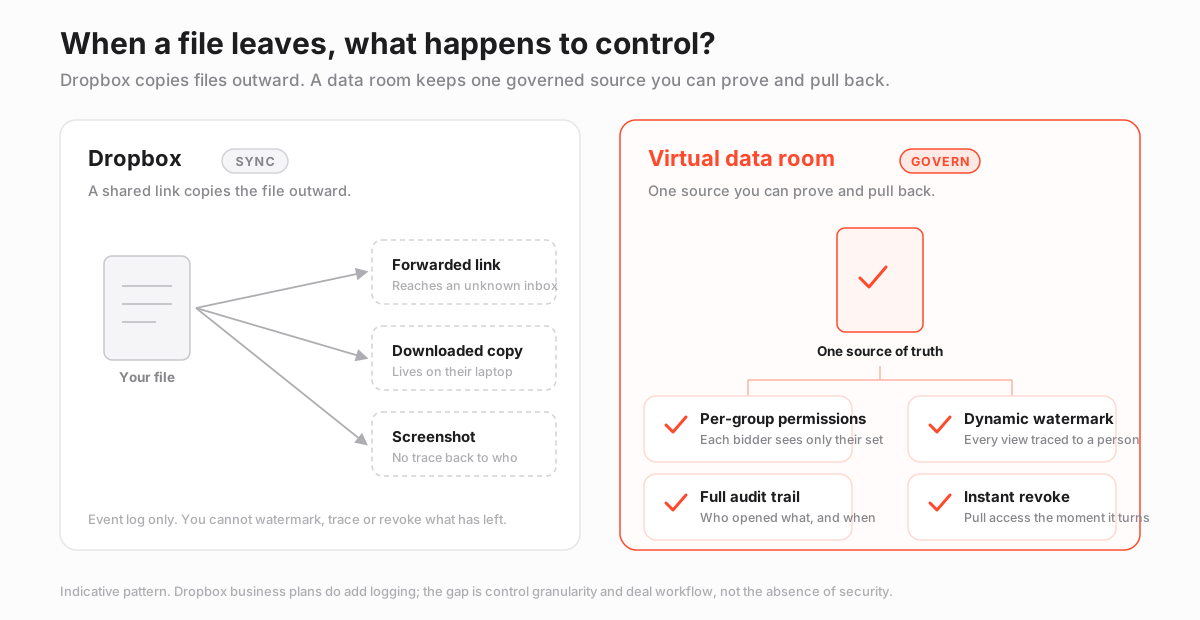
The diagram above is the whole argument in one picture. On the Dropbox side, a single file fans out into a forwarded link, a downloaded copy and a screenshot, none of which you can pull back. On the room side, the same file stays a single governed source, wrapped in per-group permissions, watermarking, an audit trail and an instant revoke button.
Same document, two entirely different relationships with it.
Five words that separate the two
Most of the gap between Dropbox and a data room lives in five capabilities. Learn these terms and you can read any provider’s feature page without getting lost.
- Granular permissions. The ability to grant rights per document and per group, not just per folder or per link. You can show one bidder a subset of a folder while hiding the rest from another. Dropbox permissions stop at the folder and the shared link.
- Dynamic watermarking. A stamp applied at view time carrying the viewer’s own name, email and timestamp, so a leaked screenshot points straight back to whoever took it. Dropbox does not apply per-viewer watermarks.
- Audit trail. A tamper-evident, per-document record of every view, print and download, detailed enough to hand to counsel. Dropbox logs link events, which is a coarser and weaker thing.
- Q&A module. A structured queue where bidders ask questions against specific documents and your team routes and answers them in one auditable place. Dropbox has no equivalent, so questions scatter across email.
- Instant revoke. The power to cut off access to a document, even one already opened, the moment the deal changes. A downloaded Dropbox file, by contrast, is gone from your control the instant it lands on someone’s disk.
Each of these has a deeper treatment worth reading before a raise or a sale: data room permissions explained, dynamic watermarking and fence view, and VDR audit trails explained.
What Dropbox lacks the moment a deal starts
Line the five terms up against Dropbox and the missing pieces are the same four every time: granular permissions, watermarking, a defensible audit trail, and structured Q&A. Dropbox has none of them in deal-grade form. That is not a knock on the product. It is simply outside its remit.
The consequence is subtle. Running a deal on Dropbox rarely fails in a dramatic way. There is no cinematic hack.
Instead there is a slow, quiet loss of control that only becomes visible when it is too late to fix. A shared link forwarded one hop too far. A bidder who downloaded the entire folder before walking away from the table. An activity log that cannot answer a lawyer’s direct question about who opened a specific file.
Those failures trace back to ordinary human action, not a broken firewall, which is exactly why the controls around a document matter more than the storage under it. In Verizon’s 2024 Data Breach Investigations Report, the human element featured in roughly 68% of breaches. That is precisely the class of exposure a room is designed to contain.
The pattern to watch for is always the same. A file leaves the room, and with it goes every control you assumed you had.
The question in a deal is never whether a file is stored safely. It is whether you can prove who touched it, restrict what they did with it, and pull that access back the instant the deal changes course.
The switch point is a moment, not a company size
People often assume a data room is a “big company” tool. It is not.
The trigger is not headcount or revenue. It is a specific event: the start of due diligence, the point where a buyer, lender, investor or their advisers begin verifying your claims against source files, under a signed NDA.
Below that threshold, sync is the right model, and Dropbox is a perfectly reasonable, cheaper home for your documents. Above it, the whole relationship with the files changes. Now people you do not fully trust are reading privileged material, and you may have to prove or restrict their access after the fact. Sync cannot do that. Governance can.
A tiny startup entering a competitive sale needs a room. A large company circulating a marketing brochure does not. Size is a distraction; the presence of outside scrutiny under an NDA is the real line.
There is a timing point hidden in the trigger, too. The switch is easiest before diligence opens, not in the middle of it. Moving a live process into a new room while bidders are already asking questions is stressful and error-prone.
Set the room up in the quiet weeks beforehand, index it and test the permissions, and when the first request list arrives you simply open the doors. Most rooms offer a free trial, so you can build and check the structure before any outside party ever logs in.
What each option costs
On paper Dropbox looks far cheaper, and for ongoing team storage it genuinely is. A room costs more because you are buying control and a time-boxed process, not a subscription you keep forever. The figures below are indicative USD and change often, so confirm current pricing with each provider.
| Plan type | Typical entry price | Billing basis | Best fit |
|---|---|---|---|
| Dropbox Business (Standard) | ~$15 per user | Per user, annual | Everyday team file sync |
| Dropbox Business (Advanced) | ~$24 per user | Per user, annual | Larger teams, more admin controls |
| Lean virtual data room | ~$99 flat | Flat monthly | Small raises, single-project rooms |
| Mid-market data room | Low hundreds | Flat or per-page | Active M&A and diligence |
| Enterprise data room | Custom quote | Per engagement | Banking, complex multi-party deals |
The number to distrust is the head-to-head monthly figure, because it compares two different things. Dropbox bills per seat per year for permanent storage. A room bills for a defined project window.
A three-month raise in a $99 room can cost less than a year of Dropbox seats for the same working group, while adding controls Dropbox does not offer at any price.
For the mechanics of how rooms bill, VDR pricing models explained covers per-page versus flat-rate, and the hidden costs of virtual data rooms flags the line items that surprise first-time buyers. If budget is the binding constraint, the cheapest virtual data rooms round-up is the shorter path, and you can line up live numbers on the pricing page.
Where Dropbox still wins
None of this makes Dropbox the loser. For everything that is not a governed transaction, it is the better tool, and reaching for a room you do not need wastes money and time.
Dropbox is excellent for internal collaboration, day-to-day file sync across devices, and sharing non-sensitive material with people you already trust. Almost everyone already has an account, onboarding friction is near zero, and the per-seat cost is low and predictable.
If your sharing never crosses into an NDA-bound, multi-party review, Dropbox may be all you ever need.
Dropbox for a deal: the honest trade-off
Pros
- Nearly everyone already has an account, so there is no onboarding friction
- Low, predictable per-seat cost for ongoing storage
- Genuinely strong for internal collaboration and everyday sync
- Fine for sharing non-confidential material with trusted parties
Cons
- Permissions stop at folder and link level, not per document per group
- No dynamic watermarking to deter and trace leaks
- Activity logging is event-based, not a defensible per-document audit trail
- No Q&A workflow, so bidder questions live in email
- A downloaded file leaves your control entirely
The deciding factor, again, is not the tool’s quality. It is the sensitivity of the files and the accountability you owe for them.
Is Dropbox secure enough for M&A?
Dropbox is a secure product in general terms. But “secure product” and “deal-grade control” are not the same claim, and M&A counsel almost always wants the second.
Reputable rooms are independently audited against SOC 2 and certified to ISO/IEC 27001, with that certification scoped to the exact service you are using. On a business plan Dropbox can meet many baseline controls, but the per-viewer restrictions and the tamper-evident record that make a repository defensible in a dispute are room territory.
Where personal data of EU residents is in scope, you also inherit obligations under the GDPR, and a room with data-residency options and a clear processing posture makes those far easier to satisfy. For the fuller picture, see are virtual data rooms secure, the VDR security features checklist, and GDPR and virtual data rooms if EU data is in play.
Here is the practical test. If a bidder’s lawyer asked you to prove that one named person never downloaded one named document, could you? In a room the audit trail answers in seconds. In Dropbox the answer is usually a shrug.
What about DocSend, Dropbox’s own deal tool?
DocSend, which Dropbox acquired in 2021, sits between the two worlds and confuses a lot of buyers, so it is worth placing precisely. It adds per-link analytics, view tracking and light access control, which makes it a capable tool for sending pitch decks and one-to-few documents.
What it lacks is the group-based permission model, the structured bidder Q&A, and the folder-level room architecture that a multi-party diligence process needs.
So the clean way to think about it: DocSend is a better way to send a deck, and a data room is the place you run the whole review. They are not competitors so much as tools for different stages.
If you are weighing DocSend specifically, our DocSend review covers where it fits and where it runs out of room, the Digify vs DocSend comparison pits it against a light room, and the iDeals review shows what a full deal room offers by contrast.
How to move a deal from Dropbox to a room
Migrating is quicker than most first-time sellers fear, and doing it before diligence starts is far easier than doing it mid-process. The five steps below take you from a messy shared folder to a defensible room. For the deeper version, follow how to set up a virtual data room, and how to migrate to a new data room if you are moving off another platform rather than Dropbox.
How to migrate a deal from Dropbox to a virtual data room
Move from a shared folder to a permissioned, audited room before diligence begins.
Estimated time: 2h
-
Plan the index first
Map a folder structure to the diligence checklist before you move a single file, so reviewers find documents where they expect them rather than inheriting your internal Dropbox layout.
-
Export and clean
Pull the current document set out of Dropbox, remove stale drafts and duplicates, and settle on one final version of each file so the room shows a single source of truth.
-
Bulk upload and index
Import documents in bulk into the room, order them to match the index, and run full-text indexing so everything is searchable from day one.
-
Rebuild permissions by group
Recreate access as user groups, for example bidders, legal and internal, and grant folder-level rights per group instead of the flat link sharing you used in Dropbox.
-
Turn on controls, then invite
Enable dynamic watermarking, view-only rendering and two-factor authentication, confirm the audit log is recording, and only then invite outside reviewers.
One caveat worth naming up front: Dropbox version history does not carry into a room. That is why settling on a single final version of each file before you migrate matters. From the moment the room goes live, it tracks its own history in its own audit trail. For what belongs inside, see what documents go in a data room and data room index best practices.
What you gain the moment the room is live
Migration is where the definitions stop being abstract and start paying off. On the day you invite reviewers, three things become possible that Dropbox never offered.
First, you can see engagement, not just downloads. A room records which documents each reviewer opened, in what order, and for how long. That is a real signal. A bidder who reads the customer contracts three times and ignores the financials is telling you something, and you can act on it before they say a word.
Second, you can answer questions in one place. Instead of diligence questions scattering across a dozen email threads, they land in a structured queue tied to specific documents, routed to the right person on your side, and logged. When the deal closes, that queue is part of the record.
Third, you keep the ability to change your mind. If a bidder drops out, you revoke their access with one click, and the watermark on any page they saw still carries their name. Nothing about that is possible once a file has synced to a stranger’s laptop.
Governance is not a feature you switch on at the end. It is the shape of the whole process, from the first upload.
A decision rule you can apply in a minute
Strip away the feature lists and the choice reduces to a single question about scrutiny.
- No outside party will review the files under an NDA. Stay on Dropbox. Sync and a low per-seat cost win, and there is nothing to govern.
- You are sending a pitch deck to a few investors. DocSend or a light room is enough. Link tracking covers you; group control is not yet needed.
- A seed raise with one or two friendly investors, NDA signed. A lean room earns its keep by adding watermarking and an audit trail for very little money.
- A competitive sale with multiple bidders. A full data room, no exception. Group permissions, Q&A and per-viewer control stop being nice-to-haves.
- Regulated or cross-border diligence. A data room again, because certified security and data residency are what satisfy counsel.
For the broader buying decision, how to choose a virtual data room and is a virtual data room worth it go deeper. Among the rooms we score, newer options such as Ellty sit alongside established platforms like iDeals for teams weighing a first room.
Frequently asked questions
Is a virtual data room more secure than Dropbox?
For a transaction, yes, in the ways that matter. Both encrypt files, but a VDR adds document-level permissions, dynamic watermarking, view-only rendering and a tamper-evident audit trail, and reputable rooms hold SOC 2 and ISO 27001 certification scoped to the service. Dropbox is secure for general use but does not offer that deal-grade control granularity.
Can I use Dropbox for due diligence?
You can for a small, low-sensitivity process, but it is risky for a competitive or regulated deal. Dropbox lacks group-based permissions, watermarking, structured Q&A and a defensible per-document audit trail, so you cannot cleanly control what each bidder sees or prove who accessed what.
Is a data room cheaper than Dropbox?
It depends what you compare. Dropbox bills per seat per year for permanent storage; a VDR bills for a defined project. A short raise in a lean room around $99 per month can cost less than a year of Dropbox seats for the same group, while adding controls Dropbox does not have. Treat all figures as indicative and confirm with the provider.
Does DocSend count as a data room?
Not fully. DocSend, owned by Dropbox, is strong for sending and tracking individual documents like pitch decks, but it lacks the group permissions, folder-level room structure and bidder Q&A workflow of a true virtual data room.
When exactly should I switch from Dropbox to a VDR?
When confidential documents will be reviewed by outside parties under an NDA, typically at the start of due diligence. Below that threshold Dropbox is fine; at or above it, the cost of a leak or a lost audit trail outweighs the price of a room. Most reputable rooms offer a free trial, so you can test the fit before you commit.
