
Virtual data rooms for law firms
On this page
- What a data room does that a shared drive cannot
- When you actually reach for one
- Why email and the shared drive keep failing you
- The four controls that protect privilege
- Security features and certifications to insist on
- VDR or your own document system?
- How to set up a data room for a legal matter
- A short do and don’t list
- Running many matters without losing the plot
- Turning an ethical wall into a permission
- What it costs a law firm
- Where the room fits in litigation and eDiscovery
- How to choose a provider
If you run legal matters and you keep emailing confidential files because it is fast, stop. This is the case for why, and a practical recipe for what to do instead.
Start from the job to be done. A law firm holds other people’s secrets, and it is professionally and legally accountable for keeping them.
A virtual data room, usually shortened to VDR, is the tool that lets a firm share those secrets with the people who need to see them, and no one else, while recording every access for the record. Think of it as the locked file room where privileged documents once sat under a partner’s supervision, rebuilt for a world where the reviewer on the other side may be three time zones away.
The rest of this guide walks through when you actually need one, how to stand it up defensibly, what it costs in US dollars, and how to pick a provider without getting burned. Skip to whatever you came for.
What a data room does that a shared drive cannot
A virtual data room is a secure, access-controlled online repository through which a firm discloses confidential documents to a defined group of outsiders under audit. That sentence sounds like every cloud storage pitch, so here is the difference that matters to a firm.
A generic drive gives you a link. A data room gives you a seat.
The link can be forwarded, screenshotted and reused after a person leaves the matter. The seat is tied to a named individual, can be watermarked with their identity, restricted to view-only, and revoked in one click. On top of that, the room logs every open, view, download and print, so you can prove after the fact exactly what left the building and who touched it.
That combination, granular control plus a provable record, is precisely what a firm’s duty of confidentiality demands. If you want the underlying definition of the tool itself, the guide on what a virtual data room is covers the fundamentals. This page assumes you already know roughly what a VDR is and want to put one to work in a legal practice.
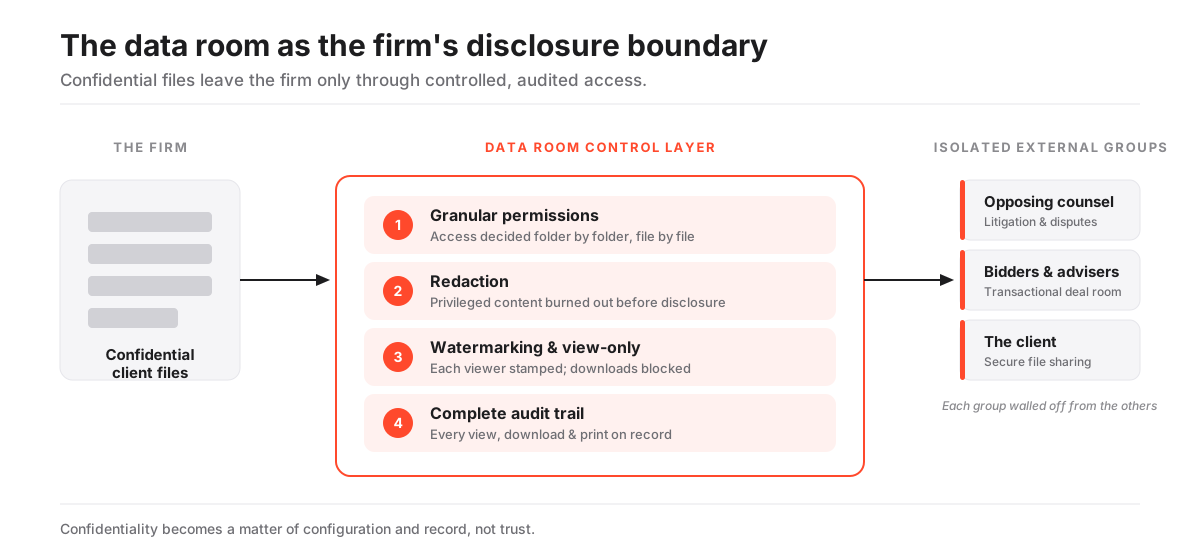
The diagram above is the whole model in one picture. Your files sit on the left, and they never reach an outside party raw. Everything passes through a control layer of permissions, redaction, watermarking and audit, then lands in three isolated external groups that cannot see each other. Keep that shape in your head; the rest of this guide is just how to build it.
When you actually reach for one
Firms reach for a data room whenever confidential documents have to cross the firm’s boundary to a party the firm does not fully control. In practice that lands in three broad modes, and it is worth being honest about which one you are in, because it changes how you configure the room.
- Transactional and corporate. The firm runs, or advises on, an M&A sale, a financing, a real estate deal or a restructuring, staging the diligence file for the other side’s counsel and advisers. Here you care about structured Q&A, staged access, and a tidy index.
- Litigation and disputes. The firm exchanges discovery, expert reports and privileged-log documents with opposing counsel, courts or arbitration panels. Here the audit trail earns its keep, because the record of what was produced and when can matter as evidence.
- Client file sharing. The firm gives a client, or a client’s board, a controlled window into their own matter file, contracts or closing binder without emailing sensitive attachments. Here you want simple, view-only convenience and very little friction.
The useful insight is that one platform serves all three. You do not buy three tools; you configure one room three ways.
A disputes room prioritises immutable logging and redaction. A deal room prioritises Q&A and staged access. A client room prioritises a clean, view-only experience your client can open on a phone. Same software, different switches.
That is also why a single firm-wide account usually beats a room per matter bought ad hoc, a point we come back to when we talk about running many matters at once.
Why email and the shared drive keep failing you
Because a firm’s obligations to protect client information are unusually strict, and consumer tools cannot enforce or evidence them. Under the widely adopted duty of confidentiality, a lawyer must make reasonable efforts to prevent the inadvertent or unauthorised disclosure of information relating to a client, a standard the American Bar Association sets out in Model Rule 1.6(c) and reinforces through its guidance on technology competence.
“A lawyer shall make reasonable efforts to prevent the inadvertent or unauthorized disclosure of, or unauthorized access to, information relating to the representation of a client.”
ABA Model Rule 1.6(c)
Read that standard against the tools most firms reach for by default and the gaps are obvious. A misaddressed email cannot be recalled. A shared link keeps working after the recipient leaves the deal. Neither leaves the firm a record it can produce later. Those are not edge cases; they are the two most common ways confidential material walks out of a firm.
A data room answers each failure mode directly. Access is granted to a named seat rather than an address, so a fat-fingered recipient never gets in. It can be revoked the moment a person leaves the matter. And every action sits in a log the firm controls, so you can say precisely what was disclosed and to whom.
The exposure is measurable, not theoretical. In the ABA’s annual Legal Technology Survey Report, roughly a quarter of responding firms said they had experienced a security breach at some point, a figure that has held stubbornly high across recent years.
A purpose-built room does not make a firm breach-proof. But it removes the two most common failure modes, and it gives the firm a defensible account of its own diligence.
The four controls that protect privilege
Privilege is fragile. Disclose a protected document to the wrong party, even by accident, and a firm can be arguing about waiver for months.
A data room reduces that risk in four concrete ways, and each maps to a control counsel already understand. Treat these as the four dials you set on every matter.
- Granular permissions decide access folder by folder and file by file, so a paralegal, a client and opposing counsel each see only their slice. This is where most mistakes happen, so it is worth reading the permissions guide on how group-based access works before you configure your first serious room.
- Redaction removes privileged or personal content before a document is produced. The distinction that matters: the better rooms burn the redaction into the rendered file rather than merely hiding a layer a recipient could peel off. The redaction glossary entry explains why a black box on screen is not the same as text being gone.
- Dynamic watermarking and view-only rendering stamp each viewer’s identity across the page and stop downloads on the most sensitive material, which deters the screenshot and the casual leak. The guide on watermarking and fence view goes deeper on how far this actually goes.
- A complete audit trail records every view, download and print, so the firm can demonstrate exactly what was disclosed, to whom and when. That log is the evidence that settles a later dispute about production or inadvertent disclosure.
The through-line: confidentiality stops being a matter of trust and becomes a matter of configuration and record. You are not asking the other side to behave. You are building a room where misbehaviour is either blocked or logged.
Security features and certifications to insist on
Require independent certification, strong encryption and enforced access controls as a floor, not a wish list. A firm cannot delegate its confidentiality duty to a vendor’s marketing page, so the signals that count are the ones a third party has audited.
Here is the short list to check before you shortlist:
- ISO/IEC 27001, the internationally recognised information-security management standard published by the ISO.
- SOC 2 Type II reporting, which tells you the controls held over a period, not just on the day of the audit.
- Encryption in transit and at rest, table stakes but confirm it in writing.
- Enforced two-factor authentication, and single sign-on for firm-wide deployments so you can manage access centrally.
- Data residency controls where the matter touches personal data of individuals in Europe, which under the GDPR regime move from preference to requirement.
To make the configuration concrete, the table below shows how the same room gets set up differently across the three legal use cases. Notice that the controls do not change, only which ones you lean on.
How the same room is configured across three legal use cases
| Capability | Transactional room | Litigation room | Client file room |
|---|---|---|---|
| Document-level permissions | Yes | Yes | Simplified |
| Redaction of privileged content | Selective | Yes | Rarely |
| Dynamic watermarking and view-only | Yes | Yes | Yes |
| Structured Q&A workflow | Yes | Not typical | No |
| Immutable, exportable audit trail | Yes | Critical | Nice to have |
| Data residency controls | If cross-border | If cross-border | Usually not |
When you are scoring vendors in earnest, the security features checklist and the guide to VDR certifications are the fuller references. Use them to turn a marketing claim into a yes or no you can defend to a client.
VDR or your own document system?
For sharing outside the firm, almost always the VDR. But the two tools solve different problems, and most firms end up running both.
A legal document management system organises the firm’s internal work product and matter files; it is built for the people inside the firewall. A virtual data room is built for the moment documents have to reach people outside it, under permission and audit. The question is not which to own. It is where each one’s job ends.
Purpose-built VDR vs sharing from an internal system
Pros
- External-facing controls (per-file permissions, watermarking, view-only) designed for non-firm users
- Audit trail scoped to a single matter and exportable for the record
- Structured Q&A and staged access for transactions
- No need to grant outsiders any access to internal firm systems
Cons
- A recurring cost on top of the firm's existing document platform
- Another system for staff to learn and administer
- Overkill for a one-off, low-sensitivity file where a secure link would do
- Duplicated storage unless the firm manages what lives where
The practical rule most firms settle on is simple enough to put on a sticky note. Keep working files in the internal system, and open a data room the moment a matter requires disclosing documents to a party the firm does not employ. When in doubt, that boundary is where the VDR earns its cost.
How to set up a data room for a legal matter
Setup is quicker than most first-time users expect, because the effort sits in structure and permissions rather than the software.
The reliable sequence is: build and index the room privately, load access by group, switch on the security controls before anyone external arrives, and only then invite the outside parties. Do it in that order and you never expose a document you meant to redact.
How to set up a virtual data room for a legal matter
A defensible setup a firm can stand behind if the process is later questioned.
Estimated time: 90min
-
Map the index to the matter
Build the folder tree to mirror the diligence request list, discovery categories or closing checklist before uploading, so reviewers find each document where they expect it.
-
Load and index the documents
Bulk upload the file, order folders to match the index, and run optical character recognition so scanned exhibits and contracts are fully searchable.
-
Redact before you expose
Apply privileged and personal-data redactions to the rendered files, and confirm the redaction is burned in rather than a hideable layer, before granting any external access.
-
Create groups, not individual grants
Set up groups for each external party (client, opposing counsel, bidder, adviser) and grant folder rights to the group, keeping each party isolated from the others.
-
Turn on watermarking, view-only and 2FA
Enable dynamic watermarking, view-only rendering on the most sensitive folders, and enforced two-factor authentication before the first outside invitation goes out.
-
Invite, then monitor the log
Release access to each group, then use the audit trail and activity view to confirm who has reviewed what, and to spot access that should be revoked.
Two of those steps cause almost all the pain, so it is worth deepening them. The standalone walkthrough on how to set up a virtual data room covers the mechanics in more depth, and the guide on granting and revoking access explains the group model, which is the single most error-prone part of the job. If you read only one before your first legal room, read the second.
A short do and don’t list
The setup sequence tells you what to do. This list tells you what firms get wrong.
- Do redact against the rendered file the reviewer will actually see, then reopen that exact version yourself to confirm the text underneath is gone.
- Do grant rights to groups, so adding a fourth bidder is one invitation, not a folder-by-folder rebuild.
- Do turn on watermarking and 2FA before the first external invite, not after someone complains.
- Don’t grant to individuals for a room that will grow; you will lose track of who can see what.
- Don’t reuse one folder tree across two adverse parties and rely on hiding folders; build the isolation into the group structure instead.
- Don’t delete the room the day the matter closes. Export the audit trail and archive it first.
- Don’t assume a secure link is enough for anything privileged. If it is confidential enough to worry about, it belongs behind a seat.
Running many matters without losing the plot
A busy practice may run dozens of live rooms at any moment, each with its own client, opposing parties and confidentiality wall. Get the account structure wrong and it becomes ungovernable fast. Get it right and it is boring, which is exactly what you want from confidentiality infrastructure.
The right shape is one firm-wide account that isolates each matter from the next, with permissions and billing that map to how the firm actually works. Each matter is a walled room; your own team carries a consistent role across all of them.
A separate ad hoc account per matter is the anti-pattern: scattered logins, no central audit, and no way to prove firm-wide diligence.
Two capabilities decide whether this scales, and both are worth asking about directly during a demo:
- Clean central administration, so a data room administrator can provision, archive and audit rooms from one place rather than chasing scattered logins.
- Cost transparency at the matter level, so the firm can attribute or pass through the expense to the right client engagement.
Pricing pages rarely tell you either of these, so put the questions to the vendor. How many parallel rooms does a plan allow, and can you bill per matter? If the answer is vague, treat that as a signal about how the tool behaves at scale.
Turning an ethical wall into a permission
When a firm erects an ethical wall, screening particular people from a matter to manage a conflict, the wall is only as good as its enforcement. A verbal instruction and a note in the file are hard to prove and easy to breach by accident.
A data room lets you express the screen as an access rule the software applies to every folder and document, and then records that it held.
Three settings do most of the work:
- Group-based permissions place screened personnel outside the matter group, so the room simply never serves them the documents.
- View-only rendering and download blocks stop a walled file leaving the room even if someone forwards a login.
- The audit trail gives the firm contemporaneous evidence that the screen was in place and was not crossed, which is exactly the record that reassures a court or a client if the wall is ever questioned.
Configured this way, the room does not just describe the ethical wall. It is the wall. That shift, from policy on paper to permission in software, is the single most underrated reason a firm managing conflicts should be on a real data room rather than a shared drive.
What it costs a law firm
Costs range widely because the use cases do, from a single small matter to a firm-wide deployment across every practice group.
A lean single-matter room can start around $100 per month. A busy transactional or disputes room commonly lands in the mid hundreds. A multi-matter firm-wide contract is usually quoted per engagement.
Watch the billing model as closely as the headline number, because it decides what a heavy matter actually costs. Per-page pricing can spike on a document-heavy discovery exercise, while flat-rate plans cap it. The table below is a planning aid, not a price list, so treat every figure as indicative and confirm current pricing with the provider.
Indicative data room cost by legal matter type (USD, confirm with the provider)
| Matter type | Typical room | Indicative cost | Common billing model |
|---|---|---|---|
| Single small matter | One client, modest file, few external users | $100 to $400/mo | Flat monthly or per-page |
| Transactional / deal room | Bidders and advisers, active Q&A | $400 to $1,500/mo | Flat rate with user tiers |
| Litigation / eDiscovery | Large document set, opposing counsel | $500 to $2,000+/mo | Per-page or per-GB storage |
| Firm-wide, many matters | Central admin, many parallel rooms | Custom / annual | Per-engagement or seat licence |
The traps are the same ones that catch every buyer: storage overages on a heavy discovery load, per-user charges as a matter team grows, and premium security features sold as extras rather than baked into the plan.
The guide to the hidden costs of virtual data rooms and the explainer on per-page vs flat-rate pricing show how matter length and document volume decide which model actually wins. If you are budgeting across a mix of matters, our pricing overview is the fastest way to see the ranges in one place.
Where the room fits in litigation and eDiscovery
In contentious work the room becomes a controlled exchange point where the audit trail carries evidentiary weight. When a firm produces documents to opposing counsel, a court or an arbitral tribunal, the record of exactly what was made available, to whom and when can itself become relevant if a dispute arises over the scope or timing of production. A data room that timestamps and logs every access gives the firm a defensible chain of custody that a folder of emailed PDFs never can.
Be clear about the boundary, though. The room is not a full eDiscovery review platform, and it does not replace one for large-scale processing, culling and coding.
What it does well is the secure exchange at the ends of that process: staging a produced set for the other side under watermark and view-only controls, holding an expert’s confidential exhibits, or giving a tribunal time-limited access to a bundle. The common pattern is to pair a review platform for the heavy lifting with a data room for the disclosure itself.
How to choose a provider
Match the room to the firm’s work, then test it on a real matter before committing. A boutique running the occasional transaction has very different needs from a full-service firm juggling deals, disputes and client portals at once, and no scorecard survives contact with your actual index.
Here is the sequence that keeps the decision honest:
- Score on the fundamentals. Redaction quality, permission granularity, audit depth, certified security, and honest total cost for your matter mix. These are the non-negotiables.
- Weigh the practicalities. How quickly your team can get a room live, and how well the provider supports many parallel matters under one account.
- Run a real matter through it. Load your actual index, apply your real redactions, and build your true permission structure. Do this in two or three rooms before you sign anything.
Where to look while you shortlist depends on your caseload. Enterprise-grade platforms such as Intralinks and Datasite are built for large, complex transactions. HighQ and Firmex are frequently seen inside legal practices. Platforms including iDeals and Ellty are among the options worth testing where speed of setup and cost discipline matter. Most providers offer a free trial, so use it: a room that demos beautifully can still fumble your redaction workflow.
To turn all of this into a scored decision rather than a gut call, the best VDRs for law firms shortlist and the how to choose a virtual data room guide are the two references to work through.
Frequently asked questions
Does using a virtual data room satisfy a firm's confidentiality obligations?
It helps a firm meet the reasonable-security standard those obligations impose, but the tool alone is not compliance. The duty is met by combining a certified, well-configured room with sound practice: correct permissions, redaction before disclosure, enforced authentication and staff who use the controls. The room gives you the mechanism and the audit record; the firm still supplies the judgement.
Can opposing counsel and clients use the same room?
They can use the same platform, but they must sit in separate, isolated groups that cannot see each other or each other's access. Group-based permissions keep a client, opposing counsel and third-party advisers walled off within one room. Misconfigured permissions that let one party glimpse another's folder are the most serious and most avoidable risk in a legal room.
Is redaction in a data room reliable enough for privileged material?
It can be, provided the redaction is burned into the rendered document rather than applied as a layer that a recipient could remove. Confirm with the provider that redactions are permanent in the version reviewers receive, test it on a sample before you rely on it, and keep an unredacted master separately. Never assume a black box on screen means the text beneath is gone.
Do we need a separate room for every matter?
Not a separate account, but usually a separate room per matter within one firm-wide workspace. Isolating each matter preserves confidentiality walls and keeps the audit trail clean and matter-specific, while central administration lets the firm provision, archive and bill without scattered logins. Ask providers how many parallel rooms a plan allows.
How long should a firm keep a room open after a matter closes?
Long enough to export and archive the full audit trail and document set, then in line with the firm's retention policy and any client agreement. The exported record is a defensible account of what was disclosed and when, which can matter if a question arises years later. Archive it deliberately rather than deleting the room at close.
The consistent lesson across transactional, contentious and client-facing work is the same. For a law firm a data room is not where documents are stored, it is where the firm controls and proves the disclosures its confidentiality duty turns on.
Get the index, the redactions and the permissions right, and the software recedes into the background where it belongs. That is the whole point. When it is working, nobody notices it, and no confidential file ever ends up somewhere it should not be.
