
Using a data room for a financial audit: PBC lists and auditor access
On this page
- What is a PBC list?
- How an audit cycle runs, and where the room sits in it
- When a data room beats email, shared drives and auditor portals
- Pros and cons of running the audit in your own room
- How to map a PBC list to data room folders
- Step by step: setting up the room for audit season
- What auditor access should look like
- Handling auditor questions without an email storm
- Group audits, component auditors and several entities
- Comparing data room options for audit use
- After sign-off: retention, lockdown and reuse
- Common mistakes finance teams make
Do you actually need a data room for an audit?
Usually not for a small, simple one. Often yes once the PBC list passes a few hundred lines, three or four people on your side are uploading, and the controller is spending Friday afternoons answering “did we already send the lease schedule?”
That is the blunt answer, and the rest of this guide is about where the line sits.
The question comes up because audits have quietly become document logistics exercises. The audit itself is judgement and testing. The client side of it, for most finance teams, is a long spreadsheet of requests, a shared inbox, and a growing doubt about which version of the fixed asset register went to which senior associate.
A data room does not make the audit shorter by itself. What it does is make the client side of the audit legible: one list, one place, one record of what was handed over.
What is a PBC list?
A PBC list (short for “prepared by client” or “provided by client”) is the auditor’s itemised request schedule: every reconciliation, ledger extract, contract, confirmation and supporting schedule the company must supply before and during fieldwork.
It is normally issued at or after the planning meeting, often as a spreadsheet with a request number, a description, an owner on the client side, a due date and a status column. A mid-sized company can receive anywhere from 150 to well over 500 lines, depending on the number of entities, the complexity of revenue and the auditor’s risk assessment.
The list is not static. Items get added after interim testing, samples are selected from populations you already provided, and follow-up questions spawn new requests. That churn is the real workload, and it is where email collapses first.
If you have ever built a due diligence request list for a sale, the shape will be familiar. Our due diligence checklist covers the deal version; the audit version is narrower and repeats every year, which is exactly why it rewards a proper structure.
How an audit cycle runs, and where the room sits in it
An annual audit is not one burst of activity. It is a sequence of overlapping phases spread over roughly six months, and the PBC list runs through almost all of them.
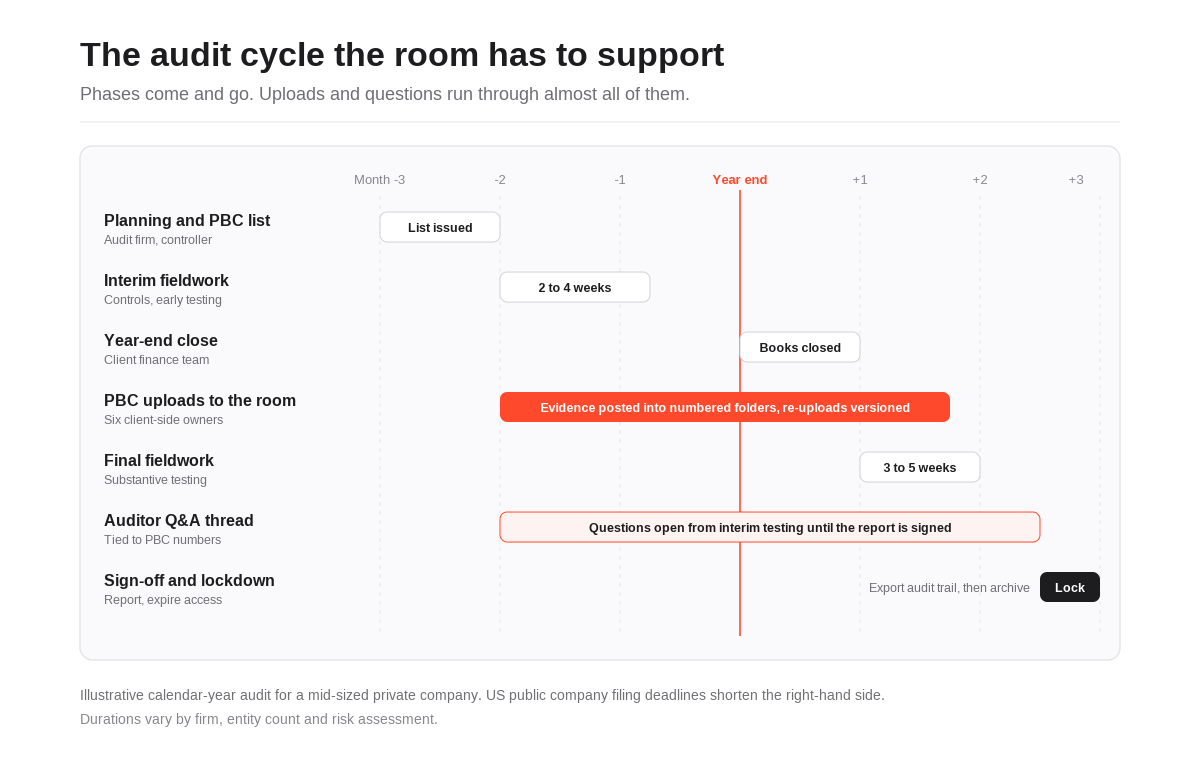
The chart shows a typical calendar-year audit for a private, mid-sized company. Planning starts around three months before year end. Interim fieldwork, usually controls testing and early substantive work, follows. The finance team then closes the books, the auditors return for final fieldwork, and the report is signed some weeks later.
Two bars run almost the full width: uploads and questions. Those are what the room is managing.
For US public companies the end of the bar is fixed by filing deadlines rather than habit. The SEC sets 10-K deadlines of 60, 75 or 90 days after year end depending on filer status, which compresses final fieldwork hard and makes a clean, searchable evidence store more valuable, not less.
Those figures come from a fictional distributor we will call Tamsin Freight, used throughout this guide. They are not survey data. They are the kind of numbers a controller sees when they count, and the middle one is the one that matters: more than a third of the work arrives after the list you planned for.
When a data room beats email, shared drives and auditor portals
There are four common ways to move PBC evidence. Each has a real place.
Email is fine for a tiny audit and terrible for anything else, because there is no single status, attachments multiply, and nobody can prove later what was sent. A shared drive fixes the storage but not the control: folders get overwritten, external access is usually a link anyone can forward, and the activity log is thin.
Many audit firms run their own client portal, and for plenty of companies that is the right answer. The portal is built around the auditor’s workflow, ties directly into their request list, and costs you nothing extra.
A data room earns its place when the audience is wider than one audit firm, or when you want the record to stay with you.
| Channel | Request tracking | Access control | Record of what was provided | Reusable beyond the audit | Who owns it |
|---|---|---|---|---|---|
| Manual, in a spreadsheet | None after sending | Scattered across inboxes | No | Nobody, really | |
| Shared drive | Folder names only | Coarse, often link-based | Basic file activity | Partly | You |
| Auditor’s client portal | Strong, mapped to their list | Set by the audit firm | Strong, held by the auditor | Rarely | The audit firm |
| Virtual data room | Strong if folders mirror the list | Granular, per group and folder | Full audit trail you can export | Yes: lenders, board, buyers | You |
The last column is the quiet decider. When the auditor’s portal closes at the end of the engagement, the record of what you supplied lives on their side. In your own room, it lives on yours, next to the same documents you will hand a lender at the covenant review or a buyer during an M&A process.
Pros and cons of running the audit in your own room
Your own data room for the annual audit
Pros
- One status view for every PBC line, owned by the finance team rather than reconstructed from email.
- Scoped access: the audit team sees the audit folders, the tax advisers see tax, and nobody sees the board pack unless they should.
- A dated audit trail of every upload and download, useful if a dispute ever turns on what the auditor was given.
- The same structured evidence set carries into lender reporting, board reviews and sale preparation without being rebuilt.
- Version history stops the wrong draft of a reconciliation reaching the senior on the engagement.
Cons
- Some audit firms will not work outside their own portal, or will mirror everything into it anyway, which doubles the handling.
- A room costs money every month it is open; a firm-provided portal usually costs the client nothing.
- Someone has to own the structure: a room with a lazy folder tree is just a shared drive with a login screen.
- Download restrictions that make sense for bidders frustrate auditors who must retain copies as evidence.
The second con deserves a straight answer. If the only thing the room does is replace a portal your auditor already provides at no charge, the economics are weak. The case improves fast when the room is a standing finance repository used across the year, not a one-off for fieldwork.
How to map a PBC list to data room folders
The structure is the product. A room that mirrors the PBC list one to one is easy for the audit team to work in and easy for you to chase.
A practical pattern is to use the auditor’s own request numbers as folder or file prefixes, grouped by audit area. That way the senior can search for “C-14” and land on the cash reconciliation without asking.
| Audit area | Typical PBC requests | Usual client owner | Suggested folder | Access for the audit team |
|---|---|---|---|---|
| Planning and entity | Org chart, board minutes, significant contracts list | Controller, company secretary | 01 Planning | View and download |
| Cash and debt | Bank reconciliations, confirmations, loan agreements, covenant calcs | Treasury | 02 Cash and debt | View and download |
| Revenue and receivables | Revenue by stream, AR ageing, credit notes, sample invoices | Revenue accounting | 03 Revenue | View and download |
| Inventory and costs | Count sheets, costing, provisions, reserve analysis | Operations finance | 04 Inventory | View and download |
| Fixed assets and leases | Register, additions support, lease schedule, impairment review | Fixed asset accountant | 05 Assets and leases | View and download |
| Payroll and HR | Payroll reconciliation, headcount, bonus accruals, sample payslips | HR, payroll | 06 Payroll (restricted) | View only, named seniors |
| Tax | Provision workings, returns, correspondence | Tax team or adviser | 07 Tax | Audit tax specialists only |
| Legal and contingencies | Litigation summary, legal letters, claims | General counsel | 08 Legal (restricted) | Partner and manager only |
Two rows carry a “restricted” note for a reason. Payroll files hold personal data on every employee, and litigation material can be privileged. The audit team needs to see enough to test, not a copy of every payslip on every laptop on the engagement.
If you want a starting tree rather than a blank screen, the data room index template can be reshaped around audit areas in a few minutes, and our folder structure guide explains why numbering survives longer than clever names.
Step by step: setting up the room for audit season
How to set up a data room for an annual audit
A setup routine that turns the auditor's PBC list into a tracked, permissioned evidence room before the planning meeting.
Estimated time: 3h
-
Agree the channel with the engagement partner
Before anything is built, confirm that the audit firm will accept evidence through your room, whether they will still mirror files into their own system, and which of their people need access.
-
Import last year's PBC list as the skeleton
Use the prior year list to create numbered folders by audit area, then adjust once the current list arrives. Most lines repeat, so the tree is largely ready on day one.
-
Create permission groups, not individual grants
Set up groups such as audit core team, audit tax specialists, audit IT specialists and audit partner and manager, then assign folders to groups. People join and leave groups as staffing changes.
-
Assign client-side owners per folder
Give each internal owner upload rights to their own folders only, so payroll can post payroll and treasury can post bank reconciliations without seeing each other's material.
-
Switch on notifications and the Q&A module
Route auditor questions through the room's Q&A so each query is tied to a request number and an owner, and turn on upload alerts so the audit senior knows when evidence lands.
-
Run a dry upload and a test login
Upload one complete area, ask the audit senior to log in and find it, and fix naming or permission problems before the full list goes live.
The first step is the one people skip. It is also the one that most often decides whether the room helps. An audit firm that has agreed the channel up front will use it; one that discovers it at fieldwork will politely ask for everything again in its own portal.
Group-based access matters more in an audit than people expect, because audit staffing changes mid-engagement. Seniors rotate, specialists drop in for a week, and a reviewing partner may only need the summary folders. Our guide to granting and revoking data room access covers the mechanics.
What auditor access should look like
Here is where audits part company with M&A.
In a sale process, the default is least privilege with view-only rendering, because the people reading are potential competitors. Auditors are not counterparties in that sense. They are bound by professional duties of confidentiality, and they are required to retain evidence supporting their opinion in their own workpapers. A room that blocks downloads simply pushes them back to email.
So the sensible default flips: the core audit team gets view and download on the audit folders, with watermarking left on so every exported page carries a name.
Restriction moves from the action to the scope. Payroll, legal and board materials sit behind narrower groups. The room limits which folders the audit team can open, not what they can do with the files once they have legitimately opened them.
A few settings are worth checking:
- Watermarks with the viewer’s name and date on downloads from restricted folders, so a stray copy is traceable.
- Two-factor authentication for every external user, including the audit partner who logs in twice a year.
- Expiry dates on group access, set to a week or two after the expected sign-off date.
- No access to staging folders where your team drafts reconciliations before they are final.
The permissions explainer walks through the levels in detail; it also explains what a viewer-specific watermark actually adds.
Handling auditor questions without an email storm
A large share of audit friction is not documents. It is questions about documents.
“The AR ageing does not tie to the trial balance by $18,400; please explain.” “Sample 7 of 25 is missing a signed delivery note.” Each of these has an owner, a deadline and an answer that may itself be a new document. In email they fracture into reply chains with four people copied, and the answer to sample 7 arrives in a thread about sample 12.
A Q&A module fixes this by attaching every question to a specific folder or file, assigning it to an owner and keeping status in one place. When the answer is a document, it goes into the right folder and the question closes against it.
This is the same discipline that makes data room Q&A in a deal manageable, adapted for a friendlier counterparty. The difference is volume and tone: an audit might generate several hundred small questions rather than dozens of loaded ones.
Two habits help. Ask the audit team to always reference the PBC number in a question. And give one person on your side the job of triaging new questions daily, because unassigned questions are what turn a three-week fieldwork window into five.
Group audits, component auditors and several entities
Single-entity audits rarely need much structure. Groups do.
Picture a parent company with subsidiaries in three countries. The group auditor signs the consolidated opinion, but local component auditors test the subsidiaries, sometimes from a different firm entirely. Each component team needs its own entity’s ledgers, bank confirmations and contracts. None of them needs the others’. The group team needs the consolidation workings and, increasingly, read access to what the components were given.
A shared drive cannot express that without a tangle of duplicated folders. A room can, because access is set per group and per folder rather than per link.
The usual pattern is a top-level folder per entity, mirrored PBC numbering inside each, and a separate consolidation area visible only to the group audit team and your group reporting staff. Component auditors are created as their own permission groups, scoped to one entity apiece.
Two further benefits show up only at this scale.
First, the room becomes the single place where the group team can see which component is behind. Upload activity per entity folder is an honest progress report; nobody has to ask.
Second, the audit trail answers a question group auditors increasingly ask: what exactly did each component team receive, and when? That record supports the group team’s own review of component work, and it is far easier to export than to reconstruct from three firms’ inboxes.
Language and time zones add friction but not much complexity. Name folders in one working language, allow local-language files inside them, and set the room’s notifications and alerts so that each entity’s owner hears about questions on their own folders, not everyone else’s.
Comparing data room options for audit use
Most full-featured data rooms can run an audit. The differences that matter here are different from the ones that matter in a competitive sale.
What matters when a data room runs an audit, and how provider types differ (indicative, confirm with the provider)
| Requirement | Full-featured VDR with published pricing | Quote-priced enterprise VDR | File-sharing platform with a data room add-on |
|---|---|---|---|
| Folder-level permission groups | Yes | Yes | Varies by plan |
| Q&A tied to documents | Yes | Yes | No |
| Exportable audit trail | Yes | Yes | Basic |
| Version history on re-uploads | Yes | Yes | Yes |
| Year-round use at predictable cost | Monthly plan, e.g. from $149/mo | Annual contract by quote | Per user, e.g. from $15/mo |
| Fast setup without a sales call | Yes | Usually a sales process | Yes |
Among rooms with published pricing, Ellty starts from $149 per month (indicative) with a 14-day free trial and covers the controls an audit actually uses: granular permissions, Q&A, watermarking, DRM and a full audit trail, in the same class as iDeals and Datasite on core deal features. Quote-priced rooms such as iDeals or Intralinks make most sense when the finance team already holds an annual contract for deal work and the audit simply becomes another project inside it.
For general-purpose platforms, Box or Citrix ShareFile can carry an audit if your company already lives in them, but neither offers the document-level Q&A that keeps a busy fieldwork window under control. The pricing overview lays the plans side by side.
After sign-off: retention, lockdown and reuse
The audit report is signed. The room is not finished.
First, lock it. Remove upload rights from client owners, expire the audit team’s access, and export the full audit trail together with the folder index. That export is your record of what was provided, at what time, to whom.
Second, think about retention separately from the auditor’s. The audit firm keeps its own workpapers under its professional rules; in US public company audits, standards set by the PCAOB govern how long that documentation is held. Your company’s retention obligations come from tax law, company law and your own policies, and they are not discharged by the auditor holding a copy.
Third, reuse it. The cleanest audited evidence pack your company will ever have exists for a few weeks after sign-off. Lenders want parts of it at the covenant review. A board committee may want the controls findings. If a sale is ever on the table, buyers will ask for three years of audited financials and the support behind them.
Tamsin Freight, our illustrative distributor, cloned its audit room into a lender folder in an afternoon. A year later, when a strategic buyer approached, the finance section of the sale room was already 70 percent built.
That is the real argument for running audits in a room you own. The first audit pays for the structure. The second one barely needs setup. By the third, the room has become the finance team’s memory. When the room does eventually come down, our guide to closing and archiving a data room covers what to export first.
Common mistakes finance teams make
Most audit room problems are self-inflicted, and most are predictable.
Building the tree from scratch every year. The prior-year PBC list is 80 percent of this year’s. Clone the room, clear the files, keep the structure.
Uploading drafts into live folders. Once an auditor has downloaded a draft reconciliation, it is evidence. Use a staging area that the audit team cannot see, and move files across only when they are final. Version control in a data room explains how re-uploads are tracked.
Granting access person by person. It works for three auditors and fails for twelve. Groups survive staffing changes; individual grants become a cleanup job nobody does.
Leaving access open after sign-off. An audit team that still has access in July to a room built in February is a finding waiting to happen in your own security review.
Assuming the room replaces the conversation. It does not. The planning meeting, the walk-throughs and the closing meeting still happen. The room just means nobody spends them asking whether a file was sent.
Frequently asked questions
What does PBC stand for in an audit?
PBC stands for prepared by client, sometimes read as provided by client. A PBC list is the auditor's schedule of reconciliations, ledgers, contracts and supporting documents the company must supply, usually with a request number, an owner, a due date and a status for each line.
Will my auditor accept documents through our data room?
Often, but not always. Many audit firms run their own client portals and some require them. Agree the channel with the engagement partner before planning, confirm whether they will still copy files into their own system, and make sure their IT and confidentiality requirements are met by your room.
Should auditors get view-only or download access?
Usually download access on the audit folders. Auditors must retain evidence supporting their opinion in their own workpapers, so view-only settings mostly push them back to email. Keep watermarking on, and restrict sensitive areas such as payroll and litigation to smaller groups rather than blocking downloads for everyone.
How long should we keep the audit data room open?
Keep active access open until sign-off plus a short buffer for late queries, then expire the audit team's access and lock uploads. Export the audit trail and folder index before you archive, and keep the room or its export for as long as your own retention policy requires, which is separate from the auditor's retention rules.
Is a data room worth it for a small company audit?
Rarely on its own. If the audit is single-entity, the PBC list is short and the audit firm provides a portal, the extra cost buys little. A room becomes worthwhile when the list is long, several people upload, or the same evidence also goes to lenders, a board or future buyers.
