
Virtual data rooms for small businesses
On this page
- The one-sentence test
- Do small businesses actually need a VDR? Mostly no, sometimes yes
- 5 events that justify a room
- 1. You are selling the business
- 2. You are raising a round
- 3. You are applying for real lending
- 4. A big customer runs a security review
- 5. You are bringing in a partner or co-owner
- The four capabilities a plain folder lacks
- Why a shared folder quietly fails you
- Small business versus enterprise: what actually changes
- The feature list, sorted into three piles
- Why certification is not optional
- What it costs, tier by tier
- The two pricing traps that catch small teams
- How long to keep the room open
- Use the free trial, and use it for real work
- How to choose on a small-business budget
- What documents to put in the room
- The mistakes that cost small teams the most
- Five questions to ask before you pay
- A realistic timeline for a first room
- Who should run the room internally
- So is it worth it for a small business?
It is a Tuesday. A buyer’s lawyer emails and asks, politely, for your last three years of financials, your key contracts, and your cap table. In one place. By Friday.
Until that email, “virtual data room” sounded like something built for other people. Investment bankers. Fortune 500 legal teams. For sharing files day to day, it is exactly that: overkill.
Then the email lands, and a shared Drive folder stops being good enough. An outsider now needs structured, provable access to your most confidential documents, and they expect to see who touched what.
That Tuesday is what this guide is written for. Lean budget. No deal team. A need to look organised in front of a buyer, investor or lender without hiring anyone to run the room.
The one-sentence test
If you can name the outside party and the deadline, you probably need a data room.
If you cannot, you probably do not. Everything below is detail. That sentence is the filter.
Do small businesses actually need a VDR? Mostly no, sometimes yes
Not for everyday work. Not on a subscription you renew out of habit.
For routine file sharing, consumer cloud storage is cheaper, simpler and completely fine. You need a data room only around a specific, high-stakes event where a third party reviews sensitive files and expects a record of who accessed what. Outside those events, the extra control is cost with no payoff.
The distinction is control and proof. A shared folder tells you a link was opened. It does not tell you which investor read your cap table twice, it cannot stop a screenshot being forwarded, and it leaves you with no defensible record if a deal turns sour.
A data room adds three things a folder cannot: document-level permissions, dynamic watermarking, and a complete audit trail. That is precisely the stack a buyer’s lawyer or a lender’s credit team assumes is already in place. For the underlying mechanics, how a virtual data room works walks through the same controls in detail.
For a small business, the value of a data room is rarely the storage. It is the ability to prove exactly who saw which document, and to revoke that access the instant a deal changes course.
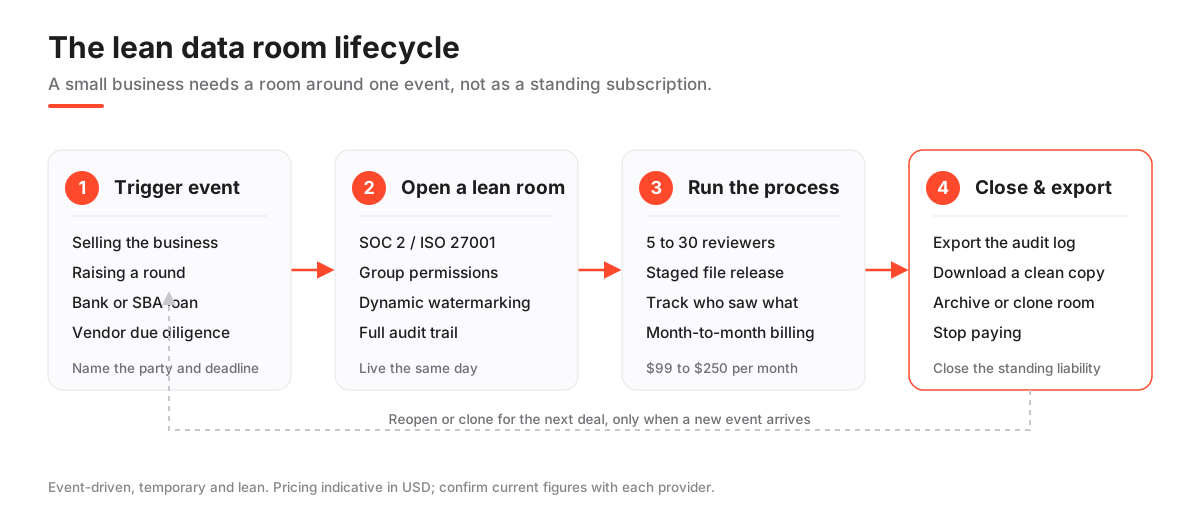
5 events that justify a room
You almost never open a room for a routine reason. You open one around a transaction or a formal request.
Here are the five that come up for small businesses, in rough order of how often they trigger a room.
1. You are selling the business
Even a sub-$5M sale triggers buyer due diligence. The buyer’s advisers will ask for corporate records, financials and contracts, and they will want them in one organised place.
A tidy, permissioned room does double duty. It hands over the files, and it signals a well-run company. That impression can shorten the process and blunt the price chipping that comes from a chaotic handover.
2. You are raising a round
Angel and seed investors increasingly ask for a structured data room rather than a folder of PDFs. It reads as professional, and it spares everyone a dozen back-and-forth email threads.
The room also gives you a signal most founders miss: you can see who actually opened your financials, and how long they lingered. Our guide to a virtual data room for startup fundraising covers how to size and stage a room for a seed or Series A.
3. You are applying for real lending
Larger loan applications, including bank and SBA-style facilities, come with document requests that map neatly onto a data room index. Statements, tax returns, corporate documents, sometimes personal guarantees.
A lender’s credit team reviews a lot of these. Give them a clean, indexed room instead of a zip file and you make their job easier. An easier reviewer is a faster decision.
4. A big customer runs a security review
When a larger customer or enterprise partner runs a procurement or security review, they may require you to share files through an audited channel. A public link or an email attachment can fail their compliance checklist on the spot.
This one surprises small teams. You are not selling or raising anything. You just want to close a deal with a bigger customer, and their process forces the room on you.
5. You are bringing in a partner or co-owner
A buy-in or co-ownership deal means sharing financials, contracts and intellectual property with someone who is not yet fully inside the business. View-only controls and a record of access protect both sides while trust is still being built.
If the deal does not close, you want to have shown the files without having handed over copies. A data room is the only way to do both at once.
The four capabilities a plain folder lacks
Strip away the marketing and a VDR is really four capabilities a consumer folder does not have. Understand these four and you understand what you are paying for.
- Permissions by document and by group. You decide who sees each folder, and you can hide the most sensitive files from all but a restricted group until you are ready.
- Dynamic watermarking. Every page a reviewer views or prints carries their name and a timestamp, which quietly discourages leaks and forwarding.
- A full audit trail. Every view, download and print is logged, so you know exactly who saw what and when, and you keep that record after the deal.
- Instant revocation. The moment a deal changes course, you cut access, and any files already downloaded still carry the watermark.
None of this is exotic. It is table stakes for a transaction, which is why buyers and lenders assume it.
There is a fifth thing worth naming, because small teams underrate it. The room is a signal. A reviewer who opens a clean, indexed, permissioned space forms a quiet judgement about how you run the business long before they read a single number. Sloppy handovers invite hard questions; organised ones buy you the benefit of the doubt.
Why a shared folder quietly fails you
It is worth being blunt about where consumer file sharing breaks down, because “just use a Drive link” is the advice most small teams reach for first.
- No proof of access. You cannot show, months later, exactly who opened which file and when. In a disputed deal, that gap is expensive.
- No revocation that sticks. Kill a share link and any file already downloaded is still out there, unmarked and unlogged.
- No staged disclosure. Everyone with the link tends to see everything, so your most sensitive files sit next to the routine ones.
- No watermark. Nothing discourages a reviewer from forwarding a document to someone you never approved.
Day to day, none of that matters. It matters enormously the week a buyer’s lawyer is reading your contracts. Line a data room up against consumer storage and it comes down to those four gaps, which is really what how a virtual data room works is describing.
Small business versus enterprise: what actually changes
The technology is broadly the same. The scale, the price and the hand-holding are not.
Enterprise rooms assume hundreds of bidders, a dedicated project manager, and a procurement cycle measured in weeks. Small-business needs are the mirror image: one room, a handful of reviewers, live within a day, and a bill you can justify without a board sign-off.
| Dimension | Small business | Enterprise deployment |
|---|---|---|
| Typical reviewers | 5 to 30 | Hundreds, across multiple bidders |
| Time to live | Same day | Days to weeks with onboarding |
| Setup help | Self-serve, occasional support | Dedicated project manager |
| Indicative price | $99 to $250 / mo | Custom, often per-page or per-engagement |
| What you pay for | Security and simplicity | Scale, workflow, integrations |
Pricing is indicative in USD; confirm current figures and included storage with each provider.
The lesson is short. Paying for an enterprise platform to run a $2M sale is like renting a warehouse to store a filing cabinet. The certifications and core controls you want are available at the lean end too, which is why the cheapest virtual data rooms can still clear a buyer’s security bar.
The feature list, sorted into three piles
A short list does most of the work. Certified security, permissions you can set by group, watermarking, and an audit trail. Everything past that is either a convenience or an enterprise feature you can safely skip on a first room.
Here is the same list sorted into the only three piles that matter.
Must have, do not compromise:
- SOC 2 or ISO 27001 certification
- Granular, folder-level permissions
- Dynamic watermarking
- A full audit trail of views and downloads
- Two-factor authentication
Nice to have, if it is in your tier:
- A structured Q&A module for buyer questions
- Engagement heatmaps and analytics
Usually skippable on a first room:
- Deep CRM or document-management integrations
- A dedicated project manager
If a provider buries a must-have behind their top tier, that is a pricing red flag, not a feature to admire. For the full inventory before you decide what to drop, the VDR security features checklist and virtual data room features explained cover each control in plain language.
Why certification is not optional
Because the party reviewing your files often will not accept anything less. And because the cost of getting it wrong is not scaled down to your size.
A single mishandled document can expose customer data or trade secrets, and the financial hit lands the same way whether you are large or small. If anything, small teams feel it harder, because they have no reserves to absorb it.
The numbers make the point. According to IBM’s Cost of a Data Breach Report, the global average cost of a breach reached roughly $4.88M in 2024. Verizon’s Data Breach Investigations Report confirms thousands of breaches at small and mid-sized businesses every year, most exploiting weak access controls rather than exotic attacks.
Certified controls are how a data room proves the basics are covered.
- SOC 2 is audited against criteria set by the AICPA. It is the report a US buyer or lender usually asks to see.
- ISO 27001 is the international standard for information security management, maintained by the ISO. It travels well across borders.
- GDPR applies the moment any EU personal data lands in the room, adding obligations enforced under the GDPR framework, which makes data residency and processing terms matter.
If you handle EU personal data, our guide on GDPR and virtual data rooms unpacks what changes. And when the reviewer is a lender or an enterprise buyer, the certification is often the gatekeeper: no SOC 2 report, no access to their diligence process.
What it costs, tier by tier
Less than the enterprise sticker shock suggests. Lean rooms suited to a small company commonly start around $99 per month and climb into the low hundreds as you add users, storage or a formal Q&A module.
The wide public ranges you see quoted usually reflect banking-grade platforms that a small business does not need. Ignore them. Here is the range that actually applies to you.
| Tier | Indicative monthly | Best for | Typical limits |
|---|---|---|---|
| Entry / single room | $99 to $149 | One deal, small loan, seed round | Capped users and storage |
| Growth | $150 to $250 | Active fundraise or sale | More users, watermarking, basic Q&A |
| Multi-room | $250 to $500 | Serial deals, several partners | Multiple concurrent rooms |
| Per-page legacy | Quote only | Bank-run processes | Charged per page viewed |
All figures indicative in USD; confirm with the provider, since plans, storage and trial terms change frequently.
The two pricing traps that catch small teams
Per-page pricing. A legacy model that can balloon when reviewers browse heavily, because you are billed by pages viewed rather than a flat fee. Our per-page vs flat-rate data room pricing guide explains exactly when it bites.
Overage on users and storage. The headline price looks lean until you add the fourth reviewer or upload a video walkthrough, and the bill jumps. The hidden costs of virtual data rooms guide lists the ones that catch people out.
For a full breakdown by deal size, see how much a virtual data room costs. To compare the lean end head to head on price and security, the compare hub and the pricing page line every provider up side by side.
How long to keep the room open
Only as long as the event lasts, plus a short tail for follow-up questions. For most small businesses that is a matter of months, not years.
A room you leave running out of inertia is the single most common way a lean team quietly overpays for software it stopped using. Month-to-month billing is what keeps the total sane.
The closing discipline is simple:
- Export the audit log for your records, so you keep the proof of who saw what.
- Download a clean copy of everything you shared, in case you need it later.
- Close or archive the room, so confidential files are not sitting in a live, externally accessible space once the reason for sharing them is gone.
Every open room is a standing liability. If you expect to raise or sell again in a couple of years, a provider that lets you reopen or clone a past room saves you rebuilding the index from scratch.
This is also where an annual contract can backfire. Paying twelve months up front for a six-week process is exactly the trap the hidden costs of virtual data rooms guide warns about, so read the billing terms before you sign, not after.
Use the free trial, and use it for real work
Yes, almost always. A free trial is the cheapest way to test whether the interface makes sense, to you and to whoever will actually run the room, before any commitment.
Trial length and included features vary, so read the terms. Then do real work, not a demo click-through.
- Upload a slice of your genuine documents, not sample PDFs.
- Set up two permission groups, one broad and one restricted.
- Turn on watermarking and check how it looks on a real page.
- Invite a colleague as a test reviewer and watch what they see.
If setting a folder permission takes ten confusing clicks now, it will be worse under deal pressure. Our free trial vs paid data rooms guide covers what a trial can and cannot tell you before you pay.
How to choose on a small-business budget
Choose on fit and speed, not on the longest feature list. The right room for a small business is certified, cheap enough to justify for a single event, and simple enough to run without help.
Work through it in order.
How to choose a virtual data room for a small business
A budget-conscious path to a room you can run yourself.
Estimated time: 2h
-
Define the single event
Name the deal, round or request and its deadline. That fixes how long you need the room and how many reviewers will use it, which drives the tier you pay for.
-
Filter for certification
Drop any provider without SOC 2 or ISO 27001. This is non-negotiable and removes the riskiest cheap options immediately.
-
Match tier to reviewer count
Map your realistic number of reviewers and storage need to an entry or growth tier, and ignore multi-room and enterprise plans.
-
Run a real free trial
Upload genuine files, set two permission groups and invite a test user. Judge setup speed and clarity, not the marketing site.
-
Check the exit terms
Confirm month-to-month billing, easy export and a clean way to close the room, so you are not locked into a subscription past the deal.
If you would rather start from a shortlist, our how to choose a virtual data room guide and the best virtual data rooms for startups roundup are built for lean teams. Several of the options we review, Ellty among them, publish a price you can start from and a room that scales up as the deal grows. You can also read individual write-ups such as our iDeals review, or browse every provider on the best data rooms hub.
What documents to put in the room
The same categories a large company shares, just fewer of them. Reviewers expect corporate records, financials, contracts, and anything about intellectual property or key people. A clear index matters more than volume.
- Corporate. Incorporation documents, cap table, shareholder agreements, board minutes.
- Financial. Two to three years of statements, tax returns, current management accounts.
- Commercial. Major customer and supplier contracts, terms of business.
- People and IP. Key employee agreements, trademarks, domains, software or product IP.
- Legal. Any litigation, insurance policies, regulatory licences.
Do not overshare early. Stage the release, keep the most sensitive files in a restricted group, and use view-only rendering. Our guide on what documents go in a data room and the data room folder structure template give you a ready index to copy rather than build from scratch.
The mistakes that cost small teams the most
They are avoidable, and they are expensive in time. They cluster around three habits: overspending, oversharing, and poor structure. Each one quietly undermines the impression of a well-run company that a buyer or investor is looking for.
What to get right:
- Match the tier to one event and bill month to month.
- Set permissions by group before you invite anyone.
- Turn on watermarking and two-factor from the very start.
- Plan the index to mirror the buyer’s own checklist.
What to avoid:
- Buying an enterprise plan for a small deal.
- Dumping every file in with no folder structure.
- Granting broad access instead of staged, group-based rights.
- Leaving the subscription running long after the deal closes.
For the fuller list and how to recover from each, see data room mistakes to avoid and the data room index best practices guide.
Five questions to ask before you pay
Before you hand over a card, get straight answers to these. Vague answers are themselves an answer.
- What is the real monthly price for my number of users and gigabytes? Not the headline tier, the figure with your actual usage.
- Is billing month to month, or am I locked into a year? For a single event, an annual contract is usually the wrong shape.
- Which certification do you hold, and can I see the report? SOC 2 or ISO 27001, and a provider that hesitates here is not for a deal.
- How do I export everything and close the room when the deal ends? Confirm the exit before you need it.
- What is in the trial, and how long does it last? Enough to set up two permission groups and invite a test reviewer, ideally.
If those five come back clean, you are most of the way to a decision.
A realistic timeline for a first room
Small teams overestimate how long a room takes to stand up and underestimate the prep. Here is roughly how the hours actually fall for a first, single-event room.
- Day zero, one to two hours. Sign up on a trial, create the room, and rough out the folder structure to mirror the buyer’s or lender’s checklist.
- Day zero to one, half a day. Gather and rename your documents so filenames are self-explanatory. This is the real work, and it happens outside the software.
- Day one, under an hour. Upload, set your two permission groups, switch on watermarking and two-factor.
- Day one, five minutes. Invite the first reviewer. From here, granting access to a new person is a matter of minutes, not a project.
The lesson: the software is fast, your file hygiene is the bottleneck. If your documents are already tidy, a room can be live and shared the same day.
Who should run the room internally
On a lean team the answer is usually one person, and it should be the person closest to the deal, not whoever is most technical.
- A founder or the finance lead tends to own it, because they know which files are sensitive and which reviewer should see what.
- Keep the reviewer list short and named, and resist the urge to add “just in case” viewers who never open anything.
- Write down, even in a single note, which group sees which folder, so you can hand the room over or reopen it later without re-deriving your own logic.
A room run by committee tends to leak permissions. One clear owner, a short access list, and a written map of who sees what is enough for almost any small-business process.
So is it worth it for a small business?
For a genuine transaction or a formal document request, yes. For routine file sharing, no.
The value is not the storage; you can get that for a fraction of the price elsewhere. It is the proof and control that let a small company run a serious process credibly, revoke access instantly when a deal changes, and hold a defensible record afterwards.
Priced against a single deal, a $150 room is a rounding error next to the outcome it protects. Weigh it deal by deal, as our is a virtual data room worth it guide argues, and you will rarely regret the certified, lean option.
Frequently asked questions
Can a small business use free file sharing instead of a VDR?
For everyday work, yes, and you should; consumer cloud storage is cheaper and simpler. But when a buyer, investor or lender needs auditable, permissioned access to confidential files, free file sharing cannot prove who saw what or stop a document being forwarded, which is exactly what a data room is built to do.
How much should a small business budget for a data room?
Indicative pricing for lean rooms starts around $99 per month and commonly runs to about $250 as you add users, storage or a Q&A module. Because most small businesses only need the room for the length of one event, budget for a few months on month-to-month billing rather than an annual commitment, and confirm current pricing with the provider.
Do small-business data rooms offer a free trial?
Many do. A free trial is the best way to test the interface and permission controls with your own documents before you pay. Trial length and included features vary between providers, so check the current terms and use the trial to do real setup work, not just click through a demo.
How long does it take to set up a room for a small deal?
A basic room can be live the same day, often within an hour, if your documents are ready and your index is planned. The time goes into organising files and setting permissions correctly, not the software.
Do I need SOC 2 or ISO 27001 for a small business?
You do not hold the certification yourself, but your data room provider should. SOC 2 and ISO 27001 are how the platform proves its security is independently audited, and many buyers and lenders will expect to see one of them before reviewing sensitive files through the room.
Once you have shortlisted a couple of certified, lean options and tested them on a trial, the decision is usually clear. Line them up on price and setup speed, and pick the one you can run without help. The compare hub, the pricing page and the best virtual data rooms for startups roundup are the fastest way to get to that shortlist.
